
spring-mvc + shiro框架整合(sonne_game网站开发04)
这篇文章讲的内容是在之前spring + mybatis + spring-mvc + freemarker框架整合的代码的基础上。有需要的可以看看我博客的前两篇文章。
另外,本文章所讲相关所有代码都已上传至github上:https://github.com/SonnAdolf/sonne_game
shiro是一个很有名的安全框架,功能也很多:登录的身份认证、权限管理、session会话管理、加密、缓存等等……
至于我目前开发的网站,需要用到的功能就三点:登录、权限、session。接下来我也只围绕这三点讲。
先谈我的需求,我的网站会有三种类型的人在使用,一是游客(未登录),二是普通用户、三是管理员。
我的设定是,网站主页任何用户都可以访问,个人空间只能登录用户访问,管理员页面只能管理员用户访问。
在user类里有这样一个字段:private boolean is_admin;用于区别于普通用户和管理员。
1,加入jar包、shiro-core-1.2.3.jar、shiro-spring-1.2.3.jar、shiro-web-1.2.3.jar
jackson-annotations-2.1.4.jar、jackson-core-2.1.4.jar、jackson-databind-2.1.4.jar(json相关,由于加入登录功能会遇到前端ajax请求后端返回json的情况)
log4j-1.2.16.jar
还有些jar包是我前两期博文写过的,这次就不提了。
2,web.xml里设置shiro的拦截器:
  <filter>

        <filter-name>shiroFilter</filter-name>

        <filter-class>org.springframework.web.filter.DelegatingFilterProxy</filter-class>

        <init-param>

            <param-name>targetFilterLifecycle</param-name>

            <param-value>true</param-value>

        </init-param>

  </filter>

  <filter-mapping>

        <filter-name>shiroFilter</filter-name>

        <url-pattern>*.form</url-pattern>

  </filter-mapping>

  <filter-mapping>

        <filter-name>shiroFilter</filter-name>

        <url-pattern>*.ftl</url-pattern>

  </filter-mapping>
有了这个拦截器以后,前端后端请求都可以被shiro获取。
3,新建文件,spring-shiro.xml。
这是spring类型的配置文件,在web.xml里,下面这句配置
<context-param>
<param-name>contextConfigLocation</param-name>
<param-value>classpath:/spring-*.xml</param-value>
</context-param>
把所有spring-*.xml文件都包括了。
<?xml version="1.0" encoding="UTF-8"?>

<beans xmlns="http://www.springframework.org/schema/beans" xmlns:xsi="http://www.w3.org/2001/XMLSchema-instance" xmlns:context="http://www.springframework.org/schema/context"

    xsi:schemaLocation="http://www.springframework.org/schema/beans http://www.springframework.org/schema/beans/spring-beans-3.2.xsd

       http://www.springframework.org/schema/context http://www.springframework.org/schema/context/spring-context-3.2.xsd"

    default-lazy-init="true">

    <bean id="shiroFilter" class="org.apache.shiro.spring.web.ShiroFilterFactoryBean">

        <property name="securityManager" ref="securityManager" />

        <property name="loginUrl" value="" />

        <property name="successUrl" value="" />

        <property name="unauthorizedUrl" value="" />

        <property name="filterChainDefinitions">

            <value>

                /admin/** = roles[admin]

                /space/** = roles[user]

            </value>

        </property>

    </bean>

    <bean id="securityManager" class="org.apache.shiro.web.mgt.DefaultWebSecurityManager">

        <property name="realm" ref="authenticationRealm" />

    </bean>

    <bean id="authenticationRealm" class="sonn.web.my_shiro.MyRealm">

    </bean>

</beans>
shiroFilter里面设置的loginUrl一类的我暂时都没填。filterChainDefinitions在我看来是重点,可以实现配置的指定url的权限管理。/admin/**=roles[admin]是指/admin/**路径需要admin权限。
securityManager是shiro核心概念之一。安全管理器。支配着所有subject(用户)的和安全相关的操作。可以视作为service层。subject是entity层。
authenticationRealm是另一个核心概念,realm。类似于dao层。这里的realm是自定义的,路径为sonn.web.my_shiro.MyRealm
4,自定义Realm
package sonn.web.my_shiro;

import javax.annotation.Resource;

import org.apache.shiro.SecurityUtils;

import org.apache.shiro.authc.AuthenticationException;

import org.apache.shiro.authc.AuthenticationInfo;

import org.apache.shiro.authc.AuthenticationToken;

import org.apache.shiro.authc.IncorrectCredentialsException;

import org.apache.shiro.authc.SimpleAuthenticationInfo;

import org.apache.shiro.authc.UnknownAccountException;

import org.apache.shiro.authz.AuthorizationInfo;

import org.apache.shiro.authz.SimpleAuthorizationInfo;

import org.apache.shiro.realm.AuthorizingRealm;

import org.apache.shiro.session.Session;

import org.apache.shiro.subject.PrincipalCollection;

import org.apache.shiro.subject.Subject;

import sonn.web.entity.User;

import sonn.web.mapper.UserMapper;

import sonn.web.utils.Principal;

/**

 * @ClassName: AuthenticationRealm

 * @Description: Shiro's realm

 * @author sonne

 * @date 2017-1-15 13:08:59

 * @version 1.0

 */

public class MyRealm extends AuthorizingRealm {

    @Resource(name = "userMapper")

    private UserMapper userMapper;

    @Override

    public String getName() {

        return "AuthenticationRealm";

    }

    @Override

    protected AuthorizationInfo doGetAuthorizationInfo(PrincipalCollection arg0) {

        SimpleAuthorizationInfo simpleAuthorInfo = new SimpleAuthorizationInfo();

        Session session = this.getSession();

        if (session == null) {

            return null;

        }

        Principal principal = (Principal) session.getAttribute("currentUser");

        String role = principal.getRole();

        if (role.equals("user")) {

            simpleAuthorInfo.addRole("user");

        }

        if (role.equals("admin")) {

            simpleAuthorInfo.addRole("admin");

        }

        return simpleAuthorInfo;

    }

    @Override

    protected AuthenticationInfo doGetAuthenticationInfo(

            AuthenticationToken token) throws AuthenticationException {

        String username = (String) token.getPrincipal();

        String password = new String((char[]) token.getCredentials());

        User db_usr = userMapper.findByUsername(username);

        if (!db_usr.getUsrname().equals(username)) {

            throw new UnknownAccountException();

        }

        if (!db_usr.getPasswd().equals(password)) {

            throw new IncorrectCredentialsException();

        }

        SimpleAuthenticationInfo simpleAuthenticationInfo = new SimpleAuthenticationInfo(

                username, password, getName());

        String role;

        if (db_usr.isIs_admin()) {

            role = "admin";

        } else {

            role = "user";

        }

        Principal principal = new Principal(db_usr.getId(), username, role);

        this.setSession("currentUser", principal);

        return simpleAuthenticationInfo;

    }

    private void setSession(Object key, Object value) {

        Subject currentUser = SecurityUtils.getSubject();

        if (null != currentUser) {

            Session session = currentUser.getSession();

            System.out

                    .println("Session默认超时时间为[" + session.getTimeout() + "]毫秒");

            if (null != session) {

                session.setAttribute(key, value);

            }

        }

    }

    private Session getSession() {

        Subject currentUser = SecurityUtils.getSubject();

        if (null != currentUser) {

            Session session = currentUser.getSession();

            return session;

        }

        return null;

    }

}
这里面setSession和getSession就是shiro的session的get、set方法,不多说。
核心是AuthorizationInfo doGetAuthorizationInfo(PrincipalCollection arg0)方法和AuthenticationInfo doGetAuthenticationInfo(AuthenticationToken token) throws AuthenticationException
。也就是继承AuthorizingRealm方法必须要实现的方法
前者是每次用户访问权限限制url(见第三步filterChainDefinitions里的设置)都会访问这个方法,来检查是否具有权限。代码中通过获取session,然后检查session中设置的权限。(用户登录成功后设置session这是前提)
后者是登录过程通过用户输入的用户名和密码进行权限确认的方法。用户名和密码通过AuthenticationToken token参数获取。之后查询数据库检验用户信息,若登录成功则设置session信息。
        Principal principal = new Principal(db_usr.getId(), username, role);

        this.setSession("currentUser", principal);
session中包含用户id、用户名、和角色。
至于mybatis的数据库操作,通过spring标签将mapper的bean注入进来了,之后直接使用即可:
    @Resource(name = "userMapper")

    private UserMapper userMapper;
有必要注明一点:由于目前还没完全地做成一个登录功能,所以登录过程没有加密处理,也没有验证码。最主要目的是整合shiro框架。
5,登录controller
package sonn.web.controller;

import javax.servlet.http.HttpServletRequest;

import javax.servlet.http.HttpServletResponse;

import org.apache.shiro.SecurityUtils;

import org.apache.shiro.authc.ExcessiveAttemptsException;

import org.apache.shiro.authc.IncorrectCredentialsException;

import org.apache.shiro.authc.UnknownAccountException;

import org.apache.shiro.authc.UsernamePasswordToken;

import org.apache.shiro.subject.Subject;

import org.springframework.stereotype.Controller;

import org.springframework.ui.Model;

import org.springframework.web.bind.annotation.RequestMapping;

import org.springframework.web.bind.annotation.RequestMethod;

import org.springframework.web.bind.annotation.ResponseBody;

import sonn.web.entity.User;

import com.alibaba.fastjson.JSONObject;

/**

 * @ClassName: LoginController

 * @Description: Controller of login

 * @author sonne

 * @date 2017-1-15 13:07:00

 * @version 1.0

 */

@Controller

@RequestMapping("/login")

public class LoginController {

    /*

     * show the web page of login action.

     */

    @RequestMapping(value = "/show", method = RequestMethod.GET)

    public String submit(HttpServletRequest request, Model model)

            throws Exception {

        String path = request.getContextPath();

        String basePath = request.getScheme() + "://" + request.getServerName()

                + ":" + request.getServerPort() + path;

        model.addAttribute("base", basePath);

        return "login";

    }

    /*

     * login submit, check, save the session.

     */

    @RequestMapping(value = "/login", method = RequestMethod.POST)

    @ResponseBody

    public JSONObject submit(HttpServletRequest request,

            HttpServletResponse response, User usr) throws Exception {

        JSONObject jo = new JSONObject();

        String usrname = usr.getUsrname();

        String passwd = usr.getPasswd();

        UsernamePasswordToken token = new UsernamePasswordToken(usrname, passwd);

        Subject subject = SecurityUtils.getSubject();

        try {

            subject.login(token);

        } catch (IncorrectCredentialsException ice) {

            jo.put("success", false);

            jo.put("msg", "密码错误");

            return jo;

        } catch (UnknownAccountException uae) {

            jo.put("success", false);

            jo.put("msg", "未知用户名");

            return jo;

        } catch (ExcessiveAttemptsException eae) {

            jo.put("success", false);

            jo.put("msg", "登录次数过多");

            return jo;

        }

        jo.put("success", true);

        jo.put("msg", "登录成功");

        return jo;

    }

}
这里通过设置UsernamePasswordToken这个token给Realm来进行校验:
        String usrname = usr.getUsrname();

        String passwd = usr.getPasswd();

        UsernamePasswordToken token = new UsernamePasswordToken(usrname, passwd);

        Subject subject = SecurityUtils.getSubject();

        try {

            subject.login(token);

        } catch (IncorrectCredentialsException ice) {

            ……

        }
Subject subject = SecurityUtils.getSubject();这样的写法应该是工厂模式吧。
6,登录功能相关、新增根据用户名查询用户的dao层操作
<?xml version="1.0" encoding="UTF-8"?>

<!DOCTYPE mapper

  PUBLIC "-//mybatis.org//DTD Mapper 3.0//EN"

  "http://mybatis.org/dtd/mybatis-3-mapper.dtd">

 <mapper namespace = "sonn.web.mapper.UserMapper">

     <select id = "findAll" resultType = "sonn.web.entity.User">

         select ID,USRNAME,PASSWD,IS_ADMIN from USER

     </select>

      <select id = "findByUsername"  parameterType="String" resultType = "sonn.web.entity.User">

         select ID,USRNAME,PASSWD,IS_ADMIN from USER where USRNAME = #{usrname}

     </select>

 </mapper>
需要注意mybatis里select ID,USRNAME,PASSWD,IS_ADMIN from USER where USRNAME = #{usrname}这样的写法。
7,登录功能前端方面、一些与shiro不太相关的介绍:
<!DOCTYPE html PUBLIC "-//W3C//DTD HTML 4.01 Transitional//EN"

 "http://www.w3.org/TR/html4/loose.dtd">

<html>

    <head>

        <meta http-equiv="Content-Type" content="text/html; charset=UTF-8">

        <title>sonne_game</title>

    </head>

    <body>

         <p>Here,log in</p>

         <form id="loginForm" action="/Sonne_game/login/login.form"  method="post">

               usrname:<input name="usrname"/><br>

               passwd:<input name="passwd"/><br>

               <button type="submit" id="submit" style="height:20px;width:55px;">submit</button>

         </form>

             <script type="text/javascript" src="${base}/Jquery/jquery-1.3.1.js"></script>

             <script type="text/javascript" src="${base}/Jquery/jquery.form.js"></script>

             <script type="text/javascript">

                $(document).ready(function() {

                  $('#loginForm').ajaxForm({

                         dataType:      'json',

                         beforeSubmit:  validate,

                         success:       successFunc

                     });

               });

               function validate(formData, jqForm, options) {

                    return true;

                }

                function successFunc(data) {

                    if (data.success) {

                        alert("登录成功:"+" " + data.msg);

                    }

                    else {

                        alert("登录失败:"+" " + data.msg);

                    }

                }

               </script>

    </body>

</html>
登录这类操作操作需要使用ajax操作。这方面原始的javascript是比较麻烦的。一般用jquery的组件。jquery.form.js。具体先不讲了。
本系列下一篇大概会认真搞一搞前端,做一个全力发挥自己前端水平的登录页面(虽然不是前端程序员)。
主要会研究下响应式页面和滑动式验证码~
8,目前达到的效果:
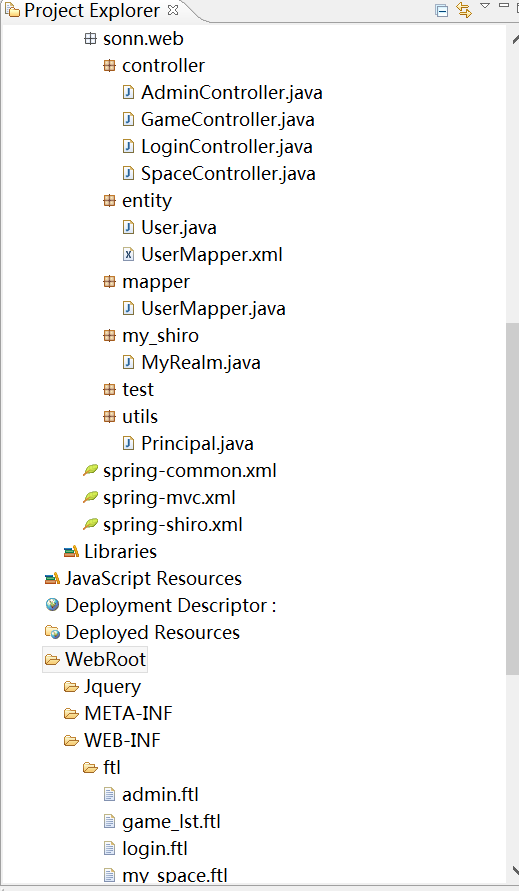
项目结构:
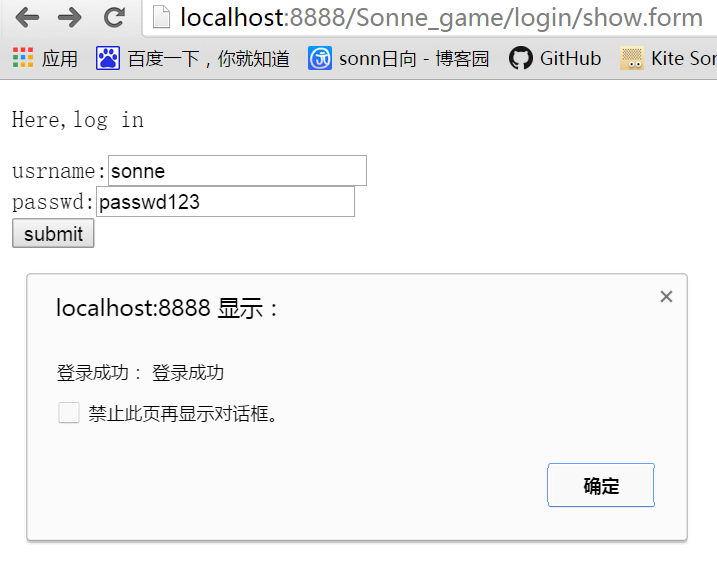
登录:
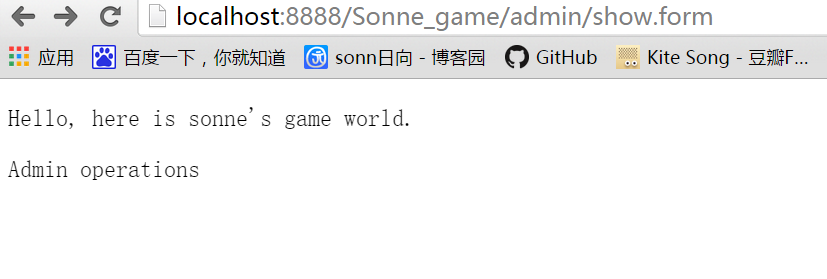
只有admin类型的user能访问admin管理页面,同理只有普通用户能访问个人空间页面:
spring-mvc + shiro框架整合(sonne_game网站开发04)的更多相关文章
- spring-mvc+freemarker整合(sonne_game网站开发03)
今天的任务就是在spring+mybatis+springmvc的基础上,将freemarker整合进来. freemarker是什么? freemarker是一种模板引擎.它的目的是基于模板和数据, ...
- Spring + Spring MVC+Hibernate框架整合详细配置
来源于:http://www.jianshu.com/p/8e2f92d0838c 具体配置参数: Spring: spring-framework-4.2.2Hibernate: hibernate ...
- Spring + Spring MVC + MyBatis框架整合
---恢复内容开始--- 一.Maven Web项目创建 如有需要,请参考:使用maven创建web项目 二.Spring + Spring MVC + MyBatis整合 1.Maven引入需要的J ...
- Spring+Spring MVC+Mybatis 框架整合开发(半注解半配置文件)
项目结构: (代码里面都有注释) 一.在pom文件中依赖jar包 因为我这里分了模块,所以有父子级的共两个pom文件 父级: <?xml version="1.0" enco ...
- Spring MVC + jpa框架搭建,及全面分析
一,hibernate与jpa的关系 首先明确一点jpa是什么?以前我就搞不清楚jpa和hibernate的关系. 1,JPA(Java Persistence API)是Sun官方提出的Java持久 ...
- Spring MVC 学习总结(十)——Spring+Spring MVC+MyBatis框架集成(IntelliJ IDEA SSM集成)
与SSH(Struts/Spring/Hibernate/)一样,Spring+SpringMVC+MyBatis也有一个简称SSM,Spring实现业务对象管理,Spring MVC负责请求的转发和 ...
- [读后感]spring Mvc 教程框架实例以及系统演示下载
[读后感]spring Mvc 教程框架实例以及系统演示下载 太阳火神的漂亮人生 (http://blog.csdn.net/opengl_es) 本文遵循"署名-非商业用途-保持一致&qu ...
- hibernate+spring+mvc+Easyui框架模式下使用grid++report的总结
最近刚开始接触hibernate+spring+mvc+Easyui框架,也是刚开通了博客,希望能记录一下自己实践出来的东西,让其他人少走弯路. 转让正题,以个人浅薄的认识hibernate对于开发人 ...
- SSH(Spring SpringMVC Hibernate)框架整合
项目说明: 使用SSH(Spring SpringMVC Hibernate)框架整合添加部门功能 项目结构 1.导入依赖jar包 <!--单测--> <dependency&g ...
随机推荐
- 多线程下HashMap的死循环是如何产生的
前言 HashMap不是线程安全的,如果需要在多线程环境中使用Map,那么我们可以使用ConcurrentHashmap. 1.举例说明: package com.test; import java. ...
- JS获取字符串实际长度
JS中默认中文字符长度和其它字符长度计算方法是一样的,但某些情况下我们需要获取中文字符串的实际长度,代码如下: function strLength(str) { var realLength = 0 ...
- [原] 细说 NUMA
详说 NUMA 标签(空格分隔): Cloud2.0 测试条件 两台机器: CPU: Intel(R) Xeon(R) CPU E5-2620 v3 @ 2.40GHz X 24 Intel(R) X ...
- ASP.NET vNext 在 Mac OS
让 ASP.NET vNext 在 Mac OS 中飞呀飞... 写在前面 阅读目录: 娓娓道来 Install ASP.NET vNext Command Line Tools 安装 Homeb ...
- 启用密码管理之前创建的用户连接Oracle报ORA-28002处理一则
处理方法其实很简单.只要: alter user <username> identified by <same password>; 这个操作后,恢复正常了 下面作个 ...
- openGL线s的绘制
/** * 缓冲区工具类 */ public class BufferUtil { /** * 将浮点数组转换成字节缓冲区 */ public static ByteBuffer arr2ByteBu ...
- JS事件调试
JS事件调试 - 查找HTML元素绑定的事件以及绑定代码所在位置 日常的网页开发调试工作中,经常需要知道指定的某个网页元素绑定了哪些事件以及绑定代码的位置,下面介绍三种用来跟踪页面中的事件的方法. ...
- 最简单的修改HashMap value值的方法
说到遍历,首先应该想到for循环,然而map集合的遍历通常情况下是要这样在的,先要获得一个迭代器. Map<Integer,String> map = new HashMap<> ...
- AngularJS的工作原理
AngularJS的工作原理 个人觉得,要很好的理解AngularJS的运行机制,才能尽可能避免掉到坑里面去.在这篇文章中,我将根据网上的资料和自己的理解对AngularJS的在启动后,每一步都做了些 ...
- [原]iOS中 Web 页面与 Native Code 的一种通信方式
在 iOS 开发中,Web 页面与 Native Code 通信可以分为两个方面: 1.Native Code 调用 Web 页面的方法:主要是调用页面中的 Javascript 函数. 2.Web ...