
Spring Junit 读取WEB-INF下的配置文件
假设Spring配置文件为applicationContext.xml
一、Spring配置文件在类路径下面
在Spring的java应用程序中,一般我们的Spring的配置文件都是放在放在类路径下面(也即编译后会进入到classes目录下)。
以下是我的项目,因为是用maven管理的,所以配置文件都放在“src/main/resources”目录下
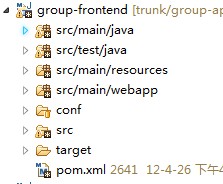
这时候,在代码中可以通过
- ApplicationContext applicationContext = new ClassPathXmlApplicationContext("applicationContext.xml");
然后获取相应的bean。
如果代码想用Junit测试框架来测试,则Spring提供了对Junit支持,还可以使用注解的方式:
- @RunWith(SpringJUnit4ClassRunner.class)
- @ContextConfiguration(locations={"classpath:applicationContext.xml"})
只需要在相应的Test类前面加上此两个注解(第二个注解用来指明Spring的配置文件位置),就可以在Junit Test类使用中Spring提供的依赖注入功能。
二、Spring配置文件在WEB-INF下面
当然在做J2EE开发时,有些人习惯把Spring文件放在WEB-INF目录(虽然更多人习惯放在类路径下面)下面;或者有些Spring配置文件是放在类路径下面,而有些又放在
WEB-INF目录下面,如下图。
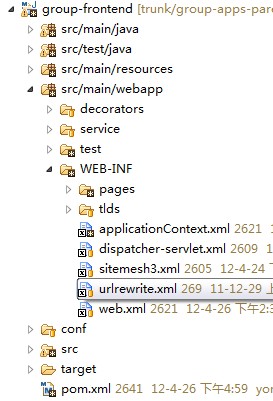
这时候,在代码中就不可以使用ClassPathXmlApplicationContext来加载配置文件了,而应使用FileSystemXmlApplicationContext。
- ApplicationContext applicationContext = new FileSystemXmlApplicationContext("src/main/webapp/WEB-INF/applicationContext.xml");
然后获取相应的bean。
如果代码想用Junit测试框架来测试,则Spring提供了对Junit支持,还可以使用注解的方式:
- @RunWith(SpringJUnit4ClassRunner.class)
- @ContextConfiguration(locations={"file:src/main/webapp/WEB-INF/applicationContext.xml"})
只需要在相应的Test类前面加上此两个注解(第二个注解用来指明Spring的配置文件位置),就可以在Junit Test类使用中Spring提供的依赖注入功能。
下面是我的一个Spring管理下的Junit测试类:
- package com.sohu.group.service.external;
- import java.util.List;
- import org.junit.Test;
- import org.junit.runner.RunWith;
- import org.springframework.beans.factory.annotation.Autowired;
- import org.springframework.test.context.ContextConfiguration;
- import org.springframework.test.context.junit4.SpringJUnit4ClassRunner;
- @RunWith(SpringJUnit4ClassRunner.class)
- @ContextConfiguration({"file:src/main/webapp/WEB-INF/applicationContext.xml"})
- public class SuFriendServiceImplOverRMITest {
- @Autowired
- private SuFriendService suFriendService;
- @Test
- public void getUserFollowerListTest(){
- List<String> list = suFriendService.getUserFollowerList("liug_talk@163.com");
- System.out.println("------"+list);
- }
- }
Spring Junit 读取WEB-INF下的配置文件的更多相关文章
- java读取resource目录下的配置文件
java读取resource目录下的配置文件 1:配置resource目录 下的文件 host: 127.0.0.1 port: 9300 2:读取 / 代表resource目录 InputSt ...
- 读取web应用下的资源文件(例如properties)
package gz.itcast.b_resource; import java.io.IOException; import java.io.InputStream; import java.ut ...
- Java读取Maven工程下的配置文件,工具类
Java开发中,经常需要在maven工程中读取src/main/resources下的配置文件: 思路如下: Class.getClassLoader() 返回类加载器ClassLoader,进而可以 ...
- Spring boot 读取resource目录下的文件
背景:最近做项目重构将以前的ssh + angular js架构,重构为spring boot + vue.项目是一个数据管理平台,后台涉及到多表关联查询,数据导入导出等. 问题:读取resource ...
- spring读取classpath目录下的配置文件通过表达式去注入属性值.txt
spring读取配置文件: 1. spring加载配置文件: <context:property-placeholder location="classpath:config/syst ...
- 使用IDEA搭建一个 Spring + Spring MVC 的Web项目(零配置文件)
注解是Spring的一个构建的一个重要手段,减少写配置文件,下面解释一下一些要用到的注解: @Configuration 作用于类上面,声明当前类是一个配置类(相当于一个Spring的xml文件)@C ...
- 使用IDEA搭建一个Spring + Spring MVC 的Web项目(零配置文件)
话不多说,直接上代码: 注解是Spring的一个构建的一个重要手段,减少写配置文件,下面解释一下一些要用到的注解: @Configuration 作用于类上面,声明当前类是一个配置类(相当于一个Spr ...
- spring boot读取配置文件
一.springboot配置文件 核心配置文件和自定义配置文件.核心配置文件是指在resources根目录下的application.properties或application.yml配置文 ...
- 读取web外的配置文件
一般web项目配置文件都放在classPath下面,读取的时候: 1 import java.io.InputStream; 2 import java.util.Properties; 3 publ ...
随机推荐
- java 对象的组合,一个类组合到另一个类中(例如手机卡装到手机上)
Example4_9.java public class Example4_9 { public static void main(String args[]) { SIM simOne = new ...
- 转:loadruner报错:Step download timeout(120 seconds)的一个解决方法
一个网友问了我一个问题如下:loadruner报错:Error -27728: Step download timeout (120 seconds) 如何解决语法检查通过,但是在并发执行一个查询时候 ...
- C# devExpress GridControl 统计行总数
dev我不怎么会用,边学边记: 如果要在gridControl 页面底部统计记录总数只需两步: 1:设置显示gridControl页脚 2,.设置统计列: DevExpress.XtraGrid.Co ...
- Struts2 程序步骤
1. 新建一个web project, 手动导入包: D:\Java\jar\struts-2.3.24.1\apps\struts2-blank\WEB-INF\lib copy到 WEB-INF/ ...
- 搭建App主流框架_纯代码搭建(OC)
转载自:http://my.oschina.net/hejunbinlan/blog/529778?fromerr=EmSuX7PR 搭建主流框架界面 源码地址在文章末尾 达成效果 效果图 注:本文部 ...
- win7 64位andriod开发环境搭建
本文转自:http://www.cfanz.cn/index.php?c=article&a=read&id=65289 最近换了新电脑,装了win7 64位系统,安装了各种开发环境, ...
- (转)在Java中如何遍历Map对象
在Java中如何遍历Map对象 How to Iterate Over a Map in Java 在java中遍历Map有不少的方法.我们看一下最常用的方法及其优缺点. 既然java中的所有map都 ...
- Entity Framework Power Tools Beta 3
http://visualstudiogallery.msdn.microsoft.com/72a60b14-1581-4b9b-89f2-846072eff19d/ PM> Install-P ...
- 前端开发chrome与fireFox浏览器都使用
chrome查看元素的样式时,显示的很方便和准确,方便开发快速辨别结构. 而fireFox在css3上,我发现好像比chrome支持得更全面.
- iOS 程序间跳转传参(支付和地图)
两个APP之间的跳转是通过[[UIApplication sharedApplication] openURL:url]这种方式来实现的. 1.首先设置第一个APP的url地址 2.接着设置第二个AP ...