
给Cygwin重新安装curl
之前已经安装过了cygwin了,但是重装了系统了。
不过发现cygwin倒是还可以继续使用。
现在想要使用其中的curl工具。
但是却在cygwin安装目录
E:\dev_install_root\cygwin\bin
对应的bin下面没有找到curl.exe。
倒是很诡异的看到了curl-config文件。
现在想要给当前的cygwin安装curl。
1.由于之前
E:\Dev_Tools\Cygwin\cygwin_download_2
中已经有了之前安装时候所下载的本地的安装所需的文件,
所以其下有文件夹http%3a%2f%2fmirrors.163.com%2fcygwin%2f
http%3a%2f%2fmirrors.163.com%2fcygwin%2f下有release文件夹和setup.ini配置文件。
2.专门看了下那个setup.ini,导致找到了curl相关的内容:
|
1
2
3
4
5
6
7
8
9
10
11
12
13
14
15
16
17
18
19
20
21
22
23
24
25
|
@ curlsdesc: "Multi-protocol file transfer command-line tool"ldesc: "curl is a command line tool and library for transferring fileswith URL syntax, supporting FTP, FTPS, HTTP, HTTPS, SCP, SFTP, TFTP,TELNET, DICT, and FILE. curl supports SSL certificates, HTTP POST, HTTPPUT, FTP uploading, HTTP form based upload, proxies, cookies,user+password authentication (Basic, Digest, NTLM, Negotiate...), filetransfer resume, proxy tunneling and a busload of other useful tricks."category: Net Webrequires: libcurl4 zlib0 cygwinversion: 7.24.0-3install: release/curl/curl-7.24.0-3.tar.bz2 382557 a15eb0b04985a0be7e941b359d307768source: release/curl/curl-7.24.0-3-src.tar.bz2 1985097 f23b3e091e052f7b3e9a54ee622ecf2f[prev]version: 7.24.0-2install: release/curl/curl-7.24.0-2.tar.bz2 382165 935c3577492e3fe79eb4b1683a9716bbsource: release/curl/curl-7.24.0-2-src.tar.bz2 1985377 2d3603e9767c0de437a6a9a77da35e63@ curl-develsdesc: "Obsolete package"ldesc: "Obsolete package"category: _obsoleterequires: libcurl-develversion: 7.24.0-1install: release/curl/curl-devel/curl-devel-7.24.0-1.tar.bz2 14 4059d198768f9f8dc9372dc1c54bc3c3 |
3.去运行之前的cygwin的安装文件setup.exe,然后选择从本地安装,然后选择上面的那个E:\Dev_Tools\Cygwin\cygwin_download_2文件夹。
然后可以自动解析,之后,在选择模块的界面,输入curl,找到了相关的curl的库,然后都设置为reinstall:

其中,参考了:
How do I install cURL on cygwin?
知道了curl是在Net下面的。
不过,很明显,上述我是已经不管三七二十一,把Libs,Net,Web的curl,全部选择上了。
然后点击下一步去安装。
然后就是很快的就下载并安装好了:

结果很悲催的是,E:\dev_install_root\cygwin\bin下面,还是没有找到curl啊。
4.后来又去对应的
E:\Dev_Tools\Cygwin\cygwin_download_2\http%3a%2f%2fmirrors.163.com%2fcygwin%2f\release\curl
下看到了有已经下载的那4个相关的:
curl-devel,libcurl3,libcurl4,libcurl-devel
然后每个文件夹都有对应的tar文件,打开后发现,的确里面也都没有包含curl.exe,所以即使都安装上,也还是没有curl.exe的
5.然后又回去参考:
How do I install cURL on cygwin?
看到两种方法:
I just ran into this.
If you’re not seeing curl in the list (see ibaralf’s screenshot), then you may have out-of-date cygwin sources. In one of the screens in cygwin’s setup.exe wizard, you have the option to "Install from Internet" or "Install from Local Directory". If you have the "Install from Local Directory" option enabled, then you may not see curl in the list. Switch to "Install from Internet" and select a mirror and then you should see curl.
和
I searched for curl on the cygwin packages part of their home page.
I found this link
http://cygwin.com/packages/curl/. But that wasn’t helpful because I couldn’t download anythingSo I searched for the
curl-7.20.1-1 cygwinon Google. I found this helpful sitemirrors.xmission.com/cygwin/release/curl/That site had a link to download
curl-7.20.1-1.tar.bz2. I unzipped it using 7zip. It unzips it into./user/bin/or something so I had to findcurl.exein the local/usr/binfolder and put it into my/binfolder ofc:\cygwinFinally I could use cURL!
This drove me crazy. I hope it helps someone!
貌似第二种感觉更靠谱。
不过也可以先试试第一种。
然后继续重新运行setup.exe,期间还被告知有更新的版本的setup.exe,不过懒得管了。
然后继续,选择了那个:

的源,然后下一步,然后搜curl,找到了真正想要的:
curl: Multi-protocol file transfer tool

然后再点击下一步去安装,即可。
不过很悲催的是,由于不小心,没有取消全部的别的模块,所以估计是默认选择安装了很多别的模块,所以现在却是去下载很多别的模块:
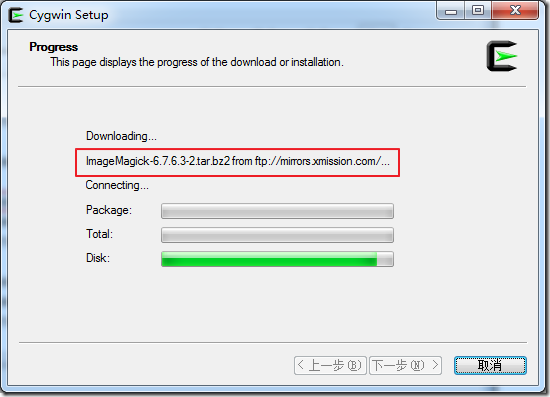
索性取消掉算了。
然后又按照之前步骤重新执行一次,只是在选择模块是,所有的都选择reinstall,然后再另外搜curl,然后对于其中的curl,是选择安装的:

然后由于是reinstall,而之前已经安装好的模块,本地都已经有文件了,所以是瞬间下载好了:

结果,又还是去下载很多其他模块了。
所以,再次取消掉。
这次重新再弄一次,选择的是,download without installing,然后选择模块是,只选择curl,并且选择的是keep,结果还是会去下载很多其他的模块。
所以,还是放弃此法。
5换用另外那种,直接去:
http://mirrors.xmission.com/cygwin/release/curl/
下载对应的curl-7.27.0-1.tar.bz2,然后本地直接解压,得到一个usr文件夹,其下有
bin\curl.exe
share\doc\xxx
share\man\xxx
所以,直接全部拷贝到cygwin的usr文件夹:
E:\dev_install_root\cygwin\usr
下面,即可。
只不过此处悲催的,又是遇到一堆权限问题,但是后来还是慢慢的解决了。
5.然后再去重新打开cygwin窗口,验证是否可以找到crul了。
结果还是没有找到。
所以,看来是cygwin没有把/usr/bin加到其path中,此点也是很奇怪的。
不过懒得管了,干脆手动再次把/usr/bin下的curl.exe移至/bin下面即可。
终于,cygwin中可以找到curl了:
|
1
2
3
4
5
6
7
8
9
10
11
12
13
14
15
16
17
18
19
20
21
22
|
Administrator@NYBDHB7EB3XEHP6 ~$ curl --helpUsage: curl [options...] <url>Options: (H) means HTTP/HTTPS only, (F) means FTP only --anyauth Pick "any" authentication method (H) -a, --append Append to target file when uploading (F/SFTP) --basic Use HTTP Basic Authentication (H) --cacert FILE CA certificate to verify peer against (SSL) --capath DIR CA directory to verify peer against (SSL) -E, --cert CERT[:PASSWD] Client certificate file and password (SSL) --cert-type TYPE Certificate file type (DER/PEM/ENG) (SSL) --ciphers LIST SSL ciphers to use (SSL) --compressed Request compressed response (using deflate or gzip) -K, --config FILE Specify which config file to read --connect-timeout SECONDS Maximum time allowed for connection -C, --continue-at OFFSET Resumed transfer offset -b, --cookie STRING/FILE String or file to read cookies from (H) -c, --cookie-jar FILE Write cookies to this file after operation (H) --create-dirs Create necessary local directory hierarchy --crlf Convert LF to CRLF in upload --crlfile FILE Get a CRL list in PEM format from the given file...... |
【总结】
其实,想要在cygwin中安装单个模块,工具等,直接可以从网上找cygwin的景象,比如:
http://mirrors.xmission.com/cygwin/release/
其中curl的地址是:
http://mirrors.xmission.com/cygwin/release/curl/
然后手动下载对应的工具,解压,放到对应的bin或sbin等路径下即可。
给Cygwin重新安装curl 提示 没有cywmetalink-3.dll找到模块
http://mirrors.163.com/cygwin/
32位
http://mirrors.xmission.com/cygwin/x86/release/curl/
下载对应的curl,然后本地直接解压,得到一个usr文件夹,其下有
bin\curl.exe
share\doc\xxx
share\man\xxx
所以,直接全部拷贝到cygwin的usr文件夹:
E:\dev_install_root\cygwin\usr
下面,即可。
只不过此处悲催的,又是遇到一堆权限问题,但是后来还是慢慢的解决了。
5.然后再去重新打开cygwin窗口,验证是否可以找到crul了。
结果还是没有找到。
所以,看来是cygwin没有把/usr/bin加到其path中,此点也是很奇怪的。
不过懒得管了,干脆手动再次把/usr/bin下的curl.exe移至/bin下面即可。
终于,cygwin中可以找到curl了:
【总结】
其实,想要在cygwin中安装单个模块,工具等,直接可以从网上找cygwin的景象,比如:
32位
http://mirrors.xmission.com/cygwin/x86/
其中curl的地址是:
然后手动下载对应的工具,解压,放到对应的bin或sbin等路径下即可。
================================================
提示 没有cywmetalink-3.dll
分析后得出 模块名是metalink 找到模块
http://mirrors.163.com/cygwin/x86/release/libmetalink/libmetalink3/
$ curl
D:/cygwin/bin/curl.exe: error while loading shared libraries: cygcurl-4.dll: cannot open shared object file: No such file or directory
http://mirrors.163.com/cygwin/x86/release/curl/libcurl4/
下载安装即可
==============================================
解决Cygwin “error while loading shared libraries”
日期: 2013-02-28 作者: Gamepader 分类: ARM_Linux 标签: Cygwin, Linux, 爱折腾
评论: 0 超过100人围观
今天在网易源安装了最新版的Cygwin,刚刚在Cygwin下执行curl的时候,出现如下提示信息
| 1 | $curl: error while loading shared libraries: ?: cannot open shared object file: No such file or directory |
解决办法:
第一步.使用cygcheck检查:
| 1
2 3 4 5 6 7 8 9 10 11 12 13 14 15 16 17 18 19 20 21 22 23 24 25 26 27 28 29 30 31 32 33 34 35 36 37 38 39 40 41 42 43 44 45 46 47 48 49 50 51 52 53 |
$cygcheck curl
C:\Dell\Cygwin\bin\curl.exe C:\Dell\Cygwin\bin\cygcurl-4.dll C:\Dell\Cygwin\bin\cyggcc_s-1.dll C:\Dell\Cygwin\bin\cygwin1.dll C:\Windows\system32\KERNEL32.dll C:\Windows\system32\API-MS-Win-Core-RtlSupport-L1-1-0.dll C:\Windows\system32\ntdll.dll C:\Windows\system32\KERNELBASE.dll C:\Windows\system32\API-MS-Win-Core-ProcessThreads-L1-1-0.dll C:\Windows\system32\API-MS-Win-Core-Heap-L1-1-0.dll C:\Windows\system32\API-MS-Win-Core-Memory-L1-1-0.dll C:\Windows\system32\API-MS-Win-Core-Handle-L1-1-0.dll C:\Windows\system32\API-MS-Win-Core-Synch-L1-1-0.dll C:\Windows\system32\API-MS-Win-Core-File-L1-1-0.dll C:\Windows\system32\API-MS-Win-Core-IO-L1-1-0.dll C:\Windows\system32\API-MS-Win-Core-ThreadPool-L1-1-0.dll C:\Windows\system32\API-MS-Win-Core-LibraryLoader-L1-1-0.dll C:\Windows\system32\API-MS-Win-Core-NamedPipe-L1-1-0.dll C:\Windows\system32\API-MS-Win-Core-Misc-L1-1-0.dll C:\Windows\system32\API-MS-Win-Core-SysInfo-L1-1-0.dll C:\Windows\system32\API-MS-Win-Core-Localization-L1-1-0.dll C:\Windows\system32\API-MS-Win-Core-ProcessEnvironment-L1-1-0.dll C:\Windows\system32\API-MS-Win-Core-String-L1-1-0.dll C:\Windows\system32\API-MS-Win-Core-Debug-L1-1-0.dll C:\Windows\system32\API-MS-Win-Core-ErrorHandling-L1-1-0.dll C:\Windows\system32\API-MS-Win-Core-Fibers-L1-1-0.dll C:\Windows\system32\API-MS-Win-Core-Util-L1-1-0.dll C:\Windows\system32\API-MS-Win-Core-Profile-L1-1-0.dll C:\Windows\system32\API-MS-Win-Security-Base-L1-1-0.dll C:\Dell\Cygwin\bin\cygcrypto-1.0.0.dll C:\Dell\Cygwin\bin\cygz.dll C:\Dell\Cygwin\bin\cyggssapi-3.dll C:\Dell\Cygwin\bin\cygheimntlm-0.dll C:\Dell\Cygwin\bin\cygkrb5-26.dll C:\Dell\Cygwin\bin\cygasn1-8.dll C:\Dell\Cygwin\bin\cygroken-18.dll C:\Dell\Cygwin\bin\cygcrypt-0.dll C:\Dell\Cygwin\bin\cygcom_err-2.dll C:\Dell\Cygwin\bin\cygwind-0.dll C:\Dell\Cygwin\bin\cyghx509-5.dll C:\Dell\Cygwin\bin\cygintl-8.dll C:\Dell\Cygwin\bin\cygiconv-2.dll C:\Dell\Cygwin\bin\cygsqlite3-0.dll C:\Dell\Cygwin\bin\cygheimbase-1.dll C:\Dell\Cygwin\bin\cygidn-11.dll C:\Dell\Cygwin\bin\cyglber-2-4-2.dll C:\Dell\Cygwin\bin\cygldap-2-4-2.dll C:\Dell\Cygwin\bin\cygssl-1.0.0.dll C:\Dell\Cygwin\bin\cygssh2-1.dll C:\Dell\Cygwin\bin\cygmetalink-3.dll C:\Dell\Cygwin\bin\cygexpat-1.dll cygcheck: track_down: could not find cygsasl2-2.dll |
发现是缺少了cygsasl2-2.dll
第二步.分析丢失的模块并安装:
有文件名分析丢失的模块名字应该为cygsasl2,当然也有可能是cygsasl,cyg,sasl2等,一个个都使用Cygwin的Setup.exe安装上,发现丢失的模块名字应该是sasl2,点选install,问题解决
http://mirrors.163.com/cygwin/
给Cygwin重新安装curl的更多相关文章
- curl提示不支持https协议解决方法
根据网上的资料,这个问题的原因是因为在安装curl时使用默认安装,但是默认安装并不支持https协议 简单粗暴的办法就是,卸载重新安装curl(有一种方法是重新编译就可以了,然后使用编译后的可执行文件 ...
- python error: curl: (1) Protocol "'https" not supported or disabled in libcurl
python 调用curl访问一个网页时,出现error: curl: (1) Protocol "'https" not supported or disabled in lib ...
- curl: (35) Server aborted the SSL handshake 解决办法
# 先删除curl brew uninstall curl # 重新安装curl,带上--with-openssl brew install curl --with-openssl # 然后重启下ph ...
- cygwin执行.py提示找不到模块,但已经安装模块的解决办法
. 在解决了cygwin中make命令不能使用的问题之后(https://www.cnblogs.com/zhenggege/p/10724122.html),make maskrcnn路径下的set ...
- Alcatraz,
今天重装Alcatraz,运行github上的命令后,安装成功,可是配置界面没出来. 无奈重装, 先删除原本的插件 rm -rf ~/Library/Application\ Support/Deve ...
- Elasticsearch 数据搜索篇·【入门级干货】
ES即简单又复杂,你可以快速的实现全文检索,又需要了解复杂的REST API.本篇就通过一些简单的搜索命令,帮助你理解ES的相关应用.虽然不能让你理解ES的原理设计,但是可以帮助你理解ES,探寻更多的 ...
- Elasticsearch 数据搜索篇·【入门级干货】===转
ES即简单又复杂,你可以快速的实现全文检索,又需要了解复杂的REST API.本篇就通过一些简单的搜索命令,帮助你理解ES的相关应用.虽然不能让你理解ES的原理设计,但是可以帮助你理解ES,探寻更多的 ...
- [Python]实践:实现探测Web服务质量
来源:Python 自动化运维 技术与最佳实践 HTTP服务是最流行的互联网应用之一,服务质量的好坏关系到用户体验以及网站的运营服务水平,最常用的有两个标准:1.服务的可用性,比是否处于正常提供服务状 ...
- python3之模板pycurl探测web服务质量
1.pycurl简介 pycURL是libcurl多协议文件传输库的python接口,与urllib模块类似,PycURL可用于从python程序中获取由URL标识的对象,功能很强大,libcurl速 ...
随机推荐
- 图解Javascript之字符串
好东西分享给大家,但要尊重事实!!!因此特别说明:本图非我本人亲自所作,乃我大天朝网友所绘制.个人感觉此图,覆盖全面,细节考虑甚周全,因此分享给大家,同时在此特别感谢网友的无私分享!
- 用django搭建一个简易blog系统(翻译)(三)
06. Connecting the Django admin to the blog app Django 本身就带有一个应用叫作Admin,而且它是一个很好的工具 在这一部分,我们将要激活admi ...
- jQuery extend函数详解
一 jQuery的扩展方法原型是 $.extend(dest,src1,src2,src3); 含义是将src1,src2,src3合并到dest中,返回值为合并后的dest,该方法合并后,dest的 ...
- SOCKET网络编程细节问题(2)
SOCKET网络编程快速上手(二)——细节问题(2) 2.TCP数据包接收问题 对初学者来说,很多都会认为:客户端与服务器最终的打印数据接收或者发送条数都该是一致的,1000条发送打印,1000条接收 ...
- 将JDBC ResultSet结果集转成List
private List<Map<String, Object>> list = new ArrayList<Map<String,Object>>() ...
- jQuery实现返回顶部功能
整理两个实现功能,一个是右下角的返回顶部,一个是右侧的返回顶部,分别如图 第一种实现 一.JSP或HTML(主体结构) 在body中添加 <body id=" ...
- easyui datagrid自定义操作列
通过formatter方法给Jquery easyui 的datagrid 每行增加操作链接 我们都知道Jquery的EasyUI的datagrid可以添加并且自定义Toolbar, 这样我们选择一行 ...
- OC-变量和数据类型
对象的初始化 Fraction *myFract=[[Fraction alloc] init];//初始化对象 [myFract setTo:1 over:3];//设置初始值 初始化对象和设置初始 ...
- Ajax实现天气预报功能
实现天气预报功能 闲来无聊,写下此文 经常看见很多网站上有那种天气预报功能,自己之前也写过一个,不过属于那种涉及WCF服务引用那种,今天发现一个更为简单的方式来实现,使用Javascript和Ajax ...
- 从零开始学C++之运算符重载(三):完善String类([]、 +、 += 运算符重载)、>>和<<运算符重载
在前面文章中使用过几次String类的例子,现在多重载几个运算符,更加完善一下,并且重载流类运算符. []运算符重载 +运算符重载 +=运算符重载 <<运算符重载 >>运算符重 ...