
C++进程间通信之共享内存
转载:http://blog.csdn.net/taily_duan/article/details/51692999
转载:http://blog.csdn.net/fengrx/article/details/4069088
转载:http://www.cnblogs.com/xuandi/p/5673917.html
// ServerCom.cpp : Defines the entry point for the console application.

//

#include "stdafx.h"

#include <stdio.h>

#include <windows.h>

#pragma endregion

#define MAP_PREFIX          L"Local\\"

#define MAP_NAME            L"SampleMap"

#define FULL_MAP_NAME       MAP_PREFIX MAP_NAME

// Max size of the file mapping object.

#define MAP_SIZE            65536

// File offset where the view is to begin.

#define VIEW_OFFSET         0

// The number of bytes of a file mapping to map to the view. All bytes of the

// view must be within the maximum size of the file mapping object (MAP_SIZE).

// If VIEW_SIZE is 0, the mapping extends from the offset (VIEW_OFFSET) to

// the end of the file mapping.

#define VIEW_SIZE           1024

// Unicode string message to be written to the mapped view. Its size in byte

// must be less than the view size (VIEW_SIZE).

#define MESSAGE             L"Message from the first process."

int _tmain(int argc, _TCHAR* argv[])

{

    HANDLE hMapFile = NULL;

    PVOID pView = NULL;

    // Create the file mapping object.

    hMapFile = CreateFileMapping(

        INVALID_HANDLE_VALUE,   // Use paging file - shared memory

        NULL,                   // Default security attributes

        PAGE_READWRITE,         // Allow read and write access

        ,                      // High-order DWORD of file mapping max size

        MAP_SIZE,               // Low-order DWORD of file mapping max size

        FULL_MAP_NAME           // Name of the file mapping object

        );

    if (hMapFile == NULL)

    {

        wprintf(L"CreateFileMapping failed w/err 0x%08lx\n", GetLastError());

        goto Cleanup;

    }

    wprintf(L"The file mapping (%s) is created\n", FULL_MAP_NAME);

    // Map a view of the file mapping into the address space of the current

    // process.

    pView = MapViewOfFile(

        hMapFile,               // Handle of the map object

        FILE_MAP_ALL_ACCESS,    // Read and write access

        ,                      // High-order DWORD of the file offset

        VIEW_OFFSET,            // Low-order DWORD of the file offset

        VIEW_SIZE               // The number of bytes to map to view

        );

    if (pView == NULL)

    {

        wprintf(L"MapViewOfFile failed w/err 0x%08lx\n", GetLastError());

        goto Cleanup;

    }

    wprintf(L"The file view is mapped\n");

    // Prepare a message to be written to the view.

    PWSTR pszMessage = MESSAGE;

    DWORD cbMessage = (wcslen(pszMessage) + ) * sizeof(*pszMessage);

    // Write the message to the view.

    memcpy_s(pView, VIEW_SIZE, pszMessage, cbMessage);

    wprintf(L"This message is written to the view:\n\"%s\"\n",

        pszMessage);

    // Wait to clean up resources and stop the process.

    wprintf(L"Press ENTER to clean up resources and quit");

    getchar();

Cleanup:

    if (hMapFile)

    {

        if (pView)

        {

            // Unmap the file view.

            UnmapViewOfFile(pView);

            pView = NULL;

        }

        // Close the file mapping object.

        CloseHandle(hMapFile);

        hMapFile = NULL;

    }

    return ;

}
// ClientCom.cpp : Defines the entry point for the console application.

//

#include "stdafx.h"

#include <stdio.h>

#include <windows.h>

#pragma endregion

#define MAP_PREFIX          L"Local\\"

#define MAP_NAME            L"SampleMap"

#define FULL_MAP_NAME       MAP_PREFIX MAP_NAME

// File offset where the view is to begin.

#define VIEW_OFFSET         0

// The number of bytes of a file mapping to map to the view. All bytes of the

// view must be within the maximum size of the file mapping object. If

// VIEW_SIZE is 0, the mapping extends from the offset (VIEW_OFFSET) to the

// end of the file mapping.

#define VIEW_SIZE           1024

int _tmain(int argc, _TCHAR* argv[])

{

    HANDLE hMapFile = NULL;

    PVOID pView = NULL;

    // Try to open the named file mapping identified by the map name.

    hMapFile = OpenFileMapping(

        FILE_MAP_READ,          // Read access

        FALSE,                  // Do not inherit the name

        FULL_MAP_NAME           // File mapping name

        );

    if (hMapFile == NULL)

    {

        wprintf(L"OpenFileMapping failed w/err 0x%08lx\n", GetLastError());

        goto Cleanup;

    }

    wprintf(L"The file mapping (%s) is opened\n", FULL_MAP_NAME);

    // Map a view of the file mapping into the address space of the current

    // process.

    pView = MapViewOfFile(

        hMapFile,               // Handle of the map object

        FILE_MAP_READ,          // Read access

        ,                      // High-order DWORD of the file offset

        VIEW_OFFSET,            // Low-order DWORD of the file offset

        VIEW_SIZE               // The number of bytes to map to view

        );

    if (pView == NULL)

    {

        wprintf(L"MapViewOfFile failed w/err 0x%08lx\n", GetLastError());

        goto Cleanup;

    }

    wprintf(L"The file view is mapped\n");

    // Read and display the content in view.

    wprintf(L"Read from the file mapping:\n\"%s\"\n", (PWSTR)pView);

    // Wait to clean up resources and stop the process.

    wprintf(L"Press ENTER to clean up resources and quit");

    getchar();

Cleanup:

    if (hMapFile)

    {

        if (pView)

        {

            // Unmap the file view.

            UnmapViewOfFile(pView);

            pView = NULL;

        }

        // Close the file mapping object.

        CloseHandle(hMapFile);

        hMapFile = NULL;

    }

    return ;

}
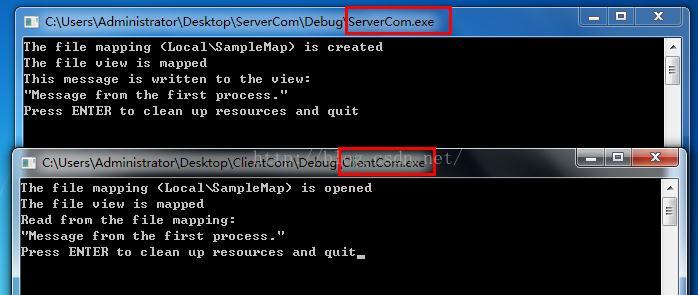
注:运行的时候先运行写入的进程,再运行读出的进程
C++进程间通信之共享内存的更多相关文章
- 浅析Linux下进程间通信:共享内存
浅析Linux下进程间通信:共享内存 共享内存允许两个或多个进程共享一给定的存储区.因为数据不需要在客户进程和服务器进程之间复制,所以它是最快的一种IPC.使用共享内存要注意的是,多个进程之间对一给定 ...
- Linux环境进程间通信(五): 共享内存(下)
linux下进程间通信的几种主要手段: 管道(Pipe)及有名管道(named pipe):管道可用于具有亲缘关系进程间的通信,有名管道克服了管道没有名字的限制,因此,除具有管道所具有的功能外,它还允 ...
- Linux环境进程间通信(五): 共享内存(上)
linux下进程间通信的几种主要手段: 管道(Pipe)及有名管道(named pipe):管道可用于具有亲缘关系进程间的通信,有名管道克服了管道没有名字的限制,因此,除具有管道所具有的功能外,它还允 ...
- Linux进程IPC浅析[进程间通信SystemV共享内存]
Linux进程IPC浅析[进程间通信SystemV共享内存] 共享内存概念,概述 共享内存的相关函数 共享内存概念,概述: 共享内存区域是被多个进程共享的一部分物理内存 多个进程都可把该共享内存映射到 ...
- Linux进程间通信—使用共享内存
Linux进程间通信-使用共享内存 转自: https://blog.csdn.net/ljianhui/article/details/10253345 下面将讲解进程间通信的另一种方式,使用共享内 ...
- Linux进程间通信——使用共享内存
一.什么是共享内存 顾名思义,共享内存就是允许两个不相关的进程访问同一个逻辑内存.共享内存是在两个正在运行的进程之间共享和传递数据的一种非常有效的方式.不同进程之间共享的内存通常安排为同一段物理内存. ...
- linux进程间通信之共享内存篇
本文是对http://www.cnblogs.com/andtt/articles/2136279.html中共享内存(上)的进一步阐释说说明 1 共享内存的实现原理 共享内存是linux进程间通讯的 ...
- linux内核剖析(十一)进程间通信之-共享内存Shared Memory
共享内存 共享内存是进程间通信中最简单的方式之一. 共享内存是系统出于多个进程之间通讯的考虑,而预留的的一块内存区. 共享内存允许两个或更多进程访问同一块内存,就如同 malloc() 函数向不同进程 ...
- Linux进程间通信——使用共享内存(转)
一.什么是共享内存 顾名思义,共享内存就是允许两个不相关的进程访问同一个逻辑内存.共享内存是在两个正在运行的进程之间共享和传递数据的一种非常有效的方式.不同进程之间共享的内存通常安排为同一段物理内存. ...
- Python进程间通信之共享内存
前一篇博客说了怎样通过命名管道实现进程间通信,但是要在windows是使用命名管道,需要使用python调研windows api,太麻烦,于是想到是不是可以通过共享内存的方式来实现.查了一下,Pyt ...
随机推荐
- CentOS中利用Docker安装Redis
CentOS中利用Docker安装Redis 1.拉取镜像 #docker pull redis:4.0.10 2.加载镜像 #docker run -p 6379:6379 --name test- ...
- Python全栈-day4-语法基础2
一.字符串 1.字符串基础 1)作用:用于描述姓名.性别.地址等信息 2)定义方式:单引号或者双引号以及三引号内添加字符 注:day3中介绍 name = 'zhang' user_name = &q ...
- Rpgmakermv(7) Chronus插件介绍翻译
协议:MIT 作用:时间,有时间推进,可以设置速度,随着游戏中时间的推进,会发生昼夜改变和天气变化. ------------------------------------------------- ...
- MVC中视图界面设置Checkbox
今天是六一儿童节,来谈谈Checkbox,前面的博客已经提到了关于单选.多选.反选.全选等问题的处理,这里作一下补充说明. 全选/反选 <td width="5%">& ...
- caffe生成voc格式lmdb
要训练ssd基本都是在liu wei框架下改,生成lmdb这一关照葫芦画瓢总遇坑,记录之: 1. labelmap_voc.prototxt要根据自己的分类修改,比如人脸检测改成这样: item { ...
- HttpServletRequestWrapper
1). why 需要改变从 Servlet 容器 (可能是任何的 Servlet 容器)中传入的 HttpServletRequest 对象的某个行为,该怎么办? 一. 继承 HttpServletR ...
- MQ(转)
1. 到底什么时候该使用MQ? 1). 典型场景一:数据驱动的任务依赖 采用MQ的优点是: a. 不需要预留buffer,上游任务执行完,下游任务总会在第一时间被执行 b. 依赖多个任务,被多个任务依 ...
- Linux基础命令---ifcfg
ifcfg ifcfg是一个简单的脚本替换iconfig命令,它可以设置网络接口的ip地址. 此命令的适用范围:RedHat.RHEL.Ubuntu.CentOS.SUSE.openSUSE.Fedo ...
- JustOj 1415: 字符串解压
题目描述 豆豆非常调皮,总喜欢把一样的东西摆在一起,然后用神奇的猫爪功把他们揉成一团. 比如一堆A,就会被揉成个数+A. 这就是豆豆的字符串压缩算法了. 比如给豆豆一个字符串:ABBCCCDDDDEE ...
- java -cp & java jar的区别
java -cp java -cp 和 -classpath 一样,是指定类运行所依赖其他类的路径,通常是类库和jar包,需要全路径到jar包,多个jar包之间连接符:window上分号“;”.Lin ...