
C++进程间通信之共享内存
转载:http://blog.csdn.net/taily_duan/article/details/51692999
转载:http://blog.csdn.net/fengrx/article/details/4069088
转载:http://www.cnblogs.com/xuandi/p/5673917.html
// ServerCom.cpp : Defines the entry point for the console application.

//

#include "stdafx.h"

#include <stdio.h>

#include <windows.h>

#pragma endregion

#define MAP_PREFIX          L"Local\\"

#define MAP_NAME            L"SampleMap"

#define FULL_MAP_NAME       MAP_PREFIX MAP_NAME

// Max size of the file mapping object.

#define MAP_SIZE            65536

// File offset where the view is to begin.

#define VIEW_OFFSET         0

// The number of bytes of a file mapping to map to the view. All bytes of the

// view must be within the maximum size of the file mapping object (MAP_SIZE).

// If VIEW_SIZE is 0, the mapping extends from the offset (VIEW_OFFSET) to

// the end of the file mapping.

#define VIEW_SIZE           1024

// Unicode string message to be written to the mapped view. Its size in byte

// must be less than the view size (VIEW_SIZE).

#define MESSAGE             L"Message from the first process."

int _tmain(int argc, _TCHAR* argv[])

{

    HANDLE hMapFile = NULL;

    PVOID pView = NULL;

    // Create the file mapping object.

    hMapFile = CreateFileMapping(

        INVALID_HANDLE_VALUE,   // Use paging file - shared memory

        NULL,                   // Default security attributes

        PAGE_READWRITE,         // Allow read and write access

        ,                      // High-order DWORD of file mapping max size

        MAP_SIZE,               // Low-order DWORD of file mapping max size

        FULL_MAP_NAME           // Name of the file mapping object

        );

    if (hMapFile == NULL)

    {

        wprintf(L"CreateFileMapping failed w/err 0x%08lx\n", GetLastError());

        goto Cleanup;

    }

    wprintf(L"The file mapping (%s) is created\n", FULL_MAP_NAME);

    // Map a view of the file mapping into the address space of the current

    // process.

    pView = MapViewOfFile(

        hMapFile,               // Handle of the map object

        FILE_MAP_ALL_ACCESS,    // Read and write access

        ,                      // High-order DWORD of the file offset

        VIEW_OFFSET,            // Low-order DWORD of the file offset

        VIEW_SIZE               // The number of bytes to map to view

        );

    if (pView == NULL)

    {

        wprintf(L"MapViewOfFile failed w/err 0x%08lx\n", GetLastError());

        goto Cleanup;

    }

    wprintf(L"The file view is mapped\n");

    // Prepare a message to be written to the view.

    PWSTR pszMessage = MESSAGE;

    DWORD cbMessage = (wcslen(pszMessage) + ) * sizeof(*pszMessage);

    // Write the message to the view.

    memcpy_s(pView, VIEW_SIZE, pszMessage, cbMessage);

    wprintf(L"This message is written to the view:\n\"%s\"\n",

        pszMessage);

    // Wait to clean up resources and stop the process.

    wprintf(L"Press ENTER to clean up resources and quit");

    getchar();

Cleanup:

    if (hMapFile)

    {

        if (pView)

        {

            // Unmap the file view.

            UnmapViewOfFile(pView);

            pView = NULL;

        }

        // Close the file mapping object.

        CloseHandle(hMapFile);

        hMapFile = NULL;

    }

    return ;

}
// ClientCom.cpp : Defines the entry point for the console application.

//

#include "stdafx.h"

#include <stdio.h>

#include <windows.h>

#pragma endregion

#define MAP_PREFIX          L"Local\\"

#define MAP_NAME            L"SampleMap"

#define FULL_MAP_NAME       MAP_PREFIX MAP_NAME

// File offset where the view is to begin.

#define VIEW_OFFSET         0

// The number of bytes of a file mapping to map to the view. All bytes of the

// view must be within the maximum size of the file mapping object. If

// VIEW_SIZE is 0, the mapping extends from the offset (VIEW_OFFSET) to the

// end of the file mapping.

#define VIEW_SIZE           1024

int _tmain(int argc, _TCHAR* argv[])

{

    HANDLE hMapFile = NULL;

    PVOID pView = NULL;

    // Try to open the named file mapping identified by the map name.

    hMapFile = OpenFileMapping(

        FILE_MAP_READ,          // Read access

        FALSE,                  // Do not inherit the name

        FULL_MAP_NAME           // File mapping name

        );

    if (hMapFile == NULL)

    {

        wprintf(L"OpenFileMapping failed w/err 0x%08lx\n", GetLastError());

        goto Cleanup;

    }

    wprintf(L"The file mapping (%s) is opened\n", FULL_MAP_NAME);

    // Map a view of the file mapping into the address space of the current

    // process.

    pView = MapViewOfFile(

        hMapFile,               // Handle of the map object

        FILE_MAP_READ,          // Read access

        ,                      // High-order DWORD of the file offset

        VIEW_OFFSET,            // Low-order DWORD of the file offset

        VIEW_SIZE               // The number of bytes to map to view

        );

    if (pView == NULL)

    {

        wprintf(L"MapViewOfFile failed w/err 0x%08lx\n", GetLastError());

        goto Cleanup;

    }

    wprintf(L"The file view is mapped\n");

    // Read and display the content in view.

    wprintf(L"Read from the file mapping:\n\"%s\"\n", (PWSTR)pView);

    // Wait to clean up resources and stop the process.

    wprintf(L"Press ENTER to clean up resources and quit");

    getchar();

Cleanup:

    if (hMapFile)

    {

        if (pView)

        {

            // Unmap the file view.

            UnmapViewOfFile(pView);

            pView = NULL;

        }

        // Close the file mapping object.

        CloseHandle(hMapFile);

        hMapFile = NULL;

    }

    return ;

}
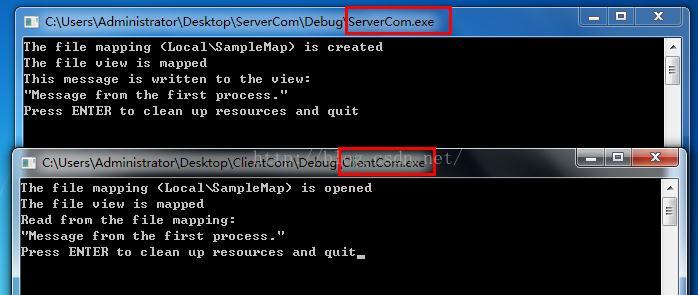
注:运行的时候先运行写入的进程,再运行读出的进程
C++进程间通信之共享内存的更多相关文章
- 浅析Linux下进程间通信:共享内存
浅析Linux下进程间通信:共享内存 共享内存允许两个或多个进程共享一给定的存储区.因为数据不需要在客户进程和服务器进程之间复制,所以它是最快的一种IPC.使用共享内存要注意的是,多个进程之间对一给定 ...
- Linux环境进程间通信(五): 共享内存(下)
linux下进程间通信的几种主要手段: 管道(Pipe)及有名管道(named pipe):管道可用于具有亲缘关系进程间的通信,有名管道克服了管道没有名字的限制,因此,除具有管道所具有的功能外,它还允 ...
- Linux环境进程间通信(五): 共享内存(上)
linux下进程间通信的几种主要手段: 管道(Pipe)及有名管道(named pipe):管道可用于具有亲缘关系进程间的通信,有名管道克服了管道没有名字的限制,因此,除具有管道所具有的功能外,它还允 ...
- Linux进程IPC浅析[进程间通信SystemV共享内存]
Linux进程IPC浅析[进程间通信SystemV共享内存] 共享内存概念,概述 共享内存的相关函数 共享内存概念,概述: 共享内存区域是被多个进程共享的一部分物理内存 多个进程都可把该共享内存映射到 ...
- Linux进程间通信—使用共享内存
Linux进程间通信-使用共享内存 转自: https://blog.csdn.net/ljianhui/article/details/10253345 下面将讲解进程间通信的另一种方式,使用共享内 ...
- Linux进程间通信——使用共享内存
一.什么是共享内存 顾名思义,共享内存就是允许两个不相关的进程访问同一个逻辑内存.共享内存是在两个正在运行的进程之间共享和传递数据的一种非常有效的方式.不同进程之间共享的内存通常安排为同一段物理内存. ...
- linux进程间通信之共享内存篇
本文是对http://www.cnblogs.com/andtt/articles/2136279.html中共享内存(上)的进一步阐释说说明 1 共享内存的实现原理 共享内存是linux进程间通讯的 ...
- linux内核剖析(十一)进程间通信之-共享内存Shared Memory
共享内存 共享内存是进程间通信中最简单的方式之一. 共享内存是系统出于多个进程之间通讯的考虑,而预留的的一块内存区. 共享内存允许两个或更多进程访问同一块内存,就如同 malloc() 函数向不同进程 ...
- Linux进程间通信——使用共享内存(转)
一.什么是共享内存 顾名思义,共享内存就是允许两个不相关的进程访问同一个逻辑内存.共享内存是在两个正在运行的进程之间共享和传递数据的一种非常有效的方式.不同进程之间共享的内存通常安排为同一段物理内存. ...
- Python进程间通信之共享内存
前一篇博客说了怎样通过命名管道实现进程间通信,但是要在windows是使用命名管道,需要使用python调研windows api,太麻烦,于是想到是不是可以通过共享内存的方式来实现.查了一下,Pyt ...
随机推荐
- Faster-rcnn实现目标检测
Faster-rcnn实现目标检测 前言:本文浅谈目标检测的概念,发展过程以及RCNN系列的发展.为了实现基于Faster-RCNN算法的目标检测,初步了解了RCNN和Fast-RCNN实现目标检 ...
- 第二章:Opencv核心類Mat
Opecv就是做計算機視覺,就是讲图片转换成计算机所能识别的数据 Mat类中由大量的内联函数,主要就是用于提高速度. 一般类型都用rgb,存的时候用CV_8UC3.create函数一般会把原来的空间释 ...
- EL语言表达式 (一)【语法和特点】
一.基本语法规则: EL表达式语言以“${”开头,以"}"结尾的程序段,具体格式如下: ${expression} 其中expression:表示要指定输出的内容和字符串以及EL运 ...
- leetCodeReorderList链表合并
原题 Given a singly linked list L: L0?L1?-?Ln-1?Ln, reorder it to: L0?Ln?L1?Ln-1?L2?Ln-2?- You must do ...
- [6]Windows内核情景分析 --APC
APC:异步过程调用.这是一种常见的技术.前面进程启动的初始过程就是:主线程在内核构造好运行环境后,从KiThreadStartup开始运行,然后调用PspUserThreadStartup,在该线程 ...
- 四 js Math数学简单使用
//Math是全局的 //Math.PI 数学里的3.1415926.... console.log(Math.PI); //取随机数 //js提供的随机函数 Math.random() --> ...
- nw.js package一般设置
{ "name": "app name", "main": "mainpage", ...
- RepRap Prusa i3 平台自動補正
RepRap Prusa i3 平台自動補正 平台校正不但費時,而且經常失敗,時在是很令人洩氣!期盼了好一陣子,Marlin終於將平台自動補正的功能加進來了!!這個功能將原本Z軸的Endstop,改裝 ...
- sitecore系列教程之Sitecore个性化-体验概况概述
SITECORE 8:体验概况概述 什么是体验简介? 体验配置文件是Sitecore中的仪表板应用程序,它说明了客户体验和交互的关键区域,例如访问者详细信息,访问,活动,目标,配置文件,自动化等等. ...
- codeforces 979C Kuro and Walking Route
题意: 给出一棵树,其中有两个点,x和y,限制走了x之后的路径上不能有y,问可以走的路径(u,v)有多少条,(u,v)和(v,u)考虑为两条不同的路径. 思路: 简单树形dp,dfs统计在x到y路径( ...