
分布式任务调度系统xxl-job搭建(基于docker)
一、简介
XXL-JOB是一个轻量级分布式任务调度平台,其核心设计目标是开发迅速、学习简单、轻量级、易扩展。现已开放源代码并接入多家公司线上产品线,开箱即用。
更多介绍,请访问官网:
http://www.xuxueli.com/xxl-job/#/

接下来,本文将详细介绍,如何安装XXL-JOB
本文所使用的操作系统为: ubuntu-16.04.5-server-amd64
二、安装MySQL(docker)
安装方式
xxl-job 依赖 mysql,所以必须要安装mysql才行!安装mysql有2种方式:
1. 在线安装或者编译安装
2. 使用docker
如果直接使用apt-get 在线安装,使用以下命令:
apt-get install -y mysql-server
在安装过程中,会提示输出root密码,注意:必须输入密码为 root_pwd,下面会介绍到!
注意:默认的配置文件是监听127.0.0.1,因此还需要修改 /etc/mysql/mysql.conf.d/mysqld.cnf ,修改bind参数为0.0.0.0
安装完成之后,mysql就启动了!
基于docker安装
本文主要介绍,如何使用docker安装mysql。下载镜像
docker pull mysql
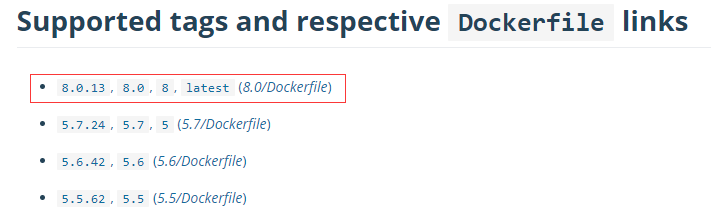
默认是下载 latest 标签的mysql,那么版本是多少呢?访问以下链接:
https://hub.docker.com/_/mysql/
可以发现,latest 对应的版本应该是 8.0.13
导入表
下载项目
访问github地址:
https://github.com/xuxueli/xxl-job
查看releases版本
https://github.com/xuxueli/xxl-job/releases
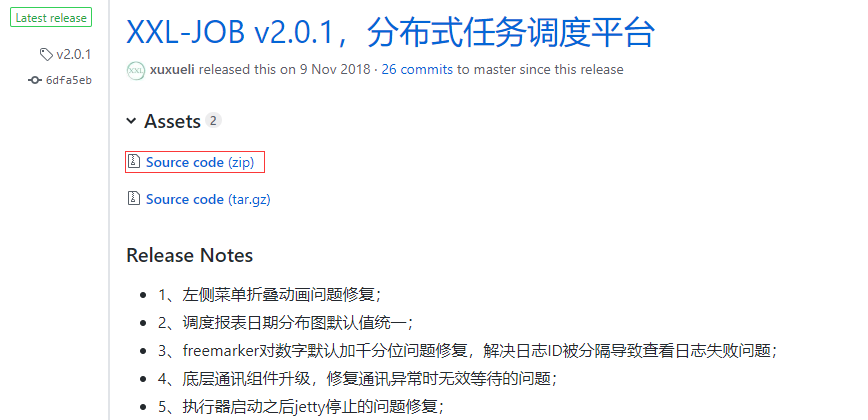
最新版本是2.0.1,下载zip包
将zip包上传至/opt 目录下,然后进行解压
cd /opt/

apt-get install -y unzip

unzip xxl-job-2.0..zip
进入db目录,其中 tables_xxl_job.sql 就是我们要导入的sql文件
root@ubuntu:~# cd /opt/xxl-job-2.0.1/doc/db/

root@ubuntu:/opt/xxl-job-2.0./doc/db# ll

total

drwxr-xr-x  root root  Nov   : ./

drwxr-xr-x  root root  Nov   : ../

-rw-r--r--  root root  Nov   : tables_mysql(备份,请忽略).sql

-rw-r--r-- 1 root root 9293 Nov  9 09:58 tables_xxl_job.sql
正式导入
先启动mysql 镜像,指定密码为123456,映射目录/opt,指定默认编码为utf-8
注意:密码不要包含感叹号,否则会导致xxl-job启动失败!
docker run -e MYSQL_ROOT_PASSWORD= -p : -v /opt:/opt mysql --character-set-server=utf8mb4 --collation-server=utf8mb4_unicode_ci
输出如下:
Initializing database

--21T07::.704431Z  [Warning] [MY-] [Server] 'Disabling symbolic links using --skip-symbolic-links (or equivalent) is the default. Consider not using this option as it' is deprecated and will be removed in a future release.

--21T07::.704535Z  [System] [MY-] [Server] /usr/sbin/mysqld (mysqld 8.0.) initializing of server in progress as process

--21T07::.371624Z  [Warning] [MY-] [Server] root@localhost is created with an empty password ! Please consider switching off the --initialize-insecure option.

--21T07::.750172Z  [Warning] [MY-] [Server] 'user' entry 'mysql.infoschema@localhost' ignored in --skip-name-resolve mode.

--21T07::.750311Z  [Warning] [MY-] [Server] 'user' entry 'mysql.session@localhost' ignored in --skip-name-resolve mode.

--21T07::.750368Z  [Warning] [MY-] [Server] 'user' entry 'mysql.sys@localhost' ignored in --skip-name-resolve mode.

--21T07::.750418Z  [Warning] [MY-] [Server] 'user' entry 'root@localhost' ignored in --skip-name-resolve mode.

--21T07::.750483Z  [Warning] [MY-] [Server] 'db' entry 'performance_schema mysql.session@localhost' ignored in --skip-name-resolve mode.

--21T07::.750525Z  [Warning] [MY-] [Server] 'db' entry 'sys mysql.sys@localhost' ignored in --skip-name-resolve mode.

--21T07::.750571Z  [Warning] [MY-] [Server] 'proxies_priv' entry '@ root@localhost' ignored in --skip-name-resolve mode.

--21T07::.750735Z  [Warning] [MY-] [Server] 'tables_priv' entry 'user mysql.session@localhost' ignored in --skip-name-resolve mode.

--21T07::.750780Z  [Warning] [MY-] [Server] 'tables_priv' entry 'sys_config mysql.sys@localhost' ignored in --skip-name-resolve mode.

--21T07::.791082Z  [System] [MY-] [Server] /usr/sbin/mysqld (mysqld 8.0.) initializing of server has completed

Database initialized

MySQL init process in progress...

--21T07::.384449Z  [Warning] [MY-] [Server] 'Disabling symbolic links using --skip-symbolic-links (or equivalent) is the default. Consider not using this option as it' is deprecated and will be removed in a future release.

--21T07::.384578Z  [System] [MY-] [Server] /usr/sbin/mysqld (mysqld 8.0.) starting as process

MySQL init process in progress...

MySQL init process in progress...

MySQL init process in progress...

mbind: Operation not permitted

--21T07::.085694Z  [Warning] [MY-] [Server] CA certificate ca.pem is self signed.

--21T07::.088469Z  [Warning] [MY-] [Server] Insecure configuration for --pid-file: Location '/var/run/mysqld' in the path is accessible to all OS users. Consider choosing a different directory.

--21T07::.099211Z  [Warning] [MY-] [Server] 'user' entry 'mysql.infoschema@localhost' ignored in --skip-name-resolve mode.

--21T07::.099334Z  [Warning] [MY-] [Server] 'user' entry 'mysql.session@localhost' ignored in --skip-name-resolve mode.

--21T07::.099389Z  [Warning] [MY-] [Server] 'user' entry 'mysql.sys@localhost' ignored in --skip-name-resolve mode.

--21T07::.099437Z  [Warning] [MY-] [Server] 'user' entry 'root@localhost' ignored in --skip-name-resolve mode.

--21T07::.099499Z  [Warning] [MY-] [Server] 'db' entry 'performance_schema mysql.session@localhost' ignored in --skip-name-resolve mode.

--21T07::.099541Z  [Warning] [MY-] [Server] 'db' entry 'sys mysql.sys@localhost' ignored in --skip-name-resolve mode.

--21T07::.099585Z  [Warning] [MY-] [Server] 'proxies_priv' entry '@ root@localhost' ignored in --skip-name-resolve mode.

--21T07::.177538Z  [Warning] [MY-] [Server] 'tables_priv' entry 'user mysql.session@localhost' ignored in --skip-name-resolve mode.

--21T07::.177655Z  [Warning] [MY-] [Server] 'tables_priv' entry 'sys_config mysql.sys@localhost' ignored in --skip-name-resolve mode.

--21T07::.185438Z  [System] [MY-] [Server] /usr/sbin/mysqld: ready for connections. Version: '8.0.13'  socket: '/var/run/mysqld/mysqld.sock'  port:   MySQL Community Server - GPL.

--21T07::.266527Z  [System] [MY-] [Server] X Plugin ready for connections. Socket: '/var/run/mysqld/mysqlx.sock'

Warning: Unable to load '/usr/share/zoneinfo/iso3166.tab' as time zone. Skipping it.

Warning: Unable to load '/usr/share/zoneinfo/leap-seconds.list' as time zone. Skipping it.

Warning: Unable to load '/usr/share/zoneinfo/zone.tab' as time zone. Skipping it.

Warning: Unable to load '/usr/share/zoneinfo/zone1970.tab' as time zone. Skipping it.

--21T07::.078178Z  [Warning] [MY-] [Server] 'user' entry 'mysql.infoschema@localhost' ignored in --skip-name-resolve mode.

--21T07::.078298Z  [Warning] [MY-] [Server] 'user' entry 'mysql.session@localhost' ignored in --skip-name-resolve mode.

--21T07::.078352Z  [Warning] [MY-] [Server] 'user' entry 'mysql.sys@localhost' ignored in --skip-name-resolve mode.

--21T07::.078400Z  [Warning] [MY-] [Server] 'user' entry 'root@localhost' ignored in --skip-name-resolve mode.

--21T07::.078569Z  [Warning] [MY-] [Server] 'db' entry 'performance_schema mysql.session@localhost' ignored in --skip-name-resolve mode.

--21T07::.078638Z  [Warning] [MY-] [Server] 'db' entry 'sys mysql.sys@localhost' ignored in --skip-name-resolve mode.

--21T07::.078686Z  [Warning] [MY-] [Server] 'proxies_priv' entry '@ root@localhost' ignored in --skip-name-resolve mode.

--21T07::.078889Z  [Warning] [MY-] [Server] 'tables_priv' entry 'user mysql.session@localhost' ignored in --skip-name-resolve mode.

--21T07::.078935Z  [Warning] [MY-] [Server] 'tables_priv' entry 'sys_config mysql.sys@localhost' ignored in --skip-name-resolve mode.

--21T07::.200048Z  [System] [MY-] [Server] /usr/sbin/mysqld: Shutdown complete (mysqld 8.0.)  MySQL Community Server - GPL.

MySQL init process done. Ready for start up.

--21T07::.239758Z  [Warning] [MY-] [Server] 'Disabling symbolic links using --skip-symbolic-links (or equivalent) is the default. Consider not using this option as it' is deprecated and will be removed in a future release.

--21T07::.239874Z  [System] [MY-] [Server] /usr/sbin/mysqld (mysqld 8.0.) starting as process

--21T07::.211647Z  [Warning] [MY-] [Server] CA certificate ca.pem is self signed.

--21T07::.214367Z  [Warning] [MY-] [Server] Insecure configuration for --pid-file: Location '/var/run/mysqld' in the path is accessible to all OS users. Consider choosing a different directory.

--21T07::.293300Z  [Warning] [MY-] [Server] 'user' entry 'mysql.infoschema@localhost' ignored in --skip-name-resolve mode.

--21T07::.293623Z  [Warning] [MY-] [Server] 'user' entry 'mysql.session@localhost' ignored in --skip-name-resolve mode.

--21T07::.293818Z  [Warning] [MY-] [Server] 'user' entry 'mysql.sys@localhost' ignored in --skip-name-resolve mode.

--21T07::.293995Z  [Warning] [MY-] [Server] 'user' entry 'root@localhost' ignored in --skip-name-resolve mode.

--21T07::.294464Z  [Warning] [MY-] [Server] 'db' entry 'performance_schema mysql.session@localhost' ignored in --skip-name-resolve mode.

--21T07::.294626Z  [Warning] [MY-] [Server] 'db' entry 'sys mysql.sys@localhost' ignored in --skip-name-resolve mode.

--21T07::.294793Z  [Warning] [MY-] [Server] 'proxies_priv' entry '@ root@localhost' ignored in --skip-name-resolve mode.

--21T07::.311834Z  [Warning] [MY-] [Server] 'tables_priv' entry 'user mysql.session@localhost' ignored in --skip-name-resolve mode.

--21T07::.312036Z  [Warning] [MY-] [Server] 'tables_priv' entry 'sys_config mysql.sys@localhost' ignored in --skip-name-resolve mode.

--21T07::.398254Z  [System] [MY-] [Server] /usr/sbin/mysqld: ready for connections. Version: '8.0.13'  socket: '/var/run/mysqld/mysqld.sock'  port:   MySQL Community Server - GPL.

--21T07::.549764Z  [System] [MY-] [Server] X Plugin ready for connections. Socket: '/var/run/mysqld/mysqlx.sock' bind-address: '::' port:
如果有输出:
/usr/sbin/mysqld: ready for connections. Version: '8.0.13' socket: '/var/run/mysqld/mysqld.sock' port: MySQL Community Server - GPL.
则表示,启动mysql成功!可以看到版本确实是8.0.13
查看docker 进程
root@ubuntu:~# docker ps

CONTAINER ID        IMAGE               COMMAND                  CREATED             STATUS              PORTS                               NAMES

3c28a71089b4        mysql               "docker-entrypoint..."    seconds ago      Up  seconds       0.0.0.0:->/tcp, /tcp   kind_spence
进入docker,导入sql文件
root@ubuntu:~# docker exec -it 3c28a71089b4 /bin/bash

root@3c28a71089b4:/# mysql -u root -p123456

mysql> exit;
查看 sql文件
root@3c28a71089b4:/# cat /opt/xxl-job-2.0.1/doc/db/tables_xxl_job.sql | head -3

CREATE database if NOT EXISTS `xxl-job` default character set utf8 collate utf8_general_ci;

use `xxl-job`;
可以发现,它会判断 xxl-job 数据库是否存在,如果不存在,就会自动创建。
会自动切换到xxl-job 数据库
导入sql 文件
mysql> source /opt/xxl-job-2.0.1/doc/db/tables_xxl_job.sql;

Query OK,  row affected,  warnings (0.12 sec)

...
设置权限
查看默认的授权列表
mysql> select Host,User,authentication_string from mysql.user;

+-----------+------------------+------------------------------------------------------------------------+

| Host      | User             | authentication_string                                                  |

+-----------+------------------+------------------------------------------------------------------------+

| %         | root             | *6BB4837EB74329105EE4568DDA7DC67ED2CA2AD9                              |

| localhost | mysql.infoschema | $A$$THISISACOMBINATIONOFINVALIDSALTANDPASSWORDTHATMUSTNEVERBRBEUSED |

| localhost | mysql.session    | $A$$THISISACOMBINATIONOFINVALIDSALTANDPASSWORDTHATMUSTNEVERBRBEUSED |

| localhost | mysql.sys        | $A$$THISISACOMBINATIONOFINVALIDSALTANDPASSWORDTHATMUSTNEVERBRBEUSED |

| localhost | root             | $A$$QCx{][26P-1f|wmEouH1rBifNJZVGQZiH9NBl3SgrUqB319vSHh7FHI96 |

+-----------+------------------+------------------------------------------------------------------------+

 rows in set (0.00 sec)
可以发现,默认已经将root用户设置了远程访问,也就是%的那条记录。但是密码和localhost的不一样。
因此,需要修改密码,并刷新权限
mysql> ALTER USER 'root'@'%' IDENTIFIED WITH mysql_native_password BY '123456';

mysql> flush privileges;
注意:不要使用以下命令,执行会直接报错!
grant all privileges on *.* to 'root'@'%' identified by '' with grant option;
测试远程连接
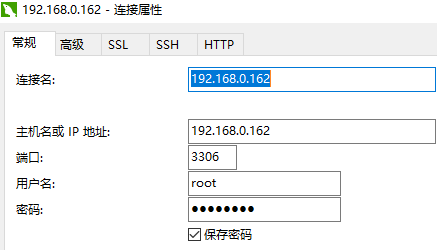
使用Navicat 新建一个mysql连接
点击连接测试,效果如下:
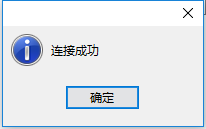
注意:这里必须能够远程访问,因为待会由 xxl-job来连接,必须测试通过,否则会导致xxl-job启动失败!
三、安装xxl-job
下载镜像
docker pull xuxueli/xxl-job-admin
执行会报错:
Using default tag: latest

Error response from daemon: manifest for xuxueli/xxl-job-admin:latest not found
为什么呢?因为官方没有打 latest 的tag标签,所以会提示下载失败!那怎么下载呢?必须制定版本才可以!
在上面的内容中,我们已经访问了releases连接,最新版本是2.0.1
那么下载命令为:
docker pull xuxueli/xxl-job-admin:2.0.1
启动镜像
注意:官方文档,提到了2个命令
docker run -p : -v /tmp:/data/applogs --name xxl-job-admin  -d xuxueli/xxl-job-admin

和

docker run -e PARAMS="--spring.datasource.url=jdbc:mysql://127.0.0.1:3306/xxl-job?Unicode=true&characterEncoding=UTF-8" -p : -v /tmp:/data/applogs --name xxl-job-admin  -d xuxueli/xxl-job-admin
这2个命令,执行之后,是无法访问8080页面的!
正确的命令为:
docker run -e PARAMS="--spring.datasource.url=jdbc:mysql://192.168.0.162:3306/xxl-job?Unicode=true&characterEncoding=UTF-8 --spring.datasource.username=root --spring.datasource.password=123456" -p : -v /tmp:/data/applogs --name xxl-job-admin xuxueli/xxl-job-admin:2.0.1
上面的红色部分,就是在官方的基础上面改的!指定真实的mysql地址,以及用户和密码。根据实际情况修改!!!
注意:jdbc的地址不能是127.0.0.1,因为官方的镜像没有mysql。官方的jdbc命令只是单纯的指定了数据库为xxl-job,并没有指定用户名和密码!
最后一个参数,是镜像地址。注意:必须带版本,否则无法启动
启动之后,输出如下:
  .   ____          _            __ _ _

 /\\ / ___'_ __ _ _(_)_ __  __ _ \ \ \ \

( ( )\___ | '_ | '_| | '_ \/ _` | \ \ \ \

 \\/  ___)| |_)| | | | | || (_| |  ) ) ) )

  '  |____| .__|_| |_|_| |_\__, | / / / /

 =========|_|==============|___/=/_/_/_/

 :: Spring Boot ::       (v1.5.17.RELEASE)

::30.705 logback [main] INFO  c.x.job.admin.XxlJobAdminApplication - Starting XxlJobAdminApplication on ab6d93ba81f9 with PID  (/app.jar started by root in /)

::30.797 logback [main] INFO  c.x.job.admin.XxlJobAdminApplication - No active profile set, falling back to default profiles: default

::39.762 logback [main] INFO  o.s.b.c.e.AnnotationConfigEmbeddedWebApplicationContext - Refreshing org.springframework.boot.context.embedded.AnnotationConfigEmbeddedWebApplicationContext@70f3863: startup date [Mon Jan  :: CST ]; root of context hierarchy

::40.071 logback [background-preinit] INFO  o.h.validator.internal.util.Version - HV000001: Hibernate Validator 5.3..Final

::09.375 logback [main] INFO  o.s.b.c.e.t.TomcatEmbeddedServletContainer - Tomcat initialized with port(s):  (http)

::09.800 logback [main] INFO  o.a.coyote.http11.Http11NioProtocol - Initializing ProtocolHandler ["http-nio-8080"]

::10.001 logback [main] INFO  o.a.catalina.core.StandardService - Starting service [Tomcat]

::10.002 logback [main] INFO  o.a.catalina.core.StandardEngine - Starting Servlet Engine: Apache Tomcat/8.5.

::11.564 logback [localhost-startStop-] INFO  o.a.c.c.C.[.[.[/xxl-job-admin] - Initializing Spring embedded WebApplicationContext

::11.565 logback [localhost-startStop-] INFO  o.s.web.context.ContextLoader - Root WebApplicationContext: initialization completed in  ms

::13.528 logback [localhost-startStop-] INFO  o.s.b.w.s.ServletRegistrationBean - Mapping servlet: 'dispatcherServlet' to [/]

::13.617 logback [localhost-startStop-] INFO  o.s.b.w.s.FilterRegistrationBean - Mapping filter: 'characterEncodingFilter' to: [/*]

14:28:13.619 logback [localhost-startStop-1] INFO  o.s.b.w.s.FilterRegistrationBean - Mapping filter: 'hiddenHttpMethodFilter' to: [/*]

14:28:13.619 logback [localhost-startStop-1] INFO  o.s.b.w.s.FilterRegistrationBean - Mapping filter: 'httpPutFormContentFilter' to: [/*]

14:28:13.621 logback [localhost-startStop-1] INFO  o.s.b.w.s.FilterRegistrationBean - Mapping filter: 'requestContextFilter' to: [/*]

14:28:28.676 logback [main] INFO  o.s.s.quartz.SchedulerFactoryBean - Loading Quartz config from [class path resource [quartz.properties]]

14:28:28.987 logback [main] INFO  org.quartz.impl.StdSchedulerFactory - Using default implementation for ThreadExecutor

14:28:28.994 logback [main] INFO  org.quartz.simpl.SimpleThreadPool - Job execution threads will use class loader of thread: main

14:28:29.186 logback [main] INFO  o.quartz.core.SchedulerSignalerImpl - Initialized Scheduler Signaller of type: class org.quartz.core.SchedulerSignalerImpl

14:28:29.187 logback [main] INFO  org.quartz.core.QuartzScheduler - Quartz Scheduler v.2.3.0 created.

14:28:29.288 logback [main] WARN  o.a.tomcat.jdbc.pool.ConnectionPool - maxIdle is larger than maxActive, setting maxIdle to: 30

Mon Jan 21 14:28:31 CST 2019 WARN: Establishing SSL connection without server's identity verification is not recommended. According to MySQL 5.5.45+, 5.6.26+ and 5.7.6+ requirements SSL connection must be established by default if explicit option isn't set. For compliance with existing applications not using SSL the verifyServerCertificate property is set to 'false'. You need either to explicitly disable SSL by setting useSSL=false, or set useSSL=true and provide truststore for server certificate verification.

Mon Jan 21 14:28:31 CST 2019 WARN: Establishing SSL connection without server's identity verification is not recommended. According to MySQL 5.5.45+, 5.6.26+ and 5.7.6+ requirements SSL connection must be established by default if explicit option isn't set. For compliance with existing applications not using SSL the verifyServerCertificate property is set to 'false'. You need either to explicitly disable SSL by setting useSSL=false, or set useSSL=true and provide truststore for server certificate verification.

Mon Jan 21 14:28:31 CST 2019 WARN: Establishing SSL connection without server's identity verification is not recommended. According to MySQL 5.5.45+, 5.6.26+ and 5.7.6+ requirements SSL connection must be established by default if explicit option isn't set. For compliance with existing applications not using SSL the verifyServerCertificate property is set to 'false'. You need either to explicitly disable SSL by setting useSSL=false, or set useSSL=true and provide truststore for server certificate verification.

Mon Jan 21 14:28:32 CST 2019 WARN: Establishing SSL connection without server's identity verification is not recommended. According to MySQL 5.5.45+, 5.6.26+ and 5.7.6+ requirements SSL connection must be established by default if explicit option isn't set. For compliance with existing applications not using SSL the verifyServerCertificate property is set to 'false'. You need either to explicitly disable SSL by setting useSSL=false, or set useSSL=true and provide truststore for server certificate verification.

Mon Jan 21 14:28:32 CST 2019 WARN: Establishing SSL connection without server's identity verification is not recommended. According to MySQL 5.5.45+, 5.6.26+ and 5.7.6+ requirements SSL connection must be established by default if explicit option isn't set. For compliance with existing applications not using SSL the verifyServerCertificate property is set to 'false'. You need either to explicitly disable SSL by setting useSSL=false, or set useSSL=true and provide truststore for server certificate verification.

Mon Jan 21 14:28:32 CST 2019 WARN: Establishing SSL connection without server's identity verification is not recommended. According to MySQL 5.5.45+, 5.6.26+ and 5.7.6+ requirements SSL connection must be established by default if explicit option isn't set. For compliance with existing applications not using SSL the verifyServerCertificate property is set to 'false'. You need either to explicitly disable SSL by setting useSSL=false, or set useSSL=true and provide truststore for server certificate verification.

Mon Jan 21 14:28:32 CST 2019 WARN: Establishing SSL connection without server's identity verification is not recommended. According to MySQL 5.5.45+, 5.6.26+ and 5.7.6+ requirements SSL connection must be established by default if explicit option isn't set. For compliance with existing applications not using SSL the verifyServerCertificate property is set to 'false'. You need either to explicitly disable SSL by setting useSSL=false, or set useSSL=true and provide truststore for server certificate verification.

Mon Jan 21 14:28:32 CST 2019 WARN: Establishing SSL connection without server's identity verification is not recommended. According to MySQL 5.5.45+, 5.6.26+ and 5.7.6+ requirements SSL connection must be established by default if explicit option isn't set. For compliance with existing applications not using SSL the verifyServerCertificate property is set to 'false'. You need either to explicitly disable SSL by setting useSSL=false, or set useSSL=true and provide truststore for server certificate verification.

Mon Jan 21 14:28:32 CST 2019 WARN: Establishing SSL connection without server's identity verification is not recommended. According to MySQL 5.5.45+, 5.6.26+ and 5.7.6+ requirements SSL connection must be established by default if explicit option isn't set. For compliance with existing applications not using SSL the verifyServerCertificate property is set to 'false'. You need either to explicitly disable SSL by setting useSSL=false, or set useSSL=true and provide truststore for server certificate verification.

Mon Jan 21 14:28:32 CST 2019 WARN: Establishing SSL connection without server's identity verification is not recommended. According to MySQL 5.5.45+, 5.6.26+ and 5.7.6+ requirements SSL connection must be established by default if explicit option isn't set. For compliance with existing applications not using SSL the verifyServerCertificate property is set to 'false'. You need either to explicitly disable SSL by setting useSSL=false, or set useSSL=true and provide truststore for server certificate verification.

14:28:32.600 logback [main] INFO  o.s.s.quartz.LocalDataSourceJobStore - Using db table-based data access locking (synchronization).

14:28:32.605 logback [main] INFO  o.s.s.quartz.LocalDataSourceJobStore - JobStoreCMT initialized.

14:28:32.607 logback [main] INFO  org.quartz.core.QuartzScheduler - Scheduler meta-data: Quartz Scheduler (v2.3.0) 'getSchedulerFactoryBean' with instanceId 'ab6d93ba81f91548052108992'

  Scheduler class: 'org.quartz.core.QuartzScheduler' - running locally.

  NOT STARTED.

  Currently in standby mode.

  Number of jobs executed: 0

  Using thread pool 'org.quartz.simpl.SimpleThreadPool' - with 50 threads.

  Using job-store 'org.springframework.scheduling.quartz.LocalDataSourceJobStore' - which supports persistence. and is clustered.

14:28:32.608 logback [main] INFO  org.quartz.impl.StdSchedulerFactory - Quartz scheduler 'getSchedulerFactoryBean' initialized from an externally provided properties instance.

14:28:32.608 logback [main] INFO  org.quartz.impl.StdSchedulerFactory - Quartz scheduler version: 2.3.0

14:28:32.614 logback [main] INFO  org.quartz.core.QuartzScheduler - JobFactory set to: org.springframework.scheduling.quartz.AdaptableJobFactory@2914dd79

14:28:33.031 logback [main] INFO  c.x.r.r.p.XxlRpcProviderFactory - >>>>>>>>>>> xxl-rpc, provider factory add service success. serviceKey = com.xxl.job.core.biz.AdminBiz, serviceBean = class com.xxl.job.admin.service.impl.AdminBizImpl

14:28:33.236 logback [main] INFO  org.eclipse.jetty.util.log - Logging initialized @78724ms

14:28:33.236 logback [main] INFO  c.x.j.a.c.s.XxlJobDynamicScheduler - >>>>>>>>> init xxl-job admin success.
最后一行,输出 init xxl-job admin success. 表示启动成功!
访问页面
直接访问:
http://192.168.0.162:8080
是没有任何效果的!!!
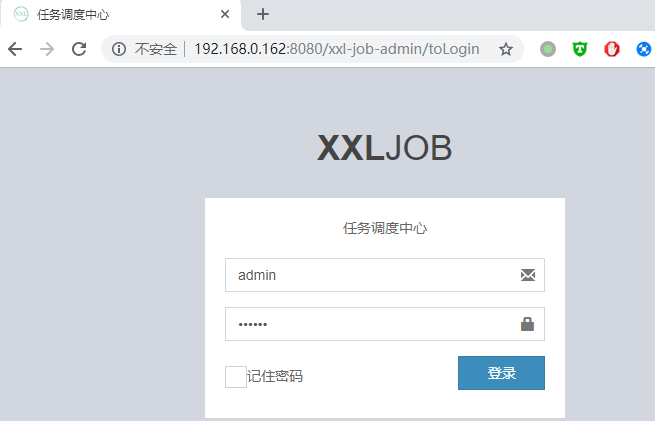
真正的访问地址为:
http://192.168.0.162:8080/xxl-job-admin
效果如下:
默认的用户名和密码,已经帮你输入好了
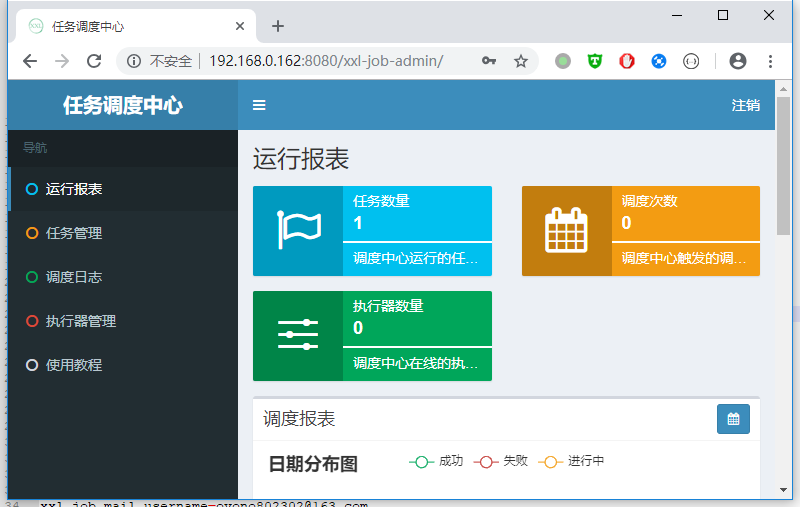
点击登录,效果如下:
本文参考官方文档:
http://www.xuxueli.com/xxl-job/#/
有很多坑呀,不能傻瓜示的照着敲命令,那样是不行的!
分布式任务调度系统xxl-job搭建(基于docker)的更多相关文章
- 基于nginx+xxl-job+springboot高可用分布式任务调度系统
技术.原理讲解: <分布式任务调度平台XXL-JOB--源码解析一:项目介绍> <分布式任务调度平台XXL-JOB--源码解析二:基于docker搭建admin调度中心和execut ...
- 分布式任务调度系统:xxl-job
任务调度,通俗来说实际上就是"定时任务",分布式任务调度系统,翻译一下就是"分布式环境下定时任务系统". xxl-job一个分布式任务调度平台,其核心设计目标是 ...
- 分布式任务调度系统xxl-job搭建
为解决分布式环境下定时任务的可靠性,稳定性,只执行一次的特性,我找到了个大众点评开源的分布式调度任务解决完整系统,下面我将一步步深入解读该系统,从基本的使用到源码的探究 下载 https://gith ...
- 分布式任务调度平台XXL-JOB快速搭建教程
1. XXL-JOB简介 XXL-JOB是一个分布式任务调度平台,其核心设计目标是开发迅速.学习简单.轻量级.易扩展.现已开放源代码并接入多家公司线上产品线,开箱即用.它的有两个核心模块,一个模块叫做 ...
- 三万字无坑搭建基于Docker+K8S+GitLab/SVN+Jenkins+Harbor持续集成交付环境
写在前面 最近在 K8S 1.18.2 版本的集群上搭建DevOps环境,期间遇到了各种坑.目前,搭建环境的过程中出现的各种坑均已被填平,特此记录,并分享给大家! 文章和搭建环境所需要的yml文件已收 ...
- 搭建基于Docker社区版的Kubernetes本地集群
Kubernetes的本地集群搭建是一件颇费苦心的活,网上有各种参考资源,由于版本和容器的不断发展,搭建的方式也是各不相同,这里基于Docker CE的18.09.0版本,在Mac OS.Win10下 ...
- 分布式任务调度系统xxl-job源码探究(一、客户端)
前面讲了xxl-job的搭建,现在来粗略的解析下该分布式调度系统的源码,先来客户点代码 客户端源码 客户端开启的时候会向服务中心进行注册,其实现用的是jetty连接,且每隔半分钟会发送一次心跳,来告诉 ...
- 如何搭建基于Docker的gitlab服务器集成CI/CD实现DEVOPS(完整版)
From this lesson you will learn about 1,How to install and configure a docker based gitlab server 2, ...
- 在 Mac/Windows 系统中使用 Laradock 搭建基于 Docker 的 Laravel 开发环境 (改)
开篇 Use Docker First And Learn About It Later 简介 Laradock 是为 Docker 提供的完整 PHP 本地开发环境,和 Homestead 一样提供 ...
随机推荐
- Scala进阶之路-反射(reflect)技术详解
Scala进阶之路-反射(reflect)技术详解 作者:尹正杰 版权声明:原创作品,谢绝转载!否则将追究法律责任. Scala中的反射技术和Java反射用法类似,我这里就不一一介绍反射是啥了,如果对 ...
- 缓存方案 通过SqlDependency实现Cache和Database的同步
对于一个真正的企业级的应用来说,Caching肯定是一个不得不考虑的因素,合理.有效地利用Caching对于增强应用的Performance(减少对基于Persistent storage的IO操作) ...
- JavaScript数组倒序函数reverse()
左边为原数组,右边为array.reverse()的结果: 函数很简单,但是 var temp = ChartConfig.getMonthData(); $scope.monthList = tem ...
- Python发邮件的小脚本
# -*- coding: UTF-8 -*- import smtplib from email.mime.text import MIMEText mailto_list = ['hitwh_Gy ...
- 无线路由器的web漏洞
1.XSS漏洞 2.CSRF漏洞 这样的攻击方式具体可以由多种形式实现,除了建立欺诈服务器外,还可以使用超链接陷阱.所谓的超链接陷阱,就是指伪造一个可信的链接或者地址,但其实际地址中包含了修改无线路由 ...
- mongodb系列~mongo常用命令
mongodb常用命令大全1 索引相关命令 db.chenfeng.ensureIndex({"riqi":1}) 添加索引会阻塞nohup mongo --eval " ...
- mysql 原理 ~ change buffer
一 简介:今天咱们来聊聊mysql的change buffer二 详细说明 1 +-change Buffer和数据页一样,也是物理页的一个组成部分,数据结构也是一颗B+树,这棵B+树放在共享表空 ...
- mysql 查询优化~ 分页优化讲解
一 简介:今天咱们来聊聊mysql的分页查询二 语法 LIMIT [offset,] rows offset是第多少条 rows代表多少条之后的行数 性能消耗 se ...
- IIS配置过程中的常见问题
解析Json需要设置Mime IIS6.0 1.打开IIS添加Mime项 关联扩展名:*.json内容类型(MIME):application/x-JavaScript 2.添加映射: 位置 ...
- dataTable插件锁表头和锁列的教程
源代码下载 我的同事让我帮忙给弄个锁头锁列的插件.结果找到大名鼎鼎的jquery dataTable插件. 今天我们来介绍不常用的功能:dataTable插件锁表头和锁前两列 由于是移动前端.我们不考 ...