
微服务之分布式跟踪系统(springboot+zipkin+mysql)
通过上一节《微服务之分布式跟踪系统(springboot+zipkin)》我们简单熟悉了zipkin的使用,但是收集的数据都保存在内存中重启后数据丢失,不过zipkin的Storage除了内存,还有Cassandra、MYSQL、ElasticSearch。
二、zipkin的各种Storage配置简介
zipkin存在一些公用的配置,同时存在一些私有的配置(详细信息地址为:https://github.com/openzipkin/zipkin/tree/master/zipkin-server#configuration-for-the-ui),此处不做配置说明的翻译(因为都比较简单易懂),其公用的配置如下所示:
- *`QUERY_PORT`: Listen port for the http api and web ui; Defaults to 9411
- *`QUERY_LOG_LEVEL`: Log level written to the console; Defaults to INFO
- *`QUERY_LOOKBACK`: How many milliseconds queries can look back from endTs;Defaults to 7 days
- *`STORAGE_TYPE`: SpanStore implementation: one of `mem`, `mysql`, `cassandra`,`elasticsearch`
- *`COLLECTOR_PORT`: Listen port for the scribe thrift api; Defaults to 9410
- *`COLLECTOR_SAMPLE_RATE`: Percentage of traces to retain, defaults to alwayssample (1.0).
(1)Cassandra Storage配置
- * `CASSANDRA_KEYSPACE`: The keyspace to use. Defaults to "zipkin".
- * `CASSANDRA_CONTACT_POINTS`: Comma separated list of hosts / ip addresses part of Cassandra cluster. Defaults to localhost
- * `CASSANDRA_LOCAL_DC`: Name of the datacenter that will be considered "local" for latency load balancing. When unset, load-balancing is round-robin.
- * `CASSANDRA_ENSURE_SCHEMA`: Ensuring cassandra has the latest schema. If enabled tries to execute scripts in the classpath prefixed with `cassandra-schema-cql3`. Defaults to true
- * `CASSANDRA_USERNAME` and `CASSANDRA_PASSWORD`: Cassandra authentication. Will throw an exception on startup if authentication fails. No default
- * `CASSANDRA_USE_SSL`: Requires `javax.net.ssl.trustStore` and `javax.net.ssl.trustStorePassword`, defaults to false.
(2)MySQL Storage配置
- * `MYSQL_DB`: The database to use. Defaults to "zipkin".
- * `MYSQL_USER` and `MYSQL_PASS`: MySQL authentication, which defaults to empty string.
- * `MYSQL_HOST`: Defaults to localhost
- * `MYSQL_TCP_PORT`: Defaults to 3306
- * `MYSQL_MAX_CONNECTIONS`: Maximum concurrent connections, defaults to 10
- * `MYSQL_USE_SSL`: Requires `javax.net.ssl.trustStore` and `javax.net.ssl.trustStorePassword`, defaults to false.
(3)Elasticsearch Storage配置
- * `ES_CLUSTER`: The name of the elasticsearch cluster to connect to. Defaults to "elasticsearch".
- * `ES_HOSTS`: A comma separated list of elasticsearch hostnodes to connect to. When in host:port
- format, they should use the transport port, not the http port. To use http, specify
- base urls, ex. http://host:9200. Defaults to "localhost:9300". When not using http,
- Only one of the hosts needs to be available to fetch the remaining nodes in the
- cluster. It is recommended to set this to all the master nodes of the cluster.
- If the http URL is an AWS-hosted elasticsearch installation (e.g.
- https://search-domain-xyzzy.us-west-2.es.amazonaws.com) then Zipkin will attempt to
- use the default AWS credential provider (env variables, system properties, config
- files, or ec2 profiles) to sign outbound requests to the cluster.
- * `ES_PIPELINE`: Only valid when the destination is Elasticsearch 5.x. Indicates the ingest
- pipeline used before spans are indexed. No default.
- * `ES_MAX_REQUESTS`: Only valid when the transport is http. Sets maximum in-flight requests from
- this process to any Elasticsearch host. Defaults to 64.
- * `ES_AWS_DOMAIN`: The name of the AWS-hosted elasticsearch domain to use. Supercedes any set
- `ES_HOSTS`. Triggers the same request signing behavior as with `ES_HOSTS`, but
- requires the additional IAM permission to describe the given domain.
- * `ES_AWS_REGION`: An optional override to the default region lookup to search for the domain
- given in `ES_AWS_DOMAIN`. Ignored if only `ES_HOSTS` is present.
- * `ES_INDEX`: The index prefix to use when generating daily index names. Defaults to zipkin.
- * `ES_DATE_SEPARATOR`: The date separator to use when generating daily index names. Defaults to '-'.
- * `ES_INDEX_SHARDS`: The number of shards to split the index into. Each shard and its replicas
- are assigned to a machine in the cluster. Increasing the number of shards
- and machines in the cluster will improve read and write performance. Number
- of shards cannot be changed for existing indices, but new daily indices
- will pick up changes to the setting. Defaults to 5.
三、zipkin环境准备与启动
在本节中,以MySQL为例进行说明,由于目前只是Mysql5.6和5.7进行测试过,所以本次我选择Mysql5.7版本。
(1) 初始化数据库
安装好Mysql5.7后新建zipkin的数据库,然后执行下面的SQL语句新建表:
- CREATETABLE IF NOT EXISTS zipkin_spans (
- `trace_id_high` BIGINT NOT NULL DEFAULT 0COMMENT 'If non zero, this means the trace uses 128 bit traceIds instead of 64bit',
- `trace_id` BIGINT NOT NULL,
- `id` BIGINT NOT NULL,
- `name` VARCHAR(255) NOT NULL,
- `parent_id` BIGINT,
- `debug` BIT(1),
- `start_ts` BIGINT COMMENT 'Span.timestamp():epoch micros used for endTs query and to implement TTL',
- `duration` BIGINT COMMENT 'Span.duration():micros used for minDuration and maxDuration query'
- )ENGINE=InnoDB ROW_FORMAT=COMPRESSED CHARACTER SET=utf8 COLLATE utf8_general_ci;
- ALTERTABLE zipkin_spans ADD UNIQUE KEY(`trace_id_high`, `trace_id`, `id`) COMMENT'ignore insert on duplicate';
- ALTERTABLE zipkin_spans ADD INDEX(`trace_id_high`, `trace_id`, `id`) COMMENT 'forjoining with zipkin_annotations';
- ALTERTABLE zipkin_spans ADD INDEX(`trace_id_high`, `trace_id`) COMMENT 'forgetTracesByIds';
- ALTERTABLE zipkin_spans ADD INDEX(`name`) COMMENT 'for getTraces and getSpanNames';
- ALTERTABLE zipkin_spans ADD INDEX(`start_ts`) COMMENT 'for getTraces ordering andrange';
- CREATETABLE IF NOT EXISTS zipkin_annotations (
- `trace_id_high` BIGINT NOT NULL DEFAULT 0COMMENT 'If non zero, this means the trace uses 128 bit traceIds instead of 64bit',
- `trace_id` BIGINT NOT NULL COMMENT 'coincideswith zipkin_spans.trace_id',
- `span_id` BIGINT NOT NULL COMMENT 'coincideswith zipkin_spans.id',
- `a_key` VARCHAR(255) NOT NULL COMMENT'BinaryAnnotation.key or Annotation.value if type == -1',
- `a_value` BLOB COMMENT'BinaryAnnotation.value(), which must be smaller than 64KB',
- `a_type` INT NOT NULL COMMENT'BinaryAnnotation.type() or -1 if Annotation',
- `a_timestamp` BIGINT COMMENT 'Used toimplement TTL; Annotation.timestamp or zipkin_spans.timestamp',
- `endpoint_ipv4` INT COMMENT 'Null whenBinary/Annotation.endpoint is null',
- `endpoint_ipv6` BINARY(16) COMMENT 'Null whenBinary/Annotation.endpoint is null, or no IPv6 address',
- `endpoint_port` SMALLINT COMMENT 'Null whenBinary/Annotation.endpoint is null',
- `endpoint_service_name` VARCHAR(255) COMMENT'Null when Binary/Annotation.endpoint is null'
- )ENGINE=InnoDB ROW_FORMAT=COMPRESSED CHARACTER SET=utf8 COLLATE utf8_general_ci;
- ALTERTABLE zipkin_annotations ADD UNIQUE KEY(`trace_id_high`, `trace_id`, `span_id`,`a_key`, `a_timestamp`) COMMENT 'Ignore insert on duplicate';
- ALTERTABLE zipkin_annotations ADD INDEX(`trace_id_high`, `trace_id`, `span_id`)COMMENT 'for joining with zipkin_spans';
- ALTERTABLE zipkin_annotations ADD INDEX(`trace_id_high`, `trace_id`) COMMENT 'forgetTraces/ByIds';
- ALTERTABLE zipkin_annotations ADD INDEX(`endpoint_service_name`) COMMENT 'forgetTraces and getServiceNames';
- ALTERTABLE zipkin_annotations ADD INDEX(`a_type`) COMMENT 'for getTraces';
- ALTERTABLE zipkin_annotations ADD INDEX(`a_key`) COMMENT 'for getTraces';
- ALTERTABLE zipkin_annotations ADD INDEX(`trace_id`, `span_id`, `a_key`) COMMENT 'fordependencies job';
- CREATETABLE IF NOT EXISTS zipkin_dependencies (
- `day` DATE NOT NULL,
- `parent` VARCHAR(255) NOT NULL,
- `child` VARCHAR(255) NOT NULL,
- `call_count` BIGINT
- )ENGINE=InnoDB ROW_FORMAT=COMPRESSED CHARACTER SET=utf8 COLLATE utf8_general_ci;
- ALTERTABLE zipkin_dependencies ADD UNIQUE KEY(`day`, `parent`, `child`);
(2) 启动实例
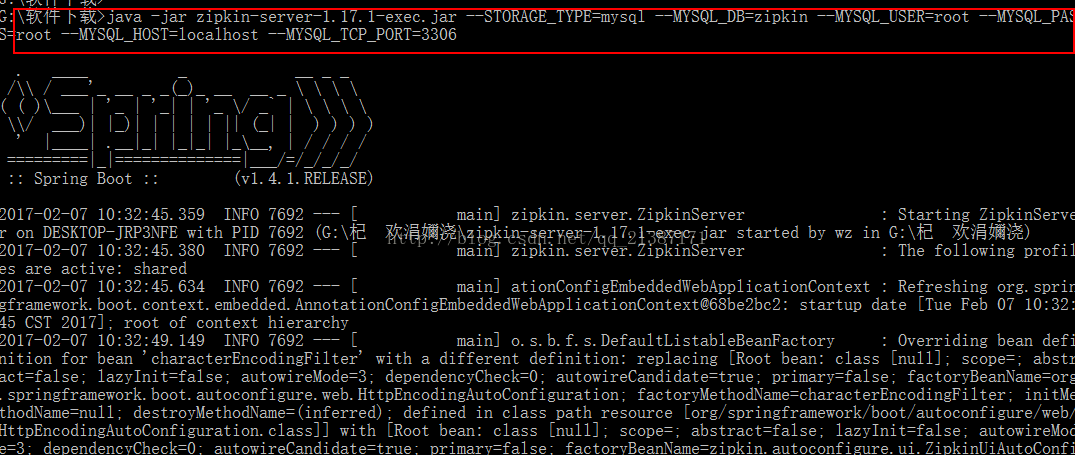
执行命令:java -jar zipkin-server-1.17.1-exec.jar --STORAGE_TYPE=mysql--MYSQL_DB=zipkin --MYSQL_USER=root --MYSQL_PASS=root --MYSQL_HOST=localhost--MYSQL_TCP_PORT=3306,启动成功如下图所示:
(3) 查看运行效果
通过上图,我们发现zipkin使用springboot,并且启动的端口为9411,然后我们通过浏览器访问,效果如下:
四、分布式跟踪系统实践(springboot+zipkin+mysql)
4.1场景设置与分析
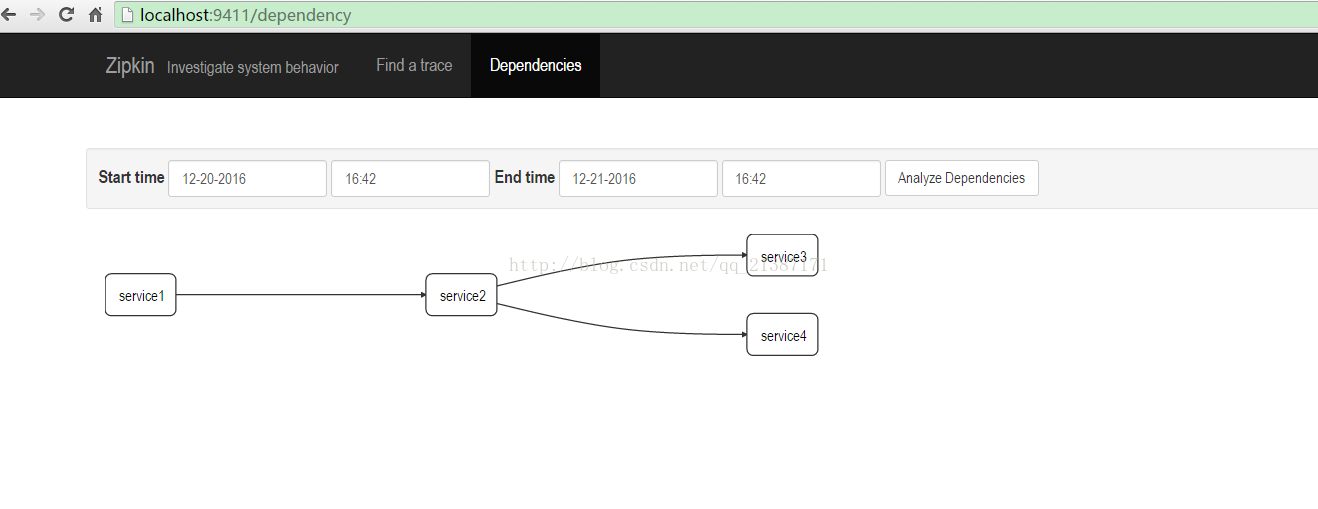
现在有一个服务A调用服务B,服务B又分别调用服务C和D,整个链路过程的关系图如下所示:
4.2 代码编写
具体代码和上一节代码相同,源代码下载地址:https://github.com/dreamerkr/mircoservice.git文件夹springboot+zipkin下面。
4.3运行效果
(1)分别启动每个服务,然后访问服务1,浏览器访问(http://localhost:8081/service1/test)
(2)输入zipkin地址,每次trace的列表
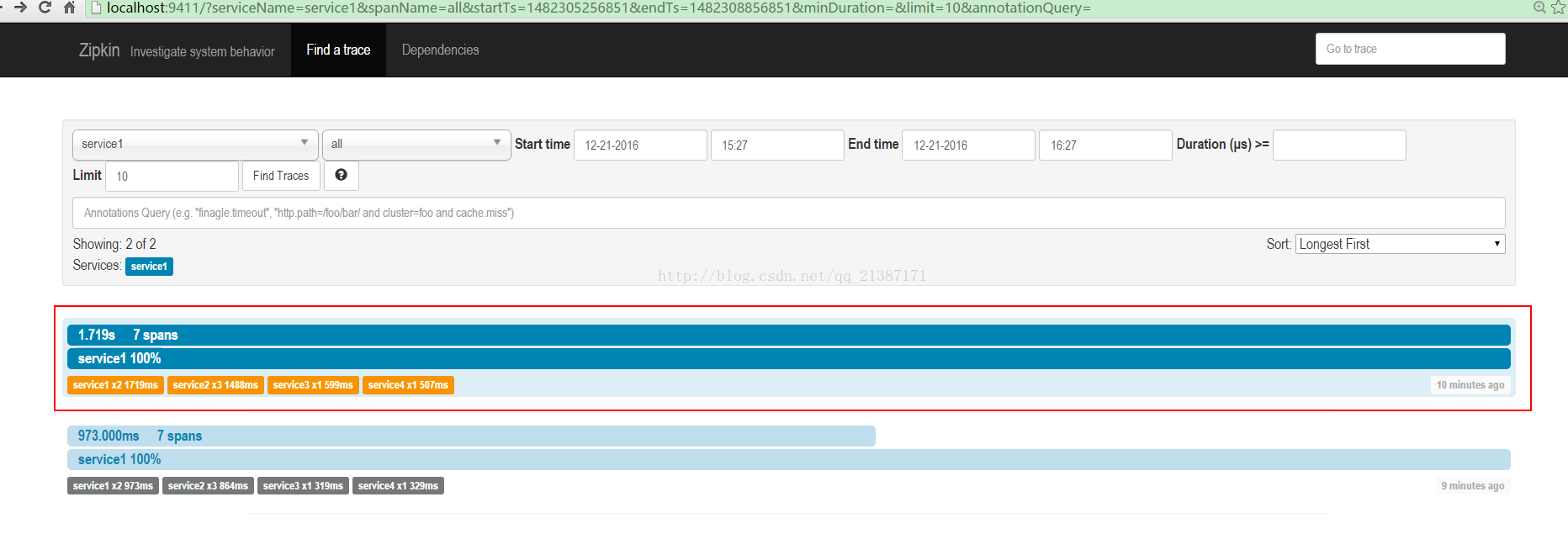
点击其中的trace,可以看trace的树形结构,包括每个服务所消耗的时间:
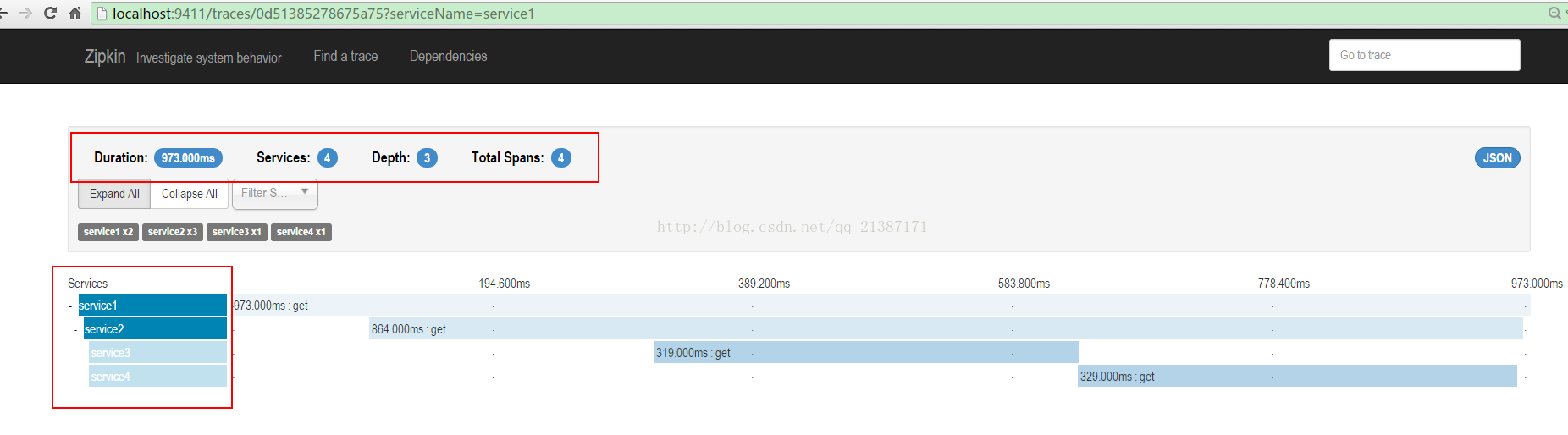
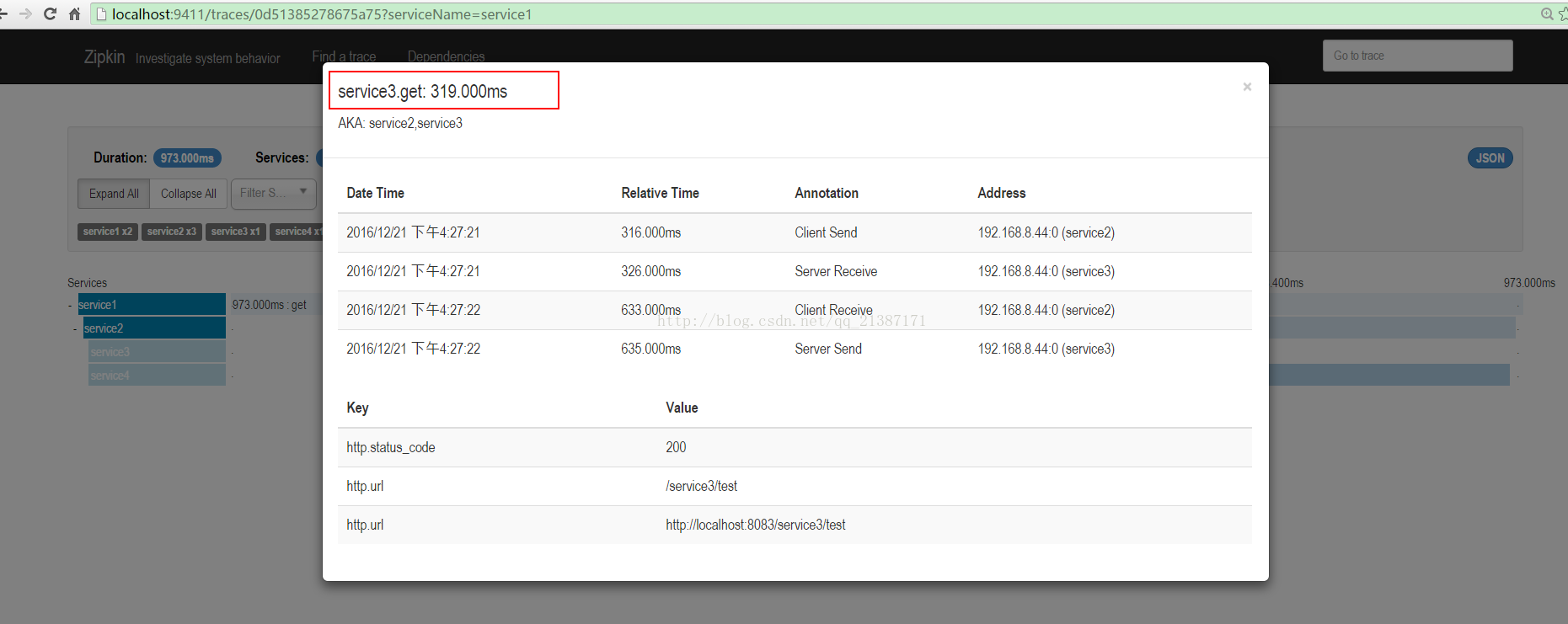
点击每个span可以获取延迟信息:
同时可以查看服务之间的依赖关系:
同时查看zipkin数据库表已经存在数据:

微服务之分布式跟踪系统(springboot+zipkin+mysql)的更多相关文章
- 微服务之分布式跟踪系统(springboot+pinpoint)
这篇文章介绍一下在微服务(springboot开发)的项目中使用pintpoint监控的过程及效果展示. 背景 随着项目微服务的进行,微服务数量逐渐增加,服务间的调用也越来越复杂,我们急切需要一个AP ...
- 基于SkyWalking的分布式跟踪系统 - 微服务监控
上一篇文章我们搭建了基于SkyWalking分布式跟踪环境,今天聊聊使用SkyWalking监控我们的微服务(DUBBO) 服务案例 假设你有个订单微服务,包含以下组件 MySQL数据库分表分库(2台 ...
- 基于SkyWalking的分布式跟踪系统 - 环境搭建
前面的几篇文章我们聊了基于Metrics的监控Prometheus,利用Prometheus和Grafana可以全方位监控你的服务器及应用的性能指标,在出现异常时利用Alertmanager告警及时通 ...
- 基于SkyWalking的分布式跟踪系统 - 异常告警
通过前面2篇文章我们搭建了SW的基础环境,监控了微服务,能了解所有服务的运行情况.但是当出现服务响应慢,接口耗时严重时我们需要立即定位到问题,这就需要我们今天的主角--监控告警,同时此篇也是SW系列的 ...
- 最近整理出了有关大数据,微服务,分布式,Java,Python,Web前端,产品运营,交互等1.7G的学习资料,有视频教程,源码,课件,工具,面试题等等。这里将珍藏多年的资源免费分享给各位小伙伴们
大数据,微服务,分布式,Java,Python,Web前端,产品运营,交互 领取方式在篇尾!!! 基础篇.互联网架构,高级程序员必备视频,Linux系统.JVM.大型分布式电商项目实战视频...... ...
- SpringCloud微服务架构分布式组件如何共享session对象
一.简单做一个背景说明1.为说明问题,本文简单微服务架构示例如下 2.组件说明分布式架构,每个组件都是集群或者主备.具体说明如下:zuul service:网关,API调用都走zuul service ...
- Go微服务全链路跟踪详解
在微服务架构中,调用链是漫长而复杂的,要了解其中的每个环节及其性能,你需要全链路跟踪. 它的原理很简单,你可以在每个请求开始时生成一个唯一的ID,并将其传递到整个调用链. 该ID称为Correlati ...
- Spring Cloud(8):日志及分布式跟踪(Sleuth&Zipkin)
简介 在微服务架构中,项目中前端发起一个请求,后端可能跨几个服务调用才能完成这个请求.如果系统越来越庞大,服务之间的调用与被调用关系就会变得很复杂,那么这时候我们需要分析具体哪一个服务出问题了就会显得 ...
- 面试刷题37:微服务是什么?springcloud,springboot是什么?
面试中被问到为什么要使用微服务架构?springcloud的核心组件有哪些? 拿我们国家的兵种来说,如何把战争这个单体架构微服务化,就是根据适用的场景,拆分出不同的兵种(微服务) 然后每个兵种之间通过 ...
随机推荐
- BFS深度优先搜索 炸弹人
题面:一个人在一个坐标放炸弹,请问可以可以杀死的敌人数目最大是,并且输出该点的坐标 G代表敌人 .代表该位置可以走 "#"代表该位置存在障碍物 并且防止炸弹的蔓13 13 3 3 ...
- How to do distributed locking
How to do distributed locking 怎样做可靠的分布式锁,Redlock 真的可行么? 本文是对 Martin Kleppmann 的文章 How to do distribu ...
- GinKgoCTF-Misc
一:谁动了我的校徽? Jpg改txt——>寻找——>GKCTF{This_is_a_huaji} 二:奇怪的压缩包1 六位数字的密码一点也不安全!!!!!! 下载压缩包——>有密码( ...
- queue 的基本用法
queue 1.back() 返回一个引用,指向最后一个元素2.empty() 如果队列空则返回真3.front() 返回第一个元素4.pop() 删除第一个元素5.push() 在末尾加入一个元素6 ...
- HTTP与TCP的区别和联系--转载
相信不少初学手机联网开发的朋友都想知道Http与Socket连接究竟有什么区别,希望通过自己的浅显理解能对初学者有所帮助. 一.基本概念 1.TCP连接 手机能够使用联网功能是因为手机底层实现了TCP ...
- 安装Centos7时提示 /dev/root does not exits
安装centos 7时提示 "Warning: /dev/root does not exist, could not boot" 这个问题是木有找到你的U盘. 在一个能够编辑U盘 ...
- 【精尽Netty源码解析】1.Scalable IO in Java——多Reactor的代码实现
Java高伸缩性IO处理 在Doug Lea大神的经典NIO框架文章<Scalable IO in Java>中,具体阐述了如何把Reactor模式和Java NIO整合起来,一步步理论结 ...
- showdoc 开源在线api&&技术文档管理工具
showdoc 是一个很不错的api 以及技术文档管理工具 环境准备 doker-copose 文件 version: "3" services: doc: image: regi ...
- skipper backend 负载均衡配置
skipper 对于后端是支持负载均衡处理的,支持官方文档并没有提供,实际使用中,这个还是比较重要的 同时支持健康检查. 格式 hello_lb_group: Path("/foo" ...
- Unity3D协同函数与异步加载功能实战 学习