
010 处理模型数据(ModelAndView,Map Model,@SessionAttributes)
1.处理数据模型
SpringMVC提供了几种途径出书模型数据
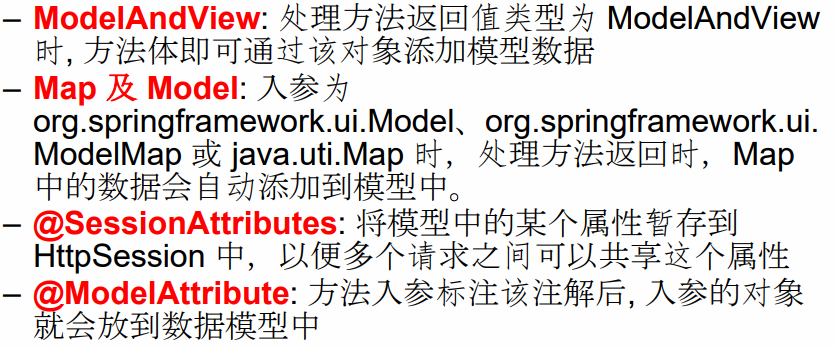
二:ModelAndView
1.介绍
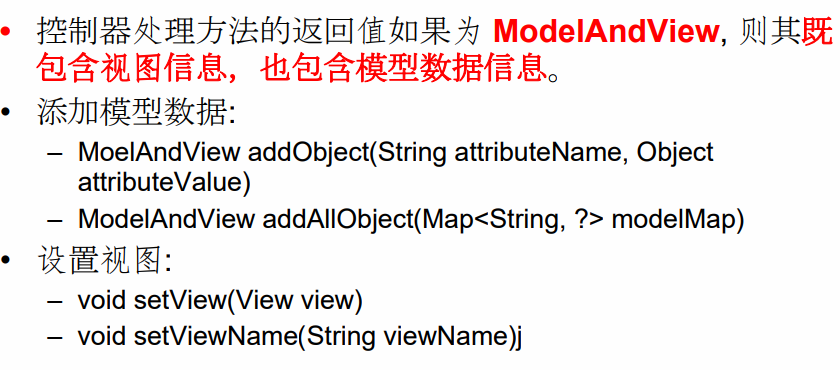
2.index
 <%@ page language="java" contentType="text/html; charset=utf-8"

     pageEncoding="utf-8"%>

 <!DOCTYPE html PUBLIC "-//W3C//DTD HTML 4.01 Transitional//EN" "http://www.w3.org/TR/html4/loose.dtd">

 <html>

 <head>

 <meta http-equiv="Content-Type" content="text/html; charset=utf-8">

 <title>Insert title here</title>

 </head>

 <body>

     测试

     <br>

     <a href="helloworld7/">ModelAndViewTest</a>

     <br><br><br>

     测试Servlet API

     <br>

     <a href="helloworld6/">test servlet API</a>

     <br>

 </body>

 </html>
3.controller
 package com.spring.it;

 import java.util.Date;

 import org.springframework.stereotype.Controller;

 import org.springframework.web.bind.annotation.RequestMapping;

 import org.springframework.web.servlet.ModelAndView;

 @Controller

 public class ModelAndViewTest {

     @RequestMapping("/helloworld7")

     public ModelAndView hello() {

         String viewName="success";

         ModelAndView modelAndView=new ModelAndView(viewName);

         //添加模型数据

         modelAndView.addObject("time", new Date());

         return modelAndView;

     }

 }
4.success
 <%@ page language="java" contentType="text/html; charset=utf-8"

     pageEncoding="utf-8"%>

 <!DOCTYPE html PUBLIC "-//W3C//DTD HTML 4.01 Transitional//EN" "http://www.w3.org/TR/html4/loose.dtd">

 <html>

 <head>

 <meta http-equiv="Content-Type" content="text/html; charset=utf-8">

 <title>Insert title here</title>

 </head>

 <body>

     success page

     <br>

     time:${requestScope.time}

 </body>

 </html>
5.效果

6.ps
SpringMVC会把ModelAndView的model中的数据方法放到request 域对象中。
三:Model和Map
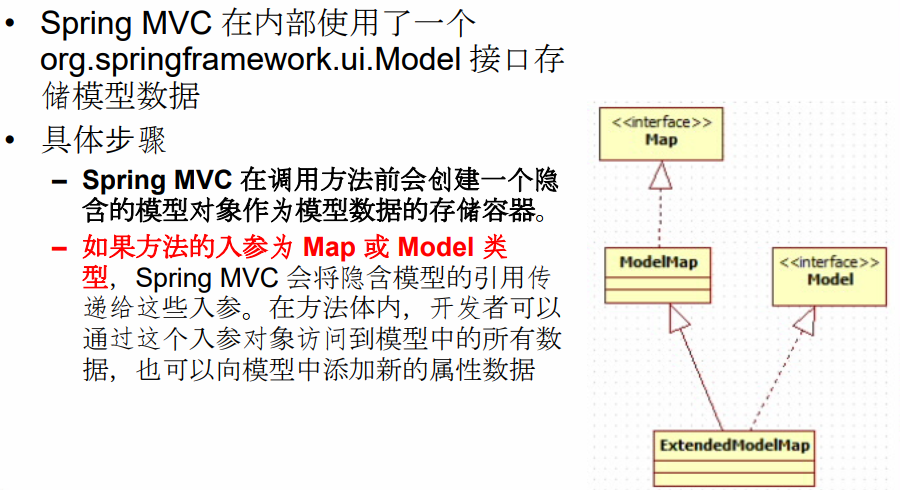
1.介绍
一般传入map就可以了
实际上,可以Model类型或者ModelMap类型。
2.controller
map放在方法参数里,如果新建一个map是不会传入进参数的。
 package com.spring.it;

 import java.util.Arrays;

 import java.util.Date;

 import java.util.HashMap;

 import org.springframework.stereotype.Controller;

 import org.springframework.web.bind.annotation.RequestMapping;

 import org.springframework.web.servlet.ModelAndView;

 @Controller

 public class ModelAndViewTest {

     @RequestMapping("/helloworld8")

     public String hello1(HashMap<String,Object> map) {

 //        HashMap<String,Object> map=new HashMap();

         map.put("names", Arrays.asList("Tom","Jack","Bob"));

         return "success";

     }

     @RequestMapping("/helloworld7")

     public ModelAndView hello2() {

         String viewName="success";

         ModelAndView modelAndView=new ModelAndView(viewName);

         //添加模型数据

         modelAndView.addObject("time", new Date());

         return modelAndView;

     }

 }
3.index
 <%@ page language="java" contentType="text/html; charset=utf-8"

     pageEncoding="utf-8"%>

 <!DOCTYPE html PUBLIC "-//W3C//DTD HTML 4.01 Transitional//EN" "http://www.w3.org/TR/html4/loose.dtd">

 <html>

 <head>

 <meta http-equiv="Content-Type" content="text/html; charset=utf-8">

 <title>Insert title here</title>

 </head>

 <body>

     测试MAP

     <br>

     <a href="helloworld8">MAP Test</a>

     <br><br><br>

     测试ModelAndViewTest

     <br>

     <a href="helloworld7">ModelAndViewTest</a>

     <br><br><br>

     测试Servlet API

     <br>

     <a href="helloworld6/">test servlet API</a>

     <br>

 </body>

 </html>
4.success
 <%@ page language="java" contentType="text/html; charset=utf-8"

     pageEncoding="utf-8"%>

 <!DOCTYPE html PUBLIC "-//W3C//DTD HTML 4.01 Transitional//EN" "http://www.w3.org/TR/html4/loose.dtd">

 <html>

 <head>

 <meta http-equiv="Content-Type" content="text/html; charset=utf-8">

 <title>Insert title here</title>

 </head>

 <body>

     success page

     <br><br>

     time:${requestScope.time}

     <br><br>

     names:${requestScope.names}

 </body>

 </html>
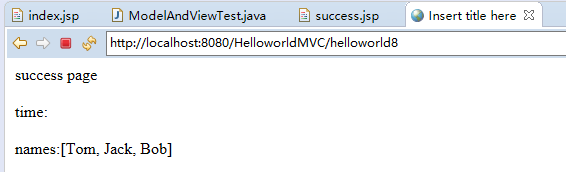
5.效果
四:@SessionAttributes之value
1.index
 <%@ page language="java" contentType="text/html; charset=utf-8"

     pageEncoding="utf-8"%>

 <!DOCTYPE html PUBLIC "-//W3C//DTD HTML 4.01 Transitional//EN" "http://www.w3.org/TR/html4/loose.dtd">

 <html>

 <head>

 <meta http-equiv="Content-Type" content="text/html; charset=utf-8">

 <title>Insert title here</title>

 </head>

 <body>

     测试MAP

     <br>

     <a href="helloworld8">MAP Test</a>

     <br><br><br>

     测试ModelAndViewTest

     <br>

     <a href="helloworld7">ModelAndViewTest</a>

     <br><br><br>

     测试Servlet API

     <br>

     <a href="helloworld6/">test servlet API</a>

     <br>

 </body>

 </html>
2.controller
注解只能放到类上。
 package com.spring.it;

 import java.util.Arrays;

 import java.util.Date;

 import java.util.HashMap;

 import org.springframework.stereotype.Controller;

 import org.springframework.web.bind.annotation.RequestMapping;

 import org.springframework.web.bind.annotation.SessionAttributes;

 import org.springframework.web.servlet.ModelAndView;

 import com.spring.bean.Person;

 @SessionAttributes({"person"})

 @Controller

 public class ModelAndViewTest {

     @RequestMapping("/helloworld8")

     public String hello1(HashMap<String,Object> map) {

         map.put("person", new Person("Tom", "12345", "tom#123.com", 18));

         return "success";

     }

 }
3.success
 <%@ page language="java" contentType="text/html; charset=utf-8"

     pageEncoding="utf-8"%>

 <!DOCTYPE html PUBLIC "-//W3C//DTD HTML 4.01 Transitional//EN" "http://www.w3.org/TR/html4/loose.dtd">

 <html>

 <head>

 <meta http-equiv="Content-Type" content="text/html; charset=utf-8">

 <title>Insert title here</title>

 </head>

 <body>

     success page

     <br><br>

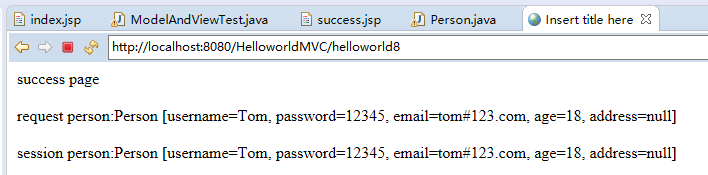
     request person:${requestScope.person}

     <br><br>

     session person:${sessionScope.person}

 </body>

 </html>
4.效果
五:@SessionAttributes之types
1.介绍

2.insex
不变
3.controller
 package com.spring.it;

 import java.util.Arrays;

 import java.util.Date;

 import java.util.HashMap;

 import org.springframework.stereotype.Controller;

 import org.springframework.web.bind.annotation.RequestMapping;

 import org.springframework.web.bind.annotation.SessionAttributes;

 import org.springframework.web.servlet.ModelAndView;

 import com.spring.bean.Person;

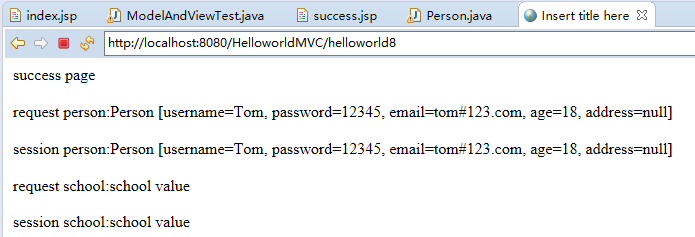
 @SessionAttributes(value={"person"},types= {String.class})

 @Controller

 public class ModelAndViewTest {

     @RequestMapping("/helloworld8")

     public String hello1(HashMap<String,Object> map) {

         map.put("person", new Person("Tom", "12345", "tom#123.com", 18));

         //说明types

         map.put("school", "school value");

         return "success";

     }

 }
4.seccess
 <%@ page language="java" contentType="text/html; charset=utf-8"

     pageEncoding="utf-8"%>

 <!DOCTYPE html PUBLIC "-//W3C//DTD HTML 4.01 Transitional//EN" "http://www.w3.org/TR/html4/loose.dtd">

 <html>

 <head>

 <meta http-equiv="Content-Type" content="text/html; charset=utf-8">

 <title>Insert title here</title>

 </head>

 <body>

     success page

     <br><br>

     request person:${requestScope.person}

     <br><br>

     session person:${sessionScope.person}

     <br><br>

     request school:${requestScope.school}

     <br><br>

     session school:${sessionScope.school}

 </body>

 </html>
5.效果
010 处理模型数据(ModelAndView,Map Model,@SessionAttributes)的更多相关文章
- 5、处理模型数据ModelAndView、Map、Model以及@SessionAttributes注解
Spring MVC提供了以下几种途径输出模型数据 —— ModelAndView: 处理方法返回值类型为ModelAndView时,方法体即可通过该对象添加模型数据.数据会添加到request域中. ...
- SpringMVC(十):SpringMVC 处理输出模型数据之Map及Model
Spring MVC提供了以下几种途径输出模型数据: 1)ModelAndView:处理方法返回值类型为ModelAndView时,方法体即可通过该对象添加模型数据: 2)Map及Model:处理方法 ...
- [Spring MVC] 取控制器返回的ModelAndView/Map/Model/Request的对象
${key }页面可取, <input value="${key}"> 或者<%=request.getParameter("key")%&g ...
- SpringMVC 学习笔记(四) 处理模型数据
Spring MVC 提供了下面几种途径输出模型数据: – ModelAndView: 处理方法返回值类型为 ModelAndView时, 方法体就可以通过该对象加入模型数据 – Map及Model: ...
- Spring MVC—模型数据,转发重定向,静态资源处理方式
Spring MVC处理模型数据 添加模型数据的方法 ModelAndView Map及Model SessionAttribute ModelAttribute Spring MVC转发和重定向 S ...
- SpringMVC学习 -- ModelAndView , Model , ModelMap , Map 及 @SessionAttributes 的使用
输出模型数据: ModelAndView:处理方法返回值类型为 ModelAndView 时 , 其中包含视图和模型信息.方法体即可通过该对象添加模型数据 , 即 SpringMVC 会把 Model ...
- SpringMVC(二)--处理数据模型、ModelAndView、Model、Map、重定向、@ModelAttribute、
1.处理模型数据 Spring MVC 提供了以下几种途径输出模型数据: – ModelAndView:处理方法返回值类型为 ModelAndView 时, 方法体即可通过该对象添加模型数据 ...
- SpringMVC(十一):SpringMVC 处理输出模型数据之SessionAttributes
Spring MVC提供了以下几种途径输出模型数据:1)ModelAndView:处理方法返回值类型为ModelAndView时,方法体即可通过该对象添加模型数据:2)Map及Model:处理方法入参 ...
- SpringMVC(九):SpringMVC 处理输出模型数据之ModelAndView
Spring MVC提供了以下几种途径输出模型数据: 1)ModelAndView:处理方法返回值类型为ModelAndView时,方法体即可通过该对象添加模型数据: 2)Map及Model:处理方法 ...
随机推荐
- python的安装和pycharm的安装
下载地址 官网:https://www.python.org/downloads/release/python-372/ Window 平台安装 Python: Add python xx to ...
- Activity四种启动模式与Flag及affinity属性详解
Activity有四种加载模式:standard(默认).singleTop.singleTask.singleInstance standard:Activity的默认加载模式,即使某个Activi ...
- java Comparable 和 Cloneable接口
Comparable接口定义了compareTo方法,用于比较对象. 例如,在JavaAPI中,Integer.BigInteger.String以及Date类定义如下 Cloneable接口 Clo ...
- Informatic学习总结_day03_update组件学习
- python函数——形参中的:*args和**kwargs
python函数——形参中的:*args和**kwargs 多个实参,放到一个元组里面,以*开头,可以传多个参数:**是形参中按照关键字传值把多余的传值以字典的方式呈现 *args:(表示的就是将 ...
- Django中全局Context处理器
1.模板标签和模板变量 模板标签在{% %}中定义: {% if is_logged_in %} Thanks for logging in! {% else %} Please log in. {% ...
- freeRTOS中文实用教程2--队列
1.前言 freeRTOS中所有任务的通信和同步机制都是基于队列来实现. 2.队列的特点 图 队列的读写操作 队列的数据存储 (1)队列可以保存有限个具有确定长度的数据单元,队列可以保存的最大单元数目 ...
- 自助Linux之问题诊断工具strace【转】
转自:http://www.cnblogs.com/bangerlee/archive/2012/02/20/2356818.html 引言 “Oops,系统挂死了..." “Oops,程序 ...
- .net active up mail 邮件发送
using System;using System.Collections.Generic;using System.Linq;using System.Text;using System.Threa ...
- Node.jsでMySQLを使うメモ
インストール npm install mysql コネクション var mysql = require('mysql'); var connection = mysql.createConnectio ...