
30-seconds-of-css
你可以再30秒或者更短的时间内读懂的有用的CSS代码片段的精选.
github地址 不过代码不在github上面
官网地址 上面有详细的介绍和演示
下面是我读到的一些个人认为比较实用的片段
1. 等宽高比
给定一个可变宽度的元素, 它确保其高度以响应的方式与宽度保持成比例, 即宽度与高度的比例保持一致.
<div class="constant-width-to-height-ratio"></div>
CSS代码
.constant-width-to-height-ratio {

  background: #333;

  width: 50%;

}

.constant-width-to-height-ratio::before {

  content: '';

  padding-top: 100%;

  float: left;

}

.constant-width-to-height-ratio::after {

  content: '';

  display: block;

  clear: both;

}
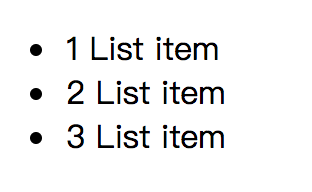
2. 计数器
计数器本质上是由CSS维护的变量, 其值可以通过CSS规则递增以跟踪它们的使用次数
<ul>

  <li>List item</li>

  <li>List item</li>

  <li>List item</li>

</ul>
CSS代码
ul {

  counter-reset: counter;

}

li::before {

  counter-increment: counter;

  content: counters(counter, '.') ' ';

}
效果
3. 自定义文本选择
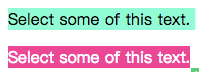
更改文本选择的样式
<p>Sleect some of this text</p>

<p class="custom-text-selection">Select some of this text.</p>
CSS代码
::selection {

  background: aquamarine;

  color: black;

}

.custom-text-selection::selection {

  background: deeppink;

  color: white;

}
效果
4. 自定义变量
CSS变量, 其中包含要在整个文档中重用的值.
<p class="custom-variables">CSS is awesome!</p>
CSS代码
:root {

  --some-color: #da7800;

  --some-keyword: italic;

  --some-size: 1.25em;

  --some-complex-value: 1px 1px 2px whitesmoke, 0 0 1em slategray, 0 0 0.2em slategray;

}

.custom-variables {

  color: var(--some-color);

  font-size: var(--some-size);

  font-style: var(--some-keyword);

  text-shadow: var(--some-complex-value);

}
5. 渐变文本
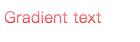
为文本提供渐变(IE无效)
<p class="gradient-text">Gradient text</p>
CSS代码
.gradient-text {

  background: -webkit-linear-gradient(pink, red);

  -webkit-text-fill-color: transparent;

  -webkit-background-clip: text;

}
6. 溢出滚动渐变
向溢出元素添加渐变以更好的提示用户有更多内容需要滚动
<div class="overflow-scroll-gradient">

  <div class="overflow-scroll-gradient__scroller">

    Content to be scrolled

  </div>

</div>
CSS代码
.overflow-scroll-gradient {

  position: relative;

}

.overflow-scroll-gradient::after {

  content: '';

  position: absolute;

  bottom:;

  width: 240px;

  height: 25px;

  background: linear-gradient(

    rgba(255, 255, 255, 0.001),

    white

  ); /* transparent keyword is broken in Safari */

  pointer-events: none;

}

.overflow-scroll-gradient__scroller {

  overflow-y: scroll;

  background: white;

  width: 240px;

  height: 200px;

  padding: 15px 0;

  line-height: 1.2;

  text-align: center;

}
7. 环形旋转器
用CSS动画创建一个正在加载的动画
<div class="donut"></div>
CSS代码
@keyframes donut-spin {

  0% {

    transform: rotate(0deg);

  }

  100% {

    transform: rotate(360deg);

  }

}

.donut {

  display: inline-block;

  border: 4px solid rgba(0, 0, 0, 0.1);

  border-left-color: #7983ff;

  border-radius: 50%;

  width: 30px;

  height: 30px;

  animation: donut-spin 1.2s linear infinite;

}
其实有很多加载动画都可以用css3去书写, 如果不考虑IE9以下的流浪器
30-seconds-of-css的更多相关文章
- [PHP]Maximum execution time of 30 seconds exceeded
前言 在使用PHP渲染页面页面的时候,如果程序处理的时间特别久,超过配置文件(php.ini)设置的超时时间,就会出现如下提示: Maximum execution time of 30 second ...
- Drupal错误:drupal Maximum execution time of 30 seconds exceeded database in解决方法
Drupal开源内容管理框架 Drupal是使用PHP语言编写的开源内容管理框架(CMF),它由内容管理系统(CMS)和PHP开发框架(Framework)共同构成.连续多年荣获全球最佳CMS大奖,是 ...
- Maximum execution time of 30 seconds exceeded解决错误方法
Maximum execution time of 30 seconds exceeded解决错误方法Fatal error: Maximum execution time of 30 seconds ...
- PHP超过三十秒怎么办Maximum execution time of 30 seconds exceeded
1 如图所示, Maximum execution time of 30 seconds exceeded 2 在php.ini文件中查找"max_execution_time"把 ...
- Maximum execution time of 30 seconds exceeded解决办法
Maximum execution time of 30 seconds exceeded,今天把这个错误的解决方案总结一下: 简单总结一下解决办法: 报错一:内存超限,具体报错语句忘了,简单说一下解 ...
- Fatal error: Maximum execution time of 30 seconds exceeded in
Fatal error: Maximum execution time of 30 seconds exceeded in C:\Program Files\Apache Software Found ...
- 【PHP】Maximum execution time of 30 seconds exceeded解决办法
Maximum execution time of 30 seconds exceeded,今天把这个错误的解决方案总结一下: 简单总结一下解决办法: 报错一:内存超限,具体报错语句忘了,简单说一下解 ...
- 解决php网页运行超时问题:Maximum execution time of 30 seconds exceeded
Fatal error: Maximum execution time of 30 seconds exceeded in C:\Inetpub\wwwroot\ry.php on line 11 意 ...
- 项目读取数据,一直出现 Closing connections idle longer than 30 SECONDS,卡死现象
项目读取数据,一直出现 Closing connections idle longer than 30 SECONDS,卡死现象. 我的是在读取oracle数据的时候出现这种错误. 可以参考这篇文章 ...
- Mysql : Maximum execution time of 30 seconds exceeded
在向Mysql数据库中插入数据时,提示Maximum execution time of 30 seconds exceeded.......翻译:最大运行时间超过30秒. 最后在php.ini中找到 ...
随机推荐
- 关于 global nonlocal 用法
# 1 关于 globals() locals() nolocl 还有内置函数的引用## 概念的解释# 命名空间# 1 局部命名空间:每一个函数都有自己的命名空间# 2 全局命名空间:写在函数外的变量 ...
- python day04作业
- 看我怎么扒掉CSDN首页的底裤(python selenium+phantomjs爬取CSDN首页内容)
这里只是学习一下动态加载页面内容的抓取,并不适用于所有的页面. 使用到的工具就是python selenium和phantomjs,另外调试的时候还用了firefox的geckodriver.exe. ...
- strcmp用法
strcmp() 用来比较字符串(区分大小写),其原型为: int strcmp(const char *s1, const char *s2); [参数]s1, s2 为需要比较的两个字符串. ...
- jQuery事件委托方法 bind live delegate on
1.bind jquery 1.3之前 定义和用法:主要用于给选择到的元素上绑定特定事件类型的监听函数 语法: bind(type,[data],function(e)); 特点: a.适合页 ...
- Sublime text3常用的插件功能和常用的快捷键
Sublime text3常用的插件功能和用法 Package control 插件管理 (使用ctrl+` 将代码复制后粘贴到代码粘贴处,按Enter没有出现错误的话就安装成功了)(ctrl+shi ...
- GraphQL和C#
GraphQL ---02 GraphQL和C#结合的实战项目 本文章是介绍和记录如何创建GraphQL项目,以及如何使用GraphQL进行数据的相关操作.项目参照GraphQL .Net 的官方 ...
- CentOS下安装VirtualBox
VirtualBox在Ubtubu下的使用和Window下一样简单,下载安装包,安装运行即可.但在CentOS下需要折腾一下 ======1 下载相应的repo包:官网找到Centos7相应的repo ...
- 10 HashMap,Map.Entry,LinkedHashMap,TreeMap,Hashtable,Collections类
Map集合的功能概述 添加功能 * V put(K key,V value):添加元素. * 如果键是第一次存储,就直接存储元素,返回null * 如果键不 ...
- IntelliJ IDEA备忘
IntelliJ IDEA生成get/set方法的快捷键 IntelliJ IDEA生成get/set有2种方式,alt+enter.alt+insert.下面分别介绍这2种方式快速生成get与set ...