
iOS:针对固定数据源,更好的封装cell
一、介绍
在iOS开发中,tableView非常常用,能将其展示出来,它的数据源必不可少。当然数据源有动态下发的,有固定写死的,这里我只探讨固定写死的情况。对于死数据,我们在项目中经常遇到的场景就是我的模块,以及设置模块等。那么,这些死数据我们如何组装的呢? 在以前开发中,我直接用一个可变数组装着每一个cell对应的字典(字典中包含每一个cell需要字段的键值对),虽然也可以实现效果,但是扩展不方便,本人不推荐。 在开发中,我的搭档推荐我项目中的封装的cell模型,我一看,确实不错,在这里给大家分享一下。
二、思想
1、定义继承NSObject的CustomCellConfig类,定义cell可能需要的全部属性
2、定义一个实例化的方法,参数为字典
3、在实例化方法中接着通过OC的setValuesForKeysWithDictionary方法将对应的所有赋值的属性初始化
4、当然再重写一下该类的init方法,默认赋值cell的高为44.0f像素
5、在控制器中创建CustomCellConfig的实体对象并存入数据源,最后刷新tableView
6、获取CustomCellConfig实体对象对cell进行赋值并触发block即可
三、代码
//

//  CustomCellConfig.h

//  CustomCellConfig

//

//  Created by 夏远全 on 2017/12/8.

//  Copyright © 2017年 夏远全. All rights reserved.

//

#import <Foundation/Foundation.h>

#import <UIKit/UIKit.h>

@class CustomCellConfig;

typedef void (^CustomCellSelectedBlock)(CustomCellConfig *config);

@interface CustomCellConfig : NSObject

@property (nonatomic, strong) NSString *title;

@property (nonatomic, strong) NSString *detail;

@property (nonatomic, strong) UIImage  *image;

@property (nonatomic, strong) NSString *avatar;

@property (nonatomic, assign) int       badge;

@property (nonatomic, assign) int       contentType;

@property (nonatomic, assign) float     height;

@property (nonatomic, assign) BOOL      canEdit;

@property (nonatomic, assign) UITableViewCellAccessoryType    accessoryType;

@property (nonatomic,   copy) CustomCellSelectedBlock block;

@property (nonatomic, strong) NSString *viewController;

@property (nonatomic, strong) NSString *segue;

@property (nonatomic, strong) NSIndexPath *indexPath;

@property (nonatomic,   copy) NSAttributedString *attributedDetail;

@property (nonatomic, strong) NSString *identify;

@property (nonatomic, strong) id        object;

+ (CustomCellConfig *)configWithDictionary:(NSDictionary *)dict;

@end
//

//  CustomCellConfig.m

//  CustomCellConfig

//

//  Created by 夏远全 on 2017/12/8.

//  Copyright © 2017年 夏远全. All rights reserved.

//

#import "CustomCellConfig.h"

@implementation CustomCellConfig

- (id)init {

    if (self = [super init]) {

        self.height = 44.0f;

    }

    return self;

}

+ (CustomCellConfig *)configWithDictionary:(NSDictionary *)dict {

    CustomCellConfig *config = [[CustomCellConfig alloc] init];

    [config setValuesForKeysWithDictionary:dict];

    return config;

}

@end
四、使用
//

//  ViewController.m

//  CustomCellConfig

//

//  Created by 夏远全 on 2017/12/8.

//  Copyright © 2017年 夏远全. All rights reserved.

//

#import "ViewController.h"

#import "CustomCellConfig.h"

@interface ViewController ()<UITableViewDataSource,UITableViewDelegate>

@property (strong,nonatomic)UITableView     *tableView;

@property (strong,nonatomic)NSMutableArray  *dataSource;

@end

@implementation ViewController

#pragma mark - life cycle

- (void)viewDidLoad {

    [super viewDidLoad];

    [self setupNavigation];

    [self setupDefaultValue];

    [self setupSubviews];

    [self loadData];

}

-(void)viewWillAppear:(BOOL)animated

{

    [super viewWillAppear:animated];

}

-(void)viewWillDisappear:(BOOL)animated

{

    [super viewWillDisappear:animated];

}

-(void)setupNavigation

{

    self.title = @"测试cellConfig";

}

-(void)setupDefaultValue

{

    self.tableView.backgroundColor = [UIColor whiteColor];

    self.tableView.tableFooterView = [[UIView alloc] initWithFrame:CGRectZero];

}

-(void)setupSubviews

{

    [self addSubViews];

    [self setupSubviewsConstraints];

}

#pragma mark - add subviews

-(void)addSubViews

{

    [self.view addSubview:self.tableView];

}

#pragma mark - layout subviews

-(void)setupSubviewsConstraints

{

}

#pragma mark - load data

-(void)loadData

{

    __weak typeof(self) weakSelf = self;

    //第一组cell

    CustomCellConfig *cellConfig1 = [CustomCellConfig configWithDictionary:@{@"image":[UIImage imageNamed:@"avatar"],@"title":@"消息",@"accessoryType":@(UITableViewCellAccessoryDisclosureIndicator),@"block":^(CustomCellConfig *config){

        [weakSelf pushViewController:config];

    }}];

    CustomCellConfig *cellConfig2 = [CustomCellConfig configWithDictionary:@{@"image":[UIImage imageNamed:@"avatar"],@"title":@"成绩",@"detail":@"分析",@"accessoryType":@(UITableViewCellAccessoryDisclosureIndicator),@"block":^(CustomCellConfig *config){

        [weakSelf pushViewController:config];

    }}];

    CustomCellConfig *cellConfig3 = [CustomCellConfig configWithDictionary:@{@"image":[UIImage imageNamed:@"avatar"],@"title":@"管理",@"attributedDetail":@"",@"accessoryType":@(UITableViewCellAccessoryDisclosureIndicator),@"block":^(CustomCellConfig *config){

        [weakSelf pushViewController:config];

    }}];

    NSArray<CustomCellConfig *> *section1 = @[cellConfig1,cellConfig2,cellConfig3];

    //第二组cell

    CustomCellConfig *cellConfig4 = [CustomCellConfig configWithDictionary:@{@"image":[UIImage imageNamed:@"avatar"],@"title":@"消息",@"height":@(),@"accessoryType":@(UITableViewCellAccessoryNone),@"block":^(CustomCellConfig *config){

        [weakSelf pushViewController:config];

    }}];

    CustomCellConfig *cellConfig5 = [CustomCellConfig configWithDictionary:@{@"image":[UIImage imageNamed:@"avatar"],@"title":@"成绩",@"height":@(),@"detail":@"分析",@"accessoryType":@(UITableViewCellAccessoryDetailDisclosureButton),@"block":^(CustomCellConfig *config){

        [weakSelf pushViewController:config];

    }}];

    CustomCellConfig *cellConfig6 = [CustomCellConfig configWithDictionary:@{@"image":[UIImage imageNamed:@"avatar"],@"title":@"管理",@"height":@(),@"accessoryType":@(UITableViewCellAccessoryCheckmark),@"block":^(CustomCellConfig *config){

        [weakSelf pushViewController:config];

    }}];

    CustomCellConfig *cellConfig7 = [CustomCellConfig configWithDictionary:@{@"image":[UIImage imageNamed:@"avatar"],@"title":@"更多",@"height":@(),@"accessoryType":@(UITableViewCellAccessoryDetailButton),@"block":^(CustomCellConfig *config){

        [weakSelf pushViewController:config];

    }}];

    NSArray<CustomCellConfig *> *section2 = @[cellConfig4,cellConfig5,cellConfig6,cellConfig7];

    //......等等......该模型的字段均可用,自己根据需要进行赋值...........//

    [self.dataSource addObject:section1];

    [self.dataSource addObject:section2];

    [self.tableView reloadData];

}

#pragma mark - delegate - datasource methods

-(NSInteger)numberOfSectionsInTableView:(UITableView *)tableView

{

    return self.dataSource.count;

}

-(NSInteger)tableView:(UITableView *)tableView numberOfRowsInSection:(NSInteger)section

{

    return [self.dataSource[section] count];

}

-(UITableViewCell *)tableView:(UITableView *)tableView cellForRowAtIndexPath:(NSIndexPath *)indexPath{

    static NSString *reuserIdentifier = @"reuserIdentifier";

    UITableViewCell *cell = [tableView dequeueReusableCellWithIdentifier:reuserIdentifier];

    if (!cell) {

        cell = [[UITableViewCell alloc] initWithStyle:UITableViewCellStyleDefault reuseIdentifier:reuserIdentifier];

    }

    CustomCellConfig *cellConfig = self.dataSource[indexPath.section][indexPath.row];

    cell.imageView.image = cellConfig.image;

    cell.textLabel.text = cellConfig.title;

    cell.detailTextLabel.text = cellConfig.detail;

    cell.accessoryType = cellConfig.accessoryType;

    return cell;

}

-(CGFloat)tableView:(UITableView *)tableView heightForRowAtIndexPath:(NSIndexPath *)indexPath{

    CustomCellConfig *cellConfig = self.dataSource[indexPath.section][indexPath.row];

    return cellConfig.height;

}

-(void)tableView:(UITableView *)tableView didSelectRowAtIndexPath:(NSIndexPath *)indexPath{

    [tableView deselectRowAtIndexPath:indexPath animated:YES];

    CustomCellConfig *cellConfig = self.dataSource[indexPath.section][indexPath.row];

    if (cellConfig.block) {

        cellConfig.block(cellConfig);

    }

}

#pragma mark - event rsponse

-(void)pushViewController:(CustomCellConfig *)cellConfig{

    UIViewController *vc = [[UIViewController alloc] init];

    vc.view.backgroundColor = [UIColor redColor];

    [self.navigationController pushViewController:vc animated:YES];

}

#pragma mark - public methods

#pragma mark - private methods

#pragma mark - getters and setters

-(UITableView *)tableView

{

    if (!_tableView) {

        _tableView = [[UITableView alloc] initWithFrame:self.view.bounds style:UITableViewStyleGrouped];

        _tableView.dataSource = self;

        _tableView.delegate = self;

    }

    return _tableView;

}

-(NSMutableArray *)dataSource{

    if (!_dataSource) {

        _dataSource = [NSMutableArray array];

    }

    return _dataSource;

}

@end
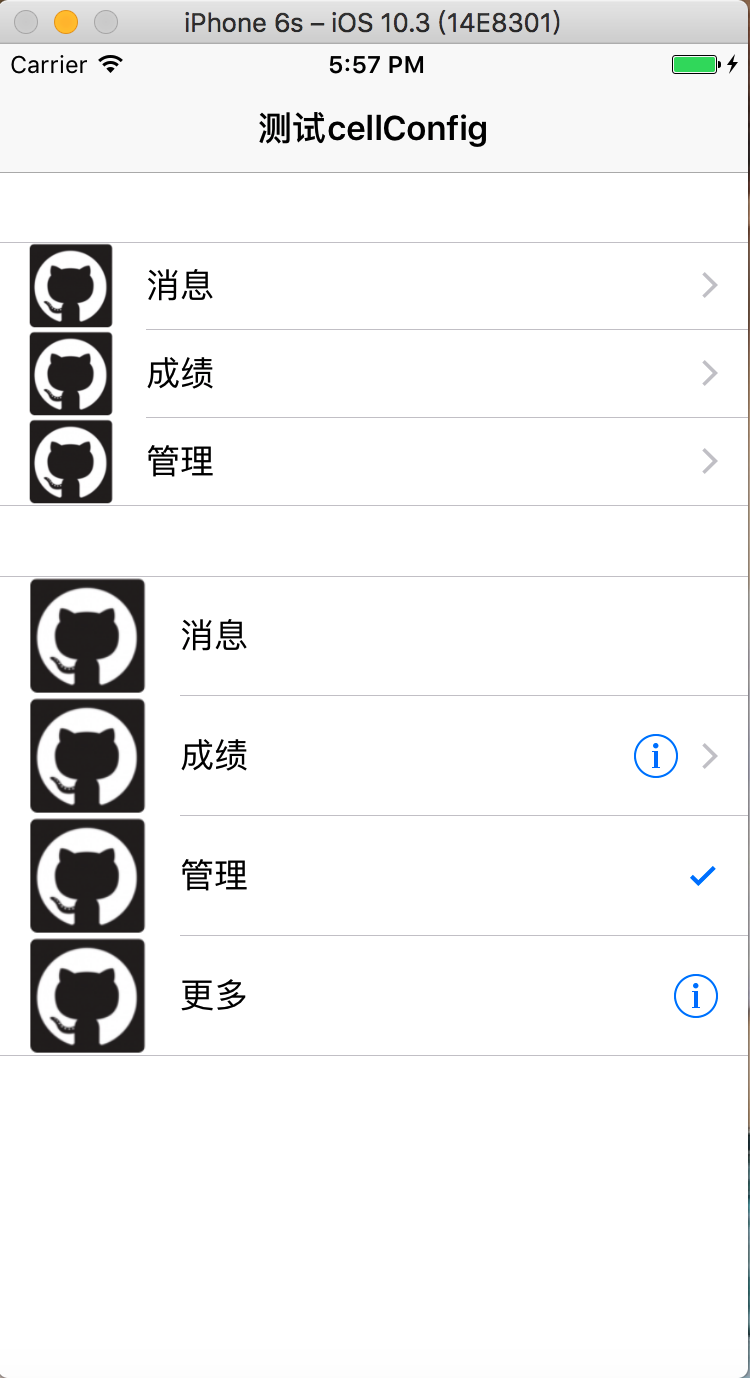
五、效果
iOS:针对固定数据源,更好的封装cell的更多相关文章
- iOS开发之微信聊天工具栏的封装
之前山寨了一个新浪微博(iOS开发之山寨版新浪微博小结),这几天就山寨个微信吧.之前已经把微信的视图结构简单的拖了一下(IOS开发之微信山寨版),今天就开始给微信加上具体的实现功能,那么就先从微信的聊 ...
- wzplayer for ios 针对(mms)优化版本V1.0
wzplayer for ios针对mms优化版本发布. 1.支持mms,http,rtmp,rtsp等协议 2.支持全格式 下载地址:http://www.coolradio.cn/WzPlayer ...
- web自动化针对PO模式进行二次封装之basepage
在PO模式当中,我们做到了页面对象与测试用例的分离,但在页面对象编写时,我们仍然还有优化的空间.页面对象有一些共同的基本操作,可以封装起来,并可以在基本操作当中加上日志和异常截图的处理.比如说我们在查 ...
- iOS开发UI篇—核心动画(UIView封装动画)
iOS开发UI篇—核心动画(UIView封装动画) 一.UIView动画(首尾) 1.简单说明 UIKit直接将动画集成到UIView类中,当内部的一些属性发生改变时,UIView将为这些改变提供动画 ...
- APP自动化针对PO模式进行二次封装之basepage
APP自动化跟WEB自动化所使用的框架基本一样,都是采用的PO模式结合pytest框架编写自动化测试脚本,为了提高代码的复用性.稳定性和易维护性,我们针对PO模式进行了二次封装,将日志,等待以及异常截 ...
- iOS开发之自定义表情键盘(组件封装与自动布局)
下面的东西是编写自定义的表情键盘,话不多说,开门见山吧!下面主要用到的知识有MVC, iOS开发中的自动布局,自定义组件的封装与使用,Block回调,CoreData的使用.有的小伙伴可能会问写一个自 ...
- iOS数据库离线缓存思路和网络层封装
一直想总结一下关于iOS的离线数据缓存的方面的问题,然后近期也简单的对AFN进行了再次封装.全部想把这两个结合起来写一下.数据展示型的页面做离线缓存能够有更好的用户体验,用户在离线环境下仍然能够获取一 ...
- 让iOS开发变得更有效率-分类、工具类
在工作中整理的一些分类与工具类,分享给大家.这些工具类可以减少项目中的代码量,让代码变得更简洁,可以大大的提升项目的效率,直接拖到项目中使用即可.下载地址:https://github.com/lee ...
- iOS菜鸟之FMDB的二次封装简单易用
闲来无事写点东西,希望大家多多指正! 大家先去git下载FMDB,然后将其中source文件夹中的fmdb文件夹拖入自己的项目中.最后就可以引用下面的代码对fmdb进行一次简单的封装. 这样可以更直观 ...
随机推荐
- LR提交JSON格式的请求
https://www.cnblogs.com/yangxia-test/p/5584317.html
- php面向对象编程self和static的区别
在php的面向对象编程中,总会遇到 class test{ public static function test(){ self::func(); static::func(); } public ...
- python接口自动化测试十四: 用正则表达式提取数据
import requests import re url = 'xxxx' r = requests.post(url) # 正则公式: postid = re.findall(r"(.+ ...
- ERP合同审核流程处理(二十九)
合同审批流程: 前端的代码: <%@ Page Language="C#" AutoEventWireup="true" CodeBehind=" ...
- python yield,到这个层次,才能叫深入哈
http://python.jobbole.com/88677/?utm_source=blog.jobbole.com&utm_medium=relatedPosts ~~~~~~~~~~~ ...
- PIGS
题解: 考虑建立一个分层图,从s向猪圈连边,容量为初始容量, 猪圈向第一个顾客连边,容量为INF 顾客向汇点连边,容量为购买量 这样一轮就搞完了,考虑下一个顾客 由于上一轮被顾客访问的猪圈都互通了,那 ...
- Linux 文件系统与挂载详解
https://blog.csdn.net/baidu_34051990/article/details/60963947
- Topic路由模式
原本理解的不够彻底,程序总是不太对.所以查询了资料,关于这种模式的意思做了仔细的解读,复制的文字. 一:介绍 1.模式 2.知识点 其中,#可以匹配一个或者多个字符 其中,*可以匹配一个字符 3.仔细 ...
- 091实战 Nginx配置(日志服务器中关于日志的产生)
一:概括 1.需要配置的概括 定义日志格式 日志的分割字段:^A 日志格式:IP地址^A服务器时间^A请求参数 配置location,记录请求日志到本地磁盘 将数据按照给定的日志格式存储到本地磁盘 二 ...
- Python3 - 基础知识、基本了解
一.Python到底是什么? (抄自 金角大王) 1. Python是一门解释型语言? 我初学Python时,听到的关于Python的第一句话就是,Python是一门解释性语言,我就这样一直相信下去, ...