
Lab 3-3
Execute the malware found in the file Lab03-03.exe while monitoring it using basic dynamic analysis tools in a safe environment.
Questions and Short Answers
What do you notice when monitoring this malware with Process Explorer?
A: The malware performs process replacement on svchost.exe.
Can you identify any live memory modifications?
A: Comparing the disk image of svchost.exe with its memory image shows that they are not the same. The memory image has strings such as practicalmalwareanalysis.log and [ENTER], but the disk image has neither.
What are the malware’s host-based indicators?
A: The malware creates the log file practicalmalwareanalysis.log.
What is the purpose of this program?
A: The program performs process replacement on svchost.exe to launch
a keylogger.
Detailed Analysis
For this lab, we begin by launching Process Explorer and procmon. When procmon starts, the events stream by quickly, so we use File -> Capture Events to toggle event capture on and off. (It’s best to keep event capture off until all dynamic analysis programs are started and you’re ready to execute the program.) We use Filter -> Filter to open the Filter dialog, and then ensure that only the default filters are enabled by clicking the Reset button.
Lab03-03.exe can be run from the command prompt or by double-clicking its icon. Once run, Lab03-03.exe should be visible inside Process Explorer. Notice how it creates the subprocess svchost.exe, and then exits, but leaves the svchost.exe process running as an orphaned process, as shown in Figure 3-8L. (An orphaned process has no parent process listed in the process tree structure.) The fact that svchost.exe is orphaned is highly unusual and highly suspicious.
Process Explorer 在 Lab03-03.exe 运行前中后的状态如下图:

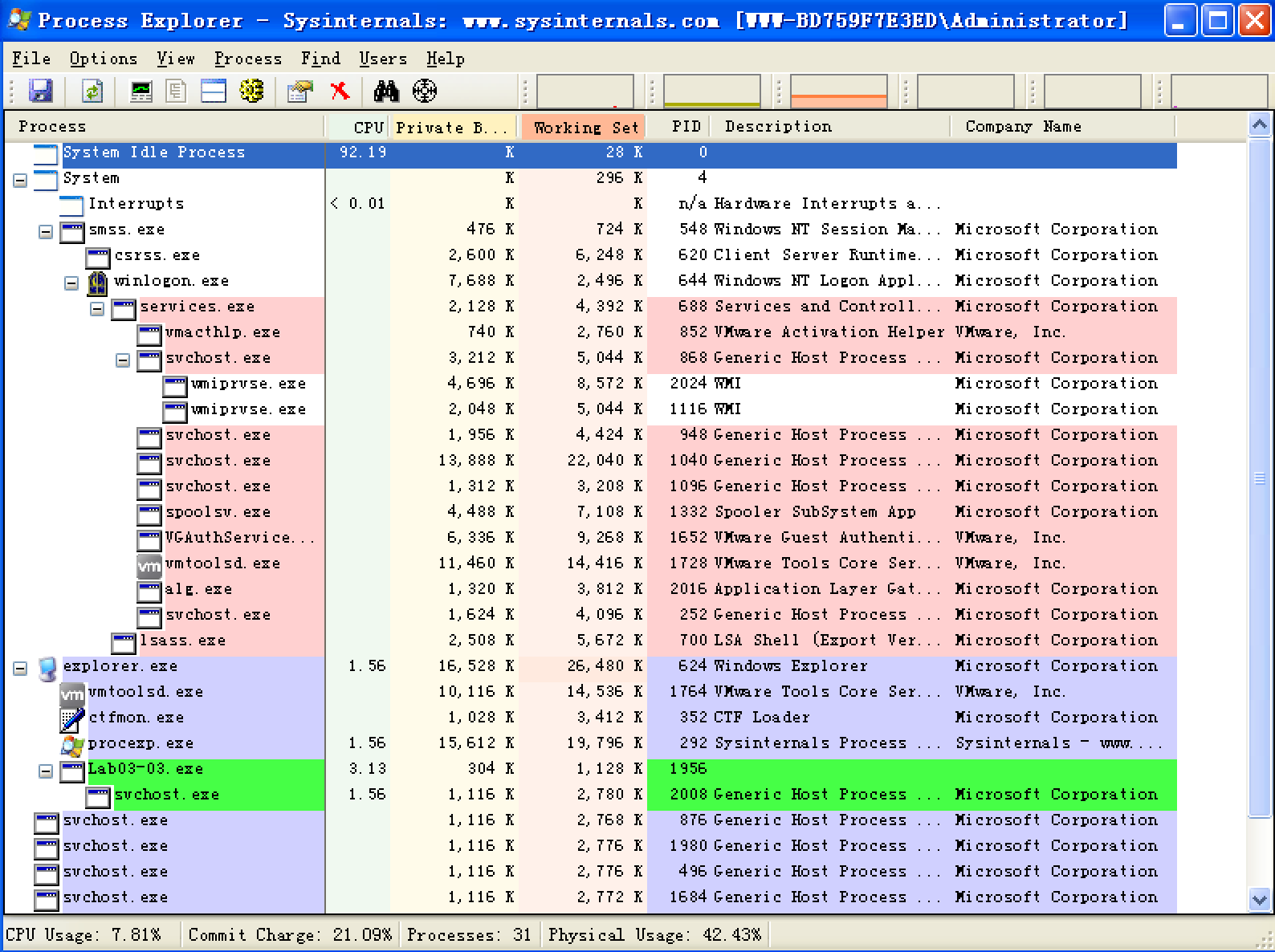
注:此图是我运行了很多遍,拼手速截的,故进程 PID 会有出入。
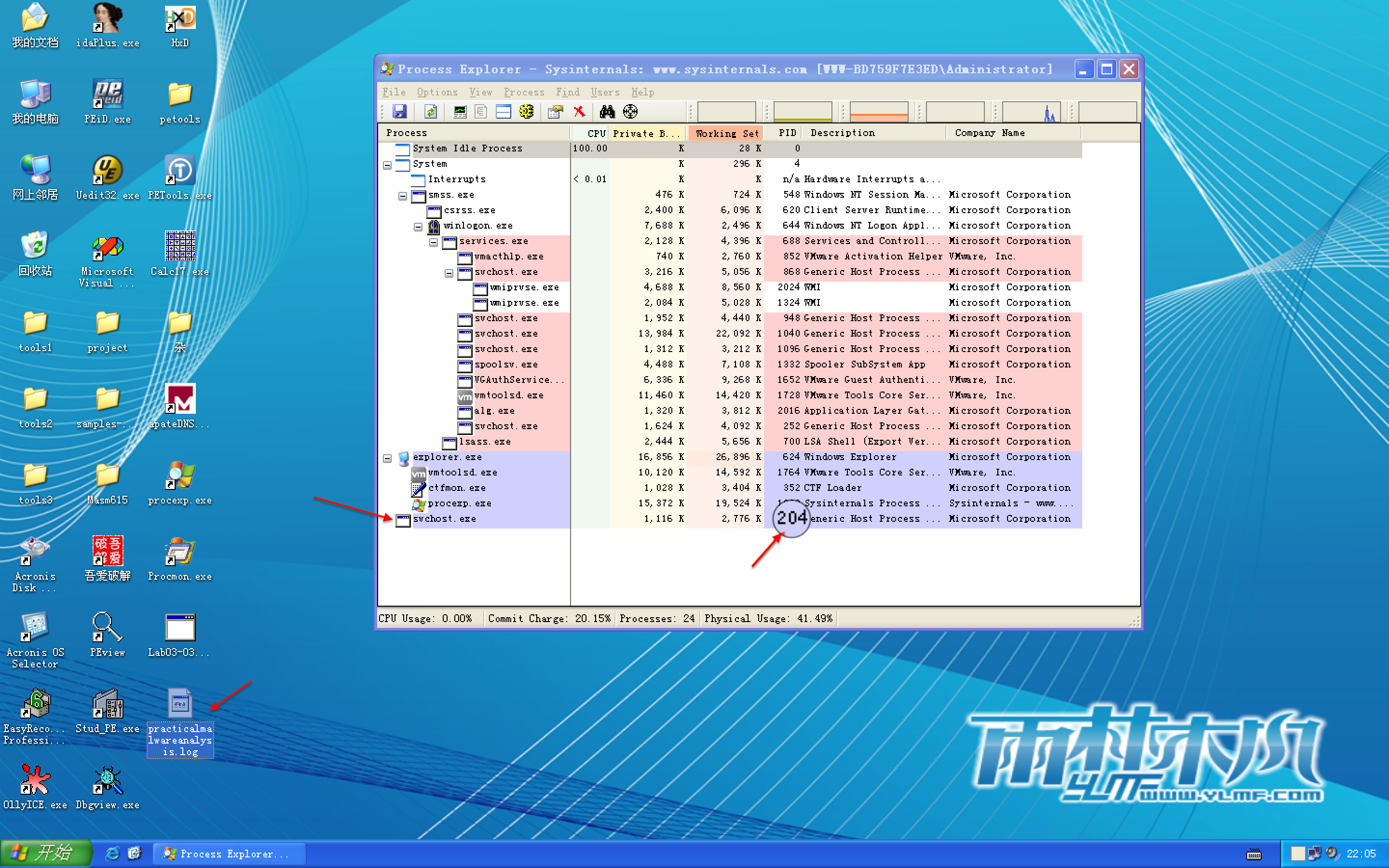
Figure 3-8L: Process Explorer view of orphaned svchost.exe
We investigate further by right-clicking and selecting Properties for the orphaned svchost.exe process. As shown in Figure 3-8L, the process appears to be a valid svchost.exe process with PID 204, but this svchost.exe is suspicious because svchost.exe is typically a child of services.exe.

From this same properties page, we select Strings to show the strings in both the executable image on disk and in memory. Toggling between the Image and Memory radio buttons shows significant discrepancies between the images. As shown in Figure 3-9L, the strings in memory on the right contain practicalmalwareanalysis.log and [ENTER], seen at \({\color{red}1}\) and \({\color{red}2}\), neither of which is found in a typical Windows svchost.exe file on disk, as seen on the left.

Figure 3-9L: Process Explorer shows strings that are not normally contained in svchost.exe.
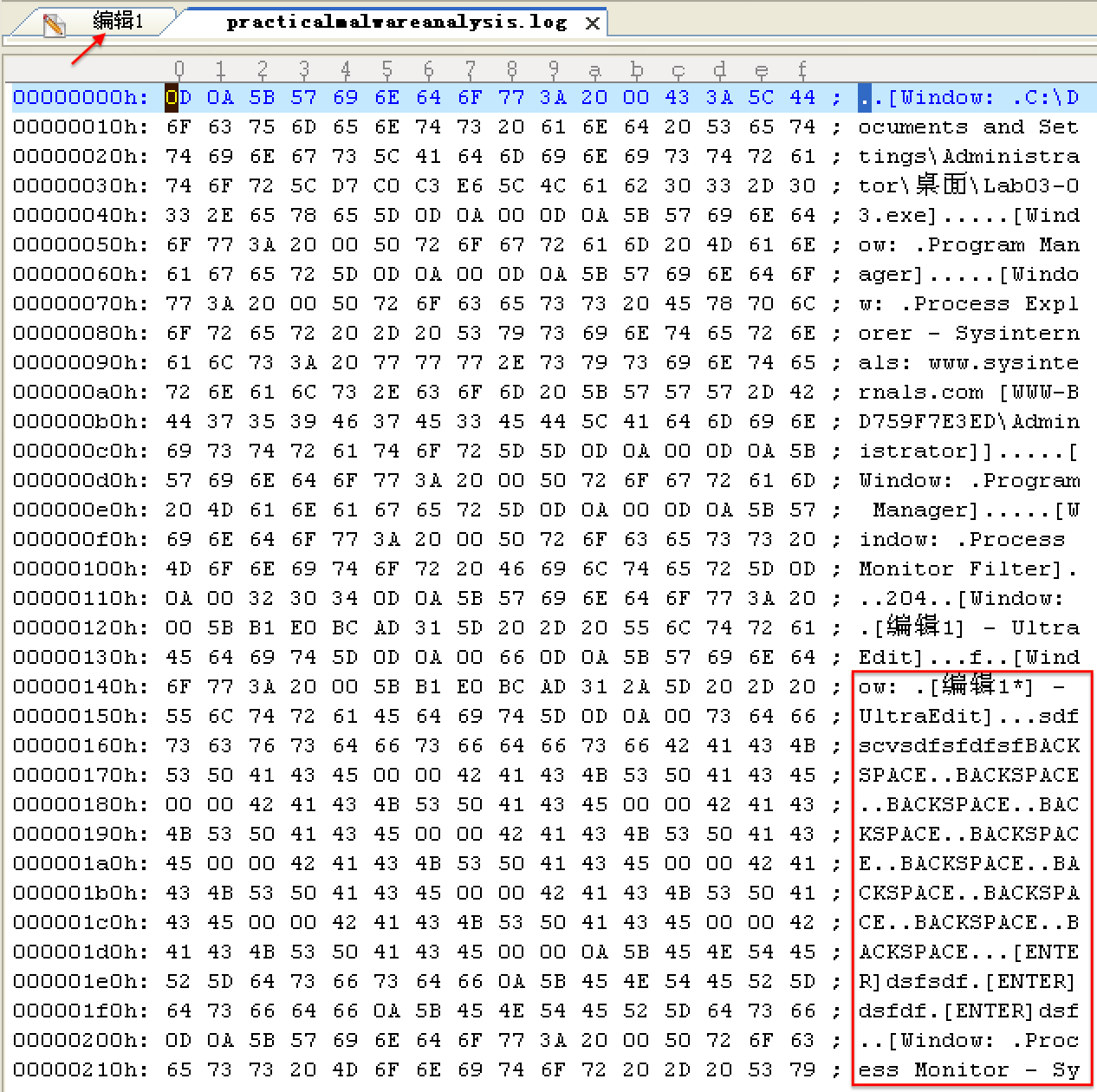
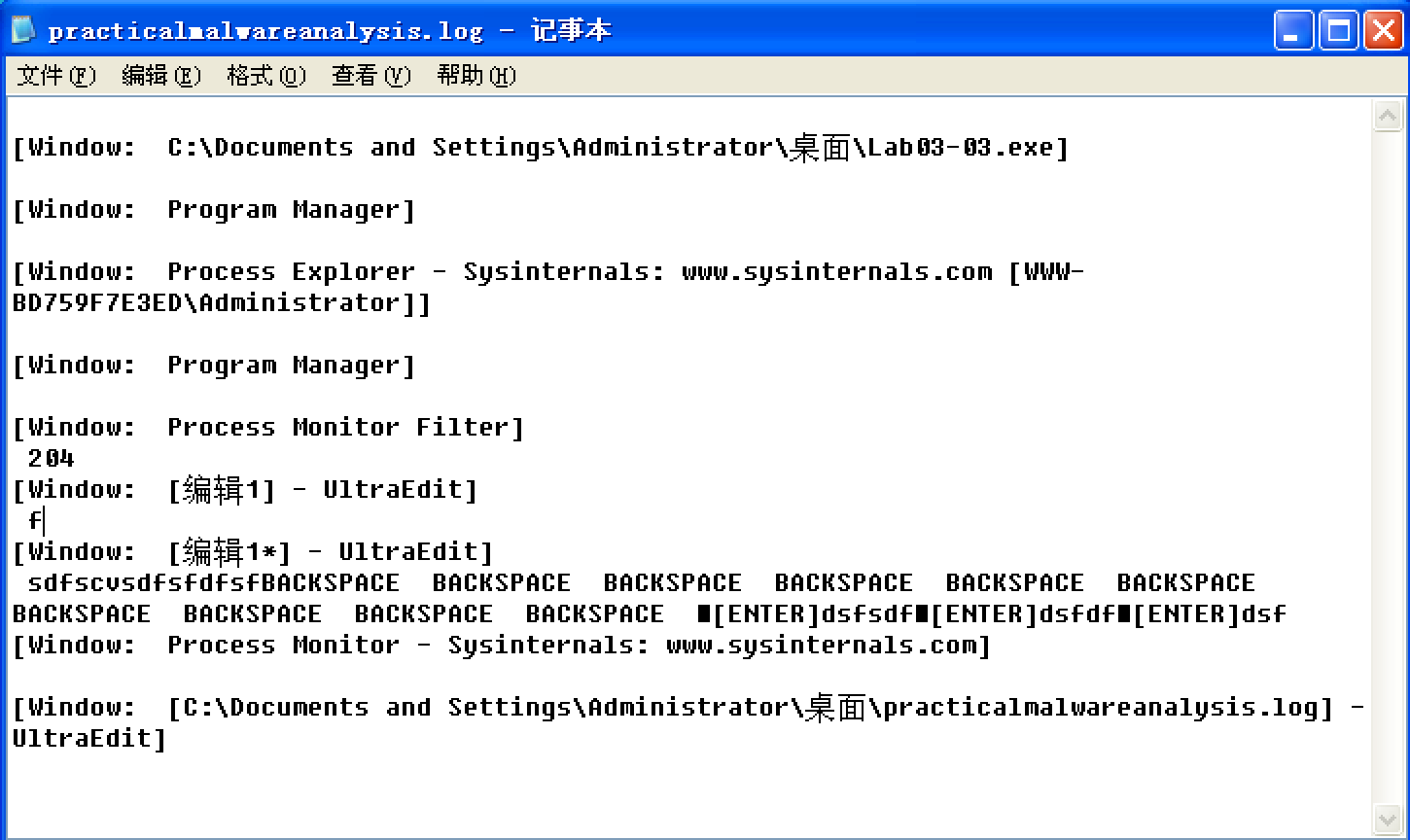
The presence of the string practicalmalwareanalysis.log, coupled with strings like [ENTER] and [CAPS LOCK], suggests that this program is a keylogger. To test our assumption, we open Notepad and type a short message to see if the malware will perform keylogging. To do so, we use the PID (found in Process Explorer) for the orphaned svchost.exe to create a filter in procmon to show only events from that PID (204). As you can see in Figure 3-10L, the CreateFile and WriteFile events for svchost.exe are writing to the file named practicalmalwareanalysis.log. (This same string is visible in the memory view of the orphaned svchost.exe process.)
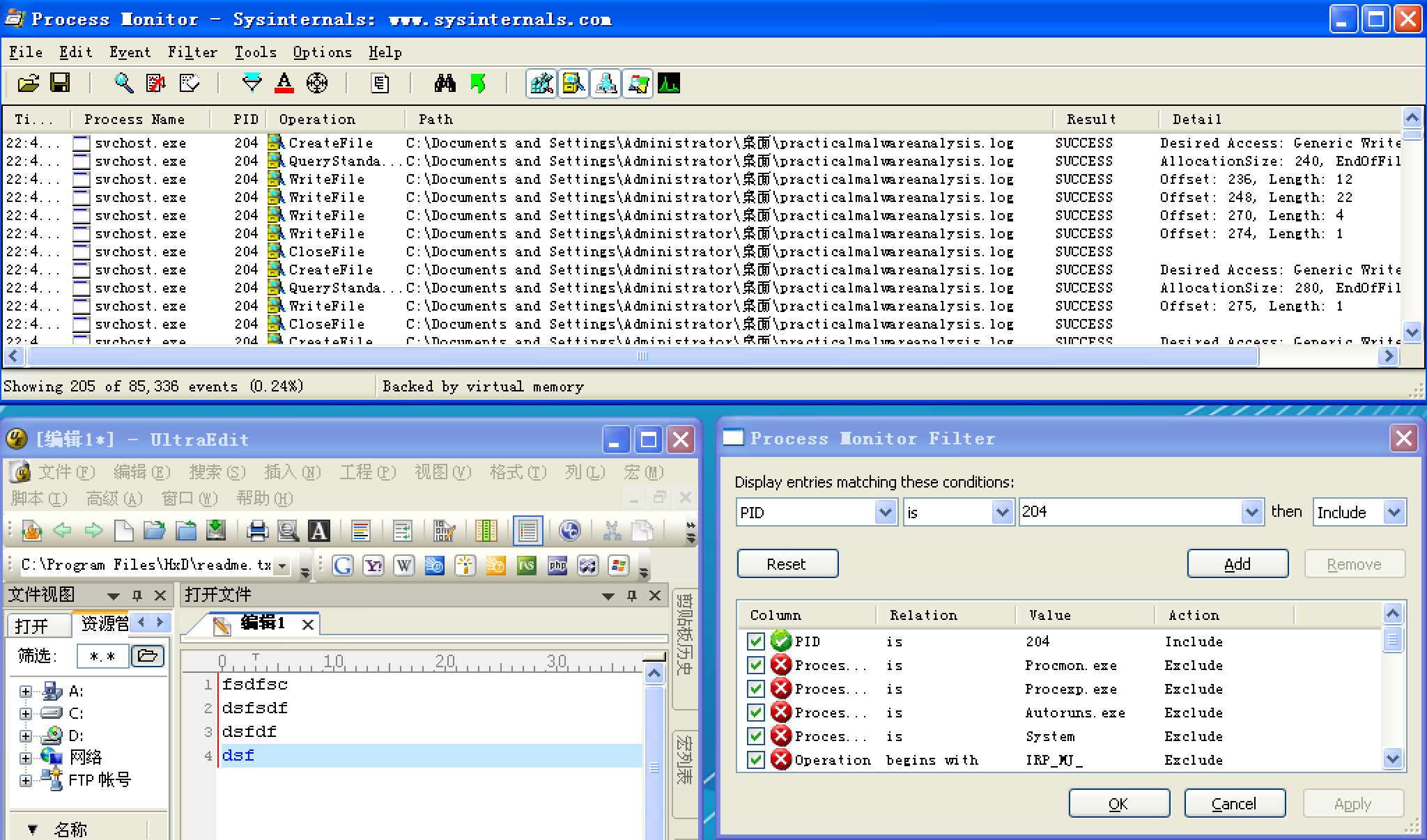
Figure 3-10L: Procmon output of svchost.exe with PID 204
Opening practicalmalwareanalysis.log with a simple text editor reveals the keystrokes you entered in Notepad. We conclude that this malware is a keylogger that uses process replacement on svchost.exe.
Preference
Lab 3-3的更多相关文章
- MIT 6.828 JOS学习笔记18. Lab 3.2 Part B: Page Faults, Breakpoints Exceptions, and System Calls
现在你的操作系统内核已经具备一定的异常处理能力了,在这部分实验中,我们将会进一步完善它,使它能够处理不同类型的中断/异常. Handling Page Fault 缺页中断是一个非常重要的中断,因为我 ...
- MIT 6.828 JOS学习笔记17. Lab 3.1 Part A User Environments
Introduction 在这个实验中,我们将实现操作系统的一些基本功能,来实现用户环境下的进程的正常运行.你将会加强JOS内核的功能,为它增添一些重要的数据结构,用来记录用户进程环境的一些信息:创建 ...
- MIT 6.828 JOS学习笔记16. Lab 2.2
Part 3 Kernel Address Space JOS把32位线性地址虚拟空间划分成两个部分.其中用户环境(进程运行环境)通常占据低地址的那部分,叫用户地址空间.而操作系统内核总是占据高地址的 ...
- MIT 6.828 JOS学习笔记15. Lab 2.1
Lab 2: Memory Management lab2中多出来的几个文件: inc/memlayout.h kern/pmap.c kern/pmap.h kern/kclock.h kern/k ...
- MIT 6.828 JOS学习笔记10. Lab 1 Part 3: The kernel
Lab 1 Part 3: The kernel 现在我们将开始具体讨论一下JOS内核了.就像boot loader一样,内核开始的时候也是一些汇编语句,用于设置一些东西,来保证C语言的程序能够正确的 ...
- MIT 6.828 JOS学习笔记7. Lab 1 Part 2.2: The Boot Loader
Lab 1 Part 2 The Boot Loader Loading the Kernel 我们现在可以进一步的讨论一下boot loader中的C语言的部分,即boot/main.c.但是在我们 ...
- python opencv 利用Lab空间把春天的场景改为秋天
前一段时间实现了Reinhard颜色迁移算法,感觉挺有意思的,然后在代码上随意做了一些更改,有了一些发现,把Lab通道的a通道值改为127左右,可以将绿色改为黄色,而对其他颜色的改动非常小,因此可以将 ...
- Acadia Lab 228 + Lab 222
又是一对串烧实验,布好线后非常方便就可以一起完成. 连线方案一模一样: Lab 228 数码管骰子 核心代码如下: def loop() : global cnt global btn_read,se ...
- Acadia Lab 203 + Lab 231
在做完 Lab 6 之后,惊觉选做实验缺口很大,于是遍历了一遍夏任务,找到了一条最省力的路线. 做完 Lab 6 的连线不用拆,可以接下来做以下两个实验: Lab 203 网络时钟 核心代码如下: v ...
- GJM : 【技术干货】给The Lab Renderer for Unity中地形添加阴影
感谢您的阅读.喜欢的.有用的就请大哥大嫂们高抬贵手"推荐一下"吧!你的精神支持是博主强大的写作动力以及转载收藏动力.欢迎转载! 版权声明:本文原创发表于 [请点击连接前往] ,未经 ...
随机推荐
- eval()、exec()与execfile()
eval(expression[, globals[, locals]]) eval()函数执行一个python表达式字符串并返回表达式执行后的结果: >>> x = 1 >& ...
- deepin云打印实现连接Windows打印机
问题的产生:今天给台式机安装deepin系统时,突发奇想能不能给其安装上打印机驱动,让其实现打印功能. 问题的解决方法: 1.在连接打印机的电脑上安装deepin云打印服务端软件,下载地址:https ...
- Spring 学习——Spring JSR注解——@Resoure、@PostConstruct、@PreDestroy、@Inject、@Named
JSR 定义:JSR是Java Specification Requests的缩写,意思是Java 规范提案.是指向JCP(Java Community Process)提出新增一个标准化技术规范的正 ...
- Android灯光系统--通知灯深入分析【转】
本文转自:https://www.cnblogs.com/lkq1220/p/6406261.html Android灯光系统--通知灯深入分析 通知的类别 声音 振动 闪灯 APP如何发出通知灯请求 ...
- 牛客竞赛&&mjt的毒瘤赛
题目链接 https://ac.nowcoder.com/acm/contest/368/F 思路 询问可以离线. 然后每个节点上建32个权值线段树(权值不大,其实只要20颗) 记录每一位权值为x(如 ...
- 【做题】agc002D - Stamp Rally——整体二分的技巧
题意:给出一个无向连通图,有\(n\)个顶点,\(m\)条边.有\(q\)次询问,每次给出\(x,y,z\),最小化从\(x\)和\(y\)开始,总计访问\(z\)个顶点(一个顶点只计算一次),经过的 ...
- 【索引失效】什么情况下会引起MySQL索引失效
索引并不是时时都会生效的,比如以下几种情况,将导致索引失效: 1.如果条件中有or,即使其中有条件带索引也不会使用(这也是为什么尽量少用or的原因) 注意:要想使用or,又想让索引生效,只能将or条件 ...
- JZ2440存储管理器--SDRAM
为了cpu访问外部设备,ARM提供一个存储管理器部件,提供访问外部设备的所需的信号(对SDRAM.网卡.nor等设备进行初始化,以便存储器管理器配合CPU进行与外设数据通讯). CPU通常读写一 ...
- ZJOI 2015 幻想乡战略游戏(动态点分治)
题意 https://loj.ac/problem/2135 思路 首先要明确一点,答案分布是有单调性的.什么意思呢?假设我们的答案在 \(u\) 节点,\((u,v)\) 之间有一条边且 \(u\) ...
- 17秋 SDN课程 第一次作业
SDN第一次作业 你会选择作 网络编程 方向的程序员吗?为什么? 有可能.原因如下: 1.我的研究与网络密切相关: 2.SDN侧重软件实现,自然涉及socket等网络编程知识,属于基本功: 3.市场. ...