
(原)使用TortoiseGit提交代码push的时候报错:HTTP 413 curl 22 The requested URL returned error: 413 Request Entity Too Large
今天我想rk的sdk包里面的一些东西提交到我的git服务器上,结果,总是报错,折腾了一下午,结果才解决。
首先看看我提交代码的时候,报错的信息:
git.exe push --progress "origin" master:master
Counting objects: 43142, done.
Delta compression using up to 8 threads.
Compressing objects: 100% (25108/25108), done.
Writing objects: 100% (43142/43142), 824.64 MiB | 26.18 MiB/s, done.
Total 43142 (delta 14030), reused 43141 (delta 14030)
fatal: The remote end hung up unexpectedly
fatal: The remote end hung up unexpectedly
error: RPC failed; HTTP 413 curl 22 The requested URL returned error: 413 Request Entity Too Large
Everything up-to-date
git did not exit cleanly (exit code 1) (717417 ms @ 2016/11/1 15:57:57)
网上搜了一下,我以为跟上次我pull的时候报错git clone: error: RPC failed; result=18, HTTP code = 200 解决办法的解决方法一样哦,结果我始终修改http.postBuffer的大小,改大改小都试过,但提交到一定大小以后,老是会出现上述的报错信息。
后面结合http://stackoverflow.com/questions/7489813/github-push-error-rpc-failed-result-22-http-code-413中的内容,以及http://blog.csdn.net/passion_wu128/article/details/8234901博文的内容,我了解到上述的这种报错:
这跟Git的postBuffer变量值没有关系。
(如果code = 411,则是由postBuffer引起的,可以在客户端执行
git config --global http.postBuffer 52428800,改为最大50M)
解决方法其实能通过ssh提交来解决,所以实在没办法,我使用ssh来提交,而不用之前的http方法,最后证明可行。
这里记录下使用ssh提交代码和生成公钥的过程。
这个过程,我借鉴http://www.cnblogs.com/ChenRihe/p/Git_TortoiseGit_SSH.html的部分内容做参考:
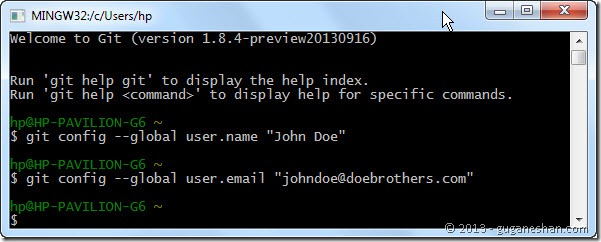
1.如果没配置过用户名和密码(配过也再来一次咯):
git config --global user.name "John Doe"
git config --global user.email "johndoe@doebrothers.com"
下图抄的..
2.创建SSH和复制公钥到剪切板(如复制以下代码执行出现参数过多提示,一般由于字符问题,需自己手打以下代码)
ssh-keygen –t rsa –C "johndoe@doebrothers.com"
clip < ~/.ssh/id_rsa.pub
下图抄的..
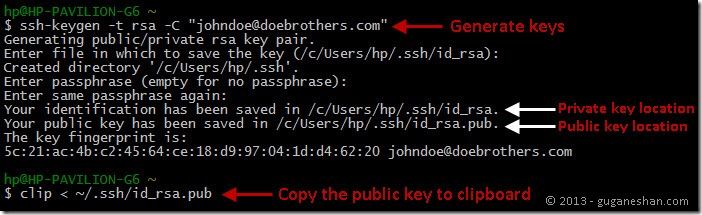
3.生成ssh公钥以后,我们先cat一下公钥,在git bash中输入cat ~/.ssh/id_rsa.pub,这个时候会显示出我们生成的公钥,这时候拷贝公钥,在我们git的账户中添加ssh就OK。
4.设置remote url,在git bash中输入:
git remote set-url origin git@github.com:GitRepoName.gitgithub.com是你的服务器域名,例如你用开源中国的码云的话,这个地方就是git@git.oschina.net
GitRepoName.git是git仓库名。
5.提交代码,git push origin master
使用ssh提交代码,比使用http不但能解决413的大文件报错,同时还能提高提交代码的速度,从我提交的速度来看,他最少能够提升100%的速度,所以还是使用ssh吧。
转载注明出处:http://www.cnblogs.com/lihaiping/p/6021813.html
(原)使用TortoiseGit提交代码push的时候报错:HTTP 413 curl 22 The requested URL returned error: 413 Request Entity Too Large的更多相关文章
- 使用git提交时报错:error: RPC failed; HTTP 413 curl 22 The requested URL returned error: 413 Request Entity Too Large
Delta compression using up to 4 threads.Compressing objects: 100% (2364/2364), done.Writing objects: ...
- 使用nginx代理gogs遇到推送代码错误的问题(RPC failed; HTTP 413 curl 22 The requested URL returned error: 413)
前提 代码管理我是用Gogs.Git,前些阵子使用Nginx将git.balabiu.com反向代理到了Gogs的默认端口,其他二级域名准备做其他使用, 导致上报代码出现了错误. 问题 推送代码报错误 ...
- git push The requested URL returned error: 403 Forbidden while accessing
错误提示信息: error: The requested URL returned error: Forbidden while accessing https://github.com/xingfu ...
- 解决github push错误The requested URL returned error: 403 Forbidden while accessing
来源:http://blog.csdn.net/happyteafriends/article/details/11554043 github push错误: git push error: The ...
- 解决git提交问题error: The requested URL returned error: 403 Forbidden while accessing
git提交代码时,出现这个错误"error: The requested URL returned error: 403 Forbidden while accessing https&qu ...
- GitHub 在使用命令行 git push 时报错:The requested URL returned error: 403
使用 git 的命令行向 GitHub 提交的时候,报错: [Young@localhost OtherLang]$ git push origin master error: The request ...
- 解决github push错误The requested URL returned error: 403 Forbidden while accessing(转)
github push错误: git push error: The requested URL returned error: 403 Forbidden while accessing https ...
- 解决在Vue项目中时常因为代码缩进导致页面报错的问题
前言 如果我们初次使用vue-cli来构建单页SPA应用,在撸代码的过程中有可能会遇到这种因为代码缩进导致 页面报错的问题,导致我们烦不胜烦.接下来我们就来看一看如何解决这个小问题... erro原因 ...
- TortoiseGit 提交代码每次需要输入用户名和密码?
每次用TortoiseGit Pull或者Push的时候都会弹出让输入用户名.密码的框, 很麻烦 ,解决办法如下: 解决办法如下: Right click → TortoiseGit → Settin ...
随机推荐
- luoguP3302 [SDOI2013]森林 主席树 启发式合并
题目链接 luoguP3302 [SDOI2013]森林 题解 本来这题树上主席树暴力启发式合并就完了 结果把lca写错了... 以后再也不这么写了 复杂度\(O(nlog^2n)\) "f ...
- HDU.1529.Cashier Employment(差分约束 最长路SPFA)
题目链接 \(Description\) 给定一天24h 每小时需要的员工数量Ri,有n个员工,已知每个员工开始工作的时间ti(ti∈[0,23]),每个员工会连续工作8h. 问能否满足一天的需求.若 ...
- BZOJ.3585.mex(线段树)
题目链接 题意:多次求区间\(mex\). 考虑\([1,i]\)的\(mex[i]\),显然是单调的 而对于\([l,r]\)与\([l+1,r]\),如果\(nxt[a[l]]>r\),那么 ...
- 如何调整eclipse中代码字体大小
找到windows--->preferences---->General------>Appearance---->color and fonts ---->ba ...
- AndroidStudio下加入百度地图的使用(四)——路线规划
上一章中我们已经完成了API常用的方法及常量属性的使用,这一章向大家介绍一下地图的重要功能-路线规划. (1) 定义API中的路线查询类: RoutePlanSearch mSearch = Rout ...
- fetch使用的常见问题及其解决办法
摘自: https://segmentfault.com/a/1190000008484070 fetch使用的常见问题及其解决办法 javascript wonyun 2月25日发布 | 0 收 ...
- Spring.profiles多环境配置最佳实践
转自:https://www.cnblogs.com/jason0529/p/6567373.html Spring的profiles机制,是应对多环境下面的一个解决方案,比较常见的是开发和测试环境的 ...
- Shell获取某目录下所有文件夹的名称
查看目录下面的所有文件: #!/bin/bash cd /目标目录 for file in $(ls *) do echo $file done 延伸的方法,查看目录下面的所有目录 #!/bin/ba ...
- CentOS 7安装nVIDIA显卡驱动程序
1. 到http://www.geforce.cn/drivers,根据显卡的型号,选择下载相应的驱动程序,一般是.run文件: 2. 运行下载的.run文件,会提示X Server正在运行,不能安装 ...
- open jdk
http://rednaxelafx.iteye.com/blog/1549577 https://www.jianshu.com/p/f98c3acd8df8 http://download.jav ...