
MySQL official tutorial
1.installation
2.setup environment variables
add %/MySQL Server/bin to path.
then restart cmd/powershell
3.invoking mysql programs
command interpreter represents with shell>
enter the program name followed by any options or other arguments.
shell>不是输入的一部分
关于options:
1.参数亦单或者双dash开头来specify程序选项.单后接缩写short form,双后接全写long form.
缩写中间用空格甚至不留空格,全称中间用等号.
2.option大小写敏感 -v for --verbose and -V for --version.
3.一些option后面跟选项名,比如-h localhost or--host=localhost
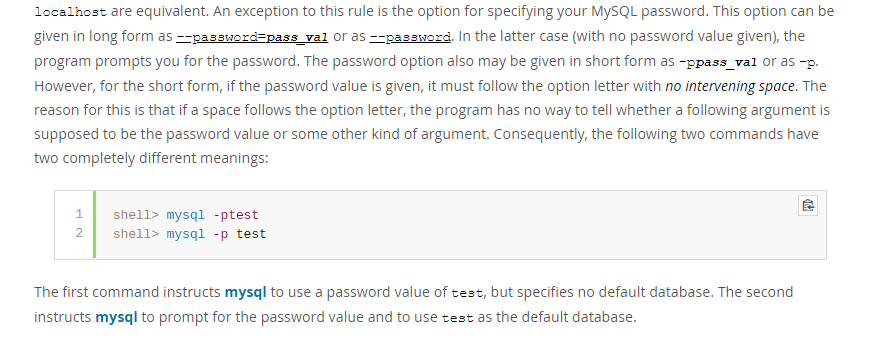
4.password的特殊性
5. Within option names, dash (-) and underscore (_) may be used interchangeably. For example, --skip-grant-tables and--skip_grant_tables are equivalent. (However, the leading dashes cannot be given as underscores.)
6.Numeric值后可以跟K,M,G表示1024,1024^2,1024^3
e.g. mysqladmin --count=1K --sleep=10 ping
K可以小写k.
7.包含空格的值必须使用引号括起来.
有几种方式来specify选项for MySQL programs:
a)List the options on the command line following the program name.This is common for options that apply to a specific invocation of the program
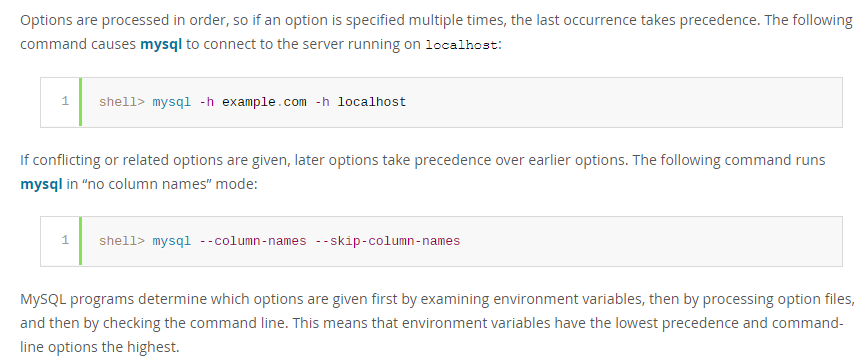
tions the highest.
4.reset password
官网教程比较详细.
https://dev.mysql.com/doc/mysql-windows-excerpt/8.0/en/resetting-permissions-windows.html
可能因为安全性原因,Google了好几种方法,要么是针对老版本的,要么是针对忘记密码修改密码的.
如果知道密码或者没有密码,想修改密码为其他或者null,其实可以更简单.
假设配置好环境变量,不然的话需要在cmd在Server 8.0的bin目录下启动.
直接shell>mysql -u root[or username if changed] [-p](if set pwd)登入.
然后在控制台中输入:
ALTER USER 'root'@'localhost' IDENTIFIED BY 'MyNewPass';
如果MyNewPass为空,则没有密码.
ALTER USER root@localhost IDENTIFIED BY 'MyNewPass';
也是等效的.
-------------------
https://dev.mysql.com/doc/refman/8.0/en/mysqladmin.html
-----------------------
A> mysqladmin - client for Administering a MySQL server.
mysqladmin is a client for performing administrative operations.
syntax:
shell> mysqladmin [options] command [command-arg] [command [command-arg]] ...
B> mysqlcheck - A Table Maintenance Program
it checks ,repairs, optimizes, or analyzes tables.
mysqlcheck must be used when the mysqld server is running,.
mysqlcheck use the SQL statements CHECK_TABLE| REPAIR_TABLE | ANALYZE_TABLE AND OPTIMIZE_TABLE.
C> mysqldump - A Database Backup Program
the mysqldump client utility performs logical backups, producing a set of SQL statements that can be executed to reproduce the original database obejct definitions and table data.
It dumps one or more MySQL databases for backup or transfer to another SQL server. THe mysqldump conmmand can also generate output in CSV,outer delimited text, or XML format.
D>mysqlimport - A Data Import Program
The mysqlimport client provides a command-line interface to the LOAD_DATA_INFILE SQL statement.
Syntax:
shell> mysqlimport [options] db_name textfile1 [textfile2 ...]
filename会忽略(strip)拓展名,也就是只要名称相同,所有拓展名包括无拓展名的该名称的文件都会被导入.
E>mysqlpump - A Database Backup Program
the mysqlpump client utility performs logical backups.producing a set of SQL statements that can be executed to reproduce the origin database object definitions and table data.
It dumps one or more MySQL databases for backup or transfer t o another SQL server.
F> mysqlsh - The MySQL Shell
MySQL shell is an advancecd command-line client and code editor for mySQL. In addition to SQL, mysql shell also offers scripting capabilites for JavaScript and Python.
G>mysqlslap - Load Emulation Client
is a diagnostic program designed to emulate client load for a MySQL server and to report the timing of each stage.
It works as if multiple clients are accessing the server.
syntax: shell>mysqlslap [options]
Some options such as --create or --query enable you to specify a string containing an SQL statement or a file containing statements.
MySQL official tutorial的更多相关文章
- mysqlsh : mysql shell tutorial
MySQL Shell 是一个高级的命令行客户端以及代码编辑器for Mysql. 除了SQL,MySQL Shell也提供脚本能力 for JS and Python. When MySQL she ...
- [转载] CMake Official Tutorial——教程还是官方的好
CMake官方教程传送门:https://cmake.org/cmake-tutorial/ 以下的内容跟官方教程基本一致,少数地方根据自己的测试有所改动: A Basic Starting Poin ...
- ROS->The Official Tutorial
系统安装 我的使用环境是Ubuntu 16.04LTS 32bit # deb cdrom:[Ubuntu 16.04 LTS _Xenial Xerus_ - Release amd64 (2016 ...
- [Hibernate] official tutorial - userguide
Persistence contexts org.hibernate.Session API and javax.persistence.EntityManager API represent a c ...
- MySQL vs. MongoDB: Choosing a Data Management Solution
原文地址:http://www.javacodegeeks.com/2015/07/mysql-vs-mongodb.html 1. Introduction It would be fair to ...
- JDBC + MySQL 示例
jdbc mysql connection 教程 翻译自:JDBC MySQL Connection Tutorial Java Database Connectivity (JDBC) 是一个基于J ...
- TensorFlow tutorial
代码示例来自https://github.com/aymericdamien/TensorFlow-Examples tensorflow先定义运算图,在run的时候才会进行真正的运算. run之前需 ...
- How to Install MySQL on CentOS 7
CentOS 7的yum源中貌似没有正常安装mysql时的mysql-sever文件,需要去官网上下载 # wget http://dev.mysql.com/get/mysql-communit ...
- Connect C# to MySQL
Connect C# to MySQL using MySQL Connector/Net, Insert, Update, Select, Delete example, Backup and re ...
随机推荐
- DDos攻击的常见方法及防御方法
什么是DDoS? DDoS是英文Distributed Denial of Service的缩写,意即“分布式拒绝服务”,那么什么又是拒绝服务(Denial of Service)呢?可以这么理解,凡 ...
- 20165310 NetSec2019 Week6 Exp4 恶意代码分析
20165310 NetSec2019 Week6 Exp4 恶意代码分析 一.实验要求 1.系统运行监控 使用如计划任务,每隔一分钟记录自己的电脑有哪些程序在联网,连接的外部IP是哪里.运行一段时间 ...
- kali linux web程序集简述
Burp Suite Burp Suite是一个用于执行Web应用程序安全性测试的集成平台. 它的各种工具可以无缝地协同工作,支持整个测试过程,从应用程序攻击面的初始映射和分析,到查找和利用安全漏洞. ...
- 尚硅谷面试第一季-15Mysql什么时候建索引
课堂重点: MySQL的官方定义: 索引的优势: 索引的劣势: 那些情况下需要建立索引: 那些情况下不要建立索引: 何为过滤性:例如在数据库字段里,手机号/身份证号这些字段是过滤性好的字段,而性别则是 ...
- 【python004-分支循环】
一.条件分支 1.第一个改进要求:游戏猜错的时候程序提示用户当前的输入比答案大了还是小了 python的比较操作符: > 左边大于右边 >= 左边大于等于右边 ...
- Kubernetes(k8s)入门、单机版安装、kuberctl指令、k8s服务实例
1.切换root .关闭centos自带的防火墙 # systemctl disable firewalld # systemctl stop firewalld .安装etcd和kubernetes ...
- 【做题】TCSRM601 Div1 500 WinterAndSnowmen——按位考虑&dp
原文链接https://www.cnblogs.com/cly-none/p/9695526.html 题意:求有多少对集合\(S,T\)满足:\(S \subseteq \{1,2...n \}, ...
- MySQL的启动和关闭
1.Windows下 启动服务 mysqld --console 或 net start mysql 关闭服务 mysqladmin -uroot shudown 或 net stop mysql 2 ...
- Python 基础 Python是什么
1.Python 是一门高级的.面向对象的,解释性,脚本语言.
- Qt中中文字符 一劳永逸的解决方法
QT中中文字符问题,有没有一劳永逸的解决方法? 目前遇到有以下问题 1.字符串中有中文时,编译提示"常量中含有换行符" 2.在控制台窗口输出中文时无法正常显示,中文全部显示为? 目 ...