
MySQL official tutorial
1.installation
2.setup environment variables
add %/MySQL Server/bin to path.
then restart cmd/powershell
3.invoking mysql programs
command interpreter represents with shell>
enter the program name followed by any options or other arguments.
shell>不是输入的一部分
关于options:
1.参数亦单或者双dash开头来specify程序选项.单后接缩写short form,双后接全写long form.
缩写中间用空格甚至不留空格,全称中间用等号.
2.option大小写敏感 -v for --verbose and -V for --version.
3.一些option后面跟选项名,比如-h localhost or--host=localhost
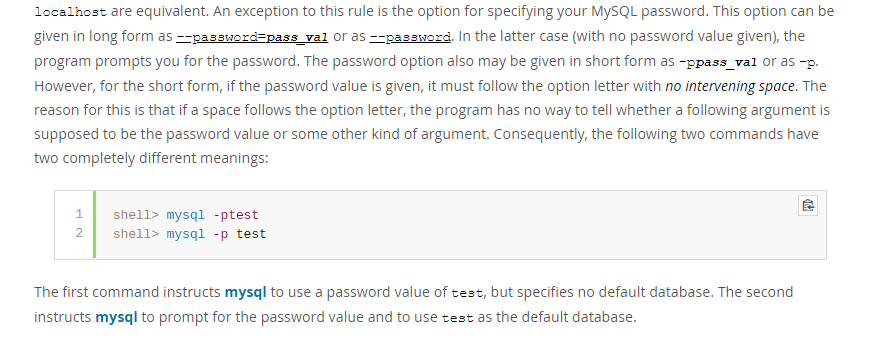
4.password的特殊性
5. Within option names, dash (-) and underscore (_) may be used interchangeably. For example, --skip-grant-tables and--skip_grant_tables are equivalent. (However, the leading dashes cannot be given as underscores.)
6.Numeric值后可以跟K,M,G表示1024,1024^2,1024^3
e.g. mysqladmin --count=1K --sleep=10 ping
K可以小写k.
7.包含空格的值必须使用引号括起来.
有几种方式来specify选项for MySQL programs:
a)List the options on the command line following the program name.This is common for options that apply to a specific invocation of the program
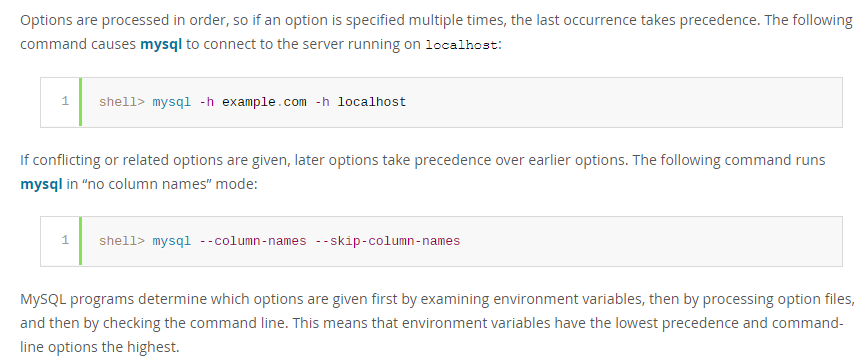
tions the highest.
4.reset password
官网教程比较详细.
https://dev.mysql.com/doc/mysql-windows-excerpt/8.0/en/resetting-permissions-windows.html
可能因为安全性原因,Google了好几种方法,要么是针对老版本的,要么是针对忘记密码修改密码的.
如果知道密码或者没有密码,想修改密码为其他或者null,其实可以更简单.
假设配置好环境变量,不然的话需要在cmd在Server 8.0的bin目录下启动.
直接shell>mysql -u root[or username if changed] [-p](if set pwd)登入.
然后在控制台中输入:
ALTER USER 'root'@'localhost' IDENTIFIED BY 'MyNewPass';
如果MyNewPass为空,则没有密码.
ALTER USER root@localhost IDENTIFIED BY 'MyNewPass';
也是等效的.
-------------------
https://dev.mysql.com/doc/refman/8.0/en/mysqladmin.html
-----------------------
A> mysqladmin - client for Administering a MySQL server.
mysqladmin is a client for performing administrative operations.
syntax:
shell> mysqladmin [options] command [command-arg] [command [command-arg]] ...
B> mysqlcheck - A Table Maintenance Program
it checks ,repairs, optimizes, or analyzes tables.
mysqlcheck must be used when the mysqld server is running,.
mysqlcheck use the SQL statements CHECK_TABLE| REPAIR_TABLE | ANALYZE_TABLE AND OPTIMIZE_TABLE.
C> mysqldump - A Database Backup Program
the mysqldump client utility performs logical backups, producing a set of SQL statements that can be executed to reproduce the original database obejct definitions and table data.
It dumps one or more MySQL databases for backup or transfer to another SQL server. THe mysqldump conmmand can also generate output in CSV,outer delimited text, or XML format.
D>mysqlimport - A Data Import Program
The mysqlimport client provides a command-line interface to the LOAD_DATA_INFILE SQL statement.
Syntax:
shell> mysqlimport [options] db_name textfile1 [textfile2 ...]
filename会忽略(strip)拓展名,也就是只要名称相同,所有拓展名包括无拓展名的该名称的文件都会被导入.
E>mysqlpump - A Database Backup Program
the mysqlpump client utility performs logical backups.producing a set of SQL statements that can be executed to reproduce the origin database object definitions and table data.
It dumps one or more MySQL databases for backup or transfer t o another SQL server.
F> mysqlsh - The MySQL Shell
MySQL shell is an advancecd command-line client and code editor for mySQL. In addition to SQL, mysql shell also offers scripting capabilites for JavaScript and Python.
G>mysqlslap - Load Emulation Client
is a diagnostic program designed to emulate client load for a MySQL server and to report the timing of each stage.
It works as if multiple clients are accessing the server.
syntax: shell>mysqlslap [options]
Some options such as --create or --query enable you to specify a string containing an SQL statement or a file containing statements.
MySQL official tutorial的更多相关文章
- mysqlsh : mysql shell tutorial
MySQL Shell 是一个高级的命令行客户端以及代码编辑器for Mysql. 除了SQL,MySQL Shell也提供脚本能力 for JS and Python. When MySQL she ...
- [转载] CMake Official Tutorial——教程还是官方的好
CMake官方教程传送门:https://cmake.org/cmake-tutorial/ 以下的内容跟官方教程基本一致,少数地方根据自己的测试有所改动: A Basic Starting Poin ...
- ROS->The Official Tutorial
系统安装 我的使用环境是Ubuntu 16.04LTS 32bit # deb cdrom:[Ubuntu 16.04 LTS _Xenial Xerus_ - Release amd64 (2016 ...
- [Hibernate] official tutorial - userguide
Persistence contexts org.hibernate.Session API and javax.persistence.EntityManager API represent a c ...
- MySQL vs. MongoDB: Choosing a Data Management Solution
原文地址:http://www.javacodegeeks.com/2015/07/mysql-vs-mongodb.html 1. Introduction It would be fair to ...
- JDBC + MySQL 示例
jdbc mysql connection 教程 翻译自:JDBC MySQL Connection Tutorial Java Database Connectivity (JDBC) 是一个基于J ...
- TensorFlow tutorial
代码示例来自https://github.com/aymericdamien/TensorFlow-Examples tensorflow先定义运算图,在run的时候才会进行真正的运算. run之前需 ...
- How to Install MySQL on CentOS 7
CentOS 7的yum源中貌似没有正常安装mysql时的mysql-sever文件,需要去官网上下载 # wget http://dev.mysql.com/get/mysql-communit ...
- Connect C# to MySQL
Connect C# to MySQL using MySQL Connector/Net, Insert, Update, Select, Delete example, Backup and re ...
随机推荐
- vertica导出导入数据
直接开. 导出dat vsql -U dbadmin -wlizhenghua -At -F'|' -c "select * from APP_INTER_BOSS_CDR_COUNT_T& ...
- 20145212 罗天晨 WEB登陆发贴及会话管理功能的实现
会话管理简介 Cookie: cookie常用于识别用户. cookie 是服务器留在用户计算机中的小文件,每当相同的计算机通过浏览器请求页面时,它同时会发送 cookie. 通过PHP能够创建并取回 ...
- 20145319 《计算机病毒》动态分析lab3-2
20145319 <计算机病毒>动态分析lab3-2(实践六) 实践过程 基础分析 拿到恶意代码时,首先使用PE ID打开,查看其中一些基础信息以及观察该恶意代码是否加壳,来确定下一步分析 ...
- ubuntu上解决访问github慢的方法
1.进入终端命令行模式,输入sudo vi /etc/hosts 2.输入i进入编辑命令,英文输入法输入G,vim编辑器跳到hosts文件的最后一行 3.用浏览器访问 IPAddress.com 使用 ...
- Plantuml画图工具
1,Plantuml画图工具 安装指南: Mac sublimetext http://blog.csdn.net/zhangjikuan/article/details/53365730 win i ...
- Lottie的json动画
我们的设计如是说: Lottie的json动画,优缺点有 优点: 1.开发成本低,动画的还原度高.设计师导出 json 文件后,交付开发.原本要1天甚至更久的动画实现,现在只要不到一小时甚至更少时间了 ...
- 如何在Framework中读取bundle中的Res
前因: 因为公司上架前后的原因,外围的平台层部分提前上线,而我做的功能部分需要晚一些上线,是单独的一个工程在其他仓库开发. 我的资源文件放在Bundle中.合到主工程中,资源文件不用改,直接拖进去.倒 ...
- topcoder srm 425 div1
problem1 link 暴力搜索即可. problem2 link 可以将每次所有的piece的位置看作一个状态,由于$C_{25}^{5}=53130$,所以最多有这么多状态.这里可以加一些优化 ...
- topcoder srm 702 div1 -3
1.给定一个$n*m$的矩阵,里面的数字是1到$n*m$的一个排列.一个$n*m$矩阵$A$对应一个$n*m$ 的01字符串,字符串的位置$i*m+j$为1当且仅当$A_{i,j}=i*m+j+1$. ...
- [Sdoi2017]序列计数 矩阵优化dp
题目 https://www.lydsy.com/JudgeOnline/problem.php?id=4818 思路 先考虑没有质数限制 dp是在同余系下的,所以\(f[i][j]\)表示前i个点, ...