
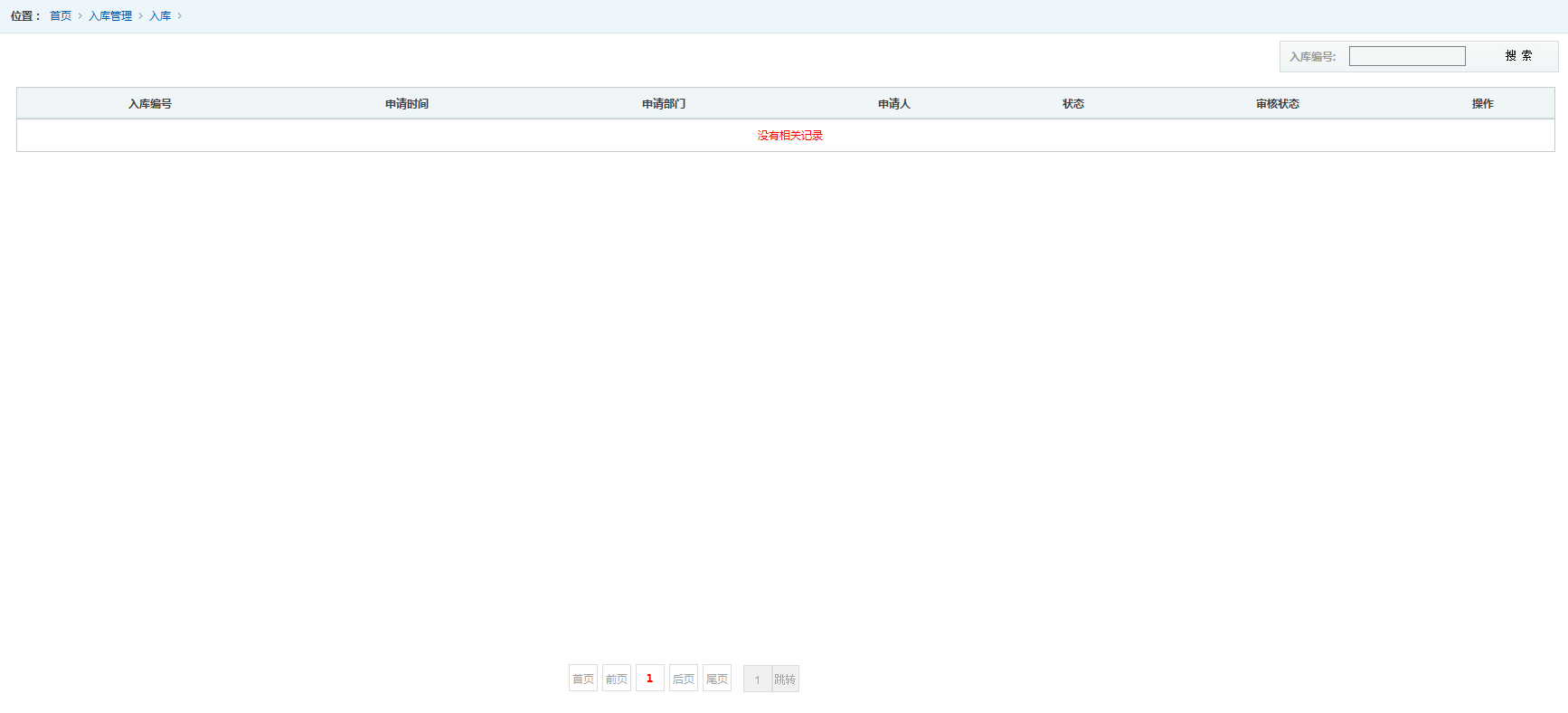
GridView 无数据时,绑定提示
  private void BindData()

     {

         DataTable dt = DAO.RunSQLReturnDt(this.getsql());

         int dtcount = dt.Rows.Count;

         if (dtcount == )

         {

             dt.Rows.Add(dt.NewRow());

         }

         DataView dv = dt.DefaultView;

         //对用于分页的类的引用

         PagedDataSource pds = new PagedDataSource();

         pds.DataSource = dv;//设置数据源(DataTable类型)

         pds.AllowPaging = true;

         //每页显示的行数

         pds.PageSize = ;

         AspNetPager1.RecordCount = dv.Count;

         pds.CurrentPageIndex = AspNetPager1.CurrentPageIndex - ;

         pds.PageSize = AspNetPager1.PageSize;

         GridView1.DataSource = pds;

         GridView1.DataBind();

         if (dtcount <= )

         {

             int colnumcount = dt.Columns.Count;

             GridView1.Rows[].Cells.Clear();

             GridView1.Rows[].Cells.Add(new TableCell());

             GridView1.Rows[].Cells[].ColumnSpan = colnumcount;

             GridView1.Rows[].Cells[].Text = "没有相关记录";

             GridView1.Rows[].Cells[].Style.Add("color", "red");

         }

     }
页面正常显示
 <asp:GridView ID="GridView1" runat="server" AutoGenerateColumns="False" CssClass="tablelist" GridLines="None" DataKeyNames="C_ID" OnRowDataBound="GridView1_RowDataBound">

                     <Columns>

                         <asp:BoundField DataField="C_AppNum" HeaderText="入库编号" SortExpression="C_AppNum">

                             <ItemStyle HorizontalAlign="Center" />

                         </asp:BoundField>

                         <asp:BoundField DataField="C_AppDate" HeaderText="申请时间" SortExpression="C_AppDate">

                             <ItemStyle HorizontalAlign="Center" />

                         </asp:BoundField>

                         <asp:TemplateField HeaderText="申请部门">

                             <ItemTemplate>

                           <%# XC.Depart.GetDepartName(Eval("C_AppDepartID").ToString()) %>

                             </ItemTemplate>

                             <ItemStyle HorizontalAlign="Center" />

                         </asp:TemplateField>

                         <asp:TemplateField HeaderText="申请人">

                             <ItemTemplate>

                                 <%# XC.User.GetUserName(Eval("C_AppUserID").ToString())%>

                             </ItemTemplate>

                             <ItemStyle HorizontalAlign="Center" />

                         </asp:TemplateField>

                         <asp:BoundField DataField="C_Status" HeaderText="状态" SortExpression="C_Status">

                             <ItemStyle HorizontalAlign="Center" />

                         </asp:BoundField>

                         <asp:BoundField DataField="C_AuditState" HeaderText="审核状态" SortExpression="C_AuditState">

                             <ItemStyle HorizontalAlign="Center" />

                         </asp:BoundField>

                     </Columns>

                     <HeaderStyle HorizontalAlign="center" />

                 </asp:GridView>
效果
GridView 无数据时,绑定提示的更多相关文章
- ASP.NET 使用AJAX让GridView的数据行显示提示框(ToolTip)
介绍ASP.NET AJAX可以使你的web应用程序具有更丰富的功能和更多的用户响应. 本文中,我将演示如何通过ASP.NET AJAX的帮助,给像GridView这样的数据绑定控件的数据行增加pop ...
- 扩展:gridview 空数据时显示表头
2015年7月14日16:50:06 Gridview 默认展示数据时,若数据为空,则表格不显示,显示不美观. 针对此问题进行扩展: using System.Web.UI.WebControls; ...
- UWP GridView切换数据时界面闪动
在选择数据时,比如1-10集,和11-20集切换时,GridView需要切换对应的数据,但是会发生界面闪动. 这是默认的Item Transition导致的. 可以去掉默认的转换效果. <Gri ...
- 从Excel中导入数据时,提示“未在本地计算机上注册“Microsoft.ACE.OLEDB.12.0”提供程序”的解决办法
注意,64位系统,用64位的补丁文件; https://www.cnblogs.com/A2008A/articles/2438962.html 操作系统:使用的是64位的Windows Server ...
- easyui 中Datagrid 控件在列较多且无数据时,列显示不全的解决方案
在onLoadSuccess 中加入如下代码就OK啦 $('#dg3').datagrid({ onLoadSuccess:function(data){ if(data.total==0){ var ...
- 扩展当easyui datagrid无数据时,显示特定值。如:没有数据
var myview = $.extend({},$.fn.datagrid.defaults.view,{ onAfterRender:function(target){ $.fn.datagrid ...
- vue-scroll 底部无数据时,底部出现大片的空白
vue-scroll放在vue的项目中,实现下拉刷新的效果,但是发现,不能上拉的bug,上拉了之后,底部出现了一大段的空白,参照GitHub的问题,算是暂时解决了. 不能上拉的原因是:滑动标签里边的内 ...
- 使用Entity Framwork 保存数据时,提示不能在对象中插入重复键,违反了PRIMARY_KEY约束
这种情况,大多发生在有外键存在的情况下,解决方法是: 把dataContext.Set<T>().Add(model)修改成dataContext.Models.Add(model);
- Repeater为空时显示“暂无数据”,很方便实用方法
Repeater为空时显示“暂无数据”,很方便实用方法 <FooterTemplate> <asp:Label ID="lblEmptyZP" Text=&q ...
随机推荐
- New Distinct Substrings
spoj705:http://www.spoj.com/problems/SUBST1/ 题意:和spoj694一样,只是数据范围变大了. 题解:同spoj694. #include<iostr ...
- ftp 匿名访问设置
为了让ftp可以匿名访问,需要设置/etc/vsftp.conf 的 anonymous_enable=YES. 当然仅仅是这样,还是不可以的,会出现错误: vsftpd: refusing to r ...
- WordPress wp-admin/includes/post.php脚本安全漏洞
漏洞名称: WordPress wp-admin/includes/post.php脚本安全漏洞 CNNVD编号: CNNVD-201309-168 发布时间: 2013-09-13 更新时间: 20 ...
- Linux学习笔记21——线程同步的两种方式
一 用信号量同步 1 信号量函数的名字都以sem_开头,线程中使用的基本信号量函数有4个 2 创建信号量 #include<semaphore.h> int sem_init(sem_t ...
- Longest Consecutive Sequence hashset
public class Solution { public int longestConsecutive(int[] num) { HashSet<Integer> hash=new H ...
- 两种常用的MySQL官方客户端软件
本博文的主要内容有 .命令行客户端软件---MySQL Command Line Client .MySQL-Workbench客户端软件 1.命令行客户端软件---MySQL Command Lin ...
- Goole音乐搜索
本博文的主要内容有 .Goole音乐搜索的介绍 1.Goole音乐搜索的介绍 https://zh.wikipedia.org/wiki/%E8%B0%B7%E6%AD%8C%E9%9F%B3% ...
- CentOS7.0分布式安装HADOOP 2.6.0笔记-转载的
三台虚拟机,IP地址通过路由器静态DHCP分配 (这样就无需设置host了). 三台机器信息如下 - 1. hadoop-a: 192.168.0.20 #master 2. ha ...
- python实现应用程序在右键菜单中添加打开方式
最近项目组开发的一个小工具想要在右键菜单中添加打开方式,以有道云笔记为例进行了需求拆解和代码编写 1.需求拆解: 如何实现手动添加右键菜单的打开方式: Step1:打开注册表编辑器,Win+R-> ...
- Away3D ATFTexture
之前在项目中贴图大量使用了 PNG 和 jpg 遇到了个问题.在使用BitmapTexture的时候发现 是必须MIP 不管你 是否开启或者关闭 MIP 他都会去创建.而每次MIP都会根据贴图大小去生 ...