
百度UEditor(富文本编辑器)的基础用法
百度的这个编辑器挺强大的,这里只是用他的文本功能,没有介绍上传图片视频的。
我用是的SSH来写的项目。
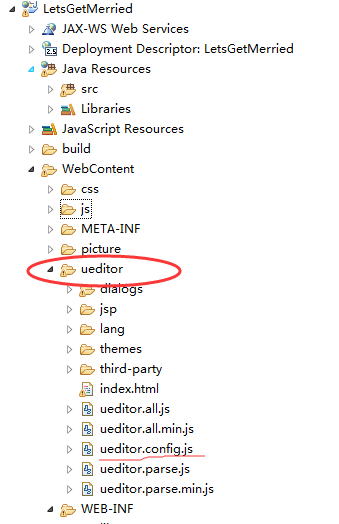
1. 把下载的UEditor(ueditor1_4_3_1-utf8-jsp)解压后全部复制到WebContent目录下,如下图:
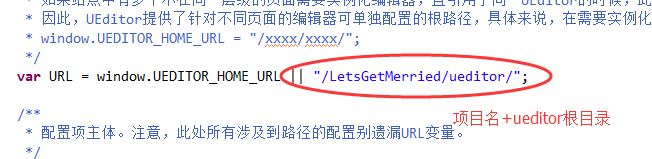
2.修改ueditor/ueditor.config.js里的路径 如下图:
3. 将ueditor/jsp/lib下的所有Jar文件复制到项目的/WEB-INF/lib中;
4.修改ueditor/ueditor.config.js里面的toolbars的内容来减少不想要的图标:
 //工具栏上的所有的功能按钮和下拉框,可以在new编辑器的实例时选择自己需要的从新定义

        , toolbars: [[

            'fullscreen', 'source', '|', 'undo', 'redo', '|',

            'bold', 'italic', 'underline', 'fontborder', 'strikethrough', '|', 'forecolor', 'backcolor', 'insertorderedlist', 'insertunorderedlist', 'selectall', 'cleardoc', '|',

            'rowspacingtop', 'rowspacingbottom', 'lineheight', '|',

            'customstyle', 'paragraph', 'fontfamily', 'fontsize', '|',

            'directionalityltr', 'directionalityrtl', 'indent', '|',

            'justifyleft', 'justifycenter', 'justifyright', 'justifyjustify', '|', 'touppercase', 'tolowercase', '|',

            'link', 'unlink','|',

            'emotion', 'pagebreak', 'background', '|',

            'horizontal', 'date', 'time', 'spechars', 'snapscreen', '|',

            'inserttable', 'deletetable', 'insertrow', 'deleterow', 'insertcol', 'deletecol', 'charts', '|',

            'preview', 'searchreplace', 'help'

        ]]
4.新建自己的jsp页面,把自带的index.html中需要的复制进去
一定要引入以下三个js,否则没有效果
    <script type="text/javascript" charset="utf-8" src="js/ueditor/ueditor.config.js"></script>

    <script type="text/javascript" charset="utf-8" src="js/ueditor/ueditor.all.min.js"> </script>

    <script type="text/javascript" charset="utf-8" src="js/ueditor/zh-cn.js"></script>
5. 内容中可以换成 <textarea name="content" id="editor" style="height: 400px;"></textarea>
<form action="article_addArticle" method="post">

                        //换成自己自己需要的

            <input type="text" name="userId" value="<s:property value="#session.user.userId" />">

            <textarea name="content" id="editor" style="height: 400px;"></textarea>

            <script type="text/javascript">

         //实例化实例化编辑器

                var ue = UE.getEditor('editor');

                function getContent() {

                    var arr = [];

                    arr.push("使用editor.getContent()方法可以获得编辑器的内容");

                    arr.push("内容为:");

                    arr.push(UE.getEditor('editor').getContent());

                    alert(arr.join("\n"));

                }

            </script>

            <button type="submit" value="提交">提交</button>

        </form>
效果:
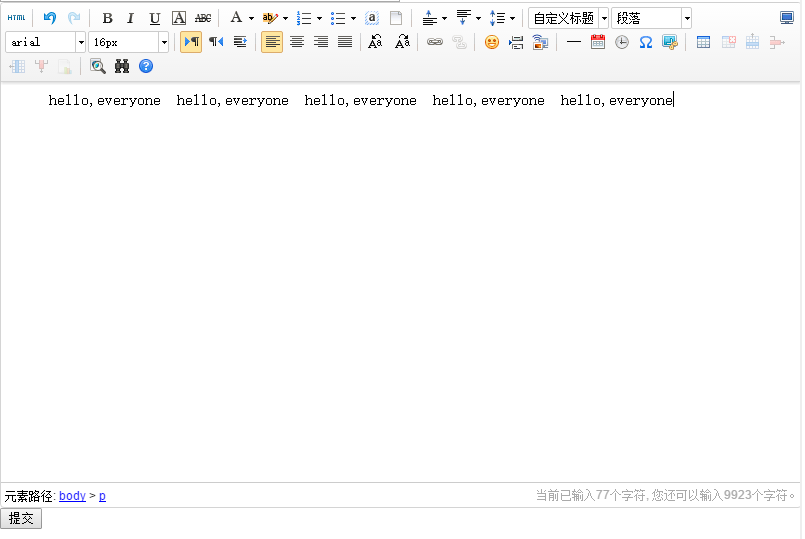
6. 编辑文本的时候,只需要把内容带回来就行了
    <form action="article_updateArticle" method="post" >

      <input type="text" name = "articleId" value="<s:property value="articleInfo.articleId" />">

      <br/>

      <input type="text" name="title" value="<s:property value="articleInfo.artTitle" />" style="width:400px;height:30px;">

     <!-- <textarea name="content" id="editor" style="height:400px;"></textarea> -->

     <script type="text/plain" id="editor" name="content" style="height:400px;">

          <s:property value="articleInfo.artContent" escape="false"/>

     </script>

<script type="text/javascript">

    var ue = UE.getEditor('editor');

    function getContent() {

        var arr = [];

        arr.push("使用editor.getContent()方法可以获得编辑器的内容");

        arr.push("内容为:");

        arr.push(UE.getEditor('editor').getContent());

        alert(arr.join("\n"));

    }

</script>

     <button type="submit" value="提交">提交</button>

    </form>
7.说一下,保存到数据库的时候会把格式都保存进去,所以输出的时候会把html格式都输出来,只需要加上(escape = "false")即解析html代码
<s:property value="articleInfo.artContent" escape="false"/>

就ok了,这样保存到数据库的html就会起作用了。
这是自己学习过程中的记录,方便自己回顾,好记性不如烂笔头。
作者:艺至
百度UEditor(富文本编辑器)的基础用法的更多相关文章
- 百度ueditor富文本编辑器的使用
百度ueditor富文本编辑器的使用 //以下为我在官网下载的ueditor v1.3.5 php版的大楷配置步骤第一步: //配置文件的引入应该比功能文件先引入,最后设置语言类型.即:editor. ...
- ASP.NET MVC5 中百度ueditor富文本编辑器的使用
随着网站信息发布内容越来越多,越来越重视美观,富文本编辑就是不可缺少的了,众多编辑器比较后我选了百度的ueditor富文本编辑器. 百度ueditor富文本编辑器分为两种一种是完全版的ueditor, ...
- PHP如何搭建百度Ueditor富文本编辑器
本文为大家分享了PHP搭建百度Ueditor富文本编辑器的方法,供大家参考,具体内容如下 下载UEditor 官网:下载地址 将下载好的文件解压到thinkphp项目中,本文是解压到PUBLIC目录下 ...
- django之百度Ueditor富文本编辑器后台集成
Python3 + Django2.0 百度Ueditor 富文本编辑器的集成 百度富文本编辑器官网地址:http://fex.baidu.com/ueditor/ 疑问:为什么要二次集成? 答案:因 ...
- vue集成百度UEditor富文本编辑器
在前端开发的项目中.难免会遇到需要在页面上集成一个富文本编辑器.那么.如果你有这个需求.希望可以帮助到你 vue是前端开发者所追捧的框架,简单易上手,但是基于vue的富文本编辑器大多数太过于精简.于是 ...
- 百度UEditor富文本编辑器去除过滤div等标签
将设计排版好的页面html代码上传到数据库,再读取出来的时候发现所有的div都被替换成了p标签. 解决方法: 首先在ueditor.all.js文件内搜索allowDivTransToP,找到如下的代 ...
- 百度UEditor富文本编辑器去除自动追加p标签
本篇文章还原了我在遇到这个问题时的解决过程: 找到ueditor.all.js文件,搜索 me.addInputRule(function(root){ 或者直接搜索 //进入编辑器的li要套p标签 ...
- vue2.x结合百度UEditor富文本编辑器
1.首先下载UEditor源码(https://ueditor.baidu.com/website/),将整个文件放到static文件夹中 2.在src/components文件夹下创建公共组件UEd ...
- 百度Ueditor富文本编辑器 .net版本 任意文件上传执行漏掉修复
问题描述: 借由上传网络图片功能中可传递可执行文件.后台代码中只做了文件类型的检测未能正确的拦截掉非法文件. 只需将上传地址改为 XXXXXX.jpg?.aspx最终服务上最终存储的文件会变为XXXX ...
随机推荐
- ndk-gdb of NDK r9d modified to *always* debug the ":remote"-process of your app
https://gist.github.com/TomTasche/9690186 ndk-gdb of NDK r9d modified to *always* debug the ":r ...
- android 获取当前版本号/修改自定义的应用程序的版本号
1.获取当前版本号 PackageManager pm = getPackageManager(); PackageInfo pi = pm.getPackageInfo(getPackageName ...
- 编写Word宏使选中的图片改变为固定宽度并保持纵横比
代码如下: Sub 改变图片宽度为12并设置灰色边框() ' ' 改变图片宽度为12并设置灰色边框 宏 ' ' ' Application.Run MacroName:="改变图片大 ...
- 什么是Scale Up和Scale Out?
导读:Scale Out(也就是Scale horizontally)横向扩展,向外扩展 Scale Up(也就是Scale vertically)纵向扩展,向上扩展 无论是Scale Out,Sca ...
- 用mac自带的safari浏览器下载excel文件后面自带了.exe后缀
将 Content-Type 设为 application/vnd.ms-excel
- jqgrid表格列动态加载的实现
选中几个测点名,在表格中就显示几列. 具体代码如下: function reloadGrid(postData){ $('#gridTable').jqGrid('GridUnload'); var ...
- 原创 C# 正则表达式 读写 Ini 文件
昨天遇到读ini文件的问题,我知道C#里没有提供相应的类,所有的.net配置都是xml方式存储的. 读取ini文件,很多人直接google一把,然后添加dll引用.介绍的比较详细的,如: C#如何读写 ...
- SoundPool没有声音的问题
在项目中需要播放一个提示,很短的一个声音,Android中播放声音有两种方式:MediaPlayer和SoundPool.相对来说SoundPool比较轻量级一些,多用在播放比较短急的声音,Media ...
- RPC框架之Thrift
目前流行的服务调用方式有很多种,例如基于SOAP消息格式的 Web Service,基于 JSON 消息格式的 RESTful 服务等.其中所用到的数据传输方式包括 XML,JSON 等,然而 XML ...
- 在Windows下自动运行Modelsim
首先声明:该文章是在刘志伟老师的<Modelsim的Tcl命令>的基础上写的,希望我们能越来越自动化. 1.编写好源文件.包含asyn_fifo.v.fifomem.v.rptr_empt ...