
比特币编译(Ubuntu 16.04)
- 安装比特币需要的所有库
sudo apt-get install build-essential libtool autotools-dev automake pkg-config libssl-dev libevent-dev bsdmainutils python3

sudo apt-get install libboost-all-dev
- GUI:关于QT的各种库
sudo apt-get install libqt5gui5 libqt5core5a libqt5dbus5 qttools5-dev qttools5-dev-tools libprotobuf-dev protobuf-compiler
出现了错误,有些包无法下载:

解决方法:参考 https://blog.csdn.net/tiny_lxf/article/details/75027865
sudo vim /etc/resolv.conf

修改 nameserver 8.8.8.8
再次运行上面的GUI安装,成功
- git源码
sudo apt-get install git
git clone https://github.com/bitcoin/bitcoin.git
- 安装Berkeley DB:推荐使用Berkeley DB 4.8
cd bitcoin

./contrib/install_db4.sh `pwd`
- 配置
./autogen.sh

./configure
出现报错:原因是找不到berkeleyDB的相关头文件导致的(参考 https://blog.csdn.net/xocoder/article/details/78914576)
报错:libdb_cxx headers missing, Bitcoin Core requires this library for wallet functionality (–disable-wallet to disable wallet functionality)
上面安装db的脚本执行后其实会提示:
When compiling bitcoind, run `./configure` in the following way:
export BDB_PREFIX='/home/zhang/bitcoin/db4'
./configure BDB_LIBS="-L${BDB_PREFIX}/lib -ldb_cxx-4.8" BDB_CFLAGS="-I${BDB_PREFIX}/include" ...
所以,应当设置bash环境变量BDB_PREFIX为刚才指定的安装目录,并在configure时,提供这个环境变量
解决步骤:
vim ~/.bashrc

export BDB_PREFIX='/home/zhang/bitcoin/db4'

source ~/.bashrc

./configure BDB_LIBS="-L${BDB_PREFIX}/lib -ldb_cxx-4.8" BDB_CFLAGS="-I${BDB_PREFIX}/include"
- 编译
make

make install
出现错误:
[install-libLTLIBRARIES] Error 1
[install-recursive] Error 1
解决方法:
sudo make install
- 测试
$ which bitcoind

/usr/local/bin/bitcoind

$ which bitcoin-cli

/usr/local/bin/bitcoin-cli
bitcoind

bitcoin-qt

bitcoin-cli

or
./src/bitcoind
./src/qt/bitcoin-qt
./src/bitcoin-cli
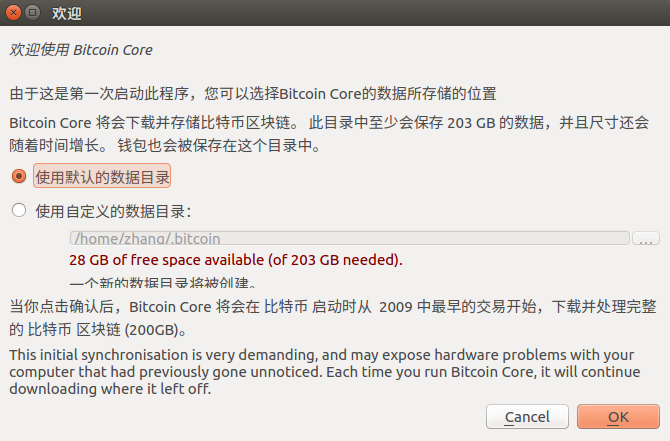
安装过程参考:
https://blog.csdn.net/u011609555/article/details/79660086
https://github.com/bitcoin/bitcoin/blob/master/doc/build-unix.md
https://blog.csdn.net/aaadssdffff/article/details/52992688
比特币编译(Ubuntu 16.04)的更多相关文章
- Ubuntu 16.04下为Android编译OpenCV 3.2.0 Manager
http://johnhany.net/2016/07/build-opencv-manager-for-android-on-ubuntu/ 最近想在Android上尝试一下SIFT和SURF匹配算 ...
- PHP7 学习笔记(一)Ubuntu 16.04 编译安装Nginx-1.10.3、 PHP7.0.9、Redis3.0 扩展、Phalcon3.1 扩展、Swoole1.9.8 扩展、ssh2扩展(全程编译安装)
==================== PHP 7.0 编译安装================== wget http://cn2.php.net/get/php-7.0.9.tar.bz2/fr ...
- Ubuntu 16.04 源码编译安装PHP7+swoole
备注: Ubuntu 16.04 Server 版安装过程图文详解 Ubuntu16镜像地址: 链接:https://pan.baidu.com/s/1XTVS6BdwPPmSsF-cYF6B7Q 密 ...
- Ubuntu 16.04 配置安卓5.1编译环境
Ubuntu 16.04版本 电脑cpu必须是64位 硬盘分配大约100G的空间 1.ubuntu中更新源 $ sudo apt-get update 2.安装 openjdk-8-jdk $ sud ...
- Ubuntu 16.04.5下FFmpeg编译与开发环境搭建
PC环境: Ubuntu 18.04 上面只要安装下面的提示安装即可,基本上不必再下载依赖库的源代码进行编译和安装 编译步骤: 1, 安装相关工具: sudo apt install -y auto ...
- Ubuntu 16.04下编译安装Apache2.4和PHP7结合
Ubuntu 16.04下编译安装Apache2.4和PHP7结合,并安装PDOmysql扩展. 1.编译安装apache2.4.20 1 第一步: ./configure --prefix=/usr ...
- 在Ubuntu 16.04 LTS上用g++和gcc编译C/C++代码错误提示“.../x86_64-linux-gnu/crt1.o: ELF section name out of range”
(有一些图片我是直接从个人的CSDN博客上复制来的) 最近一个多月来,我曾经多次尝试在Ubuntu 16.04 LTS上使用g++和gcc(这俩好像合起来叫MinGW?)来编译C/C++代码,但是在解 ...
- [Android 编译(一)] Ubuntu 16.04 LTS 成功编译 Android 6.0 源码教程
本文转载自:[Android 编译(一)] Ubuntu 16.04 LTS 成功编译 Android 6.0 源码教程 1 前言 经过3天奋战,终于在Ubuntu 16.04上把Android 6. ...
- ubuntu 16.04源码编译和配置caffe详细教程 | Install and Configure Caffe on ubuntu 16.04
本文首发于个人博客https://kezunlin.me/post/b90033a9/,欢迎阅读! Install and Configure Caffe on ubuntu 16.04 Series ...
- Ubuntu 16.04上源码编译和安装pytorch教程,并编写C++ Demo CMakeLists.txt | tutorial to compile and use pytorch on ubuntu 16.04
本文首发于个人博客https://kezunlin.me/post/54e7a3d8/,欢迎阅读最新内容! tutorial to compile and use pytorch on ubuntu ...
随机推荐
- 【bzoj1593】[Usaco2008 Feb]Hotel 旅馆 线段树区间合并
题目描述 奶牛们最近的旅游计划,是到苏必利尔湖畔,享受那里的湖光山色,以及明媚的阳光.作为整个旅游的策划者和负责人,贝茜选择在湖边的一家著名的旅馆住宿.这个巨大的旅馆一共有N (1 <= N & ...
- Go语言【第二篇】:Go语法和数据类型
Go语言基础语法 Go标记 Go程序可以由多个标记组成,可以是关键字,标识符,常量,字符串,符号.如以下Go语句由6个标记组成: fmt.PrintIn("Hello, World!&quo ...
- 【题解】HNOI2016网络
整体二分是个好东西!可我忘记了它QAQ其实当你知道这题可以整体二分的时候就已经不难了(个人觉得这是最难想到的一点啊).整体二分的话,我们就可以把问题转化为是否有一条权值 \(>= k\) 的链经 ...
- 【刷题】BZOJ 1001 [BeiJing2006]狼抓兔子
Description 现在小朋友们最喜欢的"喜羊羊与灰太狼",话说灰太狼抓羊不到,但抓兔子还是比较在行的,而且现在的兔子还比较笨,它们只有两个窝,现在你做为狼王,面对下面这样一个 ...
- [洛谷P3224][HNOI2012]永无乡
题目大意:给你$n$个点,每个点有权值$k$,现有两种操作: 1. $B\;x\;y:$将$x,y$所在联通块合并2. $Q\;x\;k:$查询第$x$个点所在联通块权值第$k$小是哪个数 题解:线段 ...
- 【POJ3621】【洛谷2868】Sightseeing Cows(分数规划)
[POJ3621][洛谷2868]Sightseeing Cows(分数规划) 题面 Vjudge 洛谷 大意: 在有向图图中选出一个环,使得这个环的点权\(/\)边权最大 题解 分数规划 二分答案之 ...
- HDU.1596 find the safest road (Floyd)
HDU.1596 find the safest road (Floyd) 题意分析 与普通的最短路不太相同,本题有些许的变化. 1. 要找到由i到j最安全的路,故在求解的时候要保证mp[i][j]尽 ...
- 一种高效的寻路算法 - B*寻路算法
在此把这个算法称作B* 寻路算法(Branch Star 分支寻路算法,且与A*对应),本算法适用于游戏中怪物的自动寻路,其效率远远超过A*算法,经过测试,效率是普通A*算法的几十上百倍. 通过引入该 ...
- 使用Faster-Rcnn进行目标检测(实践篇)转载
原 文链接:http://blog.csdn.net/gavin__zhou/article/details/52052915 原理 上一篇文章,已经说过了,大家可以参考一下,Faster-Rcnn进 ...
- Codeforces Round #396 (Div. 2) A B C D 水 trick dp 并查集
A. Mahmoud and Longest Uncommon Subsequence time limit per test 2 seconds memory limit per test 256 ...