
Django rest framework + Vue简单示例
构建vue项目参考这篇文章https://segmentfault.com/a/1190000008049815
一、创建Vue项目
修改源:npm config set registry https://registry.npm.taobao.org (建议修改)
创建脚手架:vue init webpack Vue项目名称
基本插件:
axios,发送Ajax请求
vuex,保存所有组件共用的变量
vue-cookies,操作cookie
二、流程
vue项目基本目录结构
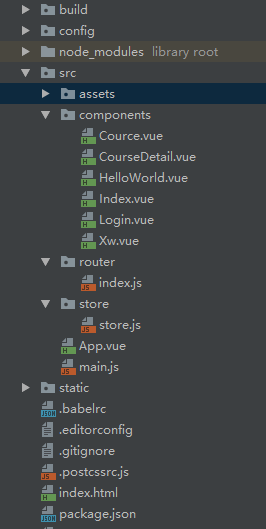
1.创建脚手架
vue init webpack Vue项目名称
运行 npm run dev
2.App.Vue中
# 用于点击查看组件

<router-link to="/index">首页</router-link>

# 组件显示的位置

<router-view/>
3.写路由
写在route/index.js中
import Vue from 'vue'

import Router from 'vue-router'

import HelloWorld from '@/components/HelloWorld'

import index from '@/components/Index'

import Cource from '@/components/Cource'

import Xw from '@/components/Xw'

import Login from '@/components/Login'

import CourseDetail from '@/components/CourseDetail'

Vue.use(Router);

export default new Router({

  routes: [

    {

      path: '/',

      name: 'HelloWorld',

      component: HelloWorld

    },

    {

      path: '/index',

      name: 'index',

      component: index

    },

    {

      path: '/cource',

      name: 'Cource',

      component: Cource

    },

    {

      path: '/xw',

      name: 'Xw',

      component: Xw

    },

    {

      path: '/login',

      name: 'Login',

      component: Login

    },

     {

      path: '/course-detail/:id/',

      name: 'CourseDetail',

      component: CourseDetail

    }

  ],

  mode: 'history'

})
index.js
注意:
我们访问的时候url一般会带有‘#’,如果不想有,在路由后面加上 mode: 'history'
如果想url中想传参:
 {

      path: '/course-detail/:id/',

      name: 'CourseDetail',

      component: CourseDetail

    }
4.写组件
组件写在src/components下
<template>

  <div class="hello">

   <h1>登录</h1>

    <input type="text"  v-model="username"><br>

    <input type="text"   v-model="password"><br>

    <a type="button" @click="doLogin">提交</a>

  </div>

</template>

<script>

export default {

  name: 'HelloWorld',

  data () {

    return {

      username: '',

      password:'',

    }

  },

  methods:{

    doLogin(){

      var that = this;

      this.$axios.request({

        url:'http://127.0.0.1:8000/login/',

        method:'POST',

        data:{

          username:this.username,

          password:this.password

        },

        responseType:'json'

      }).then(function (response) {

        console.log(response.data);

        that.$store.commit('saveToken',response.data);

        // 重定向到index

        that.$router.push('/index')

      })

    }

  }

}

</script>

<!-- Add "scoped" attribute to limit CSS to this component only -->

<style scoped>

h1, h2 {

  font-weight: normal;

}

ul {

  list-style-type: none;

  padding: 0;

}

li {

  display: inline-block;

  margin: 0 10px;

}

a {

  color: #42b983;

}

</style>
5.类似与ajax的请求ajax请求:axios
下载:npm install axios
首先必须在main.js中导入
// The Vue build version to load with the `import` command

// (runtime-only or standalone) has been set in webpack.base.conf with an alias.

import Vue from 'vue'

import App from './App'

import router from './router'

import axios from 'axios'

import store from './store/store'

Vue.prototype.$axios = axios;

Vue.config.productionTip = false;

/* eslint-disable no-new */

new Vue({

  el: '#app',

  store,

  router,

  components: { App },

  template: '<App/>'

});
main.js
import axios from 'axios'

Vue.prototype.$axios = axios
使用:
methods:{

    doLogin(){

      var that = this;

      this.$axios.request({

        url:'http://127.0.0.1:8000/login/',

        method:'POST',

        data:{

          username:this.username,

          password:this.password

        },

        responseType:'json'

      }).then(function (response) {

        console.log(response.data);

        that.$store.commit('saveToken',response.data);

        // 重定向到index

        that.$router.push('/index')

      })

    }

  }
重定向: that.$router.push('/index')
6.vuex的使用
下载:npm install vuex
1.在src目录下创建store/store.js
import Vue from 'vue'

import Vuex from 'vuex'

import Cookie from 'vue-cookies'

Vue.use(Vuex);

export default new Vuex.Store({

  // 组件中通过 this.$store.state.username 调用

  state: {

    username: Cookie.get('username'),

    token: Cookie.get('token')

  },

  mutations: {

    // 组件中通过 this.$store.commit(参数)  调用

    saveToken: function (state, data) {

      state.username = data.username;

      state.token = data.token;

      Cookie.set('username', data.username, '20min');

      Cookie.set('token', data.token, '20min')

    },

    clearToken: function (state) {

      state.username = null;

      state.token = null;

      Cookie.remove('username');

      Cookie.remove('token')

    }

  }

})
store.js
2.在main.js中导入store
// The Vue build version to load with the `import` command

// (runtime-only or standalone) has been set in webpack.base.conf with an alias.

import Vue from 'vue'

import App from './App'

import router from './router'

import axios from 'axios'

import store from './store/store' //vuex

Vue.prototype.$axios = axios;

Vue.config.productionTip = false;

/* eslint-disable no-new */

new Vue({

  el: '#app',

  store,   //vuex

  router,

  components: { App },

  template: '<App/>'

});
main.js
7.vue-cookies 的使用
下载:npm install vue-cookies
cookie的使用:
import Vue from 'vue'

import Vuex from 'vuex'

import Cookie from 'vue-cookies'

Vue.use(Vuex);

export default new Vuex.Store({

  // 组件中通过 this.$store.state.username 调用

  state: {

    username: Cookie.get('username'),

    token: Cookie.get('token')

  },

  mutations: {

    // 组件中通过 this.$store.commit(参数)  调用

    saveToken: function (state, data) {

      state.username = data.username;

      state.token = data.token;

      Cookie.set('username', data.username, '20min');

      Cookie.set('token', data.token, '20min')

    },

    clearToken: function (state) {

      state.username = null;

      state.token = null;

      Cookie.remove('username');

      Cookie.remove('token')

    }

  }

})
store.js
8.router-link参数的常见用法
<router-link :to="{'path':'/course-detail/'+item.id }"{{item.name}}</router-link>

<router-link to="/index">首页</router-link>
9. 获取传过来的参数
this.$route.params.id
10.重定向
this.$router.push('/index')
示例:
前端vue部分:
点击查看组件
<template>

  <div id="app">

    <router-link to="/index">首页</router-link>

    <router-link to="/cource">课程</router-link>

    <router-link to="/xw">学位</router-link>

    <div>

          <div v-if="this.$store.state.username">

          <a>{{ this.$store.state.username }}</a>

          <a @click="logout">注销</a>

          </div>

          <router-link v-else to="/login">登录</router-link>

        </div>

    <router-view/>

  </div>

</template>

<script>

export default {

  name: 'App',

  methods:{

    logout(){

      this.$store.state.username = '';

      this.$store.state.token = ''

    }

  }

}

</script>

<style>

/*#app {*/

  /*font-family: 'Avenir', Helvetica, Arial, sans-serif;*/

  /*-webkit-font-smoothing: antialiased;*/

  /*-moz-osx-font-smoothing: grayscale;*/

  /*text-align: center;*/

  /*color: #2c3e50;*/

  /*margin-top: 60px;*/

/*}*/

</style>
App.vue
组件
<template>

  <div class="hello">

   <h1>登录</h1>

    <input type="text"  v-model="username"><br>

    <input type="text"   v-model="password"><br>

    <a type="button" @click="doLogin">提交</a>

  </div>

</template>

<script>

export default {

  name: 'HelloWorld',

  data () {

    return {

      username: '',

      password:'',

    }

  },

  methods:{

    doLogin(){

      var that = this;

      this.$axios.request({

        url:'http://127.0.0.1:8000/login/',

        method:'POST',

        data:{

          username:this.username,

          password:this.password

        },

        responseType:'json'

      }).then(function (response) {

        console.log(response.data);

        that.$store.commit('saveToken',response.data);

        // 重定向到index

        that.$router.push('/index')

      })

    }

  }

}

</script>

<!-- Add "scoped" attribute to limit CSS to this component only -->

<style scoped>

h1, h2 {

  font-weight: normal;

}

ul {

  list-style-type: none;

  padding: 0;

}

li {

  display: inline-block;

  margin: 0 10px;

}

a {

  color: #42b983;

}

</style>
Login.vue
<template>

  <div class="hello">

   <h1>首页</h1>

  </div>

</template>

<script>

export default {

  name: 'HelloWorld',

  data () {

    return {

      msg: 'Welcome to Your Vue.js App'

    }

  }

}

</script>

<!-- Add "scoped" attribute to limit CSS to this component only -->

<style scoped>

h1, h2 {

  font-weight: normal;

}

ul {

  list-style-type: none;

  padding: 0;

}

li {

  display: inline-block;

  margin: 0 10px;

}

a {

  color: #42b983;

}

</style>
index.vue
<template>

  <div class="hello">

       <ul>

      <li v-for="item in courseList" >

        <router-link :to="{'path':'/course-detail/'+item.id }">{{item.name}}</router-link>

      </li>

    </ul>

  </div>

</template>

<script>

export default {

  name: 'HelloWorld',

  data () {

    return {

      courseList: ''

    }

  },

  mounted:function () {

     this.initCourses()

  },

   methods: {

    initCourses:function () {

      var that = this;

      this.$axios.request({

        url: 'http://127.0.0.1:8000/courses/',

        method: 'GET'

      }).then(function (response) {

        that.courseList = response.data.courseList

      })

    }

  }

}

</script>

<!-- Add "scoped" attribute to limit CSS to this component only -->

<style scoped>

h1, h2 {

  font-weight: normal;

}

ul {

  list-style-type: none;

  padding: 0;

}

li {

  display: inline-block;

  margin: 0 10px;

}

a {

  color: #42b983;

}

</style>
Cource.vue
<template>

  <div>

      <div>课程详细</div>

      <h1>{{title}}</h1>

      <h1>{{summary}}</h1>

  </div>

</template>

<script>

export default {

  data () {

    return {

      title:'',

      summary:'',

    }

  },

  mounted:function () {

    this.initCourseDetail()

  },

  methods:{

    initCourseDetail (){

      var nid = this.$route.params.id;

      var that = this;

      var url = 'http://127.0.0.1:8000/courses/' + nid+'.json';

      this.$axios.request({

        url: url,

        method:'GET',

        responseType:'json'

      }).then(function (response) {

        console.log(response);

        that.title = response.data.title;

        that.summary = response.data.summary

      })

    }

  }

}

</script>

<!-- Add "scoped" attribute to limit CSS to this component only -->

<style scoped>

</style>
CourceDetail.vue
路由:
import Vue from 'vue'

import Router from 'vue-router'

import HelloWorld from '@/components/HelloWorld'

import index from '@/components/Index'

import Cource from '@/components/Cource'

import Xw from '@/components/Xw'

import Login from '@/components/Login'

import CourseDetail from '@/components/CourseDetail'

Vue.use(Router);

export default new Router({

  routes: [

    {

      path: '/',

      name: 'HelloWorld',

      component: HelloWorld

    },

    {

      path: '/index',

      name: 'index',

      component: index

    },

    {

      path: '/cource',

      name: 'Cource',

      component: Cource

    },

    {

      path: '/xw',

      name: 'Xw',

      component: Xw

    },

    {

      path: '/login',

      name: 'Login',

      component: Login

    },

     {

      path: '/course-detail/:id/',

      name: 'CourseDetail',

      component: CourseDetail

    }

  ],

  mode: 'history'

})
index.js
保存全局使用的变量
import Vue from 'vue'

import Vuex from 'vuex'

import Cookie from 'vue-cookies'

Vue.use(Vuex);

export default new Vuex.Store({

  // 组件中通过 this.$store.state.username 调用

  state: {

    username: Cookie.get('username'),

    token: Cookie.get('token')

  },

  mutations: {

    // 组件中通过 this.$store.commit(参数)  调用

    saveToken: function (state, data) {

      state.username = data.username;

      state.token = data.token;

      Cookie.set('username', data.username, '20min');

      Cookie.set('token', data.token, '20min')

    },

    clearToken: function (state) {

      state.username = null;

      state.token = null;

      Cookie.remove('username');

      Cookie.remove('token')

    }

  }

})
store.js
// The Vue build version to load with the `import` command

// (runtime-only or standalone) has been set in webpack.base.conf with an alias.

import Vue from 'vue'

import App from './App'

import router from './router'

import axios from 'axios'

import store from './store/store' //vuex

Vue.prototype.$axios = axios;

Vue.config.productionTip = false;

/* eslint-disable no-new */

new Vue({

  el: '#app',

  store,   //vuex

  router,

  components: { App },

  template: '<App/>'

});
main.js
后端restframwork部分
"""luffyweb URL Configuration

The `urlpatterns` list routes URLs to views. For more information please see:

    https://docs.djangoproject.com/en/1.11/topics/http/urls/

Examples:

Function views

    1. Add an import:  from my_app import views

    2. Add a URL to urlpatterns:  url(r'^$', views.home, name='home')

Class-based views

    1. Add an import:  from other_app.views import Home

    2. Add a URL to urlpatterns:  url(r'^$', Home.as_view(), name='home')

Including another URLconf

    1. Import the include() function: from django.conf.urls import url, include

    2. Add a URL to urlpatterns:  url(r'^blog/', include('blog.urls'))

"""

from django.conf.urls import url

from django.contrib import admin

from api import views

urlpatterns = [

    url(r'^admin/', admin.site.urls),

    url(r'^login/', views.LoginView.as_view()),

    url(r'^courses/$', views.CoursesView.as_view()),

    url(r'^courses/(?P<pk>\d+)\.(?P<format>[a-z0-9]+)$', views.CoursesView.as_view()),

]
urls
from django.http import JsonResponse

from django.shortcuts import render,HttpResponse

from rest_framework.views import APIView

# Create your views here.

class LoginView(APIView):

    def get(self,request,*args,**kwargs):

        ret = {

            'code': 1000,

            'data': '老男孩'

        }

        response = JsonResponse(ret)

        response['Access-Control-Allow-Origin'] = "*"

        return response

    def post(self,request,*args,**kwargs):

        print(request.POST)

        ret = {

            'code':1000,

            'username':'老男孩',

            'token':'71ksdf7913knaksdasd7',

        }

        response = JsonResponse(ret)

        response['Access-Control-Allow-Origin'] = "*"

        return response

    def options(self, request, *args, **kwargs):

        # self.set_header('Access-Control-Allow-Origin', "http://www.xxx.com")

        # self.set_header('Access-Control-Allow-Headers', "k1,k2")

        # self.set_header('Access-Control-Allow-Methods', "PUT,DELETE")

        # self.set_header('Access-Control-Max-Age', 10)

        response = HttpResponse()

        response['Access-Control-Allow-Origin'] = '*'

        response['Access-Control-Allow-Headers'] = '*'

        #response['Access-Control-Allow-Methods'] = 'PUT'

        return response

class CoursesView(APIView):

    def get(self, request, *args, **kwargs):

        pk = kwargs.get('pk')

        if pk:

            ret = {

                'title': "标题标题标题",

                'summary': '老师,太饿了。怎么还不下课'

            }

        else:

            ret = {

                'code': 1000,

                'courseList': [

                    {"name": '21天学会Pytasdfhon', 'id': 1},

                    {"name": '23天学会Pytasdfhon', 'id': 2},

                    {"name": '24天学会Pytasdfhon', 'id': 3},

                ]

            }

        response = JsonResponse(ret)

        response['Access-Control-Allow-Origin'] = "*"

        return response
views
Django rest framework + Vue简单示例的更多相关文章
- Django REST framework+Vue 打造生鲜超市(四)
五.商品列表页 5.1.django的view实现商品列表页 (1)goods/view_base.py 在goods文件夹下面新建view_base.py,为了区分django和django res ...
- Django REST framework+Vue 打造生鲜超市(三)
四.xadmin后台管理 4.1.xadmin添加富文本插件 (1)xadmin/plugins文件夹下新建文件ueditor.py 代码如下: # xadmin/plugins/ueditor.py ...
- Django REST framework+Vue 打造生鲜超市(五)
六.商品类别数据展示 6.1. 商品类别数据接口 (1)商品分类有两个接口: 一种是全部分类:一级二级三级 一种是某一类的分类以及商品详细信息: 开始写商品分类的接口 (2)序列化 给分类添加三级分类 ...
- Django REST framework+Vue 打造生鲜超市(十二)
十三.首页.商品数量.缓存和限速功能开发 13.1.轮播图接口实现 首先把pycharm环境改成本地的,vue中local_host也改成本地 (1)goods/serializer class B ...
- web 框架的本质及自定义web框架 模板渲染jinja2 mvc 和 mtv框架 Django框架的下载安装 基于Django实现的一个简单示例
Django基础一之web框架的本质 本节目录 一 web框架的本质及自定义web框架 二 模板渲染JinJa2 三 MVC和MTV框架 四 Django的下载安装 五 基于Django实现的一个简单 ...
- Django REST framework+Vue 打造生鲜电商项目(笔记二)
(转自https://www.cnblogs.com/derek1184405959/p/8768059.html)(有修改) 接下来开始引入django resfulframework,体现它的强大 ...
- Django REST framework+Vue 打造生鲜超市(一)
一.项目介绍 1.1.掌握的技术 Vue + Django Rest Framework 前后端分离技术 彻底玩转restful api 开发流程 Django Rest Framework 的功能实 ...
- Ubuntu18.04安装和配置Django,并实现简单示例
一.前言(系统,django介绍,window.mac.linux简单区别) Django是python开发过程最重要的web框架.因为在看的Django教学视频是在mac下安装的,我自己用的是Lin ...
- Django REST framework+Vue 打造生鲜电商项目(笔记四)
(PS:部分代码和图片来自博客:http://www.cnblogs.com/derek1184405959/p/8813641.html.有增删) 一.用户登录和手机注册 1.drf的token功能 ...
随机推荐
- 【Python】python基础语法 编码
编码 默认情况下,python以UTF-8编码,所有的字符串都是Unicode字符串,可以为代码定义不同的的编码. #coding:UTF-8 #OR #-*- coding:UTF-8 -*- p ...
- 【bzoj1026】[SCOI2009]windy数 数位dp
题目描述 windy定义了一种windy数.不含前导零且相邻两个数字之差至少为2的正整数被称为windy数. windy想知道,在A和B之间,包括A和B,总共有多少个windy数? 输入 包含两个整数 ...
- 楼房 洛谷1382 && codevs2995
P1382 楼房 题目描述 地平线(x轴)上有n个矩(lou)形(fang),用三个整数h[i],l[i],r[i]来表示第i个矩形:矩形左下角为(l[i],0),右上角为(r[i],h[i]).地平 ...
- Python单例模式的四种方法
在这之前,先了解super()和__new__()方法 super()方法: 返回一个父类或兄弟类类型的代理对象,让你能够调用一些从继承过来的方法. 它有两个典型作用: a. 在单继承的类层次结构中, ...
- requireJs使用方法项目实例
首先,定义 main.js 和 事件处理的公共 js main.js 主要是定义引用名称和路径的对应关系 事件绑定模块: 写jsp页面: jsp中先引入 require.js 和 main.js 然 ...
- responseBody注解可以直接返回字符串 && springMVC Controller get请求返回字符串是中文乱码解决
//获取商品描述信息(html片段)字符串返回给前台填充html @RequestMapping(value="/item/desc/{itemId}",produces=Medi ...
- train loss与test loss结果分析(接利用caffe的solverstate断点训练)
train loss 不断下降,test loss不断下降,说明网络仍在学习; train loss 不断下降,test loss趋于不变,说明网络过拟合; train loss 趋于不变,test ...
- mysql中的case when 与if else
大神说:在sql中,能用if else 就不用case when 下面来看看,具体为什么,没有搞清楚,如果有大神知道的提供下资料: Mysql的if既可以作为表达式用,也可在存储过程中作为流程控制 ...
- redis缓存在项目中的使用
关于redis为什么能作为缓存这个问题我们就不说了,直接来说一下redis缓存到底如何在项目中使用吧: 1.redis缓存如何在项目中配置? 1.1redis缓存单机版和集群版配置?(redis的客户 ...
- 手脱ASProtect v1.23 RC1(无Stolen Code)
1.载入PEID ASProtect v1.23 RC1 2.载入OD,不勾选内存访问异常,其他异常全部勾选 > 01C04200 push 跑跑排行.0042C001 ; //入口处 E8 c ...