
Executor Framework
Why?
look at the following 2 pieces of code for implementing a simple web server based on socket, can you point out the problems(I put them in the comments)?
/*
* Single thread. bad response time and throughout(CPU idle). Think about how it will block(read from/ write to socket, perform I/O operation
* like File system , DB, Network...)
*
*/
class SingleThreadWebServer {

    public static void main(String[] args) throws IOException {

        ServerSocket socket = new ServerSocket();

        while (true) {

            Socket connection = socket.accept();

            handleRequest(connection);

        }

    }

}

/////////////////////////////////////////////////////////////
/*
* Multiple threads. will get good response time and throughout.
* Problems:
*        1. Creating a thread for each request. Creating thread will consume resource(cpu time / memory).
*        2. one Thead is only for one request.(not reused).
*        3. in a heavy concurrent load environment, JVM will have pressure for GC or even get OOM exception.
*/
class ThreadPerTaskWebServer {

    public static void main(String[] args) throws IOException {

        ServerSocket socket = new ServerSocket();

        while (true) {

            final Socket connection = socket.accept();

            Runnable task = new Runnable() {

                public void run() {

                    handleRequest(connection);

                }

            };

            new Thread(task).start();

            }

        }

}
Java Executor Framework
The framework has a flexible design to run tasks asynchronously, decouple the task submission and execution based on producer/consumer pattern, provide mechanisms to manage the lifecycle of the service and tasks.
The Executor Interface
It is simple with only one method signature below:
public interface Executor {

    void execute(Runnable command);

}
Task/command can run in a new thread, in a thread pool or in the calling thread depending on the implementations of the Executor. For example:
public class MyExecutor implements Executor {

    public void execute(Runnable r) {

        new Thread(r).start(); // run in a new thread

        r.run(); //run in the calling thread.

    };

}
Runnable & Callable
They both are interfaces in different packages. But Callable's call method has a return value and throws a checked Exception. See checked exception and runtime exception herewhich is interesting. Task usually needs a return value like query database, perform a calculation. The Executor interface provides a very basic task submission where a task is a Runnable implementation. So, if you do not care about the result and exception handling, just use Executor.execute(Runnable). Regarding how Callable is called in a thread, we will talk later in this page.
The ExecutorService Interface
JVM cannot exit until all the nondaemon threads have terminated. So, failing to shut down the executor could prevent JVM from exiting.
Executor runs task asynchronously, at any given time the state of previously submitted tasks is not immediately obvious. Some may have finished, some may be concurrently running and some may be in the queue awaiting execution. Since Executors(those implements) provide a service to the application, they should be able to be shut down as well, both gracefully(like do not accept new tasks) and abruptly(like power off) and feedback application with information about the status of the tasks that affected by the shutdown.
The interface of this mechanism is ExecutorService which extends the Executor interface, adding some new methods to provide lifecycle management for the executor/service and methods to facilitate the task submission. For example, you can use ExecutorService.submit(Runnable) if you do not want a return result or use ExecutorService.submit(Runnable,T) to get a result if the runnable is completed successfully.
"An Executor that provides methods to manage termination and methods that can produce a Future for tracking the progress of one or more asynchronous tasks."
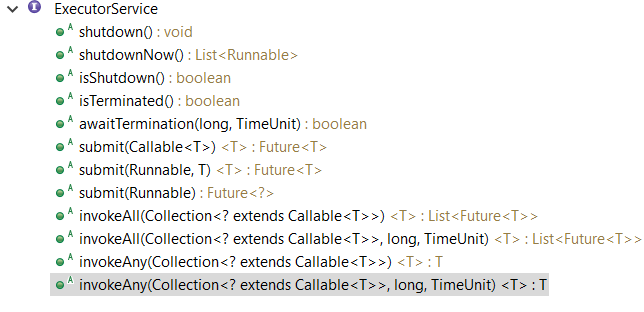
The shutdown method will allow previously submitted tasks to execute before terminating, while the shutdownNow method prevents waiting tasks from starting and attempts to stop currently executing tasks. The executing tasks can be terminated/stopped if it wants to be by properly handling the InterruptedException which is caused by the(another) executor who interrupts/cancels it(invoking the the interrupt method of the target thread).
Upon termination, an executor has no tasks actively executing, no tasks awaiting execution, and no new tasks can be submitted. An unused ExecutorService should be shut down to allow reclamation of its resources.
Method submit extends base method Executor.execute(Runnable) by creating and returning a Future that can be used to cancel execution and/or wait for completion. Methods invokeAny and invokeAll perform the most commonly useful forms of bulk execution, executing a collection of tasks and then waiting for at least one, or all, to complete. (Class ExecutorCompletionService can be used to write customized variants of these methods.)
Future, FutureTask
Future as an interface represents the lifecycle of a task and provides methods to test whether the task has completed or been canceled, retrieve its result, and cancel the task.
cancel():
Attempts to cancel execution of this task. This attempt will fail if the task has already completed, has already been cancelled, or could not be cancelled for some other reason. If successful, and this task has not started when cancel is called, this task should never run(the task, in this case, is not picked from the queue). If the task has already started, then the mayInterruptIfRunning parameter determines whether the thread executing this task should be interrupted in an attempt to stop the task. If it is true and the task properly handles the InterruptException for cancelling, the cancel will be sucessful. If it is false, the in-progress tasks are allowed to complete.
After this method returns, subsequent calls to isDone will always return true. Subsequent calls to isCancelled will always return true if this method returned true.
In the Executor framework, tasks that have been submitted but not yet started can always be cancelled, and tasks that have started can sometimes be cancelled if they are responsive to interruption.Cancelling a task that has already completed has no effect.
get():
throws InterruptedException, ExecutionException,CancellationException. The another version also throws TimeoutException
Waits(blocked) if necessary for the computation to complete, and then retrieves its result. It throws checked exception.
ExecutionException is the wrapper of all other exceptions including runtime exception, customized exception, program error..., use e.getCause to get the specific exception.
IsCanclelled:
Returns true if this task was cancelled before it completed normally.
IsDone:
Returns true if this task completed.Completion may be due to normal termination, an exception, or cancellation -- in all of these cases, this method will return true.
 public interface Callable < V > {

     V call() throws Exception;

 }

 public interface Future < V > {

     boolean cancel(boolean mayInterruptIfRunning);

     boolean isCancelled();

     boolean isDone();

     V get() throws InterruptedException,ExecutionException,CancellationException;

     V get(long timeout, TimeUnit unit) throws InterruptedException,ExecutionException,CancellationException,TimeoutException;

 }
Here is a question, How Callable as a task run in thread(consumer) in ExecutorService ? As we know, the java Thread Model needs a Runnable (target) implementing the run method, how this work? When submitting a task by ExecutorService.submit(Callable<T>), in the code(AbstractExecutorService), it wrapper the Callable into a FutureTask class in newTaskFor(Callable) method. FutureTask implements the RunnableFuture. As the name tells us, RunnableFuture implements both Runnable and Future. So, in the run method of FutureTask, it invokes the Callable.call() method and set the result of the task(FutureTask).
run method in class FutureTask and the wrapper
    public void run() {

        if (state != NEW ||

            !UNSAFE.compareAndSwapObject(this, runnerOffset,

                                         null, Thread.currentThread()))

            return;

        try {

            Callable<V> c = callable;

            if (c != null && state == NEW) {

                V result;

                boolean ran;

                try {

                    result = c.call();

                    ran = true;

                } catch (Throwable ex) {

                    result = null;

                    ran = false;

                    setException(ex);

                }

                if (ran)

                    set(result);

            }
protected <T> RunnableFuture<T> newTaskFor(Callable<T> callable) {

        return new FutureTask<T>(callable);

    }
Execution policy and Thread pool
Because the framework decouples the task submission and execution, it support the execution policy which specify the "what, where, when and how" of task execution,including:
• In what thread will tasks be executed?
• In what order should tasks be executed (FIFO, LIFO, priority order)?
• How many tasks may execute concurrently?
• How many tasks may be queued pending execution?
• If a task has to be rejected because the system is overloaded, which task should be selected as the victim, and how should the application be notified?
• What actions should be taken before or after executing a task?
You can use execution policy to match your system resource.
Thread pool, uses a work queue to hold tasks waiting to be executed. The work thread takes next task from the queue, execute it, then back to the pool for another task.
Below is the new version of the web server demo using thread pool. What's the benefits?
1) Reused threads can save the time to create/destroy thread repeatedly, increasing response time. The default Thread class cannot be reused, so an extended one is needed to achieve reuse.
2) You can have the proper size of the threads to keep cpu busy but not too many of them.
 class TaskExecutionWebServer {

     private static final int NTHREADS = ;

     private static final Executor exec = Executors.newFixedThreadPool(NTHREADS);

     public static void main(String[] args) throws IOException {

         ServerSocket socket = new ServerSocket();

         while (true) {

             final Socket connection = socket.accept();

             Runnable task = new Runnable() {

                 public void run() {

                     handleRequest(connection);

                 }

             };

             exec.execute(task);

         }

     }

 }
You can create a thread pool by calling one of the static factory methods in Executors provided by the java library
- newFixedThreadPool
"Creates a thread pool that reuses a fixed number of threads operating off a shared unbounded queue. At any point, at most nThreads threads will be active processing tasks.If additional tasks are submitted when all threads are active,they will wait in the queue until a thread is available.If any thread terminates due to a failure during execution prior to shutdown, a new one will take its place if needed to execute subsequent tasks. The threads in the pool will exist until it is explicitly shutdown." - newCachedThreadPool
Creates a thread pool that creates new threads as needed, but will reuse previously constructed threads when they are available. These pools will typically improve the performance of programs that execute many short-lived asynchronous tasks. Calls to execute will reuse previously constructed threads if available. If no existing thread is available, a new thread will be created and added to the pool. Threads that have not been used for sixty seconds are terminated and removed from the cache. Thus, a pool that remains idle for long enough will not consume any resources. Note that pools with similar properties but different details (for example, timeout parameters)may be created using ThreadPoolExecutor constructors. newSingleThreadExecutor
A single-threaded executor creates a single worker thread to process tasks, replacing it if it dies unexpectedly. Tasks are guaranteed to be processed sequentially according to the order imposed by the task queue (FIFO, LIFO, priority order).newScheduledThreadPool
Creates a thread pool that can schedule commands to run after a given delay, or to execute periodically, similar to Timer.
All the above methods invoke the constructor of the ThreadPoolExecutor to create thread pool. So, you can also instance a ThreadPoolExecutor to satisfy your needs: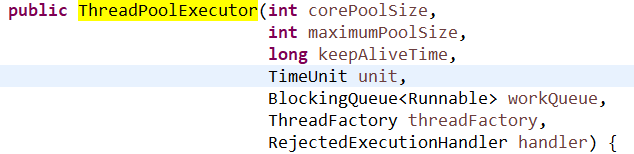
For example, you can also create your custom pool with work queue to implement FIFO,LIFO, priority order. For the web server example, using the pool-based policy will no longer fail under heavy load as it does not create too many threads. But as the work queue is unbounded, if the speed of task execution is much slower than the task comes(producer is much faster than consumer), it can still fail(like TaskExecutionWebServer). We can add a bounded work queue(BlockingQueue) to the pool if needed to hold tasks awaiting execution.
The default for newFixedThreadPool and newSingleThreadExecutor is to use an unbounded LinkedBlockingQueue. Tasks will queue up if all worker threads are busy, but the queue could grow without bound if the tasks keep arriving faster than they can be executed. ArrayBlockingQueue, bounded LinkedBlockingQueue and PriorityBlockingQueue can help to reduce the resource exhaustion. There are kinds of saturation policies to control how the new tasks are treated if the bounded queue is full. With a bounded work queue, the queue size and pool size must be tuned together.
The newCachedThreadPool factory uses a SynchronousQueue, which is actually not a real queue but a handoff mechanism between threads (producer/consumer) just like the name(synchronous) indicates. If a new task comes and if there is a thread already waiting to accept the handoff, the task will be run or the task will be rejected according to the saturation policy. It is more efficient than those real queues as no additional operations on the queue(enqueue/dequeue). newCachedThreadPool is a good start point to use.
You can set your own thread factory , by this, you can create thread with custom name, add statistic , logging functions...
You can also extend TheadPoolExecutor which provides several hooks for subclass like beforeExecute, afterExecute, terminated. With these methods, you can add timing, logging, statistics.
Saturation policies
The setRejectedExecutionHandler is used to modify the policy when bounded work queue is full or the executor has been shut down. Several RejectedExecutionHandler implementations are provided with different policies.
ThreadPoolExecutor executor = new ThreadPoolExecutor(N_THREADS, N_THREADS,0L, TimeUnit.MILLISECONDS,new LinkedBlockingQueue<Runnable>(CAPACITY));

executor.setRejectedExecutionHandler(new ThreadPoolExecutor.CallerRunsPolicy());
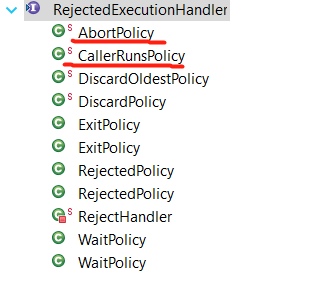
The default is AbortPolicy which throw the unchecked RejectedExecutionException. The caller method can catch it. DiscardPolicy will just silently discard the new task. Note that using DiscardOldestPolicy with a PriorityQueue may drop the most urgent task.
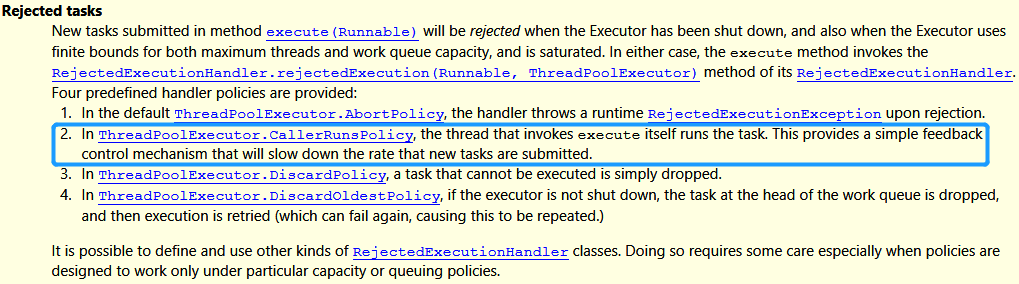
The CallerRunsPolicy is interesting. It neither throws Exception nor discards the task. Instead, tries to slow down the flow of new tasks by pushing some of the work back to the caller thread. The caller thread ( the thread calling execute on the Executor) not the thread pool will execute the task. This gives the executor time to handle thebacklog tasks while it also blocks the new tasks/connectiona in TCP/IPlqueue/ayer since the main threadcan not submit(accept) new task(it is runningthe the task) . As the load continues to come, the TCP/IP layer may be full as well and may decide if it starts to discard the newly connection /request...As the server becomes overloaded, the overload is gradually pushed outward—from the pool threads to the work queue to the application to the TCP layer, and eventually to the client—enabling more graceful degradation under load.
Examples/Applications
- Shutdown the ExecutorService. Below is the logic of in what situation task will be rejected
 class LifecycleWebServer {

     private final ExecutorService exec = ...;

     public void start() throws IOException {

         ServerSocket socket = new ServerSocket(80);

         while (!exec.isShutdown()) {

             try {

                 final Socket conn = socket.accept();

                 exec.execute(new Runnable() {

                     public void run() {

                         handleRequest(conn);

                     }

                 });

             } catch (RejectedExecutionException e) {

                 //when the Executor has been shut down, and also when the Executor uses finite bounds for both maximum threads and work queue capacity,
                   //and is saturated.

                 if (!exec.isShutdown())

                     log("task submission rejected", e);

             }

         }

     }

     public void stop() {

         exec.shutdown();

     }

     void handleRequest(Socket connection) {

         Request req = readRequest(connection);

         if (isShutdownRequest(req))

             stop();

         else

             dispatchRequest(req);

     }

 }
- Delayed and periodic tasks
Use ScheduledThreadPoolExecutor replace Time/TimerTask class. If you need to build your own scheduling service, you may still be able to take advantage of the library by using a DelayQueue, a BlockingQueue implementation that provides the scheduling functionality of ScheduledThreadPoolExecutor. A DelayQueue manages a collection of Delayed objects. A Delayed has a delay time associated with it: DelayQueue lets you take an element only if its delay has expired. Objects are returned from a DelayQueue ordered by the time associated with their delay
See demo here - ExecutorCompletionService
What if you submit many tasks and need to get the result immediately if available. Using get method, to repeatedly poll the result with timeout zero is not a good idea. CompletionService combines the Executor and BlockingQueue. It delegates the task execution to Executor, put the Future to the BlockingQueue once it is done by overriding the done() method of Future/FutureTask. You can use the service.take() method to get the Future(finished) from the queue once there is one available and then call get method for the result. So, in CompletionService, it will wrapper task as QueueingFuture.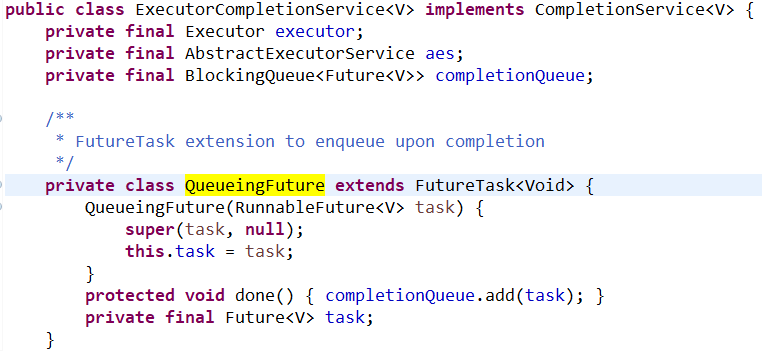
 for (int t = 0, n = info.size(); t < n; t++) {

     Future < ImageData > f = completionService.take();

     ImageData imageData = f.get();

     renderImage(imageData);

 }
By calling completionService.take(), you get the result soon once any of the tasks is completed.
- Placing time limits on tasks. Sometimes, we want to cancel tasks due to a timeout setting.
 Page renderPageWithAd() throws InterruptedException {

     long endNanos = System.nanoTime() + TIME_BUDGET;

     Future < Ad > f = exec.submit(new FetchAdTask());

     // Render the page while waiting for the ad

     Page page = renderPageBody();

     Ad ad;

     try {

         // Only wait for the remaining time budget

         long timeLeft = endNanos - System.nanoTime();

         ad = f.get(timeLeft, NANOSECONDS);

     } catch (ExecutionException e) {

         ad = DEFAULT_AD;

     } catch (TimeoutException e) {

         ad = DEFAULT_AD;

         f.cancel(true);

     }

     page.setAd(ad);

     return page;

 }
If you have a list of tasks, you can use a more convenient way of following:
 private class QuoteTask implements Callable < TravelQuote > {

     private final TravelCompany company;

     private final TravelInfo travelInfo;

     ...

     public TravelQuote call() throws Exception {

         return company.solicitQuote(travelInfo);

     }

 }

 public List < TravelQuote > getRankedTravelQuotes(TravelInfo travelInfo, Set < TravelCompany > companies,

     Comparator < TravelQuote > ranking, long time, TimeUnit unit)

 throws InterruptedException {

     List < QuoteTask > tasks = new ArrayList < QuoteTask > ();

     for (TravelCompany company: companies) tasks.add(new QuoteTask(company, travelInfo));

     List < Future < TravelQuote >> futures = exec.invokeAll(tasks, time, unit);

     List < TravelQuote > quotes = new ArrayList < TravelQuote > (tasks.size());

     Iterator < QuoteTask > taskIter = tasks.iterator();

     for (Future < TravelQuote > f: futures) {

         QuoteTask task = taskIter.next();

         try {

             quotes.add(f.get());

         } catch (ExecutionException e) {

             quotes.add(task.getFailureQuote(e.getCause()));

         } catch (CancellationException e) {

             quotes.add(task.getTimeoutQuote(e));

         }

     }

     Collections.sort(quotes, ranking);

     return quotes;

 }
Reference:
Java 8 API doc
Book JCIP
http://tutorials.jenkov.com/java-concurrency/index.html
Executor Framework的更多相关文章
- Java Concurrency - Fork/Join Framework
Normally, when you implement a simple, concurrent Java application, you implement some Runnable obje ...
- Java并发框架:Executor
介绍 随着当今处理器中可用的核心数量的增加, 随着对实现更高吞吐量的需求的不断增长,多线程 API 变得非常流行. Java 提供了自己的多线程框架,称为 Executor 框架. 1. Execut ...
- 转载一些Android性能优化建议
首先给出原文链接,感谢大神的经验分享:http://www.jointforce.com/jfperiodical/article/3553?utm_source=tuicool&utm_me ...
- Effective java笔记(九),并发
66.同步访问共享的可变数据 JVM对不大于32位的基本类型的操作都是原子操作,所以读取一个非long或double类型的变量,可以保证返回的值是某个线程保存在该变量中的,但它并不能保证一个线程写入的 ...
- CountDownLatch如何使用
正如每个Java文档所描述的那样,CountDownLatch是一个同步工具类,它允许一个或多个线程一直等待,直到其他线程的操作执行完后再执行.在Java并发中,countdownlatch的概念是一 ...
- Effective Java 读书笔记之九 并发
一.访问共享的可变数据时要同步 1.synchronized关键字既然保证访问的可见性也能保证原子性.而volatile修饰符只能保证变量的线程可见性. 2.增量操作符等不是原子性,多线程操作时可能导 ...
- 使用Timer和ScheduledThreadPoolExecutor执行定时任务
Java使用Timer和ScheduledThreadPoolExecutor执行定时任务 定时任务是在指定时间执行程序,或周期性执行计划任务.Java中实现定时任务的方法有很多,主要JDK自带的一些 ...
- 什么时候使用CountDownLatch
正如每个Java文档所描述的那样,CountDownLatch是一个同步工具类,它允许一个或多个线程一直等待,直到其他线程的操作执行完后再执行.在Java并发中,countdownlatch的概念是一 ...
- [Java Basics] multi-threading
1, Process&Threads Most implementations of the Java virtual machine run as a single process. Thr ...
随机推荐
- Oracle中常用的语句
1.查询锁表 SELECT a.object_name,b.session_id,c.serial#,c.program,c.username,c.command,c.machine,c.lockwa ...
- Xcode 9.3 pod install update 错误
[!] Oh no, an error occurred. Search for existing GitHub issues similar to yours: https://github.com ...
- meven 配置
配置meven 自定义文件[User Settings] D:\java\apache-maven-3.5.3\conf\settings.xml settings.xml 新增两端配置信息 < ...
- Spring MVC体系
框架搭建 web.xml配置 <?xml version="1.0" encoding="UTF-8"?> <web-app xmlns:xs ...
- 基于JQ的简版选项卡记录
<!DOCTYPE html><html lang="en"><head> <meta charset="UTF-8" ...
- Web Services简单介绍
Web Services简单介绍 Web Services入门 一.Web Services简介 1.什么是Web Services? Web Services 是应用程序组件 Web Service ...
- Oracle之基础操作
sqlplus常用命令: 进入sqlplus模式:sqlplus /nolog 管理员登录: conn / as sysdba 登录本机的数据库 conn sys/123456 as sysdba 普 ...
- Apache Spark on K8s的安全性和性能优化
前言 Apache Spark是目前最为流行的大数据计算框架,与Hadoop相比,它是替换MapReduce组件的不二选择,越来越多的企业正在从传统的MapReduce作业调度迁移到Spark上来,S ...
- Ubuntu12.04下zxing源码编译
1.下载zxing源码 git clone https://github.com/15903016222/zxing-cpp.git 2.安装依赖工具cmake sudo apt-get instal ...
- 让pandas的输出结果中显示全部数据
import pandas as pd pd.set_option('display.max_columns', 1000) pd.set_option('display.width', 1000) ...