
Android学习07
自定义Dialog
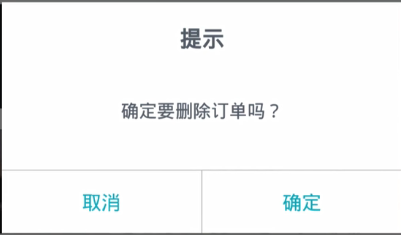
创建一个Java类CustomDialog继承Dialog。
package com.example.helloworld.widget;

import android.app.Dialog;

import android.content.Context;

import android.graphics.Point;

import android.os.Bundle;

import android.text.TextUtils;

import android.view.Display;

import android.view.View;

import android.view.WindowManager;

import android.widget.TextView;

import androidx.annotation.NonNull;

import com.example.helloworld.R;

public class CustomDialog extends Dialog implements View.OnClickListener {

    private TextView mTvTitle,mTvMessage,mTvCancel,mTvConfirm;

    private String title,message,cancel,confirm;

    private IOnCancelListener cancelListener;  //取消按钮被点击了的监听器

    private IOnConfirmlListener confirmlListener;  //确定按钮被点击了的监听器

    public CustomDialog(@NonNull Context context) {

        super(context);

    }

    public CustomDialog(@NonNull Context context,int themeId) {

        super(context,themeId);

    }

    public CustomDialog setTitle(String title) {

        this.title = title;

        return this;

    }

    public CustomDialog setMessage(String message) {

        this.message = message;

        return this;

    }

    public CustomDialog setCancel(String cancel,IOnCancelListener listener) {

        this.cancel = cancel;

        this.cancelListener = listener;

        return this;

    }

    public CustomDialog setConfirm(String confirm,IOnConfirmlListener listener) {

        this.confirm = confirm;

        this.confirmlListener = listener;

        return this;

    }

    @Override

    protected void onCreate(Bundle savedInstanceState) {

        super.onCreate(savedInstanceState);

        setContentView(R.layout.layout_custom_dialog);

        //空白处不能取消动画

        setCanceledOnTouchOutside(false);

        //设置宽度

        WindowManager m = getWindow().getWindowManager();

        Display d = m.getDefaultDisplay();

        WindowManager.LayoutParams p =getWindow().getAttributes();

        Point size = new Point();

        d.getSize(size);

        p.width = (int)(size.x * 0.8);  //设置dialog的宽度为当前手机屏幕的宽度*0.8

        getWindow().setAttributes(p);

        mTvTitle = findViewById(R.id.tv_title);

        mTvMessage = findViewById(R.id.tv_message);

        mTvCancel = findViewById(R.id.tv_cancel);

        mTvConfirm = findViewById(R.id.tv_confirm);

        if (!TextUtils.isEmpty(title)){

            mTvTitle.setText(title);

        }

        if (!TextUtils.isEmpty(message)){

            mTvMessage.setText(message);

        }

        if (!TextUtils.isEmpty(cancel)){

            mTvCancel.setText(cancel);

        }

        if (!TextUtils.isEmpty(confirm)){

            mTvConfirm.setText(confirm);

        }

        //设置取消和确定的监听事件

        mTvCancel.setOnClickListener(this);

        mTvConfirm.setOnClickListener(this);

    }

    @Override

    public void onClick(View v) {

        switch (v.getId()){

            case R.id.tv_cancel:

                if (cancelListener!=null){

                    cancelListener.onCancel(this);

                }

                break;

            case R.id.tv_confirm:

                if (confirmlListener!=null){

                    confirmlListener.onConfirm(this);

                }

                break;

        }

    }

//回调接口

    public interface IOnCancelListener{

        void onCancel(CustomDialog dialog);

    }

    public interface IOnConfirmlListener{

        void onConfirm(CustomDialog dialog);

    }

}
activity_custom.xml:
<?xml version="1.0" encoding="utf-8"?>

<LinearLayout xmlns:android="http://schemas.android.com/apk/res/android"

    android:layout_width="match_parent"

    android:layout_height="match_parent"

    android:orientation="vertical"

    android:padding="15dp">

    <Button

        android:id="@+id/btn_custom_dialog"

        android:layout_width="match_parent"

        android:layout_height="wrap_content"

        android:text="自定义Dialog"

        android:textAllCaps="false"/>

</LinearLayout>
在drawable中新建bg_custom_dialog.xml设置边框:
<?xml version="1.0" encoding="utf-8"?>

<shape xmlns:android="http://schemas.android.com/apk/res/android"

    android:layout_width="match_parent"

    android:layout_height="match_parent">

    <solid android:color="#ffffff" />

    <stroke

        android:width="0.8dp"

        android:color="#ffffff" />

    <!-- 圆角 -->

    <corners android:radius="6dp" />

</shape>
新建layout文件,layout_custom_dialog.xml:
<?xml version="1.0" encoding="utf-8"?>

<LinearLayout xmlns:android="http://schemas.android.com/apk/res/android"

    android:orientation="vertical"

    android:layout_width="match_parent"

    android:layout_height="match_parent"

    android:gravity="center_horizontal"

    android:background="@drawable/bg_custom_dialog">

    <TextView

        android:id="@+id/tv_title"

        android:layout_width="wrap_content"

        android:layout_height="wrap_content"

        android:textSize="30sp"

        android:textColor="#000"

        android:text="提示"

        android:textStyle="bold"

        android:layout_marginTop="15dp"/>

    <TextView

        android:id="@+id/tv_message"

        android:layout_width="wrap_content"

        android:layout_height="wrap_content"

        android:textSize="30sp"

        android:textColor="#000"

        android:text="删除?"

        android:layout_marginTop="20dp"

        android:layout_marginBottom="20dp"/>

    <View

        android:layout_width="match_parent"

        android:layout_height="1dp"

        android:background="#3CA9C4"/>

    <LinearLayout

        android:layout_width="match_parent"

        android:layout_height="45dp"

        android:orientation="horizontal">

        <TextView

            android:id="@+id/tv_cancel"

            android:layout_width="0dp"

            android:layout_height="match_parent"

            android:layout_weight="1"

            android:text="取消"

            android:textSize="20sp"

            android:textColor="#3CA9C4"

            android:gravity="center"/>

        <View

            android:layout_width="1dp"

            android:layout_height="match_parent"

            android:background="#3CA9C4"/>

        <TextView

            android:id="@+id/tv_confirm"

            android:layout_width="0dp"

            android:layout_height="match_parent"

            android:layout_weight="1"

            android:text="确定"

            android:textSize="20sp"

            android:textColor="#3CA9C4"

            android:gravity="center"/>

    </LinearLayout>

</LinearLayout>
CustomActivity:
package com.example.helloworld;

import androidx.appcompat.app.AppCompatActivity;

import android.os.Bundle;

import android.view.View;

import android.widget.Button;

import android.widget.Toast;

import com.example.helloworld.widget.CustomDialog;

public class CustomDialogActivity extends AppCompatActivity {

    private Button mBtnDialog;

    @Override

    protected void onCreate(Bundle savedInstanceState) {

        super.onCreate(savedInstanceState);

        setContentView(R.layout.activity_custom);

        mBtnDialog = findViewById(R.id.btn_custom_dialog);

        mBtnDialog.setOnClickListener(new View.OnClickListener() {

            @Override

            public void onClick(View v) {

                final CustomDialog customDialog = new CustomDialog(CustomDialogActivity.this);

                customDialog.setTitle("提示").setMessage("确认删除?")

                        .setCancel("取消", new CustomDialog.IOnCancelListener() {

                    @Override

                    public void onCancel(CustomDialog dialog) {

                        Toast.makeText(CustomDialogActivity.this, "取消", Toast.LENGTH_SHORT).show();

                        customDialog.dismiss();

                    }

                })

                        .setConfirm("确认", new CustomDialog.IOnConfirmlListener() {

                    @Override

                    public void onConfirm(CustomDialog dialog) {

                        Toast.makeText(CustomDialogActivity.this, "确定", Toast.LENGTH_SHORT).show();

                        customDialog.dismiss();

                    }

                }).show();

            }

        });

    }

}
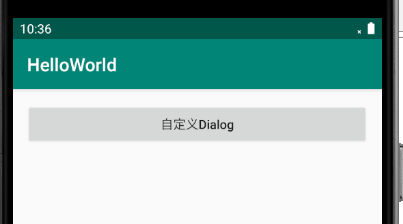
运行截图:

Android学习07的更多相关文章
- Android 学习资源
下面这些资源对Android开发来说是很有帮助的! 最常用的: Android开发官方网站:http://developer.android.com/index.html 这个网站应该是Android ...
- Android学习资料收集
1.Android 学习之路 http://stormzhang.com/android/2014/07/07/learn-android-from-rookie/
- Android学习——windows下搭建NDK_r9环境
1. NDK(Native Development Kit) 1.1 NDK简介 Android NDK是一套允许开发人员使用本地代码(如C/C++)进行Android APP功能开发的工具,通过这个 ...
- Android 学习之路
转载:http://stormzhang.com/android/2014/07/07/learn-android-from-rookie/ 这篇博客背后的故事 一路走来很不容易,刚好知乎上被人邀请回 ...
- 10、android学习资源整理
1.github上整理好的开源工程 https://github.com/Trinea/android-open-project 2.最流行的android组件大全 http://colobu.com ...
- android学习系列:jercy——AI3 的博客
[android学习之十七]——特色功能2:桌面组件(快捷方式,实时文件夹) 二.桌面组件 1.快捷方式 Android手机上得快捷方式的意思可以以我们实际PC机器上程序的快捷方式来理解.而andro ...
- Android 学习之路和App开发框架
学习之路: 1. http://www.stormzhang.com/android/2014/07/07/learn-android-from-rookie/ 框架: 2. https://gith ...
- Android学习路线总结,绝对干货
title: Android学习路线总结,绝对干货 tags: Android学习路线,Android学习资料,怎么学习android grammar_cjkRuby: true --- 一.前言 不 ...
- Android学习——第一个NDK程序
在前面的学习中,我们已经讲解了关于NDK编程的环境搭建流程,简单的使用我们也通过官网本身自带的例子进行说明了.可是相信大家一定还存在这么的一个疑惑:“如果我要自己利用NDK编写一个Android应用, ...
随机推荐
- [CF705B] Spider Man - 博弈论
[CF705B] Description ICG 游戏有若干个环,每次操作将一个环断成非空的两部分,节点数总和不变.集合初态为空,每次向集合中添加一个环,询问当前集合用于游戏的胜负. \(n \le ...
- 如何在vivado中调用ultraedit 编辑器
ISE下点击菜单Edit -> Preferences -> Editor. 在Editor选项框里选择Custom,在Command line syntax文本框里输入: {C:/Pro ...
- 剑指offer 面试题52. 两个链表的第一个公共节点
这题之前leetcode做过,权当复习 首先这题没说是否一定有公共节点,如果代码可能因为这一点造成死循环的,需要提前验证所给两个链表是否有公共节点. 方法1:对于每一个list1的节点,遍历list2 ...
- dp--B - Hard problem
B - Hard problem Vasiliy is fond of solving different tasks. Today he found one he wasn't able to so ...
- 【转】C#路径中获取文件全路径、目录、扩展名、文件名称
C#路径中获取文件全路径.目录.扩展名.文件名称 原文链接:https://www.cnblogs.com/JiYF/p/6879139.html 常用函数 需要引用System.IO 直接可以调 ...
- jQuery的主要使用方法
一.在html中添加jquery,可以使用cdn加载jquery 1.网址:https://www.bootcdn.cn/jquery/ 2.推荐使用3.4左右版本的,建议使用min.js后缀的,mi ...
- node安装升级过程中遇到的问题汇总
一.Node already installed, it's just not linked 第一步:sudo chown -R $(whoami) $(brew --prefix)/* 第二步:br ...
- spring_boot 加入 mybatis
第一步: <!-- mybatis启动器 自动包含jdbc所以不需要再次引入jdbc依赖 --> <dependency> <groupId>org.mybatis ...
- django入门(一)
小白一枚,老是感觉自己学了点什么东西马上就忘了,所以打算写点下来,以后可以看看,也希望能给以后点进来的人有一些帮助 本文是django的入门,现在在学,有错误之处还希望能包涵和指出,谢谢! 首先先下载 ...
- codeforces Make The Fence Great Again(dp)
题目链接:http://codeforces.com/contest/1221/problem/D 题目要求ai ! = ai-1,草纸上推理一下可以发现每一个栅栏可以升高的高度无非就是 +0,+1, ...