
Introducing .NET 5
Today, we’re announcing that the next release after .NET Core 3.0 will be .NET 5. This will be the next big release in the .NET family.
There will be just one .NET going forward, and you will be able to use it to target Windows, Linux, macOS, iOS, Android, tvOS, watchOS and WebAssembly and more.
We will introduce new .NET APIs, runtime capabilities and language features as part of .NET 5.
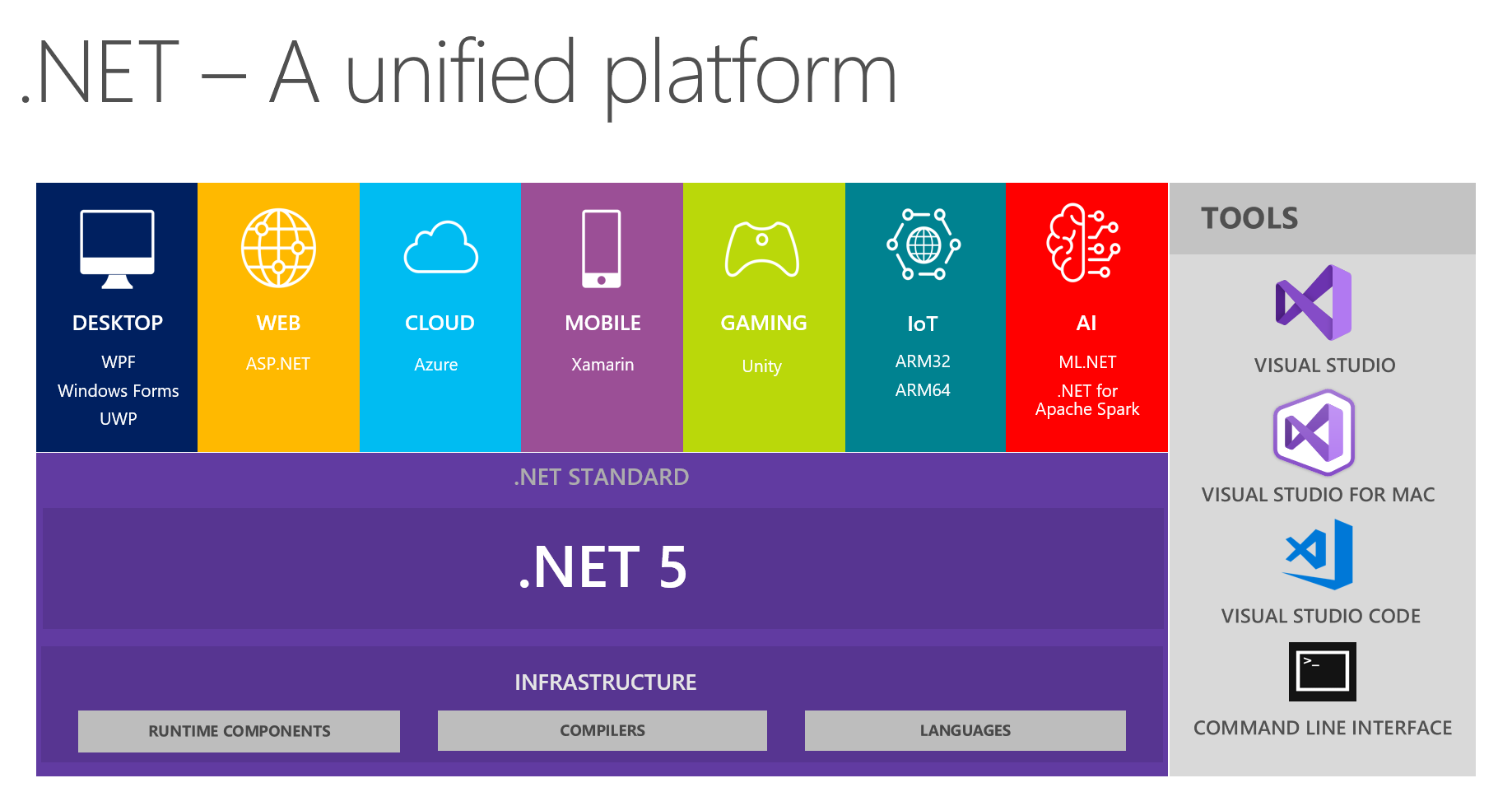
From the inception of the .NET Core project, we’ve added around fifty thousand .NET Framework APIs to the platform. .NET Core 3.0 closes much of the remaining capability gap with .NET Framework 4.8, enabling Windows Forms, WPF and Entity Framework 6. .NET 5 builds on this work, taking .NET Coreand the best of Mono to create a single platform that you can use for all your modern .NET code.
We intend to release .NET 5 in November 2020, with the first preview available in the first half of 2020. It will be supported with future updates to Visual Studio 2019, Visual Studio for Mac and Visual Studio Code.
Check out .NET Core is the Future of .NET to understand how .NET 5 relates to .NET Framework.
.NET 5 = .NET Core vNext
.NET 5 is the next step forward with .NET Core. The project aims to improve .NET in a few key ways:
- Produce a single .NET runtime and framework that can be used everywhere and that has uniform runtime behaviors and developer experiences.
- Expand the capabilities of .NET by taking the best of .NET Core, .NET Framework, Xamarin and Mono.
- Build that product out of a single code-base that developers (Microsoft and the community) can work on and expand together and that improves all scenarios.
This new project and direction are a game-changer for .NET. With .NET 5, your code and project files will look and feel the same no matter which type of app you’re building. You’ll have access to the same runtime, API and language capabilities with each app. This includes new performance improvements that get committed to corefx, practically daily.
Everything you love about .NET Core will continue to exist:
- Open source and community-oriented on GitHub.
- Cross-platform implementation.
- Support for leveraging platform-specific capabilities, such as Windows Forms and WPF on Windows and the native bindings to each native platform from Xamarin.
- High performance.
- Side-by-side installation.
- Small project files (SDK-style).
- Capable command-line interface (CLI).
- Visual Studio, Visual Studio for Mac, and Visual Studio Code integration.
Here’s what will be new:
- You will have more choice on runtime experiences (more on that below).
- Java interoperability will be available on all platforms.
- Objective-C and Swift interoperability will be supported on multiple operating systems.
- CoreFX will be extended to support static compilation of .NET (ahead-of-time – AOT), smaller footprints and support for more operating systems.
We will ship .NET Core 3.0 this September, .NET 5 in November 2020, and then we intend to ship a major version of .NET once a year, every November:
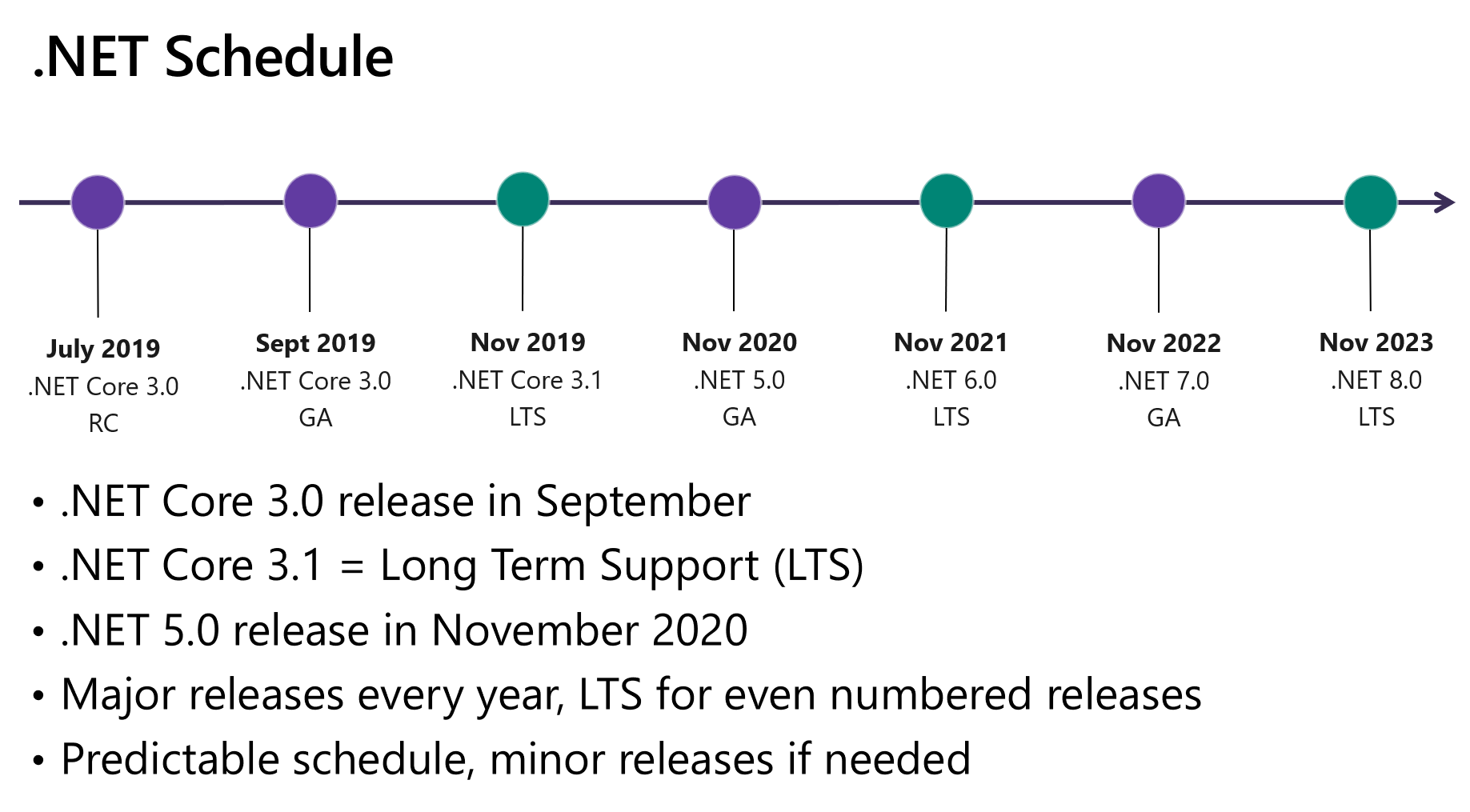
We’re skipping the version 4 because it would confuse users that are familiar with the .NET Framework, which has been using the 4.x series for a long time. Additionally, we wanted to clearly communicate that .NET 5 is the future for the .NET platform.
We are also taking the opportunity to simplify naming. We thought that if there is only one .NET going forward, we don’t need a clarifying term like “Core”. The shorter name is a simplification and also communicates that .NET 5 has uniform capabilities and behaviors. Feel free to continue to use the “.NET Core” name if you prefer it.
Runtime experiences
Mono is the original cross-platform implementation of .NET. It started out as an open-source alternative to .NET Framework and transitioned to targeting mobile devices as iOS and Android devices became popular. Mono is the runtime used as part of Xamarin.
CoreCLR is the runtime used as part of .NET Core. It has been primarily targeted at supporting cloud applications, including the largest services at Microsoft, and now is also being used for Windows desktop, IoT and machine learning applications.
Taken together, the .NET Core and Mono runtimes have a lot of similarities (they are both .NET runtimes after all) but also valuable unique capabilities. It makes sense to make it possible to pick the runtime experience you want. We’re in the process of making CoreCLR and Mono drop-in replacements for one another. We will make it as simple as a build switch to choose between the different runtime options.
The following sections describe the primary pivots we are planning for .NET 5. They provide a clear view on how we plan to evolve the two runtimes individually, and also together.
High throughput and high productivity
From the very beginning, .NET has relied on a just-in-time compiler (JIT) to translate Intermediate Language (IL) code to optimized machine code. Since that time, we’ve built an industry-leading JIT-based managed runtime that is capable of very high throughput and also enabled developer experiences that make programming fast and easy.
JITs are well suited for long-running cloud and client scenarios. They are able to generate code that targets a specific machine configuration, including specific CPU instructions. A JIT can also re-generate methods at runtime, a technique used to JIT quickly while still having the option to produce a highly-tuned version of the code if this becomes a frequently used method.
Our efforts to make ASP.NET Core run faster on the TechEmpower benchmarks is a good example of the power of JIT and our investments in CoreCLR. Our efforts to harden .NET Core for containers also demonstrates the runtime’s ability to dynamically adapt to constrained environments.
Developer tools are another good example where JIT shines, such as with the dotnet watch tool or edit and continue. Tools often require compiling and loading code multiple times in a single process without restarting and need to do it very quickly.
Developers using .NET Core or .NET Framework have primarily relied on JIT. As a result, this experience should seem familiar.
The default experience for most .NET 5 workloads will be using the JIT-based CoreCLR runtime. The two notable exceptions are iOS and client-side Blazor (web assembly) since both require ahead-of-time (AOT) native compilation.
Fast startup, low footprint, and lower memory usage
The Mono Project has spent much of its effort focused on mobile and gaming consoles. A key capability and outcome of that project is an AOT compiler for .NET, based on the industry-leading LLVM compiler project. The Mono AOT compiler enables .NET code to be built into a single native code executable that can run on a machine, much like C++ code. AOT-compiled apps can run efficiently in small places, and trades throughput for startup if needed.
The Blazor project is already using the Mono AOT. It will be one of the first projects to transition to .NET 5. We are using it as one of the scenarios to prove out this plan.
There are two types of AOT solutions:
- solutions that require 100% AOT compilation.
- solutions where most code is AOT-compiled but where a JIT or interpreter is available and used for code patterns that are not friendly to AOT (like generics).
The Mono AOT supports both cases. The first type of AOT is required by Apple for iOS and some game consoles, typically for security reasons. The second is the preferred choice since it offers the benefits of AOT without any of its drawbacks.
.NET Native is the AOT compiler we use for Windows UWP applications and is an example of the first type of AOT listed above. With that particular implementation, we limited the .NET APIs and capabilities that you can use. We learned from that experience that AOT solutions need to cover the full spectrum of .NET APIs and patterns.
AOT compilation will remain required for iOS, web assembly and some game consoles. We will make AOT compilation an option for applications that are more appliance-like, that require fast startup and/or low footprint.
Fundamentals and overlapping experiences
It is critical that we continue to move forward as an overall platform with startup, throughput, memory use, reliability, and diagnostics. At the same time, it also makes sense to focus our efforts. We’ll invest more in throughput and reliability in CoreCLR while we invest more in startup and size reduction with the Mono AOT compiler. We think that these are good pairings. Throughput and reliability go together as do startup and size reduction.
While there are some characteristics where it makes sense to make different investments, there are others that do not.
Diagnostics capabilities need to be the same across .NET 5, for both functional and performance diagnostics. It is also important to support the same chips and operating systems (with the exception of iOS and web assembly).
We will continue to optimize .NET 5 for each workload and scenario, for whatever makes sense. There will be even greater emphasis on optimizations, particular where multiple workloads have overlapping needs.
All .NET 5 applications will use the CoreFX framework. We will ensure that CoreFX works well in the places it is not used today, which is primarily the Xamarin and client-side Blazor workloads.
All .NET 5 applications will be buildable with the .NET CLI, ensuring that you have common command-line tooling across projects.
C# will move forward in lock-step with .NET 5. Developers writing .NET 5 apps will have access to the latest C# version and features.
The birth of the project
We met as a technical team in December 2018 in Boston to kick off this project. Design leaders from .NET teams (Mono/Xamarin and .NET Core) and also from Unity presented on various technical capabilities and architectural direction.
We are now moving forward on this project as a single team with one set of deliverables. Since December, we have made a lot of progress on a few projects:
- Defined a minimal layer that defines the runtime <-> managed code layer, with the goal making >99% of CoreFX common code.
- MonoVM can now use CoreFX and its class libraries.
- Run all CoreFX tests on MonoVM using the CoreFX implementation.
- Run ASP.NET Core 3.0 apps with MonoVM.
- Run MonoDevelop and then Visual Studio for Mac on CoreCLR.
Moving to a single .NET implementation raises important questions. What will the target framework be? Will NuGet package compatibility rules be the same? Which workloads should be supported out-of-the-box by the .NET 5 SDK? How does writing code for a specific architecture work? Do we still need .NET Standard? We are working through these issues now and will soon be sharing design docs for you to read and give feedback on.
Closing
The .NET 5 project is an important and exciting new direction for .NET. You will see .NET become simpler but also have broader and more expansive capability and utility. All new development and feature capabilities will be part of .NET 5, including new C# versions.
We see a bright future ahead in which you can use the same .NET APIs and languages to target a broad range of application types, operating systems, and chip architectures. It will be easy to make changes to your build configuration to build your applications differently, in Visual Studio, Visual Studio for Mac, Visual Studio Code, Azure DevOps or at the command line.
Introducing .NET 5的更多相关文章
- Introducing Windows 10 Editions(Windows10版本介绍)
Windows 10将在今年夏天正式发布,今天微软官方博客分享了一些Windows 10版本的细节.详见Introducing Windows 10 Editions Windows 10 HomeW ...
- Introducing shard translator
Introducing shard translator by Krutika Dhananjay on December 23, 2015 GlusterFS-3.7.0 saw the relea ...
- 微软推出的免费新书《Introducing Microsoft SQL Server 2012》
微软推出的免费新书<Introducing Microsoft SQL Server 2012>,该书详细介绍微软SQL 2012数据库服务最新功能以及功能应用和使用技巧. 该书适合SQL ...
- Introducing the Blog Module
Introducing the Blog Module Now that we know about the basics of the zend-mvc skeleton application, ...
- Big Data Security Part One: Introducing PacketPig
Series Introduction Packetloop CTO Michael Baker (@cloudjunky) made a big splash when he presented ‘ ...
- (转载)iOS Framework: Introducing MKNetworkKit
This article is available in Serbo-Croatian, Japanese and German. (Translations in Serbo-Croatian b ...
- Introducing Regular Expressions 学习笔记
Introducing Regular Expressions 读书笔记 工具: regexbuddy:http://download.csdn.net/tag/regexbuddy%E7%A0%B4 ...
- 17.1.1.9 Introducing Additional Slaves to an Existing Replication Environment 引入额外的Slaves 到一个存在的复制
17.1.1.9 Introducing Additional Slaves to an Existing Replication Environment 引入额外的Slaves 到一个存在的复制环境 ...
- DirectX 9 UI三种设计学习笔记:文章4章Introducing DirectInput+文章5章Wrapping Direct3D
本文从哈利_创.转载请注明出处.有问题欢迎联系本人! 邮箱:2024958085@qq.com 上一期的地址: DX 9 UI设计学习笔记之二 第4章 Introducin ...
- Introducing ASP.NET vNext and MVC 6
[译]Introducing ASP.NET vNext and MVC 6 原文:http://www.infoq.com/news/2014/05/ASP.NET-vNext?utm_source ...
随机推荐
- python后续学习
关于使用python输出中文字符的问题: Python中默认的编码格式是 ASCII 格式,在没修改编码格式时无法正确打印汉字,所以在读取中文时会报错. 解决方法为只要在文件开头加入 # -*- co ...
- centos安装虚拟机,桥接网络连接失败
centos安装虚拟机,桥接网络连接失败 待办 即使是虚拟机也要在网络选择网桥连接方式之后,点击连接网线才可以,虚拟机都是按照有线进行连接的.
- resize2fs: 报错
报错如下 [root@localhost ~]# resize2fs /dev/mapper/centos-root resize2fs (-Dec-) resize2fs: Bad magic nu ...
- AC3 Rematrix
当L R channel highly correlated时,AC3 encoder 使用rematrix技术压缩L/R的和和差. 原始信号为left,right,使用rematrix压缩信号为le ...
- 每日扫盲:eclipse快捷键 包括查找类、方法、变量汇总
[Ct rl+T] 搜索当前接口的实现类 1. [ALT +/] 此快捷键为用户编辑的好帮手,能为用户提供内容的辅助,不要为记不全方法和属性名称犯愁,当记不全类.方法和属性的名字时,多体验一下[ ...
- css transform 2D3D转换
2D转换 translate 移动 <style> div{ width: 100px; height: 100px; } .box{ border: 1px dashed red; fl ...
- JS高级---案例:随机小方块 (贪吃蛇的食物部分)
案例:随机小方块 产生随机数对象,自调用构造函数 产生小方块对象,自调用构造函数,里面存放: 食物的构造函数 给原型对象添加方法:初始化小方块的显示的效果及位置---显示地图上 给原型对象添加方法,产 ...
- tf.train.examle函数
在自定义数据集中: example = tf.train.Example(features=tf.train.Features(feature={ 'img_raw': tf.train.Featur ...
- 解决Hbase启动后,hmaster会在几秒钟后自动关闭(停掉)!!!
在日志(身为小白白的我,一开始日志在哪我都不知道!路径:/usr/local/hadoop/app/hbase-0.98.8/logs/hbase-hadoop-master-Master.log(也 ...
- Mongodb学习笔记(二)Capped Collection固定集合
一.Capped Collection固定集合 简单介绍 capped collections是性能出色的有着固定大小的集合(定容集合),以LRU(Least Recently Used最近最少使用) ...