
Java_Day8
Java learning_Day8
本人学习视频用的是马士兵的,也在这里献上
<链接:https://pan.baidu.com/s/1qKNGJNh0GgvlJnitTJGqgA>
提取码:fobs
内容
- 容器
- 泛型
容器
Java API 所提供的一系列类的实例,用于在程序中存放对象。
容器 API
- JDK 所提供的容器 API 位于 java.util 包内。
- 容器 API 的类图结构如下图所示:
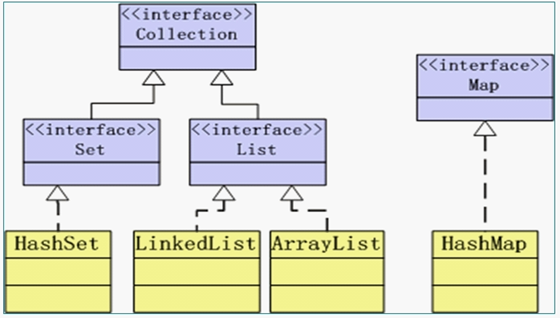
- Collection 接口:定义了存取一组对象的方法,其子接口 Set 和 List 分别定义了存储方式。
- Set 中的数据对象没有顺序且不可以重复。
- List 中的数据对象有顺序且可以重复。
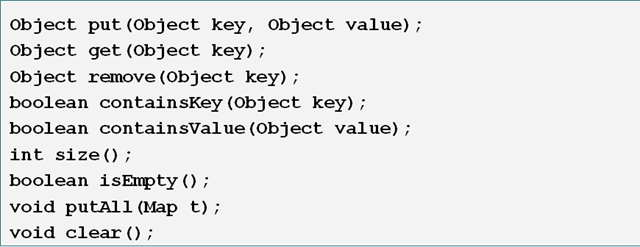
- Map 接口定义了存储“键(key)—— 值(value)映射对”的方法。
Collection
Collection接口所定义的方法:
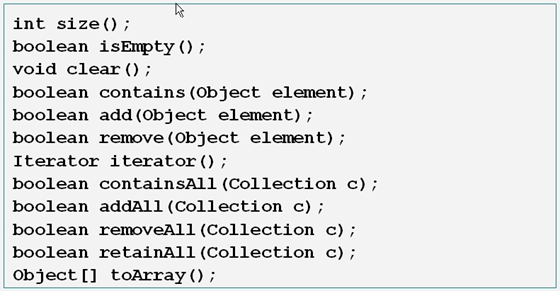
Collection 方法举例
- 容器类对象在调用 remove、contains 等方法时需要比较对象是否相等,这回涉及到对象类型的 equals 方法和 hashCode 方法;对于自定义的类型,需要重写 equals 和 hashCode 方法以实现自定义的对象相等规则。
- 注意:相等的对象应该具有相等的 hashCodes。
Iterator 接口
- 所有实现了 Collection 接口的容器类都有一个 iterator 方法用以返回一个实现了 Iterator 接口的对象。
- iterator 对象称作迭代器,用以方便地实现对容器内元素的遍历操作。
- Iterator 接口定义了如下方法:

方法举例一
import java.util.*;

public class IteratorTest {

	public static void main(String[] args) {

		Collection c = new HashSet();

		c.add(new Name("f1", "l1"));

		c.add(new Name("f2", "l2"));

		c.add(new Name("f3", "l3"));

		Iterator i = c.iterator();

		while (i.hasNext()) {

			//next()的返回值为object类型,需要转换为相应类型

			Name n = (Name)i.next();

			System.out.println(n.getFirstName());

		}

	}

}

class Name {

	String firstName, lastName;

	public Name(String firstName, String lastName) {

		this.firstName = firstName;

		this.lastName = lastName;

	}

	public String getFirstName() {

		return firstName;

	}

	public String getLastName() {

		return lastName;

	}

}
输出
f3

f1

f2
注意:由于哈希值没有固定的顺序,因此输出内容的顺序可能有所不同
方法举例二
        ... ... ...

Collection c = new HashSet();

c.add(new Name("fff1", "lll1"));

c.add(new Name("f2", "l2"));

c.add(new Name("fff3", "lll3"));

for (Iterator i = c.iterator(); i.hasNext();) {

    Name name = (Name)i.Next();

    if (name.getFirstName().length() < 3) {

        i.remove();

        //如果换成 c.remove(name);会产生例外(线程锁定)

    }

}
增强 for 循环
- 增强的 for 循环对于遍历 array 或 Collection 的时候相当简便
- 缺陷:
- 数组:不能方便地访问下标值
- 集合:
- 与使用 Iterator 相比,不能方便地删除集合中的内容
- 在内部也是调用 Iterator
- 总结:除了简单遍历并读出其中的内容外(只读),不建议使用增强 for
举例
import java.util.*;

public class EnhancedFor {

	public static void main(String[] args) {

		int[] arr = {1, 2, 3, 4, 5};

		for(int i : arr) {

			System.out.println(i);

		}

		Collection c = new ArrayList();

		c.add(new String("aaa"));

		c.add(new String("bbb"));

		c.add(new String("ccc"));

		for(Object o : c) {

			System.out.println(o);

		}

	}

}
Set 接口
- Set 接口是 Collection 的子接口,Set 接口没有提供额外的方法,但实现 Set 接口的容器类中的元素是没有顺序的,而且不可以重复。
- Set 容器可以与数学中“集合”的概念相对应。
- JDK API 中所提供的的 Set 容器类有 HashSet,TreeSet 等。
List 接口
- List 接口是 Collection 的子接口,实现 List 接口的容器类的元素是有顺序的,而且可以重复。
- List 容器中的元素都对应一个整数型的序号记载其在容器中的位置,可以根据序号存取容器中的元素。
- JDK 所提供的 List 容器类有 ArrayList,LinkList 等。
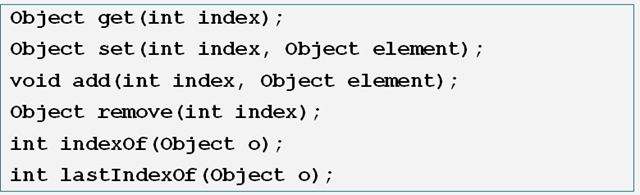
List 常用算法
类 java.util.Collections 提供了一些静态方法实现了基于 List 容器的一些常用算法。
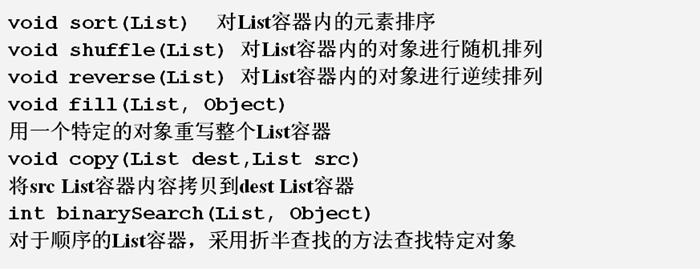
Comparable 接口
- 所有可以“排序”的类都实现了 java.lang.Comparable 接口,Comparable 接口中只有一个方法:
public int compareTo(Object obj);
该方法:- 返回0表示 this == obj
- 返回正数表示 this > obj
- 返回负数表示 this < obj
- 实现了 Comparable 接口的类通过实现 comparaTo 方法从而确定该类对象的排序方式。
如何选择数据结构*
- 衡量标准:读的效率和改的效率
- Array 读快改慢
- Linked 改快读慢
- Hash 两者之间
Map 接口
- 实现 Map 接口的类用来存储键——值对。
- Map 接口的实现类有 HashMap 和 TreeMap 等。
- Map 类中存储的键——值对通过键来标识,所以键值不能重复。
示例
import java.util.*;

public class TestMap {

	public static void main(String[] args) {

		Map m1 = new HashMap();

		Map m2 = new TreeMap();

		m1.put("one", new Integer(1));

		m1.put("two", new Integer(2));

		m1.put("three", new Integer(3));

		m2.put("A", new Character('A'));

		m2.put("B", new Character('B'));

		System.out.println(m1.size());  //3

		System.out.println(m1.containsKey("one"));  //true

		System.out.println(m2.containsValue(new Character('A')));  //true

		if (m2.containsKey("A")) {

			char i = ((Character)m2.get("A")).charValue();

			System.out.println(i);  //A

		}

		Map m3 = new HashMap(m1);

		m3.putAll(m2);

		System.out.println(m3);

	}

}
输出
3

true

true

A

{A=A, B=B, two=2, three=3, one=1}
Auto-boxing/unboxing
- 在合适的时机自动打包、解包
- 自动将基础类型转换为对象
- 自动将对象转换为基础类型
对上一处的程序进行改进
import java.util.*;

public class TestMap {

	public static void main(String[] args) {

		Map m1 = new HashMap();

		Map m2 = new TreeMap();

		m1.put("one", 1);  //Autoboxing

		//m1.put("one", new Integer(1));

		m1.put("two", 2);  //Autoboxing

		//m1.put("two", new Integer(2));

		m1.put("three", 3);  //Autoboxing

		//m1.put("three", new Integer(3));

		m2.put("A", 'A');  //Autoboxing

		//m2.put("A", new Character('A'));

		m2.put("B", 'B');  //Autoboxing

		//m2.put("B", new Character('B'));

		System.out.println(m1.size());  //3

		System.out.println(m1.containsKey("one"));  //true

		System.out.println(m2.containsValue('A'));  //Autoboxing

		//System.out.println(m2.containsValue(new Character('A')));  //true

		if (m2.containsKey("A")) {

			char i = (Character)m2.get("A");  //Autoboxing

			//char i = ((Character)m2.get("A")).charValue();

			System.out.println(i);  //A

		}

		Map m3 = new HashMap(m1);

		m3.putAll(m2);

		System.out.println(m3);

	}

}
编译通过,可见编译器会自动执行打包和解包工作。
泛型(generic)
- 起因:
- JDK1.4 以前类型不明确;
- 装入集合的类型都被当做 Object 对待,从而失去自己的实际类型。
- 从集合中取出时往往需要转型,效率低,容易产生错误。
- JDK1.4 以前类型不明确;
- 解决办法:在定义集合的时候同时定义集合中对象的类型
- 好处:增强程序的可读性和稳定性
对上一个程序应用泛型
import java.util.*;

public class TestMap {

	public static void main(String[] args) {

		//Map m1 = new HashMap();

		Map<String, Integer> m1 = new HashMap<String, Integer>();  //generic

		//Map m2 = new TreeMap();

		Map<String, Character> m2 = new TreeMap<String, Character>();  //generic

		m1.put("one", 1);  //Autoboxing

		//m1.put("one", new Integer(1));

		m1.put("two", 2);  //Autoboxing

		//m1.put("two", new Integer(2));

		m1.put("three", 3);  //Autoboxing

		//m1.put("three", new Integer(3));

		m2.put("A", 'A');  //Autoboxing

		//m2.put("A", new Character('A'));

		m2.put("B", 'B');  //Autoboxing

		//m2.put("B", new Character('B'));

		System.out.println(m1.size());  //3

		System.out.println(m1.containsKey("one"));  //true

		System.out.println(m2.containsValue('A'));  //Autoboxing

		//System.out.println(m2.containsValue(new Character('A')));  //true

		if (m2.containsKey("A")) {

			char i = m2.get("A");  //generic

			//*char i = (Character)m2.get("A");  //Autoboxing

			//char i = ((Character)m2.get("A")).charValue();

			System.out.println(i);  //A

		}

		Map<String, Object> m3 = new HashMap<String, Object>(m1);

		m3.putAll(m2);

		System.out.println(m3);

	}

}
Java_Day8的更多相关文章
随机推荐
- 重读es6, 正确了解promise中catch的用法
前言 在最近的项目中,用到了es6的promise语法,发现promise.prototype.catch 并不只是单单reject抛出的回调函数,所以今天做一些笔录,防止以后在项目中又碰到这样的问题 ...
- ELF文件之五——使用链接脚本-2个函数-data-bss
main.c int enable; ; int main() { ; } int add() { ; } bss段在elf中虽然size是4,但并不占filesize,节头表如下图所示 程序头中,项 ...
- Django (一) 基础
创建项目 创建app python manager.py startapp app01 修改.添加url from django.conf.urls import url,include fr ...
- 4.【Spring Cloud Alibaba】服务容错-sentinel
雪崩效应 常见容错方案 超时 限流 仓壁模式 断路器模式 断路器三态转换 使用Sentinel实现容错 什么是Sentinel https://github.com/alibaba/Sentinel ...
- Docker深入浅出系列 | 容器数据持久化
Docker深入浅出系列 | 容器数据持久化 Docker已经上市很多年,不是什么新鲜事物了,很多企业或者开发同学以前也不多不少有所接触,但是有实操经验的人不多,本系列教程主要偏重实战,尽量讲干货,会 ...
- Nginx之常用基本配置
上一篇博客我们大概介绍了一下nginx,nginx的架构,nginx编译安装和nginx命令的用法,回顾请参考https://www.cnblogs.com/qiuhom-1874/p/1236680 ...
- Oracle Linux下安装Oracle11gR2
Linux上Oracle11g R2安装及配置 一. 安装环境准备 1. 环境说明 Linux服务器系统:Oracle Linux Release 6 Update 2 (64bit),先安装好. ...
- C#建立自己的测试用例系统
引言 很多时候,需要对类中的方法进行一些测试,来判断是否能按要求输出预期的结果. C#提供了快速创建单元测试的方法,但单元测试不仅速度慢不方便,大量的单元测试还会拖慢项目的启动速度. 所以决定自己搞个 ...
- Sublime Text3添加到右键菜单,"用 SublimeText3 打开"
在Sublime Text3安装目录下新建一个文件 sublime_addright.inf 文件内容: [Version] Signature="$Windows NT$" [D ...
- git系列之---码云gitee 添加SHH公钥
公钥 很多服务器都是需要认证的,SHH 认证是其中的一种:在客户端生成公钥,把生成的公钥添加到服务器,你以后连接服务器的时候就不用每次都输入用户名和密码了:很多git服务器都是用ssh认证方式,你需要 ...