
centos7安装postgresql和postgis
1、安装步骤
-- 安装对应的rpm文件(其他系统的rpm包,请自行到https://yum.postgresql.org/下载)
yum install -y https://download.postgresql.org/pub/repos/yum/reporpms/EL-7-x86_64/pgdg-redhat-repo-latest.noarch.rpm
-- 查询postgresql的版本
yum search postgresql
-- 安装对应的版本(我安装的是postgresql9.6+postgis2.4)
yum -y install postgresql96.x86_64 postgresql96-server.x86_64 postgresql96-devel.x86_64
-- 安装对应的postgis插件
yum install postgis24_96.x86_64
如果出现如下图所示错误,
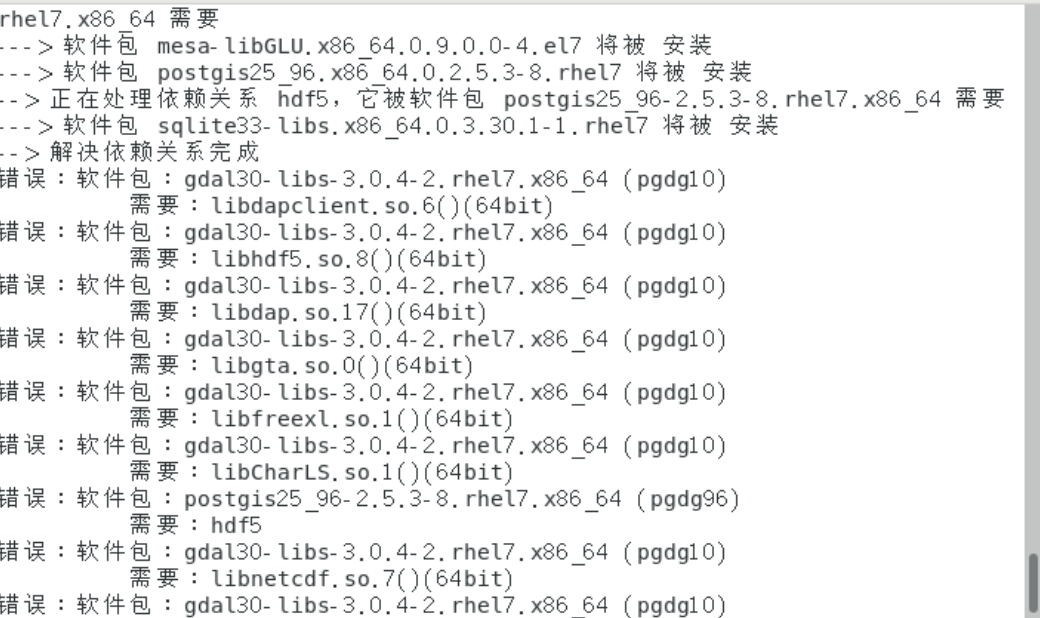
请执行如下命令:rpm -ivh http://dl.fedoraproject.org/pub/epel/epel-release-latest-7.noarch.rpm
执行完毕后,继续执行yum install postgis24_96.x86_64
至此整个安装过程完毕!
2、初始化运行环境
-- 初始化数据库
/usr/pgsql-9.6/bin/postgresql96-setup initdb
-- 启动psql服务器
systemctl start postgresql-9.6
--设置开机自启动
systemctl enable postgresql-9.6
--开发防火墙
firewall-cmd--permanent --add-port=5432/tcp
firewall-cmd--reload
-- 修改pg_hba.conf和postgresql.conf
/var/lib/pgsql/9.6/data/pg_hba.conf 将配置文件中记录的method的ident修改为trust(可以实现用户名和密码访问数据库)
/var/lib/pgsql/9.6/data/postgresql.conf 修改listen_addresses = 'localhost'为listen_addresses= '*',允许所有远程访问
(这样可以在其它客户机上远程登陆服务器,比如在windows机器上使用pgadmin客户端)
-- 初始化数据库
su postgresql
--登录到数据库
psql(可以默认登陆到用户名为:postgres 数据库名为postgres的数据库)
--查看当前连接到的数据库
\c
--查看当前的数据库信息
\l
--查看当前数据库的表信息
\d
--导入sql脚本
第一种方法:\i sql脚本的路径信息
第二种:psql -U 用户 -d 数据库 -h 主机 -p 端口 -f 脚本路径
至此基本的安装,初始化过程就结束了, 如果你在过程中有任何疑问,欢迎交流学习!
centos7安装postgresql和postgis的更多相关文章
- CentOS7使用yum安装PostgreSQL和PostGIS
更新yum源 CentOS7默认yum源的PostgreSQL版本过低,不适合在本版本上使用.在https://yum.postgresql.org/repopackages.php上找到适合Cent ...
- ubuntu安装postgresql与postgis
版本信息 ubuntu 14.04.1LTS postgresql 9.3.5 postgis 2.1.2 今天尝试着安装了postgis 2.1.2,(较简便的包安装,不是源码 ...
- ubuntu16.04搭建geodjango+postgresql+postgis的WebGIS框架(二))安装postgresql和postgis
卸载老版本sudo dpkg --purge postgis postgresql-9.3-postgis1.安装postgresql sudo apt-cache search postgresql ...
- CentOS7安装Postgresql
执行命令 Yum install postgresql-server Yum install postgresql-contrib 安装完成后,检查postgresql的服务状态 Systemctl ...
- Centos7安装 PostgreSQL步骤
1. 安装服务器即可. Yum install postgresql-server Yum install postgresql-contrib 2. 验证是否安装成功: rpm -aq| grep ...
- CentOS7 安装Postgresql 11+ 源码编译安装Postgis-2.5.2
####安装Postgresql-11yum install zlib-devel gcc makegroupadd postgresuseradd -g postgres postgrespassw ...
- 阿里云ecs centos7安装 postgresql 9.4
rpm -Uvh http://yum.postgresql.org/9.4/redhat/rhel-7-x86_64/pgdg-centos94-9.4-3.noarch.rpm yum insta ...
- centos7 安装 PostgreSql
确定你是管理员,然后运行命令: yum -y install postgresql-server postgresql-contrib 初始化数据库 postgresql-setup initdb 启 ...
- Centos7 源码安装PostgreSQL Citus集群 (转载)
citus的分布式集群目前在苏宁大规模应用,苏宁陈华军也做了很多技术分享和博客介绍.目前所有的教程都是rpm和pg一起安装,个人不喜欢,毕竟citus定位是个插件,我想在我已安装的pg上源码装一个ci ...
随机推荐
- xLua下使用lua-protobuf
本文发表于程序员刘宇的博客,转载请注明来源:https://www.cnblogs.com/xiaohutu/p/12168781.html protobuf作为一种通用套接字格式,各种插件里,最本质 ...
- rabbitmq 实现延迟队列的两种方式
原文地址:https://blog.csdn.net/u014308482/article/details/53036770 ps: 文章里面延迟队列=延时队列 什么是延迟队列 延迟队列存储的对象肯定 ...
- 看透Spring MVC:源代码分析与实践 (Web开发技术丛书)
第一篇 网站基础知识 第1章 网站架构及其演变过程2 1.1 软件的三大类型2 1.2 基础的结构并不简单3 1.3 架构演变的起点5 1.4 海量数据的解决方案5 1.4.1 缓存和页面静态化5 1 ...
- 个人第4次作业——alpha项目测试
这个作业属于哪个课程 http://edu.cnblogs.com/campus/xnsy/GeographicInformationScience 这个作业的要求在哪里 https://www.cn ...
- 解决 C# GetPixel 和 SetPixel 效率问题(转)
在对Bitmap图片操作的时候,有时需要用到获取或设置像素颜色方法:GetPixel 和 SetPixel, 如果直接对这两个方法进行操作的话速度很慢,这里我们可以通过把数据提取出来操作,然后操作完在 ...
- 双指针,BFS和图论(三)
(一)图论 1.大臣的旅费 很久以前,T王国空前繁荣. 为了更好地管理国家,王国修建了大量的快速路,用于连接首都和王国内的各大城市. 为节省经费,T国的大臣们经过思考,制定了一套优秀的修建方案,使得任 ...
- 异想家Golang学习笔记
1. 简介 官网:https://golang.google.cn/ 2. 编译器.工具链 编译 go build .\demo.go 编译和执行指令合二为一 go run demo.go 3. 注释 ...
- zabbix3.4搭建钉钉报警
1.在钉钉群里添加一个自定义的机器 在设置说明中无需开启Outgoing机制 红色箭头指的信息很重要后面脚本会用到 2.脚本 #!/usr/bin/python # -*- coding: utf-8 ...
- OGG主从表结构不同步,出现OGG-01296错误
一.Cause ogg的err日志出现以下报错 2019-09-10 16:36:55 WARNING OGG-01003 Oracle GoldenGate Delivery for Oracle, ...
- 如何快速安装kafka-manager
1.下载kafka-manager git clone https://github.com/yahoo/kafka-manager.git 2.配置sbt镜像仓库 因为kafka-manager是雅 ...