
姿势估计实验-Realtime_Multi-Person_Pose_Estimation-CMU
前言:
论文及源代码网址:
https://github.com/ZheC/Realtime_Multi-Person_Pose_Estimation
地址2:
https://github.com/CMU-Perceptual-Computing-Lab/openpose/blob/master/doc/installation.md
1. 一个失败的尝试
首先是跑一个例子试试,使用
https://github.com/CMU-Perceptual-Computing-Lab/openpose/
按照作者的指导,如下:
Training Steps
- Run
cd training; bash getData.shto obtain the COCO images indataset/COCO/images/, keypoints annotations indataset/COCO/annotations/and COCO official toolbox indataset/COCO/coco/.- 这里建议开screen,因为要下载超级久
- Run
getANNO.min matlab to convert the annotation format from json to mat indataset/COCO/mat/. - Run
genCOCOMask.min matlab to obatin the mask images for unlabeled person. You can use 'parfor' in matlab to speed up the code.- 注意修改Matlab程序中的路径,在 im = imread(['dataset/COCO/', img_paths]);的COCO后面加上images/,原程序有点问题
- 这里尝试开启了一下并行运算,速度特别快,将代码中第二个for循环改为parfor i = 1:L,然后使用Matlab的时候,先输入matlabpool open,然后再运行程序。关闭的方法为matlabpool close
- 然后遇到了Subscripted assignment between dissimilar structures.问题,看代码也没有找到问题,参考 [1]
- Run
genJSON('COCO')to generate a json file indataset/COCO/json/folder. The json files contain raw informations needed for training. - Run
python genLMDB.pyto generate your LMDB. (You can also download our LMDB for the COCO dataset (189GB file) by:bash get_lmdb.sh) - Download our modified caffe: caffe_train. Compile pycaffe. It will be merged with caffe_rtpose (for testing) soon.
- Run
python setLayers.py --exp 1to generate the prototxt and shell file for training. - Download VGG-19 model, we use it to initialize the first 10 layers for training.
- Run
bash train_pose.sh 0,1(generated by setLayers.py) to start the training with two gpus.
2. 安装Caffe
这种跑一个例子失败之后,
转而使用最根本的方法从头按照步骤编译,不走捷径:参考下面的网址
因为电脑里已经安装过caffe的依赖环境了,所以把caffe编译一下就可以用了,参考下面的话 [3]
### Install Caffe ###

cd 3rdparty/caffe/

# Select your desired Makefile file (run only one of the next 4 commands)

cp Makefile.config.Ubuntu14_cuda7.example Makefile.config # Ubuntu 14, cuda 7

cp Makefile.config.Ubuntu14_cuda8.example Makefile.config # Ubuntu 14, cuda 8

cp Makefile.config.Ubuntu16_cuda7.example Makefile.config # Ubuntu 16, cuda 7

cp Makefile.config.Ubuntu16_cuda8.example Makefile.config # Ubuntu 16, cuda 8

# Change any custom flag from the resulting Makefile.config (e.g. OpenCV 3, Atlas/OpenBLAS/MKL, etc.)

# Compile Caffe
make all -j${number_of_cpus} && make distribute -j${number_of_cpus}
比如make all -j16(使用16个CPU同时运行)

                           3. 安装 OpenPose

cd ../../models/

bash ./getModels.sh # It just downloads the Caffe trained models

cd ..

# Same file cp command as the one used for Caffe

cp ubuntu/Makefile.config.Ubuntu14_cuda7.example Makefile.config

# Change any custom flag from the resulting Makefile.config (e.g. OpenCV 3, Atlas/OpenBLAS/MKL, etc.)

make all -j${number_of_cpus}
一定要严格按照顺序(实验室服务器用的是zsh,所以注意替换bash为zsh)
如果使用OpenCV 3版本的话,可以通过所有make,但是不能运行实际的例子
按照作者在某个Issue下的回答,应该使用OpenCV2.4,然后折腾很久,见另一篇博客 [7]
然后出现无法make,错误中关键行为这个
../lib/libcaffe.so: undefined reference to cv::imread(cv::String const&, int)'
搜索之后得到解答:[4]
open your Makefile with some text editor, locate line 164 (in my case), add opencv_imgcodecs behind.
 LIBRARIES += glog gflags protobuf leveldb snappy \

  lmdb boost_system hdf5_hl hdf5 m \

  opencv_core opencv_highgui opencv_imgproc opencv_imgcodecs
在vim里使用
:se nu
然后回车,可以显示行号;使用
/opencv
可以快速定位到第一个出现的opencv字符串的位置
添加后可以make了,然后不出意料的还是不能运行实际的例子:
4. 运行一个例子
实际例子运行方法:[3]
1. Running on Video
# Ubuntu

./build/examples/openpose/openpose.bin --video examples/media/video.avi

# With face and hands

./build/examples/openpose/openpose.bin --video examples/media/video.avi --face --hand
会出现
zsh: abort (core dumped) ./build/examples/openpose/openpose.bin --video examples/media/video.avi
再试试别的运行方法:
3. Running on Images
# Ubuntu

./build/examples/openpose/openpose.bin --image_dir examples/media/

# With face and hands

./build/examples/openpose/openpose.bin --image_dir examples/media/ --face --hand
会出现
Starting pose estimation demo.
Error:
boost::filesystem::directory_iterator::construct: No such file or directory
Coming from:
- src/openpose/utilities/fileSystem.cpp:getFilesOnDirectory():186
- src/openpose/producer/imageDirectoryReader.cpp:getImagePathsOnDirectory():25
- src/openpose/utilities/flagsToOpenPose.cpp:flagsToProducer():133
terminate called after throwing an instance of 'std::runtime_error'
what():
Error:
boost::filesystem::directory_iterator::construct: No such file or directory
Coming from:
- src/openpose/utilities/fileSystem.cpp:getFilesOnDirectory():186
- src/openpose/producer/imageDirectoryReader.cpp:getImagePathsOnDirectory():25
- src/openpose/utilities/flagsToOpenPose.cpp:flagsToProducer():133
zsh: abort (core dumped) ./build/examples/openpose/openpose.bin --image_dir examples/media/
然后搜索后,根据 [5] DuinoDu的回答,去 [6] 里找答案,“install boost from src.”
根据user3715812的回答,输入以下命令行来安装BOOST:
wget -O boost_1_55_0.tar.gz http://sourceforge.net/projects/boost/files/boost/1.55.0/boost_1_55_0.tar.gz/download

tar xzvf boost_1_55_0.tar.gz

cd boost_1_55_0/

./bootstrap.sh --prefix=/usr/local     // 这里改成自己想要安装到的目录

./b2

./b2 install       // 没有SUDO权限但是也可以
然后再去运行
./build/examples/openpose/openpose.bin --image_dir examples/media/
这次的报错和上次不一样了,是
Starting pose estimation demo.

Auto-detecting GPUs... Detected  GPU(s), using them all.

Starting thread(s)

: cannot connect to X server

E0819 ::53.031266  common.cpp:] Cannot create Cublas handle. Cublas won't be available.

E0819 ::53.031266  common.cpp:] Cannot create Cublas handle. Cublas won't be available.

E0819 ::53.031266  common.cpp:] Cannot create Cublas handle. Cublas won't be available.

E0819 ::53.031266  common.cpp:] Cannot create Cublas handle. Cublas won't be available.

E0819 ::53.031266  common.cpp:] Cannot create Cublas handle. Cublas won't be available.

E0819 ::53.031266  common.cpp:] Cannot create Cublas handle. Cublas won't be available.

E0819 ::53.031266  common.cpp:] Cannot create Cublas handle. Cublas won't be available.

E0819 ::53.031266  common.cpp:] Cannot create Cublas handle. Cublas won't be available.

E0819 ::53.031266  common.cpp:] Cannot create Cublas handle. Cublas won't be available.

E0819 ::53.031266  common.cpp:] Cannot create Curand generator. Curand won't be available.

E0819 ::53.031266  common.cpp:] Cannot create Cublas handle. Cublas won't be available.

E0819 ::53.031266  common.cpp:] Cannot create Cublas handle. Cublas won't be available.

E0819 ::53.031266  common.cpp:] Cannot create Cublas handle. Cublas won't be available.

E0819 ::53.031266  common.cpp:] Cannot create Cublas handle. Cublas won't be available.

E0819 ::53.031266  common.cpp:] Cannot create Cublas handle. Cublas won't be available.

E0819 ::53.031266  common.cpp:] Cannot create Cublas handle. Cublas won't be available.

E0819 ::53.031266  common.cpp:] Cannot create Curand generator. Curand won't be available.

E0819 ::53.031266  common.cpp:] Cannot create Curand generator. Curand won't be available.

E0819 ::53.031266  common.cpp:] Cannot create Curand generator. Curand won't be available.

F0819 ::53.031266  common.cpp:] Check failed: error == cudaSuccess ( vs. )  driver shutting downF0819 ::53.031266  common.cpp:] Check failed: error == cudaSuccess ( vs. )  driver shutting downF0819 ::53.035267  common.cpp:] Check failed: error == cudaSuccess ( vs. )  driver shutting down

*** Check failure stack trace: ***

E0819 ::53.031266  common.cpp:] Cannot create Cublas handle. Cublas won't be available.

E0819 ::53.031266  common.cpp:] Cannot create Curand generator. Curand won't be available.

E0819 ::53.031266  common.cpp:] Cannot create Curand generator. Curand won't be available.

E0819 ::53.031266  common.cpp:] Cannot create Curand generator. Curand won't be available.

F0819 ::53.031266  common.cpp:] Check failed: error == cudaSuccess ( vs. )  driver shutting downF0819 ::53.031266  common.cpp:] Check failed: error == cudaSuccess ( vs. )  driver shutting downF0819 ::53.035267  common.cpp:] Check failed: error == cudaSuccess ( vs. )  driver shutting downF0819 ::53.035267  common.cpp:] Check failed: error == cudaSuccess ( vs. )  driver shutting downF0819 ::53.035267  common.cpp:] Check failed: error == cudaSuccess ( vs. )  driver shutting downF0819 ::53.035267  common.cpp:] Check failed: error == cudaSuccess ( vs. )  driver shutting down

*** Check failure stack trace: ***

F0819 ::53.031266  common.cpp:] Check failed: error == cudaSuccess ( vs. )  driver shutting down

zsh: abort (core dumped)  ./build/examples/openpose/openpose.bin --image_dir examples/media/
然后在GITHUB 的ISSUE区准备提问的时候,根据提示
Note: add
--logging_level 0to get higher debug information.
在运行的命令行后加上了这个,即:
./build/examples/openpose/openpose.bin --image_dir examples/media/ --logging_level
于是得到了较为准确的信息:
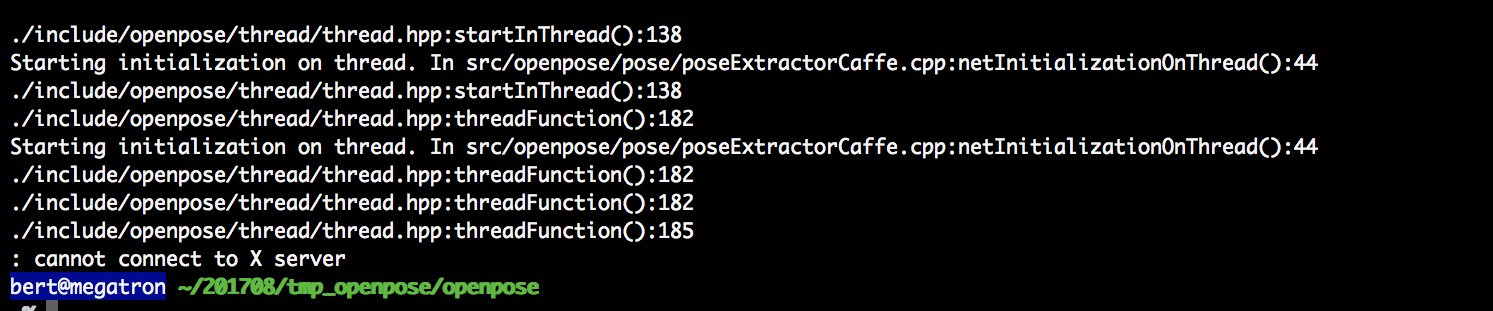
可以理解为又一个图形界面要展示但是出不来 [8](X server相关),
查阅资料后根据 [9] 的xiaoyan的回答:
Add "export DISPLAY=your ip:0.0" in ~/.bashrc, source ~/.bashrc (ip is your host IP, where you wanna display plots or things like that. If you are using Windows, cmd-ipconfig, find your IP).
于是不再出现X server问题了,出现了下图的问题
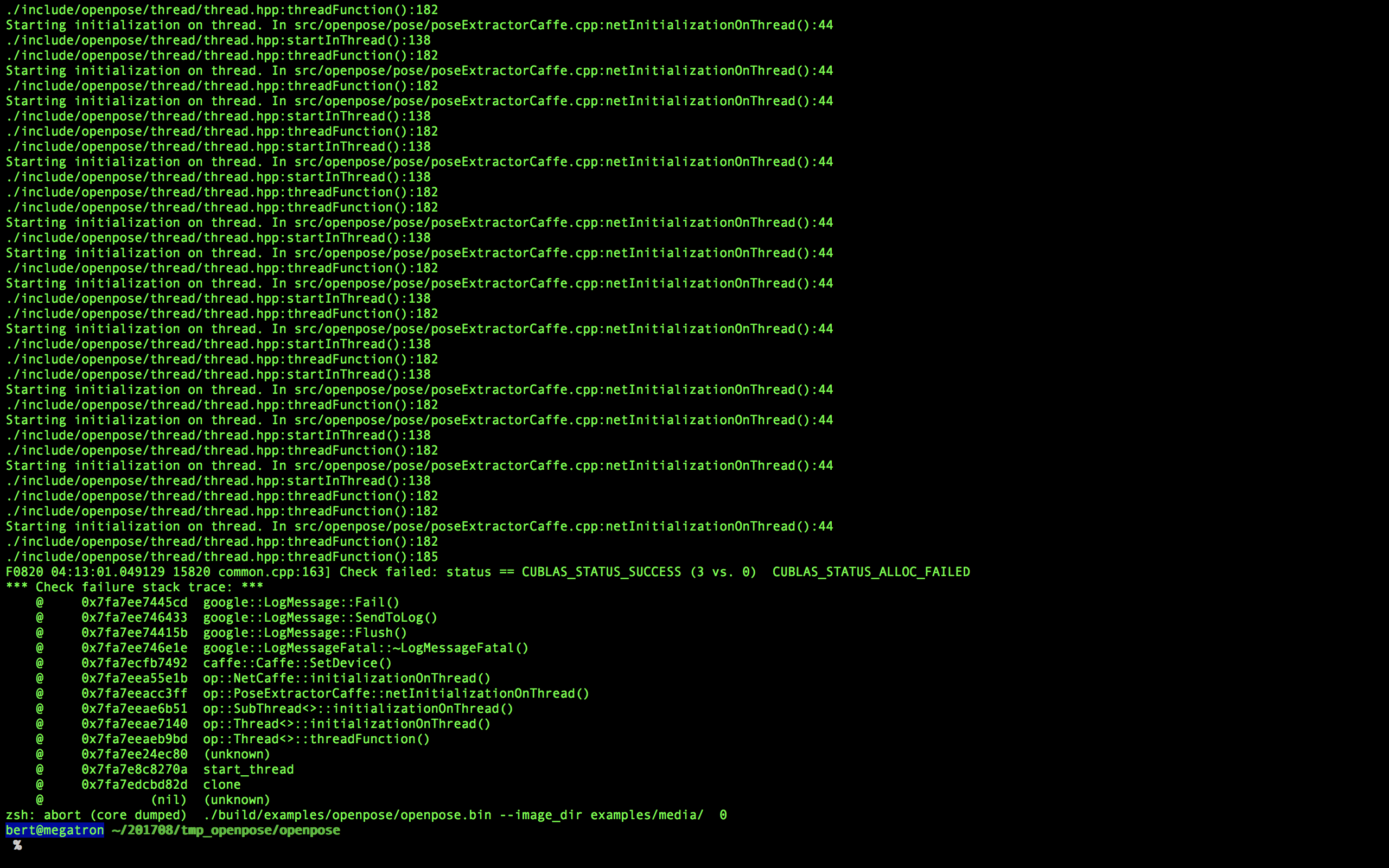
找了好久没找到问题,最后求助了组里的史博士,这里表示非常感谢!!!
原因是这个Demo默认使用所有探测到的CUDA 设备,而实验室的CUDA设备还有很多人在用,这会造成问题(可能是冲突或者资源不够,或者不被允许个人使用这么多个?)
所以在运行的命令行前面要加上一定的限制:
CUDA_VISIBLE_DEVICES= ./build/examples/openpose/openpose.bin --net_resolution "160x80" --video examples/media/video.avi
使得被探测到的设备数量只有两个。
然后发现还是运行不了,为什么呢?
因为OS X上的SHELL并不具备显示远程窗口的功能,
所以在史博士的推荐下使用了MobaXterm(在WIN10下),然后就成功了,因为这个软件直接内置了X server的接口
更新:如果想在Mac上运行,可以参考
[10] http://blog.csdn.net/dobell/article/details/55047811
安装XQuartz,

https://www.xquartz.org

按说明安装好

打开 mac terminal

ssh -X   {用户名}@{远程端ip}; (注意大写的X)

这次就可以了
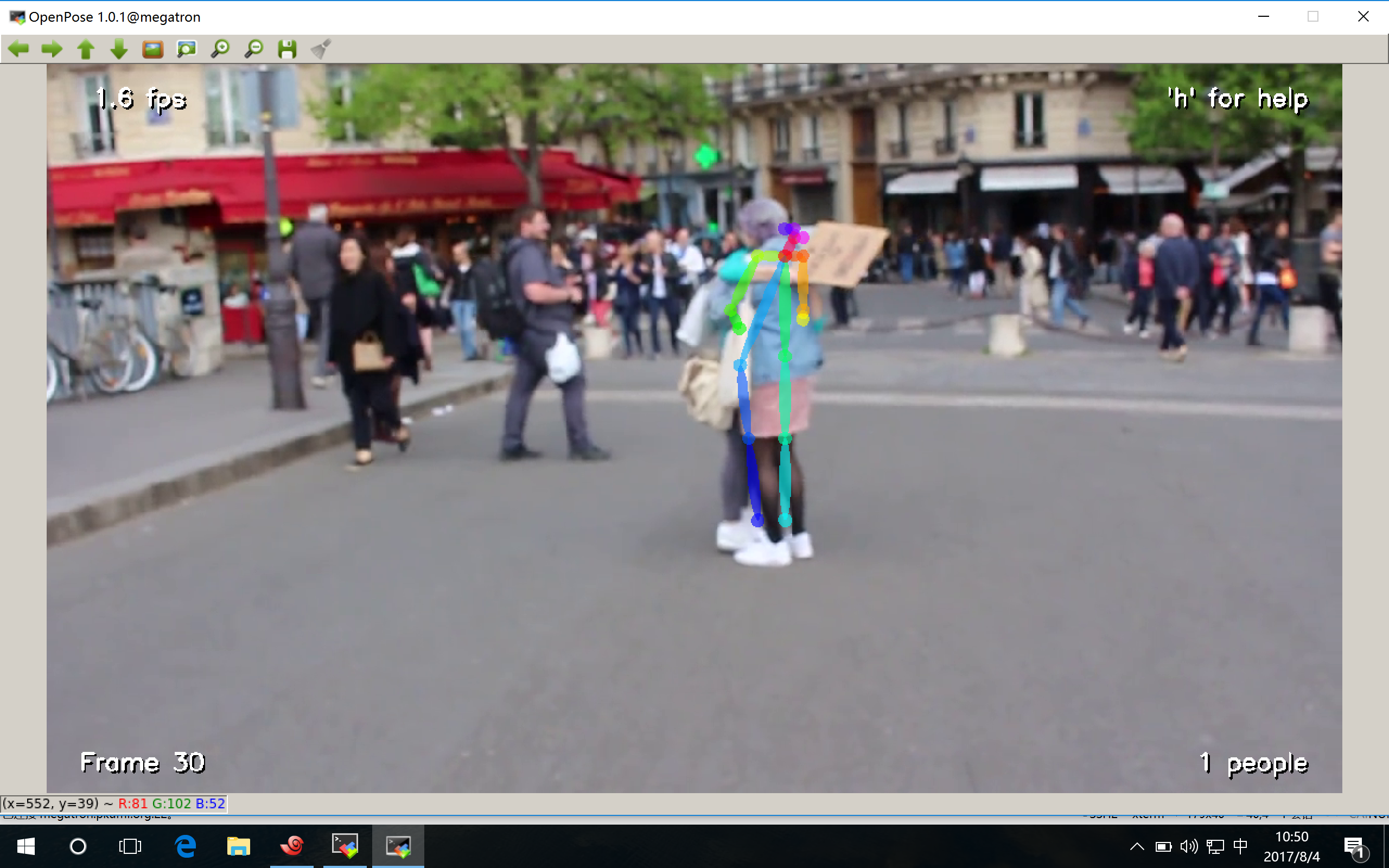
实际运行截图如下:
你也可以读一下我在GITHUB上的提问:
https://github.com/CMU-Perceptual-Computing-Lab/openpose/issues/184可能会有帮助
另外:
因为实验室的服务器出于安全考虑不允许使用
sudo pip install
, 所以使用
pip install --user
来替代。[2]
参考文献:
[1] http://www.cnblogs.com/emituofo/archive/2011/11/13/2247523.html
[2] https://stackoverflow.com/questions/31512422/pip-install-r-oserror-errno-13-permission-denied
[3] https://github.com/CMU-Perceptual-Computing-Lab/openpose/blob/master/doc/installation.md
[4] https://github.com/BVLC/caffe/issues/1276
[5] https://github.com/CMU-Perceptual-Computing-Lab/openpose/issues/17
[6] https://stackoverflow.com/questions/12578499/how-to-install-boost-on-ubuntu
[7] http://www.cnblogs.com/QingHuan/p/7278357.html
[8] http://www.cnblogs.com/super119/archive/2010/12/18/1910065.html
[9] https://askubuntu.com/questions/571116/cannot-connect-to-x-server-error
[10] http://blog.csdn.net/dobell/article/details/55047811
姿势估计实验-Realtime_Multi-Person_Pose_Estimation-CMU的更多相关文章
- 从DeepNet到HRNet,这有一份深度学习“人体姿势估计”全指南
从DeepNet到HRNet,这有一份深度学习"人体姿势估计"全指南 几十年来,人体姿态估计(Human Pose estimation)在计算机视觉界备受关注.它是理解图像和视频 ...
- 人体姿态和形状估计的视频推理:CVPR2020论文解析
人体姿态和形状估计的视频推理:CVPR2020论文解析 VIBE: Video Inference for Human Body Pose and Shape Estimation 论文链接:http ...
- 快速人体姿态估计:CVPR2019论文阅读
快速人体姿态估计:CVPR2019论文阅读 Fast Human Pose Estimation 论文链接: http://openaccess.thecvf.com/content_CVPR_201 ...
- 手势估计- Hand Pose Estimation
http://blog.csdn.net/myarrow/article/details/51933651 1. 目前进展 1.1 相关资料 1)HANDS CVPR 2016 2 ...
- AB实验的高端玩法系列2 - 更敏感的AB实验, CUPED!
背景 AB实验可谓是互联网公司进行产品迭代增加用户粘性的大杀器.但人们对AB实验的应用往往只停留在开实验算P值,然后let it go...let it go ... 让我们把AB实验的结果简单的拆解 ...
- AB实验的高端玩法系列3 - AB组不随机?观测试验?Propensity Score
背景 都说随机是AB实验的核心,为什么随机这么重要呢?有人说因为随机所以AB组整体不存在差异,这样才能准确估计实验效果(ATE) \[ ATE = E(Y_t(1) - Y_c(0)) \] 那究竟随 ...
- Paper慢慢读 - AB实验人群定向 Recursive Partitioning for Heterogeneous Casual Effects
这篇是treatment effect估计相关的论文系列第一篇所以会啰嗦一点多给出点背景. 论文 Athey, S., and Imbens, G. 2016. Recursive partition ...
- 3D深度估计
3D深度估计 Consistent Video Depth Estimation 论文地址:https://arxiv.org/pdf/2004.15021.pdf 项目网站:https://roxa ...
- 论文阅读笔记(一)FCN
本文先对FCN的会议论文进行了粗略的翻译,使读者能够对论文的结构有个大概的了解(包括解决的问题是什么,提出了哪些方案,得到了什么结果).然后,给出了几篇博文的连接,对文中未铺开解释的或不易理解的内容作 ...
随机推荐
- CPU高速缓存
目录 Code: 物理结构: 缓存行Cache Line 伪共享: 概念: 解决办法: 内存屏障: 理解: 参考: Code: public class Main { static long[][] ...
- react开发初始配置和一些问题
1.npm run build之后,打开网页显示为空白的解决方案 初始使用的开发者应该都会使用create-react-app,初次尝试,启动没有问题,然后就测试一下build,结果发现本地文件ind ...
- Visual Studio 2017 配置导出/导入/重置
1.打开VS,按下面的快捷键呼出命令窗口 Ctrl+Alt+A 2.导入/导出/重置命令 Tools.ImportandExportSettings [/export:filename | /impo ...
- Monent.js:强大的日期处理类库
一.介绍及安装 1.1 介绍 Moment.js是一个优秀的JavaScript 日期处理类库. 如果没有Moment.js之类的日期处理库,我们如果需要获得格式化后的日期.往往需要通过new Dat ...
- 力扣(LeetCode)804. 唯一摩尔斯密码词
国际摩尔斯密码定义一种标准编码方式,将每个字母对应于一个由一系列点和短线组成的字符串, 比如: "a" 对应 ".-", "b" 对应 &q ...
- Python 条件控制
Python 条件控制 Python条件语句是通过一条或多条语句的执行结果(True或者False)来决定执行的代码块. 可以通过下图来简单了解条件语句的执行过程: if 语句 Python中if语 ...
- SQL Server 2008 分区函数和分区表详解
[摘要]本文详细介绍SQL Server 2008 分区函数和分区表,包括查询某个分区.归档数据.添加分区.删除分区等内容. 当我们数据量比较大的时候,我们需要将大型表拆分为多个较小的表,则只访问部门 ...
- 『TensorFlow』流程控制之tf.identity
一个详细介绍 下面程序要做的是,5次循环,每次循环给x加1,赋值给y,然后打印出来, x = tf.Variable(0.0) #返回一个op,表示给变量x加1的操作 x_plus_1 = tf.as ...
- 使用mint-ui中弹框组件与原生弹框阻止父页面不滑动方法
1,使用mint-ui框架中<mt-popup></mt-popup>,在组件中加入 lockScroll="true" 阻止父页面不滑动. 2,原生弹框中 ...
- Python人工智能之路 - 第二篇 : 算法实在太难了有现成的直接用吧
本节内容 预备资料: 1.FFmpeg: 链接:https://pan.baidu.com/s/1jonSAa_TG2XuaJEy3iTmHg 密码:w6hk 2.baidu-aip: pip ins ...