
ionic1滑动时间选择器
上图:
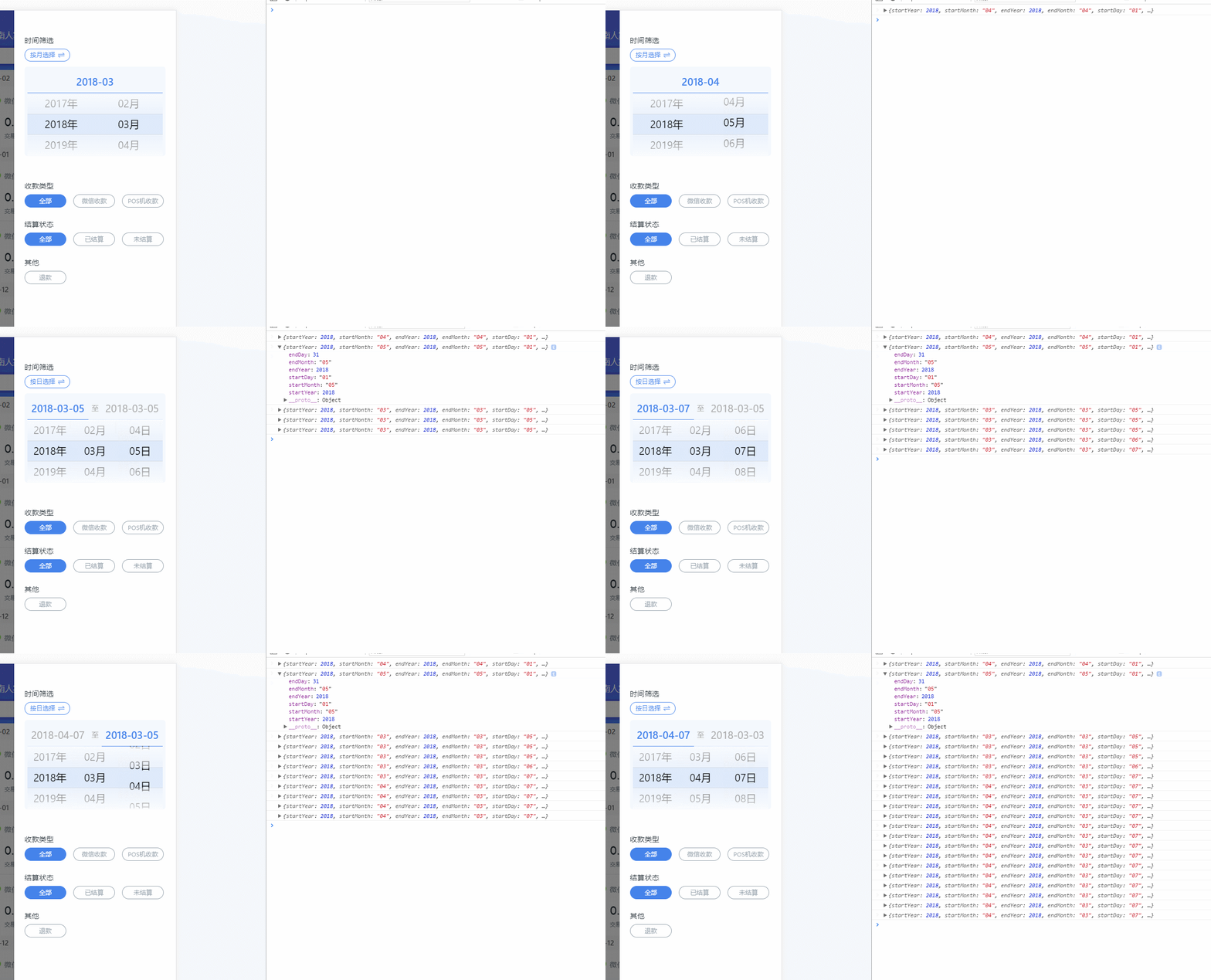
1.derective代码
.directive('monthPicker', function ($ionicScrollDelegate) {
return {
restrict: 'E',
templateUrl: 'component/tab_bill/month-picker.html',
scope: {
localDate: '='
},
link: function ($scope) {
var yearIndex = 0, year = new Date().getFullYear() + 2, localYear = new Date().getFullYear(),
localMonth = month = new Date().getMonth() + 1, localDay = new Date().getDate();
var monthIndex = 0, month = new Date().getMonth() + 1;
if (month < 10) {
month = '0' + month
}
if (localMonth < 10) {
localMonth = '0' + localMonth;
}
if (localMonth < 10) {
localDay = '0' + localDay;
}
var dayIndex = 0;
$scope.years = []; // 年数组
$scope.months = ['01', '02', '03', '04', '05', '06', '07', '08', '09', '10', '11', '12'];
$scope.days = [];
var spar = {
28: ['01', '02', '03', '04', '05', '06', '07', '08', '09', '10', '11', '12', '13', '14', '15', '16', '17', '18', '19', '20', '21', '22', '23', '24', '25', '26', '27', '28'],
29: ['01', '02', '03', '04', '05', '06', '07', '08', '09', '10', '11', '12', '13', '14', '15', '16', '17', '18', '19', '20', '21', '22', '23', '24', '25', '26', '27', '28', '29'],
30: ['01', '02', '03', '04', '05', '06', '07', '08', '09', '10', '11', '12', '13', '14', '15', '16', '17', '18', '19', '20', '21', '22', '23', '24', '25', '26', '27', '28', '29', '30'],
31: ['01', '02', '03', '04', '05', '06', '07', '08', '09', '10', '11', '12', '13', '14', '15', '16', '17', '18', '19', '20', '21', '22', '23', '24', '25', '26', '27', '28', '29', '30', '31']
};
// $scope.hasDate = false; // 是否选择需要选择日期
$scope.changeFlag = 1; // 1是开始时间,2是结束时间
for (var i = 2000; i <= year; i++) {
$scope.years.push(i)
}
var loop1, loop2, loop3;
var checkTag = 0, checkTag2 = 0, checkTag3 = 0;
var _endDay, _endYear, _endMonth;
$scope.goChoose = function () {
$scope.blockFlag = true;
setTimeout(function () {
_initScroll()
},300)
};
$scope.$on('initPicker', function (scope, unReset) {
if (!unReset) {
$scope.localDate = angular.extend($scope.localDate, {
startYear: localYear,
startMonth: localMonth,
startDay: localDay,
endYear: localYear,
endMonth: localMonth,
endDay: localDay
});
_initScroll();
return;
}
_endDay = $scope.localDate.endDay;
_endYear = $scope.localDate.endYear;
_endMonth = $scope.localDate.endMonth;
_initScroll();
});
$scope.check1 = function () {
clearInterval(loop1);
if (checkTag < 0) {
return false;
}
checkTag = 0;
loop1 = setInterval(function () {
checkTag++;
if (checkTag > 2) {
chooseYear();
checkTag = -1;
}
}, 100)
};
$scope.check2 = function () {
clearInterval(loop2);
if (checkTag2 < 0) {
return false;
}
checkTag2 = 0;
loop2 = setInterval(function () {
checkTag2++;
if (checkTag2 > 2) {
chooseMonth();
checkTag2 = -1;
}
}, 100)
};
$scope.check3 = function () {
clearInterval(loop3);
if (checkTag3 < 0) {
return false;
}
checkTag3 = 0;
loop3 = setInterval(function () {
checkTag3++;
if (checkTag3 > 2) {
chooseDay();
checkTag3 = -1;
}
}, 100)
};
$scope.changeType = function () {
if ($scope.hasDate) {
$scope.hasDate = !$scope.hasDate;
$scope.blockFlag = false;
$scope.localDate = angular.extend($scope.localDate, {
startYear: '',
startMonth: '',
startDay: '',
endYear: '',
endMonth: '',
endDay: ''
});
return;
}
$scope.hasDate = !$scope.hasDate;
if ($scope.hasDate) {
$scope.localDate = angular.extend($scope.localDate, {
startYear: localYear,
startMonth: localMonth,
startDay: localDay,
endYear: localYear,
endMonth: localMonth,
endDay: localDay
});
$scope.days = spar[getDaysInOneMonth(localYear, localMonth)];
setTimeout(function () {
_initScroll()
},100)
} else {
$scope.localDate.startYear = $scope.localDate.endYear;
$scope.localDate.startMonth = $scope.localDate.endMonth;
$scope.localDate.startDay = $scope.localDate.endDay;
_initScroll()
}
};
$scope.setDate = function () {
if ($scope.changeFlag === 1) {
$scope.localDate.startYear = $scope.years[yearIndex];
$scope.localDate.startMonth = $scope.months[monthIndex];
if (!$scope.hasDate) {
$scope.localDate.endYear = $scope.years[yearIndex];
$scope.localDate.endMonth = $scope.months[monthIndex];
$scope.localDate.startDay = '01';
$scope.localDate.endDay = getDaysInOneMonth($scope.years[yearIndex], $scope.months[monthIndex]);
} else {
$scope.localDate.startDay = $scope.days[dayIndex];
}
} else {
$scope.localDate.endYear = $scope.years[yearIndex];
$scope.localDate.endMonth = $scope.months[monthIndex];
$scope.localDate.endDay = $scope.days[dayIndex];
}
console.log($scope.localDate)
};
$scope.setTime = function (num, _year, _month, _day) {
$scope.changeFlag = num;
if (!_year) {
_year = $scope.localDate.startYear;
_month = $scope.localDate.startMonth;
_day = $scope.localDate.startDay;
}
$ionicScrollDelegate.$getByHandle('scroll1').scrollTop();
$ionicScrollDelegate.$getByHandle('scroll2').scrollTop();
$ionicScrollDelegate.$getByHandle('scroll3').scrollTop();
_animation(_year, _month, _day)
};
function chooseYear() {
var top = $ionicScrollDelegate.$getByHandle('scroll1').getScrollPosition().top;
yearIndex = (top / 44).toFixed(0);
$ionicScrollDelegate.$getByHandle('scroll1').scrollTo(0, yearIndex * 44);
_initDate();
$scope.setDate();
setTimeout(function () {
checkTag = 0;
clearInterval(loop1);
$scope.$apply();
}, 100)
}
function chooseMonth() {
var top = $ionicScrollDelegate.$getByHandle('scroll2').getScrollPosition().top;
monthIndex = (top / 44).toFixed(0);
$ionicScrollDelegate.$getByHandle('scroll2').scrollTo(0, monthIndex * 44);
_initDate();
$scope.setDate();
setTimeout(function () {
checkTag2 = 0;
clearInterval(loop2);
$scope.$apply();
}, 100)
}
function chooseDay() {
var top = $ionicScrollDelegate.$getByHandle('scroll3').getScrollPosition().top;
dayIndex = Number((top / 44).toFixed(0));
$ionicScrollDelegate.$getByHandle('scroll3').scrollTo(0, dayIndex * 44);
$scope.setDate();
setTimeout(function () {
checkTag3 = 0;
clearInterval(loop3);
$scope.$apply();
}, 100)
}
function _animation(year, month, day) {
$ionicScrollDelegate.$getByHandle('scroll1').scrollTop();
$ionicScrollDelegate.$getByHandle('scroll2').scrollTop();
for (var i = 0; i < $scope.years.length; i++) {
if ($scope.years[i] == year) {
yearIndex = i;
$ionicScrollDelegate.$getByHandle('scroll1').scrollTo(0, yearIndex * 44);
}
}
for (var j = 0; j < 12; j++) {
if ($scope.months[j] == month) {
monthIndex = j;
$ionicScrollDelegate.$getByHandle('scroll2').scrollTo(0, monthIndex * 44);
}
}
if (day) {
for (var k = 0; k < 32; k++) {
if ($scope.days[k] == day) {
dayIndex = k;
$ionicScrollDelegate.$getByHandle('scroll3').scrollTo(0, dayIndex * 44);
}
}
}
}
function _initDate() {
var sparNum = getDaysInOneMonth($scope.years[yearIndex], $scope.months[monthIndex]);
$scope.days = spar[sparNum];
if (dayIndex + 1 > sparNum) {
for (var k = 0; k < 32; k++) {
if ($scope.days[k] == sparNum) {
dayIndex = k;
$ionicScrollDelegate.$getByHandle('scroll3').scrollTo(0, dayIndex * 44);
}
}
}
}
function getDaysInOneMonth(year, month) {
month = parseInt(month, 10);
var d = new Date(year, month, 0);
return d.getDate();
}
function _initScroll() {
if (!$scope.blockFlag) {
return;
}
$scope.changeFlag = 1;
if ($scope.hasDate) {
_animation($scope.localDate.startYear, $scope.localDate.startMonth, $scope.localDate.startDay)
return
}
if (_endDay) {
$scope.localDate = angular.extend($scope.localDate, {
startYear: '',
startMonth: '',
startDay: '',
endYear: '',
endMonth: '',
endDay: ''
});
_animation(_endYear,_endMonth);
return;
}
_animation(localYear,month)
}
}
};
}
);
2.html代码
<div class="switch-btn-zx" ng-click="changeType()" ng-if="blockFlag">

    {{hasDate?'按日选择':'按月选择'}}

</div>

<div class="switch-btn-zx" ng-click="goChoose()" ng-if="!blockFlag">

    未筛选

</div>

<div id="month-picker" ng-if="blockFlag">

    <div class="title" ng-if="!hasDate">{{localDate.endYear?localDate.endYear + '-' + localDate.endMonth:localDate.endDay + '-' + localDate.startMonth}}</div>

    <div class="title1" ng-if="hasDate">

        <span ng-click="setTime(1,localDate.startYear,localDate.startMonth,localDate.startDay)" ng-class="{'active': changeFlag == 1}">

            {{localDate.startYear + '-' + localDate.startMonth + '-' + localDate.startDay}}

        </span>

        <span>至</span>

        <span ng-click="setTime(2,localDate.endYear,localDate.endMonth,localDate.endDay)" ng-class="{'active': changeFlag == 2}">

            <span ng-if="localDate.endYear" style="border-bottom:0" >{{localDate.endYear + '-' + localDate.endMonth + '-' + localDate.endDay}}</span>

            <span ng-if="!localDate.endYear" style="color:#666;border-bottom:0">结束日期</span>

        </span>

    </div>

    <div class="select-container">

        <div class="hook">

            <ion-scroll scrollbar-y="false" delegate-handle="scroll1" on-scroll="check1()">

                <ul>

                    <li ng-repeat="year in years">{{year}}年</li>

                </ul>

            </ion-scroll>

            <div class="picker-center-highlight"></div>

        </div>

        <div class="hook">

            <ion-scroll scrollbar-y="false" delegate-handle="scroll2" on-scroll="check2()">

                <ul>

                    <li ng-repeat="month in months">{{month}}月</li>

                </ul>

            </ion-scroll>

            <div class="picker-center-highlight"></div>

        </div>

        <div class="hook"  ng-if="hasDate">

            <ion-scroll scrollbar-y="false" delegate-handle="scroll3" on-scroll="check3()">

                <ul>

                    <li ng-repeat="day in days">{{day}}日</li>

                </ul>

            </ion-scroll>

            <div class="picker-center-highlight"></div>

        </div>

    </div>

</div>
3.scss代码
#month-picker {

  width: 5.4rem;

  height: (378px/2);

  border-radius: 0.1rem;

  padding: 6px 6px 0px 6px;

  background: rgba(72, 128, 237, 0.06);

  position: relative;

  .title {

    height: 50px;

    line-height: 50px;

    border-bottom: 1px solid #4880ED;

    color: #4880ED !important;

    text-align: center;

    font-size: 0.4rem !important;

  }

  .title1 {

    height: 50px;

    line-height: 50px;

    color: #aaa !important;

    text-align: center;

    font-size: 0.4rem !important;

    display: -webkit-flex;

    display: flex;

    span:first-child, span:last-child {

      -webkit-flex: 1;

      flex: 1;

    }

    span:nth-child(2) {

      width: 0.5rem;

      font-size: 0.28rem;

    }

    .active {

      color:#4880ED !important;

      font-weight: 500;

      border-bottom: 1px solid #4880ED;

    }

  }

  .select-container {

    display: -webkit-flex;

    display: flex;

    position: relative;

    .hook {

      -webkit-flex: 1;

      flex: 1;

      height: (44*3px);

      position: relative;

      z-index: 33!important;

    }

    ion-scroll {

      width: 100%;

      height: 100%;

      z-index: 1!important;

      .scroll {

        z-index: 1!important;

      }

      ul {

        padding: 44px 0;

        background: rgba(72, 128, 237, 0.12);

      }

      li {

        height: 44px;

        text-align: center;

        line-height: 44px;

        font-size: 0.4rem;

        color: #000;

      }

    }

  }

  .picker-center-highlight {

    position: absolute;

    bottom: 0;

    left: 0;

    width: 100%;

    height: 132px;

    -webkit-box-sizing: border-box;

    -moz-box-sizing: border-box;

    box-sizing: border-box;

    margin-top: 0;

    pointer-events: none;

    z-index: 3333;

    &:after {

      content: '';

      width: 100%;

      height: 44px;

      position: absolute;

      left: 0;

      top: 50%;

      margin-top: -22px;

      z-index: 33333;

      background-image: -webkit-linear-gradient(top, #d0d0d0, #d0d0d0, transparent, transparent), -webkit-linear-gradient(bottom, #d0d0d0, #d0d0d0, transparent, transparent);

      background-image: linear-gradient(180deg, #d0d0d0, #d0d0d0, transparent, transparent), linear-gradient(0deg, #d0d0d0, #d0d0d0, transparent, transparent);

      background-position: top, bottom;

      background-size: 100% 1px;

      background-repeat: no-repeat;

    }

    &:before {

      height: 100%;

      margin: 0 auto;

      z-index: 333333;

      background-image: -webkit-linear-gradient(top, hsla(0, 0%, 100%, .8), hsla(0, 0%, 100%, .4)), -webkit-linear-gradient(bottom, hsla(0, 0%, 100%, .8), hsla(0, 0%, 100%, .4));

      background-image: linear-gradient(180deg, hsla(0, 0%, 100%, .8), hsla(0, 0%, 100%, 0.4)), linear-gradient(0deg, hsla(0, 0%, 100%, .8), hsla(0, 0%, 100%, .4));

      background-position: top , bottom;

      background-size: 100% 44px;

      background-repeat: no-repeat;

      position: absolute;

      left: 0;

      top: 0;

      content: '';

      width: 100%;

    }

  }

}

.switch-btn-zx {

  width: 1.74rem;

  height: 0.48rem;

  border-radius: 1rem;

  background: rgba(72, 128, 237, 0.06);

  border: 1px solid #4880ED;

  font-size: 0.24rem;

  color: #4880ED;

  padding: 0.08rem 0 0.13rem 0.2rem;

  background: url('../img/switch.png') no-repeat 1.23rem center;

  background-size: 0.32rem 0.32rem;

  margin-bottom: 0.2rem;

}
4.controller用法
 $scope.localDate = {};  // 初始化时间选择插件对象
 $scope.$broadcast('initPicker', true); // 需要手动初始化的时候调用一下广播。

在ios上scroll的层级会有问题,我在里面初始化了两次后显示正常。现在还找不到原因。
ionic的scroll指令在移动很短距离的时候不会触发scroll-complete事件。所以用了一个定时器在on-scroll事件上去计算值,然后再计算移动距离。
有想法的童鞋可以指导改进一下。
ionic1滑动时间选择器的更多相关文章
- 移动端material风格日期时间选择器
原文 好多时候在移动端需要一个的日期选择器,由于在应用上有可能应用各种框架库(Vue.js, React.js, zepto.js等):所以说一个无依赖的,这样易于上层进行封装.直接开门见山,先来张动 ...
- android 可以精确到秒级的时间选择器
android自带的时间选择器只能精确到分,但是对于某些应用要求选择的时间精确到秒级,此时只有自定义去实现这样的时间选择器了.下面介绍一个可以精确到秒级的时间选择器. 先上效果图: 下面是工程目录: ...
- 微信小程序中利用时间选择器和js无计算实现定时器(将字符串或秒数转换成倒计时)
转载注明出处 改成了一个单独的js文件,并修改代码增加了通用性,点击这里查看 今天写小程序,有一个需求就是用户选择时间,然后我这边就要开始倒计时. 因为小程序的限制,所以直接选用时间选择器作为选择定时 ...
- 移动端lCalendar纯原生js日期时间选择器
网上找过很多的移动端基于zepto或jquery的日期选择器,在实际产品中也用过一两种,觉得都不太尽如人意,后来果断选择了H5自己的日期input表单,觉得还可以,至少不用引用第三方插件了,性能也不错 ...
- ClockPicker – 时钟风格 Bootstrap 时间选择器
ClockPicker 是国内前端开发者发布的一个时钟样式 Timepicker,可以用于 Bootstrap 和 jQuery.所有主流浏览器都支持,包括 IE9+,支持移动设备,能够在触摸屏设备很 ...
- Android课程---日历选择器和时间选择器
package com.hanqi.test5; import android.os.Bundle; import android.support.annotation.IdRes; import a ...
- 分享一下我封装iOS自定义控件的体会,附上三个好用的控件Demo <时间选择器&多行输入框&日期选择器>
前段时间有小伙伴问到我:"这样的控件该怎么做呢?",我感觉是个比较简单的控件,可能对于入行不久的同志思路没有很清晰吧.趁着最近工作不忙,就来这里分享一下我封装自定义控件的几点体会吧 ...
- bootstrap 时间选择器 datetime
$("'#datetimepicker").datetimepicker({ format: "yyyy-mm-dd hh:ii:ss",//设置时间格式,默认 ...
- Android日期时间选择器实现以及自定义大小
本文主要讲两个内容:1.如何将DatePicker和TimePicker放在一个dialog里面:2.改变他们的宽度: 问题1:其实现思路就是自定义一个Dialog,然后往里面同时放入DatePick ...
随机推荐
- 算法课笔记系列(七)—— 平摊分析Amortized Analysis
本周的内容是Amortized Analysis,是对算法复杂度的另一种分析.它的基本概念是,给定一连串操作,大部分的操作是非常廉价的,有极少的操作可能非常昂贵,因此一个标准的最坏分析可能过于消极了. ...
- users-and-groups-in-linux
https://www.tecmint.com/compress-files-and-finding-files-in-linux/ https://www.tecmint.com/manage-us ...
- h5 扫描二维码打开app和点击下载功能的实现
window.onload = function () { jumpToapp() } var browser = { isAndroid: function () { return navigato ...
- 再杀掉app之后 删除NSUserDefault存在本地的数据
这两天在处理 app退出后删除本地数据 在appDelegate里的这个函数里设置发现进不去 - (void)applicationWillTerminate:(UIApplication*)ap ...
- 看雪CTF第十题
__int64 sub_140006F50() { __int64 v0; // r8@1 __int64 v1; // r9@1 signed __int64 len; // rax@1 __int ...
- 【转】导致SQL执行慢的原因
索引对大数据的查询速度的提升是非常大的,Explain可以帮你分析SQL语句是否用到相关索引. 索引类似大学图书馆建书目索引,可以提高数据检索的效率,降低数据库的IO成本.MySQL在300万条记录左 ...
- Module 10:I/O流(java如何实现与外界数据的交流)
Module 10:I/O流(java如何实现与外界数据的交流) Input/Output:指跨越出了JVM的边界,与外界数据的源头或者目标数据源进行数据交换. 输出 ...
- SpringBoot系统列 3 - 多线程数据处理(ThreadPoolTaskExecutor、DruidDataSource)
在上篇文章的基础上进行改造: package com.hello.util; import org.slf4j.Logger; import org.slf4j.LoggerFactory; impo ...
- 同时安装anaconda2和anaconda3
安装的过程请参考 Ubuntu14.04下同时安装Anaconda2与Anaconda3 启动的时候cd到$HOME/anaconda2/envs/py3k/bin下 source activate ...
- 基于 SOA 概念 RPC 框架 的 消息中心 云部署 设计 漫谈
一.背景 假设有一个系统的最大并发量有2000TPS左右.同时该系统有闲时和忙时,希望可以随时进行拓展和削减服务能力,以节省服务器费用开销. 该系统能提供站内消息.短信.app消息.邮箱的一个消息系统 ...