
SpringBoot系统列 2 - 配置文件,多环境配置(dev,qa,online)
实现项目的多环境配置的方法有很多,比如通过在Pom.xml中配置profiles(最常见) 然后在Install项目打War包的时候,根据需求打不同环境的包,如图:
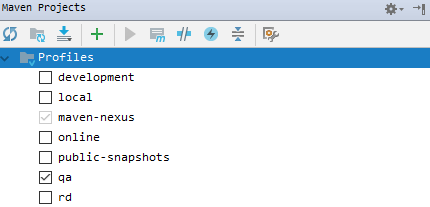
这种配置多环境的方法在SSM框架中使用的最多,但在SpringBoot中使用最多的是在启动SpringBoot项目的时候指定运行环境,下面也是主要描述这种配置的方法:
1.添加配置文件
在SpringBoot的Resources目录下建4个配置文件 application.yml、application-dev.yml、application-qa.yml、application-online.yml
dev:开发环境
qa:测试环境
online:生产环境
然后在application.yml配置文件中配置默认的运行环境:
spring:

  profiles:

    active: dev
然后在dev、qa、online中分别配置不同的配置内容,例如变更端口:
dev
server:

  port: 8085

  servlet:

    context-path: /api

  tomcat:

    max-threads: 100

  connection-timeout: 5000

spring:

  profiles: dev
qa
server:

  port: 8086

  servlet:

    context-path: /api

  tomcat:

    max-threads: 100

  connection-timeout: 5000

spring:

  profiles: qa
online
server:

  port: 8087

  servlet:

    context-path: /api

  tomcat:

    max-threads: 100

  connection-timeout: 5000

spring:

  profiles: online
然后在 SpringBoot系统列 1 - HelloWorld! 的基础上继续添加代码,新建WebConfig用于存放SpringBoot的一些配置信息(SpringBoot的配置即可以在配置文件中配置,也可以在类中配置):
import org.springframework.beans.factory.annotation.Value;

import org.springframework.boot.SpringBootConfiguration;

/**

 * 配置类

 * @author XIHONGLEI

 * @date 2018-10-31

 */

@SpringBootConfiguration

public class WebConfig {

    @Value("${server.port}")

    public String port;

}
然后改造一下HelloContrlller,为了区分环境,我们在请求/api/hello的时候将端口号展示出:
import com.hello.WebConfig;

import org.springframework.beans.factory.annotation.Autowired;

import org.springframework.web.bind.annotation.RequestMapping;

import org.springframework.web.bind.annotation.RestController;

@RestController

public class HelloController {

    @Autowired

    private WebConfig webConfig;

    @RequestMapping("hello")

    public String hello() {

        return "Hello World! port:".concat(webConfig.port);

    }

}
然后在pom.xml配置Jar包的打包配置:
<packaging>jar</packaging>

    <build>

        <finalName>spring-boot-hello</finalName>

        <resources>

            <resource>

                <directory>src/main/java</directory>

                <includes>

                    <include>**/*.yml</include>

                    <include>**/*.properties</include>

                    <include>**/*.xml</include>

                </includes>

                <filtering>false</filtering>

            </resource>

            <resource>

                <directory>src/main/resources</directory>

                <includes>

                    <include>**/*.yml</include>

                    <include>**/*.properties</include>

                    <include>**/*.xml</include>

                </includes>

                <filtering>false</filtering>

            </resource>

        </resources>

        <plugins>

            <plugin>

                <groupId>org.springframework.boot</groupId>

                <artifactId>spring-boot-maven-plugin</artifactId>

                <configuration>

                    <fork>true</fork>

                    <mainClass>com.hello.Application</mainClass>

                </configuration>

                <executions>

                    <execution>

                        <goals>

                            <goal>repackage</goal>

                        </goals>

                    </execution>

                </executions>

            </plugin>

            <plugin>

                <artifactId>maven-resources-plugin</artifactId>

                <version>2.5</version>

                <configuration>

                    <encoding>UTF-8</encoding>

                    <useDefaultDelimiters>true</useDefaultDelimiters>

                </configuration>

            </plugin>

            <plugin>

                <groupId>org.apache.maven.plugins</groupId>

                <artifactId>maven-surefire-plugin</artifactId>

                <version>2.18.1</version>

                <configuration>

                    <skipTests>true</skipTests>

                </configuration>

            </plugin>

            <plugin>

                <groupId>org.apache.maven.plugins</groupId>

                <artifactId>maven-compiler-plugin</artifactId>

                <version>2.3.2</version>

                <configuration>

                    <source>1.8</source>

                    <target>1.8</target>

                </configuration>

            </plugin>

        </plugins>

    </build>
然后Install,找打Jar包 spring-boot-hello.jar;
在Window控制台或者Linux中可以使用java -jar spring-boot-hello.jar来启动SpringBoot项目,然后通过在后方添加--spring.profiles.active来指定启动SpringBoot项目时使用的环境:
# Dev环境

$ java -jar spring-boot-hello.jar --spring.profiles.active=dev

# qa环境

$ java -jar spring-boot-hello.jar --spring.profiles.active=qa

# online环境

$ java -jar spring-boot-hello.jar --spring.profiles.active=online
例启动Online环境:
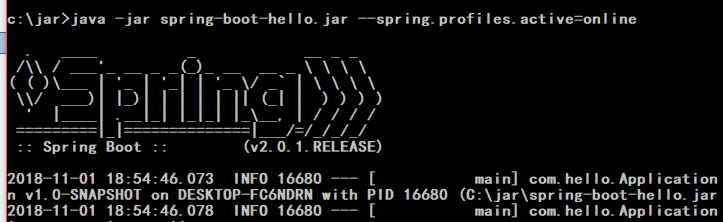
然后通过 http://localhost:8087/api/hello 来访问,因为Online中配置的端口是8087

完成!
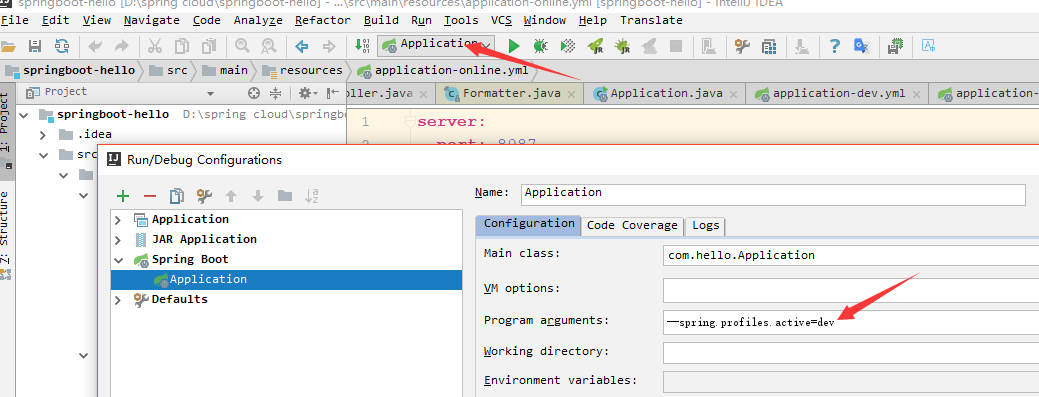
在IDEA中怎么在运行的时候选定执行环境,可以通过配置Application的program arguments中配置运行环境:
SpringBoot系统列 2 - 配置文件,多环境配置(dev,qa,online)的更多相关文章
- SpringBoot系统列 1 - HelloWorld!
学习SpringBoot系统列之HelloWorld! 1.新建一个Maven项目 2.添加POM配置 <parent> <groupId>org.springframewor ...
- WIN7系统JavaEE(java+tomcat7+Eclipse)环境配置
https://jingyan.baidu.com/article/3a2f7c2e62d25e26afd611fa.html WIN7系统JavaEE(java+tomcat7+Eclipse)环境 ...
- SpringBoot在启动时的多环境配置以及加载顺序
通常我们在开发完成一个SpringBoot项目时,总是要打包部署的. 在启动SpringBoot应用时,我们常常会使用命令java -jar xxx.jar来启动这个服务. 命令java -jar 除 ...
- SpringBoot | 第五章:多环境配置
前言 写上一篇看英文资料,耗费了心力呀,这章,相对来说简单点.也比较熟悉,但是这很实用.不扯了,开始~ 多环境配置 maven的多环境配置 springboot多环境配置 总结 老生常谈 多环境配置 ...
- windows系统下简单nodej.s环境配置 安装
国内目前关注最高,维护最好的一个关于nodejs的网站应该是http://www.cnodejs.org/ windows系统下简单nodejs环境配置. 第一步:下载安装文件 下载地址:官网 htt ...
- 配置文件,环境配置和war报分离,方便生产更改
在生产环境实现配置文件和war包 的分离,为方便在必要的时候进行一定的更改,可以避免修改包,但是需要重启 最初为这样的选择配置,单不知为何未生效,修改为配置2配置方法,但不灵活,待跟进.配置1: &l ...
- windows系统下简单node.js环境配置 安装
国内目前关注最高,维护最好的一个关于nodejs的网站应该是http://www.cnodejs.org/ windows系统下简单nodejs环境配置. 第一步:下载安装文件 下载地址:官网 htt ...
- (四)Spring Boot之配置文件-多环境配置
一.Properties多环境配置 1. application.properties配置激活选项 spring.profiles.active=dev 2.添加其他配置文件 3.结果 applica ...
- Ubuntu系统下《汇编语言》环境配置
说明 1.系统:Ubuntu codists@pc:~$ lsb_release -a No LSB modules are available. Distributor ID: Ubuntu Des ...
随机推荐
- bzoj3376/poj1988[Usaco2004 Open]Cube Stacking 方块游戏 — 带权并查集
题目链接:http://www.lydsy.com/JudgeOnline/problem.php?id=3376 题目大意: 编号为1到n的n(1≤n≤30000)个方块正放在地上.每个构成一个立方 ...
- HTML 标题标签
HTML:超文本标记语言基本结构 <!DOCTYPE html> <!--文档的声明 一个HTML文件就是一个文档 --> <html lang="en&quo ...
- redis:hash哈希类型的操作
1. hash哈希类型的操作 1.1. hset key field value 语法:hset key field value 作用:把key中field域的值设为value 注:如果没有field ...
- PAT Basic 1008
1008 数组元素循环右移问题 (20 分) 一个数组A中存有N(>0)个整数,在不允许使用另外数组的前提下,将每个整数循环向右移M(≥0)个位置,即将A中的数据由(A0A1⋯AN ...
- MySql 数据库安装、环境变量配置 以及 本地连接
一.准备 MySql 的安装包,这里我从网上下载的是 mysql-installer-community-5.6.21.1.msi,如下图: 二.,双击 mysql-installer-com ...
- python中@classmethod @staticmethod区别(转)
pthon中3种方式定义类方法, 常规方式, @classmethod修饰方式, @staticmethod修饰方式. class A(object): def foo(self, x): print ...
- Java知识回顾 (7) 继承、多态与接口、封装
一.继承 1.1 继承的特性 子类拥有父类非 private 的属性.方法. 子类可以拥有自己的属性和方法,即子类可以对父类进行扩展. 子类可以用自己的方式实现父类的方法. Java 的继承是单继承, ...
- 咏南DELPHI7中间件+开发框架
咏南DELPHI7中间件+开发框架 演示下载:链接: https://pan.baidu.com/s/1bulGBIZ6A1nkeErxIrGsGA 密码: 22dk 解压后运行ynmain.exe ...
- [rtsp]海康IPC监控摄像头远程外网监控配置(DDNS)
本来这个DDNS服务正是我想要的,但是配置了之后海康提示不再提供这个服务了,以后统一使用萤石云了,看来有必要去学习下萤石开放平台的api,看都提供哪些服务. 海康威视网络摄像机出厂的默认IP地 ...
- NLP 第10章 基于深度学习的NLP 算法