
Centos6搭建sftp服务器
一、创建sftp相关用户和目录
[root@mail samba]# useradd -s /sbin/nologin -M sftp_user #创建一个系统用户,按需设置登录的shell和家目录

[root@mail samba]# passwd sftp_user  #设置密码,也是sftp登录的密码,公网上尽可能复杂点

[root@mail samba]# mkdir /var/sftp/sftp_user -pv  #创建sftp的根目录

[root@mail samba]# chown root:root -R  /var/sftp/sftp_user  #将属组和属主都设置为root,必须,这里最容易出错

[root@mail sftp_user]# cd /var/sftp/sftp_user/

[root@mail sftp_user]# mkdir public  #创建共享目录

[root@mail sftp_user]# chown sftp_user:sftp_user -R /var/sftp/sftp_user/public/  #将共享目录的属组属主设为我们的sftp用户
二、编辑sshd配置文件,内容如下
#   $OpenBSD: sshd_config,v 1.80 // :: djm Exp $

# This is the sshd server system-wide configuration file.  See

# sshd_config() for more information.

# This sshd was compiled with PATH=/usr/local/bin:/bin:/usr/bin

# The strategy used for options in the default sshd_config shipped with

# OpenSSH is to specify options with their default value where

# possible, but leave them commented.  Uncommented options change a

# default value.

#Port

#AddressFamily any

#ListenAddress 0.0.0.0

#ListenAddress ::

# Disable legacy (protocol version ) support in the server for new

# installations. In future the default will change to require explicit

# activation of protocol

Protocol 2 #支持的SSH协议的版本号

# HostKey for protocol version

#HostKey /etc/ssh/ssh_host_key

# HostKeys for protocol version

#HostKey /etc/ssh/ssh_host_rsa_key

#HostKey /etc/ssh/ssh_host_dsa_key

# Lifetime and size of ephemeral version  server key

#KeyRegenerationInterval 1h

#ServerKeyBits

# Logging

# obsoletes QuietMode and FascistLogging

#SyslogFacility AUTH

SyslogFacility AUTHPRIV   #将日志消息通过哪个日志子系统(facility)发送

#LogLevel INFO

# Authentication:

#LoginGraceTime 2m

#PermitRootLogin yes

#StrictModes yes

#MaxAuthTries

#MaxSessions

#RSAAuthentication yes

#PubkeyAuthentication yes

#AuthorizedKeysFile .ssh/authorized_keys

#AuthorizedKeysCommand none

#AuthorizedKeysCommandRunAs nobody

# For this to work you will also need host keys in /etc/ssh/ssh_known_hosts

#RhostsRSAAuthentication no

# similar for protocol version

#HostbasedAuthentication no

# Change to yes if you don't trust ~/.ssh/known_hosts for

# RhostsRSAAuthentication and HostbasedAuthentication

#IgnoreUserKnownHosts no

# Don't read the user's ~/.rhosts and ~/.shosts files

#IgnoreRhosts yes

# To disable tunneled clear text passwords, change to no here!

#PasswordAuthentication yes

#PermitEmptyPasswords no

PasswordAuthentication yes  #允许通过密码进行登录

# Change to no to disable s/key passwords

#ChallengeResponseAuthentication yes

ChallengeResponseAuthentication no  #是否允许质疑-应答(challenge-response)认证。默认值是"yes"。

# Kerberos options

#KerberosAuthentication no

#KerberosOrLocalPasswd yes

#KerberosTicketCleanup yes

#KerberosGetAFSToken no

#KerberosUseKuserok yes

# GSSAPI options

#GSSAPICleanupCredentials yes

GSSAPICleanupCredentials yes  #是否在用户退出登录后自动销毁用户凭证缓存。默认值是"yes"。仅用于SSH-2。

#GSSAPIStrictAcceptorCheck yes

#GSSAPIKeyExchange no

# Set this to 'yes' to enable PAM authentication, account processing,

# and session processing. If this is enabled, PAM authentication will

# be allowed through the ChallengeResponseAuthentication and

# PasswordAuthentication.  Depending on your PAM configuration,

# PAM authentication via ChallengeResponseAuthentication may bypass

# the setting of "PermitRootLogin without-password".

# If you just want the PAM account and session checks to run without

# PAM authentication, then enable this but set PasswordAuthentication

# and ChallengeResponseAuthentication to 'no'.

#UsePAM no

UsePAM yes  #是否启用pam认证

# Accept locale-related environment variables

AcceptEnv LANG LC_CTYPE LC_NUMERIC LC_TIME LC_COLLATE LC_MONETARY LC_MESSAGES  #指定客户端发送的哪些环境变量将会被传递到会话环境中。[注意]只有SSH-2协议支持环境变量的传递,可以设置多个

AcceptEnv LC_PAPER LC_NAME LC_ADDRESS LC_TELEPHONE LC_MEASUREMENT

AcceptEnv LC_IDENTIFICATION LC_ALL LANGUAGE

AcceptEnv XMODIFIERS

#AllowAgentForwarding yes

#AllowTcpForwarding yes

#GatewayPorts no

#X11Forwarding no

X11Forwarding yes  #是否允许进行 X11 转发。默认值是"no",设为"yes"表示允许

#X11DisplayOffset

#X11UseLocalhost yes

#PrintMotd yes

#PrintLastLog yes

#TCPKeepAlive yes

#UseLogin no

#UsePrivilegeSeparation yes

#PermitUserEnvironment no

#Compression delayed

#ClientAliveInterval

#ClientAliveCountMax

#ShowPatchLevel no

#PidFile /var/run/sshd.pid

#MaxStartups ::

#PermitTunnel no

#ChrootDirectory none

# no default banner path

#Banner none

# override default of no subsystems

#Subsystem  sftp    /usr/libexec/openssh/sftp-server

Subsystem       sftp    internal-sftp    #配置一个外部子系统,仅用于SSH-2协议。值是一个子系统的名字和对应的命令行(含选项和参数)。比如"sftp /usr/libexec/openssh/sftp-server"。,###这里配置为内部的

# Example of overriding settings on a per-user basis

#Match User anoncvs

#   X11Forwarding no

#   AllowTcpForwarding no

#   ForceCommand cvs server

GSSAPIAuthentication no #是否允许使用基于 GSSAPI 的用户认证。默认值为"no"。仅用于SSH-2。

UseDNS no   #是否对远程主机名进行反向解析

AllowTcpForwarding yes   #是否允许TCP转发

Compression yes #是否对通信数据进行加密,还是延迟到认证成功之后再对通信数据加密

MaxAuthTries 6  #指定每个连接最大允许的认证次数。默认值是 6

PermitRootLogin yes  #是否允许 root 登录

PrintMotd yes  #是否在每一次交互式登录时打印 /etc/motd 文件的内容

PubkeyAuthentication yes  #是否允许公钥认证。仅可以用于SSH-2。默认值为"yes"。

RSAAuthentication no  #是否允许使用纯 RSA 公钥认证。仅用于SSH-1。默认值是"yes"

Match User sftp_user  #对特定的用户单独配置,匹配到的用户会强制使用/bin/false shell,只能以sftp登录,无法使用ssh登录服务器,没有匹配到的用户或组可以直接sftp登录,但是根目录为自己的家目录,无法指定具体的根目录。也可以设置为组,例如:Match Group sftp

ChrootDirectory   /var/sftp/sftp_user/  #限定用户的根目录

X11Forwarding no

AllowTcpForwarding yes

ForceCommand internal-sftp  #强制执行这里指定的命令而忽略客户端提供的任何命令
重启sshd服务
[root@mail sftp_user]# /etc/init.d/sshd restart

停止 sshd:                                                [确定]

正在启动 sshd:                                          [确定]
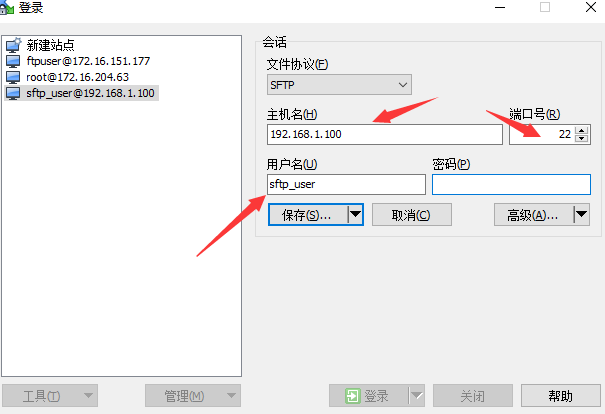
测试登录,这里使用winscp这款软件
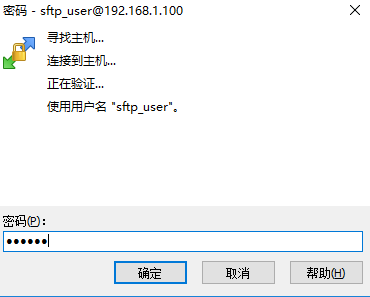
输入我们之前设置的密码
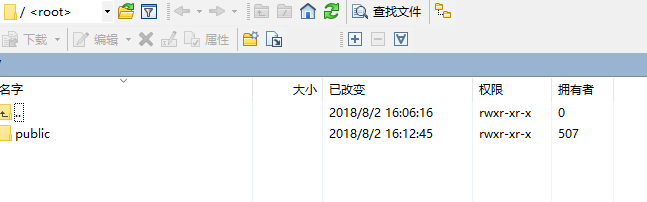
登录成功
Centos6搭建sftp服务器的更多相关文章
- Linux Centos 6.6搭建SFTP服务器
Linux Centos 6.6搭建SFTP服务器 在Centos 6.6环境使用系统自带的internal-sftp搭建SFTP服务器. 打开命令终端窗口,按以下步骤操作. 0.查看openssh的 ...
- freeSSHD在windows环境下搭建SFTP服务器
freeSSHD在windows环境下搭建SFTP服务器 0 建议现在windows环境下安装cygwin,否则在windows环境下cmd模式使用不了sftp去连接,可以利用win scp去测试连接 ...
- Linux ---搭建SFTP服务器
在Centos 6.6环境使用系统自带的internal-sftp搭建SFTP服务器. 打开命令终端窗口,按以下步骤操作. 0.查看openssh的版本 ssh -V 使用ssh -V 命令来查看op ...
- windows 上搭建 sftp 服务器 -freesshd全过程( 在linux上部署逐浪CMS的必读教程)
文章标题: windows 上搭建 sftp 服务器 - freesshd全过程 关键字 : freesshd 文章分类: 教程 创建时间: 2020年3月23日 缘由 动手 第一步:添加用户 第二步 ...
- linux搭建sftp服务器
转自:http://blog.csdn.net/superswordsman/article/details/49331539 最近工作需要用到sftp服务器,被网上各种方法尤其是权限设置问题搞得晕头 ...
- Windows搭建SFTP服务器
1.项目需要搭建一个SFTP服务器,网上搜了一下,用的是freeSSHd软件,网上查一下我用的是1.3.1版本https://freesshd.updatestar.com/网址自己下载即可. 2.安 ...
- 搭建SFTP服务器,允许一个或多个用户拥有一个或多个目录的rwx权限
1.引言 sftp可以为传输文件提供一种安全的网络的加密方法.sftp 与 ftp 有着几乎一样的语法和功能.SFTP 为 SSH的其中一部分,是一种传输档案至 Blogger 伺服器的安全方式.其实 ...
- CentOS6搭建OpenVPN服务器
一.服务器端安装及配置 服务器环境:干净的CentOS6.3 64位系统 内网IP:10.143.80.116 外网IP:203.195.xxx.xxx OpenVPN版本:OpenVPN 2.3.2 ...
- linux如何搭建sftp服务器
工具/原料 centos7.2_x64 方法/步骤 创建sftp组 groupadd sftp 创建完成之后使用cat /etc/group命令组的信息 2 创建一个sftp用户mysft ...
随机推荐
- zabbix3.4.7远程命令例子详解
zabbix可以通过远程发送执行命令或脚本来对部分的服务求故障进行修复 zabbix客户端配置 设置zabbix客户端用户的sudo权限 执行命令visudo: Defaults:zabbix !re ...
- Python—装饰器详解
装饰器:(语法糖) 本质是函数,它是赋予函数新功能,但是不改变函数的源代码及调用方式 原则: 1.不能修改被装饰函数的源代码 2.不能修改被装饰函数的调用方式 3.函数的返回值也不变 这两点简而言 ...
- vuex-getter
store 的计算属性. getter 的返回值会根据它的依赖被缓存起来,且只有当它的依赖值发生了改变才会被重新计算 const store = new Vuex.Store({ state: { t ...
- JAVA8之Lambda表达式与方法引用表达式
一.Lambda表达式 基本语法: lambdaParameters->lambdaBody lambdaParameters传递参数,lambdaBody用于编写逻辑,lambda表达式会生成 ...
- 外网访问SQLServer数据库holer实现
外网访问内网SQLServer数据库 内网主机上安装了SQLServer数据库,只能在局域网内访问,怎样从公网也能访问本地SQLServer数据库? 本文将介绍使用holer实现的具体步骤. 1. 准 ...
- Js/Bind()的认识
1.bind( eventType [, eventData], handler(eventObject))2.向绑定的对象上面提供一些事件方法的行为.其中三个参数的意义分别代表: 一.eventTy ...
- 2java判断素数
package com.test; import java.math.*;import java.util.Scanner; public class test222 { /** * @param a ...
- 洛谷1101:单词方阵(DFS)
题目描述 给一n×nn \times nn×n的字母方阵,内可能蕴含多个"yizhong"单词.单词在方阵中是沿着同一方向连续摆放的.摆放可沿着888个方向的任一方向,同一单词摆放 ...
- 软件工程第四次作业 石墨文档IOS
待分析的产品:石墨文档IOS客户端 作业地址: https://edu.cnblogs.com/campus/nenu/2016CS/homework/2505 第一部分 调研, 评测 1.下载并 ...
- EtherCAT 要点
倍福: 1.倍福的每个从站模块(IO模块)一般都有转换时间而这些时间会导致从站模块输出数值存在延迟,举例:当在15:00开始调用API让主站板卡输出数据,而用示波器实际检测到模块输出数值的时间大约在1 ...