
MVC项目不同域之间的UrlRouting
一、DomainAction,方便生成不同域下的url
1、新建3个MVC项目,一个公用类库WebCore
Demo.WebApplication0
绑定域名 www.demo.com demo.com t0.demo.com
Demo.WebApplication1(可不用建)
绑定域名 t1.demo.com
Demo.WebApplication2(可不用建)
绑定域名 t2.demo.com
Demo.WebCore
2、项目Demo.WebApplication0新增一个学生的Controller
     public class StudentController : Controller

     {

         public ActionResult Search(int gender, int degree, int pageSize, int page)

         {

             return Content(string.Format("查找学生,筛选条件。性别:{0},学历:{1},每页学生数量:{2},页码:{3}"

                 , (gender ==  ? "男" : (gender ==  ? "女" : "不限"))

                 ,degree, pageSize, page

                 ));

             //return View();

         }

     }
3、域名枚举
     public enum DemoDomain

     {

         /// <summary>

         /// www.demo.com

         /// demo.com

         /// t0.demo.com

         /// </summary>

         T0,

         /// <summary>

         /// t1.demo.com

         /// </summary>

         T1,

         /// <summary>

         /// t2.demo.com

         /// </summary>

         T2,

         /// <summary>

         /// demo.com

         /// </summary>

         Default,

     }
4、System.Web.Mvc.UrlHelper的静态扩展类DemoUrlExtensions
     public static class DemoUrlExtensions

     {

         public static string DomainAction(this UrlHelper urlHelper, string actionName, string controllerName)

         {

             return urlHelper.DomainAction(actionName, controllerName, DemoDomain.Default);

         }

         public static string DomainAction(this UrlHelper urlHelper, string actionName, string controllerName, object routeValues)

         {

             return urlHelper.DomainAction(actionName, controllerName, routeValues, DemoDomain.Default);

         }

         public static string DomainAction(this UrlHelper urlHelper, string actionName, string controllerName, DemoDomain Domain)

         {

             return urlHelper.DomainAction(actionName, controllerName, new { }, Domain);

         }

         public static string DomainAction(this UrlHelper urlHelper, string actionName, string controllerName, object routeValues, DemoDomain Domain)

         {

             return DomainAction(urlHelper, actionName, controllerName, new RouteValueDictionary(routeValues), Domain);

         }

         public static string DomainAction(this UrlHelper urlHelper, string actionName, string controllerName, RouteValueDictionary routeValues, DemoDomain Domain)

         {

             string subDomain = string.Empty;

             string HostName = string.Empty;

             switch (Domain)

             {

                 case DemoDomain.Default:

                     subDomain = string.Empty;

                     break;

                 case DemoDomain.T0:

                     subDomain = "t0";

                     break;

                 case DemoDomain.T1:

                     subDomain = "t1";

                     break;

                 case DemoDomain.T2:

                     subDomain = "t2";

                     break;

                 default:

                     subDomain = string.Empty;

                     break;

             }

             if (!string.IsNullOrEmpty(subDomain))

             {

                 HostName = subDomain + ".demo.com";

             }

             else

             {

                 HostName = "www.demo.com";

             }

             //核心的一行

             string url = urlHelper.Action(actionName, controllerName, routeValues, "http", HostName);

             if (url.Contains('?'))

             {

                 url = url.TrimEnd('/');

             }

             else

             {

                 if (url.EndsWith(".html/"))

                 {

                     url = url.TrimEnd('/');

                 }

             }

             return url;

         }

     }
5、修改Home/Index内容
 <div>

     <a href="@Url.DomainAction("Index","Home", DemoDomain.T1)">我要去t1.demo.com</a>

     <a href="@Url.DomainAction("Index","Home", DemoDomain.T2)">我要去t2.demo.com</a>

     <a href="@Url.DomainAction("Index", "Home", new { from = "www" }, DemoDomain.T2)">我要去t2.demo.com,我要带参数,表示我是从www过来的</a>

     <a href="@Url.DomainAction("Search", "Student", new { gender = 1, degree = 0, pageSize = 20, page = 1 }, DemoDomain.T0)">查找性别男的学生</a>

 </div>
对应的html源码
<div>
<a href="http://t1.demo.com/">我要去t1.demo.com</a>
<a href="http://t2.demo.com/">我要去t2.demo.com</a>
<a href="http://t2.demo.com/?from=www">我要去t2.demo.com,我要带参数,表示我是从www过来的</a> <a href="http://t0.demo.com/Student/Search?gender=1&degree=0&pageSize=20&page=1">查找性别男的学生</a> </div>
二、注册路由,SEO优化
现在已经能做到
@Url.DomainAction("Search", "Student", new { gender = , degree = , pageSize = , page = }, DemoDomain.T0)
对应的Url为
http://t0.demo.com/Student/Search?gender=1°ree=0&pageSize=20&page=1
,但这个链接不利于SEO,理想的情况可能是这样(请把t0当成student)
http://t0.demo.com/Search/1-0-20-1.html
定义路由
 public class DomainRoute : Route

     {

         private static Regex tokenRegex = new Regex(@"({[a-zA-Z0-9_]*})*-?\.?\/?({[a-zA-Z0-9_]*})*-?\.?\/?({[a-zA-Z0-9_]*})*-?\.?\/?({[a-zA-Z0-9_]*})*-?\.?\/?({[a-zA-Z0-9_]*})*-?\.?\/?({[a-zA-Z0-9_]*})*-?\.?\/?({[a-zA-Z0-9_]*})*-?\.?\/?({[a-zA-Z0-9_]*})*-?\.?\/?({[a-zA-Z0-9_]*})*-?\.?\/?({[a-zA-Z0-9_]*})*-?\.?\/?({[a-zA-Z0-9_]*})*-?\.?\/?({[a-zA-Z0-9_]*})*-?\.?\/?", RegexOptions.Compiled);

         private static Dictionary<string, Regex> domainRegDic = new Dictionary<string, Regex>();

         private static Dictionary<string, Regex> pathRegDic = new Dictionary<string, Regex>();

         /// <summary>

         ///

         /// </summary>

         public Regex PathRegex

         {

             get

             {

                 if (!pathRegDic.Keys.Contains(Url))

                 {

                     switch (Url)

                     {

                         case WebCoreConsts.URL_T0_SearchStudent:

                             pathRegDic[Url] = new Regex(ConvertToPattern("search/{gender}-{degree}-{pagesize}-{page}.html"), RegexOptions.Compiled | RegexOptions.IgnoreCase);

                             break;

                         default:

                             pathRegDic[Url] = CreateRegex(Url);

                             break;

                     }

                 }

                 return pathRegDic[Url];

             }

         }

         /// <summary>

         ///

         /// </summary>

         public Regex DomainRegex

         {

             get

             {

                 if (!domainRegDic.Keys.Contains(Domain))

                 {

                     domainRegDic[Domain] = CreateRegex(Domain);

                 }

                 return domainRegDic[Domain];

             }

         }

         public string Domain { get; set; }

         public DomainRoute(string domain, string url, RouteValueDictionary defaults)

             : base(url, defaults, new MvcRouteHandler())

         {

             Domain = domain;

         }

         public DomainRoute(string domain, string url, RouteValueDictionary defaults, IRouteHandler routeHandler)

             : base(url, defaults, routeHandler)

         {

             Domain = domain;

         }

         public DomainRoute(string domain, string url, object defaults)

             : base(url, new RouteValueDictionary(defaults), new MvcRouteHandler())

         {

             Domain = domain;

         }

         //new

         public DomainRoute(string domain, string url, object defaults, object constraints)

             : base(url, new RouteValueDictionary(defaults), new RouteValueDictionary(constraints), new MvcRouteHandler())

         {

             Domain = domain;

         }

         public DomainRoute(string domain, string url, object defaults, IRouteHandler routeHandler)

             : base(url, new RouteValueDictionary(defaults), routeHandler)

         {

             Domain = domain;

         }

         public override RouteData GetRouteData(HttpContextBase httpContext)

         {

             // 请求信息

             string requestDomain = httpContext.Request.Headers["host"];

             if (!string.IsNullOrEmpty(requestDomain))

             {

                 if (requestDomain.IndexOf(":") > 0)

                 {

                     requestDomain = requestDomain.Substring(0, requestDomain.IndexOf(":"));

                 }

             }

             else

             {

                 requestDomain = httpContext.Request.Url.Host;

             }

             string requestPath = httpContext.Request.AppRelativeCurrentExecutionFilePath.Substring(2) + httpContext.Request.PathInfo;

             // 匹配域名和路由

             Match domainMatch = DomainRegex.Match(requestDomain);

             Match pathMatch = PathRegex.Match(requestPath);

             // 路由数据

             RouteData data = null;

             if (domainMatch.Success && pathMatch.Success)

             {

                 data = new RouteData(this, RouteHandler);

                 // 添加默认选项

                 if (Defaults != null)

                 {

                     foreach (KeyValuePair<string, object> item in Defaults)

                     {

                         data.Values[item.Key] = item.Value;

                     }

                 }

                 // 匹配域名路由

                 for (int i = 1; i < domainMatch.Groups.Count; i++)

                 {

                     Group group = domainMatch.Groups[i];

                     if (group.Success)

                     {

                         string key = DomainRegex.GroupNameFromNumber(i);

                         if (!string.IsNullOrEmpty(key) && !char.IsNumber(key, 0))

                         {

                             if (!string.IsNullOrEmpty(group.Value))

                             {

                                 data.Values[key] = group.Value;

                             }

                         }

                     }

                 }

                 // 匹配域名路径

                 for (int i = 1; i < pathMatch.Groups.Count; i++)

                 {

                     Group group = pathMatch.Groups[i];

                     if (group.Success)

                     {

                         string key = PathRegex.GroupNameFromNumber(i);

                         if (!string.IsNullOrEmpty(key) && !char.IsNumber(key, 0))

                         {

                             if (!string.IsNullOrEmpty(group.Value))

                             {

                                 data.Values[key] = group.Value;

                             }

                         }

                     }

                 }

             }

             return data;

         }

         public override VirtualPathData GetVirtualPath(RequestContext requestContext, RouteValueDictionary values)

         {

             VirtualPathData pathData = base.GetVirtualPath(requestContext, RemoveDomainTokens(values));

             if (pathData != null && !string.IsNullOrEmpty(pathData.VirtualPath))

             {

                 if (pathData.VirtualPath.EndsWith(".html/"))

                 {

                     pathData.VirtualPath = pathData.VirtualPath.TrimEnd('/');

                 }

                 else if (!pathData.VirtualPath.EndsWith("/") && !pathData.VirtualPath.EndsWith(".html"))

                 {

                     pathData.VirtualPath = pathData.VirtualPath + "/";

                 }

             }

             return pathData;

         }

         private Regex CreateRegex(string source)

         {

             try

             {

                 string src = source;

                 // 替换

                 source = source.Replace("/", @"\/?");

                 source = source.Replace(".", @"\.?");

                 source = source.Replace("-", @"\-?");

                 source = source.Replace("{", @"(?<");

                 source = source.Replace("}", @">([a-zA-Z0-9_]*))");

                 return new Regex("^" + source + "$", RegexOptions.Compiled);

             }

             catch (Exception ex)

             {

                 //AppLogger.Error("创建正则出错:" + source + " 详情:" + ex.Message);

             }

             return new Regex("^" + source + "$", RegexOptions.Compiled);

         }

         private RouteValueDictionary RemoveDomainTokens(RouteValueDictionary values)

         {

             Match tokenMatch = tokenRegex.Match(Domain);

             for (int i = 0; i < tokenMatch.Groups.Count; i++)

             {

                 Group group = tokenMatch.Groups[i];

                 if (group.Success)

                 {

                     string key = group.Value.Replace("{", "").Replace("}", "");

                     if (values.ContainsKey(key))

                         values.Remove(key);

                 }

             }

             return values;

         }

         private static string ConvertToPattern(string source)

         {

             try

             {

                 string src = source;

                 // 替换

                 source = source.Replace("/", @"\/?");

                 source = source.Replace(".", @"\.?");

                 source = source.Replace("-", @"\-?");

                 source = source.Replace("{", @"(?<");

                 source = source.Replace("}", @">([a-zA-Z0-9_]*))");

                 return "^" + source + "$";

             }

             catch (Exception ex)

             {

             }

             return source;

         }

     }
注册路由
             routes.LowercaseUrls = true;

             routes.Add("T0StudentSearchDomainRoute", new DomainRoute(

                 "t0.demo.com",  // Domain with parameters

                 WebCoreConsts.URL_T0_SearchStudent, // URL with parameters

                 new { controller = "Student", action = "Search" }

                         //, new { }

             ));
可能还需要在web.config的system.webServer项中增加一行配置,否则.html不会进入路由,会直接映射成本地路径
<modules runAllManagedModulesForAllRequests="true" />
这时候
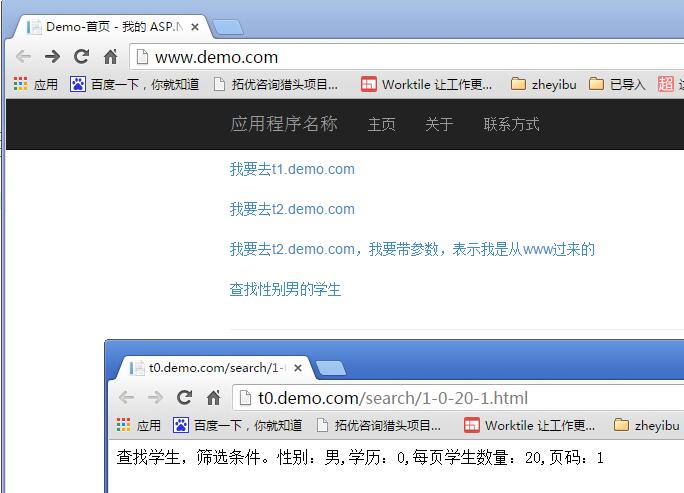
<a href="@Url.DomainAction("Search", "Student", new { gender = 1, degree = 0, pageSize = 20, page = 1 }, DemoDomain.T0)" target="_blank">查找性别男的学生</a>
就会对应成
<a href="http://t0.demo.com/search/1-0-20-1.html" target="_blank">查找性别男的学生</a>
附:源码下载
MVC项目不同域之间的UrlRouting的更多相关文章
- Mvc中域的添加和不同域之间的跳转
一.在新添加的域中中的 AreaRegistration中作如下设置: 二.在原来的Global.asax中设置: 三.不同域之间的跳转 @Url.Action("Index", ...
- MVC项目实践,在三层架构下实现SportsStore-06,实现购物车
SportsStore是<精通ASP.NET MVC3框架(第三版)>中演示的MVC项目,在该项目中涵盖了MVC的众多方面,包括:使用DI容器.URL优化.导航.分页.购物车.订单.产品管 ...
- 基于MVC4+EasyUI的Web开发框架经验总结(15)--在MVC项目中使用RDLC报表
RDLC是一个不错的报表,有着比较不错的设计模式和展现效果,在我的Winform开发里面,使用RDLC也是一个比较方便操作,如可以参考文章<DevExpress的XtraReport和微软RDL ...
- 1.2 认识ASP.NET MVC项目结构
1.开发环境 操作系统:xp.vista.windows 7.windows 8.windows server 2003|2008|2008R2|2012: 集成开发环境IDE: Vsiual Stu ...
- 在MVC项目中使用RDLC报表
原文地址:http://www.cnblogs.com/wuhuacong/p/4109833.html RDLC是一个不错的报表,有着比较不错的设计模式和展现效果,在我的Winform开发里面,使用 ...
- spring mvc的跨域解决方案
什么是跨域 一句话:同一个ip.同一个网络协议.同一个端口,三者都满足就是同一个域,否则就是跨域. 为什么非得跨域 基于两个方面: a. web应用本身是部署在不同的服务器上 b.基于开发的角度 -- ...
- 在已有的Asp.net MVC项目中引入Taurus.MVC
Taurus.MVC是一个优秀的框架,如果要应用到已有的Asp.net MVC项目中,需要修改一下. 1.前提约定: 走Taurus.MVC必须指定后缀.如.api 2.原项目修改如下: web.co ...
- .NET Core实战项目之CMS 第十三章 开发篇-在MVC项目结构介绍及应用第三方UI
作为后端开发的我来说,前端表示真心玩不转,你如果让我微调一个位置的样式的话还行,但是让我写一个很漂亮的后台的话,真心做不到,所以我一般会选择套用一些开源UI模板来进行系统UI的设计.那如何套用呢?今天 ...
- 使用JavaConfig和注解方式实现零xml配置的Spring MVC项目
1. 引言 Spring MVC是Spring框架重要组成部分,是一款非常优秀的Web框架.Spring MVC以DispatcherServlet为核心,通过可配置化的方式去处理各种web请求. 在 ...
随机推荐
- test20190320
全连 \(n\leq 10^6\) ,保证答案在 \(long\ long\) 范围内. 比较浅显的 \(dp\ ?\) 记 \(f[i]\) 表示考虑前 \(i\) 个音符,其中第 \(i\) 个 ...
- BZOJ1002 FJOI2007 轮状病毒 【基尔霍夫矩阵+高精度】
BZOJ1002 FJOI2007 轮状病毒 Description 轮状病毒有很多变种,所有轮状病毒的变种都是从一个轮状基产生的.一个N轮状基由圆环上N个不同的基原子和圆心处一个核原子构成的,2个原 ...
- MAC OS、Windows 、HTML,CSS,font-family:中文字体的英文名称
宋体 SimSun 黑体 SimHei 微软雅黑 Microsoft YaHei 微软正黑体 Microsoft JhengHei 新宋体 NSimSun 新细明体 PMingLiU 细明体 Ming ...
- lapis 集成openresty最新版本cjson 问题的解决
备注: 为了解决安装了lapis.同时又希望使用新版nginx 以及openresty 的特性(stream ...) 1. 解决方法 参考: https://github.com/leaf ...
- Android中执行的错误:java.lang.UnsatisfiedLinkError: Couldn't load locSDK3: findLibrary returned null.
今天在使用百度地图的时候执行发现报错: 明明已经增加了liblocSDK3.so.但总是无法定位.提示错误java.lang.UnsatisfiedLinkError: Couldn't load l ...
- PHP----重置阿里云主机的密码
登陆阿里云,找到你的服务器 点击更多,选择重置密码,根据提示就可以了 这个密码用于连接FTP工具和SSH工具
- MySQL出现1030-Got error 28 from storage engine错误
Navicat for MySQL出现1030-Got error 28 from storage engine错误 刚刚还能用这会儿就用不了了,估计是磁盘空间不足引起的! 在根目录/下执行命令:d ...
- rapidjson的read和write的sample
头文件 #include "json/document.h" #include "json/prettywriter.h" #include "jso ...
- JVM内存管理之GC算法精解(五分钟让你彻底明白标记/清除算法)
相信不少猿友看到标题就认为LZ是标题党了,不过既然您已经被LZ忽悠进来了,那就好好的享受一顿算法大餐吧.不过LZ丑话说前面哦,这篇文章应该能让各位彻底理解标记/清除算法,不过倘若各位猿友不能在五分钟内 ...
- Nginx启停
启动nginx /usr/local/nginx/nginx #不指定配置文件地址/usr/local/nginx/sbin/nginx -c /usr/local/nginx/conf/nginx. ...