
WinForm中DataGridView验证单元格输入的是数字
转载:http://www.cnblogs.com/ganqiyin/archive/2013/02/18/2915491.html
事件:DataGridView验证单元格输入的是数字,DataGridView源数据是从数据库读取的。
需求:当用户输入的不是数字的时候需要提示信息(数据是直接绑定数据库的,因此dataGridView有自己的报错功能,我们需要屏蔽掉它,显示自己的错误提示!)
实现: 选择DataGridView的CellValidating事件
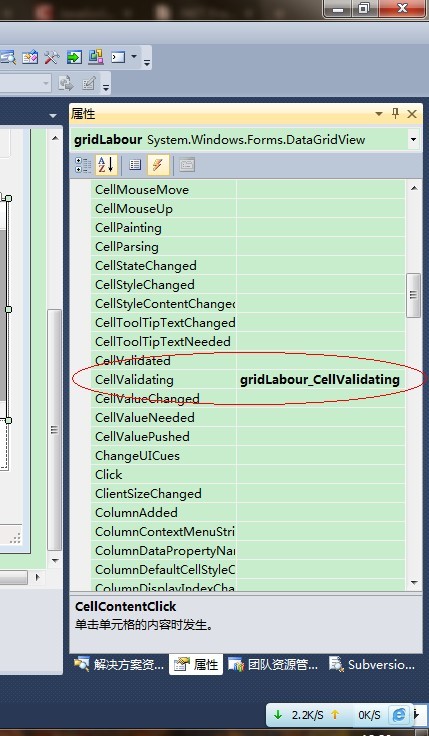
(1) 验证整数:
 1  private void gridPlant_CellValidating(object sender, DataGridViewCellValidatingEventArgs e)

 2         {

 3             if (e.RowIndex > -1 && e.ColumnIndex > -1)

 4             {

 5                 DataGridView grid = (DataGridView)sender;

 6                 grid.Rows[e.RowIndex].ErrorText = "";

 7                //这里最好用列名,而不是列索引号做判断

 8                 if (grid.Columns[e.ColumnIndex].Name == "WO0011_NUMBER_IDLE" || grid.Columns[e.ColumnIndex].Name == "WO0011_NUMBER_WORKING" || grid.Columns[e.ColumnIndex].Name == "WO0011_NUMBER_ON_SITE")

 9                 {

10

11                     Int32 newInteger = 0;

12                     if (!int.TryParse(e.FormattedValue.ToString(), out newInteger))

13                     {

14                         e.Cancel = true;

15                         grid.Rows[e.RowIndex].ErrorText = "Please enter a int number!";

16                         MessageBox.Show("the value is not nubmer , Pleaser enter a int number !");

17                         return;

18                     }

19                 }

20             }

21         }
(2) 验证十进制数:
 1  private void gridBriefsOlder_CellValidating(object sender, DataGridViewCellValidatingEventArgs e)

 2         {

 3             if (e.RowIndex > -1 && e.ColumnIndex > -1)

 4             {

 5                 DataGridView grid = (DataGridView)sender;

 6                 grid.Rows[e.RowIndex].ErrorText = "";

 7

 8                 if (grid.Columns[e.ColumnIndex].Name == "WO0009_APPROXIMATE_COMPLETION_PERCENTAGE1")

 9                 {

10                     try

11                     {

12                         Convert.ToDecimal(e.FormattedValue);

13                     }

14                     catch

15                     {

16                         e.Cancel = true;

17                         grid.Rows[e.RowIndex].ErrorText = "Please enter a number!";

18                         MessageBox.Show("the value is not nubmer , Pleaser enter a  number !");

19                         return;

20                     }

21                 }

22             }

23         }
//=>不设置CausesValidation话,则datagridview中CellValidating中出现无限循环了。
this.dgvRecyclePackage.CausesValidation = false;
这样就可以了。
WinForm中DataGridView验证单元格输入的是数字的更多相关文章
- C# Winform 中DataGridView 实现单元格输入下拉框功能
https://blog.csdn.net/ad13adsa/article/details/82108969 private void dataGridViewX1_EditingControlSh ...
- winform中dataGridView单元格根据值设置新值,彻底解决绑定后数据类型转换的困难
// winform中dataGridView单元格在数据绑定后,数据类型更改困难,只能迂回实现.有时候需要将数字变换为不同的文字描述,就会出现int32到string类型转换的异常,借助CellFo ...
- C# 文本输入限制类型,datagridview单元格输入验证
1.只能输入double类型 private void textBoxX6_KeyPress(object sender, KeyPressEventArgs e) { { //数字0~9所对应的ke ...
- WinForm中DataGridView复制选中单元格内容解决方案
WinForm中DataGridView鼠标选中单元格内容复制方案 1.CTR+C快捷键复制 前提:该控件ClipboardCopyMode属性设置值非Disable: 2.鼠标框选,自定义代码实现复 ...
- winform的datagridview单元格输入限制和右键单击datagridview单元格焦点跟着改变
在datagridview的EditingControlShowing事件里面添加代码: if (this.dgv_pch.Columns[dgv_pch.CurrentCell.ColumnInde ...
- (很难啊)如何实时获取DBGrid 中当前单元格输入的内容? [问题点数:100分,结帖人yifawu100]
如何获取DBGrid 中当前单元格输入的内容? 还没输入完成,我想实时获取 Cell中的内容,以便作其他处理,用什么事件呢? 所以Field的Onchange事件是没用的. DBGrid1.Selec ...
- 如何实时获取DBGrid 中当前单元格输入的内容?
如何获取DBGrid 中当前单元格输入的内容? 还没输入完成,我想实时获取 Cell中的内容,以便作其他处理, 用什么事件呢? 所以Field的Onchange事件是没用的. 这个问题简单啊,每输入1 ...
- C# Winform中DataGridView的DataGridViewCheckBoxColumn使用方法
下面介绍Winform中DataGridView的DataGridViewCheckBoxColumn使用方法: DataGridViewCheckBoxColumn CheckBox是否选中 在判断 ...
- C#winform中DataGridView常用的属性
1.AllowUserToAddRows属性:指示是否向用户显示添加行的选项 AllowUserToOrderColumns属性:指示是否允许通过手动对列重新定位 AllowUserToResizeC ...
随机推荐
- Integer类实现方式和注意事项
java.lang.Integer类的源代码: //定义一个长度为256的Integer数组 static final Integer[] cache = new Integer[-(-128) + ...
- Debian系网络配置 /etc/network/interfaces
说Debian系的网卡配置跟Redhat系很不一样,Redhat是放在/etc/sysconfig/network-scripts目录下面的一大堆文件里面,要修改?你一个一个文件来过吧.Debian系 ...
- NOIP填坑计划
斗地主 华容道 开车旅行 疫情控制 飞扬的小鸟 Mayan游戏 天天爱跑步
- LightOJ 1323 Billiard Balls(找规律(蚂蚁爬木棍))
题目链接:https://vjudge.net/contest/28079#problem/M 题目大意: 一个边界长为L宽为W的平面同时发射n个台球,运动K秒,台球碰到桌面及两(多)个台球相撞情况如 ...
- 791. Custom Sort String
S and T are strings composed of lowercase letters. In S, no letter occurs more than once. S was sort ...
- 记一次ceph集群的严重故障
问题:集群状态,坏了一个盘,pg状态好像有点问题[root@ceph-1 ~]# ceph -s cluster 72f44b06-b8d3-44cc-bb8b-2048f5b4acfe ...
- javax.persistence.EntityNotFoundException: Unable to find报错
这类错id 可能是10,可能是27,也可能是其他数字 错误描述: javax.persistence.EntityNotFoundException: Unable to find 某个类 with ...
- Linux内存管理中的slab分配器
转载自:http://edsionte.com/techblog/archives/4019 Linux内核中基于伙伴算法实现的分区页框分配器适合大块内存的请求,它所分配的内存区是以页框为基本单位的. ...
- CF438 The Child and Sequence
题意: 给定一个长度为n的非负整数序列a,你需要支持以下操作:1)给定l,r,输出a[l] + a[l+1] + ... + a[r] 2)给定l,r,x, 将a[l].a[l+1]......a[r ...
- Centos 7 mysql 安装使用记
某次把美团云1G 1核 centos 7 装到死机,明白了源码编译安装mysql是个大坑,遂绕路到其他大道. 安装命令 wget http://dev.mysql.com/get/mysql-comm ...