
Vue中使用百度地图——根据输入框输入的内容,获取详细地址
知识点:在Vue.js项目中调用百度地图API,实现input框,输入地址,在百度地图上定位到准确地址,获得到经纬度
参考博客: 百度地图的引用,初步了解参考博客:http://blog.csdn.net/docallen/article/details/70877925
详细功能修改参考博客: https://www.cnblogs.com/NearTheSea/p/6808093.html
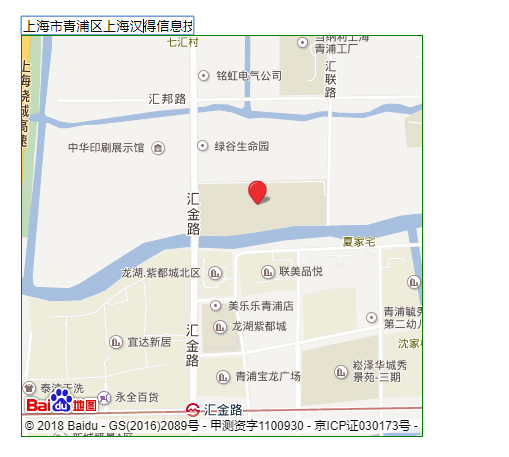
效果图:在input输入框中,输入要查询的地址,搜索出相关的名字
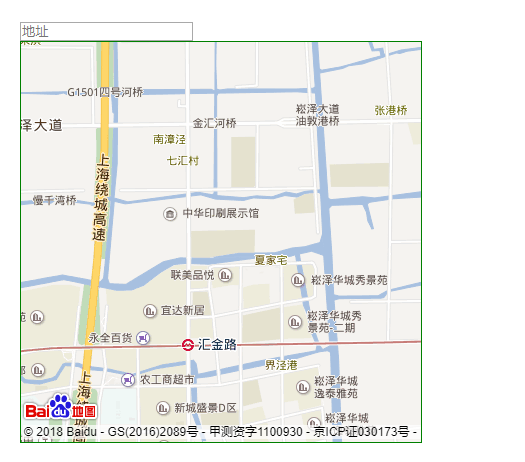
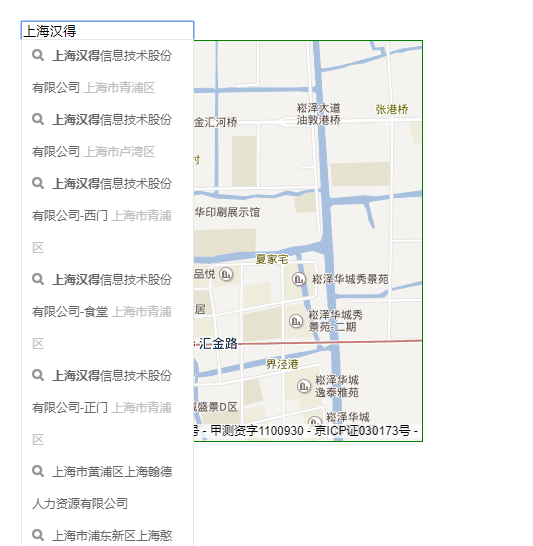
选中详细地址,地图定位到详细地址
1.申请密钥:
百度地图使用一个专门的密钥(ak)作为路径
在vue框架,的index.html中引入
<body>
<div id="app"></div>
<!--引入百度地图API-->
<script src='http://api.map.baidu.com/api?v=2.0&ak=?&callback=init'></script>
</body>
2.map.js实例:
<template>
    <div id="all">
    <input type="text" id="suggestId" name="address_detail" placeholder="地址" v-model="address_detail" class="input_style">
    <div id="allmap"></div>
    </div>
</template>
<script>
 //import {MP} from '../../map'
   export default {
       data(){
           return {
               address_detail: null, //详细地址
               userlocation: {lng: "", lat: ""},
           }
       },
       mounted(){
           this.$nextTick(function () {

                   var th = this
                   // 创建Map实例
                   var map = new BMap.Map("allmap");
                   // 初始化地图,设置中心点坐标,
                   var point = new BMap.Point(121.160724,31.173277); // 创建点坐标,汉得公司的经纬度坐标
                   map.centerAndZoom(point, 15);
                   map.enableScrollWheelZoom();
                   var ac = new BMap.Autocomplete(    //建立一个自动完成的对象
                       {
                           "input": "suggestId"
                           , "location": map
                       })
                   var myValue
                   ac.addEventListener("onconfirm", function (e) {    //鼠标点击下拉列表后的事件
                       var _value = e.item.value;
                       myValue = _value.province + _value.city + _value.district + _value.street + _value.business;
                       this.address_detail = myValue
                       setPlace();
                   });

                   function setPlace() {
                       map.clearOverlays();    //清除地图上所有覆盖物
                       function myFun() {
                           th.userlocation = local.getResults().getPoi(0).point;    //获取第一个智能搜索的结果
                           map.centerAndZoom(th.userlocation, 18);
                           map.addOverlay(new BMap.Marker(th.userlocation));    //添加标注
                       }

                       var local = new BMap.LocalSearch(map, { //智能搜索
                           onSearchComplete: myFun
                       });
                       local.search(myValue);

                       //测试输出坐标(指的是输入框最后确定地点的经纬度)
                       map.addEventListener("click",function(e){
                           //经度
                           console.log(th.userlocation.lng);
                           //维度
                           console.log(th.userlocation.lat);

                       })
                   }

           })
       },
   }
</script>
<style scoped>
   #allmap{
        width: 400px;
        height: 400px;
        font-family: "微软雅黑";
        border:1px solid green;
    }
</style>
Vue中使用百度地图——根据输入框输入的内容,获取详细地址的更多相关文章
- Vue中使用百度地图——设置地图标注
知识点:创建Map实例,为指定的位置设置标注 参考博客:https://www.cnblogs.com/liuswi/p/3994757.html 1.效果图:初始化地图,设置指定经纬度为地图中心点坐 ...
- vue中实现百度地图
1.项目根目录下下载百度地图插件 npm install vue-baidu-map –save 2.在首页index.html中引入百度地图: <script type="text/ ...
- Vue --》 如何在vue中调用百度地图
1.项目根目录下下载百度地图插件 npm install vue-baidu-map –save 2.在首页index.html中引入百度地图: <script type="text/ ...
- vue中引入百度地图
xxx.vue <template> <div> <el-input v-model="inputaddr"> </el-input> ...
- vue 中结合百度地图获取当前城市
首先需要去百度地图开发者平台申请 ak http://lbsyun.baidu.com/index.php?title=%E9%A6%96%E9%A1%B5 在index.html 中引入script ...
- vue中使用百度地图vue-baidu-map
安装 npm install vue-baidu-map --save 全局注册 全局注册将一次性引入百度地图组件库的所有组件.需在入口文件main.js中引入vue-baidu-map import ...
- vue中使用百度地图,悬浮窗搜索功能
https://www.cnblogs.com/shuaifing/p/8185311.html 侵删 <template> <div id="all"> ...
- VUE 中引入百度地图(vue-Baidu-Map)
1.安装 $ npm install vue-baidu-map --save 2.全局注册,在main.js中引入以下代码 import BaiduMap from 'vue-baidu-map' ...
- vue 中引用 百度地图
1.在 http://lbsyun.baidu.com/ 申请 秘钥 2.在index.html文件中引入 <script src="http://api.map.baidu.com/ ...
随机推荐
- etcd: request cluster ID mismatch错误解决【只适用于新建etcd集群或无数据集群】
1.报错信息 Mar 29 05:45:31 xxx etcd: request cluster ID mismatch (got 414f8613693e2e2 want cdf818194e3a8 ...
- mysql 迁移数据
一.导出导入所有数据库的数据 1.导出 mysqldump -u root -p123456 --all-databases > all.sql 2.导入 mysql -u root -p123 ...
- 003-linux基本目录介绍
一.文件系统的类型 LINUX有四种基本文件系统类型:普通文件.目录文件.连接文件和特殊文件,可用file命令来识别. 普通文件:如文本文件.C语言元代码.SHELL脚本.二进制的可执行文件等,可用c ...
- java-mybaits-00501-案例-映射分析-订单商品数据模型
1.数据模型分析思路 1.每张表记录的数据内容 分模块对每张表记录的内容进行熟悉,相当 于你学习系统 需求(功能)的过程. 2.每张表重要的字段设置 非空字段.外键 ...
- 从原型链看DOM--Document类型
JavaScript通过Document类型表示文档,原型链的继承关系为:document.__proto__->HTMLDocument.prototype->Document.prot ...
- Go实现查找目录下(包括子目录)替换文件内容
[功能] 按指定的目录查找出文件,如果有子目录,子目录也将进行搜索,将其中的文件内容进行替换. [缺陷] 1. 没有过滤出文本文件 2. 当文件过大时,效率不高 [代码] package main i ...
- 20165324 2017-2018-2 《Java程序设计》课程总结
20165324 2017-2018-2 <Java程序设计>课程总结 每周作业链接汇总 预备作业1:20165324 我期望的师生关系 预备作业2:20165324 学习基础与C语言学习 ...
- HTML5游戏开发系列教程5(译)
原文地址:http://www.script-tutorials.com/html5-game-development-lesson-5/ 最终我决定准备下一篇游戏开发系列的文章,我们将继续使用can ...
- PL/SQL编程—函数
SQL> select * from mytest; ID NAME PASSWD SALARY ----- -------------------- -------------------- ...
- ZOJ - 4048 Red Black Tree (LCA+贪心) The 2018 ACM-ICPC Asia Qingdao Regional Contest, Online
题意:一棵树上有m个红色结点,树的边有权值.q次查询,每次给出k个点,每次查询有且只有一次机会将n个点中任意一个点染红,令k个点中距离红色祖先距离最大的那个点的距离最小化.q次查询相互独立. 分析:数 ...