
devops-持续集成管理之SonarQube
1. devops-持续集成管理之SonarQube
1) 代码质量七宗罪
编码规范:是否遵守了编码规范,遵循了最佳实践。

潜在的BUG:可能在最坏情况下出现问题的代码,以及存在安全漏洞的代码。

文档和注释:过少(缺少必要信息)、过多(没有信息量)、过时的文档或注释。

重复代码:违反了DontRepeat Yourself原则

复杂度:代码结构太复杂(如圈复杂度太高),难以理解、测试和维护。

测试覆盖率:编写单元测试,特别是针对复杂代码的测试覆盖是否足够。

设计与架构:是否高内聚、低耦合,依赖最少
2) 安装sonarqube
(1) 官网地址: https://www.sonarqube.org/
安装包代码下载地址:https://binaries.sonarsource.com/Distribution/sonarqube/sonarqube-6.7.6.zip
(2) 代码扫描
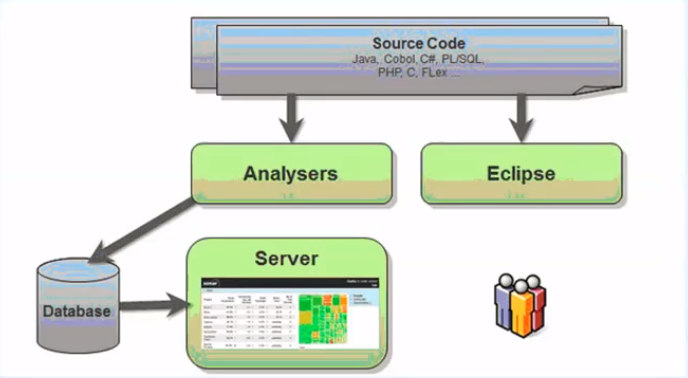
3) 安装mysql数据库
(1) 准备sonar数据库
为sonar准备mysql数据库,版本必须大于5.6
(2) 下载mysql二进制包
[root@jenkins ~]# cd /usr/local/src

[root@jenkins src]# wget http://dev.mysql.com/get/Downloads/MySQL-5.6/mysql-5.6.30-linux-glibc2.5-x86_64.tar.gz

[root@jenkins src]# ll

total 438228

-rw-r--r-- 1 root root 314592758 Mar  3  2016 mysql-5.6.30-linux-glibc2.5-x86_64.tar.gz
(3) 创建mysql用户
[root@jenkins ~]# groupadd mysql

[root@jenkins ~]# useradd -r -g mysql -s /bin/false mysql
(4) 解压mysql二进制包
[root@jenkins ~]# cd /usr/local/src/

[root@jenkins src]# tar zxf mysql-5.6.30-linux-glibc2.5-x86_64.tar.gz

[root@jenkins src]# mv mysql-5.6.30-linux-glibc2.5-x86_64 /usr/local/

[root@jenkins src]# chown -R mysql.mysql /usr/local/mysql-5.6.30-linux-glibc2.5-x86_64

[root@jenkins src]# ln -s /usr/local/mysql-5.6.30-linux-glibc2.5-x86_64 /usr/local/mysql

[root@jenkins src]# ll /usr/local/

total 0

drwxr-xr-x.  2 root  root    6 Apr 11  2018 bin

drwxr-xr-x.  2 root  root    6 Apr 11  2018 etc

drwxr-xr-x.  2 root  root    6 Apr 11  2018 games

drwxr-xr-x.  2 root  root    6 Apr 11  2018 include

drwxr-xr-x.  2 root  root    6 Apr 11  2018 lib

drwxr-xr-x.  2 root  root    6 Apr 11  2018 lib64

drwxr-xr-x.  2 root  root    6 Apr 11  2018 libexec

lrwxrwxrwx   1 root  root   45 Jan 26 16:38 mysql -> /usr/local/mysql-5.6.30-linux-glibc2.5-x86_64

drwxr-xr-x  13 mysql mysql 191 Jan 26 16:37 mysql-5.6.30-linux-glibc2.5-x86_64

drwxr-xr-x.  2 root  root    6 Apr 11  2018 sbin

drwxr-xr-x.  5 root  root   49 Oct 24 21:37 share

drwxr-xr-x.  2 root  root   82 Jan 26 16:37 src

[root@jenkins src]# chown -R mysql:mysql /usr/local/mysql
(5) 初始化mysql
[root@jenkins src]# /usr/local/mysql/scripts/mysql_install_db --defaults-file=/usr/local/mysql/my.cnf  --user=mysql --basedir=/usr/local/mysql/ --datadir=/usr/local/mysql/data/

Installing MySQL system tables...2019-01-26 16:41:26 0 [Warning] TIMESTAMP with implicit DEFAULT value is deprecated. Please use --explicit_defaults_for_timestamp server option (see documentation for more details).

2019-01-26 16:41:26 0 [Note] /usr/local/mysql//bin/mysqld (mysqld 5.6.30) starting as process 1650 ...

2019-01-26 16:41:26 1650 [Note] InnoDB: Using atomics to ref count buffer pool pages

2019-01-26 16:41:26 1650 [Note] InnoDB: The InnoDB memory heap is disabled

2019-01-26 16:41:26 1650 [Note] InnoDB: Mutexes and rw_locks use GCC atomic builtins

2019-01-26 16:41:26 1650 [Note] InnoDB: Memory barrier is not used

2019-01-26 16:41:26 1650 [Note] InnoDB: Compressed tables use zlib 1.2.3

2019-01-26 16:41:26 1650 [Note] InnoDB: Using Linux native AIO

2019-01-26 16:41:26 1650 [Note] InnoDB: Using CPU crc32 instructions

2019-01-26 16:41:26 1650 [Note] InnoDB: Initializing buffer pool, size = 128.0M

2019-01-26 16:41:26 1650 [Note] InnoDB: Completed initialization of buffer pool

2019-01-26 16:41:26 1650 [Note] InnoDB: The first specified data file ./ibdata1 did not exist: a new database to be created!

2019-01-26 16:41:26 1650 [Note] InnoDB: Setting file ./ibdata1 size to 12 MB

2019-01-26 16:41:26 1650 [Note] InnoDB: Database physically writes the file full: wait...

2019-01-26 16:41:26 1650 [Note] InnoDB: Setting log file ./ib_logfile101 size to 48 MB

2019-01-26 16:41:26 1650 [Note] InnoDB: Setting log file ./ib_logfile1 size to 48 MB

2019-01-26 16:41:27 1650 [Note] InnoDB: Renaming log file ./ib_logfile101 to ./ib_logfile0

2019-01-26 16:41:27 1650 [Warning] InnoDB: New log files created, LSN=45781

2019-01-26 16:41:27 1650 [Note] InnoDB: Doublewrite buffer not found: creating new

2019-01-26 16:41:27 1650 [Note] InnoDB: Doublewrite buffer created

2019-01-26 16:41:27 1650 [Note] InnoDB: 128 rollback segment(s) are active.

2019-01-26 16:41:27 1650 [Warning] InnoDB: Creating foreign key constraint system tables.

2019-01-26 16:41:27 1650 [Note] InnoDB: Foreign key constraint system tables created

2019-01-26 16:41:27 1650 [Note] InnoDB: Creating tablespace and datafile system tables.

2019-01-26 16:41:27 1650 [Note] InnoDB: Tablespace and datafile system tables created.

2019-01-26 16:41:27 1650 [Note] InnoDB: Waiting for purge to start

2019-01-26 16:41:27 1650 [Note] InnoDB: 5.6.30 started; log sequence number 0

2019-01-26 16:41:27 1650 [Note] Binlog end

2019-01-26 16:41:27 1650 [Note] InnoDB: FTS optimize thread exiting.

2019-01-26 16:41:27 1650 [Note] InnoDB: Starting shutdown...

2019-01-26 16:41:29 1650 [Note] InnoDB: Shutdown completed; log sequence number 1625977

OK

Filling help tables...2019-01-26 16:41:29 0 [Warning] TIMESTAMP with implicit DEFAULT value is deprecated. Please use --explicit_defaults_for_timestamp server option (see documentation for more details).

2019-01-26 16:41:29 0 [Note] /usr/local/mysql//bin/mysqld (mysqld 5.6.30) starting as process 1672 ...

2019-01-26 16:41:29 1672 [Note] InnoDB: Using atomics to ref count buffer pool pages

2019-01-26 16:41:29 1672 [Note] InnoDB: The InnoDB memory heap is disabled

2019-01-26 16:41:29 1672 [Note] InnoDB: Mutexes and rw_locks use GCC atomic builtins

2019-01-26 16:41:29 1672 [Note] InnoDB: Memory barrier is not used

2019-01-26 16:41:29 1672 [Note] InnoDB: Compressed tables use zlib 1.2.3

2019-01-26 16:41:29 1672 [Note] InnoDB: Using Linux native AIO

2019-01-26 16:41:29 1672 [Note] InnoDB: Using CPU crc32 instructions

2019-01-26 16:41:29 1672 [Note] InnoDB: Initializing buffer pool, size = 128.0M

2019-01-26 16:41:29 1672 [Note] InnoDB: Completed initialization of buffer pool

2019-01-26 16:41:29 1672 [Note] InnoDB: Highest supported file format is Barracuda.

2019-01-26 16:41:29 1672 [Note] InnoDB: 128 rollback segment(s) are active.

2019-01-26 16:41:29 1672 [Note] InnoDB: Waiting for purge to start

2019-01-26 16:41:29 1672 [Note] InnoDB: 5.6.30 started; log sequence number 1625977

2019-01-26 16:41:29 1672 [Note] Binlog end

2019-01-26 16:41:29 1672 [Note] InnoDB: FTS optimize thread exiting.

2019-01-26 16:41:29 1672 [Note] InnoDB: Starting shutdown...

2019-01-26 16:41:31 1672 [Note] InnoDB: Shutdown completed; log sequence number 1625987

OK

To start mysqld at boot time you have to copy

support-files/mysql.server to the right place for your system

PLEASE REMEMBER TO SET A PASSWORD FOR THE MySQL root USER !

To do so, start the server, then issue the following commands:

  /usr/local/mysql//bin/mysqladmin -u root password 'new-password'

  /usr/local/mysql//bin/mysqladmin -u root -h jenkins password 'new-password'

Alternatively you can run:

  /usr/local/mysql//bin/mysql_secure_installation

which will also give you the option of removing the test

databases and anonymous user created by default.  This is

strongly recommended for production servers.

See the manual for more instructions.

You can start the MySQL daemon with:

  cd . ; /usr/local/mysql//bin/mysqld_safe &

You can test the MySQL daemon with mysql-test-run.pl

  cd mysql-test ; perl mysql-test-run.pl

Please report any problems at http://bugs.mysql.com/

The latest information about MySQL is available on the web at

  http://www.mysql.com

Support MySQL by buying support/licenses at http://shop.mysql.com

New default config file was created as /usr/local/mysql//my.cnf and

will be used by default by the server when you start it.

You may edit this file to change server settings

WARNING: Default config file /etc/my.cnf exists on the system

This file will be read by default by the MySQL server

If you do not want to use this, either remove it, or use the

--defaults-file argument to mysqld_safe when starting the server
(6) 拷贝启动文件
[root@jenkins bin]# cp /usr/local/mysql/support-files/mysql.server /etc/init.d/mysqld
(7) 拷贝my.cnf
[root@jenkins bin]# cp /usr/local/mysql/my.cnf  /etc/my.cnf

cp: overwrite ‘/etc/my.cnf’? y
(8) 启动数据库
[root@jenkins bin]# /etc/init.d/mysqld start

Starting MySQL. SUCCESS!
(9) 添加mysql环境变量
[root@jenkins bin]# mysql

-bash: mysql: command not found               #提示没这个命令

[root@jenkins bin]# echo 'PATH=/usr/local/mysql/bin:$PATH' >> /etc/profile

[root@jenkins bin]# echo $PATH

/usr/local/sbin:/usr/local/bin:/usr/sbin:/usr/bin:/root/bin

[root@jenkins bin]# source /etc/profile
(10) 登录数据库
[root@jenkins bin]# mysql

Welcome to the MySQL monitor.  Commands end with ; or \g.

Your MySQL connection id is 1

Server version: 5.6.30 MySQL Community Server (GPL)

Copyright (c) 2000, 2016, Oracle and/or its affiliates. All rights reserved.

Oracle is a registered trademark of Oracle Corporation and/or its

affiliates. Other names may be trademarks of their respective

owners.

Type 'help;' or '\h' for help. Type '\c' to clear the current input statement.

mysql> Ctrl-C -- exit!

Aborted

[root@jenkins bin]# mysql

Welcome to the MySQL monitor.  Commands end with ; or \g.

Your MySQL connection id is 2

Server version: 5.6.30 MySQL Community Server (GPL)

Copyright (c) 2000, 2016, Oracle and/or its affiliates. All rights reserved.

Oracle is a registered trademark of Oracle Corporation and/or its

affiliates. Other names may be trademarks of their respective

owners.

Type 'help;' or '\h' for help. Type '\c' to clear the current input statement.

mysql> show databases;

+--------------------+

| Database           |

+--------------------+

| information_schema |

| mysql              |

| performance_schema |

| test               |

+--------------------+

4 rows in set (0.00 sec)
(11) 创建sonarqube数据库连接权限
mysql> CREATE DATABASE sonar CHARACTER SET utf8 COLLATE utf8_general_ci;

Query OK, 1 row affected (0.00 sec)

mysql> GRANT ALL ON sonar.* TO 'sonar'@'localhost' IDENTIFIED BY 'sonar@pw';

Query OK, 0 rows affected (0.00 sec)

mysql> GRANT ALL ON sonar.* TO 'sonar'@'%' IDENTIFIED BY 'sonar@pw';

Query OK, 0 rows affected (0.00 sec)

mysql> FLUSH PRIVILEGES;

Query OK, 0 rows affected (0.00 sec)
4)安装sonarqube
(1) 安装sonar
[root@jenkins ~]# yum install -y java-1.8.0
(2) 下载sonar
[root@jenkins ~]# cd /usr/local/src/

[root@jenkins src]# wget https://binaries.sonarsource.com/Distribution/sonarqube/sonarqube-6.7.6.zip

[root@jenkins src]# ll

total 463092

-rw-r--r-- 1 root root 314592758 Mar  3  2016 mysql-5.6.30-linux-glibc2.5-x86_64.tar.gz

-rw-r--r-- 1 root root 159610886 Nov 20 20:23 sonarqube-6.7.6.zip
(3) 解压sonar
[root@jenkins src]# yum -y install unzip        #安装解压工具

[root@jenkins src]# unzip sonarqube-6.7.6.zip

[root@jenkins src]# ll

total 463092

-rw-r--r--  1 root root 314592758 Mar  3  2016 mysql-5.6.30-linux-glibc2.5-x86_64.tar.gz

drwxr-xr-x 11 root root       141 Nov 20 09:59 sonarqube-6.7.6

-rw-r--r--  1 root root 159610886 Nov 20 20:23 sonarqube-6.7.6.zip

[root@jenkins  src]# mv sonarqube-6.7.6 /usr/local/

[root@jenkins src]# ln -s /usr/local/sonarqube-6.7.6/ /usr/local/sonarqube
(4) 修改sonar配置文件
[root@jenkins src]# cd /usr/local/sonarqube/conf/

[root@jenkins conf]# ll

total 24

-rw-r--r-- 1 root root 17786 Nov 20 09:50 sonar.properties

-rw-r--r-- 1 root root  3311 Nov 20 09:50 wrapper.conf

[root@jenkins conf]# vim sonar.properties                         #按照以下内容修改

sonar.web.host=0.0.0.0

sonar.web.port=9000

sonar.jdbc.username=sonar

sonar.jdbc.password=sonar@pw

sonar.jdbc.url=jdbc:mysql://localhost:3306/sonar?useUnicode=true&characterEncoding=utf8&rewriteBatchedStatements=true&useConfigs=maxPerformance&useSSL=false
(5) 创建一个普通用户启动sonar程序
[root@jenkins conf]# useradd sonarqube

[root@jenkins conf]# chown -R sonarqube.sonarqube /usr/local/sonarqube-6.7.6

[root@jenkins conf]# chown -R sonarqube.sonarqube /usr/local/sonarqube

[root@jenkins conf]# su - sonarqube

[sonarqube@jenkins ~]$ cd /usr/local/sonarqube

[sonarqube@jenkins sonarqube]$ ll

total 12

drwxr-xr-x 8 sonarqube sonarqube  136 Nov 20 09:59 bin

drwxr-xr-x 2 sonarqube sonarqube   50 Jan 26 17:42 conf

-rw-r--r-- 1 sonarqube sonarqube 7651 Nov 20 09:50 COPYING

drwxr-xr-x 2 sonarqube sonarqube   24 Nov 20 09:50 data

drwxr-xr-x 7 sonarqube sonarqube  150 Nov 20 09:59 elasticsearch

drwxr-xr-x 4 sonarqube sonarqube   40 Nov 20 09:50 extensions

drwxr-xr-x 9 sonarqube sonarqube  140 Nov 20 09:59 lib

drwxr-xr-x 2 sonarqube sonarqube   37 Jan 26 17:39 logs

drwxr-xr-x 3 sonarqube sonarqube   38 Jan 26 17:35 temp

drwxr-xr-x 9 sonarqube sonarqube 4096 Nov 20 09:59 web

[sonarqube@jenkins sonarqube]$ ll /usr/local/sonarqube/bin/

jsw-license/         linux-x86-32/        linux-x86-64/        macosx-universal-64/ windows-x86-32/      windows-x86-64/

[sonarqube@jenkins sonarqube]$ ll /usr/local/sonarqube/bin/linux-x86-64/

lib/      sonar.sh  wrapper

[sonarqube@jenkins sonarqube]$  /usr/local/sonarqube/bin/linux-x86-64/sonar.sh start

Starting SonarQube...

Started SonarQube.
(6) 验证是否启动
[sonarqube@jenkins sonarqube]$ ps -ef |grep sonarqube

root       2322   1559  0 17:43 pts/2    00:00:00 su - sonarqube

sonarqu+   2442      1  0 17:43 ?        00:00:00 /usr/local/sonarqube-6.7.6/bin/linux-x86-64/./wrapper /usr/local/sonarqube-6.7.6/bin/linux-x86-64/../../conf/wrapper.conf wrapper.syslog.ident=SonarQube wrapper.pidfile=/usr/local/sonarqube-6.7.6/bin/linux-x86-64/./SonarQube.pid wrapper.daemonize=TRUE

sonarqu+   2469   2444 39 17:43 ?        00:00:32 /usr/lib/jvm/java-1.8.0-openjdk-1.8.0.191.b12-1.el7_6.x86_64/jre/bin/java -XX:+UseConcMarkSweepGC -XX:CMSInitiatingOccupancyFraction=75 -XX:+UseCMSInitiatingOccupancyOnly -XX:+AlwaysPreTouch -server -Xss1m -Djava.awt.headless=true -Dfile.encoding=UTF-8 -Djna.nosys=true -Djdk.io.permissionsUseCanonicalPath=true -Dio.netty.noUnsafe=true -Dio.netty.noKeySetOptimization=true -Dio.netty.recycler.maxCapacityPerThread=0 -Dlog4j.shutdownHookEnabled=false -Dlog4j2.disable.jmx=true -Dlog4j.skipJansi=true -Xms512m -Xmx512m -XX:+HeapDumpOnOutOfMemoryError -Des.path.home=/usr/local/sonarqube-6.7.6/elasticsearch -cp /usr/local/sonarqube-6.7.6/elasticsearch/lib/* org.elasticsearch.bootstrap.Elasticsearch -Epath.conf=/usr/local/sonarqube-6.7.6/temp/conf/es

sonarqu+   2557   2444 51 17:44 ?        00:00:38 /usr/lib/jvm/java-1.8.0-openjdk-1.8.0.191.b12-1.el7_6.x86_64/jre/bin/java -Djava.awt.headless=true -Dfile.encoding=UTF-8 -Djava.io.tmpdir=/usr/local/sonarqube-6.7.6/temp -Xmx512m -Xms128m -XX:+HeapDumpOnOutOfMemoryError -cp ./lib/common/*:./lib/server/*:/usr/local/sonarqube-6.7.6/lib/jdbc/mysql/mysql-connector-java-5.1.42.jar org.sonar.server.app.WebServer /usr/local/sonarqube-6.7.6/temp/sq-process5217028904409453940properties

sonarqu+   2734   2444 29 17:44 ?        00:00:12 /usr/lib/jvm/java-1.8.0-openjdk-1.8.0.191.b12-1.el7_6.x86_64/jre/bin/java -Djava.awt.headless=true -Dfile.encoding=UTF-8 -Djava.io.tmpdir=/usr/local/sonarqube-6.7.6/temp -Xmx512m -Xms128m -XX:+HeapDumpOnOutOfMemoryError -cp ./lib/common/*:./lib/server/*:./lib/ce/*:/usr/local/sonarqube-6.7.6/lib/jdbc/mysql/mysql-connector-java-5.1.42.jar org.sonar.ce.app.CeServer /usr/local/sonarqube-6.7.6/temp/sq-process4860119420686879380properties

[sonarqube@jenkins sonarqube]$ netstat -lntup|grep 9000

(Not all processes could be identified, non-owned process info

 will not be shown, you would have to be root to see it all.)

tcp        0      0 0.0.0.0:9000            0.0.0.0:*               LISTEN      2557/java
(7)浏览器访问
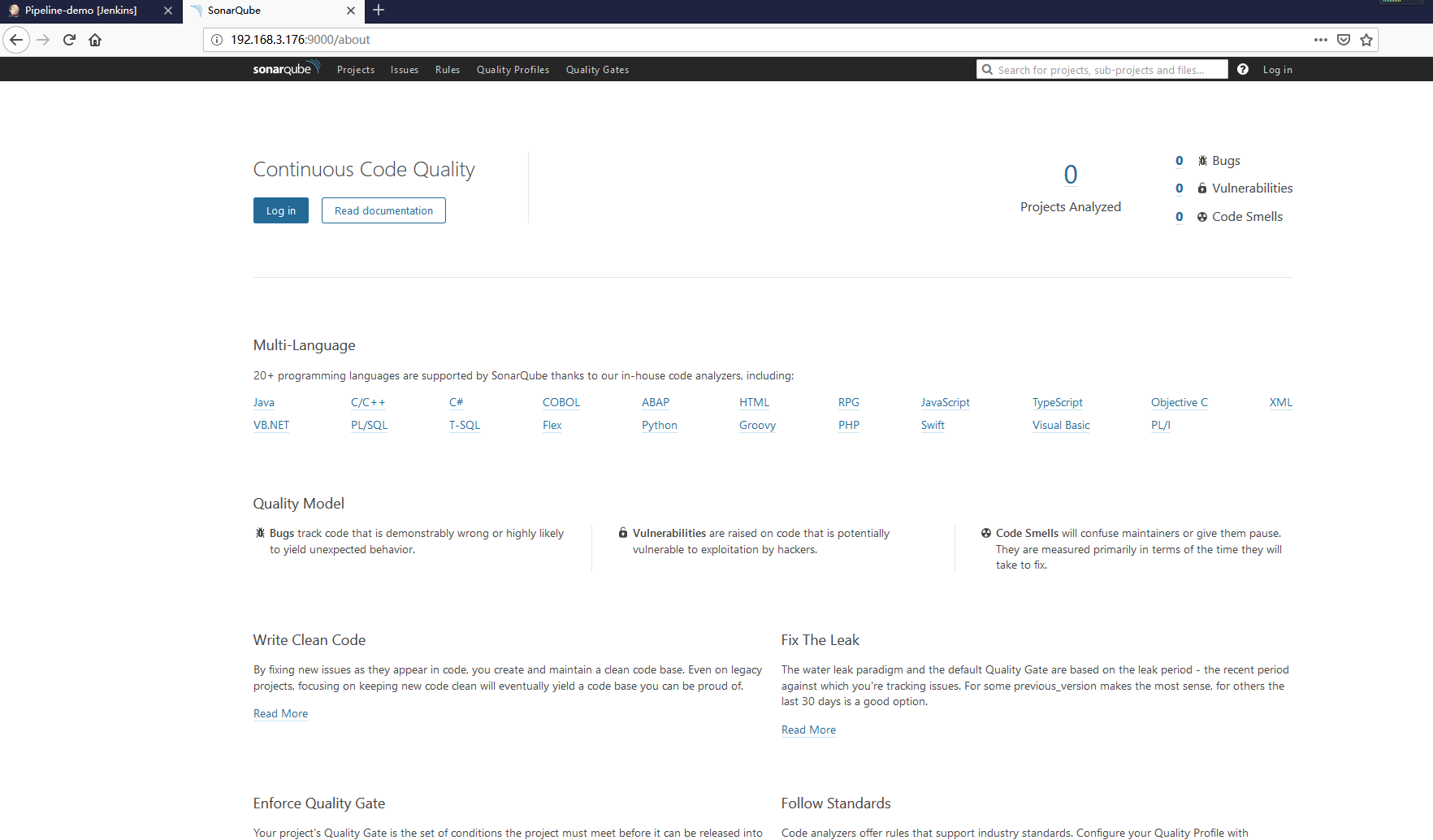
(8) 首次登陆默认登陆用户admin、登陆密码admin
(9) 汉化界面
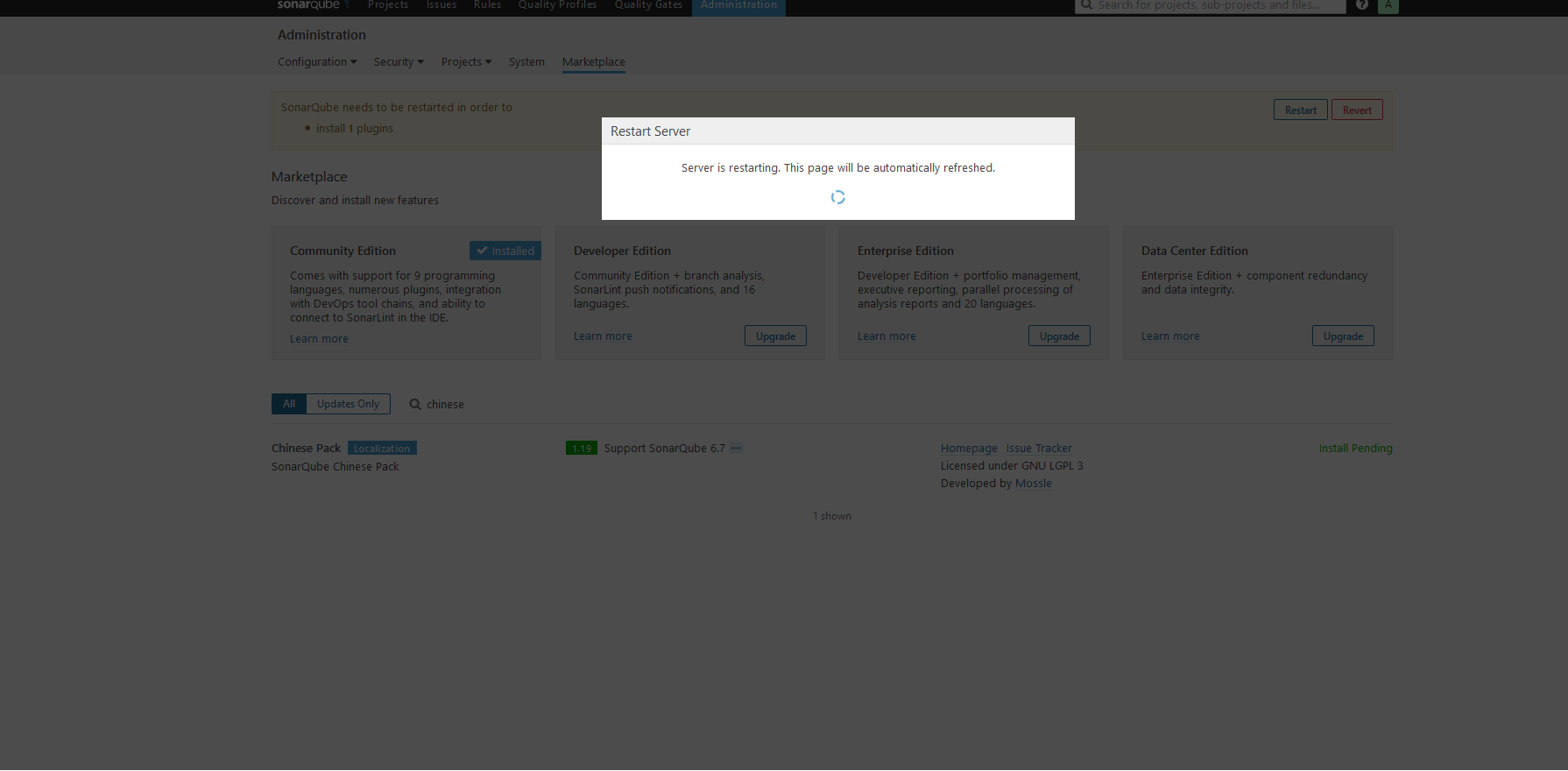
安装汉化包试试:页面上找到Administration > Marketplace,在搜索框中输入chinese,出现一个Chinese Pack,点击右侧的install按钮。
安装成功后,会提示重启 SonarQube 服务器。
devops-持续集成管理之SonarQube的更多相关文章
- 【Jenkins持续集成(一)】SonarQube 入门安装使用教程
一.前言 持续集成管理平台不只是CI服务器,是一系列软件开发管理工具的组合. 源码版本管理:svn.git 项目构建工具:Maven.Ant 代码质量管理:Sonar(Checkstyle.PMD.F ...
- 构建gitlab+Jenkins+harbor+kubernetes的DevOps持续集成持续部署环境
构建gitlab+Jenkins+harbor+kubernetes的DevOps持续集成持续部署环境 整个环境的结构图. 一.准备工作 gitlab和harbor我是安装在kubernetes集群外 ...
- Dubbo入门到精通学习笔记(六):持续集成管理平台之Hudson 持续集成服务器的安装配置与使用
文章目录 安装Hudson 使用Hudson tips:自动化部署 附录:两个脚本 安装Hudson IP:192.168.4.221 8G 内存(Hudson 多个工程在同时构建的情况下比较耗内存) ...
- 使用TeamCity对项目进行可持续集成管理
使用TeamCity对项目进行可持续集成管理 一.可持续集成管理 持续集成,CI:即Continuous integration. 可持续集成的概念是基于团队(小组)协作开发而提出来的,为了提高团 ...
- Hudson持续集成管理平台搭建
IP: 10.0.70.106 8G 内存 (Hudson 多 个 工程 在 同 时 构建 的情况下 比 较耗内存) 环 境: CentOS 6.5 . JDK7 注:Hudson 只是一个持续集成 ...
- [转]使用TeamCity对项目进行可持续集成管理(一)
一.可持续集成管理 持续集成,CI:即Continuous integration. 可持续集成的概念是基于团队(小组)协作开发而提出来的,为了提高团队开发效率与降低集成风险(早发现,早解决.晚发现, ...
- Dubbo入门到精通学习笔记(三):持续集成管理平台之SVN版本管理系统的安装和使用
文章目录 持续集成管理平台介绍 持续集成介绍 持续集成管理平台的组成 持续集成实践介绍 即将学习 SVN版本管理系统的安装 安装 Subversion + Apache 安装 jsvnadmin 简单 ...
- Dubbo入门到精通学习笔记(五):持续集成管理平台之sonarqube代码质量管理平台的介绍与安装
文章目录 SonarQube的介绍 SonarQube的安装 安装简介 详细安装过程 详细使用过程 SonarQube的介绍 SonarQube是一个管理代码质量的开放平台. 可以从七个维度检测代码质 ...
- devops持续集成
目录 Devops 版本控制系统 Git安装 Git使用 git四种状态 git基础命令 git分支 git合并冲突 git标签 git命令总结 Github使用 创建仓库 HTTP协议 SSH协议 ...
- DevOps - 持续集成(Continuous Integration)
1 - 持续集成简介 持续集成(Continuous integration,简称CI)是软件的开发和发布标准流程中最重要的部分. 作为一种开发实践,在CI中可以通过自动化等手段高频率地去获取产品反馈 ...
随机推荐
- java-对象引用和对象本身
示意图 应用场景 1.赋值 只有用新的对象本身直接赋值给对应引用,该对象引用的值会改变,因为对象引用指向的对象本身改变了. 2.方法入参 调用方法和被调用方法. 代码 import com.aliba ...
- 19_Python算法
1.冒泡算法 list = [1, 5, 2, 6, 9, 3, 4, 0] print(len(list)) # conunt = 1 while conunt < len(list): fo ...
- Java的ArrayList实现随机生成N-M之间N个不重复的随机数
在此之前我使用Java的数组实现了产生N-M之间的不重复的随机数,下面是使用数列ArrayList实现同样的功能,代码如下: /** * 随机生成 N--M,N个不重复随机数 使用ArrayList ...
- ASP.NET Core 配置与获取
目录 1,来自字典 2,来自配置文件 3,层次结构 4,映射 ASP.NET Core 中,可以使用 ConfigurationBuilder 对象来构建. 主要分为三部:配置数据源 -> Co ...
- vscode代码格式化
第一种解决方案 ctrl + shift + X eslint 安装 ctrl + , 或者打开C:\Users\Administrator\AppData\Roaming\Code\User\set ...
- 8.ExecutorService-执行器服务
- CountDownLatch、CyclicBarrier
CountDownLatch CountDownLatch类位于java.util.concurrent包下,利用它可以实现类似计数器的功能.比如有一个任务A,它要等待其他4个任务执行完毕之后才能执行 ...
- 一些JAVA题目
进程间通信方式有哪些 1)管道 管道分为有名管道和无名管道 无名管道是一种半双工的通信方式,数据只能单向流动,而且只能在具有亲缘关系的进程间使用.进程的亲缘关系一般指的是父子关系.无明管道一般用于两个 ...
- 双向最大匹配算法——基于词典规则的中文分词(Java实现)
目录 一.中文分词理论描述 二.算法描述 1.正向最大匹配算法 2.反向最大匹配算法 3.双剑合璧 三.案例描述 四.JAVA实现完整代码 五.组装UI 六.总结 前言 这篇将使用Java实现基于规则 ...
- Python-开发规范-遵循PEP8规范
Python中空白 1. 4个空格表示缩进,用4个空格代替一个TAB 2. 不再逗号.分号.冒号前加空格,应该在其后加空格 3. 关系运行符.数学运算符.逻辑运算符.赋值运算符 前后都加一个空格 4. ...