
JavaDailyReports10_17
学习JavaWeb第一天
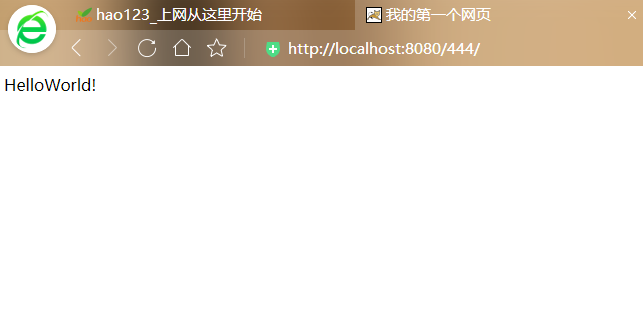
输出我的第一个HelloWorld!
 1 <%@ page language="java" import="java.util.*" pageEncoding="UTF-8"%>

 2 <%

 3 String path = request.getContextPath();

 4 String basePath = request.getScheme()+"://"+request.getServerName()+":"+request.getServerPort()+path+"/";

 5 %>

 6

 7 <!DOCTYPE HTML PUBLIC "-//W3C//DTD HTML 4.01 Transitional//EN">

 8 <html>

 9   <head>

10     <base href="<%=basePath%>">

11     <meta charset ="UTF-8">

12

13     <title>我的第一个网页</title>

14     <meta http-equiv="pragma" content="no-cache">

15     <meta http-equiv="cache-control" content="no-cache">

16     <meta http-equiv="expires" content="0">

17     <meta http-equiv="keywords" content="keyword1,keyword2,keyword3">

18     <meta http-equiv="description" content="This is my page">

19     <!--

20     <link rel="stylesheet" type="text/css" href="styles.css">

21     -->

22   </head>

23

24   <body>

25     HelloWorld!<br>

26   </body>

27 </html>
<body>

    HelloWorld!<br>

    <h1>Hello World 1</h1>

    <h2>Hello World 2</h2>

    <h3>Hello World 3</h3>

    <h4>Hello World 4</h4>

    <h5>Hello World 5</h5>

    <h6>Hello World 6</h6>

  </body>

</html>

 1 <%@ page language="java" import="java.util.*" pageEncoding="UTF-8"%>

 2 <%

 3 String path = request.getContextPath();

 4 String basePath = request.getScheme()+"://"+request.getServerName()+":"+request.getServerPort()+path+"/";

 5 %>

 6

 7 <!DOCTYPE HTML PUBLIC "-//W3C//DTD HTML 4.01 Transitional//EN">

 8 <html>

 9   <head>

10     <base href="<%=basePath%>">

11

12     <title>字体标记的使用</title>

13     <meta http-equiv="pragma" content="no-cache">

14     <meta http-equiv="cache-control" content="no-cache">

15     <meta http-equiv="expires" content="0">

16     <meta http-equiv="keywords" content="keyword1,keyword2,keyword3">

17     <meta http-equiv="description" content="This is my page">

18     <!--

19     <link rel="stylesheet" type="text/css" href="styles.css">

20     -->

21   </head>

22

23   <body>

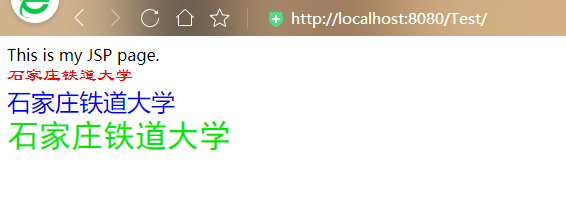
24     This is my JSP page. <br>

25     <font size="4" color="red" face = "隶书">

26      石家庄铁道大学 </font>  <br>

27

28     <font size="5" color ="blue" face="楷书">

29     石家庄铁道大学 </font>  <br>

30

31     <font size ="6" color ="gream" face ="黑体">

32     石家庄铁道大学 </font>   <br>

33

34   </body>

35 </html>
JavaDailyReports10_17的更多相关文章
随机推荐
- django邮件发送
需要一个邮箱,设置pop3 设置setting EMAIL_BACKEND = 'django.core.mail.backends.smtp.EmailBackend' EMAIL_HOST = ' ...
- 第四十一章、PyQt显示部件:TextBrowser、CalendarWidget、LCDNumber、ProgressBar、Label、HorizontalLine和VerticalLine简介
专栏:Python基础教程目录 专栏:使用PyQt开发图形界面Python应用 专栏:PyQt入门学习 老猿Python博文目录 老猿学5G博文目录 一.概述 在Designer中,显示部件有Labe ...
- 第11.8节 Python正则表达式的重复匹配模式及元字符“?”、 “*”、 “+”功能介绍
符号"?".""."+"这三个元字符修饰符在Python中都表示重复匹配的模式,即要求匹配的字符串满足重复次数的要求,但具体重复次数要求不同 ...
- PyQt(Python+Qt)学习随笔:QListWidget的sortingEnabled属性
老猿Python博文目录 专栏:使用PyQt开发图形界面Python应用 老猿Python博客地址 QListWidget的sortingEnabled属性用于控制列表部件中的项是否可以排序,如果为T ...
- PyQt(Python+Qt)学习随笔:QAbstractScrollArea的sizeAdjustPolicy、horizontalScrollBarPolicy、verticalScrollB属性
老猿Python博文目录 老猿Python博客地址 Qt Designer中QAbstractScrollArea包括三个属性,分别是horizontalScrollBarPolicy.vertica ...
- Mysql 逻辑架构图及日志系统
我们经常能看到如下的逻辑架构图,但是往往不能进行很好的记忆,看过就忘记了,也不知道它的实现方式.今天通过简单的画图来简单了解一下mysql到底是如何执行一个select语句,如何update一条语句. ...
- 【C/C++】C和C++11之enum枚举的使用细节
作者:李春港 出处:https://www.cnblogs.com/lcgbk/p/14101271.html 目录 一.前言 二.C中的枚举(enum) 2.1 C中枚举的大小 2.2 C中枚举的取 ...
- selenium模拟淘宝登陆,过所有验证
淘宝模拟登陆实现 由于淘宝使用了滑动验证码,需要进行模糊手动滑动,因此考虑使用selenium+chromedriver进行模拟登陆. 淘宝的登陆网址:https://login.taobao.com ...
- 快速构建一个vue项目
首先介绍一下命令行构建一个vue项目步骤: 1.下载安装node.js(直接运行安装包根据步骤安装完),打开命令行输入:node -v ,出现版本号即安装成功. 2.命令行界面输入:cnpm inst ...
- SpringBoot + SpringSecurity + Mybatis-Plus + JWT + Redis 实现分布式系统认证和授权(刷新Token和Token黑名单)
1. 前提 本文在基于SpringBoot整合SpringSecurity实现JWT的前提中添加刷新Token以及添加Token黑名单.在浏览之前,请查看博客: SpringBoot + Sp ...