
C#高级编程之特性
特性定义
MSDN的描述:使用特性,可以有效地将元数据或声明性信息与代码(程序集、类型、方法、属性等)相关联。 将特性与程序实体相关联后,可以在运行时使用反射这项技术查询特性。
参考此处作者的解释
https://www.cnblogs.com/chenxizhaolu/p/9497768.html
1.特性就是为了支持对象添加一些自我描述的信息,不影响类封装的前提添加额外信息。如果你用这个信息,那特性就有用;如果你不需要这个信息,那么这个特性就没用。
特性的使用
使用场景1:
这里以通过特性获取类或成员添加描述信息,然后在使用的时候拿到该信息为例:
第一步:定义一个特性类。
    public class CustomAttribute : Attribute

    {

        public CustomAttribute()

        {

            Console.WriteLine("无参数构造函数");

        }

        public CustomAttribute(int i)

        {

            Console.WriteLine("int 类型的构造函数");

        }

        public void Show()

        {

            Console.WriteLine("通过反射调用特性中的方法");

        }

    }
第二步:创建特性类实例,【里面包含着验证指定粒度的Model模型(类型、属性、方法)需要的数据,后面数据验证场景会讲到】
此处只是Model的不同粒度上附加数据。
这里分别将特性附加于类型、属性和方法上。
    public class Student

    {

        public string Id { get; set; }

        public string Name { get; set; }

        public void Answer(string message)

        {

            Console.WriteLine(message);

        }

    }
    [Custom(2018)]

    class StudentVIP:Student

    {

        [Custom(2019)]

        public string VIPGroup { get; set; }

        [Custom(2020)]

        public void HomeWork()

        {

            Console.WriteLine("Homework");

        }

        public long Salary { get; set; }

    }
通过ILSpy反编译工具可以看到:标记了特性的元素,都会在元素内部生成一个.custom,但是C#不能在元素内部调用
.class private auto ansi beforefieldinit LearningAttribute.StudentVIP

    extends ZhaoXiEduLearningAttribute.Student

{

    .custom instance void LearningAttribute.CustomAttribute::.ctor(int32) = (

        01 00 e2 07 00 00 00 00

    )

    // Fields

    .field private string '<VIPGroup>k__BackingField'

    .custom instance void [mscorlib]System.Runtime.CompilerServices.CompilerGeneratedAttribute::.ctor() = (

        01 00 00 00

    )

    .custom instance void [mscorlib]System.Diagnostics.DebuggerBrowsableAttribute::.ctor(valuetype [mscorlib]System.Diagnostics.DebuggerBrowsableState) = (

        01 00 00 00 00 00 00 00

    )

    .field private int64 '<Salary>k__BackingField'

    .custom instance void [mscorlib]System.Runtime.CompilerServices.CompilerGeneratedAttribute::.ctor() = (

        01 00 00 00

    )

    .custom instance void [mscorlib]System.Diagnostics.DebuggerBrowsableAttribute::.ctor(valuetype [mscorlib]System.Diagnostics.DebuggerBrowsableState) = (

        01 00 00 00 00 00 00 00

    )

    // Methods

    .method public hidebysig specialname

        instance string get_VIPGroup () cil managed

    {

        .custom instance void [mscorlib]System.Runtime.CompilerServices.CompilerGeneratedAttribute::.ctor() = (

            01 00 00 00

        )

        // Method begins at RVA 0x2441

        // Code size 7 (0x7)

        .maxstack 8

        IL_0000: ldarg.0

        IL_0001: ldfld string LearningAttribute.StudentVIP::'<VIPGroup>k__BackingField'

        IL_0006: ret

    } // end of method StudentVIP::get_VIPGroup

    .method public hidebysig specialname

        instance void set_VIPGroup (

            string 'value'

        ) cil managed

    {

        .custom instance void [mscorlib]System.Runtime.CompilerServices.CompilerGeneratedAttribute::.ctor() = (

            01 00 00 00

        )

        // Method begins at RVA 0x2449

        // Code size 8 (0x8)

        .maxstack 8

        IL_0000: ldarg.0

        IL_0001: ldarg.1

        IL_0002: stfld string LearningAttribute.StudentVIP::'<VIPGroup>k__BackingField'

        IL_0007: ret

    } // end of method StudentVIP::set_VIPGroup

    .method public hidebysig

        instance void HomeWork () cil managed

    {

        .custom instance void LearningAttribute.CustomAttribute::.ctor(int32) = (

            01 00 e4 07 00 00 00 00

        )

        // Method begins at RVA 0x2452

        // Code size 13 (0xd)

        .maxstack 8

        IL_0000: nop

        IL_0001: ldstr "Homework"

        IL_0006: call void [mscorlib]System.Console::WriteLine(string)

        IL_000b: nop

        IL_000c: ret

    } // end of method StudentVIP::HomeWork

    .method public hidebysig specialname

        instance int64 get_Salary () cil managed

    {

        .custom instance void [mscorlib]System.Runtime.CompilerServices.CompilerGeneratedAttribute::.ctor() = (

            01 00 00 00

        )

        // Method begins at RVA 0x2460

        // Code size 7 (0x7)

        .maxstack 8

        IL_0000: ldarg.0

        IL_0001: ldfld int64 LearningAttribute.StudentVIP::'<Salary>k__BackingField'

        IL_0006: ret

    } // end of method StudentVIP::get_Salary

    .method public hidebysig specialname

        instance void set_Salary (

            int64 'value'

        ) cil managed

    {

        .custom instance void [mscorlib]System.Runtime.CompilerServices.CompilerGeneratedAttribute::.ctor() = (

            01 00 00 00

        )

        // Method begins at RVA 0x2468

        // Code size 8 (0x8)

        .maxstack 8

        IL_0000: ldarg.0

        IL_0001: ldarg.1

        IL_0002: stfld int64 LearningAttribute.StudentVIP::'<Salary>k__BackingField'

        IL_0007: ret

    } // end of method StudentVIP::set_Salary

    .method public hidebysig specialname rtspecialname

        instance void .ctor () cil managed

    {

        // Method begins at RVA 0x2471

        // Code size 8 (0x8)

        .maxstack 8

        IL_0000: ldarg.0

        IL_0001: call instance void LearningAttribute.Student::.ctor()

        IL_0006: nop

        IL_0007: ret

    } // end of method StudentVIP::.ctor

    // Properties

    .property instance string VIPGroup()

    {

        .custom instance void LearningAttribute.CustomAttribute::.ctor(int32) = (

            01 00 e3 07 00 00 00 00

        )

        .get instance string LearningAttribute.StudentVIP::get_VIPGroup()

        .set instance void LearningAttribute.StudentVIP::set_VIPGroup(string)

    }

    .property instance int64 Salary()

    {

        .get instance int64 LearningAttribute.StudentVIP::get_Salary()

        .set instance void LearningAttribute.StudentVIP::set_Salary(int64)

    }

}
第三步:使用特性类实例。将特性与程序实体相关联后,利用反射来获取附加在这些Model上的数据。一般是传入这个实体,然后利用反射判断其是否贴有数据,如果有,然后调用object[] aAttributeArray = type.GetCustomAttributes(typeof(CustomAttribute), true);
拿到这个特性的对象(其在这个环节进行了实例化),同时此时type又包含具体的数据信息,就可以将特性的附加信息与type进行互操作了。
                Student student = new Student();

                StudentVIP studentVIP = new StudentVIP()

                {

                    Id = "1",

                    Name = "HAHAH",

                    VIPGroup = "Super学员"

                };

                InvokeCenter.ManagerStudent<Student>(studentVIP);
    public class InvokeCenter

    {

        public static void ManagerStudent<T>(T student) where T : Student

        {

            Console.WriteLine(student.Id);

            Console.WriteLine(student.Name);

            student.Answer("LNW");

            Type type = student.GetType();

            //这个type类级别上标注了特性

            if (type.IsDefined(typeof(CustomAttribute), true))//先判断

            {

                object[] aAttributeArray = type.GetCustomAttributes(typeof(CustomAttribute), true);//此处为type

                foreach (CustomAttribute item in aAttributeArray)

                {

                    item.Show(type.Name);

                }

            }

            //这个type属性上标注了特性

            foreach (var prop in type.GetProperties())//先判断

            {

                if (prop.IsDefined(typeof(CustomAttribute), true))

                {

                    object[] aAttributeArray = prop.GetCustomAttributes(typeof(CustomAttribute), true);//此处为prop

                    foreach (CustomAttribute item in aAttributeArray)

                    {

                        item.Show(prop.Name);

                    }

                }

            }

            //同理,方法上也可以获取

            foreach (var method in type.GetMethods())

            {

                if (method.IsDefined(typeof(CustomAttribute), true))

                {

                    object[] aMethodArray = method.GetCustomAttributes(typeof(CustomAttribute), true);//此处为method

                    foreach (CustomAttribute item in aMethodArray)

                    {

                        item.Show(method.Name);

                    }

                }

            }

        }

    }
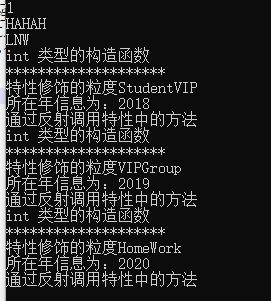
结果为:
使用场景2
添加说明信息并获取,方便进行拓展。
比如我想根据不同的枚举状态显示不同的字符串信息。
定义枚举:
    public enum UserStatus

    {

        /// <summary>

        /// 正常状态

        /// </summary>

        Normal=0,

        /// <summary>

        /// 冻结状态

        /// </summary>

        Frozen =1,

        /// <summary>

        /// 删除状态

        /// </summary>

        Delted = 2

    }
常规判断操作:
                UserStatus userStatus = UserStatus.Normal;

                if (userStatus == UserStatus.Normal)

                {

                    Console.WriteLine("正常状态");

                }

                else if (userStatus == UserStatus.Frozen)

                {

                    Console.WriteLine("冻结状态");

                }

                else

                {

                    Console.WriteLine("已删除");

                }
//.....如果发生文字修改,那么改动量特别大,if else if 分支特别长。。
使用特性
    public enum UserStatus

    {

        /// <summary>

        /// 正常状态

        /// </summary>

        [Remark("正常状态")]

        Normal=0,

        /// <summary>

        /// 冻结状态

        /// </summary>

        [Remark("冻结状态")]

        Frozen =1,

        /// <summary>

        /// 删除状态

        /// </summary>

        [Remark("删除状态")]

        Delted = 2
//可以自由拓展。


    }
//拓展方法

                string remark3withExtendMethod = UserStatus.Delted.GetRemark();
public static class AttributeExtend
{
public static string GetRemark(this Enum value)//对比上面同方法
        {

            Type type = value.GetType();

            var field = type.GetField(value.ToString());//

            if (field.IsDefined(typeof(RemarkAttribute), true))

            {

                RemarkAttribute attribute = field.GetCustomAttribute(typeof(RemarkAttribute), true) as RemarkAttribute;

                return attribute.Remak;

            }

            else

            {

                return value.ToString();

            }

        }
}
//其中GetFiled API含义如下:
// 摘要:

        //     搜索具有指定名称的公共字段。

        //

        // 参数:

        //   name:

        //     包含要获取的数据字段的名称的字符串。

        //

        // 返回结果:

        //     如找到,则为表示具有指定名称的公共字段的对象;否则为 null。

        //

        // 异常:

        //   T:System.ArgumentNullException:

        //     name 为 null。

        //

        //   T:System.NotSupportedException:

        //     此 System.Type 对象是尚未调用其 System.Reflection.Emit.TypeBuilder.CreateType 方法的 System.Reflection.Emit.TypeBuilder。

        public FieldInfo GetField(string name);
使用场景3
做数据验证。
public class IntValidateAttribute : Attribute//特性名称约定俗成是以Attribute结尾,特性命名以具体功能名称为命名,此处就是整型数据验证

    {

        /// <summary>

        /// 最小值

        /// </summary>

        private int minValue { get; set; }

        /// <summary>

        /// 最大值

        /// </summary>

        private int maxValue { get; set; }

        /// <summary>

        /// 构造函数

        /// </summary>

        /// <param name="minValue"></param>

        /// <param name="maxValue"></param>

        public IntValidateAttribute(int minValue, int maxValue)

        {

            this.minValue = minValue;

            this.maxValue = maxValue;

        }

        /// <summary>

        /// 检验值是否合法

        /// </summary>

        /// <param name="checkValue"></param>

        /// <returns></returns>

        public bool Validate(int checkValue)

        {

            return checkValue >= minValue && checkValue <= maxValue;

        }

    }

     public class User

    {

        [IntValidate(1, 10)]

        public int Id { get; set; }

        public string Name { get; set; }

    }

    public class BaseDal

    {

        public static string Insert<T>(T model)

        {

            Type modelType = typeof(T);//Model模型

            //获取类型的所有属性

            PropertyInfo[] propertyInfos = modelType.GetProperties();

            bool boIsCheck = true;

            //循环所有属性

            foreach (var property in propertyInfos)

            {

                //获取属性的所有特性

                object[] attrs = property.GetCustomAttributes(true);

                if (property.PropertyType.Name.ToLower().Contains("int"))

                {

                    foreach (var attr in attrs)

                    {

                        if (attr is IntValidateAttribute)

                        {

                            IntValidateAttribute intValidate = (IntValidateAttribute)attr;//拿到追加在Model上的特性实例化对象

                            //执行特性的验证逻辑

                            boIsCheck = intValidate.Validate((int)property.GetValue(model));//特性实例化对象intValidate执行对象方法Validate,同时proprty.GetValue(model)获取此时传进来的model实体的属性数据。进行数据验证。

                        }

                    }

                }

                if (!boIsCheck)

                {

                    break;

                }

            }

            if (boIsCheck)

            {

                return "验证通过,插入数据库成功";

            }

            else

            {

                return "验证失败";

            }

        }

    }

     class Program

    {

        public static void Main(string[] args)

        {

            string msg = BaseDal.Insert<User>(new User() { Id = 123, Name = "lvcc" });//传入Model User和User实体对象new User() { Id = 123, Name = "lvcc" }
            Console.WriteLine(msg);
        }
    }
总结:
使用特性,可以有效地将元数据或声明性信息与代码(程序集、类型、方法、属性等)相关联。 将特性与程序实体相关联后,可以在运行时使用反射这项技术查询特性。
特性具有以下属性:
- 特性向程序添加元数据。 元数据是程序中定义的类型的相关信息。 所有 .NET 程序集都包含一组指定的元数据,用于描述程序集中定义的类型和类型成员。 可以添加自定义特性来指定所需的其他任何信息。
- 可以将一个或多个特性应用于整个程序集、模块或较小的程序元素(如类和属性)。
- 特性可以像方法和属性一样接受自变量。
- 程序可使用反射来检查自己的元数据或其他程序中的元数据。 有关详细信息。
同时在MVC---EF--WCF--IOC 都有使用特性,无处不在。下篇就以简单的ORM模型来讲解反射与特性的简单使用。
参考资料:
https://www.cnblogs.com/chenxizhaolu/p/9497768.html
https://www.cnblogs.com/woadmin/p/9406970.html
C#高级编程之特性的更多相关文章
- C#高级编程:泛型优点和特性
泛型是CLR 2.0的一个新特性,在CLR 1.0中,要创建一个灵活的类或方法,但该类或方法在编译期间不知道使用什么类,就得以Object类为基础.而Object在编译期间没有类型安全性,因此必须进行 ...
- C#高级编程9 第17章 使用VS2013-C#特性
C#高级编程9 第17章 使用VS2013 编辑定位到 如果默认勾选了这项,请去掉勾选,因为勾选之后解决方案的目录会根据当前文件选中. 可以设置项目并行生成数 版本控制软件设置 所有文本编辑器行号显示 ...
- 读《C#高级编程》第1章问题
读<C#高级编程>第1章 .Net机构体系笔记 网红的话:爸爸说我将来会是一个牛逼的程序员,因为我有一个梦,虽然脑壳笨但是做事情很能坚持. 本章主要是了解.Net的结构,都是一些概念,并没 ...
- jquery插件开发继承了jQuery高级编程思路
要说jQuery 最成功的地方,我认为是它的可扩展性吸引了众多开发者为其开发插件,从而建立起了一个生态系统.这好比大公司们争相做平台一样,得平台者得天下.苹果,微软,谷歌等巨头,都有各自的平台及生态圈 ...
- (四) 一起学 Unix 环境高级编程(APUE) 之 系统数据文件和信息
. . . . . 目录 (一) 一起学 Unix 环境高级编程 (APUE) 之 标准IO (二) 一起学 Unix 环境高级编程 (APUE) 之 文件 IO (三) 一起学 Unix 环境高级编 ...
- ASP.NET MVC5 高级编程 第5章 表单和HTML辅助方法
参考资料<ASP.NET MVC5 高级编程>第5版 第5章 表单和HTML辅助方法 5.1 表单的使用 5.1.1 action 和 method 特性 默认情况下,表单发送的是 HTT ...
- 【C#高级编程(学习与理解)】1.1 C#与.NET的关系
1.C#语言不能孤立使用,而必须和.NET Framework一起考虑.C#编译器专门用于.NET,这表示用C#编写的所有代码总是在.NET Framework中运行. 2.C#就其本身而言只是一种语 ...
- javascript高级编程笔记01(基本概念)
1.在html中使用JavaScript 1. <script> 元素 <script>定义了下列6个属性: async:可选,异步下载外部脚本文件. charset:可选, ...
- 重学《C#高级编程》(继承)
前两天重新看了<C#高级编程>里的第四章:继承与第六章:数组.OOP三大特性:封装,继承,多态,个人感觉继承是实现多态的基础,包括以后接触的设计模式,都是继承特性的衍生. 继承特性有两种, ...
随机推荐
- centos8平台使用stress做压力测试
一,安装stress: 说明:el8的源里面还没有,先用el7的rpm包 [root@centos8 source]# wget https://download-ib01.fedoraproject ...
- centos8平台用ss监控网络
一,ss所属的包: [root@blog ~]# whereis ss ss: /usr/sbin/ss /usr/share/man/man8/ss.8.gz [root@blog ~]# rpm ...
- JavaScript数字与字母相互转换
数字 转换为 字母: const num = 'a'.charCodeAt() // num = 97 字母 转换为 数字: var str = String.fromCharCode(97) // ...
- c++数组的替代品
- 正式班D13
2020.10.22星期四 正式班D13 修改文件内容 vim编辑 vim基础 可理解为Windows下的文本编辑器 vim可用来修改配置.写脚本 三种模式(命令模式.输入模式.末行模式) 命令模式按 ...
- MySQL开启日志记录执行过的SQL语句
当需要分析执行过的SQL语句来判断问题,可以通过打开查询日志功能,但是重启MySQL服务后需要重新配置. 查询日志查询功能: SHOW VARIABLES LIKE 'general%'; gener ...
- elastic后台运行
nohup./bin/elasticsearch&
- ArrayBlockingQuque摘要
ArrayBlockingQuque 优势 线程同步,线程安全 对应空或满时,take\put操作将阻塞 内部是一个数组,每个元素不会产生额外的处理对象,如Node 基于什么 ReentrantLoc ...
- requests请求获取cookies的字典格式
python中requests请求的cookies值一般是jar包,如何将cookies值改为字典,此处运用了方法.举例如下: import requests response = requests ...
- uniapp swiper高度自适应问题
这里的话是想做一个比较常见的左右滑动更改tab的效果,引用了uview-ui中的u-tabs-swiper组件,需要结合swiper组件来使用 先来讲下主体思路:每个tab页(swiper-item) ...