
阿里百秀后台管理项目笔记 ---- Day04
来吧展示:
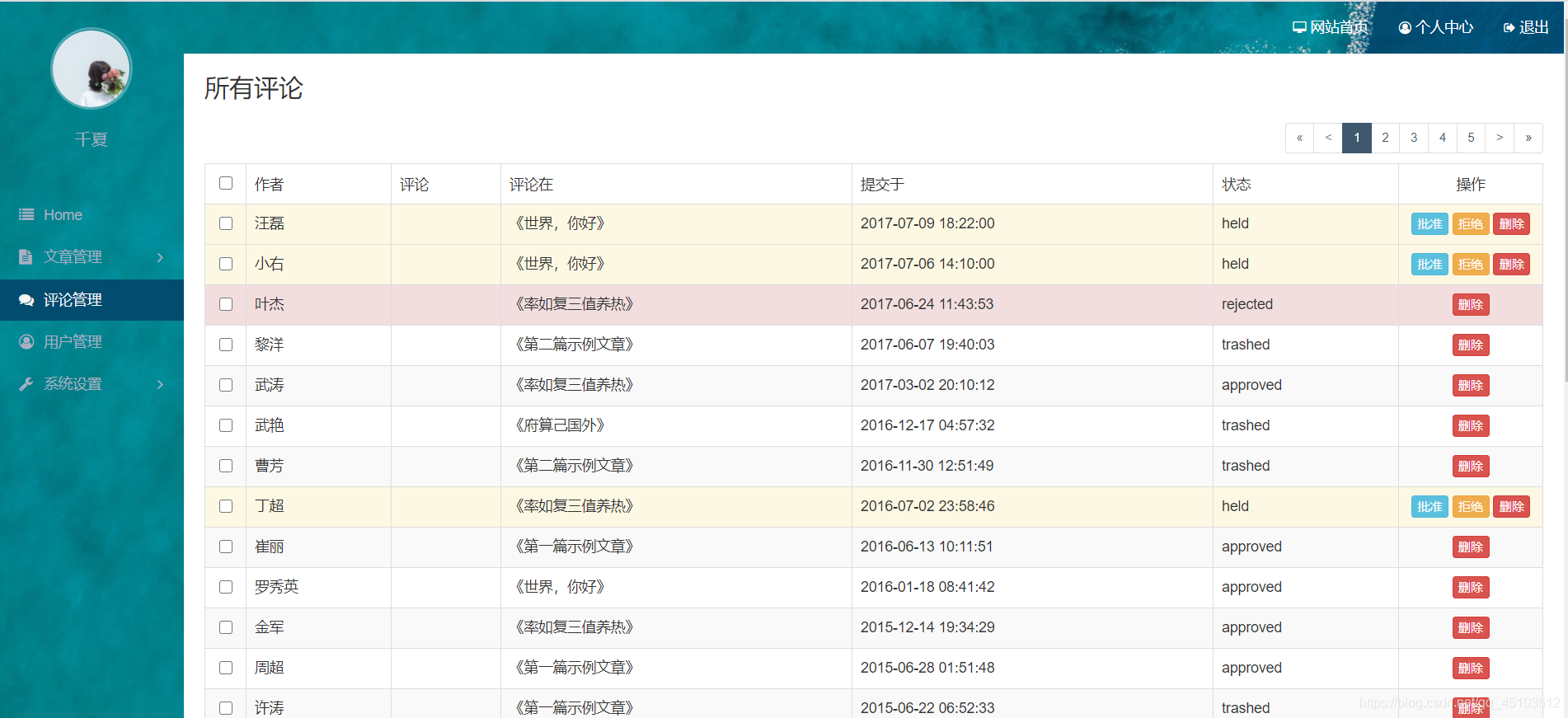
step 1 : 实现评论管理数据渲染
- 利用 ajax 创建接口得到数据使用模板引擎渲染页面
1.1 引入文件
<script src="/static/assets/vendors/jquery/jquery.js"></script>

  <script src="/static/assets/vendors/bootstrap/js/bootstrap.js"></script>

  <script src="/static/assets/vendors/jsrender/jsrender.js"></script>
1.2 创建接口文件 comments.php
<?php

require_once '../../functions.php';

$comments = mysql_all('select * from comments;');

$json = json_encode($comments);

header('Content-type: application/json');

echo $json;
1.3 利用 ajax 获取数据渲染到页面
<script>

  $.get('/admin/api/comments.php',{},function(res){

    console.log(res)

   // 通过模板引擎渲染数据

  var html = $('#comment_tmpl').render({ comments : res })

  console.log(html)

  $('tbody').html(html)

  })
其中
 $.get('/admin/api/comments.php',{},function(res){

    console.log(res)

  })
打印的结果是
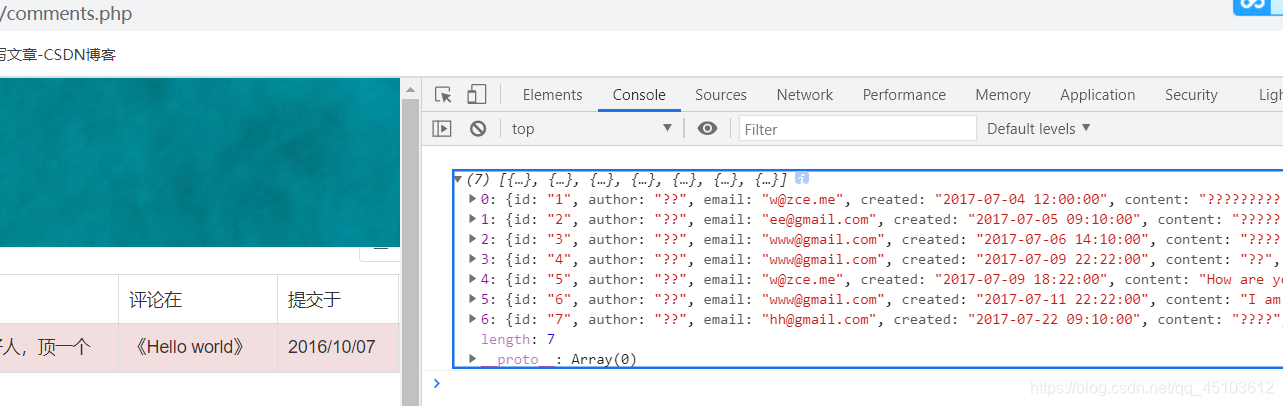
1.4 html 部分 将 tbody 里的内容都删除只剩 tbody
        <tbody>

          //<tr class="danger">

            //<td class="text-center"><input type="checkbox"></td>

           // <td>大大</td>

           // <td>楼主好人,顶一个</td>

           // <td>《Hello world》</td>

           // <td>2016/10/07</td>

            //<td>未批准</td>

            //<td class="text-center">

            // <a href="post-add.php" class="btn btn-info btn-xs">批准</a>

             // <a href="javascript:;" class="btn btn-danger btn-xs">删除</a>

          //  </td>

          //</tr>

        </tbody>
1.5 模板引擎渲染数据
<script id="comment_tmpl" type="text/x-jsrender">

  {{for comments}}

  <tr{{if status == 'held'}} class="warning" {{else status == 'rejected'}} class="danger"

  {{/if}}>

      <td class="text-center"><input type="checkbox"></td>

      <td>{{:author}}</td>

      <td>{{:comments}}</td>

      <td>《Hello world》</td>

      <td>{{:created}}</td>

      <td>{{:status}}</td>

      <td class="text-center">

        <a href="post-add.html" class="btn btn-info btn-xs">批准</a>

        <a href="javascript:;" class="btn btn-danger btn-xs">删除</a>

      </td>

   </tr>

  {{/for}}

  </script>
step 02 : 客户端关联数据查询以及删除批准颜色显示
//api/comments.php

$comments = mysql_all('select

comments.*,

posts.title as post_title

from comments

inner join posts on comments.post_id = posts.id;');
查询语句得到的数据
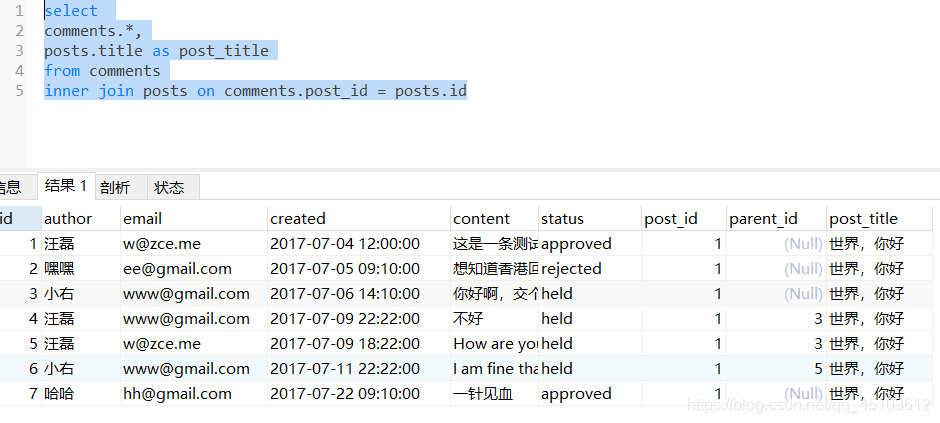
//Comments.php

{for comments}}

  <tr{{if status == 'held'}} class="warning" {{else status == 'rejected'}} class="danger"

  {{/if}}>

            <td class="text-center"><input type="checkbox"></td>

            <td>{{:author}}</td>

            <td>{{:comments}}</td>

            <td>《{{:post_title}}》</td>

            <td>{{:created}}</td>

            <td>{{:status}}</td>

            <td class="text-center">

            {{if status == 'held'}}

              <a href="post-add.html" class="btn btn-info btn-xs">批准</a>

              <a href="post-add.html" class="btn btn-warning btn-xs">拒绝</a>

             {{/if}}

              <a href="javascript:;" class="btn btn-danger btn-xs">删除</a>

            </td>

          </tr>

  {{/for}}
step 03 :服务端接口接收数据返回分页参数
//api/comments.php

<?php

require_once '../../functions.php';

// 取得url地址中传递过来的分页参数

// intval()将字符串传化为数字

$page = empty($_GET['page']) ? 1 : intval($_GET['page']);

$length = 5;

//越过多少条

$offset = ($page - 1) * $length;

$sql = sprintf('select

comments.*,

posts.title as post_title

from comments

inner join posts on comments.post_id = posts.id

order by comments.created desc

limit %d,%d;', $offset, $length);

$comments = mysql_all($sql);

$json = json_encode($comments);

header('Content-type: application/json');

echo $json;
step 04 : 使用组件实现分页功能
组件网址: https://esimakin.github.io/twbs-pagination/

- 先引入组件文件
<script src="/static/assets/vendors/twbs-pagination/jquery.twbsPagination.js"></script>
- 在分页中更改ul,将123分页的 li 都删掉,只留下 ul
<ul class="pagination pagination-sm pull-right">

         // <li><a href="#">上一页</a></li>

         // <li><a href="#">1</a></li>

         // <li><a href="#">2</a></li>

         // <li><a href="#">3</a></li>

         // <li><a href="#">下一页</a></li>

</ul>
3.在 comments.php 中去使用组件
function loadPageData(page){

   $.get('/admin/api/comments.php',{ page: page},function(res){

   //   console.log(res)

   //  // 通过模板引擎渲染数据

   var html = $('#comment_tmpl').render({ comments : res })

 // console.log(html)

   $('tbody').html(html)

 })

}

loadPageData(1)

  $('.pagination').twbsPagination({

    //最大页码

    totalPages:100,

    //页码展示个数

    visiablePages:5,

    onPageClick:function(e,page){

    //该组件默认打开page = 1

    //所以将ajax方式获取数据封装成一个函数,传入参数1

      console.log(page)

      loadPageData(page)

    }

  })
step 05 : 实现分页数据显示动画
$('tbody').fadeOut()

  $.get('/admin/api/comments.php',{ page: page},function(res){

  console.log(res)

    var html  =$('#comment_tmpl').render({comments:res})

   $('tbody').html(html).fadeIn()

   })
step 06 : 利用ajax方式实现分页功能
//comments.php

<script>

function loadPageData(page){

   $('tbody').fadeOut()

   $.get('/admin/api/comments.php',{ page: page},function(res){

    $('.pagination').twbsPagination({

    totalPages:res.total_pages,

    visiablePages:5,

    onPageClick:function(e,page){

      console.log(page)

      loadPageData(page)

    }

  })

  console.log(res)

    var html  =$('#comment_tmpl').render({comments:res.comments})

   $('tbody').html(html).fadeIn()

   })

}

loadPageData(1)

  </script>
//api/comments.php

添加语句

// 先查询到所有的数据的数量

$total_count = mysql_one('select count(1) as num

	from comments

	inner join posts on comments.post_id = posts.id')['num'];

$total_pages = ceil($total_count / $length);

 // $json = json_encode($comments);

$json = json_encode(array(

'total_pages' => $total_pages,

'comments'=> $comments

	));
step 07 : 利用ajax方式实现分页删除
//Comments-delete.php文件

<?php

require_once '../../functions.php';

if (empty($_GET['id'])) {

  exit('缺少必要参数');

}

$id = $_GET['id'];

$rows = mysql_change('delete from comments where id in (' . $id . ');');

// if ($rows > 0) {}

// header('Location: /admin/comments.php');

header('Content-Type:application/json');

echo json_encode($rows > 0);
//comments.php文件

$('tbody').on('click','.btn-delete',function(){

  var $tr = $(this).parent().parent()

  var id = $tr.data('id')

  $.get('/admin/api/comment-delete.php', { id: id }, function (res) {

    console.log(res)

    if(!res) return

      // $tr.remove()这个方法不好,当删除一个数据时,该数据的下一个数据会自动顶上去,

    // 最后一页都删除时,再次刷新就会自动减少一页数据

// 解决办法:

1. 在loadPageData函数的开头就定义 var currentPage = 1

2. $('tbody').html(html).fadeIn()

   }) 中去定义  currentPage = page

3. 在$('tbody').on('click','.btn-delete',function(){

中去执行 loadPageData(currentPage)

4.在 $.get('/admin/api/comment-delete.php', { id: id }, function (res) { 中再去执行 loadPageData(currentPage)

  })

})
//comments.php文件中的html部分

1. <a href="javascript:;"  class="btn btn-danger btn-xs btn-delete">删除</a>

加了 class = "btn-delete" 类

2. <tr{{if status == 'held'}} class="warning" {{else status == 'rejected'}} class="danger"

  {{/if}}  data-id="{{: id }}">

tr中加了 自定义属性 data-id="{{: id }}"
step 08 : 解决分页删除最后一页数据,自动跳转到前一页数据
// comments.php
var currentPage = 1
function loadPageData(page){
$('tbody').fadeOut()
$.get('/admin/api/comments.php',{ page: page},function(res){
if(page > res.total_pages){
loadPageData(res.total_pages)
return
}
$('.pagination').twbsPagination('destroy')
$('.pagination').twbsPagination({
first:'«',
last:'»',
prev:'<',
next:'>',
startPage:page,
totalPages:res.total_pages,
visiablePages:5,
initiateStartPageClick: false,
onPageClick:function(e,page){
console.log(page)
loadPageData(page)
}
})
// console.log(res)
var html =$('#comment_tmpl').render({comments:res.comments})
$('tbody').html(html).fadeIn()
currentPage = page
})
}
$('.pagination').twbsPagination({
first:'«',
last:'»',
pre:'<',
next:'>',
totalPages:100,
visiablePages:5,
onPageClick:function(e,page){
console.log(page)
loadPageData(page)
}
})
loadPageData(currentPage)
comments.php完整代码
<?php
require '../functions.php';
get_userinfo();
?>
<!DOCTYPE html>
<html lang="zh-CN">
<head>
<meta charset="utf-8">
<title>Comments « Admin</title>
<link rel="stylesheet" href="/static/assets/vendors/bootstrap/css/bootstrap.css">
<link rel="stylesheet" href="/static/assets/vendors/font-awesome/css/font-awesome.css">
<link rel="stylesheet" href="/static/assets/vendors/nprogress/nprogress.css">
<link rel="stylesheet" href="/static/assets/css/admin.css">
<script src="/static/assets/vendors/nprogress/nprogress.js"></script>
</head>
<body>
<script>NProgress.start()</script>
<div class="main">
<?php include 'com/nav.php';?>
<div class="container-fluid">
<div class="page-title">
<h1>所有评论</h1>
</div>
<!-- 有错误信息时展示 -->
<!-- <div class="alert alert-danger">
<strong>错误!</strong>发生XXX错误
</div> -->
<div class="page-action">
<!-- show when multiple checked -->
<div class="btn-batch" style="display: none">
<button class="btn btn-info btn-sm">批量批准</button>
<button class="btn btn-warning btn-sm">批量拒绝</button>
<button class="btn btn-danger btn-sm">批量删除</button>
</div>
<ul class="pagination pagination-sm pull-right"></ul>
</div>
<table class="table table-striped table-bordered table-hover">
<thead>
<tr>
<th class="text-center" width="40"><input type="checkbox"></th>
<th>作者</th>
<th>评论</th>
<th>评论在</th>
<th>提交于</th>
<th>状态</th>
<th class="text-center" width="140">操作</th>
</tr>
</thead>
<tbody>
<!-- <tr class="danger">
<td class="text-center"><input type="checkbox"></td>
<td>大大</td>
<td>楼主好人,顶一个</td>
<td>《Hello world》</td>
<td>2016/10/07</td>
<td>未批准</td>
<td class="text-center">
<a href="post-add.php" class="btn btn-info btn-xs">批准</a>
<a href="javascript:;" class="btn btn-danger btn-xs">删除</a>
</td>
</tr> -->
</tbody>
</table>
</div>
</div>
<?php $current_page='comments';?>
<?php include 'com/sidebar.php';?>
<script src="/static/assets/vendors/jquery/jquery.js"></script>
<script src="/static/assets/vendors/bootstrap/js/bootstrap.js"></script>
<script src="/static/assets/vendors/jsrender/jsrender.js"></script>
<script src="/static/assets/vendors/twbs-pagination/jquery.twbsPagination.js"></script>
<script id="comment_tmpl" type="text/x-jsrender">
{{for comments}}
<tr{{if status == 'held'}} class="warning" {{else status == 'rejected'}} class="danger"
{{/if}} data-id="{{: id }}">
<td class="text-center"><input type="checkbox"></td>
<td>{{:author}}</td>
<td>{{:comments}}</td>
<td>《{{:post_title}}》</td>
<td>{{:created}}</td>
<td>{{:status}}</td>
<td class="text-center">
{{if status == 'held'}}
<a href="post-add.php" class="btn btn-info btn-xs">批准</a>
<a href="post-add.php" class="btn btn-warning btn-xs">拒绝</a>
{{/if}}
<a href="javascript:;" class="btn btn-danger btn-xs btn-delete">删除</a>
</td>
</tr>
{{/for}}
</script>
<script>
$(document)
.ajaxStart(function () {
NProgress.start()
})
.ajaxStop(function () {
NProgress.done()
})
var currentPage = 1
function loadPageData(page){
$('tbody').fadeOut()
$.get('/admin/api/comments.php',{ page: page},function(res){
if(page > res.total_pages){
loadPageData(res.total_pages)
return
}
$('.pagination').twbsPagination('destroy')
$('.pagination').twbsPagination({
first:'«',
last:'»',
prev:'<',
next:'>',
startPage:page,
totalPages:res.total_pages,
visiablePages:5,
initiateStartPageClick: false,
onPageClick:function(e,page){
console.log(page)
loadPageData(page)
}
})
// console.log(res)
var html =$('#comment_tmpl').render({comments:res.comments})
$('tbody').html(html).fadeIn()
currentPage = page
})
}
$('.pagination').twbsPagination({
first:'«',
last:'»',
pre:'<',
next:'>',
totalPages:100,
visiablePages:5,
onPageClick:function(e,page){
console.log(page)
loadPageData(page)
}
})
loadPageData(currentPage)
$('tbody').on('click','.btn-delete',function(){
var $tr = $(this).parent().parent()
var id = $tr.data('id')
$.get('/admin/api/comment-delete.php', { id: id }, function (res) {
console.log(res)
if(!res) return
loadPageData(currentPage)
})
})
</script>
<script>NProgress.done()</script>
</body>
</html>
阿里百秀后台管理项目笔记 ---- Day04的更多相关文章
- 阿里百秀后台管理项目笔记 ---- Day01
摘要 在此记录一下阿里百秀项目的教学视频的学习笔记,部分页面被我修改了,某些页面效果会不一样,基本操作是一致的,好记性不如烂笔头,加油叭!!! step 1 : 整合全部静态页面 将静态页面全部拷贝到 ...
- vue,vuex的后台管理项目架子structure-admin,后端服务nodejs
之前写过一篇vue初始化项目,构建vuex的后台管理项目架子,这个structure-admin-web所拥有的功能 接下来,针对structure-admin-web的不足,进行了补充,开发了具有登 ...
- vue初始化项目,构建vuex的后台管理项目架子
构架vuex的后台管理项目源码:https://github.com/saucxs/structure-admin-web 一.node安装 可以参考这篇文章http://www.mwcxs.top/ ...
- SSM 电影后台管理项目
SSM 电影后台管理项目 概述 通过对数据库中一张表的CRUD,将相应的操作结果渲染到页面上. 笔者通过这篇博客还原了项目(当然有一些隐藏的坑),然后将该项目上传到了Github.Gitee,在末尾会 ...
- docloud后台管理项目(开篇)
最近朋友做app需要web做后台管理,所以花了一周时间做了这个项目. 废话不多说,开发环境是nginx+php5.3,使用thinkphp框架.是一个医疗器械数据统计的后台,业务功能很简单就是查看用户 ...
- 【vue】MongoDB+Nodejs+express+Vue后台管理项目Demo
¶项目分析 一个完整的网站服务架构,包括: 1.web frame ---这里应用express框架 2.web server ---这里应用nodejs 3.Database ---这里 ...
- 项目:Vue+node+后台管理项目小结
序:本文主要分两块说:项目机制,具体用到的知识块. 1. 项目机制 项目的原型以vue-cli为原型,进行项目的初步构建.项目以node.js服务和webpack打包机制为依托,将.vue文件打包为浏 ...
- docloud后台管理项目(前端篇)
以下内容与主题无关,如果不想看可以直接忽视 !--忽视开始--! 给大家推荐一款强大的编辑器,那就是集响应快.体验好.逼格高.功能丰富为一体的sublime text 3.它除了以上特点,还有一个最重 ...
- 基于 Ant Desigin 的后台管理项目打包优化实践
背景 按照 Ant Design 官网用 React 脚手构建的后台项目,刚接手项目的时候大概30条路由左右,我的用的机子是 Mac 8G 内存,打包完成需要耗时2分钟左右,决定优化一下. 项目技术栈 ...
- vue后台管理项目中菜单栏切换的三种方法
第一种方法:vue嵌套路由(二) <el-menu :default-active="defaultActive" style="min-height: 100%; ...
随机推荐
- 利用nginx自带的反向代理以及轮询功能实现应用的负载均衡
针对中间件部署的应用(war包),可使用nginx自带的反向代理以及轮询功能,实现应用的负载均衡. 一.架构图 二.环境准备 准备2套环境,如19.1.0.18:7001,19.1.0.16:7001 ...
- 部署owncloud连接ladp迁移数据
定期 清理日志 echo '' > /var/www/html/data/owncloud.log 查询 用户 的 ldap 语句 (|(objectclass=inetOrgPerson)(o ...
- CC1,3,6回顾
前言 前面陆续学习了CC1,CC3,CC6,以及TemplatesImpl以及改造,有点乱,正所谓温故而知新嘛,所以这篇就回顾一下,捋一捋,解决一些细节问题. CC1 由于CC1要介绍CC链的几个关键 ...
- Go语言核心36讲
你好,我是郝林.今天想跟你聊聊我和Go语言的故事. Go语言是由Google出品的一门通用型计算机编程语言.作为在近年来快速崛起的编程语言,Go已经成功跻身主流编程语言的行列. 它的种种亮点都受到了广 ...
- 解决linux mint内置无线网卡失效问题
前言 同学安装了linux mint,但是内置的无线网卡失效,只能通过有线网卡连接,经过查询得到不是缺少驱动的问题,是内核不支持 解决办法 sudo apt install linux-generic ...
- day31 1 tomcat介绍与创建web项目 & 2 继承HttpServlet类、配置webxml全局配置文件 & 3 servlet生命周期 & 4 请求对象HttpServletRequest与响应对象HttpServletResponse
Servlet Java Servlet是运行在Web服务器或应用服务器上的程序,作为客户端(Web浏览器或其他HTTP客户端)和服务端(HTTP服务器上的数据库或应用程序)之间的中间层. 使用Ser ...
- js- day03- 将数据变成柱形图
柱形图的渲染 * { margin: 0; padding: 0; } .box { display: fle ...
- PHP 实现大文件视频推流
/** * 视频推流 * 返回视频流 */ function bofang(){ set_time_limit(0); ini_set('max_execution_time', 0);//秒为单位, ...
- VUE项目无法启动NODE版本与NODE-SASS、SASS-LOADER版本不兼容解决方案
一.错误分析 在VUE项目开发中,我们经常会遇到报错: Node Sass version 7.0.1 is incompatible with ^4.0.0. 网上解决方案也千奇百怪,最终操作下来, ...
- windows 、linux文件互传-FileZilla
1.下载免安装FileZilla并解压 2.打开.exe文件 3.点击左上角的文件->站点管理 4.点击新站点->进行配置相应的服务地址信息 5.连接上服务后,若需要将windows中的文 ...