
eclipse中利用Maven逆向工程生成PO类以及mapper(mybatis)
在pom.xml的project>build里面添加如下代码,让maven环境支持mybatis-generator组件
- <pluginManagement>
- <plugins>
- <plugin>
- <groupId>org.mybatis.generator</groupId>
- <artifactId>mybatis-generator-maven-plugin</artifactId>
- <version>1.3.2</version>
- <configuration>
- <configurationFile>src/main/resources/generator.xml</configurationFile>
- <verbose>true</verbose>
- <overwrite>true</overwrite>
- </configuration>
- <executions>
- <execution>
- <id>Generate MyBatis Artifacts</id>
- <goals>
- <goal>generate</goal>
- </goals>
- </execution>
- </executions>
- <dependencies>
- <dependency>
- <groupId>org.mybatis.generator</groupId>
- <artifactId>mybatis-generator-core</artifactId>
- <version>1.3.2</version>
- </dependency>
- </dependencies>
- </plugin>
- <plugin>
- <groupId>org.apache.maven.plugins</groupId>
- <artifactId>maven-surefire-plugin</artifactId>
- <version>2.19.1</version>
- <configuration>
- <skipTests>true</skipTests>
- </configuration>
- </plugin>
- <plugin>
- <groupId>org.apache.maven.plugins</groupId>
- <artifactId>maven-resources-plugin</artifactId>
- <version>3.0.1</version>
- <configuration>
- <encoding>UTF-8</encoding>
- </configuration>
- </plugin>
- </plugins>
- </pluginManagement>
注:如果在dependencies中已经引入mysql-connector-java则不需加入以下dependency,反之加入
- <dependency>
- <groupId>mysql</groupId>
- <artifactId>mysql-connector-java</artifactId>
- <version>5.1.35</version>
- <scope>runtime</scope>
- </dependency>
2、generator.xml配置文件
需逆向的表:
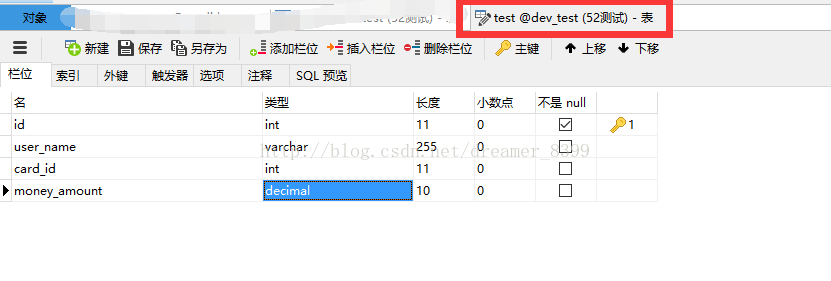
逆向代码生成目录结构:

对应配置:
- <?xml version="1.0" encoding="UTF-8"?>
- <!DOCTYPE generatorConfiguration PUBLIC "-//mybatis.org//DTD MyBatis Generator Configuration 1.0//EN" "http://mybatis.org/dtd/mybatis-generator-config_1_0.dtd">
- <generatorConfiguration>
- <!-- 数据库驱动包位置 -->
- <classPathEntry
- location="E:\apache-maven-3.3.9\repo\mysql\mysql-connector-java\5.1.18\mysql-connector-java-5.1.18.jar" />
- <context id="Tables" targetRuntime="MyBatis3">
- <commentGenerator>
- <!-- 是否去除自动生成的注释 true:是 : false:否 -->
- <property name="suppressAllComments" value="true" />
- </commentGenerator>
- <!-- 数据库链接URL、用户名、密码 -->
- <jdbcConnection driverClass="com.mysql.jdbc.Driver"
- connectionURL="jdbc:mysql://192.168.100.52:3306/dev_test" userId="数据库用户名"
- password="数据库密码">
- <!--<jdbcConnection driverClass="oracle.jdbc.driver.OracleDriver" connectionURL="jdbc:oracle:thin:@localhost:1521:orcl"
- userId="msa" password="msa"> -->
- </jdbcConnection>
- <javaTypeResolver>
- <!-- 默认false,把JDBC DECIMAL 和 NUMERIC 类型解析为 Integer, 为 true时把JDBC DECIMAL和NUMERIC类型解析为java.math.BigDecimal -->
- <property name="forceBigDecimals" value="true" />
- </javaTypeResolver>
- <!-- 生成实体类的包名和位置,这里配置将生成的实体类放在com.loan.test.entity这个包下 -->
- <javaModelGenerator targetPackage="com.loan.test.entity"
- targetProject=".\src\main\java\">
- <!-- enableSubPackages:是否让schema作为包的后缀 -->
- <property name="enableSubPackages" value="true" />
- <!-- 从数据库返回的值被清理前后的空格 -->
- <property name="trimStrings" value="true" />
- </javaModelGenerator>
- <!-- 生成的SQL映射文件包名和位置,这里配置将生成的SQL映射文件放在com.loan.test.dao.xml这个包下 -->
- <sqlMapGenerator targetPackage="com.loan.test.dao.xml"
- targetProject=".\src\main\java\">
- <!-- enableSubPackages:是否让schema作为包的后缀 -->
- <property name="enableSubPackages" value="true" />
- </sqlMapGenerator>
- <!-- 生成DAO的包名和位置,这里配置将生成的dao类放在com.loan.test.dao.mapper这个包下 -->
- <javaClientGenerator type="XMLMAPPER"
- targetPackage="com.loan.test.dao.mapper" targetProject=".\src\main\java\">
- <!-- enableSubPackages:是否让schema作为包的后缀 -->
- <property name="enableSubPackages" value="true" />
- </javaClientGenerator>
- <!-- 要生成那些表(更改tableName和domainObjectName就可以) -->
- <table tableName="test" domainObjectName="Test"
- enableCountByExample="false" enableUpdateByExample="false"
- enableDeleteByExample="false" enableSelectByExample="false"
- selectByExampleQueryId="false" />
- </context>
- </generatorConfiguration>
3、运用maven指令生成逆向工程
项目右键->run as->maven build...,Goals:中输入mybatis-generator:generate
.
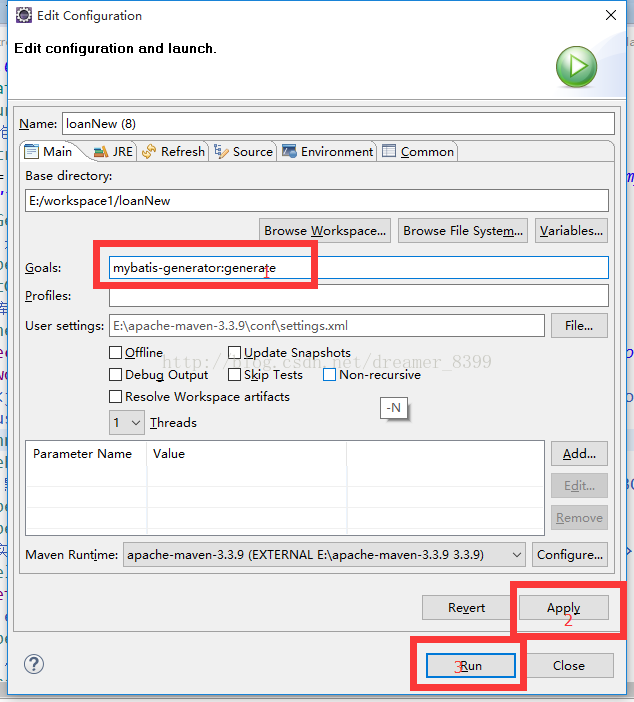
4、刷新项目,结果
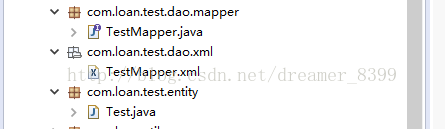
1)Test.java
- package com.loan.test.entity;
- import java.math.BigDecimal;
- public class Test {
- private Integer id;
- private String userName;
- private Integer cardId;
- private BigDecimal moneyAmount;
- public Integer getId() {
- return id;
- }
- public void setId(Integer id) {
- this.id = id;
- }
- public String getUserName() {
- return userName;
- }
- public void setUserName(String userName) {
- this.userName = userName == null ? null : userName.trim();
- }
- public Integer getCardId() {
- return cardId;
- }
- public void setCardId(Integer cardId) {
- this.cardId = cardId;
- }
- public BigDecimal getMoneyAmount() {
- return moneyAmount;
- }
- public void setMoneyAmount(BigDecimal moneyAmount) {
- this.moneyAmount = moneyAmount;
- }
- }
2)TestMapper.java
- package com.loan.test.dao.mapper;
- import com.loan.test.entity.Test;
- public interface TestMapper {
- int deleteByPrimaryKey(Integer id);
- int insert(Test record);
- int insertSelective(Test record);
- Test selectByPrimaryKey(Integer id);
- int updateByPrimaryKeySelective(Test record);
- int updateByPrimaryKey(Test record);
- }
3)TestMapper.xml
- <?xml version="1.0" encoding="UTF-8"?>
- <!DOCTYPE mapper PUBLIC "-//mybatis.org//DTD Mapper 3.0//EN" "http://mybatis.org/dtd/mybatis-3-mapper.dtd">
- <mapper namespace="com.loan.test.dao.mapper.TestMapper">
- <resultMap id="BaseResultMap" type="com.loan.test.entity.Test">
- <id column="id" jdbcType="INTEGER" property="id" />
- <result column="user_name" jdbcType="VARCHAR" property="userName" />
- <result column="card_id" jdbcType="INTEGER" property="cardId" />
- <result column="money_amount" jdbcType="DECIMAL" property="moneyAmount" />
- </resultMap>
- <sql id="Base_Column_List">
- id, user_name, card_id, money_amount
- </sql>
- <select id="selectByPrimaryKey" parameterType="java.lang.Integer" resultMap="BaseResultMap">
- select
- <include refid="Base_Column_List" />
- from test
- where id = #{id,jdbcType=INTEGER}
- </select>
- <delete id="deleteByPrimaryKey" parameterType="java.lang.Integer">
- delete from test
- where id = #{id,jdbcType=INTEGER}
- </delete>
- <insert id="insert" parameterType="com.loan.test.entity.Test">
- insert into test (id, user_name, card_id,
- money_amount)
- values (#{id,jdbcType=INTEGER}, #{userName,jdbcType=VARCHAR}, #{cardId,jdbcType=INTEGER},
- #{moneyAmount,jdbcType=DECIMAL})
- </insert>
- <insert id="insertSelective" parameterType="com.loan.test.entity.Test">
- insert into test
- <trim prefix="(" suffix=")" suffixOverrides=",">
- <if test="id != null">
- id,
- </if>
- <if test="userName != null">
- user_name,
- </if>
- <if test="cardId != null">
- card_id,
- </if>
- <if test="moneyAmount != null">
- money_amount,
- </if>
- </trim>
- <trim prefix="values (" suffix=")" suffixOverrides=",">
- <if test="id != null">
- #{id,jdbcType=INTEGER},
- </if>
- <if test="userName != null">
- #{userName,jdbcType=VARCHAR},
- </if>
- <if test="cardId != null">
- #{cardId,jdbcType=INTEGER},
- </if>
- <if test="moneyAmount != null">
- #{moneyAmount,jdbcType=DECIMAL},
- </if>
- </trim>
- </insert>
- <update id="updateByPrimaryKeySelective" parameterType="com.loan.test.entity.Test">
- update test
- <set>
- <if test="userName != null">
- user_name = #{userName,jdbcType=VARCHAR},
- </if>
- <if test="cardId != null">
- card_id = #{cardId,jdbcType=INTEGER},
- </if>
- <if test="moneyAmount != null">
- money_amount = #{moneyAmount,jdbcType=DECIMAL},
- </if>
- </set>
- where id = #{id,jdbcType=INTEGER}
- </update>
- <update id="updateByPrimaryKey" parameterType="com.loan.test.entity.Test">
- update test
- set user_name = #{userName,jdbcType=VARCHAR},
- card_id = #{cardId,jdbcType=INTEGER},
- money_amount = #{moneyAmount,jdbcType=DECIMAL}
- where id = #{id,jdbcType=INTEGER}
- </update>
- <resultMap id="BaseResultMap" type="com.loan.test.entity.Test">
- <id column="id" jdbcType="INTEGER" property="id" />
- <result column="user_name" jdbcType="VARCHAR" property="userName" />
- <result column="card_id" jdbcType="INTEGER" property="cardId" />
- <result column="money_amount" jdbcType="DECIMAL" property="moneyAmount" />
- </resultMap>
- <sql id="Base_Column_List">
- id, user_name, card_id, money_amount
- </sql>
- <select id="selectByPrimaryKey" parameterType="java.lang.Integer" resultMap="BaseResultMap">
- select
- <include refid="Base_Column_List" />
- from test
- where id = #{id,jdbcType=INTEGER}
- </select>
- <delete id="deleteByPrimaryKey" parameterType="java.lang.Integer">
- delete from test
- where id = #{id,jdbcType=INTEGER}
- </delete>
- <insert id="insert" parameterType="com.loan.test.entity.Test">
- insert into test (id, user_name, card_id,
- money_amount)
- values (#{id,jdbcType=INTEGER}, #{userName,jdbcType=VARCHAR}, #{cardId,jdbcType=INTEGER},
- #{moneyAmount,jdbcType=DECIMAL})
- </insert>
- <insert id="insertSelective" parameterType="com.loan.test.entity.Test">
- insert into test
- <trim prefix="(" suffix=")" suffixOverrides=",">
- <if test="id != null">
- id,
- </if>
- <if test="userName != null">
- user_name,
- </if>
- <if test="cardId != null">
- card_id,
- </if>
- <if test="moneyAmount != null">
- money_amount,
- </if>
- </trim>
- <trim prefix="values (" suffix=")" suffixOverrides=",">
- <if test="id != null">
- #{id,jdbcType=INTEGER},
- </if>
- <if test="userName != null">
- #{userName,jdbcType=VARCHAR},
- </if>
- <if test="cardId != null">
- #{cardId,jdbcType=INTEGER},
- </if>
- <if test="moneyAmount != null">
- #{moneyAmount,jdbcType=DECIMAL},
- </if>
- </trim>
- </insert>
- <update id="updateByPrimaryKeySelective" parameterType="com.loan.test.entity.Test">
- update test
- <set>
- <if test="userName != null">
- user_name = #{userName,jdbcType=VARCHAR},
- </if>
- <if test="cardId != null">
- card_id = #{cardId,jdbcType=INTEGER},
- </if>
- <if test="moneyAmount != null">
- money_amount = #{moneyAmount,jdbcType=DECIMAL},
- </if>
- </set>
- where id = #{id,jdbcType=INTEGER}
- </update>
- <update id="updateByPrimaryKey" parameterType="com.loan.test.entity.Test">
- update test
- set user_name = #{userName,jdbcType=VARCHAR},
- card_id = #{cardId,jdbcType=INTEGER},
- money_amount = #{moneyAmount,jdbcType=DECIMAL}
- where id = #{id,jdbcType=INTEGER}
- </update>
- </mapper>
配置完成!!
eclipse中利用Maven逆向工程生成PO类以及mapper(mybatis)的更多相关文章
- 在Eclipse中利用maven整合搭建ssm框架
首先说明用到的框架: spring + springMVC + mybatis 构建工具:maven 开发工具:eclipse 开发环境:win10 java版本:jdk1.8 ...
- 利用Eclipse中的Maven构建Web项目(三)
利用Eclipse中的Maven构建Web项目 1.将Maven Project转换成动态Web项目,鼠标右键项目,输入"Project Facets" 2.依据Dynamic W ...
- 利用Eclipse中的Maven构建Web项目报错(二)
利用Eclipse中的Maven构建Web项目 1.错误描述 [INFO] Scanning for projects... [INFO] [INFO] Using the builder org.a ...
- 利用Eclipse中的Maven构建Web项目报错(一)
利用Eclipse中的Maven构建Web项目 1.在进行上述操作时,pom.xml一直报错 <project xmlns="http://maven.apache.org/POM/4 ...
- 利用Eclipse中的Maven构建Web项目(二)
利用Eclipse中的Maven构建Web项目 1.新建源文件夹,Java Resources鼠标右键,"New-->Source Folder" 2.新建src/main/ ...
- 利用Eclipse中的Maven构建Web项目(一)
利用Eclipse中的Maven构建Web项目 1.新建一个Maven Project,"New-->Other..." 2.选择"Maven Project&qu ...
- Eclipse中发布Maven管理的Web项目时找不到类的问题根源和解决办法(转)
转自:http://blog.csdn.net/lvguanming/article/details/37812579?locationNum=12 写在前面的话 现在是越来越太原讨厌Eclipse这 ...
- Maven学习(一) -- 安装Maven及Eclipse中配置Maven
标签(空格分隔): 学习笔记 本文环境:Windows7, JDK1.7.0_76 安装及配置Maven环境变量 需要电脑中已经有Java环境 在控制台中输入:echo %JAVA_HOME%看是否能 ...
- Eclipse 中构建 Maven 项目的完整过程 - SpringBoot 项目
进行以下步骤的前提是你已经安装好本地maven库和eclipse中的maven插件了(有的eclipse中已经集成了maven插件) 一.Maven项目的新建 1.鼠标右键---->New--- ...
- Mybatis逆向工程生成po、mapper接口、mapper.xml
Mybatis逆向工程生成po.mapper接口.mapper.xml 一.新建一个maven工程 请查看我的另一篇博客:<使用idea创建一个maven工程> 二.引入所需依赖 需要my ...
随机推荐
- StunServer
Stun 服务器 npm下载stun包 npm i stun -s google stun服务器 google的stun的服务器一般国内访问较慢,所以一般自己搭建一个服务器 const stun = ...
- styled-components 全局样式定义,由injectGlobal改为createGlobalStyle
The injectGlobal API was removed and replaced by createGlobalStyle in styled-components v4. 原文链接 官方链 ...
- 二分查找中mid值的计算方法
在刷题的时候遇到许多二分查找的题目 发现很多大佬的题解中mid值得计算都是用的:mid = low + (high-low)/ 2; 为什么不用mid = (low+high)/ 2的计算方法呢? i ...
- aws note
Amazon EC2 Instance Types https://aws.amazon.com/ec2/instance-types/ My courses - AWS Skill Builder ...
- 在uniapp中,定义导航栏左侧,右侧按钮
在page.json中 代码: { "path": "pages/pandian", "style": { "navigation ...
- Linux系统root密码忘记修改
重启Linux系统 到启动状态: 按任意键,进入GRUB菜单: 按字母e进入: 调整到上图,按字母e,进入 不进行删减,在后面输入" 1"(空格1),按回车,进入 或者将" ...
- vue+elementUI 在表格中动态增加与删除行
1.定义一个数组,存放表格数据(注:表格要给定一个高度,添加数据超过这个高度会自动出现滚动条) ttable:[], 2.把数组中表格的每一行定义成一个对象,添加到数组中 newconditions: ...
- pycharm永久激活码(亲测好用)
引用自某不知名大佬,在此致谢,获取激活码链接如下: https://www.ajihuo.com/pycharm/4197.html
- 浏览器中通过js获取用户语言环境方法
用户语言环境存在navigator对象中,不同浏览器分别通过如下方法获取用户浏览器语言.操作系统语言. IE6 IE7 IE8 Firefox Chrome Safari Opera naviga ...
- docker 可视化平台Portainer搭建
1.部署步骤 docker pull portainer/portainer docker run -d -p 9001:9000 \--restart=always \-v /var/run/doc ...