
Easycode—MybatisPlus模板
EasyCode使用指南
1、下载EasyCode插件
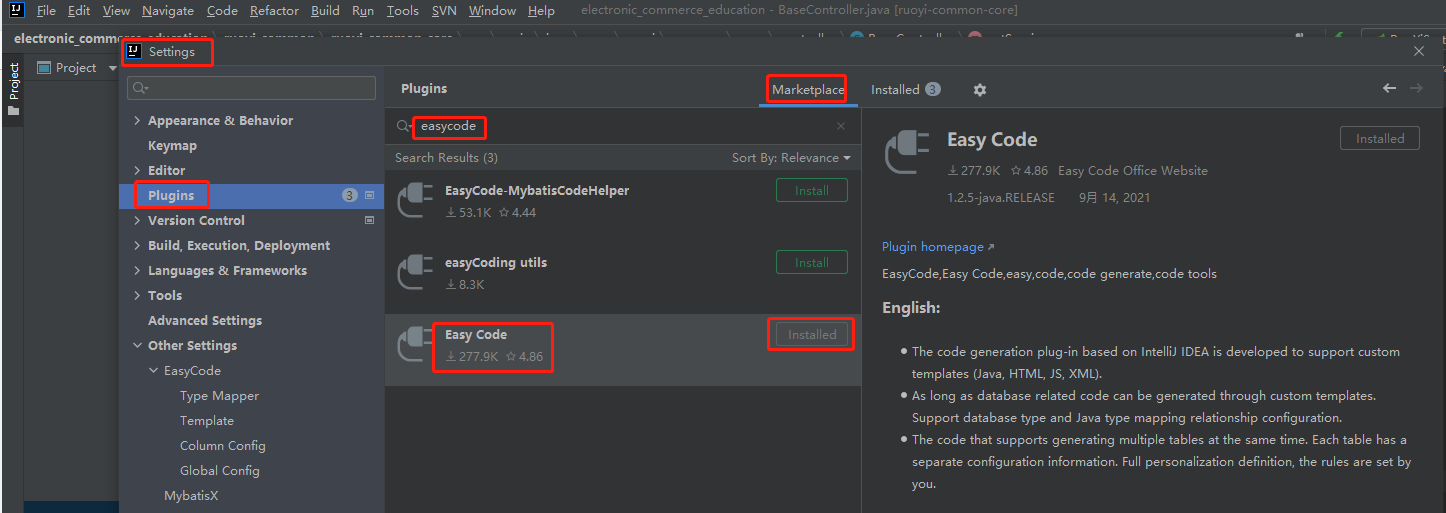
2、配置EasyCode
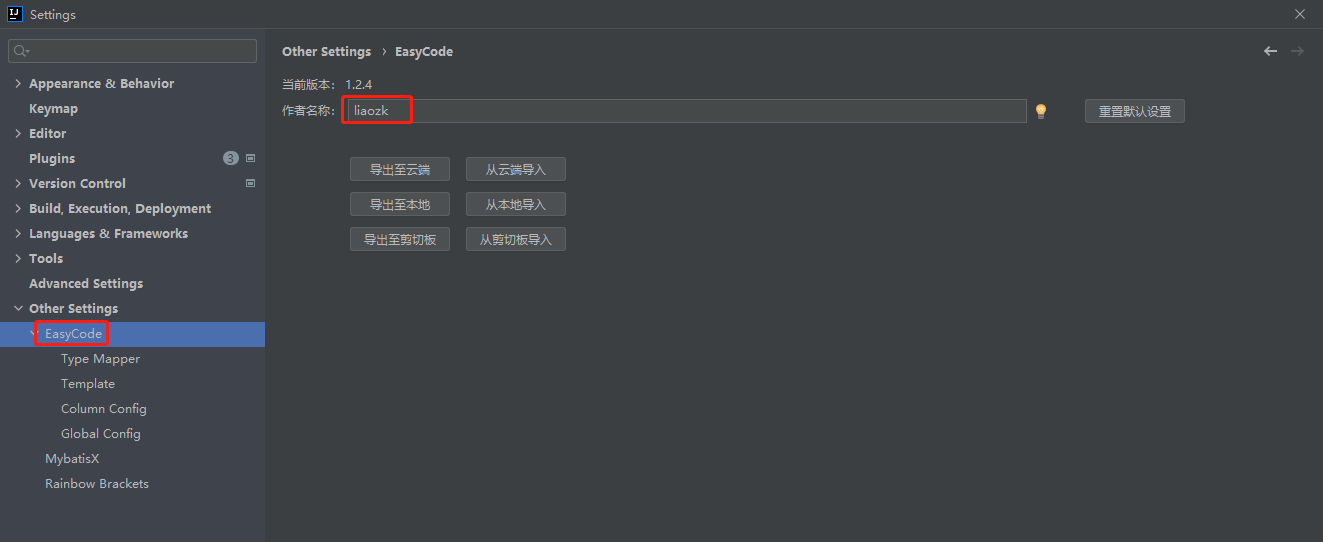
2.1、配置作者名称
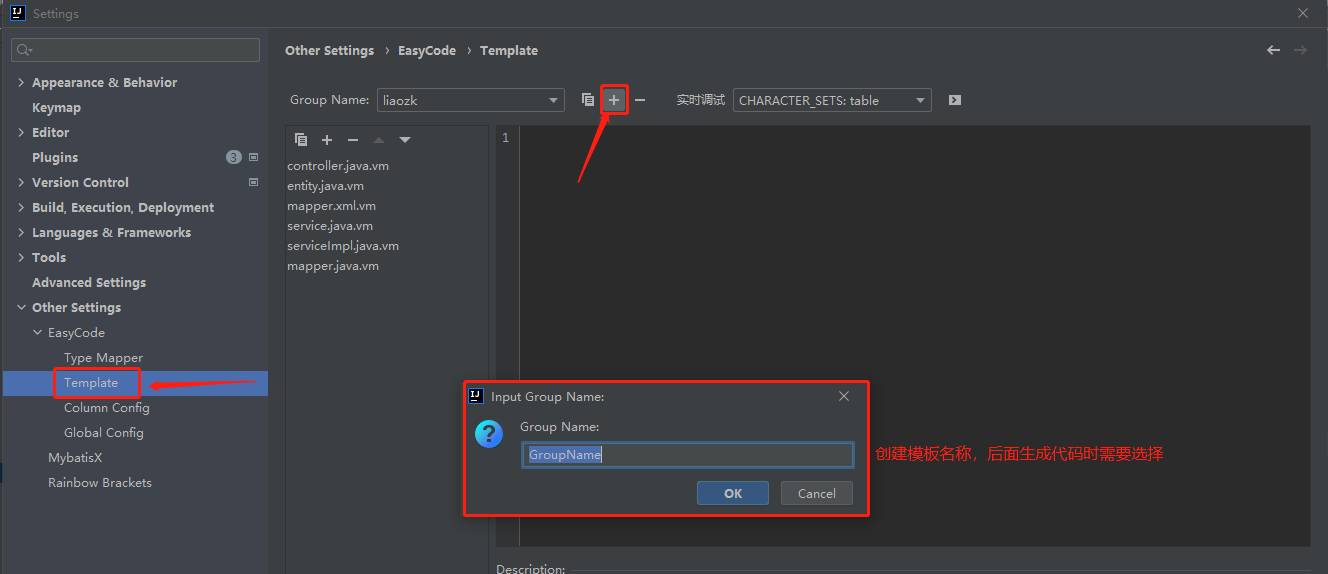
2.2、配置代码内容生成模板(模板内容见文末)
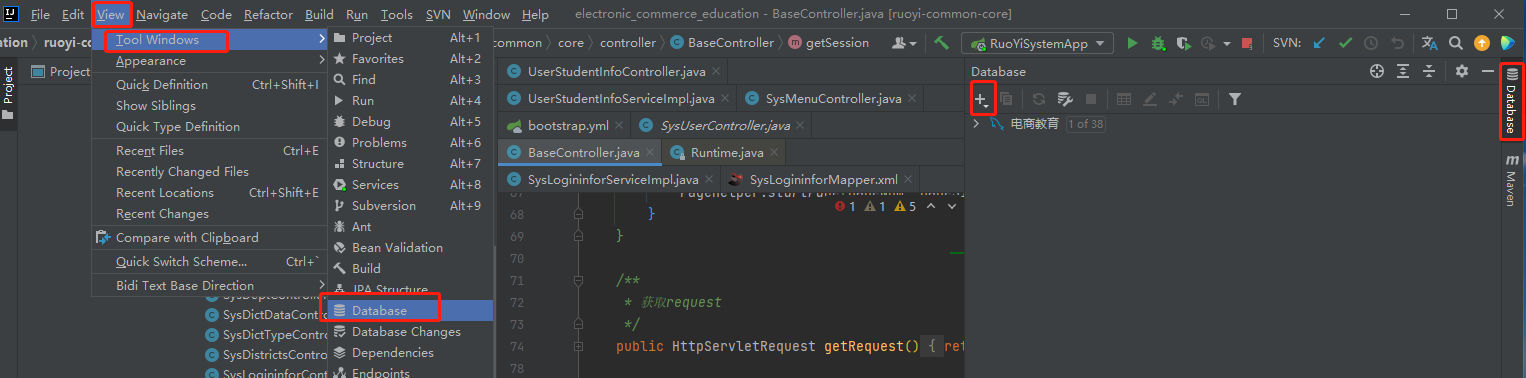
3、连接数据库
4、使用代码内容生成模板
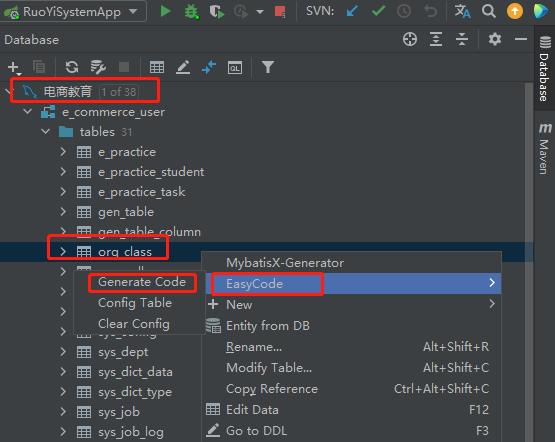
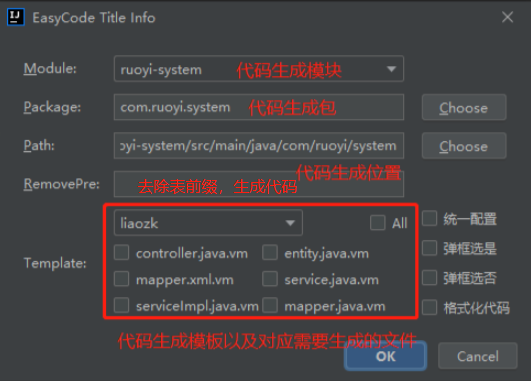
模板内容:
controller.java.vm
##导入宏定义

$!{define.vm}

##设置表后缀(宏定义)

#setTableSuffix("Controller")

##保存文件(宏定义)

#save("/controller", "Controller.java")

##包路径(宏定义)

#setPackageSuffix("controller")

##定义服务名

#set($serviceName = $!tool.append($!tool.firstLowerCase($!tableInfo.name), "Service"))

##定义实体对象名

#set($entityName = $!tool.firstLowerCase($!tableInfo.name))

import $!{tableInfo.savePackageName}.domain.dto.$!{tableInfo.name}Dto;

import $!{tableInfo.savePackageName}.service.$!{tableInfo.name}Service;

import org.springframework.web.bind.annotation.*;

import com.ruoyi.common.core.controller.BaseController;

import com.ruoyi.common.core.domain.AjaxResult;

import com.ruoyi.common.core.page.TableDataInfo;

import java.util.List;

import lombok.RequiredArgsConstructor;

##表注释(宏定义)

#tableComment("表控制层")

@RestController

@RequestMapping("$!tool.firstLowerCase($!tableInfo.name)")

@RequiredArgsConstructor

public class $!{tableName} extends BaseController{

    /**

     * 服务对象

     */

    private final $!{tableInfo.name}Service $!{serviceName};

    /**

     *

     * @param $!{entityName}dto 请求参数封装

     * @author $!author

     * @description //TODO  分页查询所有数据

     * @date $!time.currTime()

     * @return 实例对象

     */

    @PostMapping("/get$!{tableInfo.name}s")

    public TableDataInfo find$!{tableInfo.name}SelectList(@RequestBody $!{tableInfo.name}Dto $!{entityName}dto ) {

        startPage();

        return getDataTable(this.$!{serviceName}.find$!{tableInfo.name}SelectList($!{entityName}dto));

    }

    /**

     *

     * @param $!{entityName}dto 请求参数封装

     * @author $!author

     * @description //TODO  通过主键查询单条数据

     * @date $!time.currTime()

     * @return 单条数据

     */

    @PostMapping("/get$!{tableInfo.name}ById")

    public AjaxResult select$!{tableInfo.name}ById(@RequestBody $!{tableInfo.name}Dto $!{entityName}dto) {

        return AjaxResult.success($!{serviceName}.select$!{tableInfo.name}ById($!{entityName}dto.getId()));

    }

    /**

     *

     * @param $!{entityName}dto 实体对象

     * @author $!author

     * @description //TODO  新增数据

     * @date $!time.currTime()

     * @return 新增结果

     */

    @PostMapping("/add$!{tableInfo.name}")

    public AjaxResult add$!{tableInfo.name}(@RequestBody $!{tableInfo.name}Dto $!{entityName}dto) {

        return toAjax(this.$!{serviceName}.insert($!{entityName}dto));

    }

    /**

     *

     * @param $!{entityName}dto 实体对象

     * @author $!author

     * @description //TODO  修改数据

     * @date $!time.currTime()

     * @return 修改结果

     */

    @PostMapping("/update$!{tableInfo.name}")

    public AjaxResult update(@RequestBody $!{tableInfo.name}Dto $!{entityName}dto) {

         return toAjax(this.$!{serviceName}.update($!{entityName}dto));

    }

    /**

     *

     * @param ids 主键集合

     * @author $!author

     * @description //TODO  删除数据

     * @date $!time.currTime()

     * @return 删除结果

     */

    @PostMapping("/delete$!{tableInfo.name}")

    public AjaxResult delete(@RequestParam("ids") List<Long> ids) {

         return toAjax(this.$!{serviceName}.deleteById(ids));

    }

}
dto.java.vm
##引入宏定义

$!{define.vm}

##使用宏定义设置回调(保存位置与文件后缀)

#save("/domain/dto", ".java")

##使用宏定义设置包后缀

#setPackageSuffix("domain.dto")

##使用全局变量实现默认包导入

$!{autoImport.vm}

import com.fasterxml.jackson.annotation.JsonFormat;

import lombok.Data;

import lombok.EqualsAndHashCode;

import java.util.List;

##使用宏定义实现类注释信息

#tableComment("实体类")

@Data

public class $!{tableInfo.name}Dto {

#foreach($column in $tableInfo.fullColumn)

        #if(${column.comment})/**

        * ${column.comment}

        */#end

    private $!{tool.getClsNameByFullName($column.type)} $!{column.name};

    #end

    List<Long> ids;

    /**

    * 页

    */

    private Integer pageNum;

    /**

    * 条

    */

    private Integer pageSize;

    /**

    * 开始时间

    */

    @JsonFormat(pattern = "yyyy-MM-dd HH:mm:ss")

    private LocalDateTime startTime;

    /**

    * 结束时间

    */

    @JsonFormat(pattern = "yyyy-MM-dd HH:mm:ss")

    private LocalDateTime endTime;

    public Integer getPageNum() {

        return pageNum == null ? 1 : pageNum;

    }

    public Integer getPageSize() {

        return pageSize == null ? 10 : pageSize;

    }

}
mapper.java.vm
##导入宏定义

$!{define.vm}

##设置表后缀(宏定义)

#setTableSuffix("Mapper")

##保存文件(宏定义)

#save("/mapper", "Mapper.java")

##包路径(宏定义)

#setPackageSuffix("mapper")

import com.baomidou.mybatisplus.core.mapper.BaseMapper;

import $!{tableInfo.savePackageName}.domain.pojo.$!tableInfo.name;

import org.apache.ibatis.annotations.Mapper;

import java.util.List;

##表注释(宏定义)

#tableComment("表数据库访问层")

@Mapper

public interface $!{tableName} extends BaseMapper<$!tableInfo.name> {

     /**

        *

        * @param $!tool.firstLowerCase($!{tableInfo.name}) 实例对象

        * @author $!author

        * @description  分页查询数据

        * @date $!time.currTime()

        * @return 实例对象

     */

    List<$!{tableInfo.name}> select$!{tableInfo.name}List($!{tableInfo.name} $!tool.firstLowerCase($!{tableInfo.name}));

}
mapper.xml.vm
##引入mybatis支持

$!{mybatisSupport.vm}

##设置保存名称与保存位置

$!callback.setFileName($tool.append($!{tableInfo.name}, "Mapper.xml"))

$!callback.setSavePath($tool.append($modulePath, "/src/main/resources/mapper"))

##拿到主键

#if(!$tableInfo.pkColumn.isEmpty())

    #set($pk = $tableInfo.pkColumn.get(0))

#end

<?xml version="1.0" encoding="UTF-8"?>

<!DOCTYPE mapper PUBLIC "-//mybatis.org//DTD Mapper 3.0//EN" "http://mybatis.org/dtd/mybatis-3-mapper.dtd">

<mapper namespace="$!{tableInfo.savePackageName}.mapper.$!{tableInfo.name}Mapper">

    <resultMap type="$!{tableInfo.savePackageName}.domain.pojo.$!{tableInfo.name}" id="$!{tableInfo.name}Map">

#foreach($column in $tableInfo.fullColumn)

        <result property="$!column.name" column="$!column.obj.name" jdbcType="$!column.ext.jdbcType"/>

#end

    </resultMap>

<!--查询指定行数据-->

    <select id="select$!{tableInfo.name}List" resultMap="$!{tableInfo.name}Map">

        select

          #allSqlColumn()

        from $!tableInfo.obj.name

        <where>

#foreach($column in $tableInfo.fullColumn)

            <if test="$!column.name != null#if($column.type.equals("java.lang.String")) and $!column.name != ''#end">

                and $!column.obj.name = #{$!column.name}

            </if>

#end

        </where>

       </select>

</mapper>
pojo.java.vm
##引入宏定义

$!{define.vm}

##使用宏定义设置回调(保存位置与文件后缀)

#save("/domain/pojo", ".java")

##使用宏定义设置包后缀

#setPackageSuffix("domain.pojo")

##使用全局变量实现默认包导入

$!{autoImport.vm}

import java.io.Serializable;

import lombok.Data;

##使用宏定义实现类注释信息

#tableComment("实体类")

@Data

public class $!{tableInfo.name} {

private static final long serialVersionUID = $!tool.serial();

#foreach($column in $tableInfo.fullColumn)

    #if(${column.comment})/**

     * ${column.comment}

     */#end

    private $!{tool.getClsNameByFullName($column.type)} $!{column.name};

#end

}
service.java.vm
##导入宏定义

$!{define.vm}

##设置表后缀(宏定义)

#setTableSuffix("Service")

##保存文件(宏定义)

#save("/service", "Service.java")

##包路径(宏定义)

#setPackageSuffix("service")

import com.baomidou.mybatisplus.extension.service.IService;

import $!{tableInfo.savePackageName}.domain.dto.$!tableInfo.nameDto;

import $!{tableInfo.savePackageName}.domain.pojo.$!tableInfo.name;

import java.util.List;

##表注释(宏定义)

#tableComment("表服务接口")

public interface $!{tableName} extends IService<$!tableInfo.name> {

    /**

     *

     * @param id 主键

     * @author $!author

     * @description  通过ID查询单条数据

     * @date $!time.currTime()

     * @return 实例对象

     */

    public $!{tableInfo.name} select$!{tableInfo.name}ById (Long id);

    /**

     *

     * @param $!tool.firstLowerCase($!{tableInfo.name})dto 实例对象

     * @author $!author

     * @description 分页查询数据

     * @date $!time.currTime()

     * @return 实例对象

     */

    public List<$!{tableInfo.name}> find$!{tableInfo.name}SelectList ($!{tableInfo.name}Dto $!tool.firstLowerCase($!{tableInfo.name})dto);

   /**

     *

     * @param $!tool.firstLowerCase($!{tableInfo.name})dto 实例对象

     * @author $!author

     * @description  新增数据

     * @date $!time.currTime()

     * @return 实例对象

     */

    public int insert($!{tableInfo.name}Dto $!tool.firstLowerCase($!{tableInfo.name})dto);

   /**

     *

     * @param $!tool.firstLowerCase($!{tableInfo.name})dto 实例对象

     * @author $!author

     * @description 修改数据并返回

     * @date $!time.currTime()

     * @return 实例对象

     */

    public int update($!{tableInfo.name}Dto $!tool.firstLowerCase($!{tableInfo.name})dto);

    /**

     *

     * @param ids 主键

     * @author $!author

     * @description  通过主键删除数据

     * @date $!time.currTime()

     * @return

     */

    public int deleteById(List<Long> ids);

}
serviceImpl.java.vm
##导入宏定义

$!{define.vm}

##设置表后缀(宏定义)

#setTableSuffix("ServiceImpl")

##保存文件(宏定义)

#save("/service/impl", "ServiceImpl.java")

##包路径(宏定义)

#setPackageSuffix("service.impl")

import com.baomidou.mybatisplus.core.conditions.query.LambdaQueryWrapper;

import com.baomidou.mybatisplus.extension.service.impl.ServiceImpl;

import $!{tableInfo.savePackageName}.mapper.$!{tableInfo.name}Mapper;

import $!{tableInfo.savePackageName}.domain.pojo.$!{tableInfo.name};

import $!{tableInfo.savePackageName}.domain.dto.$!{tableInfo.name}Dto;

import $!{tableInfo.savePackageName}.service.$!{tableInfo.name}Service;

import org.springframework.stereotype.Service;

import $!{tableInfo.savePackageName}.mapper.$!{tableInfo.name}Mapper;

import java.util.List;

import lombok.RequiredArgsConstructor;

import com.ruoyi.common.utils.bean.BeanUtils;

##表注释(宏定义)

#tableComment("表服务实现类")

@Service("$!tool.firstLowerCase($tableInfo.name)Service")

@RequiredArgsConstructor

public class $!{tableName} extends ServiceImpl<$!{tableInfo.name}Dao, $!{tableInfo.name}> implements $!{tableInfo.name}Service {

       private final $!{tableInfo.name}Mapper $!tool.firstLowerCase($!{tableInfo.name})Mapper;

        /**

         *

         * @param  id 主键

         * @author $!author

         * @description //TODO  通过ID查询单条数据

         * @date $!time.currTime()

         * @return 实例对象

         */

        @Override

        public $!{tableInfo.name} select$!{tableInfo.name}ById (Long id) {

                LambdaQueryWrapper<$!{tableInfo.name}> $!{tool.firstLowerCase($!{tableInfo.name})}lam =  new LambdaQueryWrapper<$!{tableInfo.name}>();

                $!{tool.firstLowerCase($!{tableInfo.name})}lam.eq($!{tableInfo.name} ::getId ,id);

                return baseMapper.selectOne($!{tool.firstLowerCase($!{tableInfo.name})}lam);

        }

        /**

         *

         * @param $!tool.firstLowerCase($!{tableInfo.name})dto 实例对象

         * @author $!author

         * @description //TODO  分页查询数据

         * @date $!time.currTime()

         * @return 实例对象

         */

        @Override

        public List<$!{tableInfo.name}> find$!{tableInfo.name}SelectList ($!{tableInfo.name}Dto $!tool.firstLowerCase($!{tableInfo.name})dto) {

            $!{tableInfo.name} $!tool.firstLowerCase($!{tableInfo.name}) = new $!{tableInfo.name}();

            BeanUtils.copyBeanProp($!tool.firstLowerCase($!{tableInfo.name}),$!tool.firstLowerCase($!{tableInfo.name})dto);

            return this.$!{tool.firstLowerCase($tableInfo.name)}Mapper.select$!{tableInfo.name}List($!{tool.firstLowerCase($tableInfo.name)});

        }

        /**

         *

         * @param $!tool.firstLowerCase($!{tableInfo.name})dto 实例对象

         * @author $!author

         * @description //TODO  新增数据

         * @date $!time.currTime()

         * @return 实例对象

         */

        @Override

        public int insert($!{tableInfo.name}Dto $!tool.firstLowerCase($!{tableInfo.name})dto) {

                $!{tableInfo.name} $!tool.firstLowerCase($!{tableInfo.name}) = new $!{tableInfo.name}();

                BeanUtils.copyBeanProp($!tool.firstLowerCase($!{tableInfo.name}),$!tool.firstLowerCase($!{tableInfo.name})dto);

               return baseMapper.insert($!tool.firstLowerCase($!{tableInfo.name}));

        }

        /**

         *

         * @param $!tool.firstLowerCase($!{tableInfo.name})dto 实例对象

         * @author $!author

         * @description //TODO  修改数据并返回

         * @date $!time.currTime()

         * @return 实例对象

         */

        @Override

        public int update($!{tableInfo.name}Dto $!tool.firstLowerCase($!{tableInfo.name})dto) {

                $!{tableInfo.name} $!tool.firstLowerCase($!{tableInfo.name}) = new $!{tableInfo.name}();

                BeanUtils.copyBeanProp($!tool.firstLowerCase($!{tableInfo.name}),$!tool.firstLowerCase($!{tableInfo.name})dto);

                return  baseMapper.updateById($!{tool.firstLowerCase($!{tableInfo.name})});

        }

        /**

         *

         * @param idList 主键

         * @author $!author

         * @description //TODO    通过主键删除数据

         * @date $!time.currTime()

         * @return

         */

        @Override

        public void deleteById(List<Long> idList) {

            return baseMapper.deleteBatchIds(idList);

        }

}
Easycode—MybatisPlus模板的更多相关文章
- 基于EasyCode定制Mybatisplus全自动单表实现:新增/批量新增/修改/批量删除/分页查询/ID查询
基于EasyCode定制Mybatisplus全自动单表实现CRUD接口 分页查询 ID查询 新增 批量新增 修改 批量删除 注意使用了MybatisPlus的自动填充功能,和insertBatchS ...
- EasyCode Entity 实体类模板 IDEA
自己修改了一份EasyCode的实体类模板,防止日后找不到在这里存一下 修改了如下内容: 取消生成GetSet方法,改用Lombok 修改默认命名规则,改为[表名Entity.java] 取消了实现序 ...
- mybatis-plus的代码生成器
简介:构建自定义mybatis-plus模板,自动生成mybatis,entity,mapper,service,controller 项目源码:https://github.com/y369q369 ...
- springboot+mybatisplus 测试代码生成
测试springboot + mybatisplus 实现代码生成 使用默认的模板引擎 pom.xml文件 <?xml version="1.0" encoding=&q ...
- EasyCode实现数据库到Swagger全自动化
简介 EasyCode是基于IntelliJ IDEA开发的代码生成插件,通过自定义生成模板可以完成定制化的 Mapper Service Controller 生成,结合数据库 Comment还可以 ...
- 从零开始的SpringBoot项目 ( 六 ) 整合 MybatisPlus 实现代码自动生成
1.添加依赖 <!-- MySQL数据库 --> <dependency> <groupId>mysql</groupId> <artifactI ...
- 还在使用MyBatis Generator?试试这个工具
代码生成 在企业软件开发过程中,大多数时间都是面向数据库表的增删改查开发.通过通用的增删改查代码生成器,可以有效的提高效率,降低成本:把有规则的重复性劳动让机器完成,解放开发人员. MyBatis G ...
- 学习一下 SpringCloud (二)-- 服务注册中心 Eureka、Zookeeper、Consul、Nacos
(1) 相关博文地址: 学习一下 SpringCloud (一)-- 从单体架构到微服务架构.代码拆分(maven 聚合): https://www.cnblogs.com/l-y-h/p/14105 ...
- 手记系列之二 ----- 关于IDEA的一些使用方法经验
前言 本篇文章主要介绍的关于本人在使用IDEA的一些使用方法,一些常用设置,一些插件推荐和使用.请注意,本文特长,2w多字加上几十张图片,建议收藏观看~ 前提准备 idea官网: https://ww ...
- SpringBoot + Vue + ElementUI 实现后台管理系统模板 -- 后端篇(一): 搭建基本环境、整合 Swagger、MyBatisPlus、JSR303 以及国际化操作
相关 (1) 相关博文地址: SpringBoot + Vue + ElementUI 实现后台管理系统模板 -- 前端篇(一):搭建基本环境:https://www.cnblogs.com/l-y- ...
随机推荐
- 091_解析Callout XML 处理方式
XML: <?xml version="1.0" encoding="iso-8859-1" ?> <results> <resu ...
- Linux系统Shell脚本第五章:shell数组、正则表达式及文件三剑客之AWK
目录 一.shell数组 1.数组分类 2.定义数组方法 二.正则表达式 1.元字符 2.表示次数 3.位置锚定 4.分组 5.扩展正则表达式 三.文本三剑客之AWK 1.awk 2.使用格式 3.处 ...
- cookie是什么?有什么用?
cookie是什么? 储存在用户本地终端上的数据,是网站为了识别用户和跟踪回话而存储在用户本地终端中的文本数据 cookie就是保存在客户端的纯文本文件,比如txt文件,所谓的客户端就是我们自己的本地 ...
- myod od -tx -tc功能的c语言实现1210
一.实验要求 1. 复习c文件处理内容: 2. 编写myod.c 用myod XXX实现Linux下od -tx -tc XXX的功能: 3. main与其他分开,制作静态库和动态库: 4. 编写Ma ...
- .NET Core读写InfluxDB时序数据库的方法教程
前言 在我们很多应用中会遇到有一种基于一系列时间的数据需要处理,通过时间的顺序可以将这些数据点连成线,再通过数据统计后可以做成多纬度的报表,也可通过机器学习来实现数据的预测告警.而时序数据库就是用于存 ...
- ASP.NET Core Filter如何支持依赖注入
通过Filter来支持:分别有IResourceFilter AuthorizeFilter ActionFilter ExceptionFilter ResultFilter,Filter也被称为拦 ...
- vue3 门户网站搭建7-eslint
为了方便阅读和维护,代码规范还是有必要的 1.安装:npm i eslint --save-dev 2.配置 .eslintrc.cjs 文件,增加 rules: rules: { 'semi': [ ...
- 【git】git基本使用以及设置
视频讲解 一.git下载 官网:Git - Downloads (git-scm.com) 国内镜像:CNPM Binaries Mirror (npmmirror.com) 就目前而言,github ...
- zip()
a=[1,2,3,4]b=[5,6,7,8]c=[10,11,12,13]zi=zip(a,b,c)print(list(zi)) 结果 [(1, 5, 10), (2, 6, 11), (3, 7, ...
- 国产低功耗Soc蓝牙语音遥控器芯片HS6621 指纹锁、体脂称等应用方案
随着物联网技术不断发展,家用电器往智能化方向持续迭代,使用红外遥控器这种传统的互动方式已经满足不了实际的使用需求,蓝牙语音遥控器作为人机交互新载体,逐渐取代传统红外遥控器成为家居设备的标配.相比于传统 ...