
Easycode—MybatisPlus模板
EasyCode使用指南
1、下载EasyCode插件
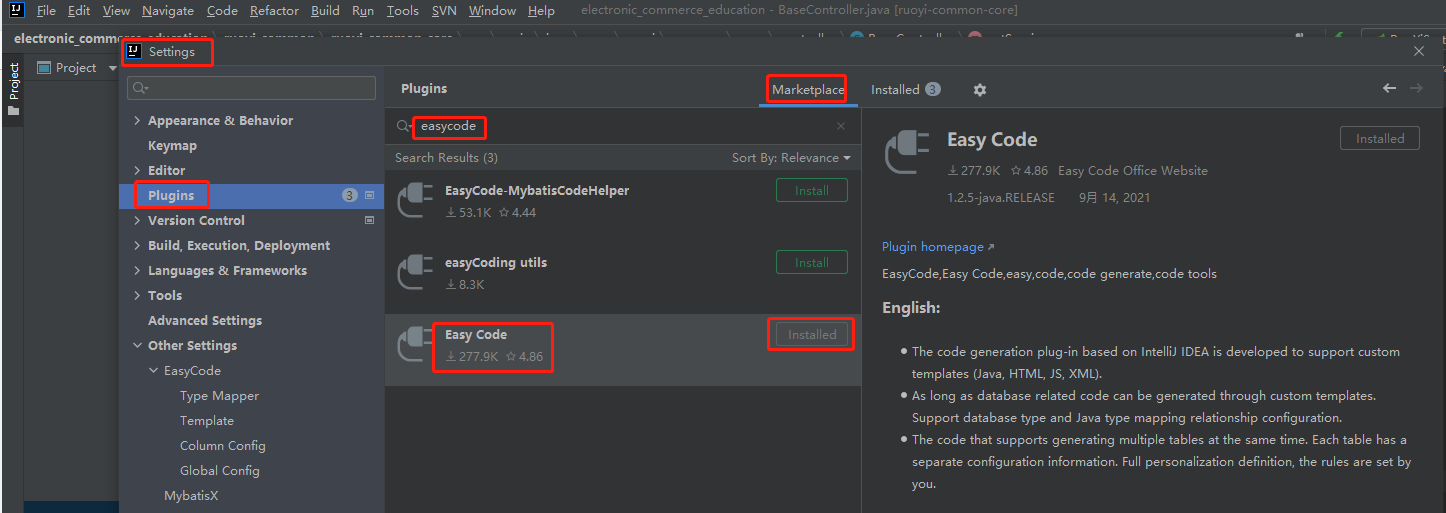
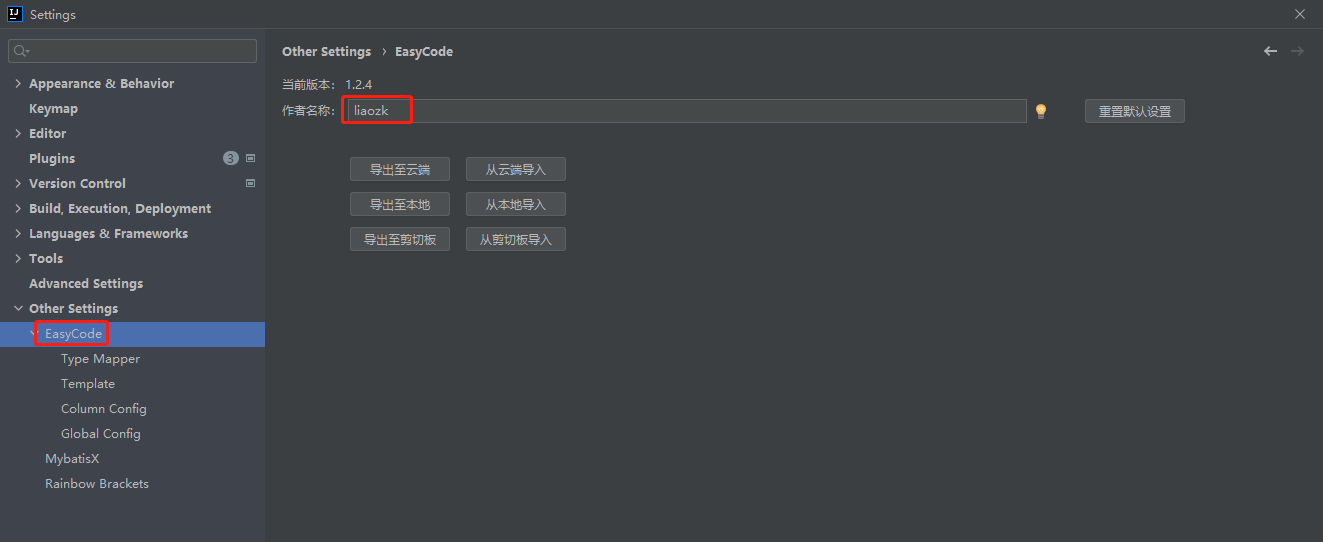
2、配置EasyCode
2.1、配置作者名称
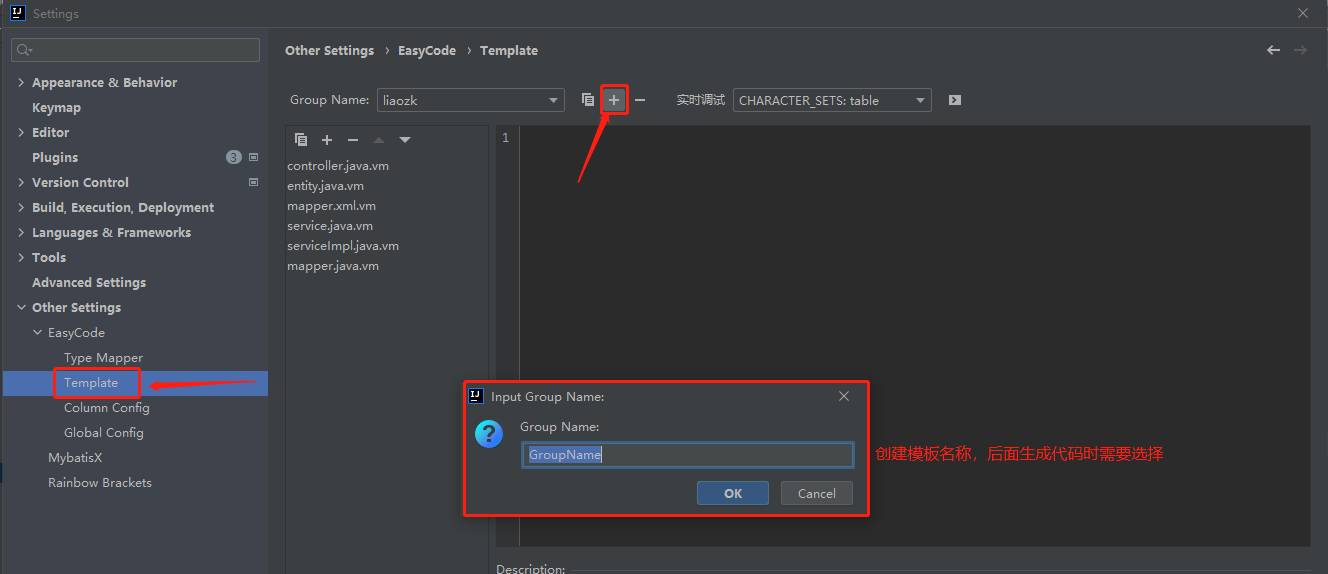
2.2、配置代码内容生成模板(模板内容见文末)
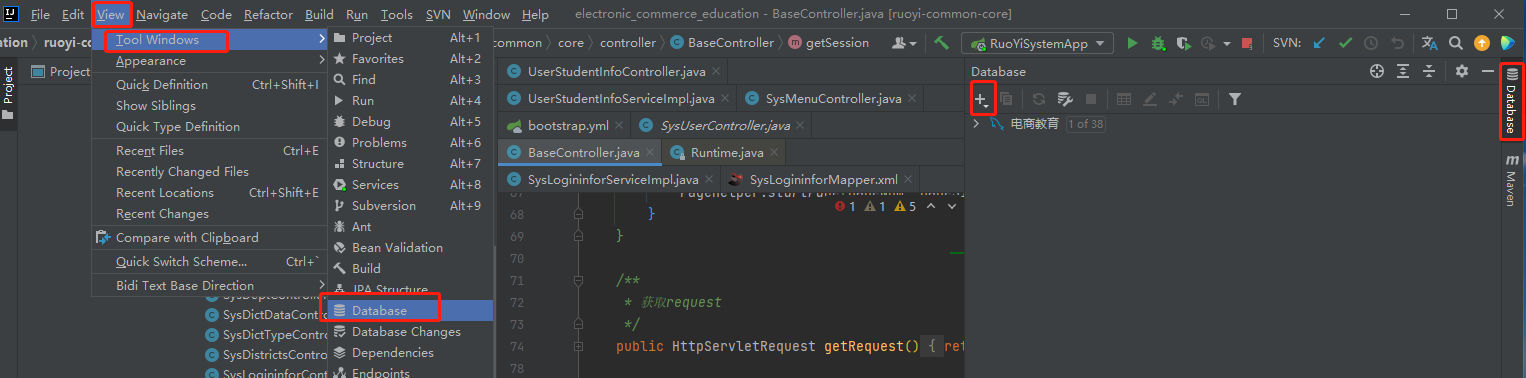
3、连接数据库
4、使用代码内容生成模板
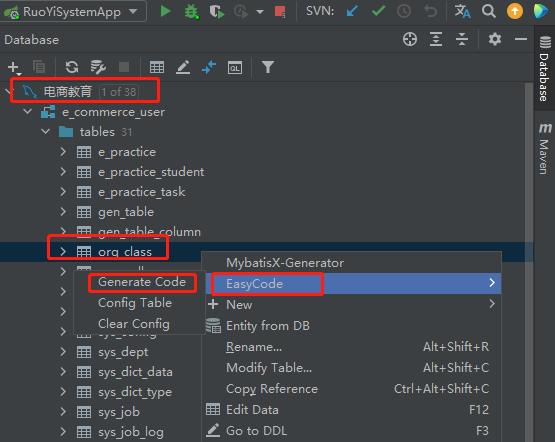
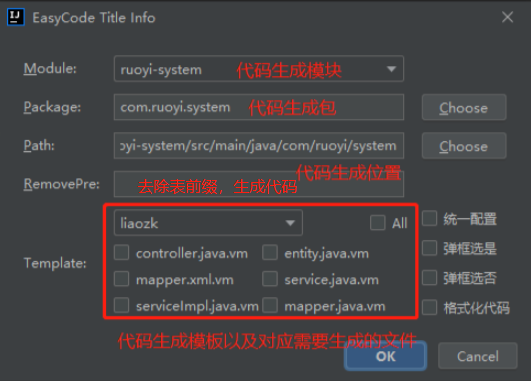
模板内容:
controller.java.vm
##导入宏定义

$!{define.vm}

##设置表后缀(宏定义)

#setTableSuffix("Controller")

##保存文件(宏定义)

#save("/controller", "Controller.java")

##包路径(宏定义)

#setPackageSuffix("controller")

##定义服务名

#set($serviceName = $!tool.append($!tool.firstLowerCase($!tableInfo.name), "Service"))

##定义实体对象名

#set($entityName = $!tool.firstLowerCase($!tableInfo.name))

import $!{tableInfo.savePackageName}.domain.dto.$!{tableInfo.name}Dto;

import $!{tableInfo.savePackageName}.service.$!{tableInfo.name}Service;

import org.springframework.web.bind.annotation.*;

import com.ruoyi.common.core.controller.BaseController;

import com.ruoyi.common.core.domain.AjaxResult;

import com.ruoyi.common.core.page.TableDataInfo;

import java.util.List;

import lombok.RequiredArgsConstructor;

##表注释(宏定义)

#tableComment("表控制层")

@RestController

@RequestMapping("$!tool.firstLowerCase($!tableInfo.name)")

@RequiredArgsConstructor

public class $!{tableName} extends BaseController{

    /**

     * 服务对象

     */

    private final $!{tableInfo.name}Service $!{serviceName};

    /**

     *

     * @param $!{entityName}dto 请求参数封装

     * @author $!author

     * @description //TODO  分页查询所有数据

     * @date $!time.currTime()

     * @return 实例对象

     */

    @PostMapping("/get$!{tableInfo.name}s")

    public TableDataInfo find$!{tableInfo.name}SelectList(@RequestBody $!{tableInfo.name}Dto $!{entityName}dto ) {

        startPage();

        return getDataTable(this.$!{serviceName}.find$!{tableInfo.name}SelectList($!{entityName}dto));

    }

    /**

     *

     * @param $!{entityName}dto 请求参数封装

     * @author $!author

     * @description //TODO  通过主键查询单条数据

     * @date $!time.currTime()

     * @return 单条数据

     */

    @PostMapping("/get$!{tableInfo.name}ById")

    public AjaxResult select$!{tableInfo.name}ById(@RequestBody $!{tableInfo.name}Dto $!{entityName}dto) {

        return AjaxResult.success($!{serviceName}.select$!{tableInfo.name}ById($!{entityName}dto.getId()));

    }

    /**

     *

     * @param $!{entityName}dto 实体对象

     * @author $!author

     * @description //TODO  新增数据

     * @date $!time.currTime()

     * @return 新增结果

     */

    @PostMapping("/add$!{tableInfo.name}")

    public AjaxResult add$!{tableInfo.name}(@RequestBody $!{tableInfo.name}Dto $!{entityName}dto) {

        return toAjax(this.$!{serviceName}.insert($!{entityName}dto));

    }

    /**

     *

     * @param $!{entityName}dto 实体对象

     * @author $!author

     * @description //TODO  修改数据

     * @date $!time.currTime()

     * @return 修改结果

     */

    @PostMapping("/update$!{tableInfo.name}")

    public AjaxResult update(@RequestBody $!{tableInfo.name}Dto $!{entityName}dto) {

         return toAjax(this.$!{serviceName}.update($!{entityName}dto));

    }

    /**

     *

     * @param ids 主键集合

     * @author $!author

     * @description //TODO  删除数据

     * @date $!time.currTime()

     * @return 删除结果

     */

    @PostMapping("/delete$!{tableInfo.name}")

    public AjaxResult delete(@RequestParam("ids") List<Long> ids) {

         return toAjax(this.$!{serviceName}.deleteById(ids));

    }

}
dto.java.vm
##引入宏定义

$!{define.vm}

##使用宏定义设置回调(保存位置与文件后缀)

#save("/domain/dto", ".java")

##使用宏定义设置包后缀

#setPackageSuffix("domain.dto")

##使用全局变量实现默认包导入

$!{autoImport.vm}

import com.fasterxml.jackson.annotation.JsonFormat;

import lombok.Data;

import lombok.EqualsAndHashCode;

import java.util.List;

##使用宏定义实现类注释信息

#tableComment("实体类")

@Data

public class $!{tableInfo.name}Dto {

#foreach($column in $tableInfo.fullColumn)

        #if(${column.comment})/**

        * ${column.comment}

        */#end

    private $!{tool.getClsNameByFullName($column.type)} $!{column.name};

    #end

    List<Long> ids;

    /**

    * 页

    */

    private Integer pageNum;

    /**

    * 条

    */

    private Integer pageSize;

    /**

    * 开始时间

    */

    @JsonFormat(pattern = "yyyy-MM-dd HH:mm:ss")

    private LocalDateTime startTime;

    /**

    * 结束时间

    */

    @JsonFormat(pattern = "yyyy-MM-dd HH:mm:ss")

    private LocalDateTime endTime;

    public Integer getPageNum() {

        return pageNum == null ? 1 : pageNum;

    }

    public Integer getPageSize() {

        return pageSize == null ? 10 : pageSize;

    }

}
mapper.java.vm
##导入宏定义

$!{define.vm}

##设置表后缀(宏定义)

#setTableSuffix("Mapper")

##保存文件(宏定义)

#save("/mapper", "Mapper.java")

##包路径(宏定义)

#setPackageSuffix("mapper")

import com.baomidou.mybatisplus.core.mapper.BaseMapper;

import $!{tableInfo.savePackageName}.domain.pojo.$!tableInfo.name;

import org.apache.ibatis.annotations.Mapper;

import java.util.List;

##表注释(宏定义)

#tableComment("表数据库访问层")

@Mapper

public interface $!{tableName} extends BaseMapper<$!tableInfo.name> {

     /**

        *

        * @param $!tool.firstLowerCase($!{tableInfo.name}) 实例对象

        * @author $!author

        * @description  分页查询数据

        * @date $!time.currTime()

        * @return 实例对象

     */

    List<$!{tableInfo.name}> select$!{tableInfo.name}List($!{tableInfo.name} $!tool.firstLowerCase($!{tableInfo.name}));

}
mapper.xml.vm
##引入mybatis支持

$!{mybatisSupport.vm}

##设置保存名称与保存位置

$!callback.setFileName($tool.append($!{tableInfo.name}, "Mapper.xml"))

$!callback.setSavePath($tool.append($modulePath, "/src/main/resources/mapper"))

##拿到主键

#if(!$tableInfo.pkColumn.isEmpty())

    #set($pk = $tableInfo.pkColumn.get(0))

#end

<?xml version="1.0" encoding="UTF-8"?>

<!DOCTYPE mapper PUBLIC "-//mybatis.org//DTD Mapper 3.0//EN" "http://mybatis.org/dtd/mybatis-3-mapper.dtd">

<mapper namespace="$!{tableInfo.savePackageName}.mapper.$!{tableInfo.name}Mapper">

    <resultMap type="$!{tableInfo.savePackageName}.domain.pojo.$!{tableInfo.name}" id="$!{tableInfo.name}Map">

#foreach($column in $tableInfo.fullColumn)

        <result property="$!column.name" column="$!column.obj.name" jdbcType="$!column.ext.jdbcType"/>

#end

    </resultMap>

<!--查询指定行数据-->

    <select id="select$!{tableInfo.name}List" resultMap="$!{tableInfo.name}Map">

        select

          #allSqlColumn()

        from $!tableInfo.obj.name

        <where>

#foreach($column in $tableInfo.fullColumn)

            <if test="$!column.name != null#if($column.type.equals("java.lang.String")) and $!column.name != ''#end">

                and $!column.obj.name = #{$!column.name}

            </if>

#end

        </where>

       </select>

</mapper>
pojo.java.vm
##引入宏定义

$!{define.vm}

##使用宏定义设置回调(保存位置与文件后缀)

#save("/domain/pojo", ".java")

##使用宏定义设置包后缀

#setPackageSuffix("domain.pojo")

##使用全局变量实现默认包导入

$!{autoImport.vm}

import java.io.Serializable;

import lombok.Data;

##使用宏定义实现类注释信息

#tableComment("实体类")

@Data

public class $!{tableInfo.name} {

private static final long serialVersionUID = $!tool.serial();

#foreach($column in $tableInfo.fullColumn)

    #if(${column.comment})/**

     * ${column.comment}

     */#end

    private $!{tool.getClsNameByFullName($column.type)} $!{column.name};

#end

}
service.java.vm
##导入宏定义

$!{define.vm}

##设置表后缀(宏定义)

#setTableSuffix("Service")

##保存文件(宏定义)

#save("/service", "Service.java")

##包路径(宏定义)

#setPackageSuffix("service")

import com.baomidou.mybatisplus.extension.service.IService;

import $!{tableInfo.savePackageName}.domain.dto.$!tableInfo.nameDto;

import $!{tableInfo.savePackageName}.domain.pojo.$!tableInfo.name;

import java.util.List;

##表注释(宏定义)

#tableComment("表服务接口")

public interface $!{tableName} extends IService<$!tableInfo.name> {

    /**

     *

     * @param id 主键

     * @author $!author

     * @description  通过ID查询单条数据

     * @date $!time.currTime()

     * @return 实例对象

     */

    public $!{tableInfo.name} select$!{tableInfo.name}ById (Long id);

    /**

     *

     * @param $!tool.firstLowerCase($!{tableInfo.name})dto 实例对象

     * @author $!author

     * @description 分页查询数据

     * @date $!time.currTime()

     * @return 实例对象

     */

    public List<$!{tableInfo.name}> find$!{tableInfo.name}SelectList ($!{tableInfo.name}Dto $!tool.firstLowerCase($!{tableInfo.name})dto);

   /**

     *

     * @param $!tool.firstLowerCase($!{tableInfo.name})dto 实例对象

     * @author $!author

     * @description  新增数据

     * @date $!time.currTime()

     * @return 实例对象

     */

    public int insert($!{tableInfo.name}Dto $!tool.firstLowerCase($!{tableInfo.name})dto);

   /**

     *

     * @param $!tool.firstLowerCase($!{tableInfo.name})dto 实例对象

     * @author $!author

     * @description 修改数据并返回

     * @date $!time.currTime()

     * @return 实例对象

     */

    public int update($!{tableInfo.name}Dto $!tool.firstLowerCase($!{tableInfo.name})dto);

    /**

     *

     * @param ids 主键

     * @author $!author

     * @description  通过主键删除数据

     * @date $!time.currTime()

     * @return

     */

    public int deleteById(List<Long> ids);

}
serviceImpl.java.vm
##导入宏定义

$!{define.vm}

##设置表后缀(宏定义)

#setTableSuffix("ServiceImpl")

##保存文件(宏定义)

#save("/service/impl", "ServiceImpl.java")

##包路径(宏定义)

#setPackageSuffix("service.impl")

import com.baomidou.mybatisplus.core.conditions.query.LambdaQueryWrapper;

import com.baomidou.mybatisplus.extension.service.impl.ServiceImpl;

import $!{tableInfo.savePackageName}.mapper.$!{tableInfo.name}Mapper;

import $!{tableInfo.savePackageName}.domain.pojo.$!{tableInfo.name};

import $!{tableInfo.savePackageName}.domain.dto.$!{tableInfo.name}Dto;

import $!{tableInfo.savePackageName}.service.$!{tableInfo.name}Service;

import org.springframework.stereotype.Service;

import $!{tableInfo.savePackageName}.mapper.$!{tableInfo.name}Mapper;

import java.util.List;

import lombok.RequiredArgsConstructor;

import com.ruoyi.common.utils.bean.BeanUtils;

##表注释(宏定义)

#tableComment("表服务实现类")

@Service("$!tool.firstLowerCase($tableInfo.name)Service")

@RequiredArgsConstructor

public class $!{tableName} extends ServiceImpl<$!{tableInfo.name}Dao, $!{tableInfo.name}> implements $!{tableInfo.name}Service {

       private final $!{tableInfo.name}Mapper $!tool.firstLowerCase($!{tableInfo.name})Mapper;

        /**

         *

         * @param  id 主键

         * @author $!author

         * @description //TODO  通过ID查询单条数据

         * @date $!time.currTime()

         * @return 实例对象

         */

        @Override

        public $!{tableInfo.name} select$!{tableInfo.name}ById (Long id) {

                LambdaQueryWrapper<$!{tableInfo.name}> $!{tool.firstLowerCase($!{tableInfo.name})}lam =  new LambdaQueryWrapper<$!{tableInfo.name}>();

                $!{tool.firstLowerCase($!{tableInfo.name})}lam.eq($!{tableInfo.name} ::getId ,id);

                return baseMapper.selectOne($!{tool.firstLowerCase($!{tableInfo.name})}lam);

        }

        /**

         *

         * @param $!tool.firstLowerCase($!{tableInfo.name})dto 实例对象

         * @author $!author

         * @description //TODO  分页查询数据

         * @date $!time.currTime()

         * @return 实例对象

         */

        @Override

        public List<$!{tableInfo.name}> find$!{tableInfo.name}SelectList ($!{tableInfo.name}Dto $!tool.firstLowerCase($!{tableInfo.name})dto) {

            $!{tableInfo.name} $!tool.firstLowerCase($!{tableInfo.name}) = new $!{tableInfo.name}();

            BeanUtils.copyBeanProp($!tool.firstLowerCase($!{tableInfo.name}),$!tool.firstLowerCase($!{tableInfo.name})dto);

            return this.$!{tool.firstLowerCase($tableInfo.name)}Mapper.select$!{tableInfo.name}List($!{tool.firstLowerCase($tableInfo.name)});

        }

        /**

         *

         * @param $!tool.firstLowerCase($!{tableInfo.name})dto 实例对象

         * @author $!author

         * @description //TODO  新增数据

         * @date $!time.currTime()

         * @return 实例对象

         */

        @Override

        public int insert($!{tableInfo.name}Dto $!tool.firstLowerCase($!{tableInfo.name})dto) {

                $!{tableInfo.name} $!tool.firstLowerCase($!{tableInfo.name}) = new $!{tableInfo.name}();

                BeanUtils.copyBeanProp($!tool.firstLowerCase($!{tableInfo.name}),$!tool.firstLowerCase($!{tableInfo.name})dto);

               return baseMapper.insert($!tool.firstLowerCase($!{tableInfo.name}));

        }

        /**

         *

         * @param $!tool.firstLowerCase($!{tableInfo.name})dto 实例对象

         * @author $!author

         * @description //TODO  修改数据并返回

         * @date $!time.currTime()

         * @return 实例对象

         */

        @Override

        public int update($!{tableInfo.name}Dto $!tool.firstLowerCase($!{tableInfo.name})dto) {

                $!{tableInfo.name} $!tool.firstLowerCase($!{tableInfo.name}) = new $!{tableInfo.name}();

                BeanUtils.copyBeanProp($!tool.firstLowerCase($!{tableInfo.name}),$!tool.firstLowerCase($!{tableInfo.name})dto);

                return  baseMapper.updateById($!{tool.firstLowerCase($!{tableInfo.name})});

        }

        /**

         *

         * @param idList 主键

         * @author $!author

         * @description //TODO    通过主键删除数据

         * @date $!time.currTime()

         * @return

         */

        @Override

        public void deleteById(List<Long> idList) {

            return baseMapper.deleteBatchIds(idList);

        }

}
Easycode—MybatisPlus模板的更多相关文章
- 基于EasyCode定制Mybatisplus全自动单表实现:新增/批量新增/修改/批量删除/分页查询/ID查询
基于EasyCode定制Mybatisplus全自动单表实现CRUD接口 分页查询 ID查询 新增 批量新增 修改 批量删除 注意使用了MybatisPlus的自动填充功能,和insertBatchS ...
- EasyCode Entity 实体类模板 IDEA
自己修改了一份EasyCode的实体类模板,防止日后找不到在这里存一下 修改了如下内容: 取消生成GetSet方法,改用Lombok 修改默认命名规则,改为[表名Entity.java] 取消了实现序 ...
- mybatis-plus的代码生成器
简介:构建自定义mybatis-plus模板,自动生成mybatis,entity,mapper,service,controller 项目源码:https://github.com/y369q369 ...
- springboot+mybatisplus 测试代码生成
测试springboot + mybatisplus 实现代码生成 使用默认的模板引擎 pom.xml文件 <?xml version="1.0" encoding=&q ...
- EasyCode实现数据库到Swagger全自动化
简介 EasyCode是基于IntelliJ IDEA开发的代码生成插件,通过自定义生成模板可以完成定制化的 Mapper Service Controller 生成,结合数据库 Comment还可以 ...
- 从零开始的SpringBoot项目 ( 六 ) 整合 MybatisPlus 实现代码自动生成
1.添加依赖 <!-- MySQL数据库 --> <dependency> <groupId>mysql</groupId> <artifactI ...
- 还在使用MyBatis Generator?试试这个工具
代码生成 在企业软件开发过程中,大多数时间都是面向数据库表的增删改查开发.通过通用的增删改查代码生成器,可以有效的提高效率,降低成本:把有规则的重复性劳动让机器完成,解放开发人员. MyBatis G ...
- 学习一下 SpringCloud (二)-- 服务注册中心 Eureka、Zookeeper、Consul、Nacos
(1) 相关博文地址: 学习一下 SpringCloud (一)-- 从单体架构到微服务架构.代码拆分(maven 聚合): https://www.cnblogs.com/l-y-h/p/14105 ...
- 手记系列之二 ----- 关于IDEA的一些使用方法经验
前言 本篇文章主要介绍的关于本人在使用IDEA的一些使用方法,一些常用设置,一些插件推荐和使用.请注意,本文特长,2w多字加上几十张图片,建议收藏观看~ 前提准备 idea官网: https://ww ...
- SpringBoot + Vue + ElementUI 实现后台管理系统模板 -- 后端篇(一): 搭建基本环境、整合 Swagger、MyBatisPlus、JSR303 以及国际化操作
相关 (1) 相关博文地址: SpringBoot + Vue + ElementUI 实现后台管理系统模板 -- 前端篇(一):搭建基本环境:https://www.cnblogs.com/l-y- ...
随机推荐
- app内嵌H5踩坑
内嵌的H5是用的vue2版本开发的,期间有很多的坑要踩: 1.调用app返回上一个页面不触发页面的onmouted和window.onPageShow app返回上一个页面调用的方法并不会出发vue的 ...
- 重写Collections集合的排序比较CompareTo方法
Collections.sort()使用该方法实际是重写Comparator接口的compare方法实现排序: //传入参数list集合,Comparator接口 T:list的元素类型 //如Lis ...
- textfsm
from concurrent.futures import ThreadPoolExecutor import netmiko import os from threading import Loc ...
- Windows下安装和使用Masscan
http://zone.secevery.com/article/1098 0x00 前言Masscan号称最快的互联网端口扫描器,本文来探测一下Masscan在Windows下的安装和使用.mass ...
- Unity简单使用 Addressables远端打包流程
跟着一步步操作即可 1.先打开一个unity项目 2.导入插件资源包地址,点击如图片所示 3.最后点击导入就行了也就是第三步 Install 4.这是在点击 Window 安装后Window/多了一个 ...
- [OC] 按照 元素 中的某个属性 来对数组进行排序
数组需要是 NSMutableArray 类型: //ascending - YES:升序,1,2,3 NO:降序:3,2,1 NSArray *sortDescriptors = [NSArray ...
- [OC] Block 是什么
Block 是 带有自动变量的匿名函数. emmmm 反正我看了也不懂,我们一点点用具体的例子分析一下block. 1. 我们现在要在一个文件中使用block(我们后面再提到两个界面传值的block ...
- Python_基础_Print_输出函数
输出函数print() print()函数: 功能:向目的地输出内容 输出的内容:数字.字符串.表达式 目的地:IDLE.控制台.文件 print()函数可以输出些什么内容? 数字 字符串(用单引号和 ...
- 用windows 定时任务执行kettle的ktr文件,以及问题处理
新建.bat文件,输入下面的批处理语句 d: cd D:\kettle\data-integration\ pan /file D:\etltest\EtltestTrans.ktr 第一行:进入你的 ...
- shell语法5-判断语句、循环语句、函数
一.判断语句 if-then形式类似于C/C++中的if-else语句. 1.单层if命令格式:if conditionthen 语句1 语句2 ...fi 2.单层if-else命 ...