
用cmd的方式执行exe程序
在asp.net中调用process.start执行程序,需要设置运行iis进程用户的权限,比较麻烦, MS的站点上有一篇说明:
http://support.microsoft.com/default.aspx/kb/555134 (估计页面404)
换种方法,可以先执行cmd.exe,然后以参数形式调用bat文件即可,参考文章:http://codebetter.com/blogs/brendan.tompkins/archive/2004/05/13/13484.aspx
此文章主要内容是:
// Get the full file path

string strFilePath = “c:\\temp\\test.bat”;

// Create the ProcessInfo object

System.Diagnostics.ProcessStartInfo psi = new System.Diagnostics.ProcessStartInfo(“cmd.exe”);

psi.UseShellExecute = false;

psi.RedirectStandardOutput = true;

psi.RedirectStandardInput = true;

psi.RedirectStandardError = true;

psi.WorkingDirectory = “c:\\temp\\“;

// Start the process

System.Diagnostics.Process proc = System.Diagnostics.Process.Start(psi);

// Open the batch file for reading

System.IO.StreamReader strm = System.IO.File.OpenText(strFilePath);

// Attach the output for reading

System.IO.StreamReader sOut = proc.StandardOutput;

// Attach the in for writing

System.IO.StreamWriter sIn = proc.StandardInput;

// Write each line of the batch file to standard input

while(strm.Peek() != -1)

{

  sIn.WriteLine(strm.ReadLine());

}

strm.Close();

// Exit CMD.EXE

string stEchoFmt = “# {0} run successfully. Exiting”;

sIn.WriteLine(String.Format(stEchoFmt, strFilePath));

sIn.WriteLine(“EXIT”);

// Close the process

proc.Close();

// Read the sOut to a string.

string results = sOut.ReadToEnd().Trim();

// Close the io Streams;

sIn.Close();

sOut.Close();

// Write out the results.

string fmtStdOut = “<font face=courier size=0>{0}</font>”;

this.Response.Write(String.Format(fmtStdOut,results.Replace(System.Environment.NewLine, “<br>”)));
.bat 的写法:
@echo off

path = %path%;.\..\Process\;

UILessRevit2018.exe

pause

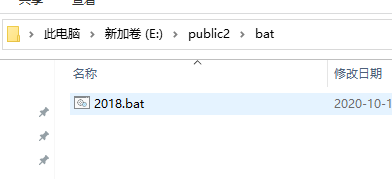

1、
@echo off:默认

path = %path%;.\..\Process\;  其中%path%是必须,.\..\Process\是相对于2018.bat的路径
UILessRevit2018.exe 是要执行的程序
pause是防止窗体关闭而已。
用cmd的方式执行exe程序的更多相关文章
- (转)C#执行exe程序
本文转自:http://www.cnblogs.com/vir56k/archive/2012/12/03/2799810.html,作者张云飞VIR 最近在操作adb做一些事情,就需要开发个wind ...
- .net 代码调用cmd执行.exe程序,获取控制台输出信息
使用.net core 对老项目升级, .net core 使用TripleDES.Create() 加密众iv字节限制 与 framework中的不同, 新项目还需要兼容老项目版本,还不想通过web ...
- 关于asp.net执行exe程序时权限不够的解决办法(2015.04.17更新)
一,本文背景 长话短说:asp.net项目中需要用到PDF转换成SWF文件,用户上传后自动调用pdf2swf.exe转换. 但有个问题,执行时权限不够,导致一直报错(滚动条一直在往下滚,刷屏中),见下 ...
- C#执行EXE程序
第一种方法:System.Diagnostics.ProcessStartInfo info =new System.Diagnostics.ProcessStartInfo(path);info.W ...
- 在任务计划程序用Bat命令执行exe程序
@echo off :open choice /c:123 /m "1:创建,2:终止,3:删除" if errorlevel 3 goto delete if errorleve ...
- C#在Xp系统执行.exe程序的报错怎么查看原因
我的电脑---->管理---->事件查看器----->应用程序,查看错误来源
- QT生成可执行的EXE程序
[转载] Qt 官方开发环境使用的动态链接库方式,在发布生成的exe程序时,需要复制一大堆 dll,如果自己去复制dll,很可能丢三落四,导致exe在别的电脑里无法正常运行.因此 Qt 官方开发环境里 ...
- Cmd使用方式--命令行运行程序
工具用惯却不知道如何去描述什么用,总感觉自己学东西用东西零零散散不系统,心虚!下面总结下自己使用cmd的几种方式. 1 => cmd,command,是window系统下命令提示符,是一种com ...
- 操作系统+编程语言的分类+执行python程序的两种方式+变量
1.什么是操作系统? 操作系统就是一个协调\管理\控制计算机硬件资源与软件资源的一个控制程序. 2.为何要操作系统? a.把复杂的硬件操作封装成简单的功能\接口用来给用户或者程序来使用(文件) b.把 ...
- 执行Go程序的三种方式及Go语言关键字
执行 Go 程序的三种方式及 Go 语言关键字 执行 Go 程序的三种方式 一.使用 go run 命令 二.使用 go build 命令 Step1. 对 go 源码源文件执行 go build 命 ...
随机推荐
- having对聚合函数的结果集进行过滤
SELECT rl.road_code,string_agg(distinct rs.tech_level_label, ',') from road_lst rlleft join road_sec ...
- unity工程多开Bat
%cd%:: 源路径set sourceDir=C:\Projects\XXX:: 目标路径set destDir=C:\Projects\XXX_Clone :: 如果目标路径不存在就创建if no ...
- java 自定义注解与示例
自定义注解 @Target(value = {ElementType.METHOD})// 使用范围:方法 @Retention(RetentionPolicy.RUNTIME)// 作用域:运行时有 ...
- 前端记录:树形插件zTree 和 表格扩展 tableX
树形插件zTree 表格扩展 tableX 项目实例 [地区联动实现_前端] <title>区域设置</title> <!--当前位置开始--> <div c ...
- Fuxploider-20210104
Usage: fuxploider.py [-h] [-d postData] [--proxy proxyUrl] [--proxy-creds [credentials]] [-f integer ...
- PY0271验证码的创建
生成的 随机背景色的 效果 from PIL import Image,ImageDraw,ImageFont,ImageFilterimport random# 设置随机的背景颜色.def rndC ...
- MacBook + 移动SSD实现三系统(Mac OS、windows、ubuntu)
Windows系统安装 1.我们先要在windows的电脑上下载好,你需要的windows镜像文件(下载地址:https://msdn.itellyou.cn/,个人建议用迅雷下载),下载好winto ...
- 路飞之-后台日志封装-前后端分离的rbac项目演示-全局异常处理封装-封装Response-luffy数据库创建-软件开发模式-User模块用户表-django的配置文件-开启media访问
目录 路飞之-后台日志封装-前后端分离的rbac项目演示-全局异常处理封装-封装Response-luffy数据库创建-软件开发模式-User模块用户表-django的配置文件-开启media访问 今 ...
- Linux df -h 显示磁盘空间满,但实际未占用满——问题分析
问题现象: 遇到一个问题,在系统上,告警提示磁盘空间不够,如下图所示: 问题分析: 1.首先使用 :du -h / --max-depth=1 命令查看各个目录的占用空间,试图找到占用较多空间的目 ...
- Content Provider详解(太懒不想抄)
1.Content Provider作用 进程间进行数据交互&共享,即跨进程通信 contentprovider作用图.png 2.Content Provider原理 content p ...