
2016/3/30 租房子 ①建立租房子的增、删、改php页面 ②多条件查询 ③全选时 各部分全选中 任意checkbox不选中 全选checkbox不选中
字符串的另一种写法:<<<AAAA; 后两个AA回车要求顶格 不然报错
例子:
 <!DOCTYPE html>

 <html lang="en">

 <head>

     <meta charset="UTF-8">

     <title>Document</title>

 </head>

 <body>

 <?php

 $str = <<<AA

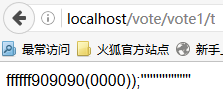
 ffffff909090(0000));'''''''''""""

 AA;

  echo $str;

 ?>

 </body>

 </html>
图:
①House分七个页面 数据库为 test2 House 表 注意form:chuli的表可以与相关表合并为一个 分开较清晰
分别是
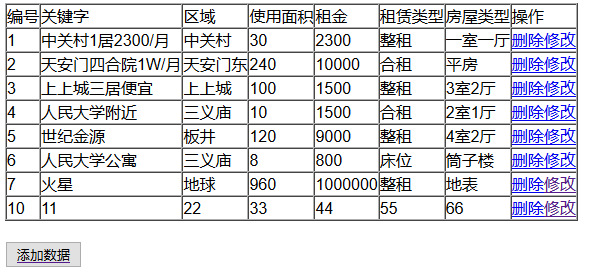
1,Hmain.php:主页面
 <!DOCTYPE html>

 <html lang="en">

 <head>

     <meta charset="UTF-8">

     <title>Document</title>

 </head>

 <body>

 <table border="1" cellpadding="0" cellspacing="0">

     <tr>

         <td>编号</td>

         <td>关键字</td>

         <td>区域</td>

         <td>使用面积</td>

         <td>租金</td>

         <td>租赁类型</td>

         <td>房屋类型</td>

         <td>操作</td>

     </tr>

     <?php

     //造连接对象

     $db=new mysqli("localhost","root","123","test2");

     //判断连接是否成功

     !mysqli_connect_error()or die("连接失败!");

     //写sql语句

     $sql="select * from House";

     //执行sql语句

     $result=$db->query($sql);

     //处理查询的结果

     $attr=$result->fetch_all();

     for ($i=0; $i <count($attr) ; $i++) {

         echo "<tr>";

         for ($j=0; $j <count($attr[$i]); $j++) {

             echo "<td>{$attr[$i][$j]}</td>";

         }

         echo "<td><a href='Hdelete.php?code={$attr[$i][0]}'>删除</a><a href='Hupdate.php?code={$attr[$i][0]}'>修改</a></td>";

             echo "</tr>";

     }

      ?>

 </table>

 <br/>

 <a href="Hadd.php"><input type="button" value="添加数据"></a>

 </body>

 </html>
图:
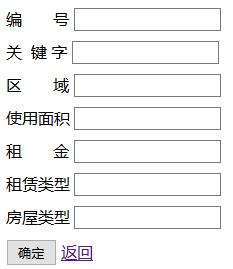
2,Hadd.php:添加页面
<!DOCTYPE html>
<html lang="en">
<head>
<meta charset="UTF-8">
<title>Document</title>
</head>
<style>
.kong
{
margin:10px 0px 10px 0px;
vertical-align:
}
</style>
<body>
<form action="Haddchuli.php" method="post"> <div class="kong">
编       号
<input type="text" name="code"/>
</div> <div class="kong">
关  键 字
<input type="text" name="keyword"/>
</div>
<div class="kong">
区       域
<input type="text" name="quyu"/>
</div>
<div class="kong">
使用面积
<input type="text" name="mianji"/>
</div>
<div class="kong">
租       金
<input type="text" name="zujin">
</div>
<div class="kong">
租赁类型
<input type="text" name="zulei"/>
</div>
<div class="kong">
房屋类型
<input type="text" name="fanglei"/>
</div>
<div>
<input type="submit" value="确定"/>
<a href="Hmain.php">返回</a>
</div>
</form>
</body>
</html>
图:
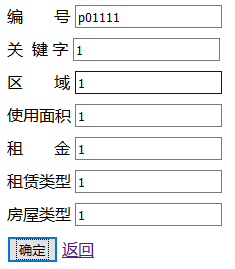

3,Haddchuli.php:添加处理页面
 <?php

 $code=$_POST["code"];

 $keyword=$_POST["keyword"];

 $quyu=$_POST["quyu"];

 $mianji=$_POST["mianji"];

 $zujin=$_POST["zujin"];

 $zulei=$_POST["zulei"];

 $fanglei=$_POST["fanglei"];

 //造连接对象

 $db=new mysqli("localhost","root","123","test2");

 //判断是否出错

 !mysqli_connect_error() or die("连接失败");

 //写sql语句

 $sql="insert into House values('$code','$keyword','$quyu','$mianji','$zujin','$zulei','$fanglei')";

 //执行语句

 $result=$db->query($sql);

 if ($result) {

     header("location:Hadd.php");

 }

 else{

     echo "执行失败!";

 }

  ?>}
4,Hdelete.php:删除页面
 <?php

 $code=$_GET["code"];

 $db=new mysqli("localhost","root","123","test2");

 !mysqli_connect_error() or die("连接有误!");

 $sql="delete from House where id='$code'";

 $result=$db->query($sql);

 if ($result) {

     header("location:Hmain.php");

 }

 else{

     echo "删除失败!";

 }

  ?>}
图:删除上图的第18个 主键删除后不会再次启用 而是以此向下排序

5,Hupdate.php:修改页面 使用面积和租金 数字填完之后有点奇怪?
<!DOCTYPE html>
<html lang="en">
<head>
<meta charset="UTF-8">
<title>Document</title>
</head>
<body>
<?php
$code=$_GET["code"];
$db=new mysqli("localhost","root","123","test2");
!mysqli_connect_error()or die("连接有误!");
$sqlu="select * from House where id='$code'";
$result=$db->query($sqlu);
$attu=$result->fetch_row(); ?>
<form action="Hupdatechuli.php" method="post"> <div>
编       号:
<input type="text" name="code" value="<?php echo $attu[0] ?>"/>
</div> <div>
关 键 字  :
<input type="text" name="keyword" value="<?php echo $attu[1] ?>"/>
</div>
<div>
区       域:
<input type="text" name="quyu" value="<?php echo $attu[2] ?>"/>
</div>
<div>
使用面积:
<input type="text" name="mianji" value="<?php echo $attu[3] ?>"/>
</div>
<div>
租       金:
<input type="text" name="zujin" value="<?php echo $attu[4] ?>"/>
</div>
<div>
租赁类型:
<input type="text" name="zulei" value="<?php echo $attu[5] ?>"/>
</div>
<div>
房屋类型:
<input type="text" name="fanglei" value="<?php echo $attu[6] ?>"/>
</div>
<div>
<input type="submit" value="确定"/>
<a href="Hmain.php">返回</a>
</div>
</form>
</body>
</html>
图:


6,Hupdatechuli.php:修改处理页面
 <meta http-equiv="Content-Type" content="text/html; charset=utf-8" />

 <?php

 $code=$_POST["code"];

 $keyword=$_POST["keyword"];

 $quyu=$_POST["quyu"];

 $mianji=$_POST["mianji"];

 $zujin=$_POST["zujin"];

 $zulei=$_POST["zulei"];

 $fanglei=$_POST["fanglei"];

 //造连接对象

 $db=new mysqli("localhost","root","123","test2");

 //判断是否出错

 !mysqli_connect_error() or die("连接失败");

 //写sql语句

 $sql="update House set KeyWord='$keyword',Area='$quyu',SquareMeter='$mianji',Rent='$zujin',RentType='$zulei',HouseType='$fanglei'where id='$code'";

 //执行语句

 $result=$db->query($sql);

 if ($result) {

     header("location:Hadd.php");

 }

 else{

     echo "执行失败!";

 }

  ?>
7,hhcheck.php:多条件联合查询页面
<!DOCTYPE html>
<html lang="en">
<head>
<meta charset="UTF-8">
<title>Document</title>
</head>
<body>
<?php
@$qytj=$_POST["qy"];
@$zltj=$_POST["zl"];
@$fltj=$_POST["fl"];
@$key=$_POST["key"]; //造查询字符串
$st1=" 1=1";
$st2=" 1=1";
$st3=" 1=1";
$st4=" 1=1";
//判断第一个条件是否有值
if (count($qytj)>0) {
$ss=implode("','",$qytj);
$st1=" Area in ('$ss') ";
}
//依次判断第二三四个条件
if (count($zltj)>0) {
$zz=implode("','",$zltj);
$st2=" Renttype in ('$zz')";
}
if (count($fltj)>0) {
$ff=implode("','",$fltj);
$st3=" HouseType in ('$ff')";
}
if ($key!="") { $st4=" KeyWord like '%$key%'";
}
$sqltj=" where".$st1." and ".$st2." and ".$st3." and ".$st4; ?>
<form action="hhcheck.php" method="post">
<div>
<div>区域:
<input type="checkbox" id="qyall" name="qyall" onclick="CheckAll(this,'qy')">全选
</div>
<div>
<?php
//1.造连接对象
$db=new mysqli("localhost","root","123","test2");
//2.判断是否连接成功
!mysqli_connect_error()or die("连接失败");
$sqlqy="select distinct(Area) from House";
$result=$db->query($sqlqy);
$arrqy=$result->fetch_all();
for ($i=0; $i <count($arrqy); $i++) {
echo "<div style='display:inline'><input type='checkbox' name='qy[]' class='qy' value='{$arrqy[$i][0]}'>{$arrqy[$i][0]}</div> ";
}
?>
</div>
<br>
<div>租赁类型:
<input type="checkbox" id="zlall" name="zlall" onclick="CheckAll(this,'zl')">全选
</div>
<div>
<?php
//1.造连接对象
$db=new mysqli("localhost","root","123","test2");
//2.判断是否连接成功
!mysqli_connect_error()or die("连接失败");
$sqlzl="select distinct(Renttype) from House";
$result=$db->query($sqlzl);
$arrzl=$result->fetch_all();
for ($i=0; $i <count($arrzl); $i++) {
echo "<div style='display:inline'><input type='checkbox' name='zl[]' class='zl'value='{$arrzl[$i][0]}'>{$arrzl[$i][0]}</div> ";
}
?>
</div>
<br>
<div>房屋类型:
<input type="checkbox" id="flall" name="fl[]" onclick="CheckAll(this,'fl')">全选
</div>
<div>
<?php
//1.造连接对象
$db=new mysqli("localhost","root","123","test2");
//2.判断是否连接成功
!mysqli_connect_error()or die("连接失败");
$sqlfl="select distinct(HouseType) from House";
$result=$db->query($sqlfl);
$arrfl=$result->fetch_all();
for ($i=0; $i <count($arrfl); $i++) {
echo "<div style='display:inline'><input type='checkbox' name='fl[]' class='fl' value='{$arrfl[$i][0]}'>{$arrfl[$i][0]}</div> ";
}
?>
</div>
<br>
<div>关键字:
<input type="text" name="key">
<input type="submit" value="搜索">
</div>
</div>
</form>
<table border="1" width=100% cellpadding="0" cellspacing="0">
<tr>
<td>关键字</td>
<td>区域</td>
<td>面积</td>
<td>租金</td>
<td>租赁类型</td>
<td>房屋类型</td>
</tr>
<?php
//1.造连接对象
$db=new mysqli("localhost","root","123","test2");
//2.判断是否连接成功
!mysqli_connect_error()or die("连接失败");
$sql="select * from House ".$sqltj;
$result=$db->query($sql);
$arral=$result->fetch_all();
for($i=0; $i<count($arral); $i++){
echo "<tr>
<td>{$arral[$i][1]}</td>
<td>{$arral[$i][2]}</td>
<td>{$arral[$i][3]}</td>
<td>{$arral[$i][4]}</td>
<td>{$arral[$i][5]}</td>
<td>{$arral[$i][6]}</td>
</tr>";
} ?>
</table>
</body>
<script type="text/javascript">
function CheckAll(checked,cname)
{ var all=document.getElementsByClassName(cname);
for (var i = 0; i < all.length; i++) {
all[i].checked=checked.checked;
}
}
</script>
</html>
图一: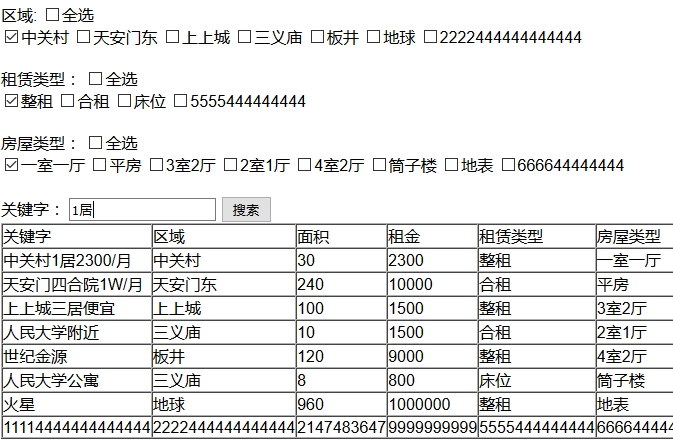
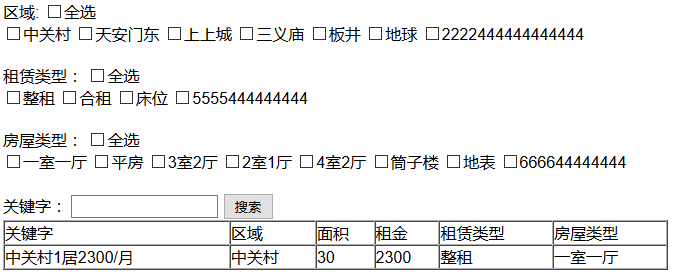
图二:图一条件查出的结果
图三: 全选中时 下面选项也选中 但有个缺陷 部分不选时 全选还是存在 接下来解决
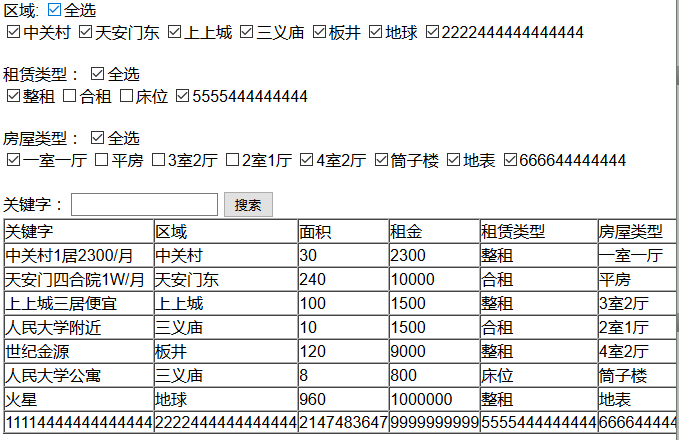
②加一个页面 checkbox 中选项任意一个不选 全选自动取消
YiGeBuZhongQuanBuZhong.php
 <!DOCTYPE html>

 <html lang="en">

 <head>

     <meta charset="UTF-8">

     <title>Document</title>

 </head>

 <body>

 <input type="checkbox" id="quan" name="qx" onclick="CheckAll(this,'list')">全选

 <div>

 <input type="checkbox" class="list" onclick="Checkpa(this)">

 <input type="checkbox" class="list" onclick="Checkpa(this)">

 <input type="checkbox" class="list" onclick="Checkpa(this)">

 <input type="checkbox" class="list" onclick="Checkpa(this)">

 <input type="checkbox" class="list" onclick="Checkpa(this)">

 <input type="checkbox" class="list" onclick="Checkpa(this)">

 </div>

 </body>

 <script>

     function CheckAll(ck,list)

     {    //找到全选按钮的选中状态

         var zt=ck.checked;

         //找到所有控制的checkbox

         var all=document.getElementsByClassName(list);

         //控制所有的checkbox状态和全选的状态一致

         for (var i = 0; i < all.length; i++) {

             all[i].checked=zt;

         }

     }

     function Checkpa(pa)

     {

         if(!pa.checked)

         {

             document.getElementById("quan").checked=

             false;

         }

     }

 </script>

 </html>


2016/3/30 租房子 ①建立租房子的增、删、改php页面 ②多条件查询 ③全选时 各部分全选中 任意checkbox不选中 全选checkbox不选中的更多相关文章
- PHP-----练习-------租房子-----增删改查,多条件查询
练习-------租房子-----增删改查,多条件 一 .题目要求: 二 .做法: [1]建立数据库 [2]封装类文件------DBDA.class.php <?php class DBDA ...
- Understand:高效代码静态分析神器详解(一) | 墨香博客 http://www.codemx.cn/2016/04/30/Understand01/
Understand:高效代码静态分析神器详解(一) | 墨香博客 http://www.codemx.cn/2016/04/30/Understand01/ ===== 之前用Windows系统,一 ...
- 点击div全选中再点击取消全选div里面的文字
想做一个就是点击一个div然后实现的功能是div里面的文字都成选中状态,然后就可以利用浏览器的自带的复制功能,任意复制在哪里去了 在网上百度了一下 然后网上的答案感觉很大的范围 然后一些搜索 然后就锁 ...
- DWZ-JUI 树形Checkbox组件 无法一次获取所有选中的值的解决方法
UI中 tree Checkbox 组件 在官方文档中提供的oncheck事件中只能够获取当前点击的权限值,而无法获取其他选中的值 <ul class="tree treeFolder ...
- jQuery操作复选框checkbox技巧总结 ---- 设置选中、取消选中、获取被选中的值、判断是否选中等
转载:https://blog.csdn.net/chenchunlin526/article/details/77448168 jQuery操作复选框checkbox技巧总结 --- 设置选中.取消 ...
- vc6列表框多选时,获取哪些项被选中
//vc6列表框多选时,获取哪些项被选中...... void CWebcyzDlg::OnButton2() { int n = m_mylist1.GetSelCount();//首先获取一共有多 ...
- easyui 上 datagrid 的表头的checkbox全选时 取消选中 disabled的checkbox
业务需求: 正常情况下,easyui的全选checkbox会选择表中全部的checkbox包括行.及时对checkbox加了disable属性也没有效果.但是现在的业务是当对checkbox加了dis ...
- 分页查询关键代码 多条件查询关键代码 删除选中商品关键代码 修改要先回显再修改 修改要先回显再修改 同一业务集中使用同一servlet的方法
分页查询关键代码: 通过servlet转发回来的各种信息进行分页的设计(转发回的信息有 分页查询的List集合 查询的页码 查询的条数 查询的数据库总条数 查询的总页码) 从开始时循环10次出现十个数 ...
- 2016/3/31 ①全选时 下面选项全选中 ② 下面不选中时 全选取消 ③在“” 中 转义字符的使用\ onclick=\"Checkpa(this,'flall')\"; ④区别于分别实现 重点在于两种情况合并实现
testxuanbuxuan.php <!DOCTYPE html> <html lang="en"> <head> <meta char ...
随机推荐
- Linux的硬件时间、校正Linux系统时间及系统时间调用流程
第一部分: 一)概述: 事实上在Linux中有两个时钟系统,分别是系统时间和硬件时间 UTC是协调世界时(Universal Time Coordinated)英文缩写,它比北京时间早8个小时. ...
- memcached 的内存管理与删除机制
1:内存的碎片化 如果用 c 语言直接 malloc,free 来向操作系统申请和释放内存时, 在不断的申请和释放过程中,形成了一些很小的内存片断,无法再利用. 这种空闲,但无法利用内存的现象,--- ...
- 利用springboot创建多模块项目
本文旨在用最通俗的语言讲述最枯燥的基本知识 最近要对一个不大不小的项目进行重构,用spring觉得太过于繁琐,用cloud又有觉得过于庞大,维护的人手不够:权衡之下,最终选了springboot作为架 ...
- 条款34:区分接口继承和实现继承(Different between inheritance of interface and inheritance of implemenation)
NOTE: 1.接口继承和实现继承不同.在public继承之下,derived classes总是继承base class的接口. 2.pure virtual 函数只具体指定接口继承及缺省实现继承. ...
- python_字符串类型
1.在python中用单引号' ',双引号'' '',三引号''' ''' 标注字符串类型. >>> name = "Alex Li" #双引号 >> ...
- POJ 2631 Roads in the North (求树的直径)
Description Building and maintaining roads among communities in the far North is an expensive busine ...
- manjaro xfce 18.0 踩坑记录
manjaro xfce 18.0 踩坑记录 1 简介1.1 Manjaro Linux1.2 开发桌面环境2 自动打开 NumLock3 系统快照3.1 安装timeshift3.2 使用times ...
- Vue微信自定义分享时安卓系统config:ok,ios系统config:invalid signature签名错误,或者安卓和ios二次分享时均config:ok但是分享无效的解决办法
简述需求:要求指定页面可以进行微信自定义分享(自定义标题,描述,图片,链接),剩下的页面隐藏所有基础接口.二次分享依然可以正常使用,切换至其他页面也可以正常进行自定义分享. 这两天在做微信自定义分享的 ...
- MYSQL常见运算符和函数【重要】
字符函数 (1)CONCAT():字符连接 SELECT CONCAT(‘IMOOC’,’-‘,’MySQL’);//IMOOC-MySQL SELECT CONCAT (first_name,las ...
- 微软2016校园招聘在线笔试 B Professor Q's Software [ 拓扑图dp ]
传送门 题目2 : Professor Q's Software 时间限制:10000ms 单点时限:1000ms 内存限制:256MB 描述 Professor Q develops a new s ...