
ASP.NET统计图表控件
近来客户需要将前段时间开发的统计信息用图表展示出来,还要多个图表类型,例如:柱状图、饼图、曲线图、三维图等等。在网上google了一下,发现了三个(也许更多)可以使用的控件。下面我们一起看看这三个控件。
1、OWC11
这个控件全称是:Office Web Component 11,是office2003中的一个组件,可惜的是office2007中没有了它的身影。不过安装office2003之后可以引用,然后使用。使用过的人都知道,就是它的效果要差一点。
2、dotnetCharting
http://www.dotnetcharting.com/
dotnetcharting是国外的一个产品,是要收费的。具体还没有使用,后面在我尝试之后,我会添加一些使用范例。大家也可以上网搜索一下,很多的列子。
3、MSChart
微软发布了.NET 3.5框架下的图表控件,发觉功能很强劲,基本上能想到的图表都可以使用它绘制出来,给图形统计和报表图形显示提供了很好的解决办法,同时支持Web和WinForm两种方式,不过缺点也比较明显,只能在最新的开发环境中使用,需要.Net 3.5 Sp1以及VS 2008的开发环境。
MSChart在ASP.NET中的使用,需要设置web.config文件,可以参看下面的链接:
http://www.cnblogs.com/carysun/archive/2009/03/15/MSChart.html
http://www.cnblogs.com/bluetiger/archive/2009/03/02/1401457.html
MSChart在SharePoint2007中的使用,同样也需要设置web.config文件,可以参看下面的链接:
http://social.msdn.microsoft.com/Forums/en/MSWinWebChart/thread/6eed0b12-9334-4ef5-9d1e-6da1c43d791a
下面是下载地址:
包含英文版,中文版。上面提供的链接是中文版的,可以更改为英文版。
语言包:Microsoft Chart Controls for Microsoft .NET Framework 3.5 Language Pack
Microsoft .NET Framework 3.5 的Microsoft 图表控件 的语言包,包含23中语言。
Microsoft Chart Controls Add-on for Microsoft Visual Studio 2008
这个只有英文的,没找到中文的。
文档 (Microsoft Chart Controls for .NET Framework Documentation)
这个只有英文的,没找到中文的。
WinForm 和 Asp.net的例子(Samples Environment for Microsoft Chart Controls) –
这个只有英文的,没找到中文的。
Demo 下载:http://code.msdn.microsoft.com/mschart
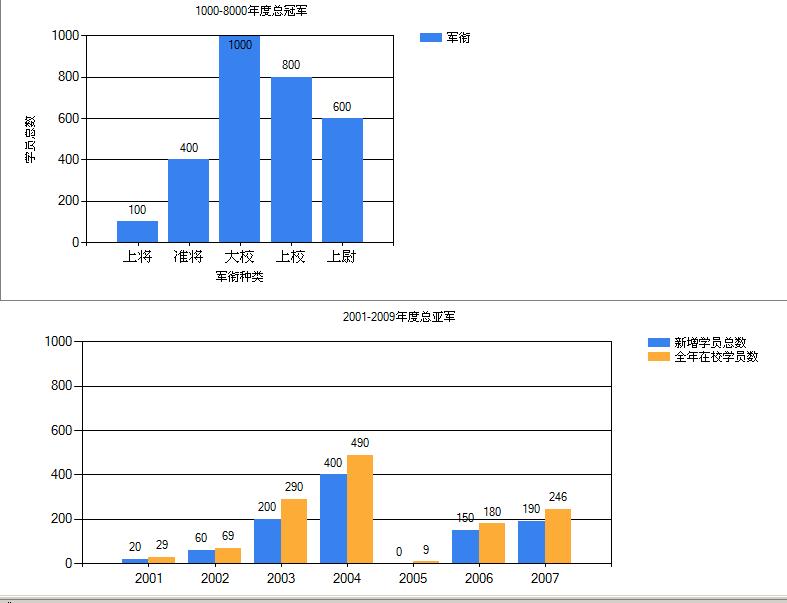
页面代码

<%@ Page Language="C#" AutoEventWireup="true" CodeBehind="Chart.aspx.cs" Inherits="BeautyCode.SharePoint.MVPDemo.Pages.Chart" %>

<%@ Register Assembly="System.Web.DataVisualization, Version=3.5.0.0, Culture=neutral, PublicKeyToken=31bf3856ad364e35"

    Namespace="System.Web.UI.DataVisualization.Charting" TagPrefix="asp" %>

<!DOCTYPE html PUBLIC "-//W3C//DTD XHTML 1.0 Transitional//EN" "http://www.w3.org/TR/xhtml1/DTD/xhtml1-transitional.dtd">

<html xmlns="http://www.w3.org/1999/xhtml">

<head runat="server">

    <title></title>

</head>

<body>

    <form id="form1" runat="server">

    <div>

        <fieldset>

            <legend>ddd</legend>

            <asp:Chart ID="Chart1" runat="server">

                <Titles>

                    <asp:Title Name="Title" Text="Title1">

                    </asp:Title>

                </Titles>

                <Annotations >

                <asp:TextAnnotation Text=""></asp:TextAnnotation>

                </Annotations>


                <Legends>

                <asp:Legend Title =""></asp:Legend>

                </Legends>

                <MapAreas>

                </MapAreas>

                <Series>


                </Series>

                <ChartAreas>

                    <asp:ChartArea Name="ChartAreas1">

                    </asp:ChartArea>

                </ChartAreas>

            </asp:Chart>

        </fieldset>

    </div>

    <div>

        <asp:Chart ID="Chart2" runat="server">

            <Series>


            </Series>

            <Legends>

                <asp:Legend Title =""></asp:Legend>

                </Legends>

            <ChartAreas>

                <asp:ChartArea Name="ChartAreas1">

                </asp:ChartArea>


            </ChartAreas>

        </asp:Chart>

    </div>

    </form>

</body>

</html>
后台代码

using System;

using System.Collections.Generic;

using System.Linq;

using System.Web;

using System.Data;

using System.Web.UI;

using System.Web.UI.WebControls;

using Microsoft.Office.Core;

using Microsoft.Office.Interop.Owc11;

using Microsoft.Office.Interop;

using System.Web.UI.DataVisualization.Charting;

namespace BeautyCode.SharePoint.MVPDemo.Pages

{

    public partial class Chart : System.Web.UI.Page

    {

        private DataTable _SampleDataTable;

        private DataTable _InSchool;

        protected void Page_Load(object sender, EventArgs e)

        {

            if (!IsPostBack)

            {

                PaintChart1();

                PaintChart2();

            }

        }

        private void CreateDataTable()

        {

            _SampleDataTable = new DataTable();

            _SampleDataTable.Columns.Add("jx");

            _SampleDataTable.Columns.Add("count");

            DataRow row;

            row = _SampleDataTable.NewRow();

            row[0] = "上将";

            row[1] = 100;

            _SampleDataTable.Rows.Add(row);

            row = _SampleDataTable.NewRow();

            row[0] = "准将";

            row[1] = 400;

            _SampleDataTable.Rows.Add(row);

            row = _SampleDataTable.NewRow();

            row[0] = "大校";

            row[1] = 1000;

            _SampleDataTable.Rows.Add(row);

            row = _SampleDataTable.NewRow();

            row[0] = "上校";

            row[1] = 800;

            _SampleDataTable.Rows.Add(row);

            row = _SampleDataTable.NewRow();

            row[0] = "上尉";

            row[1] = 600;

            _SampleDataTable.Rows.Add(row);

        }

        private void PaintChart1()

        {

            CreateDataTable();

            this.Chart1.Titles["Title"].Text = "1000-8000年度总冠军";

            this.Chart1.Series.Add(new Series("军衔"));

            this.Chart1.Width = 500;

            #region MSChart manual add data

            //this.Chart1.Series["军衔"].Points.AddXY("上将", 20);

            //this.Chart1.Series["军衔"].Points.AddXY("中将", 200);

            //this.Chart1.Series["军衔"].Points.AddXY("准将", 40);

            //this.Chart1.Series["军衔"].Points.AddXY("中校", 60);

            //this.Chart1.Series["军衔"].Points.AddXY("少校", 100);

            //this.Chart1.Series["军衔"].Points.AddXY("上尉", 48);

            #endregion

            #region MSChart DataSource Array

            //int xy = _SampleDataTable.Rows.Count;

            //List<string> jx = new List<string>();

            //List<int> count = new List<int>();

            //DataRowCollection rows = _SampleDataTable.Rows;

            //foreach (DataRow row in rows)

            //{

            //    jx.Add(row["jx"].ToString());

            //    count.Add(int.Parse(row["count"].ToString()));

            //}

            //this.Chart1.Series["军衔"].Points.DataBindXY(jx,count );

            #endregion

            #region  MSChart DataSource DataTable

            this.Chart1.DataSource = _SampleDataTable;

            this.Chart1.Series["军衔"].XValueMember = "jx";

            this.Chart1.Series["军衔"].XValueType = ChartValueType.String;

            this.Chart1.Series["军衔"].XAxisType = AxisType.Primary;

            this.Chart1.Series["军衔"].YValueMembers = "count";

            this.Chart1.Series["军衔"].YValueType = ChartValueType.Int32;

            this.Chart1.Series["军衔"].YAxisType = AxisType.Primary;

            #endregion

            #region

            this.Chart1.Series["军衔"].ChartType = SeriesChartType.Column;

            this.Chart1.Series["军衔"].BorderWidth = 1;

            this.Chart1.Series["军衔"].IsVisibleInLegend = true;

            this.Chart1.Series["军衔"].IsValueShownAsLabel = true;


            #endregion

            #region

            this.Chart1.ChartAreas["ChartAreas1"].AxisX.Title = "军衔种类";

            this.Chart1.ChartAreas["ChartAreas1"].AxisY.Interval = 200;

            this.Chart1.ChartAreas["ChartAreas1"].AxisY.Title = "学员总数";

            this.Chart1.ChartAreas["ChartAreas1"].AxisY.Maximum = 1000;

            this.Chart1.ChartAreas["ChartAreas1"].BorderDashStyle = ChartDashStyle.Solid;

            this.Chart1.ChartAreas["ChartAreas1"].BorderWidth = 1;

            this.Chart1.ChartAreas["ChartAreas1"].AxisX.MajorGrid.LineWidth = 0;

            #endregion

        }

        private void CreateInSchool()

        {

            _InSchool = new DataTable();

            _InSchool.Columns.Add("year");

            _InSchool.Columns.Add("allyear");

            _InSchool.Columns.Add("new");

            _InSchool.Rows.Add("2001", 20, 29);

            _InSchool.Rows.Add("2002", 60, 69);

            _InSchool.Rows.Add("2003", 200, 290);

            _InSchool.Rows.Add("2004", 400, 490);

            _InSchool.Rows.Add("2005", 0, 9);

            _InSchool.Rows.Add("2006", 150, 180);

            _InSchool.Rows.Add("2007", 190, 246);

        }


        private void PaintChart2()

        {

            CreateInSchool();

            this.Chart2.Titles.Add("2001-2009年度总亚军");

            this.Chart2.Width = 800;

            this.Chart2.Series.Add(new Series("新增学员总数"));

            this.Chart2.Series["新增学员总数"].ChartType = SeriesChartType.Column;

            this.Chart2.Series["新增学员总数"].BorderWidth = 1;

            this.Chart2.Series["新增学员总数"].IsVisibleInLegend = true;

            this.Chart2.Series["新增学员总数"].IsValueShownAsLabel = true;


            #region

            this.Chart2.Series["新增学员总数"].ChartType = SeriesChartType.Column;

            this.Chart2.Series["新增学员总数"].BorderWidth = 1;

            this.Chart2.Series["新增学员总数"].IsVisibleInLegend = true;

            this.Chart2.Series["新增学员总数"].IsValueShownAsLabel = true;

            this.Chart2.Series["新增学员总数"].ChartArea = "ChartAreas1";

            #endregion

            #region

            this.Chart2.ChartAreas["ChartAreas1"].AxisY.Interval = 200;

            this.Chart2.ChartAreas["ChartAreas1"].AxisY.Maximum = 1000;

            this.Chart2.ChartAreas["ChartAreas1"].BorderDashStyle = ChartDashStyle.Solid;

            this.Chart2.ChartAreas["ChartAreas1"].BorderWidth = 1;

            this.Chart2.ChartAreas["ChartAreas1"].AxisX.MajorGrid.LineWidth = 0;

            #endregion

            this.Chart2.Series.Add(new Series("全年在校学员数"));

            this.Chart2.Series["全年在校学员数"].ChartType = SeriesChartType.Column;

            this.Chart2.Series["全年在校学员数"].BorderWidth = 1;

            this.Chart2.Series["全年在校学员数"].IsVisibleInLegend = true;

            this.Chart2.Series["全年在校学员数"].IsValueShownAsLabel = true;

            #region

            this.Chart2.Series["全年在校学员数"].ChartType = SeriesChartType.Column;

            this.Chart2.Series["全年在校学员数"].BorderWidth = 1;

            this.Chart2.Series["全年在校学员数"].IsVisibleInLegend = true;

            this.Chart2.Series["全年在校学员数"].IsValueShownAsLabel = true;

            this.Chart2.Series["全年在校学员数"].ChartArea = "ChartAreas1";

            #endregion

            #region

            this.Chart2.ChartAreas["ChartAreas1"].AxisY.Interval = 200;

            this.Chart2.ChartAreas["ChartAreas1"].AxisY.Maximum = 1000;

            this.Chart2.ChartAreas["ChartAreas1"].BorderDashStyle = ChartDashStyle.Solid;

            this.Chart2.ChartAreas["ChartAreas1"].BorderWidth = 1;

            this.Chart2.ChartAreas["ChartAreas1"].AxisX.MajorGrid.LineWidth = 0;

            #endregion

            this.Chart2.DataSource = _InSchool;

            this.Chart2.Series["新增学员总数"].XValueMember = "year";

            this.Chart2.Series["新增学员总数"].XValueType = ChartValueType.Int32;

            this.Chart2.Series["新增学员总数"].XAxisType = AxisType.Primary;

            this.Chart2.Series["新增学员总数"].YValueMembers = "allyear";

            this.Chart2.Series["新增学员总数"].YValueType = ChartValueType.Int32;

            this.Chart2.Series["新增学员总数"].YAxisType = AxisType.Primary;

            this.Chart2.Series["全年在校学员数"].XValueMember = "year";

            this.Chart2.Series["全年在校学员数"].XValueType = ChartValueType.Int32;

            this.Chart2.Series["全年在校学员数"].XAxisType = AxisType.Primary;

            this.Chart2.Series["全年在校学员数"].YValueMembers = "new";

            this.Chart2.Series["全年在校学员数"].YValueType = ChartValueType.Int32;

            this.Chart2.Series["全年在校学员数"].YAxisType = AxisType.Primary;

        }

    }

}
ASP.NET统计图表控件的更多相关文章
- asp.net分页控件
一.说明 AspNetPager.dll这个分页控件主要用于asp.net webform网站,现将整理代码如下 二.代码 1.首先在测试页面Default.aspx页面添加引用 <%@ Reg ...
- asp.net ajax控件tab扩展,极品啊,秒杀其它插件
说明:asp.net ajax控件tab要设置width和height,而且在线文本编辑器放能够放入tab中,也必须是asp.net的控件型在线文本,例如fckeditor,下面是我设置好的配置. & ...
- javascript获取asp.net服务器端控件的值
代码如下: <%@ Page Language="C#" CodeFile="A.aspx.cs" Inherits="OrderManage_ ...
- ASP.NET控件<ASP:Button /> html控件<input type="button">区别联系
ASP.NET控件<ASP:Button />-------html控件<input type="button">杨中科是这么说的:asp和input是一样 ...
- [ASP.NET]asp.net Repeater控件的使用方法
asp.net Repeater控件的使用方法 -- : 4770人阅读 评论() 收藏 举报 asp.netserveraspdatasetdeletexhtml 今天学习了,Repeater控件 ...
- 关于ASP.net TextBox控件的失去焦点后触发其它事件
编写人:CC阿爸 2015-2-02 今天在这里,我想与大家一起分享如何处理的ASP.net TextBox控件的失去焦点后触发其它事件的问题,在此做个小结,以供参考.有兴趣的同学,可以一同探讨与学习 ...
- 浅谈ASP.NET报表控件
OWC似乎使用者居多,但看见有网友在帖中抱怨OWC在使用时需要许可证书,于是将其排除,我可不想BOSS在看报表时弹出一个“没有许可证书”的窗口. 接着找到了ComponentOne的Web chart ...
- 要后台控制前台的的CSS样式,我们可以加入ASP.NET Literal 控件
ASP.NET Literal 控件,用于在页面上显示文本.此文本是可编程的. 我用它来制作了 ) { this.LtdMemberPromotion7.Text = "<style ...
- ASP.Net 验证控件 RequiredFieldValidator
使用 ASP.NET 验证控件可在网页上检查用户输入.有用于各种不同类型验证的控件,例如范围检查或模式匹配验证控件.每个验证控件都引用网页上其他位置的输入控件(服务器控件).当处理用户输入时(例如,当 ...
随机推荐
- Mysql安装及自动化部署脚本方案
一.简介 数据库(Database)是按照数据结构来组织.存储和管理数据的仓库, 每个数据库都有一个或多个不同的API用于创建,访问,管理,搜索和复制所保存的数据. 我们也可以将数据存储在文件中,但是 ...
- Oracle 实现 一个关键字 匹配多个 字段
有这么一个需求,满足只有一个输入框的条件下,支持不同数据列的搜索结果. 说白了,就是这个 输入框 既可以用来 搜索姓名,也可以搜索 年龄,地址等. 分析: 一般情况下,我们的一个输入框对应 数据库 ...
- CodeForces - 813C The Tag Game(拉格朗日乘数法,限制条件求最值)
[传送门]http://codeforces.com/problemset/problem/813/C [题意]给定整数a,b,c,s,求使得 xa yb zc值最大的实数 x,y,z , 其中x ...
- sugar与阿龙的互怼(第一季)
§ 第一季 回家风波 高考了,啦啦啦~ 快要高考了,显然sugar很伤心. 显然不是因为快要考试了sugar才伤心的. 那为什么??? 因为他们都回家了,但是sugar和他的小伙伴们都不回家!!! ...
- 【flyway】开源的数据库版本管理工具【migration】
开源的数据库版本管理工具[migration] 记录
- 【Spring boot】【gradle】idea新建spring boot+gradle项目
在此之前,安装了idea/jdk/gradle在本地 ===================================== gradle怎么安装:http://www.cnblogs.com/s ...
- XP操作系统设置:[82]关机快捷键
磨镰刀不少割麦,掌握了快速关机的多种方法,在尴尬的时候说不定还真能派上用场呢. 工具/原料 手提电脑.台式电脑.Windows 操作系统. 方法一: 1 Windows XP 操作系统中有 ...
- Cocos2d-x JSB 自己主动绑定bindings
Javascript Binding (简称JSB) 自己主动绑定教程. Cocos2d-x JSB 自己主动绑定bindings-generator (以下简称B-G) 使用心得 假设想弄清深入原理 ...
- 源码编译安装php
原文:https://klionsec.github.io/2017/11/23/phpsec/#menu After compile install php 5.3.1, I can not fin ...
- ZT:三十个好习惯