
Python基础第二天
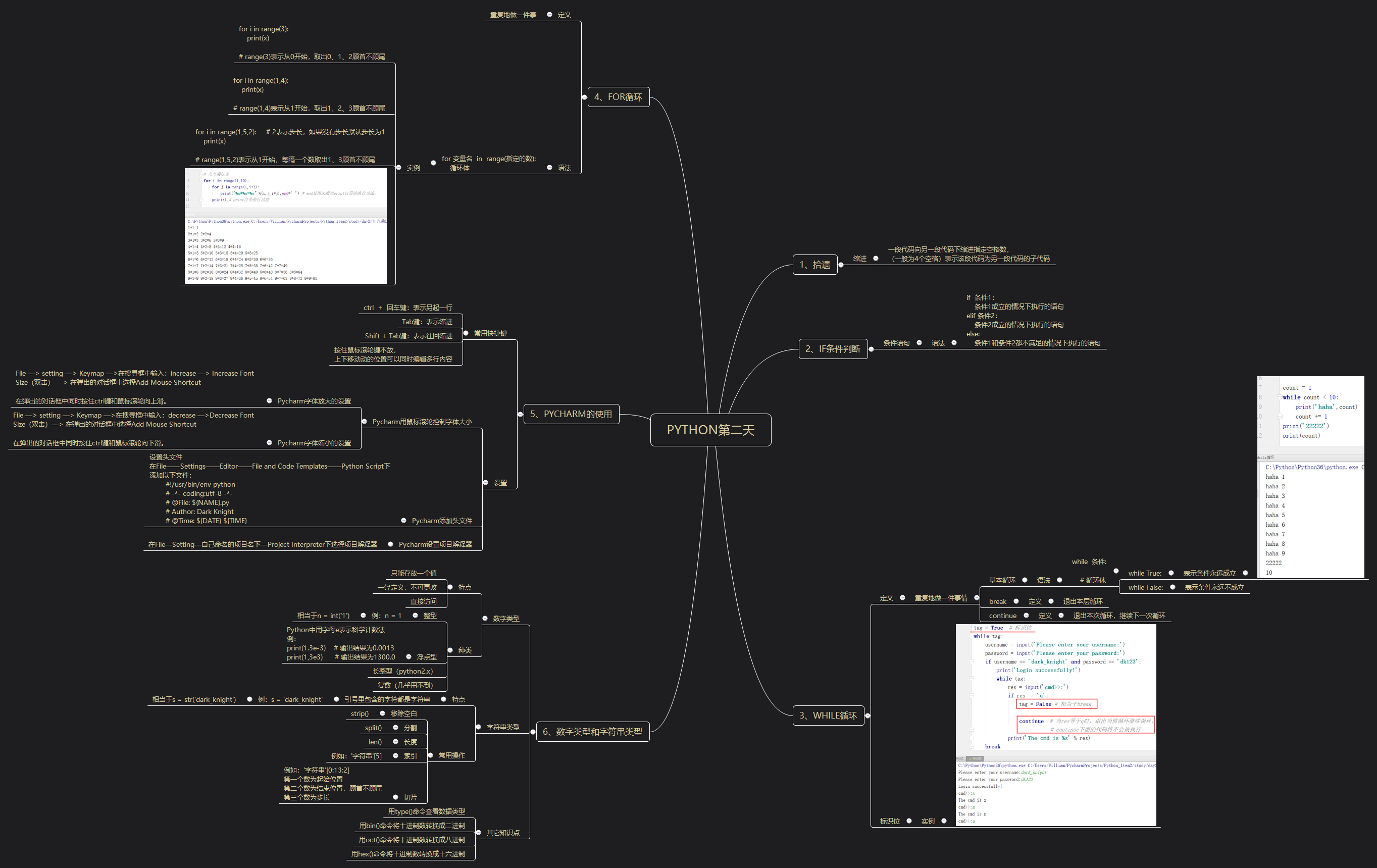
一、内容
二、练习
练习1
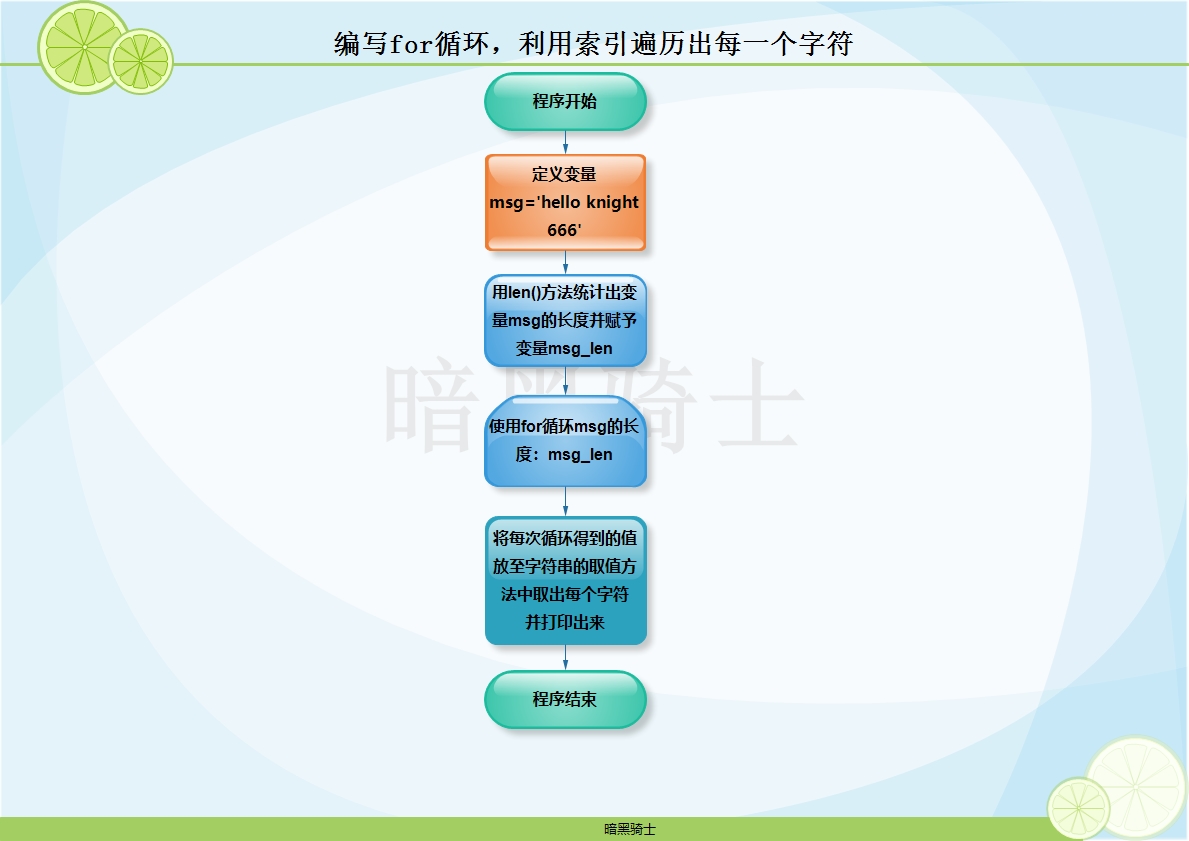
题目:已知msg='hello knight 666'编写for循环,利用索引遍历出每一个字符
图示:
代码:
msg = 'hello knight 666'

msg_len = len(msg)

for i in range(msg_len):

    print(msg[i])
输出结果:
h

e

l

l

o

k

n

i

g

h

t

6

6

6
练习2
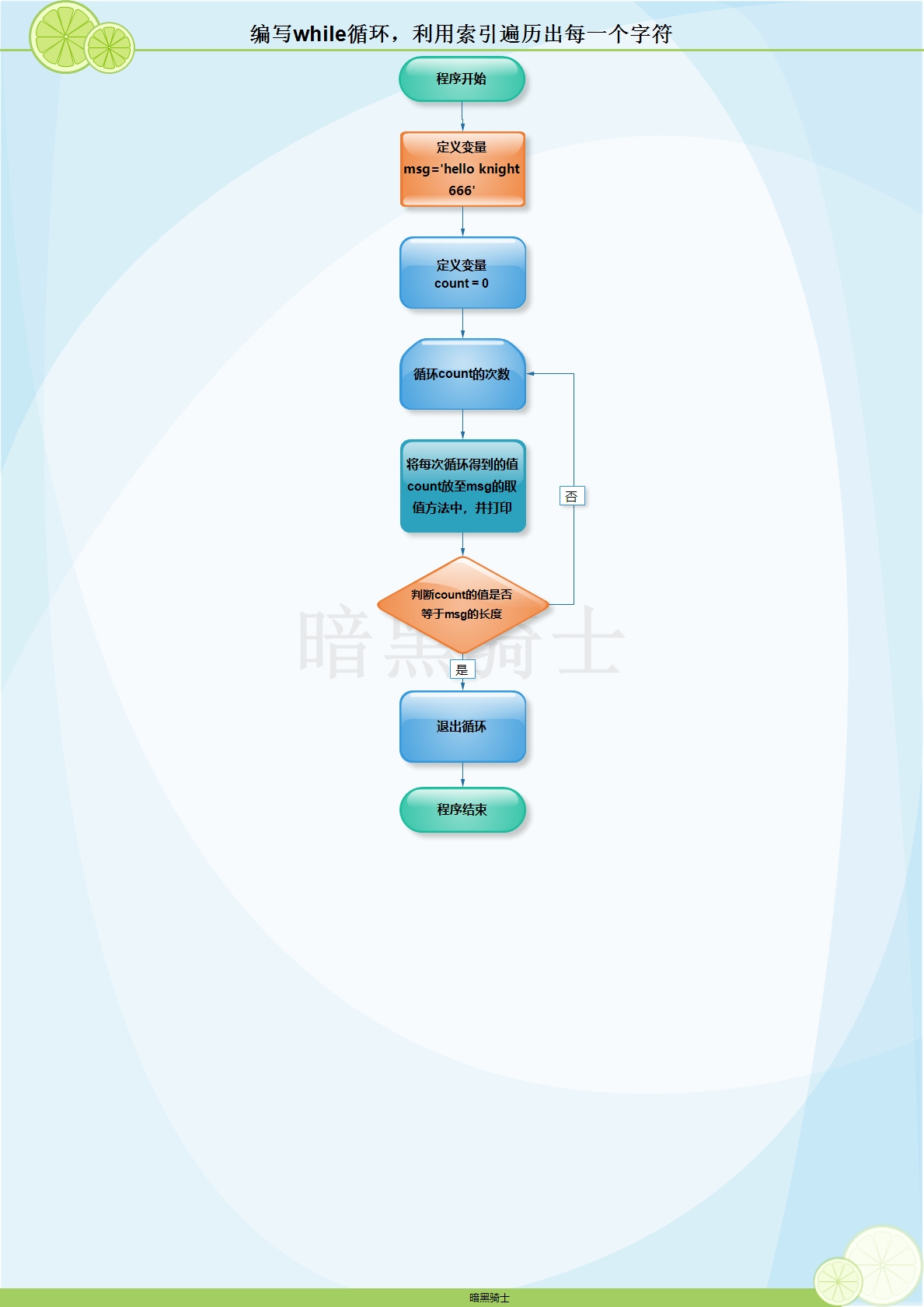
题目:已知msg='hello knight 666'编写for循环,利用索引遍历出每一个字符
图示:
代码:
msg = 'hello knight 666'

count = 0

while True:

    print(msg[count])

    count += 1

    if count == len(msg):

        break
输出结果:
h

e

l

l

o

k

n

i

g

h

t

6

6

6
练习3
题目:已知变量msg='hello qishi',将msg中的qishi替换成knight
代码:
msg='hello qishi'

msg_new = msg.replace('qishi','knight')

print(msg_new)
输出结果:
hello knight
练习4
题目:已知 msg='/etc/a.txt|365|get' 将该字符的文件名,文件大小,操作方法切割出来。
代码:
msg ='/etc/a.txt|365|get'

msg_new = msg.split('|')

print('文件名:',msg_new[0])

print('文件大小:',msg_new[1])

print('操作方法:',msg_new[2])
输出结果:
文件名: /etc/a.txt

文件大小: 365

操作方法: get
练习5
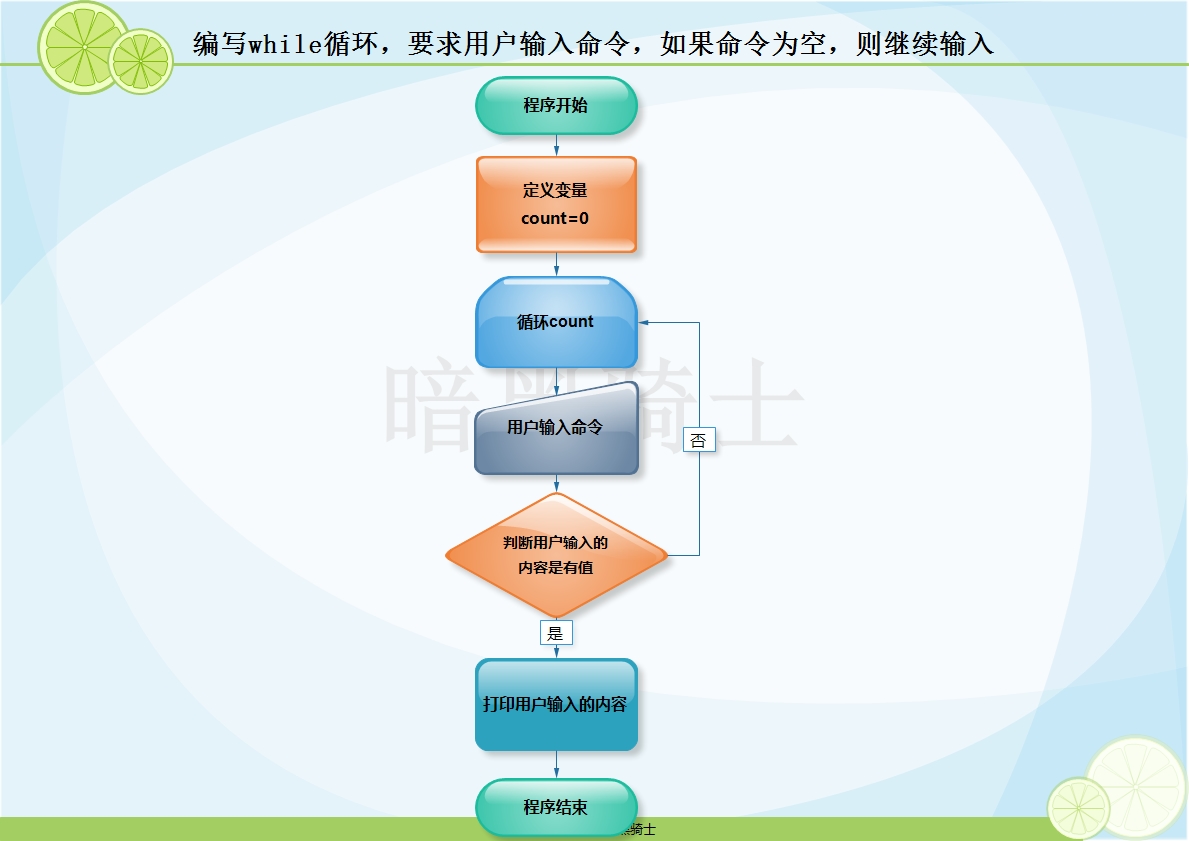
题目:编写while循环,要求用户输入命令,如果命令为空,则继续输入
图示:
代码:
count = 0

while True:

    user_input = input('Please enter command:').strip()

    if not user_input:

        continue

    print('The cmd is %s'%user_input)
练习6
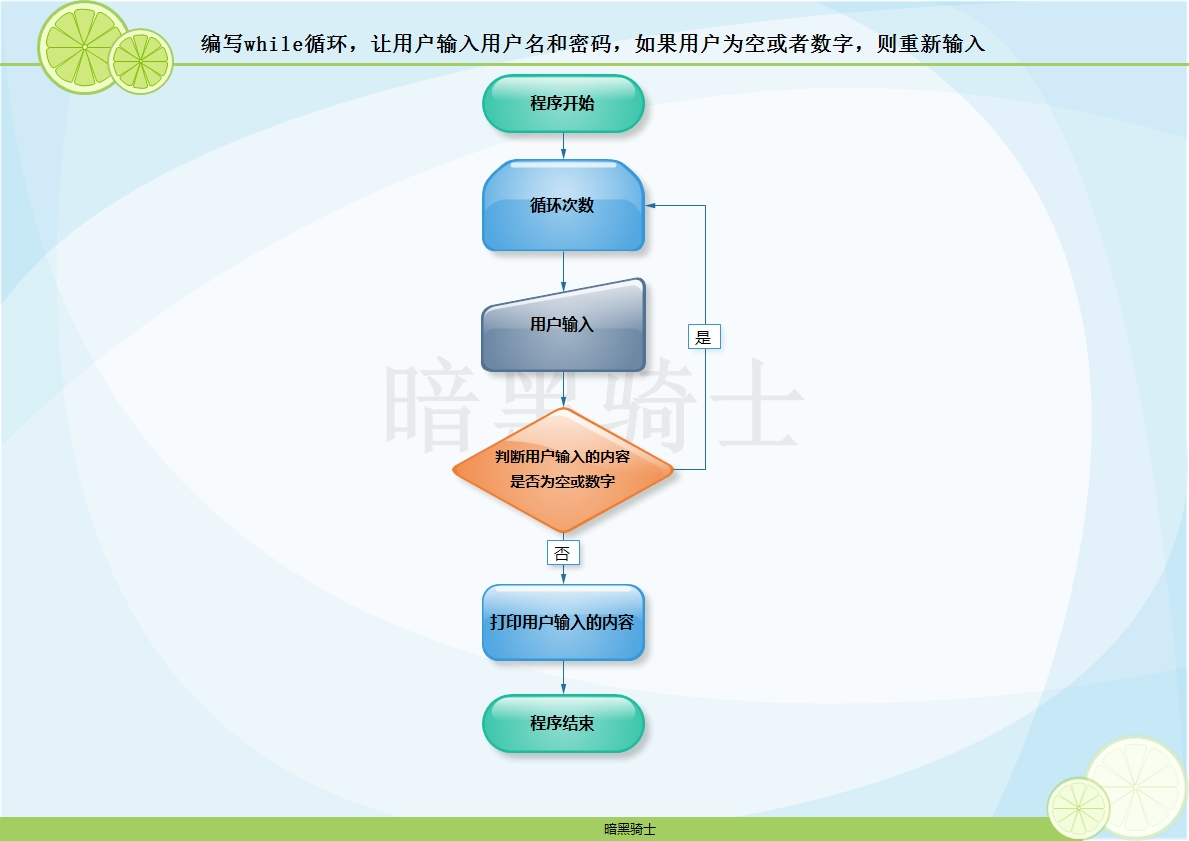
题目:编写while循环,让用户输入用户名和密码,如果用户为空或者数字,则重新输入
图示:
代码:
while True:

    user = input('Please enter username:').strip()

    password = input('Please enter password:')

    if not user or user.isdigit():

        print('The username you entered is blank, please re-enter')

        continue

    print('Welcome %s'%user)

    break
练习7
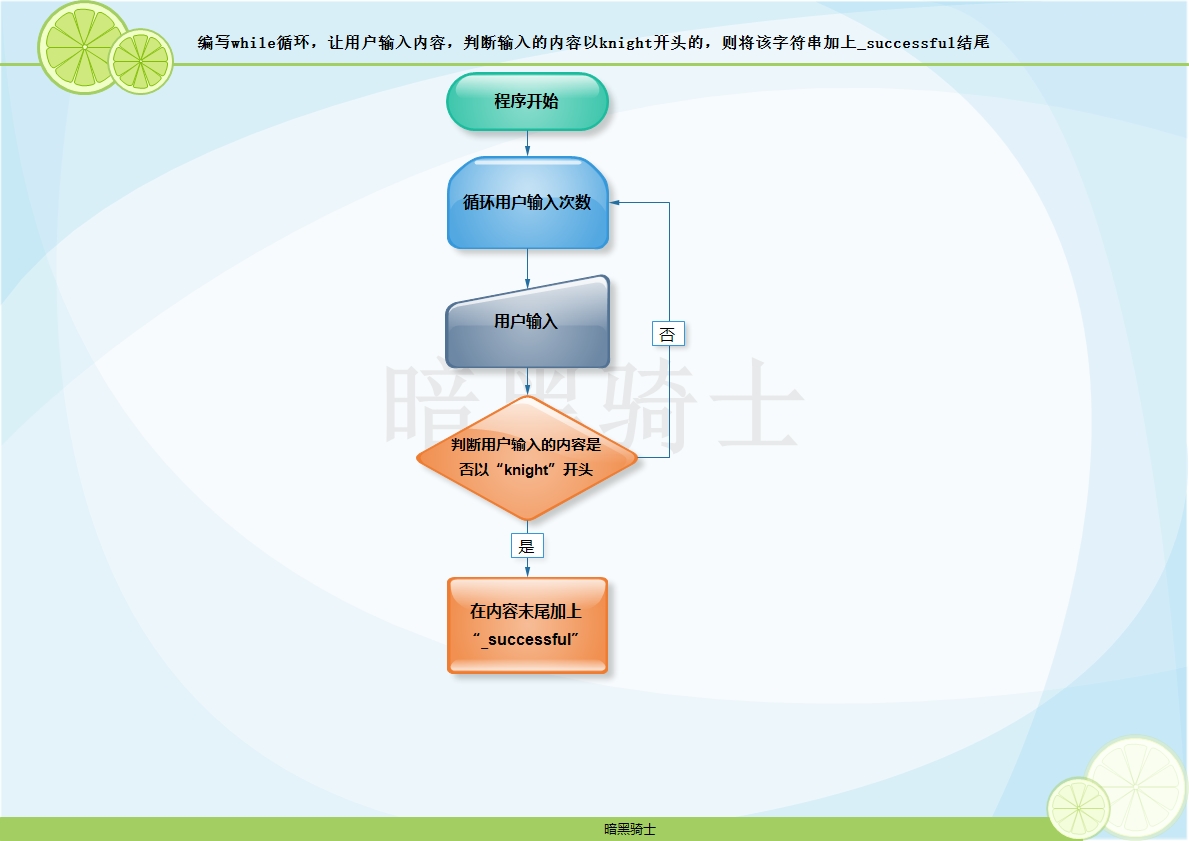
题目:编写while循环,让用户输入内容,判断输入的内容以knight开头的,则将该字符串加上_successful结尾
图示:
代码1:
while True:

    user = input('Please enter:').strip()

    if user.startswith('knight'):

        print(user+'_successful')
代码2:
while True:

    user = input('Please enter:').strip()

    if user.startswith('knight'):

        print('%s%s'%(user,'_successful'))
练习8
题目:
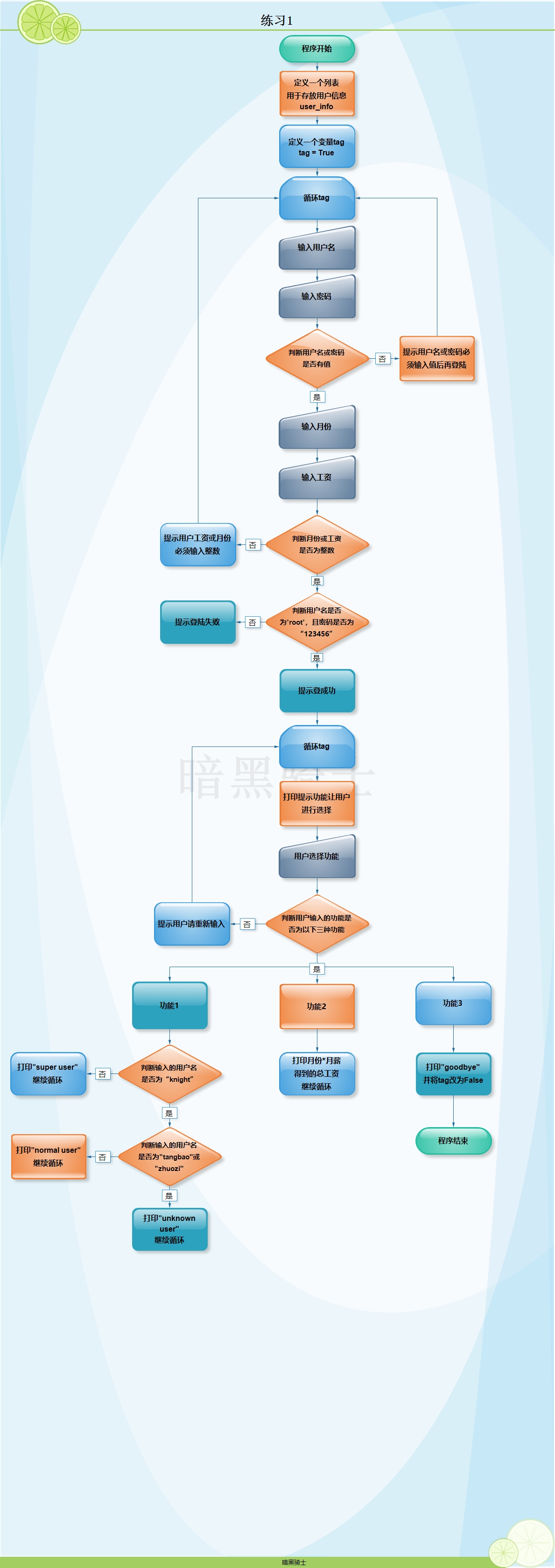
(1)两层while循环,外层的while循环,让用户输入用户名、密码、工作了几个月、每月的工资(整数),用户名或密码为空,或者工作的月数不为整数,或者月工资不为整数,则重新输入
(2)认证成功,进入下一层while循环,打印命令提示,有查询总工资,查询用户身份(如果用户名为knight则打印super user,如果用户名为tangbao或者zhuozi则打印normal user,其余情况均打印unknown user),退出功能
(3)要求用户输入退出,则退出所有循环(使用tag的方式)
图示:
代码:
user_info = ['knight','zhuozi','tangbao']

tag = True

while tag:

    username = input('Please enter username:').strip()

    password = input('Please enter password:')

    if not username or not password:

        print('Your account or password is blank, please re-enter')

        continue

    month = input('Please enter the month:').strip()

    salary = input('Please enter the salary:').strip()

    if not month.isdigit() or not salary.isdigit():

        print('The month or salary you enter must be an integer.')

    if username == 'root' and password == '123456':

        print('Login successfully!')

        while tag:

            print('请选择以下功能\n1、查询用户功能\n2、查询总工资功能\n3、退出')

            cmd = input('Please select function:').strip()

            if cmd == '1':

                user = input('Please enter username:').strip()

                if user == 'knight':

                    print('super user')

                elif user == 'tangbao' or user == 'zhuozi':

                    print('normal user')

                else:

                    print('known user')

            elif cmd =='2':

                print('Your total salary is %s'%(int(month)*int(salary)))

            elif cmd =='3':

                print('Goodbye!')

                tag = False

            else:

                print('Invalid command,please try again!')

    else:

        print('Sorry,your account or password is incorrect,please try again!')
三、英语
1、invalid
[ˈɪnvəlɪd;ɪnˈvælɪd] adj.无效的
2、item
['aɪtəm] n.项目
3、incorrect
[,ɪnkə'rɛkt] adj. 错误的,不正确的
4、range
[rendʒ] n. 范围
5、parameter
[pə'ræmɪtɚ] n. 参数
6、error
['ɛrɚ] n.错误
7、step
[stɛp] n.步
8、setting
['sɛtɪŋ] v.设定
9、key
[kiː] n.键
10、value
['vælju] n.值
11、increase
['ɪnkris] v.增加
12、decrease
[dɪ'kris] v.减少
13、script
[skrɪpt] n.脚本
14、font
[fɑnt] n. 字体
15、type
[taɪp] n.类型
16、strip
[strɪp] vt.剥离;脱去
17、split
[splɪt] vt.分割
18、count
[kaʊnt] vt.计数
19、continue
[kən'tɪnju] vi. 继续
20、break
[brek] vi.打断
Python基础第二天的更多相关文章
- python基础-第二篇-基本数据类型
一.运算符 1.算数运算: 算数运算符相信大家都不陌生吧,尤其是加减乘除,好!那我就带着大家看看最后三个,这三个到底是干什么玩意的? %,取两数相除的余数,看图: **,x的多少次幂,看图: //,取 ...
- Python基础第二篇
一.三元运算 if True: name='a' else: name='b' #上面的代码用三元运算表示: name="a" if True else "b" ...
- Python基础 第二天
1.http://www.cnblogs.com/beer/p/5672678.html requests和beautifulsoup
- Python基础第二课
字符串(引号):四种表达方式 n1 = "我是" n1 = '我是' n1 = """我是""" n1 = '" ...
- python基础(二)----数据类型
Python基础第二章 二进制 字符编码 基本数据类型-数字 基本数据类型-字符串 基本数据类型-列表 基本数据类型-元组 可变.不可变数据类型和hash 基本数据类型-字典 基本数据类型-集合 二进 ...
- Python之路【第二篇】:Python基础
参考链接:老师 BLOG : http://www.cnblogs.com/wupeiqi/articles/4906230.html 入门拾遗 一.作用域 只要变量在内存中就能被调用!但是(函数的栈 ...
- Python之路【第二篇】:Python基础(一)
一.作用域 对于变量的作用域,执行声明并在内存中存在,该变量就可以在下面的代码中使用. 1 2 3 if 1==1: name = 'wupeiqi' print name 下面的结论对吗? ...
- 第二章:python基础,数据类型
"""第二章:python基础,数据类型2.1 变量及身份运算补充2.2 二进制数2.3 字符编码每8位所占的空间位一个比特,这是计算机中最小的表示单位.每8个比特组成一 ...
- 《python基础教程(第二版)》学习笔记 文件和素材(第11章)
<python基础教程(第二版)>学习笔记 文件和素材(第11章) 打开文件:open(filename[,mode[,buffering]]) mode是读写文件的模式f=open(r' ...
随机推荐
- leds-gpio driver
我们还是先看看platform device是如何define的 platform device 是如何定义的 example1 在板级驱动中定义, 通过platform_add_devices()函 ...
- python第一章计算机基础
第一章 计算机基础 1.1 硬件 计算机基本的硬件由:CPU / 内存 / 主板 / 硬盘 / 网卡 / 显卡 / 显示器 等组成,只有硬件但硬件之间无法进行交流和通信. 1.2 操作系统 操作系统用 ...
- 【Python实践-10】用sorted()对列表排序
#按名字排序 l2= [('Bob', 75), ('Adam', 92), ('Bart', 66), ('Lisa', 88)] def by_name(t): return t[0] l2=so ...
- MySQL操作示例
""" MySQL综合练习作业 """ # 1.自行创建测试数据: # 创建数据库 """ create da ...
- 【Objective-C】07-自定义构造方法和description方法
在第5讲中已经介绍了如何定义类和创建并初始化对象,比如有Student这个类 1.Student.h 1 #import <Foundation/Foundation.h> 2 3 @in ...
- POJ 1741 Tree【Tree,点分治】
给一棵边带权树,问两点之间的距离小于等于K的点对有多少个. 模板题:就是不断找树的重心,然后分开了,分治,至少分成两半,就是上限为log 然后一起统计就ok了 #include<iostream ...
- 关于jquery stopPropagation()阻止冒泡事件
我们经常会遇到点击两个或者多个重叠的层事件的时候,往往点击最里的的一层会接连触发外面的点击事件.这时候就需要用到stopPropagation事件即阻止冒泡事件html代码如下<!DOCTYPE ...
- js数组转换成json串 (JSON.stringify)
例如: var giftlist[1490011777] = []; giftlist[1490011777]['id'] = 1490011777; giftlist[1490011777]['na ...
- Eclipse替换find/Replace
使用快捷键:ctrl+F replaceAll
- hadoop(2)hadoop配置
hadoop入门(二) hadoop的配置 1.本地模式 2.伪分布式 3.分布式 一.配置linux环境: 1打开虚拟网络编辑器,选择 VMnet1 仅主机模式, 子网 IP 设为 192. ...