
WPF学习- AllowDrop 用户控件启用拖放功能
知识点:
- 创建自定义用户控件(UserControl)
- 使用户控件成为拖动源
- 使用户控件成为放置目标
- 使面板能够接收从用户控件放置的数据
创建项目:
1、新建WPF项目(Wpf-AllowDrop)
2、在MainWindow.xaml的 Grid控件添加源码
       <Grid.ColumnDefinitions>

            <ColumnDefinition />

            <ColumnDefinition />

        </Grid.ColumnDefinitions>

        <StackPanel Grid.Column="0"

            Background="Beige">

            <TextBox Width="Auto" Margin="2"

             Text="green"/>

        </StackPanel>

        <StackPanel Grid.Column="1"

            Background="Bisque">

        </StackPanel>
设计显示效果如下:

项目中添加用户控件
1、“项目”--> “添加用户控件”
2、重命名为Circle.xaml,添加。
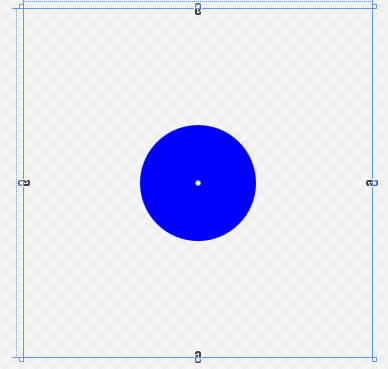
3、在Circle.xaml的Grid中添加 Ellipse标签
    <Ellipse x:Name="circleUI"

         Height="100" Width="100"

         Fill="Blue" />
显示效果如下:
4、在Circle.xaml.cs源文件中,重写构造函数
public partial class Circle : UserControl

    {

        public Circle()

        {

            InitializeComponent();

        }

        public Circle(Circle c)  //重写构造

        {

            InitializeComponent();

            this.circleUI.Height = c.circleUI.Height;

            this.circleUI.Width = c.circleUI.Height;

            this.circleUI.Fill = c.circleUI.Fill;

        }

    }
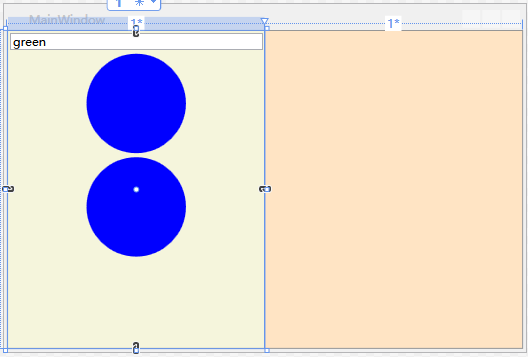
5、在MainWindow.xaml中的第一个StackPanel中添加两个自定义的圆控件
     <StackPanel Grid.Column="0"

            Background="Beige">

            <TextBox Width="Auto" Margin="2" Text="green"/>

            <!--添加圆控件-->

            <local:Circle Margin="2" />

            <local:Circle Margin="2" />

        </StackPanel>
效果图如下:
用户控件实现拖动源事件
1、在Circle.xaml.cs中重写OnMouseMove事件
    protected override void OnMouseMove(MouseEventArgs e)

        {

            base.OnMouseMove(e);

            // 判断左键是否按下

            if (e.LeftButton == MouseButtonState.Pressed)

            {

                //声明DataObject,并打包圆控件的图像绘制方式(包含颜色)、高度及其副本。

                DataObject data = new DataObject();

                data.SetData(DataFormats.StringFormat, circleUI.Fill.ToString());

                data.SetData("Double", circleUI.Height);

                data.SetData("Object", this);

                //使用DragDrop的DoDragDrop方法开启拖动功能。拖动方式为拖动复制或移动

                DragDrop.DoDragDrop(this, data, DragDropEffects.Copy | DragDropEffects.Move);

            }

        }
2、运行测试:单击一个圆,任意拖动查看效果:

3、重写OnGiveFeedback,增强拖动时,光标反馈效果。
     protected override void OnGiveFeedback(GiveFeedbackEventArgs e)

        {

            base.OnGiveFeedback(e);

            //Effects获取拖动类型

            if (e.Effects.HasFlag(DragDropEffects.Copy))

            {

                Mouse.SetCursor(Cursors.Cross); //拖动复制显示红十字

            }

            else if (e.Effects.HasFlag(DragDropEffects.Move))

            {

                Mouse.SetCursor(Cursors.Pen); //移动显示笔形

            }

            else

            {

                Mouse.SetCursor(Cursors.No);

            }

            e.Handled = true;

        }
4、运行测试:单击一个圆,任意拖动查看效果(主要指针效果)。
用户控件成为放置目标
1、在Circle.xaml的UserControl标记中添加AllowDrop属性为"True"
    <UserControl x:Class="Wpf_AllowDrop.Circle"

             xmlns="http://schemas.microsoft.com/winfx/2006/xaml/presentation"

             xmlns:x="http://schemas.microsoft.com/winfx/2006/xaml"

             xmlns:mc="http://schemas.openxmlformats.org/markup-compatibility/2006"

             xmlns:d="http://schemas.microsoft.com/expression/blend/2008"

             xmlns:local="clr-namespace:Wpf_AllowDrop"

             mc:Ignorable="d"

             d:DesignHeight="300" d:DesignWidth="300" AllowDrop="True">
2、在Circle.xaml.cs源码文件中,重写OnDrop事件方法
     protected override void OnDrop(DragEventArgs e)

        {

            base.OnDrop(e);

            //检查数据是否包含制定字符串类型数据

            if (e.Data.GetDataPresent(DataFormats.StringFormat))

            {

                //获取字符串

                string dataString = (string)e.Data.GetData(DataFormats.StringFormat);

                //使用BrushConverter将字符串转换成Brush对象并应用于提供圆形控件 UI 的 Ellipse 的 Fill

                BrushConverter converter = new BrushConverter();

                if (converter.IsValid(dataString))

                {

                    Brush newFill = (Brush)converter.ConvertFromString(dataString);

                    circleUI.Fill = newFill;

                    if (e.KeyStates.HasFlag(DragDropKeyStates.ControlKey))

                    {

                        e.Effects = DragDropEffects.Copy;

                    }

                    else

                    {

                        e.Effects = DragDropEffects.Move;

                    }

                }

            }

            e.Handled = true;

        }
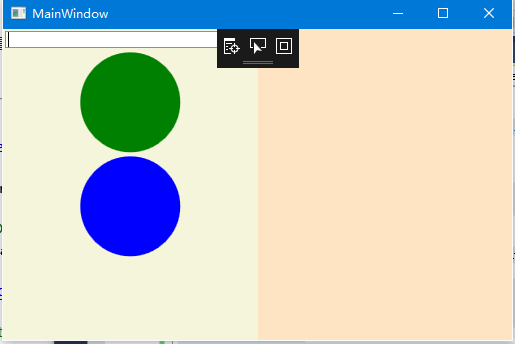
3、运行测试,查看TextBox文本green拖入圆形区域后效果:
4、重写OnDragOver,禁止无效颜色拖入圆形控件(鼠标显示禁止)
     protected override void OnDragOver(DragEventArgs e)

        {

            base.OnDragOver(e);

            //设置Effects 为不接受数据

            e.Effects = DragDropEffects.None;

            if (e.Data.GetDataPresent(DataFormats.StringFormat))

            {

                string dataString = (string)e.Data.GetData(DataFormats.StringFormat);

                BrushConverter converter = new BrushConverter();

                //判断拖动值是否有效

                if (converter.IsValid(dataString))

                {

                    //判断Ctrl键是否按下

                    if (e.KeyStates.HasFlag(DragDropKeyStates.ControlKey))

                    {

                        e.Effects = DragDropEffects.Copy;

                    }

                    else

                    {

                        e.Effects = DragDropEffects.Move;

                    }

                }

            }

            e.Handled = true;

        }
5、运行测试,拖动Gre到圆型中,查看鼠标变化
6、添加一个Brush变量用来暂时存放目标控件属性,重写OnDrageEnter和OneDrageLeave,增加预览效果,未放置则离开,目标控件颜色不发生变化。
 public partial class Circle : UserControl

    {

        private Brush _previousFill = null; //声明私有Brush,初始值为null
    protected override void OnDragEnter(DragEventArgs e)

        {

            base.OnDragEnter(e);

           //控件原始属性存放在全局私有Brush对象中

            _previousFill = circleUI.Fill;

            if (e.Data.GetDataPresent(DataFormats.StringFormat))

            {

                string dataString = (string)e.Data.GetData(DataFormats.StringFormat);

                BrushConverter converter = new BrushConverter();

                if (converter.IsValid(dataString))

                {

                    Brush newFill = (Brush)converter.ConvertFromString(dataString.ToString());

                    circleUI.Fill = newFill;

                }

            }

        }
     protected override void OnDragLeave(DragEventArgs e)

        {

            base.OnDragLeave(e);

           //若直接离开(未释放鼠标),把存在全局私有变量_previousFill属性重新赋值

            circleUI.Fill = _previousFill;

        }
7、运行测试,拖动时先不释放鼠标测试,再是否鼠标测试,查看效果:
使面板能够接受放置的数据
1、在MainWindow.xaml 的两个StackPanel控件中添加DragOver事件处理,名称为panel_DragOver,以及添加Drop事件处理,名称为panel_drop。并设置AllowDrop属性为"True"。
    <StackPanel Grid.Column="0"

            Background="Beige"

            AllowDrop="True"

            DragOver="panel_DragOver"

            Drop="panel_Drop">

            <TextBox Width="Auto" Margin="2" Text="green"/>

            <!--添加圆控件-->

            <local:Circle Margin="2" />

            <local:Circle Margin="2" />

        </StackPanel>

        <StackPanel Grid.Column="1"

            Background="Bisque"

            AllowDrop="True"

            DragOver="panel_DragOver"

            Drop="panel_Drop">

        </StackPanel>
2、在MainWindow.xaml.cs中实现两个事件处理方法:
     private void panel_DragOver(object sender, DragEventArgs e)

        {

            //检查拖动的数据是否包含由圆形用户控件打包在 DataObject 中并且在 DoDragDrop 调用中传递的“对象”数据

            if (e.Data.GetDataPresent("Object"))

            {

                if (e.KeyStates == DragDropKeyStates.ControlKey)

                {

                    e.Effects = DragDropEffects.Copy;

                }

                else

                {

                    e.Effects = DragDropEffects.Move;

                }

            }

        }
    private void panel_Drop(object sender, DragEventArgs e)

        {

            if (e.Handled == false)

            {

                Panel _panel = (Panel)sender; //取得当前panel对象

                UIElement _element = (UIElement)e.Data.GetData("Object");//移动对象转换成WPF核心基类对象

                if (_panel != null && _element != null)

                {

                    //获取移动对象的父对象

                    Panel _parent = (Panel)VisualTreeHelper.GetParent(_element);

                    if (_parent != null)

                    {

                        if (e.KeyStates == DragDropKeyStates.ControlKey &&

                            e.AllowedEffects.HasFlag(DragDropEffects.Copy))

                        {

                            Circle _circle = new Circle((Circle)_element);

                            _panel.Children.Add(_circle); //在其子元素中添加对象

                            e.Effects = DragDropEffects.Copy;

                        }

                        else if (e.AllowedEffects.HasFlag(DragDropEffects.Move))

                        {

                            _parent.Children.Remove(_element); //移动时,从父对象中移除源文件

                            _panel.Children.Add(_element);

                            e.Effects = DragDropEffects.Move;

                        }

                    }

                }

            }

        }
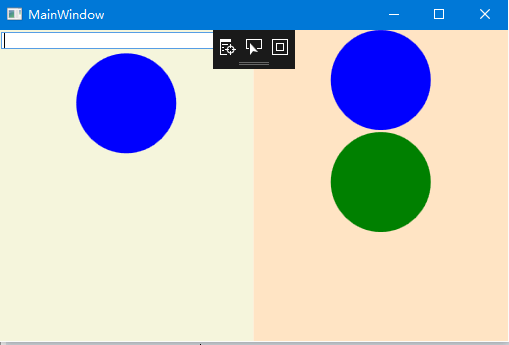
3、运行测试,随意拖动查看效果:
WPF学习- AllowDrop 用户控件启用拖放功能的更多相关文章
- [WPF 学习] 3.用户控件库使用资源字典的困惑
项目需要(或者前后端分离的需要),前端我使用了用户控件库,由后端用代码加载和控制. 然而用户控件库没法指定资源字典,于是在用户控件的xaml文件里面手工添加了资源字典 <UserControl. ...
- WPF 精修篇 用户控件
原文:WPF 精修篇 用户控件 增加用户控件 数据绑定还是用依赖属性 使用的事件 就委托注册一下 public delegate void ButtonClick(object b,EventArgs ...
- WPF之路——用户控件对比自定义控件UserControl VS CustomControl)
将多个现有的控件组合成一个可重用的“组”. 由一个XAML文件和一个后台代码文件. 不能使用样式和模板. 继承自UserControl类. 自定义控件(扩展) 在现有的控件上进行扩展,增加一些新的属性 ...
- WPF窗口和用户控件事件相互触发
问题1: WPF项目里有一个窗口和一个用户控件,窗口和用户控件里都有一个Button,点击窗口里的Button如何触发用户控件里Button的Click事件 解答: //窗口代码 public par ...
- wpf的UserControl用户控件怎么添加到Window窗体中
转载自 http://www.cnblogs.com/shuang121/archive/2013/01/09/2853591.html 我们来新建一个用户控件UserControl1.xaml &l ...
- WPF获取当前用户控件的父级窗体
方式一.通过当前控件名获取父级窗体 Window targetWindow = Window.GetWindow(button); 方式二.通过当前控件获取父级窗体 Window parentWind ...
- 为WPF版的GridControl控件添加行序号功能
废话不多数,先上效果图和代码: 包装GridControl控件 cs using DevExpress.Xpf.Data; using DevExpress.Xpf.Grid; using Syste ...
- 【WPF学习】第六十四章 构建基本的用户控件
创建一个简单用户控件是开始自定义控件的好方法.本章主要介绍创建一个基本的颜色拾取器.接下来分析如何将这个控件分解成功能更强大的基于模板的控件. 创建基本的颜色拾取器很容易.然而,创建自定义颜色拾取器仍 ...
- 【WPF学习笔记】之如何点击“新建”按钮,在面板中加载一条条的“用户控件”的信息:动画系列之(四)
...... 承接上一系列动画三. 在主界面后台代码设置嵌套第二个用户控件. using System; using System.Collections.Generic; using System. ...
随机推荐
- YTU 1098: The 3n + 1 problem
1098: The 3n + 1 problem 时间限制: 1 Sec 内存限制: 64 MB 提交: 368 解决: 148 题目描述 Consider the following algor ...
- openfire重新配置数据库oracle、mysql
1.openfire重新配置设置: 删除target/openfire/conf/openfire.xml中的 <setup>true</setup> 2.删除浏览器之前访问过 ...
- bzoj1046 [HAOI2007]上升序列——LIS
题目:https://www.lydsy.com/JudgeOnline/problem.php?id=1046 倒序求最长下降子序列,则得到了每个点开始的最长上升子序列: 然后贪心输出即可. 代码如 ...
- Pow(x, n) 位运算总结 典型
https://leetcode.com/problems/powx-n/ Implement pow(x, n), which calculates x raised to the power n ...
- HDU 5903 Square Distance (贪心+DP)
题意:一个字符串被称为square当且仅当它可以由两个相同的串连接而成. 例如, "abab", "aa"是square, 而"aaa", ...
- An internal error occurred during: "Launching MVC on Tomcat 6.x". java.lang.NullPointerException
有的时候打开Myeclispe莫名奇妙的就出现了这样的问题: An internal error occurred during: "Launching MVC on Tomcat 6.x ...
- bzoj 2157: 旅游【树链剖分+线段树】
裸的树链剖分+线段树 但是要注意一个地方--我WA了好几次才发现取完相反数之后max值和min值是要交换的-- #include<iostream> #include<cstdio& ...
- 史上最详细最全的Linux上安装Oracle的教程-centos7
一.安装Oracle前准备 1.创建运行oracle数据库的系统用户和用户组 [humf@localhost ~]$ su root #切换到root Password: [root@localhos ...
- Poj 3294 Life Forms (后缀数组 + 二分 + Hash)
题目链接: Poj 3294 Life Forms 题目描述: 有n个文本串,问在一半以上的文本串出现过的最长连续子串? 解题思路: 可以把文本串用没有出现过的不同字符连起来,然后求新文本串的heig ...
- [ZPG TEST 114] 阿狸的英文名【水题】
1. 阿狸的英文名 阿狸最近想起一个英文名,于是他在网上查了很多个名字.他发现一些名字可以由两个不同的名字各取一部分得来,例如John(约翰)的前缀 “John”和Robinson(鲁滨逊) ...