
通过uwsgi+nginx启动flask的python web程序
通过uwsgi+nginx启动flask的python web程序
一般我们启动python web程序的时候都是通过python直接启动主文件,测试的时候是可以的,当访问量大的时候就会出问题
python manage.py
通过wsgi web服务器网关接口规范启动是一种比较好的方式:
web服务器 nginx + uwsgi + flask
原理就是nginx通过代理访问通过uwsgi启动监听在本机的flask程序
1.安装uwsgi模块
# pip install uwsgi
2.通过uwsgi启动flask项目
# 通过http方式启动(推荐)
# uwsgi --http 127.0.0.1:9999 -w user:app
# 通过socket方式启动
uwsgi -s 127.0.0.1:9999 -w user:app
# 主入口需要__init__.py文件
user/__init__.py
# cat /etc/nginx/conf.d/cmdb.conf

server {

    listen       8080;

    server_name  cmdb;

    location / {

        root   /home/python/Desktop/51reboot/cmdb/;

        index  index.html index.htm;

        proxy_pass http://127.0.0.1:9999;

    }

}
访问方式是:
http://192.168.3.91:8080 --> uwsgi:9999
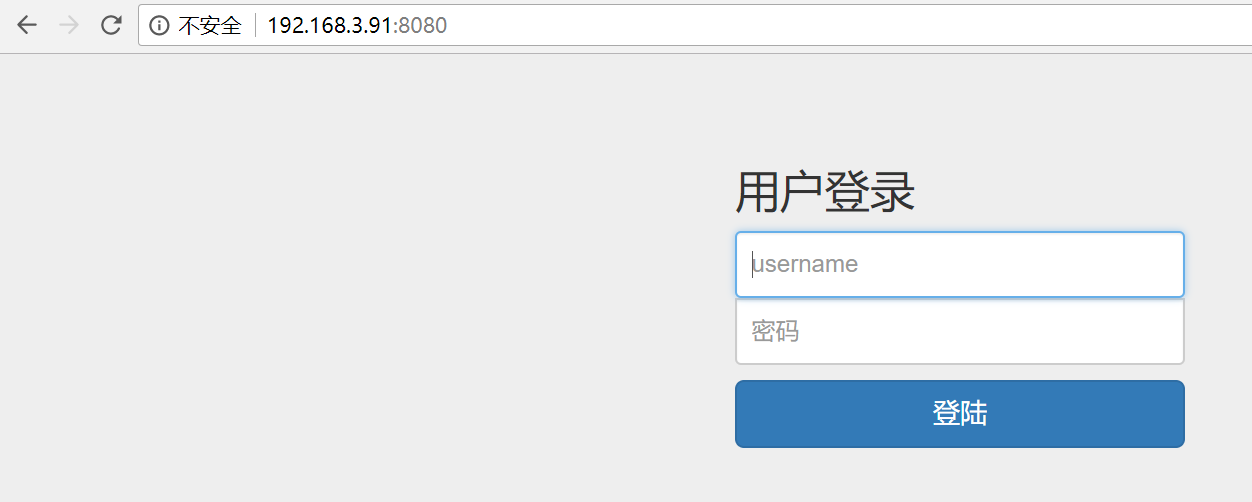
centos6.8_x64安装python3..2和wusgi

wget https://www.python.org/ftp/python/3.7.2/Python-3.7.2.tar.xz

tar -xf Python-3.7..tar.xz

cd Python-3.7.

mkdir /usr/local/python372

./configure --prefix=/usr/local/python372

make

make install

# 报错

    from _ctypes import Union, Structure, Array

ModuleNotFoundError: No module named '_ctypes'

# 解决办法:

yum install libffi-devel libffi

# 再次编译安装即可

./configure --with-ssl --prefix=/usr/local/python372

make

make install

echo $?

# 删除原来的软链,重新建立软连接

# rm -f /usr/local/python3

cd /usr/local

ln -s python372 python3

[root@srv3:/usr/local/python3]# python3 -V

Python 3.7.


# 安装ipython
# pip3 install ipython
# ln -s /usr/local/python372/bin/ipython3 /usr/sbin/ipython3

[root@srv3:/usr/local/uwsgi]# tar zxf uwsgi-latest.tar.gz

[root@srv3:/usr/local/uwsgi]# cd uwsgi-

uwsgi-2.0./        uwsgi-latest.tar.gz

[root@srv3:/usr/local/uwsgi]# cd uwsgi-2.0./

[root@srv3:/usr/local/uwsgi/uwsgi-2.0.]# python3 uwsgiconfig.py --build

################# uWSGI configuration #################

kernel = Linux

execinfo = False

ifaddrs = True

locking = pthread_mutex

event = epoll

timer = timerfd

filemonitor = inotify

pcre = True

routing = True

capabilities = False

yaml = embedded

json = False

ssl = True

xml = libxml2

debug = False

plugin_dir = .

zlib = True

ucontext = True

malloc = libc

############## end of uWSGI configuration #############

total build time:  seconds

*** uWSGI is ready, launch it with ./uwsgi ***

# 继续install

# python3 setup.py install

[root@srv3:~]# whereis uwsgi

uwsgi: /usr/bin/uwsgi /etc/uwsgi /usr/local/bin/uwsgi /usr/local/uwsgi /opt/uwsgi-2.0.13.1/bin/uwsgi

[root@srv3:~]# uwsgi --version

2.0.

# 编写测试文件

[root@srv3:/usr/local/uwsgi/uwsgi-2.0.]# cat testuwsgi.py

def application(env, start_response):

    start_response('200 OK', [('Content-Type','text/html')])

    return [b"Hello World"]

# 启动

[root@srv3:/usr/local/uwsgi/uwsgi-2.0.]# ./uwsgi --http : --wsgi-file testuwsgi.py

*** Starting uWSGI 2.0. (64bit) on [Wed Jun  :: ] ***

compiled with version: 4.4.  (Red Hat 4.4.-) on  June  ::

os: Linux-2.6.-642.6..el6.x86_64 # SMP Wed Oct  :: UTC

nodename: srv3.keepvid.com

machine: x86_64

clock source: unix

pcre jit disabled

detected number of CPU cores:

current working directory: /usr/local/uwsgi/uwsgi-2.0.

detected binary path: /usr/local/uwsgi/uwsgi-2.0./uwsgi

uWSGI running as root, you can use --uid/--gid/--chroot options

*** WARNING: you are running uWSGI as root !!! (use the --uid flag) ***

*** WARNING: you are running uWSGI without its master process manager ***

your processes number limit is

your memory page size is  bytes

detected max file descriptor number:

lock engine: pthread robust mutexes

thunder lock: disabled (you can enable it with --thunder-lock)

uWSGI http bound on : fd

spawned uWSGI http  (pid: )

uwsgi socket  bound to TCP address 127.0.0.1: (port auto-assigned) fd

uWSGI running as root, you can use --uid/--gid/--chroot options

*** WARNING: you are running uWSGI as root !!! (use the --uid flag) ***

Python version: 3.7. (default, Jun  , ::)  [GCC 4.4.  (Red Hat 4.4.-)]

*** Python threads support is disabled. You can enable it with --enable-threads ***

Python main interpreter initialized at 0x1e8dcd0

uWSGI running as root, you can use --uid/--gid/--chroot options

*** WARNING: you are running uWSGI as root !!! (use the --uid flag) ***

your server socket listen backlog is limited to  connections

your mercy for graceful operations on workers is  seconds

mapped  bytes ( KB) for  cores

*** Operational MODE: single process ***

WSGI app  (mountpoint='') ready in  seconds on interpreter 0x1e8dcd0 pid:  (default app)

uWSGI running as root, you can use --uid/--gid/--chroot options

*** WARNING: you are running uWSGI as root !!! (use the --uid flag) ***

*** uWSGI is running in multiple interpreter mode ***

spawned uWSGI worker  (and the only) (pid: , cores: )

[pid: |app: |req: /] 127.0.0.1 () { vars in  bytes} [Wed Jun  :: ] GET / => generated  bytes in  msecs (HTTP/1.1 )  headers in  bytes ( switches on core )

# 验证

[root@srv3:~]# curl http://127.0.0.1:9000/

Hello World
./configure --with-ssl --prefix=/usr/local/python372
编译的时候一定要添加 --with-ssl (cenos7.x上可以)否则pip3 install -r 安装模块时会报错:
pip is configured with locations that require TLS/SSL, however the ssl module in Python is not avail
centos6安装python3.7.x参考 https://www.cnblogs.com/reblue520/p/11103311.html
通过uwsgi+nginx启动flask的python web程序的更多相关文章
- Python Web 程序使用 uWSGI 部署
Python Web 程序使用 uWSGI 部署 WSGI是什么? WSGI,全称 Web Server Gateway Interface,或者 Python Web Server Gateway ...
- 将你的Python Web程序部署到Ubuntu服务器上
在本文记录了我在Ubuntu中部署Flask Web站点的过程, 其中包括用户创建.代码获取.Python3环境的安装.虚拟环境设置.uWSGI启动程序设置,并将Nginx作为前端反向代理.希望对各位 ...
- 使用Flask+uwsgi+Nginx部署Flask正式环境
环境准备 在开始正式讲解之前,我们将首先进行环境准备. Step1:安装Python,pip以及nginx: sudo apt-get update sudo apt-get install pyth ...
- C# 启动 Flask for Python
概览 最近有个需求是通过c#代码来启动 python 脚本.嘿~嘿!!! 突发奇想~~既然可以启动 python 脚本,那也能启动 flask,于是开始着手操作. 先看gif图 准备 因为使用的是.N ...
- 全面解读python web 程序的9种部署方式
转载自鲁塔弗的博客,本文地址http://lutaf.com/141.htm python有很多web 开发框架,代码写完了,部署上线是个大事,通常来说,web应用一般是三层结构 web serve ...
- python web 程序的9种部署方式
python有很多web 开发框架,代码写完了,部署上线是个大事,通常来说,web应用一般是三层结构 Web Server====> Application=====> DB S ...
- Pycharm+Django搭建第一个Python Web程序
1.安装django 无论是Python2.x还是Python3.x版本,都可以使用pip来安装Django.在控制台使用如下命令:pip install django 如: 2.检查dgango是否 ...
- centOS+uwsgi+nginx 部署flask项目,问题记录
用flask做的项目想要部署到centOS系统上,填了一些坑,终于成功了,记录一下遇到的问题: 此次部署主要是按照这个博客进行的 https://www.cnblogs.com/Ray-liang/p ...
- 基于Flask框架的Python web程序的开发实战 <一> 环境搭建
最近在看<Flask Web开发基于Python的Web应用开发实战>Miguel Grinberg著.安道译 这本书,一步步跟着学习Flask框架的应用,这里做一下笔记 电脑只安装一个P ...
随机推荐
- Golang入门教程(九)复合数据类型使用案例二
参考:http://www.runoob.com/go/go-slice.html 目录 切片 字典(map) 函数(func) 接口(interface) 通道(chan) 四.切片(Slice) ...
- linux大法好。。。。。
vim: 移动光标至段首:^或者home键 移动光标至段尾:$或者end键 删除光标位置到本行开头:d0或者d^ 删除光标位置到本行末尾:D或者d$ 撤销操作:u 取消撤销操作:ctrl+r ---- ...
- 使用jQuery插件时避免重复引入jquery.js文件
当一个页面使用多个jQuery插件时,需要避免重复引入jquery.js文件,因为后面映入的jQuery.js文件中定义的jQuery对象会覆盖掉前面的jQuery对象,导致之前定义的jQuery插件 ...
- Xampp PHPStorm XDebug配置
(1)https://xdebug.org/download.php 下载当前Xampp对应的XDebug版本. (2)将该dll放入C:\xampp\php\ext (3)修改Control Pan ...
- url 组成部分
NSURL其实就是我们在浏览器上看到的网站地址,这不就是一个字符串么,为什么还要在写一个NSURL呢,主要是因为网站地址的字符串都比较复杂,包括很多请求参数,这样在请求过程中需要解析出来每个部门,所以 ...
- 20秒教你如何写maven2的pom文件的依赖包
所有Maven 库 需要的包 及 pom.xml 中 groupId artifactId version 都可在这个网上收到. 例如:需要 通过 maven 在项目 中 添加 geronimo-k ...
- ads出现村田电容电感无法仿真的问题解决(`BJT1' is an instance of an undefined model `BJTM1')
需要的控件是 murata include,该控件是跟随村田库一起倒入ADS中的
- antd card 组件实现鼠标移入移出效果
鼠标移出: 鼠标移入: import React, { Component } from 'react' import { Card, Icon, Avatar } from 'antd'; cons ...
- Mysql-5.7.20-winx64绿色版安装步骤
Mysql-5.7.20-winx64绿色版安装步骤 1. 下载 mysql-5.7.20-winx64.zip 2.解压 解压到指定目录: C:\AppDate\mysql-5.7.20-winx6 ...
- 【blog】推荐一个博客系统后台管理模板 - pinghsu
pinghsu https://github.com/chakhsu/pinghsu