
cartographer 最新版安装测试
在官网的基础上稍加修改,但保证代码都是最新的
我的系统配置: Debian9 strech, ROS lunar 该方法对 ubuntu 系列操作系统以及其他ROS版本同样适用。
1. 安装依赖库
sudo apt-get install -y \

    g++ \

    git \

    google-mock \

    libboost-all-dev \

    libcairo2-dev \

    libeigen3-dev \

    libgflags-dev \

    libgoogle-glog-dev \

    liblua5.2-dev \

    libsuitesparse-dev \

    ninja-build \

    python-sphinx
2. 安装ceres-solver
google提供的地址下载太慢,在github上git clone 也是太慢, 索性直接Donload zip
https://github.com/ceres-solver/ceres-solver.git
然后编译安装:
cd ceres-solver

mkdir build

cd build

cmake ..

make -j4

sudo make install
3. 安装proto3
a. 重要说明: 如果你已经安装了ROS Lunar, 恭喜你,其实你已经安装了protobuf了, 但是你没有安装protobuf-compiler, 你只需要安装一下protobuf-compiler就可以了
sudo apt-get install protobuf-compiler
然后你可以执行 protoc --version 查看protobuf 的版本.
b. 如果你装的是ROS Kinetic, 你的protobuf 的版本应该是 2.x, 需要手动将其升级到 proto3
方法:
下载链接 https://github.com/google/protobuf/releases
官方安装手册:https://github.com/protocolbuffers/protobuf/blob/master/src/README.md
安装:(下载安装all版本)
tar zxvf protobuf-all-3.6.0.tar.gz

cd protobuf-3.6.0/

./configure –prefix=/usr/local/        (安装路径,一般情况下,默认会安装到/usr/include 文件下,我们需要指定安装到,/usr/local/include文件下,安装完成会有一个goole文件在/usr/local/include 下)

make

make check

make install

protoc –version               #查看版本
c. 如果你没有装ROS那么执行下面的步骤吧:
安装依赖
sudo apt-get install autoconf automake libtool curl make g++ unzip
方式一(推荐):
sudo apt-get install libprotobuf-dev

sudo apt-get install protobuf-compiler
方式二:
下载zip(git clone 太慢了)
地址: https://github.com/protocolbuffers/protobuf
编译安装:
./autogen.sh

./configure –prefix=/usr/local/

make -j4

make check

sudo make install

sudo ldconfig # refresh shared library cache.
make check 会提示又一些错误,没关系啦,核心库已经编译好啦
4. 安装cartographer
clone cartographer代码,这个速度还可以
git clone https://github.com/googlecartographer/cartographer.git
编译安装
cd cartographer

mkdir build

cd build

cmake ..

make -j4

sudo make install
5. 安装cartographer_ros
这个就简单了,地址:
https://github.com/googlecartographer/cartographer_ros
clone 或者下载到自己的ROS工作空间,编译一下就可以了.
6. 测试
2D:
// launch 2D example

roslaunch cartographer_ros demo_backpack_2d.launch bag_filename:=${HOME}/Downloads/cartographer_paper_deutsches_museum.bag
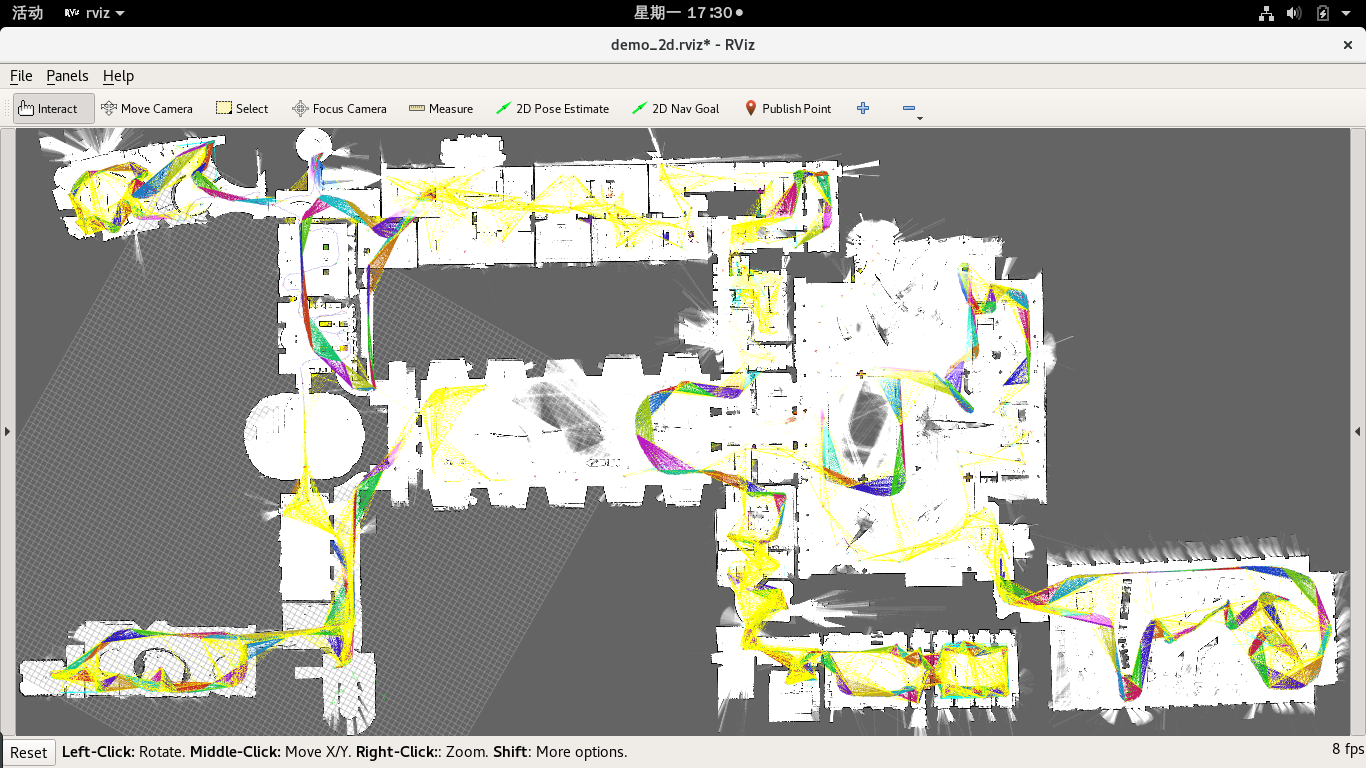
3D:
# Launch the 3D backpack demo.

roslaunch cartographer_ros demo_backpack_3d.launch bag_filename:=${HOME}/Downloads/b3-2016-04-05-14-14-00.bag
OK, 到此结束!
cartographer 最新版安装测试的更多相关文章
- 谷歌Cartographer学习 -快速安装测试
参考资料:https://www.cnblogs.com/hitcm/p/5939507.html PC下面进行安装: 遇到的问题如下 1.首先安装ceres solver 在编译的时候,如果是低配的 ...
- 谷歌Cartographer学习(1)-快速安装测试(转载)
转载自谷歌Cartographer学习(1)-快速安装测试 代码放到个人github上,https://github.com/hitcm/ 如下,需要安装3个软件包,ceres solver.cart ...
- mahout 安装测试
1 下载 在http://archive.apache.org/dist/mahout下载相应版本的mahout 版本,获取官网查看http://mahout.apache.org 相关的信息
- Hbase的安装测试工作
Hbase的安装测试工作: 安装:http://www.cnblogs.com/neverwinter/archive/2013/03/28/2985798.html 测试:http://www.cn ...
- ubuntu下opencv2.4.9安装测试
ubuntu下opencv2.4.9安装测试 whowhoha@outlook.com 一.依赖包安装 1. build-essential 软件包 sudo apt-get install bui ...
- 如何在本地安装测试ECSHOP 转载
如何在本地安装测试ECSHOP 如何在本地(自己的电脑)上先安装ECShop 一.创建PHP环境 1.下载AppServ 因为ECShop在线网上商店系统是用PHP语言开发的,所以,在本地架设网店之前 ...
- ubuntu-10.04的测试环境 安装测试 Coreseek开源中文检索引擎-Sphinx中文版
主要参考文档:http://www.coreseek.cn/products-install/install_on_bsd_linux/ 一. 32位版本: coreseek安装需要预装的软件: ap ...
- Centos 7.3 编译 & 安装 & 测试 facebook faiss
许多 AI 系统训练完毕,正式上线时的基本操作往往可以抽象为:在高维向量空间中,给定一个向量,寻找与之最相近的 k 个向量.当向量数目异常巨大时,如何快速地执行这一基本操作,便成为 AI 系统在工程应 ...
- Python 3.6.3 官网 下载 安装 测试 入门教程 (windows)
1. 官网下载 Python 3.6.3 访问 Python 官网 https://www.python.org/ 点击 Downloads => Python 3.6.3 下载 Python ...
随机推荐
- RocketMQ_问题_启动报错,修改堆内存大小
1.启动broker报错 虚拟机内存小,导致虚拟机中的JVM内存小,进而在启动broker时分配JVM内存遇到问题 查询网上得知,查看/usr/local/rocketmq-all-4.3.0/dis ...
- jvm垃圾收集器与内存分配策略
一.垃圾回收 1.对象是否已经变为垃圾 1.1.引用计数法:给对象添加一个引用计数器,每当有地方引用它时,计数器就加1:当引用失效时,计数器值就减1:任何时刻计数器为0的对象就是不可能再被使用的. 这 ...
- Java插件之Jrebel
Jrebel是干嘛的?当你在Java Web的项目中修改一些代码的时候(成员代码),想要生效必须重启服务器.但是每次修改代码都得重启服务器?重启着时间很长的,太麻烦了. Jrebel隆重出场,它可以使 ...
- Hadoop记录-Hadoop jmx
https://cwiki.apache.org/confluence/display/EAG/Hadoop+JMX+Monitoring+and+Alerting curl http://10.11 ...
- C# Selenium学习
https://blog.csdn.net/hjkl950217/article/details/54314760 https://www.cnblogs.com/vaevvaev/p/7041842 ...
- Contrast Ratio(Enhanced) (Level AAA)
Contrast ratio between your text and background is at least 7:1 All of your users will benefit from ...
- 064、Weave网络结构分析(2019-04-04 周四)
参考https://www.cnblogs.com/CloudMan6/p/7482035.html Weave网络使用之前需要执行 eval $(weave env) ,其作用是将后续的doc ...
- GBK 字符集
什么是 GBK ? 中文名 汉字编码字符集 外文名 Chinese Internal Code Specification 全 称 <汉字内码扩展规范> GBK编码,是对GB2312 ...
- 微信小程序开发(6) SSL证书及HTTPS服务器
1. 域名 在万网购买,略 2. 云服务器 阿里云购买,略 3. 安装lnmp 使用lnmp.org程序,略 4. 申请证书 阿里云-管理控制台-安全(云盾)-证书服务-购买证书证书类型: 免费型DV ...
- 本地测试使用Tomcat,生产环境使用GlassFish。
总结:Tomcat8 = javaee7规范(servlet3.1 + jsp2.3 + el3.0 + websocket1.0) + java7 [配置初始化参数使用jdk8编译]conf/web ...