
Java 把一个文本文档的内容复制到另一个文本文档
src.txt放在工程目录下,dest.txt可创建,也可不创建。一旦运行程序,如果dest.txt不存在,将自行创建这个文本文档,再将src.txt中的内容复制到dest.txt
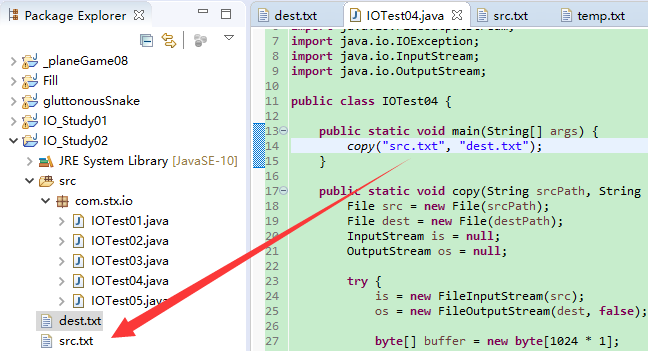
 import java.io.File;

 import java.io.FileInputStream;

 import java.io.FileNotFoundException;

 import java.io.FileOutputStream;

 import java.io.IOException;

 import java.io.InputStream;

 import java.io.OutputStream;

 public class IOTest04 {

     public static void main(String[] args) {

         copy("src.txt", "dest.txt");

     }

     public static void copy(String srcPath, String destPath) {

         File src = new File(srcPath);

         File dest = new File(destPath);

         InputStream is = null;

         OutputStream os = null;

         try {

             is = new FileInputStream(src);

             os = new FileOutputStream(dest, false);

             byte[] buffer = new byte[1024 * 1];                    // 1k bytes

             int length = -1;

             while ((length = is.read(buffer)) != -1) {

                 os.write(buffer, 0, length);

                 os.flush();

             }

         } catch (FileNotFoundException e) {

             e.printStackTrace();

         } catch (IOException e) {

             e.printStackTrace();

         } finally {

             try {

                 if (os != null) {

                     os.close();

                     System.out.println("OutputStream Closed.");

                 }

             } catch (IOException e) {

                 e.printStackTrace();

             }

             try {

                 if (is != null) {

                     is.close();

                     System.out.println("InputStream Closed.");

                 }

             } catch (IOException e) {

                 e.printStackTrace();

             }

         }

     }

 }
---- ---- ---- ---- ---- ---- ---- ----
读取文本文档A中的内容,先进行“加密”,将加密的内容写入到另一个文本文档B;完成加密和写入之后,再将文本文档B中(已加密)的内容复制、并覆盖文本文档A中原本的内容,删除文本文档B。
 import java.io.File;

 import java.io.FileInputStream;

 import java.io.FileNotFoundException;

 import java.io.FileOutputStream;

 import java.io.IOException;

 import java.io.InputStream;

 import java.io.OutputStream;

 public class Encrypt {

     public static void main(String[] args) {

         encrypt("src.txt", 1);

     }

     public static void encrypt(String srcPath, int password) {

         File src = new File(srcPath);

         File dest = new File(src.getParent(), ("temp" + src.getName()));

         InputStream is = null;

         OutputStream os = null;

         try {

             is = new FileInputStream(src);

             os = new FileOutputStream(dest);

             byte[] buffer = new byte[1024 * 1];                    // 1k bytes

             int length = -1;

             while ((length = is.read(buffer)) != -1) {

                 for (int i = 0; i < length; ++i) {

                     buffer[i] = (byte) (buffer[i] + password);

                 }

                 os.write(buffer, 0, length);

                 os.flush();

             }

         } catch (FileNotFoundException e) {

             e.printStackTrace();

         } catch (IOException e) {

             e.printStackTrace();

         } finally {

             try {

                 if (os != null) {

                     os.close();

                 }

             } catch (IOException e) {

                 e.printStackTrace();

             }

             try {

                 if (is != null) {

                     is.close();

                 }

             } catch (IOException e) {

                 e.printStackTrace();

             }

         }

         try {

             is = new FileInputStream(dest);

             os = new FileOutputStream(src);

             byte[] buffer = new byte[1024 * 1];                    // 1k bytes

             int length = -1;

             while ((length = is.read(buffer)) != -1) {

                 os.write(buffer, 0, length);

                 os.flush();

             }

         } catch (FileNotFoundException e) {

             e.printStackTrace();

         } catch (IOException e) {

             e.printStackTrace();

         } finally {

             try {

                 if (os != null) {

                     os.close();

                 }

             } catch (IOException e) {

                 e.printStackTrace();

             }

             try {

                 if (is != null) {

                     is.close();

                 }

             } catch (IOException e) {

                 e.printStackTrace();

             }

         }

         dest.delete();

     }

 }
文本文档A中的内容:

对每一个字符执行+1(实际就是将字符所对应的编码进行+1)的操作,之后变成:

---- ---- ---- ---- ---- ---- ---- ----
分解一
16         File src = new File(srcPath);

17         File dest = new File(src.getParent(), ("temp" + src.getName()));
getParent() - 返回此抽象路径名父目录的路径名字符串;如果此路径名没有指定父目录,则返回 null。
getName() - 返回由此抽象路径名表示的文件或目录的名称。
绝对路径名的定义与系统有关。在 UNIX 系统上,如果路径名的前缀是 "/",那么该路径名是绝对路径名。在 Microsoft Windows 系统上,如果路径名的前缀是后跟 "\\" 的盘符,或者是 "\\\\",那么该路径名是绝对路径名。
 import java.io.File;

 public class IO_Test01 {

     public static void main(String[] args) {

         File src = null;

         File dest = null;

         // Relative path

         src = new File("src.txt");

         dest = new File(src.getParent(), ("temp" + src.getName()));

         System.out.println("Is absolute path: " + src.isAbsolute());

         System.out.println("src's parent: " + src.getParent());

         System.out.println("src's name: " + src.getName());

         System.out.println("dest's parent: " + dest.getParent());

         System.out.println("dest's name: " + dest.getName());

         System.out.println("--------");

         // Absolute path

         src = new File("E:/Java/workspace/IO_Study02/src.txt");

         dest = new File(src.getParent(), ("temp" + src.getName()));

         System.out.println("Is absolute path: " + src.isAbsolute());

         System.out.println("src's parent: " + src.getParent());

         System.out.println("src's name: " + src.getName());

         System.out.println("dest's parent: " + dest.getParent());

         System.out.println("dest's name: " + dest.getName());

     }

 }
输出结果:
Is absolute path: false

src's parent: null

src's name: src.txt

dest's parent: null

dest's name: tempsrc.txt

--------

Is absolute path: true

src's parent: E:\Java\workspace\IO_Study02

src's name: src.txt

dest's parent: E:\Java\workspace\IO_Study02

dest's name: tempsrc.txt
---- ---- ---- ---- ---- ---- ---- ----
分解二
25             byte[] buffer = new byte[1024 * 1];                    // 1k bytes

26             int length = -1;

27             while ((length = is.read(buffer)) != -1) {

28                 for (int i = 0; i < length; ++i) {

29                     buffer[i] = (byte) (buffer[i] + password);

30                 }

31                 os.write(buffer, 0, length);

32                 os.flush();

33             }
其中的28~30行很好理解,这里不解释。
关键在于方法read(byte[] b)、write(byte[] b, int off, int len)。
public int read(byte[] b) - 从此输入流中将最多 b.length 个字节的数据读入一个 byte 数组中。在某些输入可用之前,此方法将阻塞。返回:读入缓冲区的字节总数,如果因为已经到达文件末尾而没有更多的数据,则返回 -1。
 import java.io.File;

 import java.io.FileInputStream;

 import java.io.FileNotFoundException;

 import java.io.IOException;

 import java.io.InputStream;

 public class IO_Test01 {

     public static void main(String[] args) {

         File src = new File("E:/Java/workspace/IO_Study02/src.txt");

         InputStream is = null;

         try {

             is = new FileInputStream(src);

             byte[] buffer = new byte[1024 * 1];                    // 1k bytes

             int length = -1;

             int times = 0;

             while ((length = is.read(buffer)) != -1) {

                 ++times;

                 System.out.println("length: " + length);

                 System.out.println("times: " + times);

             }

             System.out.println("length: " + length);

         } catch (FileNotFoundException e) {

             e.printStackTrace();

         } catch (IOException e) {

             e.printStackTrace();

         } finally {

             try {

                 if (is != null) {

                     is.close();

                 }

             } catch (IOException e) {

                 e.printStackTrace();

             }

         }

     }

 }
输出结果:
length: 47

times: 1

length: -1
length = 47,代表从src.txt中读取到的字节数,也就是有read()返回的。
times = 1,表示while()循环只执行了一次。
length = -1,是while()执行第二次判断,因为src.txt中的内容已经读取完毕了,所以read()返回-1。
public void write(byte[] b, int off, int len) - 将指定 byte 数组中从偏移量 off 开始的 len 个字节写入此文件输出流。参数:b - 数据。 off - 数据中的起始偏移量。 len - 要写入的字节数。
---- ---- ---- ---- ---- ---- ---- ----
分解三
功力不够深厚,理解不了,写不出!!!
---- ---- ---- ---- ---- ---- ---- ----
分解X
86 dest.delete();
public boolean delete() - 删除此抽象路径名表示的文件或目录。如果此路径名表示一个目录,则该目录必须为空才能删除。返回: 当且仅当成功删除文件或目录时,返回 true;否则返回 false
---- ---- ---- ---- ---- ---- ---- ----
总结:待完善、纠错。
Java 把一个文本文档的内容复制到另一个文本文档的更多相关文章
- java把一个文件的内容复制到另外一个文件
/** * java把一个文件的内容复制到另外一个文件 */import java.io.File;import java.io.FileInputStream;import java.io.File ...
- Path,Files巩固,题目:从键盘接收两个文件夹路径,把其中一个文件夹中(包含内容)拷贝到另一个文件夹中
这个题目用传统的File,InputStream可以做,但是如果用Files,Path类做,虽然思路上会困难一些,但是代码简洁了很多,以下是代码: import java.io.IOException ...
- ZeroMQ接口函数之 :zmq_msg_copy - 把一个消息的内容复制到另一个消息中
ZeroMQ 官方地址 :http://api.zeromq.org/4-1:zmq_msg_copy zmq_msg_copy(3) ØMQ Manual - ØMQ/3.2.5 Name zm ...
- 下拉框——把一个select框中选中内容移到另一个select框中遇到的问题
在使用jQuery实现把一个select框中选中内容移到另一个select框中功能时遇到了一个问题,就是点击按钮时内容可以到另一个select框中,但是到了另一个select框中的内容却很快闪退回原来 ...
- C++将一个vector中的内容复制到另一个vector结尾
在使用vector容器的时候,需要将一个vector中的内容复制到另一个vector结尾,如何实现呢? 使用vector的insert方法 template <class InputIterat ...
- Linux将一个文件夹或文件夹下的所有内容复制到另一个文件夹
Linux将一个文件夹或文件夹下的所有内容复制到另一个文件夹 1.将一个文件夹下的所有内容复制到另一个文件夹下 cp -r /home/packageA/* /home/cp/packageB ...
- C# 把一个文件夹下所有文件复制到另一个文件夹下 把一个文件夹下所有文件删除(转)
C# 把一个文件夹下所有文件复制到另一个文件夹下 public static void CopyDirectory(string srcPath, string destPath) { try { ...
- Excel VBA 从一个工作簿查找另一个一个工作簿中的一些内容复制到另外一个工作簿
帮朋友来写个Excel VBA 以前写过ASP,所以对vb略微熟悉,但VBA 没有仔细研究过. 以前只研究过 vba 写一个 计算个人所得税的程序. 这次写的功能也算是简单,但也耗费了两天的功夫. 需 ...
- php学习笔记:读取文档的内容,利用php修改文档内容
直接上代码 <?php /** * Created by PhpStorm. * User: Administrator * Date: 2016/9/10 0010 * Time: 20:27 ...
随机推荐
- Kotlin数据模型
Java中的常用的Bean类,每一个变量我们都需要写getter,setter方法,却都要手动实现很多方法: 尽管可以用工具帮我们完成,但是代码显得很臃肿,不灵活. 特别是当我们需改其中某一个成员的时 ...
- zabbix系列~mysql进行监控
一 简介:zabbix进行数据库监控 二 目的:采用percona进行插件式安装监控 三 安装 环境 zabbix_agent 步骤 yum -y install php php-mysql yum ...
- AJAX的来龙去脉(由来)-如何被封装出来的--ajax发送异步请求(四步操作)
<黑马程序员_超全面的JavaWeb视频教程vedio\JavaWeb视频教程_day23_ajax> \JavaWeb视频教程_day23_ajax\day23ajax_avi\14.打 ...
- 目标检测:YOLO(v1 to v3)——学习笔记
前段时间看了YOLO的论文,打算用YOLO模型做一个迁移学习,看看能不能用于项目中去.但在实践过程中感觉到对于YOLO的一些细节和技巧还是没有很好的理解,现学习其他人的博客总结(所有参考连接都附于最后 ...
- python,<一>读取文件open()
在实际操作中,我们经常会读取文件,这个时候python为我们提供了一个open()的方法,供我们读取文件,通过help(open),我们可以获取open的方法 f.close()关闭读取 f.read ...
- oracle启用异步IO(db file async I/O submit)
市局双随机awr报告中有大量db file async I/O submit等待事件 参考两篇文章: [案例]Oracle等待事件db file async I/O submit产生原因和解决办法 d ...
- Android 5.0以上Material Design 沉浸式状态栏
偶然在知乎上看到这个问题,Android 5.0 如何实现将布局的内容延伸到状态栏,之前也见过多个应用的这个功能,但是知乎上的答案却没有一个真正实现此功能的一类是把标题栏设置App主题颜色,一类是提取 ...
- CF1091F New Year and the Mallard Expedition
题目地址:CF1091F New Year and the Mallard Expedition 题意比较复杂,整理一下: \(n\) 段,每段有两个属性:长度,地形(G,W,L) 有三种运动方式: ...
- HardNet解读
论文:Working hard to know your neighbor’s margins: Local descriptor learning loss 为什么介绍此文:这篇2018cvpr文 ...
- Python-集合的常用操作
#!/usr/bin/env python # -*- coding:utf- -*- # Author:Irving list_1 = [,,,,,,,] list_1 = set(list_1) ...