
第二十二篇-Guideline基准线
效果图:
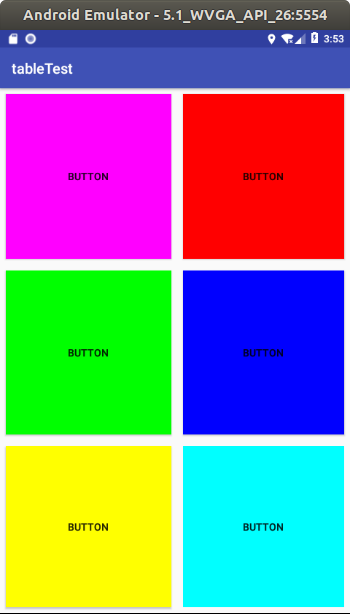
前5个是button填充的,最后一个是线性布局下放置一个button在填充。
layout.xml
<?xml version="1.0" encoding="utf-8"?>

<android.support.constraint.ConstraintLayout xmlns:android="http://schemas.android.com/apk/res/android"

    xmlns:app="http://schemas.android.com/apk/res-auto"

    xmlns:tools="http://schemas.android.com/tools"

    android:id="@+id/linearLayout"

    android:layout_width="match_parent"

    android:layout_height="match_parent">

    <android.support.constraint.Guideline

        android:id="@+id/guideline2"

        android:layout_width="wrap_content"

        android:layout_height="wrap_content"

        android:orientation="horizontal"

        app:layout_constraintGuide_percent="0.3365949" />

    <android.support.constraint.Guideline

        android:id="@+id/guideline3"

        android:layout_width="wrap_content"

        android:layout_height="wrap_content"

        android:orientation="horizontal"

        app:layout_constraintGuide_percent="0.6712329" />

    <android.support.constraint.Guideline

        android:id="@+id/guideline4"

        android:layout_width="wrap_content"

        android:layout_height="wrap_content"

        android:orientation="vertical"

        app:layout_constraintGuide_percent="0.5078125" />

    <Button

        android:background="#ff00ff"

        android:id="@+id/button"

        android:layout_width="0dp"

        android:layout_height="0dp"

        android:layout_marginBottom="8dp"

        android:layout_marginEnd="8dp"

        android:layout_marginStart="8dp"

        android:layout_marginTop="8dp"

        android:text="Button"

        app:layout_constraintBottom_toTopOf="@+id/guideline2"

        app:layout_constraintEnd_toStartOf="@+id/guideline4"

        app:layout_constraintStart_toStartOf="parent"

        app:layout_constraintTop_toTopOf="parent" />

    <Button

        android:background="#ff0000"

        android:id="@+id/button2"

        android:layout_width="0dp"

        android:layout_height="0dp"

        android:layout_marginBottom="8dp"

        android:layout_marginEnd="8dp"

        android:layout_marginStart="8dp"

        android:layout_marginTop="8dp"

        android:text="Button"

        app:layout_constraintBottom_toTopOf="@+id/guideline2"

        app:layout_constraintEnd_toEndOf="parent"

        app:layout_constraintStart_toStartOf="@+id/guideline4"

        app:layout_constraintTop_toTopOf="parent" />

    <Button

        android:background="#00ff00"

        android:id="@+id/button3"

        android:layout_width="0dp"

        android:layout_height="0dp"

        android:layout_marginBottom="8dp"

        android:layout_marginEnd="8dp"

        android:layout_marginStart="8dp"

        android:layout_marginTop="8dp"

        android:text="Button"

        app:layout_constraintBottom_toTopOf="@+id/guideline3"

        app:layout_constraintEnd_toStartOf="@+id/guideline4"

        app:layout_constraintStart_toStartOf="parent"

        app:layout_constraintTop_toTopOf="@+id/guideline2" />

    <Button

        android:background="#0000ff"

        android:id="@+id/button4"

        android:layout_width="0dp"

        android:layout_height="0dp"

        android:layout_marginBottom="8dp"

        android:layout_marginEnd="8dp"

        android:layout_marginStart="8dp"

        android:layout_marginTop="8dp"

        android:text="Button"

        app:layout_constraintBottom_toTopOf="@+id/guideline3"

        app:layout_constraintEnd_toEndOf="parent"

        app:layout_constraintStart_toStartOf="@+id/guideline4"

        app:layout_constraintTop_toTopOf="@+id/guideline2" />

    <Button

        android:background="#ffff00"

        android:id="@+id/button5"

        android:layout_width="0dp"

        android:layout_height="0dp"

        android:layout_marginBottom="8dp"

        android:layout_marginEnd="8dp"

        android:layout_marginStart="8dp"

        android:layout_marginTop="8dp"

        android:text="Button"

        app:layout_constraintBottom_toBottomOf="parent"

        app:layout_constraintEnd_toStartOf="@+id/guideline4"

        app:layout_constraintStart_toStartOf="parent"

        app:layout_constraintTop_toTopOf="@+id/guideline3" />

    <LinearLayout

        android:layout_width="0dp"

        android:layout_height="0dp"

        android:layout_marginBottom="8dp"

        android:layout_marginEnd="8dp"

        android:layout_marginStart="8dp"

        android:layout_marginTop="8dp"

        android:orientation="vertical"

        app:layout_constraintBottom_toBottomOf="parent"

        app:layout_constraintEnd_toEndOf="parent"

        app:layout_constraintStart_toStartOf="@+id/guideline4"

        app:layout_constraintTop_toTopOf="@+id/guideline3">

        <Button

            android:background="#00ffff"

            android:id="@+id/button7"

            android:layout_width="match_parent"

            android:layout_height="match_parent"

            android:text="Button" />

    </LinearLayout>

</android.support.constraint.ConstraintLayout>
ok。
第二十二篇-Guideline基准线的更多相关文章
- Python开发【第二十二篇】:Web框架之Django【进阶】
Python开发[第二十二篇]:Web框架之Django[进阶] 猛击这里:http://www.cnblogs.com/wupeiqi/articles/5246483.html 博客园 首页 ...
- 第二十二篇、IO多路复用 一
一.简介io多路复用 可以监听多个文件描述符(socket对象)(文件句柄),一旦文件句柄出现变化,就会感知到 Linux中的 select,poll,epoll(内核2.6以上) 都是IO多路复用的 ...
- Python之路【第二十二篇】CMDB项目
浅谈ITIL TIL即IT基础架构库(Information Technology Infrastructure Library, ITIL,信息技术基础架构库)由英国政府部门CCTA(Central ...
- Python之路【第二十二篇】:Django之Model操作
Django之Model操作 一.字段 AutoField(Field) - int自增列,必须填入参数 primary_key=True BigAutoField(AutoField) - bi ...
- Python之路(第二十二篇) 面向对象初级:概念、类属性
一.面向对象概念 1. "面向对象(OOP)"是什么? 简单点说,“面向对象”是一种编程范式,而编程范式是按照不同的编程特点总结出来的编程方式.俗话说,条条大路通罗马,也就说我们使 ...
- flask第二十二篇——模板【4】过滤器
请关注微信公众号:自动化测试实战 先来教大家一个pycharm设置默认模板的方法.我们每次新建模板或者平时写代码打开以后可能都要重复写# coding: utf-8这些代码,其实我们可以设置好模板,让 ...
- 【Python之路】第二十二篇--Django【基础篇】
1 Django流程介绍 MTV模式 著名的MVC模式:所谓MVC就是把web应用分为模型(M),控制器(C),视图(V)三层:他们之间以一种插件似的,松耦合的方式连接在一起. 模型负责业 ...
- SpringBoot非官方教程 | 第二十二篇: 创建含有多module的springboot工程
转载请标明出处: 原文首发于:https://www.fangzhipeng.com/springboot/2017/07/11/springbot22-modules/ 本文出自方志朋的博客 这篇文 ...
- 第二十二篇 正在表达式 re模块
re模块****** 就本质而言,正则表达式时一种小型的,高度专业化的编程语言,在python里,它内嵌在python中,并通过re模块实现.正则表达式模式被编译成一系列的字节码.然后用C编写的匹配引 ...
随机推荐
- mysql 如何查看sql语句执行时间和效率
查看执行时间 1 show profiles; 2 show variables;查看profiling 是否是on状态: 3 如果是off,则 set profiling = 1: 4 执行自己的s ...
- python之路--小数据池,再谈编码,is和 == 的区别
一 . 小数据池 # 小数据池针对的是: int, str, bool 在py文件中几乎所有的字符串都会缓存. # id() 查看变量的内存地址 s = 'attila' print(id(s)) 二 ...
- WPF中元素拖拽的两个实例
今天结合之前做过的一些拖拽的例子来对这个方面进行一些总结,这里主要用两个例子来说明在WPF中如何使用拖拽进行操作,元素拖拽是一个常见的操作,第一个拖拽的例子是将ListBox中的子元素拖拽到ListV ...
- 集合之TreeMap(含JDK1.8源码分析)
一.前言 前面所说的hashMap和linkedHashMap都不具备统计的功能,或者说它们的统计性能的时间复杂度都不是很好,要想对两者进行统计,需要遍历所有的entry,时间复杂度比较高,此时,我们 ...
- python学习 第二天
一.变量 1.变量名: 数字,字母,下划线 alex1=123 sb=“alex” a_lex=“sb” 不能以数字开头 lalex 变量名不是python内部的关键字 {‘and’,'as','as ...
- 【python练习题】程序8
#题目:输出 9*9 乘法口诀表. for i in range(1,10): k = '' for j in range(1,i+1): k += '%s * %s = %s '%(i,j,i*j) ...
- mysql语句-DDL语句
SQL分类 1.DDL语句:数据定义语句,用来定义不同的数据段.数据库,表,列,索引等数据表对象,常用语句:create.drop.alter等. 2.DML语句:数据操作语句,用于添加.删除.更新和 ...
- YUV格式与RGB格式
YUV420介绍: YUV420格式是指,每个像素都保留一个Y(亮度)分量,而在水平方向上,不是每行都取U和V分量,而是一行只取U分量,则其接着一行就只取V分量,以此重复(即4:2:0, 4:0:2, ...
- yum的使用与配置
yum简介 yum,是Yellow dog Updater, Modified 的简称,是杜克大学为了提高RPM 软件包安装性而开发的一种软件包管理器.起初是由yellow dog 这一发行版的开发者 ...
- Vmware 控制脚本
#_*_ coding:utf8 _*_ import sys,time import yaml import re import os import ssl import random import ...