
关于XLL加载项动态加载、卸载的演示及XLL函数自定义类型注册的演示
1、在XLL中,把函数定义成不同的类型,在Excel中的实际效果也不同,具体如下:
pxMacroType value 0 1 2
Can be called from a worksheet Yes Yes No
Can be called from a macro sheet Yes Yes Yes
Can be called from a defined name definition Yes Yes Yes
Can be called from a conditional format expression Yes Yes No
Listed in the Function Wizard for worksheet functions No Yes No
Listed in the Function Wizard for macro sheet functions No Yes Yes
注册函数需要使用Excel4的xlfRegister参数,其参数说明如下:
pxModuleText XLL名字,可以通过xlGetName获取
pxProcedure 推荐使用字符串,表示在XLL 代码中的函数名
pxTypeText 表示函数参数的类型和函数返回值的类型,字符串
pxFunctionText 函数名,在Excel中显示的名称
pxArgumentText 参数描述字符串
pxMacroType 函数类型: 0,1,2
pxCategory 函数类别
pxShortcutText 命令(类型2)的快捷键,"A" assigns this command to CONTROL+SHIFT+A
pxHelpTopic 帮助的引用字符串
pxFunctionHelp 函数向导中的描述
pxArgumentHelp1 函数参数1描述,后面依次类推
为了直观看到不同函数类型的效果,我用ExcelDna做了个演示文件,在文件中实现了XLL的加载、卸载;函数的注册、反注册等功能。
由于ExcelDna的限制,直接使用xlfRegister更改函数类型,会造成返回值的错误。因此,例子中的MySub函数返回值无意义。


工作表函数向导 宏表函数向导
2、XLL可以通过另一个XLL进行加载和卸载,在Excel开发里面,这是最方便的升级方式。把俺的DNATool.XLL放到同一目录下,通过加载项里面的菜单可以加载。注意名字必须完全一致,俺的代码只认识这个名字 :)
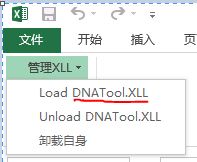
文件下载 TestXllFunction
有什么建议欢迎联系QQ:564955427
************************************************
Conditional Formatting Formulas Must Have References - If you have a conditional formatting formula that references a UDF defined in another workbook such as an add-in, then you must add a Reference to that workbook before you can reliably use the functions defined in it. If you don't, you will (sometimes) get the error 'This type of reference cannot be used in a Conditional Formatting Formula'. To add a reference, press Alt+F11 to go to the code editor, then go to Tools, References, and add the reference to this workbook by project name for the project containing the VBA code you need.
条件格式里面只能使用工作簿本身的公式,或者在VBE中引用的xla、xlsm等文件里面的公式。加载宏即使已经加载,但没有引用的话,依然不能在条件格式的公式里面使用。
************************************************
http://msdn.microsoft.com/en-us/library/bb687858.aspx Accessing XLL Code in Excel
Calling XLL Functions Directly from Excel
Once they are registered, XLL worksheet and macro sheet functions can be called from anywhere a built-in function can be called from:
A single-cell or array formula on a worksheet.
A single-cell or array formula on a macro sheet.
The definition of a defined name.
The condition and limit fields in a conditional format dialog box.
From another add-in via the C API function xlUDF.
From Visual Basic for Applications (VBA) via the Application.Run method.
You can obtain a reference to the calling cell or range of cells within your function using the C API function xlfCaller. If the function was called from the cell’s conditional format expression, you are still returned a reference to the associated cell or cells, so you cannot assume that the cell’s formula contains the XLL function. If your function was called from a VBA user-defined function (UDF), xlfCaller again returns the address of the cells that called the VBA function. For more information, see xlfCaller.
Registering Functions and Commands with Excel
Registration tells Excel the following about a DLL entry point:
Whether it is hidden or, if a function, whether it is visible in the Function Wizard.
Whether it is callable only from an XLM macro sheet, or also from a worksheet.
If a command, whether it is a worksheet function or a macro sheet equivalent function.
What its XLL/DLL export name is, and what name you want Excel to use.
If it is a function:
What data types it returns and takes as arguments.
Whether it returns its result by modifying an argument in place.
Whether it is volatile.
Whether it is thread safe (supported starting in Excel 2007).
What text the Paste Function Wizard and AutoComplete editor should display to help with calling the function.
Which function category it should be listed under.
This is all achieved using the C API function xlfRegister, equivalent to the XLM function REGISTER.
关于XLL加载项动态加载、卸载的演示及XLL函数自定义类型注册的演示的更多相关文章
- 动态库DLL加载方式-静态加载和动态加载
静态加载: 如果你有a.dll和a.lib,两个文件都有的话可以用静态加载的方式: message函数的声明你应该知道吧,把它的声明和下面的语句写到一个头文件中 #pragma comment(lib ...
- JAVA反射机制--静态加载与动态加载
Java反射是Java被视为动态(或准动态)语言的一个关键性质.这个机制允许程序在运行时透过Reflection APIs取得任何一个已知名称的class的内部信息,包括其modifiers(诸如pu ...
- Lodop 动态加载模板,动态加载数据
最近需要使用Lodop打印控件,所以就研究了一下,期间从网上找了诸多的东西,基本全是对HTML进行打印的,没有找到我想要的,就只好自己动手丰衣足食. 这篇文章主要讲述的是Lodop与数据的结合使用,官 ...
- JAVA类的静态加载和动态加载以及NoClassDefFoundError和ClassNotFoundException
我们都知道Java初始化一个类的时候可以用new 操作符来初始化, 也可通过Class.forName()的方式来得到一个Class类型的实例,然后通过这个Class类型的实例的newInstance ...
- 使用js加载器动态加载外部Javascript文件
原文:http://www.cnblogs.com/xdp-gacl/p/3927417.html 今天在网上找到了一个可以动态加载js文件的js加载器,具体代码如下: JsLoader.js var ...
- 动态链接库dll的 静态加载 与 动态加载
dll 两种链接方式 : 动态链接和静态链接(链接亦称加载) 动态链接是指在生成可执行文件时不将所有程序用到的函数链接到一个文件,因为有许多函数在操作系统带的dll文件中,当程序运行时直接从操作系统 ...
- JavaScript学习总结(十九)——使用js加载器动态加载外部Javascript文件
今天在网上找到了一个可以动态加载js文件的js加载器,具体代码如下: JsLoader.js 1 var MiniSite=new Object(); 2 /** 3 * 判断浏览器 4 */ 5 M ...
- 使用js加载器动态加载外部js、css文件
let MiniSite = new Object(); /** * 判断浏览器 */ MiniSite.Browser = { ie: /msie/.test(window.navigator.us ...
- 建立WIN32 DLL,并使用静态加载和动态加载
新建工程,选择win32 dll 编写.cpp(或.c) MyDll.cpp #include "windows.h" BOOL APIENTRY DllMain(HANDLE h ...
随机推荐
- MySQL【Delete误操作】数据恢复【转】
前言: 操作数据库时候难免会因为“大意”而误操作,需要快速恢复的话通过备份来恢复是不太可能的,因为需要还原和binlog差来恢复,等不了,很费时.这里先说明下因为Delete 操作的恢复方法 ...
- Windows Server 2016-域站点链接及子网调整
很多情况下我们在判别域控间或者域中各站点同步是否正常往往的操作内容就是查看两台域控间PING或者解析是否正常,或者查看双方防火墙是否关闭,但实际情况下我们需要注意的是,保证站点间Active Dire ...
- VMware虚拟机安装CentOS7【转】-添加部分注释(自己看着方便)
本文稍作改动,添加部分说明,原文链接:https://www.cnblogs.com/wcwen1990/p/7630545.html 本文基于vmware workstations进行CentOS7 ...
- #006 C语言大作业学生管理系统第三天
还差最后两部分 读取文件 恢复删除的学生信息 先学会处理文件的 知识点,再继续跟着视频做这个作业. 应该明天周六能把视频里手把手教的学生管理系统敲完 第二周尽量自己能完成C语言课本最后面那道学生管理系 ...
- vue中父组件调用子组件函数
用法: 子组件上定义ref="refName", 父组件的方法中用 this.$refs.refName.method 去调用子组件方法 详解: 父组件里面调用子组件的函数,父组 ...
- UVA1152-4 Values whose Sum is 0(分块)
Problem UVA1152-4 Values whose Sum is 0 Accept: 794 Submit: 10087Time Limit: 9000 mSec Problem Desc ...
- python笔记31-使用ddt报告出现dict() -> new empty dictionary dict(mapping) 问题解决
使用ddt框架生成html报告的时候,出现:dict() -> new empty dictionary dict(mapping) -> new dictionary initializ ...
- [matlab] 12.Optimization Tool的使用
1.quadprog 二次规划的函数 Matlab 中二次规划的数学模型可表述如下 其中 H是把目标函数二次项部分进行实对称矩阵, f是线性函数的列向量. 例求解二次规划 得到 h=[4,-4;-4, ...
- CPU, PSU, SPU - Oracle Critical Patch Update Terminology Update
It all started in January 2005 with Critical Patch Updates (CPU). Then Patch Set Updates (PSU) were ...
- P2690 接苹果 (DP)
补一下dp的思路: dp[i][j]表示第 i 分钟转 j 次所得到的最大值.很容易得到这个dp的推导式. 图中¢()函数表示成立为1, 不成立为0的函数. #include<cmath> ...