
vue分页组件table-pagebar
之前一直接触都是原始的前端模型,jquery+bootstrap,冗杂的dom操作,繁琐的更新绑定。接触vue后,对前端MVVM框架有了全新的认识。本文是基于webpack+vue构建,由于之前的工作主要是基于java的服务端开发工作,对前端框架和组件的理解,不够深入,借此来记录在前端框架使用和构建中的点点滴滴。
此分页组件参照于bootstrap-datatable底部分页开发完成,相关参数增加自定义功能。
最终使用展现效果图如下,数据来源于cnodejs【https://cnodejs.org/】
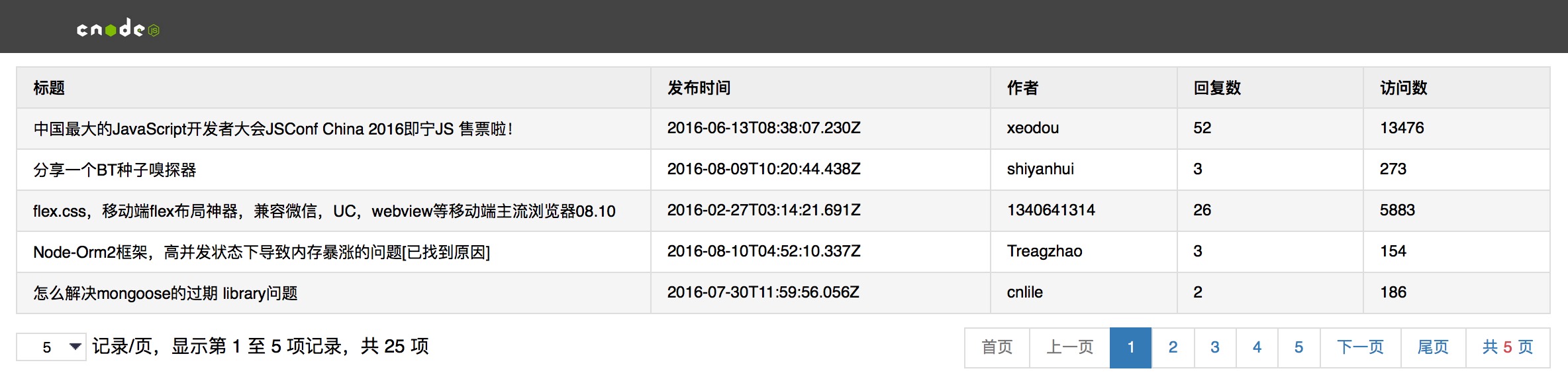
底部分页组件主要由左侧当前数据项数量显示和右侧分页页码两部分组成。组件代码如下:
<template xmlns:v-on="http://www.w3.org/1999/xhtml"
          xmlns:v-bind="http://www.w3.org/1999/xhtml">
    <div class="page-bar">
        <div class="page-size">
            <div>
                <select v-on:change="menuChange()" v-model="limit">
                    <option v-for="item in menu" v-bind:value="item">{{item}}</option>
                </select>
                记录/页,显示第 {{start}} 至 {{end}} 项记录,共 {{totalSize}} 项
            </div>
        </div>
        <div class="page-con">
            <ul>
                <li><a v-on:click="firstClick()" v-bind:class="{ 'disabled': cur == 1}">首页</a></li>
                <li><a v-on:click="preClick()" v-bind:class="{ 'disabled': cur == 1}">上一页</a></li>
                <li v-for="per in pages" v-bind:class="{ 'active': cur == per}">
                    <a v-on:click="pageClick(per)">{{ per }}</a>
                </li>
                <li><a v-on:click="nextClick()" v-bind:class="{ 'disabled': cur == totalPage}">下一页</a></li>
                <li><a v-on:click="lastClick()" v-bind:class="{ 'disabled': cur == totalPage}">尾页</a></li>
                <li><a>共<i>{{totalPage}}</i>页</a></li>
            </ul>
        </div>
        <div class="clear-both"></div>
    </div>
</template>

<script>
    import Ajax from '../ajax'

    export default{
        props: ['page-model'],
        data () {
            return {
                // 初始页
                cur: 1,
                // 请求地址
                url: this.pageModel.url ? this.pageModel.url : "",
                // 请求参数
                param: this.pageModel.param ? this.pageModel.param : {},
                // 请求方法 默认为GET请求
                method: this.pageModel.method ? this.pageModel.method : 'GET',
                // 每页显示数量 默认每页显示10条
                limit: this.pageModel.menu ? this.pageModel.menu[0] : 10,
                // 底部分页基数 默认5
                perSize: this.pageModel.perSize ? this.pageModel.perSize : 5,
                // 每页显示数量 下拉选项
                menu: this.pageModel.menu ? this.pageModel.menu : [5, 10, 50],
                // 分页参数 自定义名称
                pageParamName: this.pageModel.pageParamName ? this.pageModel.pageParamName : ['page', 'limit'],
                // 当前列表显示记录起始数
                start: 0,
                // 当前列表显示记录结束数
                end: 0,
                // 总页数
                totalPage: 0,
                // 记录总数
                totalSize: 0,
                // 分页请求返回数据
                dataList: []
            }
        },
        ready () {
            this.getData();
        },
        methods: {
            // 首页
            firstClick: function () {
                if (this.cur > 1) {
                    this.cur = 1;
                    this.getData();
                }
            },
            // 尾页
            lastClick: function () {
                if (this.cur < this.totalPage) {
                    this.cur = this.totalPage;
                    this.getData();
                }
            },
            // 上一页
            preClick: function () {
                if (this.cur > 1) {
                    this.cur--;
                    this.getData();
                }
            },
            // 下一页
            nextClick: function () {
                if (this.cur < this.totalPage) {
                    this.cur++;
                    this.getData();
                }
            },
            // 页码
            pageClick: function (data) {
                if (data != this.cur) {
                    this.cur = data;
                    this.getData();

                }
            },
            // 刷新显示记录数
            refreshPageCon: function () {
                this.start = (this.cur - 1) * this.limit + 1;
                if (this.totalSize >= this.limit * this.cur) {
                    this.end = this.limit * this.cur;
                } else {
                    this.end = this.totalSize;
                }
            },
            // 分页请求
            getData: function () {
                let _this = this;
                this.param[this.pageParamName[0]] = this.cur;
                this.param[this.pageParamName[1]] = this.limit;
                Ajax({
                    url: _this.url,
                    method: _this.method,
                    data: _this.param,
                    callback: function (res) {
                        // 返回结果数据集
                        this.dataList = res.data;
                        // 返回总记录数
                        _this.totalSize = 25;

                        _this.totalPage = Math.ceil(_this.totalSize / _this.limit);
                        _this.refreshPageCon();
                        _this.$dispatch('refresh', this.dataList);
                    }
                });
            },
            // 每页显示记录数 下拉
            menuChange: function () {
                this.getData();
            },
            getPage: function (curPage, totalPage, pageNum) {
                var leftPage, rightPage;
                curPage = curPage > 1 ? curPage : 1;
                curPage = curPage > totalPage ? totalPage : curPage;
                totalPage = curPage > totalPage ? curPage : totalPage;
                // 左侧页数
                leftPage = curPage - Math.floor(pageNum / 2);
                leftPage = leftPage > 1 ? leftPage : 1;

                // 右侧页数
                rightPage = curPage + Math.floor(pageNum / 2);
                rightPage = rightPage > totalPage ? totalPage : rightPage;

                var curPageNum = rightPage - leftPage + 1;
                // 左侧调整
                if (curPageNum < pageNum && leftPage > 1) {
                    leftPage = leftPage - (pageNum - curPageNum);
                    leftPage = leftPage > 1 ? leftPage : 1;
                    curPageNum = rightPage - leftPage + 1;
                }

                // 右侧调整
                if (curPageNum < pageNum && rightPage < totalPage) {
                    rightPage = rightPage + (pageNum - curPageNum);
                    rightPage = rightPage > totalPage ? totalPage : rightPage;
                }

                var arr = [];
                for (var i = leftPage; i <= rightPage; i++) {
                    arr.push(i);
                }
                return arr;
            }
        },
        computed: {
            pages: function () {
                return this.getPage(this.cur, this.totalPage, this.perSize);
            }
        }
    }
</script>

<style>
    ul, li {
        margin: 0px;
        padding: 0px;
    }

    li {
        list-style: none;
        display: inline;
    }

    .page-bar li:first-child > a {
        margin-left: 0px
    }

    .page-bar a {
        border: 1px solid #ddd;
        text-decoration: none;
        position: relative;
        float: left;
        padding: 6px 12px;
        margin-left: -1px;
        line-height: 1.42857143;
        color: #337ab7;
        cursor: pointer;
    }

    .page-bar a:hover {
        background-color: #eee;
    }

    .page-bar .active a {
        color: #fff;
        cursor: default;
        background-color: #337ab7;
        border-color: #337ab7;
    }

    .page-bar i {
        font-style: normal;
        color: #d44950;
        margin: 0px 4px;
        font-size: 12px;
    }

    .page-bar .page-con, .page-size {
        width: 50%;
        display: block;
        height: 30px;
        float: left;
        line-height: 30px;
    }

    .page-bar .page-con ul {
        float: right;
        padding-left: 15px;
        padding-right: 15px;
        display: inline-block;
        padding-left: 0;
    }

    .page-bar .page-size div {
        padding-left: 15px;
        padding-right: 15px;
        font-size: 14px;
    }

    a.disabled {
        color: #777;
        background-color: #fff;
        border-color: #ddd;
        cursor: not-allowed;
    }

    a.disabled:hover {
        background-color: #fff;
    }

    .clear-both {
        clear: both;
    }

    select {
        border: solid 1px #ddd;
        appearance: none;
        -moz-appearance: none;
        -webkit-appearance: none;
        background: url("../assets/images/arrow.png") no-repeat scroll right center transparent;
        padding-right: 15px;
        padding-left: 15px;
        padding-top: 2px;
        padding-bottom: 2px;
    }

    select::-ms-expand {
        display: none;
    }
</style>
组建模块使用,
<template>
    <Navbar></Navbar>
    <div class="row">
        <table class="table">
            <thead>
            <tr>
                <th>标题</th>
                <th width="20%">发布时间</th>
                <th width="10%">作者</th>
                <th width="10%">回复数</th>
                <th width="10%">访问数</th>
            </tr>
            </thead>
            <tbody>
            <tr v-show="!tabelEmpty" v-for="item in dataList">
                <td>{{item.title}}</td>
                <td>{{item.create_at}}</td>
                <td>{{item.author.loginname}}</td>
                <td>{{item.reply_count}}</td>
                <td>{{item.visit_count}}</td>
            </tr>
            <tr v-show="tabelEmpty" class="empty">
                <td colspan="5">没有匹配的记录</td>
            </tr>
            </tbody>
        </table>
    </div>
    <Pagebar :page-model="pageModel"></Pagebar>
</template>
<script>
    import Navbar from '../components/navbar.vue'
    import Pagebar from '../components/table-pagebar.vue'

    export default {//这里是官方的写法,默认导出,ES6
        components: {
            Navbar,
            Pagebar
        },
        data () {
            return {
                allArticle: "",
                dataList: [],
                pageModel: {
                    url: 'https://cnodejs.org/api/v1/topics',
                    menu: [5, 10, 20]
                },
            }
        },
        computed: {
            tabelEmpty: function () {
                if (this.dataList) {
                    return false;
                } else {
                    return true;
                }
            }
        },
        events: {
            refresh: function (e) {
                this.dataList = e;
            }
        }
    }
</script>
<style>
    body, table {
        font-size: 12px;
    }

    table {
        table-layout: fixed;
        empty-cells: show;
        border-collapse: collapse;
        width: 100%;
        margin: 10px 0;
    }

    td {
        height: 30px;
    }

    div.row {
        margin-left: 15px;
        margin-right: 15px;
    }

    h1, h2, h3 {
        font-size: 12px;
        margin: 0;
        padding: 0;
    }

    .table {
        border: 1px solid #ddd;
        background: #fff;
    }

    .table thead tr {
        background: #eee;
    }

    .table th {
        background-repeat: repeat-x;
        height: 30px;
        text-align: left;
        vertical-align: middle;
    }

    .table tr.empty {
        text-align: center;
    }

    .table td, .table th {
        border: 1px solid #ddd;
        padding: 0 1em 0;
    }

    .table tr:nth-child(odd) td {
        background-color: #f5f5f5;

    }
</style>
vue分页组件table-pagebar的更多相关文章
- java+springBoot+Thymeleaf+vue分页组件的定义
导读 本篇着重介绍java开发环境下,如何写一个vue分页组件,使用到的技术点有java.springBoot.Thymeleaf等: 分页效果图 名称为vuepagerbasic的分页组件,只包含上 ...
- 基于 bootstrap 的 vue 分页组件
申手党点这里下载示例 基于 bootstrap 的 vue 分页组件,我想会有那么一部分同学,在使用Vue的时候不使用单文件组件,因为不架设 NodeJS 服务端.那么网上流传的 *.vue 的各种分 ...
- 打通前后端全栈开发node+vue进阶【课程学习系统项目实战详细讲解】(3):用户添加/修改/删除 vue表格组件 vue分页组件
第三章 建议学习时间8小时 总项目预计10章 学习方式:详细阅读,并手动实现相关代码(如果没有node和vue基础,请学习前面的vue和node基础博客[共10章] 演示地址:后台:demo ...
- vue分页组件重置到首页问题
分页组件,可以借用这个老哥的@暴脾气大大https://www.cnblogs.com/sebastian-tyd/p/7853188.html#4163272 但是有一个问题就是下面评论中@ Mrz ...
- VUE 分页组件
<!DOCTYPE html><html> <head> <meta charset="UTF-8"> <title>& ...
- vue分页组件二次封装---每页请求特定数据
关键步骤: 1.传两个参数:pageCount (每页条数).pageIndex (页码数): 2.bind方法的调用 <!-- 这部分是分页 --> <div class=&quo ...
- vue分页组件
<template> <div> <ul class="pagination"> <li @click="goTo(1)&quo ...
- vue分页组件火狐中出现样式问题
分页的操作到了火狐浏览器会样式 怎么解决? 其实就是将input的type属性变成了text,因为number属性会变成上下的小箭头
- 手把手教你使用Vue/React/Angular三大框架开发Pagination分页组件
DevUI是一支兼具设计视角和工程视角的团队,服务于华为云DevCloud平台和华为内部数个中后台系统,服务于设计师和前端工程师.官方网站:devui.designNg组件库:ng-devui(欢迎S ...
随机推荐
- Sumsets(3sum问题,枚举d,c二分a+b)
Sumsets Time Limit: 1000MS Memory Limit: 65536K Total Submissions: 9997 Accepted: 2736 Descripti ...
- bzoj 维护序列seq(双标记线段树)
Seq 维护序列seq Time Limit: 30 Sec Memory Limit: 64 MBSubmit: 4184 Solved: 1518[Submit][Status][Discus ...
- RMAN备份之丢失数据文件及控制文件的恢复
About Recovery with a Backup Control FileIf all copies of the current control file are lost or damag ...
- Apache Thrift入门(安装、测试与java程序编写)
安装Apache Thrift ubuntu linux运行: #!/bin/bash #下载 wget http://mirrors.cnnic.cn/apache/thrift/0.9.1/thr ...
- MySQL半同步Semi-sync原理介绍【图说】
上图先.
- .NET cookie 使用方法
创建 C# cookie,两种方法 Response.Cookies["userName"].Value = "patrick"; Response.Cooki ...
- js判断手机的类型
var ua = navigator.userAgent;if(ua.match(/iPhone|iPod/i) != null){console.log("iphone代码"); ...
- JS实现用键盘控制DIV上下左右+放大缩小与变色
<!DOCTYPE html PUBLIC "-//W3C//DTD XHTML 1.0 Transitional//EN" "http://www.w3.org/ ...
- 图的广度优先/层次 遍历(BFS) c++ 队列实现
在之前的博文中,介绍了图的深度优先遍历,并分别进行了递归和非递归实现.BFS 无法递归实现,最广泛的实现是利用队列(queue).这与DFS的栈实现是极其相似的,甚至代码几乎都很少需要改动.从给定的起 ...
- 如何实现 Excel方式二维变色提示的 m*n 表格
此代码当m≠n 时,有问题.暂时还未解决此问题. <!DOCTYPE html PUBLIC "-//W3C//DTD XHTML 1.0 Transitional//EN" ...