
Shiro-授权
把 realms 配置给SecurityManager
在认证的时候单个realm是这样配置的:
  <bean id="securityManager" class="org.apache.shiro.web.mgt.DefaultWebSecurityManager">

        <property name="cacheManager" ref="cacheManager"/>

        <!-- Single realm app.  If you have multiple realms, use the 'realms' property instead. -->

        <!-- 配置session的管理方式 -->

        <!-- <property name="sessionMode" value="native"/> -->

        <property name="realm" ref="jdbcRealm"/>

        </property>

    </bean>
多个realm是这样配置的:
1).将多个realm配置给 authenticator
<!-- 配置多个Realm -->

    <bean id="authenticator" class="org.apache.shiro.authc.pam.ModularRealmAuthenticator">

        <property name="realms">

            <list>

                <ref bean="jdbcRealm"/>

                <ref bean="secondRealm"/>

            </list>

        </property>

        <property name="authenticationStrategy">

            <bean class="org.apache.shiro.authc.pam.AllSuccessfulStrategy"></bean>

        </property>

    </bean>
2).将 authenticator 配置给 SecurityManager
 <!--

        1.配置SecurityManager!

    -->

    <bean id="securityManager" class="org.apache.shiro.web.mgt.DefaultWebSecurityManager">

        <property name="cacheManager" ref="cacheManager"/>

        <!-- Single realm app.  If you have multiple realms, use the 'realms' property instead. -->

        <!-- 配置session的管理方式 -->

        <!-- <property name="sessionMode" value="native"/> -->

        <!-- <property name="realm" ref="jdbcRealm"/> -->

        <!-- 配置多个Realm -->

        <property name="authenticator" ref="authenticator"></property>

    </bean>
其实SecurityManager 中有一个 realms属性
<!--

        1.配置SecurityManager!

    -->

    <bean id="securityManager" class="org.apache.shiro.web.mgt.DefaultWebSecurityManager">

        <property name="cacheManager" ref="cacheManager"/>

        <!-- Single realm app.  If you have multiple realms, use the 'realms' property instead. -->

        <!-- 配置session的管理方式 -->

        <!-- <property name="sessionMode" value="native"/> -->

        <!-- <property name="realm" ref="jdbcRealm"/> -->

        <!-- 配置多个Realm -->

        <property name="authenticator" ref="authenticator"></property>

        <property name="realms"></property>

    </bean>
那么直接在SecurityManager中配置 realms中是否可以呢,答案是可以的。
 <bean id="securityManager" class="org.apache.shiro.web.mgt.DefaultWebSecurityManager">

        <property name="cacheManager" ref="cacheManager"/>

        <!-- Single realm app.  If you have multiple realms, use the 'realms' property instead. -->

        <!-- 配置session的管理方式 -->

        <!-- <property name="sessionMode" value="native"/> -->

        <!-- <property name="realm" ref="jdbcRealm"/> -->

        <!-- 配置多个Realm -->

        <property name="authenticator" ref="authenticator"></property>

        <property name="realms">

            <list>

                <ref bean="jdbcRealm"/>

                <ref bean="secondRealm"/>

            </list>

        </property>

    </bean>

    <!-- 配置多个Realm -->

    <bean id="authenticator" class="org.apache.shiro.authc.pam.ModularRealmAuthenticator">

        <property name="authenticationStrategy">

            <bean class="org.apache.shiro.authc.pam.AllSuccessfulStrategy"></bean>

        </property>

    </bean>
在授权中是需要将realms改为这样配置的
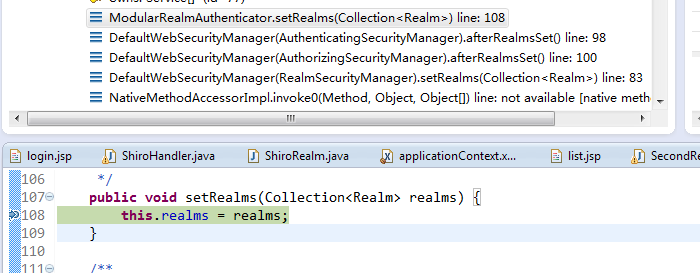
可以再 ModularRealmAuthenticator 的setRealms 中打个断点
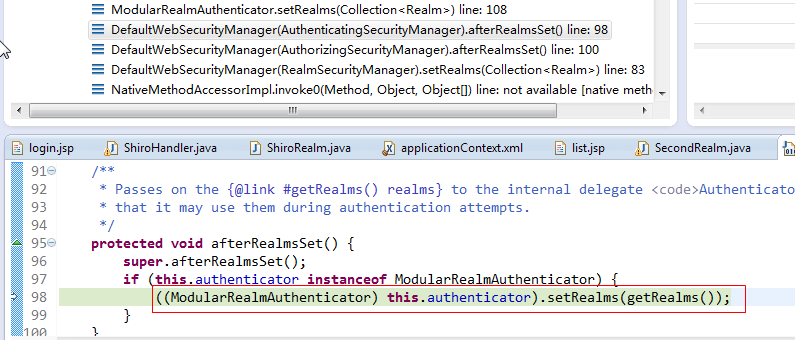
代码往前翻可以看到这里做了强制类型转换
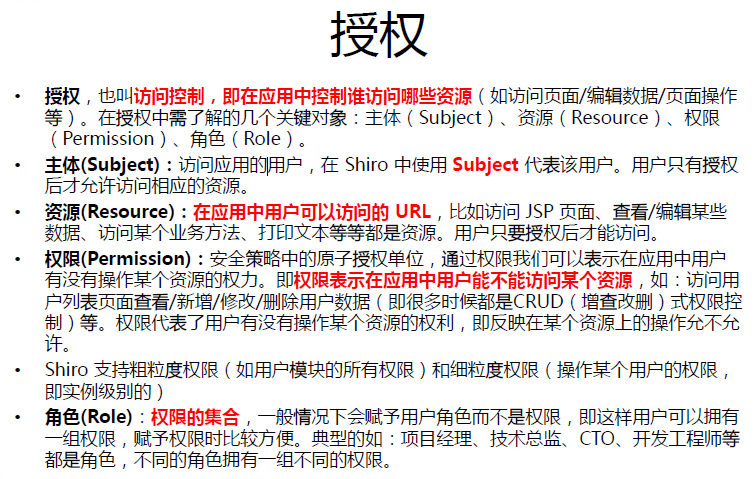
授权:
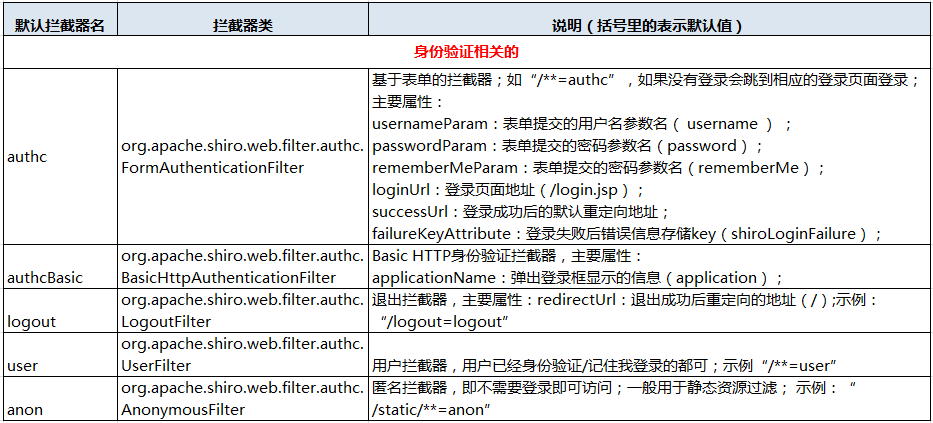
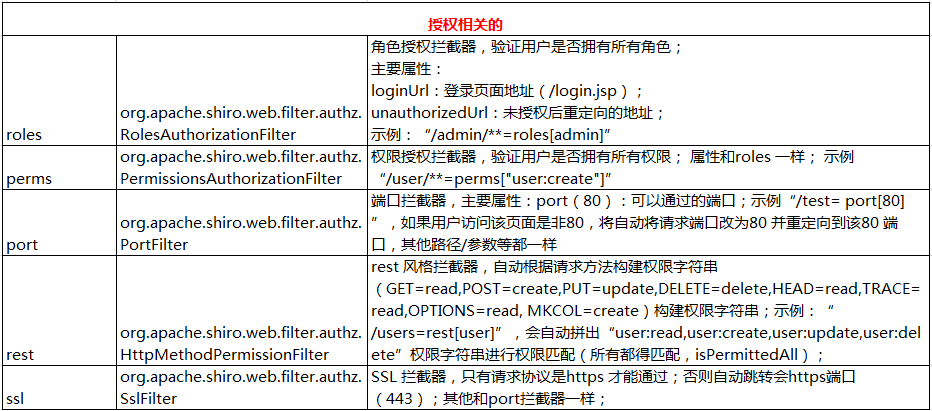
默认拦截器:
- Shiro内置了很多默认的拦截器,比如身份验证,授权等相关的。默认拦截器可以参考
public enum DefaultFilter {

    anon(AnonymousFilter.class),

    authc(FormAuthenticationFilter.class),

    authcBasic(BasicHttpAuthenticationFilter.class),

    logout(LogoutFilter.class),

    noSessionCreation(NoSessionCreationFilter.class),

    perms(PermissionsAuthorizationFilter.class),

    port(PortFilter.class),

    rest(HttpMethodPermissionFilter.class),

    roles(RolesAuthorizationFilter.class),

    ssl(SslFilter.class),

    user(UserFilter.class);

    private final Class<? extends Filter> filterClass;

    private DefaultFilter(Class<? extends Filter> filterClass) {

        this.filterClass = filterClass;

    }

    public Filter newInstance() {

        return (Filter) ClassUtils.newInstance(this.filterClass);

    }

    public Class<? extends Filter> getFilterClass() {

        return this.filterClass;

    }

    public static Map<String, Filter> createInstanceMap(FilterConfig config) {

        Map<String, Filter> filters = new LinkedHashMap<String, Filter>(values().length);

        for (DefaultFilter defaultFilter : values()) {

            Filter filter = defaultFilter.newInstance();

            if (config != null) {

                try {

                    filter.init(config);

                } catch (ServletException e) {

                    String msg = "Unable to correctly init default filter instance of type " +

                            filter.getClass().getName();

                    throw new IllegalStateException(msg, e);

                }

            }

            filters.put(defaultFilter.name(), filter);

        }

        return filters;

    }

}
身份验证相关的有:
授权相关的:
其他:

为访问路径配置权限:
1). 修改页面为 list.jsp
<%@ page language="java" contentType="text/html; charset=UTF-8"

    pageEncoding="UTF-8"%>

<!DOCTYPE html PUBLIC "-//W3C//DTD HTML 4.01 Transitional//EN" "http://www.w3.org/TR/html4/loose.dtd">

<html>

<head>

<meta http-equiv="Content-Type" content="text/html; charset=UTF-8">

<title>Insert title here</title>

</head>

<body>

    <h4>List Page</h4>

    <a href="admin.jsp">Admin Page</a>

    <br><br>

    <a href="user.jsp">User Page</a>

    <br><br>

    <a href="shiro/logout">Logout</a>

</body>

</html>
2). 在配置文件的过滤器中添加
<property name="filterChainDefinitions">

            <value>

                /login.jsp= anon

                /shiro/login= anon

                /shiro/logout = logout

                /user.jsp = roles[user]

                /admin.jsp = roles[admin]

                # everything else requires authentication:

                /** = authc

            </value>

        </property>
3).授权需要继承 AuthorizingRealm 类,并实现其 doGetAuthorizationInfo 方法
AuthorizingRealm 类继承自 AuthorizingRealm , 但没有实现 AuthorizingRealm 中的 doGetAuthenticationInfo,
所以认证和授权 只需要继承 AuthorizingRealm就可以了,同时实现他们两个抽象方法。
package com.java.shiro.realms;

import org.apache.shiro.authc.AuthenticationException;

import org.apache.shiro.authc.AuthenticationInfo;

import org.apache.shiro.authc.AuthenticationToken;

import org.apache.shiro.authz.AuthorizationInfo;

import org.apache.shiro.realm.AuthorizingRealm;

import org.apache.shiro.subject.PrincipalCollection;

public class TestRealm extends AuthorizingRealm {

    //授权需要实现的方法

    @Override

    protected AuthorizationInfo doGetAuthorizationInfo(

            PrincipalCollection principals) {

        // TODO Auto-generated method stub

        return null;

    }

    //认证需要实现的方法

    @Override

    protected AuthenticationInfo doGetAuthenticationInfo(

            AuthenticationToken token) throws AuthenticationException {

        // TODO Auto-generated method stub

        return null;

    }

}
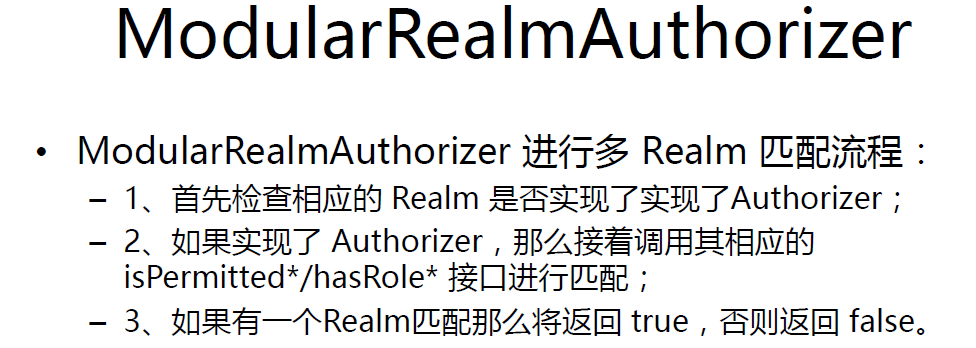
查看源码得到,多Realm授权中只要有一个通过就可以 ModularRealmAuthorizer
public boolean hasRole(PrincipalCollection principals, String roleIdentifier) {

        assertRealmsConfigured();

        for (Realm realm : getRealms()) {

            if (!(realm instanceof Authorizer)) continue;

            if (((Authorizer) realm).hasRole(principals, roleIdentifier)) {

                return true;

            }

        }

        return false;

    }
授权Realm的实现
1). 在原先的ShiroRealm的基础上修改,修改其继承
package com.java.shiro.realms;

import java.util.HashSet;

import java.util.Set;

import org.apache.shiro.authc.AuthenticationException;

import org.apache.shiro.authc.AuthenticationInfo;

import org.apache.shiro.authc.AuthenticationToken;

import org.apache.shiro.authc.LockedAccountException;

import org.apache.shiro.authc.SimpleAuthenticationInfo;

import org.apache.shiro.authc.UnknownAccountException;

import org.apache.shiro.authc.UsernamePasswordToken;

import org.apache.shiro.authz.AuthorizationInfo;

import org.apache.shiro.authz.SimpleAuthorizationInfo;

import org.apache.shiro.crypto.hash.SimpleHash;

import org.apache.shiro.realm.AuthorizingRealm;

import org.apache.shiro.subject.PrincipalCollection;

import org.apache.shiro.util.ByteSource;

public class ShiroRealm extends AuthorizingRealm {

    /**

     * 用于认证的Realm保持不变

     */

    @Override

    protected AuthenticationInfo doGetAuthenticationInfo(

            AuthenticationToken token) throws AuthenticationException {

        System.out.println("[FirstRealm] doGetAuthenticationInfo " + token);

        // 1. 把AuthenticationToken 转换为UsernamePasswordToken

        UsernamePasswordToken up = (UsernamePasswordToken) token;

        // 2. 从UsernamePasswordToken 中来获取username

        String username = up.getUsername();

        // 3. 调用数据库的方法,从数据库中查询username对应的用户记录

        System.out.println("从数据库中获取userName :" + username + " 所对应的用户信息.");

        // 4. 若用户不存在,则可以抛出 UnknownAccoountException 异常

        if ("unknown".equals(username)) {

            throw new UnknownAccountException("用户不存在");

        }

        // 5. 根据用户信息的情况,决定是否需要抛出其他的AuthencationException 异常 假设用户被锁定

        if ("monster".equals(username)) {

            throw new LockedAccountException("用户被锁定");

        }

        // 6. 根据用户的情况,来构建AuthenticationInfo 对象并返回,通常使用的是

        // SimpleAuthenticationInfo

        // 以下信息是从数据库获取的.

        Object principal = username; // principal 认证的实体信息.

                                        // 可以是username,也可以是数据表对应的用户的实体类对象

                                        // String credentials =

                                        // "fc1709d0a95a6be30bc5926fdb7f22f4";

                                        // // credentials:密码

        String credentials = null; // credentials:密码

        String realmName = getName();

        AuthenticationInfo info = null;/*

                                         * new

                                         * SimpleAuthenticationInfo(principal,

                                         * credentials, realmName);

                                         */

        if ("admin".equals(username)) {

            credentials = "038bdaf98f2037b31f1e75b5b4c9b26e";

        } else if ("user".equals(username)) {

            credentials = "098d2c478e9c11555ce2823231e02ec1";

        }

        ByteSource credentialsSalt = ByteSource.Util.bytes(username);// 这里的参数要给个唯一的;

        info = new SimpleAuthenticationInfo(principal, credentials,

                credentialsSalt, realmName);

        return info;

    }

    public static void main(String[] args) {

        String hashAlgorithmName = "MD5";

        String credentials = "123456";

        int hashIterations = 1024;

        ByteSource credentialsSalt = ByteSource.Util.bytes("user");

        Object obj = new SimpleHash(hashAlgorithmName, credentials,

                credentialsSalt, hashIterations);

        System.out.println(obj);

    }

    /**

     * 这个是用于授权的Realm

     */

    @Override

    protected AuthorizationInfo doGetAuthorizationInfo(

            PrincipalCollection principals) {

        // 1. 从 PrincipalCollection 中获取来获取登录用户的信息

        //由于我们配置了多个Realm 一个返回的是 seconde,一个返回的是认证实体,这两个Realm在配置认证的时候是有顺序地

        /**

         * <property name="realms">

         *    <list>

         *        <ref bean="jdbcRealm"/>

         *        <ref bean="secondRealm"/>

         *    </list>

         *    </property>

         *

         * 当我们在获取Principal的时候也是有顺序的

         */

        Object principal = principals.getPrimaryPrincipal();

        // 2. 利用登录用户的信息来判断当前用户的角色或权限(可能需要查询数据库)

        Set<String> roles = new HashSet<>();

        roles.add("user"); // 这里无论登录的是user 还是 admin 都存放一个user角色

        if ("admin".equals(principal)) {

            roles.add("admin"); // 如果是admin 授权一个admin角色

        }

        AuthorizationInfo info = new SimpleAuthorizationInfo(roles);

        return info;

    }

}
由于我们配置了多个Realm 一个返回的是 seconde,一个返回的是认证实体,这两个Realm在配置认证的时候是有顺序地
    <property name="realms">

            <list>

                <ref bean="jdbcRealm"/>

                <ref bean="secondRealm"/>

            </list>

        </property>
当我们在获取Principal的时候也是有顺序的
通过查看源代码
public Object getPrimaryPrincipal() {

        if (isEmpty()) {

            return null;

        }

        return iterator().next();

    }
public Iterator iterator() {

        return asSet().iterator();

    }
 public Set asSet() {

         if (realmPrincipals == null || realmPrincipals.isEmpty()) {

             return Collections.EMPTY_SET;

         }

         Set aggregated = new LinkedHashSet();

         Collection<Set> values = realmPrincipals.values();

         for (Set set : values) {

             aggregated.addAll(set);

         }

         if (aggregated.isEmpty()) {

             return Collections.EMPTY_SET;

         }

         return Collections.unmodifiableSet(aggregated);

     }
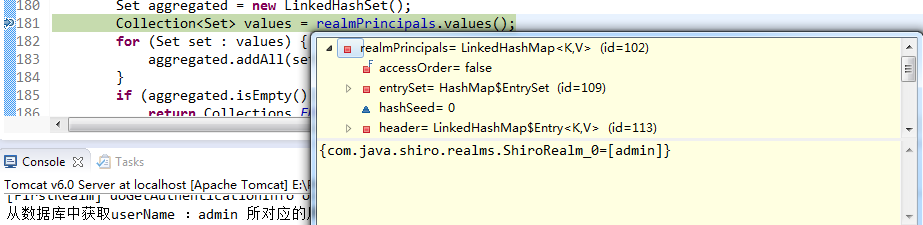
上述代码第6行得到 realmPrincipals 的类型 LinkedHashMap,只有这样才能保证我得到的是希望的那个值。
启动Tomcat
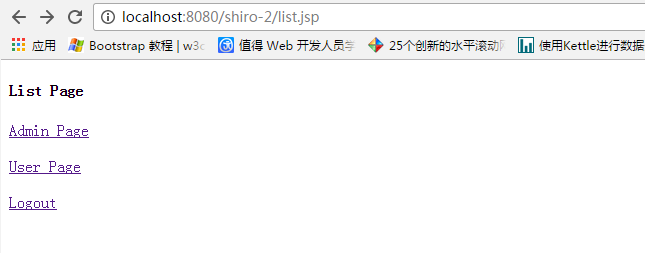
使用admin登录 可以访问两个页面,user登录只能访问一个页面
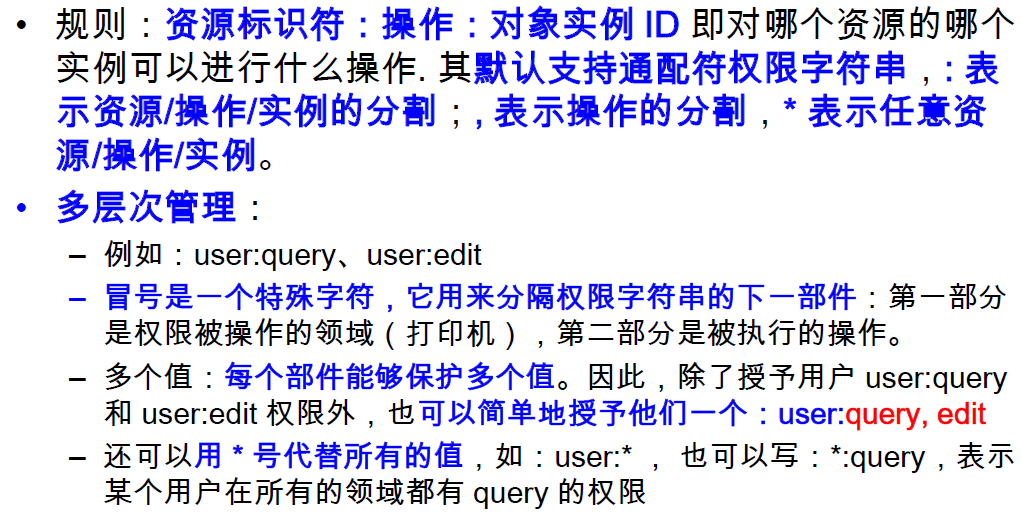
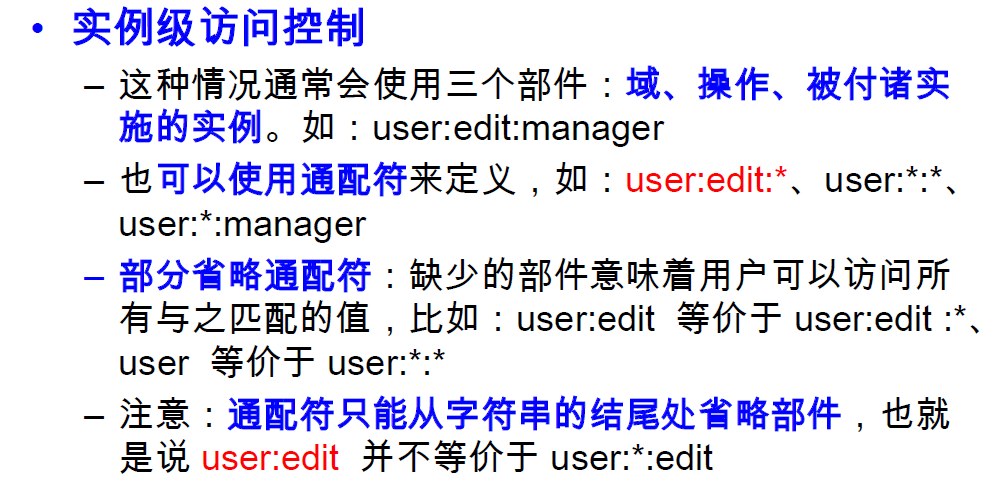
Permissions
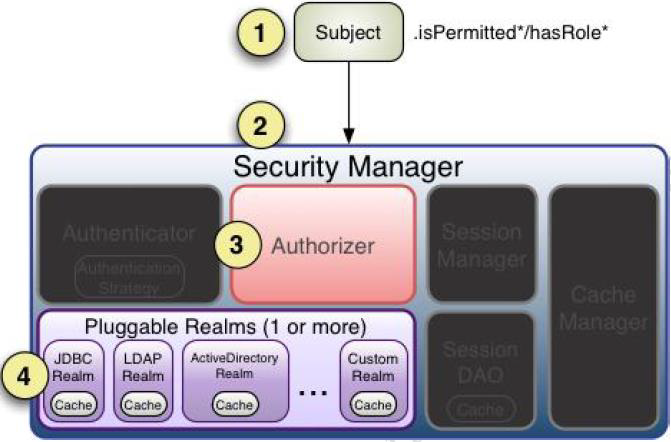
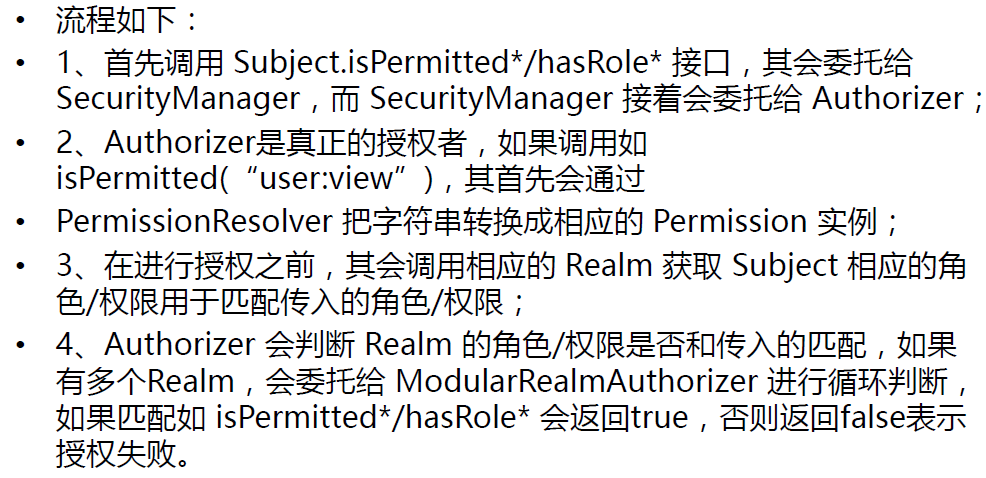
授权流程
Shiro-授权的更多相关文章
- Apache Shiro 使用手册(三)Shiro 授权
授权即访问控制,它将判断用户在应用程序中对资源是否拥有相应的访问权限. 如,判断一个用户有查看页面的权限,编辑数据的权限,拥有某一按钮的权限,以及是否拥有打印的权限等等. 一.授权的三要素 授权有着三 ...
- Apache shiro集群实现 (四)shiro授权(Authentication)--访问控制
Apache shiro集群实现 (一) shiro入门介绍 Apache shiro集群实现 (二) shiro 的INI配置 Apache shiro集群实现 (三)shiro身份认证(Shiro ...
- Shiro笔记(五)Shiro授权
Shiro授权 也叫访问控制,即在应用中控制谁能访问那些资源(如访问页面.编辑数据.页面操作等).在授权中需要了解几个关键对象:主体(subject).资源(resource).权限(Permissi ...
- Shiro授权管理
一.授权 授权,也叫访问控制,即在应用中控制谁能访问哪些资源(如访问页面/编辑数据/页面操作等).在授权中需了解的几个关键对象:主体(Subject).资源(Resource).权限(Permissi ...
- 转:JAVAWEB开发之权限管理(二)——shiro入门详解以及使用方法、shiro认证与shiro授权
原文地址:JAVAWEB开发之权限管理(二)——shiro入门详解以及使用方法.shiro认证与shiro授权 以下是部分内容,具体见原文. shiro介绍 什么是shiro shiro是Apache ...
- shiro授权-记调试过程
根据张开涛老师的shiro教程学习过程中 感觉shiro授权这块有点绕 调试了十几遍 大概有个思路 记录一下 1.单元测试入口 2.subject().isPermitted("+user ...
- frame shiro 授权及原理简述
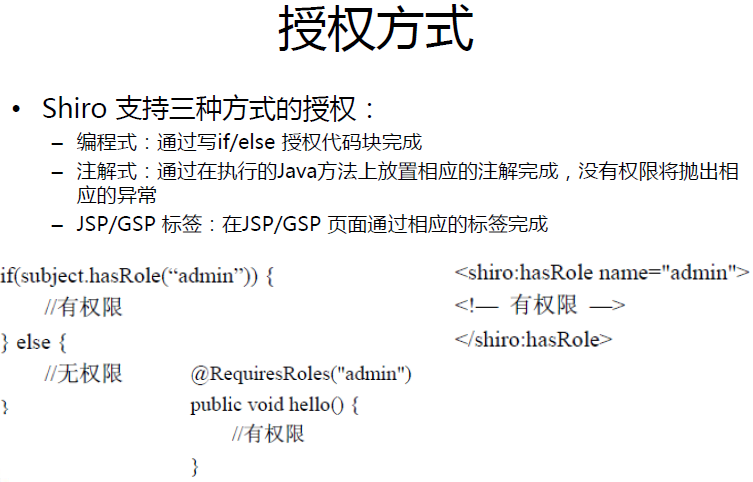
shiro 授权模式 shiro采用的是rbac授权模式rbac,基于角色的权限管理,谁扮演什么角色,被允许做什么事情. shiro 授权流程 shiro 授权方式 1.编程式 通过写if/else授 ...
- Apache Shiro 使用手册(三)Shiro 授权(转发:http://kdboy.iteye.com/blog/1155450)
授权即访问控制,它将判断用户在应用程序中对资源是否拥有相应的访问权限. 如,判断一个用户有查看页面的权限,编辑数据的权限,拥有某一按钮的权限,以及是否拥有打印的权限等等. 一.授权的三要素 授权有着三 ...
- Shiro授权流程
1,授权中涉及的一些概念 [1]授权:访问控制,即在应用中认证用户能否访问的系统资源(如一个页面,一个按钮等). [2]资源:在Web应用中反应为用户可以访问的URL. ...
- shiro授权+注解式开发
shiro授权和注解式开发 1.shiro授权角色.权限 2.Shiro的注解式开发 ShiroUserMapper.xml <select id="getRolesByUserId& ...
随机推荐
- 单向链表JAVA代码
//单向链表类 publicclassLinkList{ //结点类 publicclassNode{ publicObject data; ...
- 线段树---HDU2795Billboard
这道题跟第二个题差不多,求单点的最大值. 题目大意:有个高和宽分别为h, w的广告牌, 这个广告牌分成高为 1 的长条, 每条分别能贴长度为wi长度的广告, 输入的n为广告的条数,广告优先贴在最上边和 ...
- 图片样式 scaleType 属性
ImageView的属性android:scaleType,即ImageView.setScaleType(ImageView.ScaleType),不同值的意义区别:
- 刚接触js感觉好吃力啊
我是一个新手,最近刚刚开始学习js这门语言,感觉好难,有一种无从下手的感觉,不知道应该从哪里学习,虽然也看了很多的书,但是对于一个没有计算机基础的人来说,真的是一种煎熬,每一个名词都要去查.万事开头难 ...
- git变基、冲突解决
参考git rebase 版本..变基 git冲突解决先fetch,pull,如果文件冲突,手动处理冲突文件,然后再fetch,pull,发现拉不下来,这时需要将文件改为已合并,然后提交文件 具体操作 ...
- [php基础]PHP.INI配置:文件上传功能配置教程
昨天分享了在PHP网站开发中如何在php.ini中配置实现session功能的PHP教程,今天继续分享在利用PHP实现文件上传功能时几点关键php.ini的配置. 说到在php.ini中的文件上传的配 ...
- libthrift0.9.0解析(三)之TProtocol&TTransport
以上是transport和protocol的类图和结构图. transport封装了底层的传输通道,主要有read/write.open/close等基本的读写方法,而且都是对于二进制数据. p ...
- JAVA-3-水仙花
public static void main(String[] args) { // TODO 自动生成的方法存根 int i = 100; while (i < 1000) { int a, ...
- nodejs http.get乱码问题处理方法
var req = http.get(url,function(res){ res.setEncoding('utf-8'); var html = '' res.on('data',function ...
- HTML5学习参考资料整理
给大家推荐一下学习研究HTML5必备的一些个网站,更加有利于大家对HTML5的学些和研究.如果各位童鞋还有更多的,欢迎投递资源给我们,也可以支持 我们,让我们利用大家的力量收集更多的HTML5学习资料 ...