
0129——UINavigationController
1.创建一个UINavigationController
self.window = [[UIWindow alloc]initWithFrame:[UIScreen mainScreen].bounds];
FirstViewController * first = [[FirstViewController alloc]init];
UINavigationController * nav = [[UINavigationController alloc]initWithRootViewController:first]; UINavigationController第一个显示的界面
self.window.rootViewController = nav;
[self.window makeKeyAndVisible];
2.隐藏导航栏工具栏
self.navigationController.navigationBarHidden = YES;
self.navigationController.toolbarHidden = NO;
3.设置导航栏和工具栏的颜色(设置了之后所有都是这个颜色,因为只有一个navigationController)
self.navigationController.toolbar.barTintColor = [UIColor redColor];
self.navigationController.navigationBar.barTintColor = [UIColor redColor];
4.设置左右显示的按钮

UIBarButtonItem * leftBtn = [[UIBarButtonItem alloc]initWithTitle:@"Cancel" style:UIBarButtonItemStyleDone target:nil action:nil];
self.navigationItem.leftBarButtonItem = leftBtn;
self.navigationItem.leftBarButtonItem.tintColor = [UIColor whiteColor];
UIBarButtonItem * rightBtn = [[UIBarButtonItem alloc]initWithTitle:@"Next" style:UIBarButtonItemStyleDone target:self action:@selector(gotoSecondView)];
self.navigationItem.rightBarButtonItem = rightBtn;
self.navigationItem.rightBarButtonItem.tintColor = [UIColor whiteColor];
5.设置标题
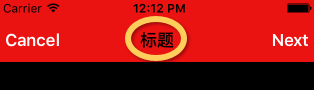
self.navigationItem.title =@"标题";
6.标题位置设置成view
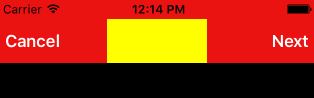
UIView * view = [[UIView alloc]initWithFrame:CGRectMake(0, 0, 100, 44)];
view.backgroundColor = [UIColor yellowColor];
self.navigationItem.titleView = view;
7.Next按钮响应第二个界面
-(void)gotoSecondView{
SecondViewController * svc = [[SecondViewController alloc]init];
//设置默认提供的返回按钮的标题
UIBarButtonItem *backItem = [[UIBarButtonItem alloc] initWithTitle:@"返回" style:UIBarButtonItemStyleDone target:nil action:nil];
self.navigationItem.backBarButtonItem = backItem;
//present:在现有的界面上盖上一层 dismissViewController来消除
//[self.navigationController presentViewController:svc animated:YES completion:nil];
//push:push入栈 pop出栈来消除
[self.navigationController pushViewController:svc animated:YES];
}
0129——UINavigationController的更多相关文章
- iOS UINavigationController(内容根据iOS编程编写)
我们知道 UITabBarController 对象,可以通过使用该对象,用户可以切换不同的屏幕.当要切换的各个屏幕之间没有相互依存关系的时候,该对象可以很好的完成任务.但是当多个屏幕互有关系的时候, ...
- UINavigationController
知识点: 1)UINavigationController 2)UINavigationBar 3)UINavigationItem 4)UIToolBar ===================== ...
- 混合使用UITabBarController和UINavigationController
混合使用这两个控件的好处是我们可以在NavigationBar添加更多的东西,如标题,按钮等.让用户能够获得更多的信息. UITabBarController的属性ViewControllers接受以 ...
- 基本组件的使用——UINavigationController
作用:在多个ViewController中切换.UINavigationController内部以栈的形式维护一组ViewController, 因此,当导航进入一个新视图的时候,会以push的形式将 ...
- 解决UINavigationController在pushViewController时出现的"卡顿"问题
进行开发中,遇到了个小问题: 在使用UINavigationController的-pushViewController:animated:执行入栈一个子控制器操作时(即最新栈顶子控制器),会出现推出 ...
- UINavigationController导航控制器初始化 导航控制器栈的push和pop跳转理解
(1)导航控制器初始化的时候一般都有一个根视图控制器,导航控制器相当于一个栈,里面装的是视图控制器,最先进去的在最下面,最后进去的在最上面.在最上面的那个视图控制器的视图就是这个导航控制器对外展示的界 ...
- IOS 学习 开发 自定义 UINavigationController 导航
文件目录如下:基本导航顺序: root -> First -> Second -> Third.其中,FirstViewController作为 navigation堆栈的rootv ...
- APP标配控制器:UINavigationController
导航控制器UINavigationController简介: 只要看到控制器界面上部有一个条就是导航控制器UINavigationController 导航控制器最上面有一个条是导航条高度44,Y值是 ...
- UIScrollerView遇到UINavigationController
今天在UITabBarController 的第一个Tab 页面中放入一个ScrollView, 原本以为可以正常运行. 结果却让人大跌眼镜. 每当我手动滚动或者 缓慢导航到另外一个页面时,当前的 ...
随机推荐
- C#double保留两位小数
public static void Main(string[] args) { double db = Math.PI; db = Math.Round(db,); Console.WriteLin ...
- mysql 5.7.9(GA) 安装
mysql 5.7.9(GA) 终于发布了,感受一下. 一.下载 下载页面 http://dev.mysql.com/downloads/mysql/ 选择相应系统的版本下载. 本文OS为centos ...
- python比较两个列表
两个列表,随机产生4个不相等的数,计算一下,相同位置上的元素相等的个数,用k1表示. b列表中的元素在a列表中,但位置不相同,有多少个,用k2表示. 例如: a=[0, 4, 7, 3]b=[7, 1 ...
- Scala学习文档-访问修饰符
在scala里,对保护成员的访问比Java严格.Scala中,保护成员只在定义了成员的类的子类中可以访问,而Java中,还允许在同一个包的其他类中访问. package p1 { class FCla ...
- FJ省队集训DAY3 T2
思路:如果一个DAG要的路径上只要一条边去切掉,那么要怎么求?很容易就想到最小割,但是如果直接做最小割会走出重复的部分,那我们就这样:反向边设为inf,这样最小割的时候就不会割到了,判断无解我们直接用 ...
- nodejs教程
http://www.yiibai.com/nodejs/ http://www.runoob.com/nodejs/nodejs-tutorial.html http://www.runoob.co ...
- Android GridView用法介绍
GridView(网格视图)是按照行和列的方式来显示内容的,一般用于显示图片等内容,比如实现九宫格图: 第一个例子: 实现代码为: MainActivity.java package com.xiao ...
- JVM基础和调优(三)
主要讲解垃圾回收的算法 上面我们已经了解到了,JVM的体系的结构,这次我们来说一下垃圾回收的算法. 1. 最开始的想法,或者说垃圾回收的最容易想到的就是:引用计数(reference count) 我 ...
- JS控制菜单样式切换
$('#subtabs a').each(function (i, ele) { var href = $(ele).attr("href"); if (location.href ...
- C++ double类型转string类型后,怎么实现小数点后只显示一个数字
C++ double类型转string类型后,怎么实现小数点后只显示一个数字 #include <iostream> #include <sstream> #include & ...